
The robots.txt Mistakes That Quietly Kill Traffic
There is a file sitting at the root of your website, almost certainly under a hundred lines long, that has the power to remove your entire site from Google. Most people who deploy it do not fully understand it. Many copied it from a template, a tutorial, or a previous project. Some have not looked at it in years. It is called robots.txt, and it is responsible for a disproportionate share of self-inflicted traffic disasters in SEO.
The problem with robots.txt is not that it is complicated — it is genuinely simple, a handful of directives with plain syntax. The problem is that it is simple enough to feel harmless and powerful enough to be catastrophic, and those two facts together make it dangerous. Nobody fears a small text file. They should. This is a critical look at the robots.txt mistakes that quietly cost sites traffic — quietly being the operative word, because robots.txt failures rarely announce themselves. They just slowly, invisibly, throttle a site while everyone looks elsewhere for the cause.
What robots.txt is actually for — and what it is not
Begin with the most important and most widely misunderstood fact, because most robots.txt mistakes flow from getting this wrong. Robots.txt controls crawling, not indexing. A Disallow directive tells compliant crawlers not to fetch a URL. It does not tell them not to index it.
This distinction is not pedantic — it is the root of the single most common robots.txt failure. People block a page in robots.txt expecting it to disappear from Google. It does not. Google can still index a URL it has never crawled, if it discovers that URL through links from elsewhere. It will index a bare entry — the URL, perhaps an anchor-text-derived title, and a note that no description is available because the page is blocked. The page you wanted hidden is now in Google's index, looking broken, with no content and no description, actively making your site look worse.
To actually keep a page out of the index, you need a noindex directive — and here is the cruel twist — the page must be crawlable for Google to see that directive. If you block the page in robots.txt, Googlebot cannot fetch it, cannot see the noindex tag, and therefore cannot honour it. Robots.txt and noindex are not interchangeable tools, and combining them wrongly produces the exact opposite of what you intended. This single confusion underlies a large fraction of the disasters below.
Mistake one: the deploy that blocks the whole site
The most spectacular robots.txt mistake is also one of the most common: shipping a development robots.txt to production. During development, staging sites are routinely protected with a blanket block:
User-agent: *
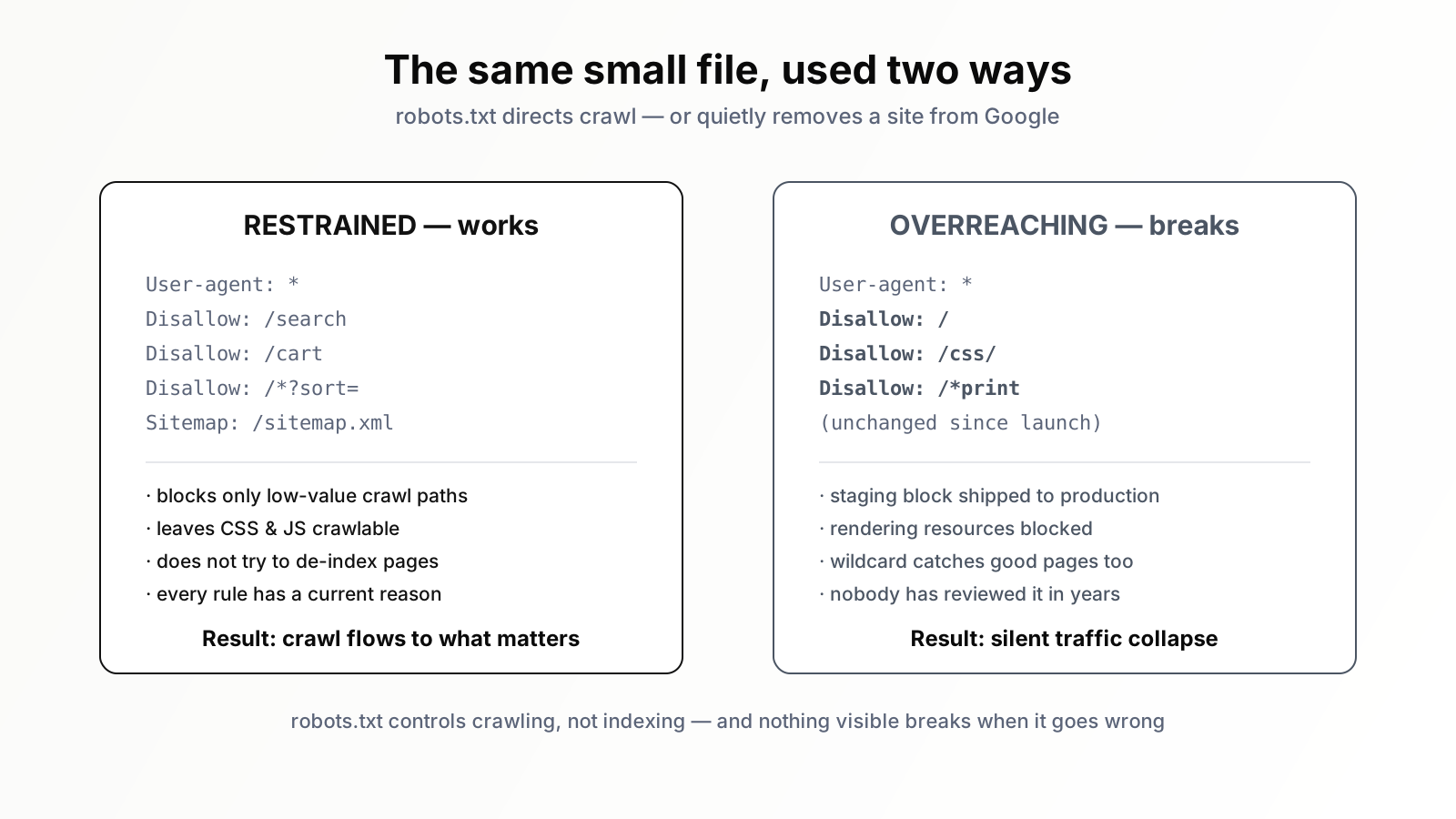
Disallow: /
Two characters — Disallow: / — tell every crawler not to fetch anything on the site. On staging, correct. Deployed to production, it is an instruction to Google to stop crawling your entire website. And because robots.txt mistakes are silent, nothing breaks visibly. The site loads fine for human visitors. Then, over days and weeks, crawling dries up, pages drop out of the index as Google stops refreshing them, and traffic erodes. By the time someone connects the traffic collapse to a one-line file, weeks of damage are done and recovery takes longer still.
This happens because robots.txt is environment-specific configuration treated as if it were static content. The fix is process: robots.txt should be generated per environment, never copied between them, and a production deploy should explicitly verify that the live robots.txt is the production version. It is a thirty-second check that prevents a month-long catastrophe.
Mistake two: blocking resources Google needs to render
A subtler mistake, born of a tidy instinct. Someone decides to keep crawlers out of "technical" directories — /assets/, /css/, /js/, /scripts/ — reasoning that those are not content, so why waste crawl on them.
The reasoning is wrong because modern Google does not just read your HTML — it renders your pages, executing CSS and JavaScript to see the page the way a user does. If you block the CSS and JavaScript, Googlebot renders a broken page: unstyled, with content missing because the script that loads it was disallowed. Google then evaluates that broken render. A page that is perfect to human visitors can be judged thin, broken, or non-mobile-friendly by Google purely because Google was denied the files it needed to see the page properly.
The rule is simple and absolute: do not block CSS and JavaScript that pages need to render. Google has said so explicitly for years. The tidy instinct to wall off "technical" folders is precisely the wrong instinct. Those folders are not noise — they are how the page becomes a page.
Mistake three: blocking pages to hide them from the index
This is the noindex confusion from the opening section, in its everyday form. A team wants certain pages out of search results — thin tag pages, old promotions, internal-use pages — so they add Disallow rules in robots.txt and consider the job done.
It is not done. As established, blocking crawl does not remove a page from the index, and worse, it freezes the page in whatever state Google last saw it. If a blocked page is already indexed, Google can no longer crawl it to discover a noindex tag, a 404, or a canonical. You have locked the page into the index and thrown away the key. The page you wanted gone is now permanently stuck in search results, and you have removed your own ability to remove it.
The correct approach for de-indexing: leave the page crawlable, add a noindex directive, and let Google crawl it, see the noindex, and drop it. Only after it has been de-indexed might you block it in robots.txt — and usually there is no reason to. Robots.txt is for managing crawl efficiency, not for hiding pages. Using it to hide pages reliably backfires.
Mistake four: the overly broad Disallow pattern
Robots.txt supports simple pattern matching, and pattern matching is where good intentions cause collateral damage. Someone wants to block a parameter or a path and writes a rule broader than they realise.
A classic: the goal is to block a print version of pages, so the rule becomes Disallow: /*print. It looks targeted. But it matches any URL containing the string "print" anywhere — including /blog/how-to-print-marketing-materials/, a perfectly good article that just happens to contain those five letters. An entire valuable page silently blocked because of an over-eager wildcard.
The same trap appears with directory blocks. Disallow: /news — without the trailing slash — does not just block the /news/ directory; it blocks every path that starts with the string "news," potentially including /newsletter-signup/. Robots.txt patterns are prefix matches with wildcards, not folder names, and they are unforgiving. Every Disallow rule should be tested — Search Console's robots.txt tester, or simply checking real URLs against the rule — to confirm it blocks exactly what is intended and nothing adjacent. A pattern that is one character too broad can quietly take out pages nobody meant to touch.
Mistake five: the file nobody ever reviews
This is less a single mistake than the condition that lets all the others persist. Robots.txt is deployed once, early, and then forgotten. The site grows. New sections launch. The CMS changes. Old rules that once made sense now block things that matter, or fail to block things that have since become a problem. Nobody looks, because the file feels finished.
A robots.txt written for a site of fifty pages is rarely right for the same site three years and three thousand pages later. Rules accumulate; their authors leave; their reasons are forgotten. The result is a file full of directives nobody can fully explain, some of them quietly wrong. Robots.txt is not set-and-forget configuration. It should be reviewed whenever the site structure changes meaningfully, and audited periodically regardless — read line by line, every rule justified, every pattern tested.
Mistake six: misunderstanding what robots.txt cannot do
A few more confusions worth dispatching. Robots.txt is not a security mechanism — it is a public file, readable by anyone, and listing a sensitive directory in it just tells the curious where to look. Use real access controls for anything that must be private. The Crawl-delay directive is ignored by Googlebot entirely, so do not rely on it to throttle Google. And robots.txt is advisory: well-behaved crawlers obey it, but it cannot force compliance from crawlers that ignore it. Knowing what the file genuinely controls — and what it merely appears to control — prevents a whole class of false confidence.
Mistake seven: the conflicting and contradictory ruleset
Robots.txt supports multiple user-agent groups — separate blocks of rules for different crawlers. Used deliberately, that is a legitimate feature. Used carelessly, it produces a file that contradicts itself, and the contradictions are resolved by matching logic that almost nobody has memorised.
A typical mess: someone adds a block for Googlebot specifically, and a separate catch-all block for User-agent: *. The intuition is that both apply to Google — the specific block plus the general one. They do not. When a crawler finds a group that names it specifically, it follows that group only and ignores the catch-all entirely. So a rule the team carefully placed in the User-agent: * block — say, blocking internal search pages — silently stops applying to Googlebot, because Googlebot has its own group and never reads the general one. The site owner believes search pages are blocked from Google. They are not.
The opposite error is just as common: a permissive rule in the Googlebot group accidentally opens something the catch-all block was meant to close. Either way, the file says one thing to a casual reader and does another in practice. The discipline here is to keep robots.txt as simple as the site allows — ideally a single User-agent: * group — and to only split into named groups when there is a genuine, understood reason. Every named group you add is a copy of the ruleset you must now keep in sync by hand, and rulesets maintained by hand drift.
Mistake eight: assuming the change took effect immediately
The last mistake is one of timing and false confidence. You edit robots.txt — you remove the bad Disallow: /, you fix the over-broad pattern — and you assume the problem is now solved. It is not solved yet; it is only fixed.
Google caches robots.txt. It does not re-fetch the file on every single request — it uses a cached copy for a period before checking again. So your correction does not take effect the instant you save it. There is a lag, and during that lag Google is still operating on the old, broken rules. More importantly, undoing the damage takes far longer than undoing the rule. If a blanket block dropped pages from the index, removing the block does not restore those pages immediately — Google has to re-crawl them, re-evaluate them, and re-index them, and that recovery unfolds over days and weeks.
The practical consequences are two. First, verify the fix rather than assuming it: use Search Console's URL Inspection on affected pages to confirm Google now sees them as crawlable, and watch crawl stats recover. Second, internalise the asymmetry — a robots.txt mistake is fast to make, slow to detect, and slow to recover from. That asymmetry is the entire reason this file deserves more caution than its size suggests. The cost of getting it wrong is not symmetrical with the effort of getting it right.
What a good robots.txt looks like
After all the warnings, the positive picture is reassuring, because a correct robots.txt is modest. It blocks genuinely low-value crawl paths — internal search result URLs, certain faceted-navigation parameter combinations, cart and checkout flows, admin areas — so crawl budget is not wasted on infinite junk URLs. It does not block CSS, JavaScript, or images needed for rendering. It does not try to de-index pages. It points to the XML sitemap. And every rule in it has a known, current reason to exist.
The common thread of every mistake above is overreach — using robots.txt to do things it was never meant to do, or writing rules broader than intended. A good robots.txt is restrained. It does one job — guide crawling away from genuine waste — and does not pretend to do the others.
Where an SEO AI agent helps
The reason robots.txt mistakes are so costly is their invisibility. A blanket Disallow does not throw an error. A blocked CSS file does not break the page for human visitors. An over-broad pattern blocks one article among thousands. These failures hide, and they hide for exactly as long as nobody is specifically looking — which, given how rarely anyone reviews the file, can be a very long time.
Continuous, specific monitoring is what closes that gap, and it is what an SEO AI agent provides. Orova can watch your robots.txt for changes, flag a dangerous directive — a site-wide Disallow, a blocked rendering resource — the moment it appears, test your Disallow patterns against your real URL inventory to catch the over-broad rule quietly taking out a good page, and cross-check robots.txt against your indexing goals so a blocked page is never mistaken for a noindexed one. The file stays small and human-owned; the agent simply ensures a one-line mistake cannot sit silently for a month. Go and read your robots.txt today. It is short. It will take five minutes. And it may be the most consequential five minutes of SEO work you do this quarter.
Run your business with AI Agents
Orova is the always-on Biz AI Agent — it plans, runs, and optimizes the work for you. Save time, unlock productivity.
Try it free