
Advisory vs Auto-Execute: Designing Human-in-the-Loop Ad Automation
A media buyer I worked with once kept a spreadsheet tab called "things the robot wants to do." Her agency had rolled out an automation layer that emailed her every recommended change — sometimes forty a day. She read maybe the first six. By Thursday she had stopped reading entirely and just clicked "approve all" out of fatigue. Three weeks later the automation had quietly doubled the budget on a campaign that was bleeding money, because she had approved a sequence of small increases without registering what they added up to. The tool was not broken. The boundary was broken. The human had been placed in exactly the wrong spot in the loop: asked to approve every trivial change, which trained her to stop paying attention to the dangerous ones.
That failure is the whole subject of this article. The interesting question in ad automation is almost never "should AI or a human make this decision." It is "where, precisely, does the human sit relative to the decision." Get that boundary right and automation feels like leverage — the boring, reversible, high-frequency work happens on its own while you spend your attention on strategy and the rare high-stakes call. Get it wrong and you end up with either a runaway system you do not trust, or a "human-in-the-loop" system that is really a human-shaped rubber stamp. This is a design problem, and like most design problems it has good answers and bad ones.
What "human in the loop" actually means
The phrase gets used so loosely that it has nearly stopped meaning anything. Vendors slap "human-in-the-loop" on a feature where you can, in theory, go look at what the AI did after the fact. That is not a human in the loop; that is a human cleaning up after the loop. To design human in the loop ad automation well, you need to be precise about which of three distinct relationships you actually want for any given action.
Advisory: the agent recommends, you decide and act
In advisory mode the agent does the analysis and writes the recommendation, but takes no action on the account. It might say: "Ad set 4 has spent $340 over seven days with two conversions; your account average is one conversion per $52. Consider pausing it." You read that, you agree or disagree, and you are the one who clicks pause. The human is fully in control of execution. The value the agent provides is attention and analysis — it watches everything constantly and surfaces what matters, which no human can do across hundreds of ad sets.
Advisory is the right mode when the action is consequential, hard to reverse, or depends on context the agent cannot see. Changing a campaign's optimization objective, restructuring how conversions are counted, launching into a brand-new market — these are decisions where you want a thinking human to own the call, with the agent acting as an extremely well-informed analyst rather than an operator.
Approve-each: the agent proposes a specific change and waits
This is the middle mode, and it is the one most people default to because it sounds responsible. The agent does not just advise — it stages a concrete, ready-to-execute change ("shift $80/day from Ad set 2 to Ad set 5") and holds it until you click approve. You are still the gate, but the agent has done all the work; approval is one tap.
Approve-each is genuinely useful for a narrow band of decisions: medium-stakes, somewhat reversible, where you want oversight but the agent's proposal is usually right. The danger — and it is a serious one — is that it scales terribly. The more changes flow through approve-each, the more it degrades into the spreadsheet-tab problem: a queue so long that approval becomes reflexive. Approve-each is a scalpel, not a default.
Auto-execute: the agent acts within rules you set
In auto mode the agent makes the change itself, immediately, without waiting for you — but only within boundaries you defined in advance and only for action types you explicitly allowed. The human is still in the loop, just earlier: you set the policy once ("pause any ad whose cost-per-result exceeds 3x the campaign average over a 5-day window") and the agent enforces it. Then you review the log of what it did.
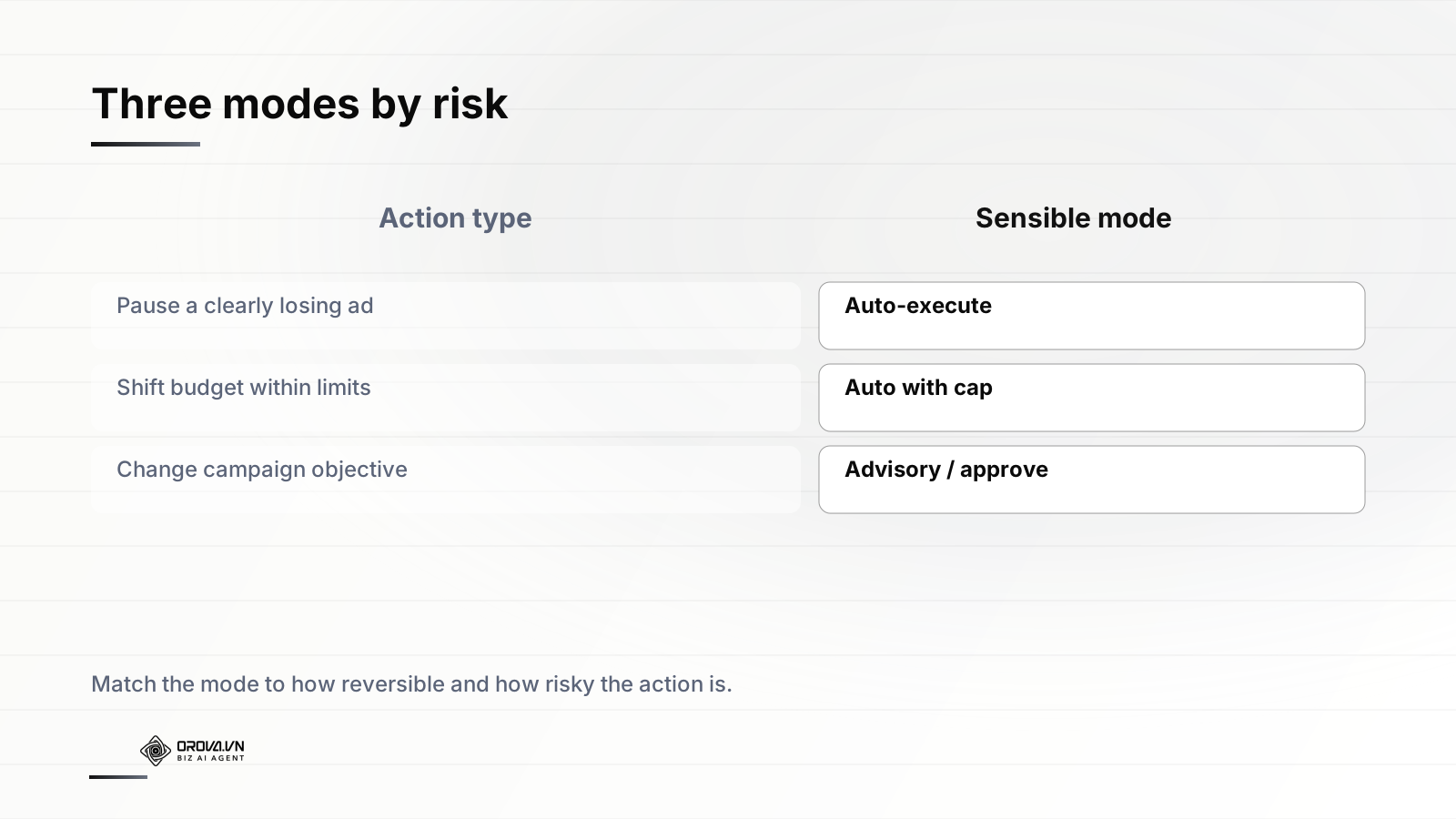
This is where the leverage lives. Pausing obvious losers, nudging budgets between ad sets within a cap, turning a clearly winning creative back on after a learning reset — these happen dozens of times a week and are highly reversible. If a human has to touch each one, the automation has failed at its only job. The art is being honest about which actions truly belong here.
Mapping actions to modes: the two axes that matter
The single most useful mental model here is a two-by-two. Plot every action an agent might take against two axes: reversibility (how easily can you undo this if it was wrong?) and blast radius (how much damage can it do before you notice?). Where an action falls on this grid tells you its mode far more reliably than your gut feeling does.
High reversibility, low blast radius → auto-execute
Pausing a single underperforming ad is the canonical example. If the agent pauses something it should not have, you un-pause it in one click and you have lost a few hours of impressions, not real money. The downside is small and instantly correctable. Forcing a human to approve these is pure friction with no risk reduction. This quadrant is what automation exists for.
Other residents: re-enabling a paused winner, small bid adjustments inside a band, rotating creatives within an existing ad set, applying a negative keyword that exactly matches a wasteful search term. None of these can quietly cost you thousands, and all of them undo cleanly.
High reversibility, high blast radius → auto with a cap
Budget shifts are the textbook case. Moving spend toward better-performing ad sets is reversible — you can move it back — but the blast radius scales with how much moves. The answer is not "make a human approve every budget change," which reintroduces the fatigue problem. The answer is to cap the blast radius so the action drops into the safe quadrant. Let the agent move budget freely, but only up to, say, 20% of a campaign's daily spend per day, and never above an absolute ceiling you set. Now the worst case is bounded, and bounded risk is auto-able risk.
The trick with budget is not to choose between control and autonomy. It is to convert an unbounded action into a bounded one with a cap, which lets you safely automate it.
Low reversibility, low blast radius → approve-each
Some changes are hard to undo cleanly even though they are not catastrophic. Deleting an audience you spent weeks building, archiving historical data, merging ad sets in a way that resets learning — these do not threaten your whole account, but a wrong call costs you something you cannot get back with one click. This is approve-each's home turf: rare enough not to flood your queue, consequential enough to warrant a deliberate human tap.
Low reversibility, high blast radius → advisory
Changing a campaign's objective, overhauling bid strategy account-wide, expanding into a new platform or geography. These are the decisions that define whether a quarter works. They are hard to reverse and they affect everything downstream. Here the human should not merely approve — the human should decide, with the agent supplying the analysis. If you find yourself wanting to auto-execute something in this quadrant, that is a signal you have mis-estimated either its reversibility or its reach. I wrote more about exactly where this line should fall in a longer piece on whether you should let AI spend your budget, and the short version is: spend authority is the boundary you should think hardest about.
The settings architecture: per-action, per-campaign, per-assistant
A mode map is useless if your tool only offers one global switch. Real control comes from being able to set modes at the right granularity, and there are three that matter.
Per-action defaults
The foundation is a default mode for each type of action, derived from the two-by-two above. Pausing losers defaults to auto; objective changes default to advisory; budget shifts default to auto-with-cap. This gives you a sensible starting posture without configuring anything campaign by campaign. A good system ships these defaults already aligned to risk, so the out-of-the-box behavior is conservative where it should be and permissive where it safely can be.
Per-campaign overrides
Not all campaigns are equal, and your settings should reflect that. An always-on prospecting campaign with a stable history is a fine candidate for aggressive automation — let the agent run budgets and pauses on auto. A new product launch with two weeks of data and your CEO watching is the opposite: dial everything back to approve-each or advisory until you trust the signal. The same action type can legitimately have different modes in different campaigns. Per-campaign overrides are what let you say "be bold on the evergreen stuff, cautious on the launch" without choosing one posture for your entire account.
Per-assistant or per-scope settings
As teams add multiple agents or assistants — one focused on creative testing, one on budget pacing, one on search-term hygiene — you want to scope authority per assistant. The creative-testing assistant might have auto rights to rotate ads but only advisory rights on spend. The budget assistant has the inverse. This mirrors how you would delegate to human specialists: you do not give your creative lead unilateral authority over the media budget. Scoping authority by agent keeps each one operating in its lane and makes the audit trail far easier to reason about.
Notifications and review: closing the loop without drowning in it
Auto-execute does not mean fire-and-forget. The human is still in the loop — they have just moved from the front (approving each action) to the back (reviewing what happened). That back-end position only works if the review surface is designed deliberately, and this is where most implementations fall apart.
The log is the contract
Every auto-executed action must land in a complete, plain-language, queryable log: what changed, when, why the agent did it, what the values were before and after, and a one-click path to revert. The log is what makes auto-execute trustworthy rather than scary. If you cannot reconstruct exactly what the agent did and undo it, you do not have human-in-the-loop automation — you have a black box with a friendly UI. A good log lets you answer "what did the agent do to this campaign last Tuesday and why" in ten seconds, not ten minutes of forensic clicking.
Notifications should be exception-based, not activity-based
Here is the single biggest design lever against the fatigue problem: do not notify on activity, notify on exceptions. The buyer with forty emails a day was getting an activity feed — every change, treated as equally noteworthy. That is guaranteed to fail, because attention is finite and a stream of routine confirmations trains people to ignore the channel entirely.
Instead, route notifications by significance:
- Silent (log only): routine, in-policy auto actions. Paused an obvious loser, shifted $40 within the cap. These belong in the log, not your inbox. You will look when you want to.
- Digest: a once-daily or weekly summary of everything the agent did, grouped and summarized — "this week I paused 11 ads, moved $1,240 in budget toward your top 3 ad sets, and added 6 negative keywords." One readable artifact, on your schedule.
- Alert (real-time): reserved for genuine exceptions. The agent hit a cap and could not act further. A metric moved sharply outside normal range. An action failed at the platform. Something needs a human now. Because alerts are rare, you will actually read them.
- Pending approval: the approve-each and advisory queue, which should be deliberately short by design. If this queue is long, your mode mapping is wrong — too many things are routed through human approval that should be auto-with-cap.
Designing against alert fatigue directly
Alert fatigue is not a user weakness to be scolded; it is a predictable consequence of bad signal design, and it is the failure mode that quietly kills most automation rollouts. A few principles keep it at bay:
- Default to silence. An action should only generate a notification if it crosses a threshold of significance you would actually want interrupted for. When in doubt, log it, do not ping it.
- Aggregate ruthlessly. Ten small budget moves are one digest line, not ten alerts. Humans reason about totals and trends, not individual events.
- Make alerts actionable. Every real-time alert should carry the context to decide and a way to act right there — pause, raise the cap, override. An alert you cannot act on is just anxiety.
- Tune over time. If you find yourself dismissing the same alert type repeatedly without acting, that is data: either raise its threshold or demote it to the digest. The notification system should be something you prune, like a garden, not a fixed firehose.
How to phase this in without betting the account
Nobody should flip every action to auto on day one. Trust in automation is earned the same way you would extend it to a new hire — incrementally, on evidence. A sane rollout looks like this.
Start everything in advisory
For the first week or two, run the agent in pure advisory mode across the board. Let it watch your account and tell you what it would do. You execute manually. This does two things: it lets you judge the quality of its reasoning before you give it any authority, and it builds your own intuition for where its recommendations are reliably good versus where they need a human's context. If the agent's pause recommendations are spot-on 95% of the time but its objective-change ideas are naive, you have learned exactly where to draw your lines.
Promote the safe quadrant to auto-with-cap
Once you trust a category, promote it. The high-reversibility, low-blast-radius actions go first — pausing losers, re-enabling winners, small in-band bid moves. Set conservative caps. Watch the log for a couple of weeks. You will almost certainly find that these actions are exactly the tedious, obvious work you never enjoyed doing manually anyway, and that having them handled frees real time.
Widen the caps as evidence accumulates
If the budget agent has spent a month moving money sensibly within a 15% daily cap and never done anything you would not have done yourself, widen the cap. Authority should expand in proportion to demonstrated reliability, and it should be just as easy to contract it if performance slips or your situation changes. The boundary is not a one-time setup; it is a dial you adjust as trust grows or circumstances shift.
Treat agent authority the way you would treat a new team member's: start narrow, expand on evidence, and keep the ability to pull it back instantly. Trust is granted, not assumed.
Keep advisory permanently for the top-left quadrant
Some things should stay advisory forever, no matter how much you trust the agent — not because the agent is bad at them, but because the decisions are genuinely strategic and you want a human to own them. Where to expand, when to kill a campaign that is technically profitable but off-brand, how to respond to a competitor's move. The goal of good human-in-the-loop design is not to automate the human out of existence. It is to automate the work that drains a human's attention so they have attention left for the work that actually needs a human.
Common design mistakes, and what to do instead
One global "automation on/off" switch
The crudest design, and the most common. A single toggle forces a false binary: either the agent can do everything or nothing. Real accounts need per-action, per-campaign granularity. If your tool only offers one switch, you will end up either too scared to turn it on or stuck cleaning up after it. The fix is granular modes, full stop.
Approve-each as the default for everything
This feels safe and is actually dangerous, because it manufactures the fatigue that leads to reflexive approval. A queue you stop reading is worse than no queue — it gives the illusion of oversight while delivering none. Reserve approve-each for the narrow band of low-reversibility, low-blast-radius actions where a deliberate tap genuinely adds value.
Caps without a hard ceiling
A percentage cap alone ("move up to 20% of daily budget") can still compound dangerously across days or campaigns. Always pair relative caps with absolute ceilings and time windows, so the worst case is provably bounded no matter how the percentages chain together. The buyer whose budget doubled was a victim of exactly this — small approved increases with no aggregate ceiling.
A log nobody can read
A log that records raw API payloads or cryptic action codes technically satisfies "auditability" while being useless in practice. The log has to be readable by the marketer who owns the account, in their language, with the why attached to the what. If reviewing the log is painful, people stop doing it, and then auto-execute really is fire-and-forget.
Treating the boundary as permanent
Finally, the meta-mistake: setting your modes once and never revisiting them. Your account changes, your trust changes, the agent's track record accumulates. The right design makes adjusting modes cheap and frequent — something you do as part of normal operations, not a config file you touch once a year. The boundary between human and agent should breathe.
The principle underneath all of it
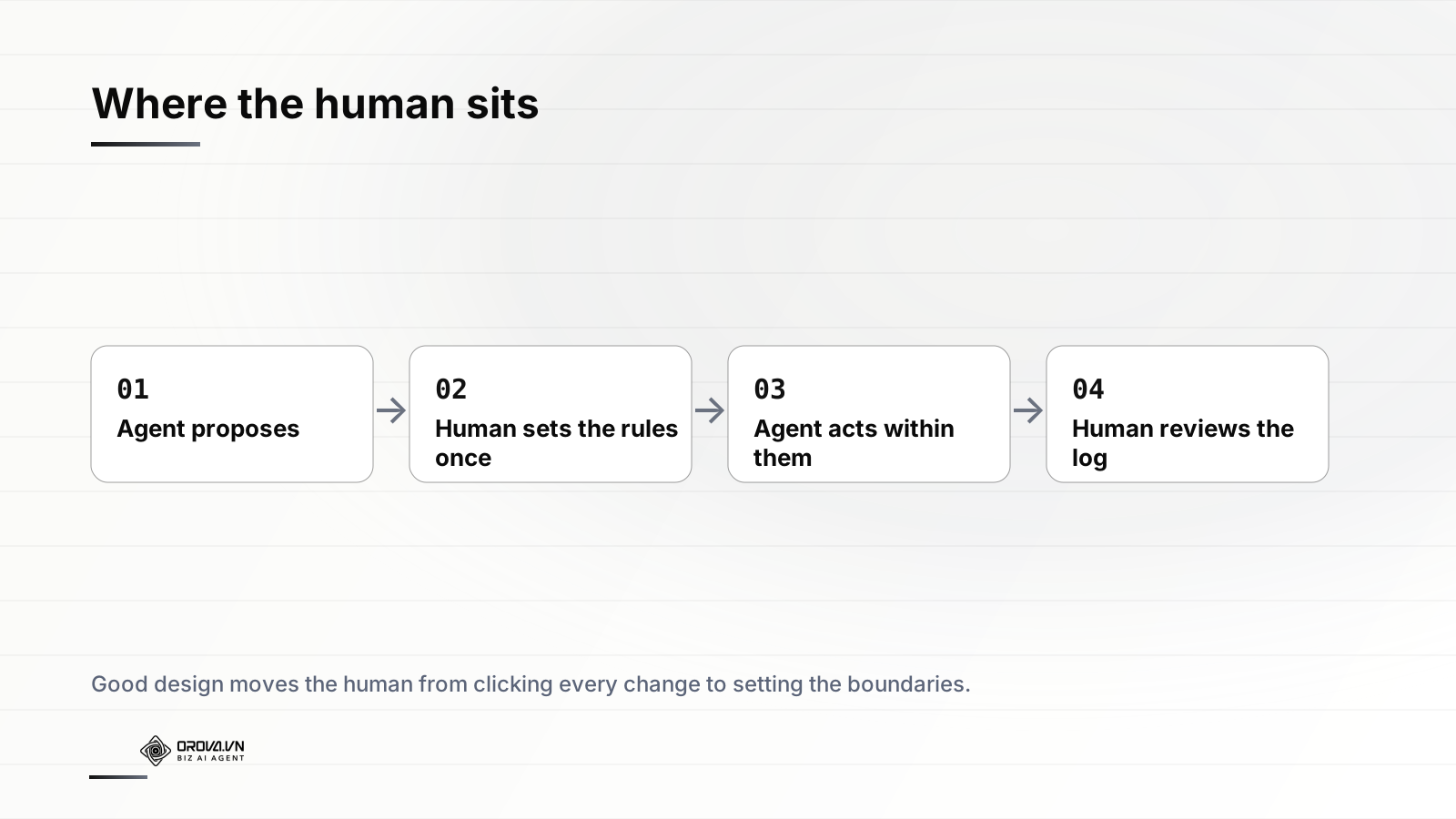
If you take one idea from this, take this: the question is never whether to trust automation, but where to place the human relative to each decision. The buyer with forty emails was placed in the wrong spot — asked to approve the trivial and therefore unable to catch the dangerous. Good design moves her to the right spot: she sets the rules once, the agent acts within them on the high-frequency reversible work, and she reviews a clean log and gets a real-time alert only when something genuinely needs her. She spends her attention on strategy and the rare big call, which is the only place a human's judgment was ever worth more than a machine's speed.
That is what well-designed human-in-the-loop automation buys you. Not the removal of control — the relocation of it, from clicking every change to setting the boundaries that make every change safe. Done right, you end up more in control than you were when you did everything by hand, because for the first time you can actually see, in one place, everything that is happening to your accounts and exactly why.
If you want this kind of control built in rather than bolted on, take a look at Orova Ads. It is an AI agent that manages paid campaigns across Google, Meta and TikTok — reading your account data every day, recommending the right optimizations, and executing budget shifts, bid changes, on/off decisions and audience adjustments within the boundaries you set, with human-in-the-loop approval and a full, readable audit log of everything it does. You decide where you sit in the loop; it does the rest.
Run your business with AI Agents
Orova is the always-on Biz AI Agent — it plans, runs, and optimizes the work for you. Save time, unlock productivity.
Try it free