
Meta CAPI vs Google vs TikTok Events API: Server-Side Conversion Tracking Compared
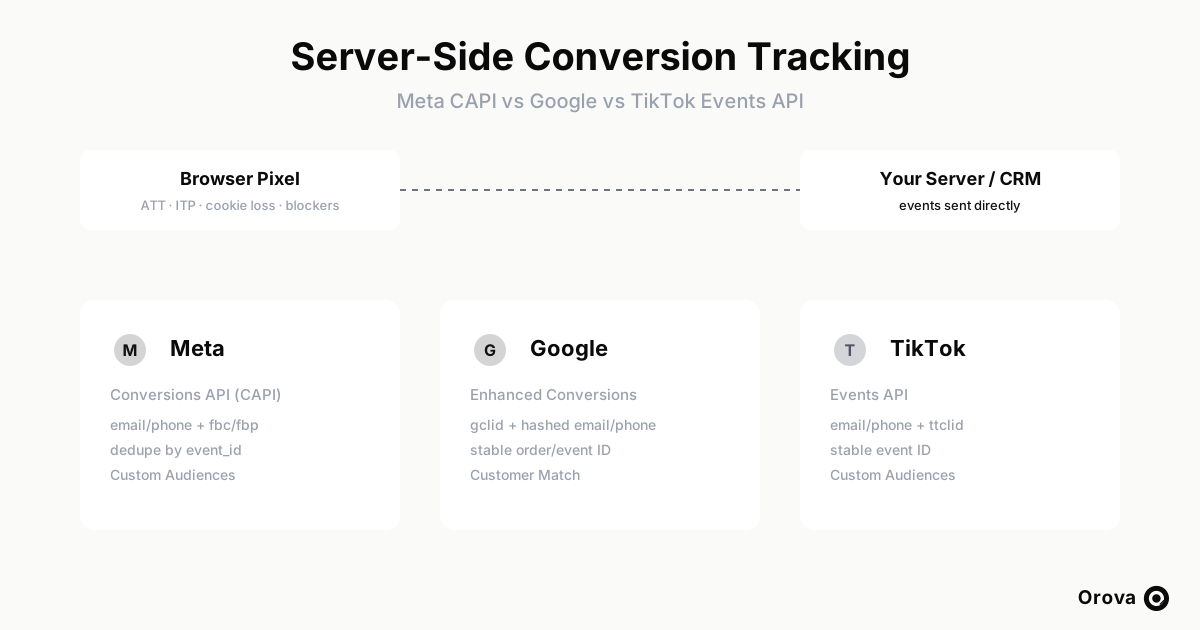
If you run paid acquisition on more than one network, you have probably watched your browser pixel quietly lose its grip on reality. A growing share of conversions never reach the pixel at all: iOS App Tracking Transparency strips identifiers, Safari's Intelligent Tracking Prevention caps client-side cookies, third-party cookies are disappearing across browsers, ad blockers drop pixel calls outright, and a meaningful slice of visitors simply decline consent. The result is that the events your ad platform sees through the browser are an incomplete, increasingly unreliable sample of what actually happened.
Server-side conversion tracking is the answer the platforms themselves now push. Instead of relying on a script in the visitor's browser to fire an event, you send the event directly from your own server to the ad platform's API. The server connection is not blocked by ITP, is not subject to ATT, does not depend on a third-party cookie surviving in the browser, and is not stripped by an ad blocker. The platform receives a clean, first-party signal it can use to attribute the conversion, optimize bidding, and build audiences.
The catch: every major network has built its own server API with its own match keys, its own deduplication rules, its own quirks, and its own setup friction. Meta has the Conversions API (CAPI). Google has Enhanced Conversions, offline conversion import, and the Data Manager API. TikTok has its Events API. They solve the same problem in three incompatible ways. This article compares all three side by side — how each one works, what identifiers it uses, how it deduplicates, how it feeds audiences, where setup goes wrong — and then shows how to operate all three without standing up and maintaining three separate integrations. For the conceptual foundation behind why these APIs decide ad performance, see the pillar guide on what a Conversion API is and why it decides ad performance.
The shared model: what every server API has in common
Before the differences, it helps to fix the parts that are identical, because they shape everything else. Each platform exposes an endpoint that accepts conversion events as structured data — a lead, a purchase, an add-to-cart, a sign-up — and each event carries three classes of information.
- The event itself: what happened (event name), when (timestamp), and how much it was worth (value and currency for purchases).
- Match keys: the identifiers the platform uses to connect the event back to a user it has seen in an ad. This is where the platforms diverge most.
- A deduplication key: a stable identifier so the platform can recognize when the same conversion arrives twice — once from the browser pixel and once from your server — and count it only once.
Two rules hold across all three. First, personally identifiable information is hashed before it leaves your server. Email addresses and phone numbers are normalized (lowercased, trimmed, phone numbers reduced to digits with country code) and then hashed with SHA-256. You never send raw email or phone to any of these APIs. Second, consent and privacy law still apply. Server-side tracking changes the transport, not your legal obligations: GDPR, regional consent requirements, and platform policies govern whether you are allowed to send a given user's data at all. Server-side is not a loophole around consent; it is a more reliable pipe for the data you are permitted to send.
There is also a subtle operational truth that trips up almost everyone the first time. When your server makes the API call, the request's source IP address belongs to your server, not to the customer. If you let the platform infer the user's IP and user-agent from the connection, you will be handing it your own data center's fingerprint for every conversion. The customer's real IP address and user-agent must be captured at the moment of the conversion (in the browser or app) and passed explicitly inside the event payload. Get this wrong and match quality collapses in a way that is invisible until you go looking for it.
Meta Conversions API (CAPI)
How it works
Meta's CAPI accepts server events at the dataset (pixel) level. In the recommended setup you run the browser pixel and the server API in parallel, sending the same conversions through both paths. The pixel catches users with cookies intact and rich browser context; the server catches everyone the browser missed and adds first-party identifiers the browser may not have. Meta merges the two streams, removes duplicates, and treats the combined signal as the source of truth for attribution and optimization.
Match keys
Meta has the richest match-key model of the three, which is why its server signal is often the strongest. It accepts hashed email and hashed phone number, but its signature identifiers are the click cookies: fbc (derived from the fbclid click parameter) and fbp (the browser pixel's first-party cookie). When you send fbc and fbp alongside hashed email, IP address, and user-agent, Meta has multiple independent ways to tie the event to a person who saw your ad. The more high-quality keys you provide, the higher your event match quality, and the better the optimization. This is also why passing the real customer IP and user-agent matters so much on Meta specifically — they are first-class match signals, not just metadata.
Deduplication
Meta deduplicates the pixel event and the server event using event_id. You generate a single stable identifier for each conversion — most teams use the order ID or a hash of (user + event + timestamp) — and send the same event_id from both the browser pixel and the server. Meta also matches on event name and timing as a backstop, but event_id is the contract. If your browser and server fire different IDs for the same purchase, Meta counts it twice and your conversion numbers inflate. If you do not send the server event at all for a conversion the pixel already caught, you simply lose the resilience benefit. The discipline is: one conversion, one event_id, sent through both channels.
Audiences
On the audience side, Meta uses Custom Audiences built from hashed customer lists. You push a list of hashed emails or phones to define an audience you can exclude (existing buyers, so you stop paying to re-acquire them) or use as a seed for lookalikes (find more people like your best customers). This is a separate API surface from event ingestion, but it draws on the same hashed PII discipline.
Setup friction and common errors
- Low event match quality: almost always caused by sending too few keys, or by sending the server's IP/UA instead of the customer's. Add fbc/fbp and the real customer IP, and quality jumps.
- Double-counted conversions: mismatched event_id between pixel and server. Audit that both paths emit the identical ID.
- Access token scope: CAPI calls authenticate with a system-user access token tied to the dataset; tokens that are too narrowly scoped or have expired fail silently from the marketer's point of view.
Google: Enhanced Conversions, offline import, and Data Manager
How it works
Google's server-side story is less a single product than a family. Enhanced Conversions supplements your existing conversion tags with hashed first-party data so Google can recover conversions the cookie alone would miss. Offline conversion import lets you upload conversions that happened after the click — a sale closed by a salesperson days later — back to the originating ad click. The newer Data Manager API (the events:ingest surface) is Google's consolidated ingestion path. The common thread across all of these is that Google's world is built around the click, not the cookie.
Match keys
This is the single biggest difference between Google and the other two. Google's click-based conversions lean on the gclid — the Google Click Identifier appended to your landing-page URLs by auto-tagging. To attribute an offline conversion to the ad click that produced it, you generally need to have captured the gclid at click time, stored it (usually in your CRM against the lead), and sent it back with the conversion. Enhanced Conversions and Customer Match add hashed email and hashed phone on top, which lets Google match users it can identify by their Google account even when the gclid is missing or stale. So Google is a two-layer model: gclid for click attribution, hashed PII for identity-based matching. If you only send hashed email and never capture gclid, you will get Enhanced-Conversions-style matching but lose the precise click attribution Google is best at.
Deduplication
Google relies on stable conversion identifiers — an order ID or transaction ID per conversion — to avoid counting the same sale twice when it arrives from multiple sources (the tag and an offline upload, for instance). As with Meta, the rule is one durable ID per real-world conversion, generated once and reused everywhere you report that conversion.
Audiences
Google's equivalent of a hashed customer list is Customer Match. You upload hashed emails and phones to build an audience you can target or, just as usefully, exclude. The exclusion case is the quiet money-saver: stop bidding on people who already converted.
Setup friction and common errors
- USER_PERMISSION_DENIED: the most common and most frustrating Google error. The account you authorized for the API connection must actually have permission on the target Google Ads account. If the connected user lacks access, every sync fails with this error regardless of how correct your payload is. Fix the account-level permission first, then debug the data.
- Missing gclid: if you never captured the click ID, click-based attribution has nothing to anchor to. Make gclid capture part of your form/CRM plumbing from day one.
- Hashing mismatches: Google is strict about normalization before SHA-256 (lowercase, trim, E.164 phone format). Inconsistent normalization silently tanks match rates.
TikTok Events API
How it works
TikTok's Events API mirrors Meta's pattern more closely than Google's. You send server events for a web data source by specifying event_source=web and identifying the destination with event_source_id set to your pixel code. As with Meta, the recommended pattern is to run the TikTok pixel in the browser and the Events API on the server together, letting TikTok merge and deduplicate the two streams. The mental model you built for CAPI transfers almost directly.
Match keys
TikTok accepts hashed email and hashed phone number, and its signature click identifier is ttclid — the TikTok click ID, analogous to Meta's fbc/fbclid and Google's gclid. Capture ttclid at click time, carry it through to the conversion, and send it hashed-PII-alongside. As on Meta, sending the customer's real IP address and user-agent improves matching, and as everywhere, email and phone are SHA-256 hashed before sending.
Deduplication
TikTok deduplicates pixel and server events using a stable event_id, exactly the same discipline as Meta. Generate one ID per conversion, send it from both the browser pixel and the Events API, and TikTok collapses the pair into a single counted event.
Audiences
TikTok offers Custom Audiences from hashed customer lists for exclusion and lookalike seeding, the same idea as Meta Custom Audiences and Google Customer Match.
Setup friction and common errors
- file_signature requirement: TikTok's custom-audience file upload requires a file_signature — an MD5 checksum of the file you are uploading. Omit it or compute it wrong and the upload is rejected. This is a TikTok-specific step that surprises teams coming from Meta or Google.
- Wrong event_source_id: sending events to the wrong pixel code routes your conversions into a void. Confirm event_source_id matches the pixel you actually optimize against.
- Server IP leakage: the same trap as the others — if you do not pass the customer's IP/UA, TikTok sees your server.
Side-by-side comparison
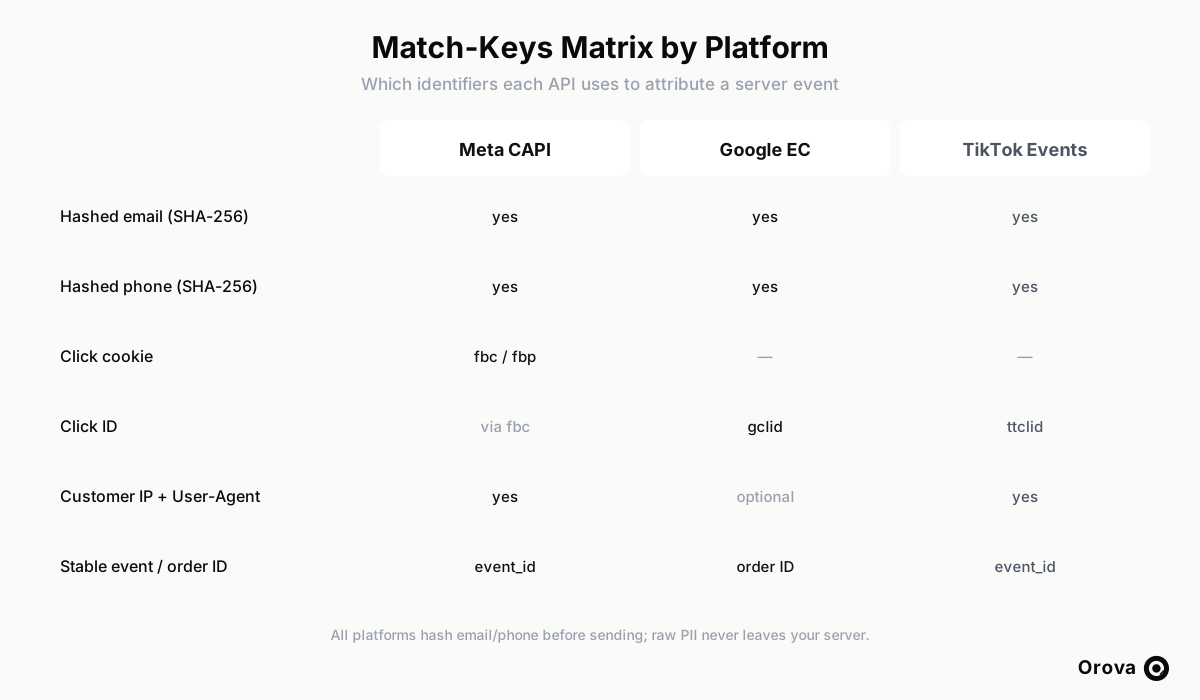
The table below compares capabilities and required fields, not invented performance numbers. Read it as a map of where the three APIs agree and where they force you to do something platform-specific.
| Dimension | Meta CAPI | Google (Enhanced Conv. / Data Manager) | TikTok Events API |
|---|---|---|---|
| API name | Conversions API (CAPI) | Enhanced Conversions / offline import / Data Manager (events:ingest) | Events API (event_source=web) |
| Primary click identifier | fbc / fbp (from fbclid) | gclid | ttclid |
| Hashed email / phone | Yes (SHA-256) | Yes (SHA-256) | Yes (SHA-256) |
| IP + user-agent as match signal | Yes (strong) | Optional / supplementary | Yes |
| Destination identifier | Dataset / pixel ID | Conversion action + Ads account | event_source_id (pixel_code) |
| Deduplication key | event_id (pixel + server) | Stable order / transaction ID | event_id (pixel + server) |
| Audience product | Custom Audiences | Customer Match | Custom Audiences |
| Hallmark setup error | Low match quality (missing keys / server IP) | USER_PERMISSION_DENIED (account access) | Missing/incorrect file_signature (MD5) on audience upload |
| Strongest when you have | Click cookies + rich PII | Captured gclid + clean hashed PII | ttclid + hashed PII |
The operational problem: three APIs, three integrations
Read the three sections back to back and the real cost of server-side tracking becomes obvious. The concept is shared, but the implementation is three separate engineering projects. To do this properly across all three networks you need to:
- Capture three different click IDs (fbclid, gclid, ttclid) at landing time and persist each in your CRM against the lead.
- Normalize and SHA-256 hash email and phone consistently — and identically — for three different validators, each with its own strictness about formatting.
- Generate stable event/order IDs and wire deduplication through both the browser pixel and the server for each platform.
- Capture and forward the customer's real IP and user-agent, because the request IP is your server's, not theirs.
- Manage three sets of credentials and three permission models — including Google's account-level access requirement that throws USER_PERMISSION_DENIED if it is even slightly wrong.
- Handle three audience-upload formats, including TikTok's MD5 file_signature, to push exclusion and lookalike lists.
- Build logging and retry for each, so that when a send fails you can see it instead of discovering weeks later that half your conversions never landed.
For most marketing teams that is three integrations to build, three to monitor, and three to keep working as each platform revises its API. The hashing logic, the IP/UA forwarding, the dedupe discipline, and the consent gating are the same problem solved three times — which is exactly the kind of repeated, error-prone plumbing worth consolidating.
Operating all three through one webhook
This is the layer Orova is designed to remove. Instead of integrating each platform separately, you point your CRM or website at one per-project webhook. Each event you send — a lead, a purchase — arrives once, and Orova routes it to whichever platform's pixel or conversion action you have selected for that project, along with the matching audiences. The hashing, the routing, the deduplication key handling, and the send log are handled in that single layer.
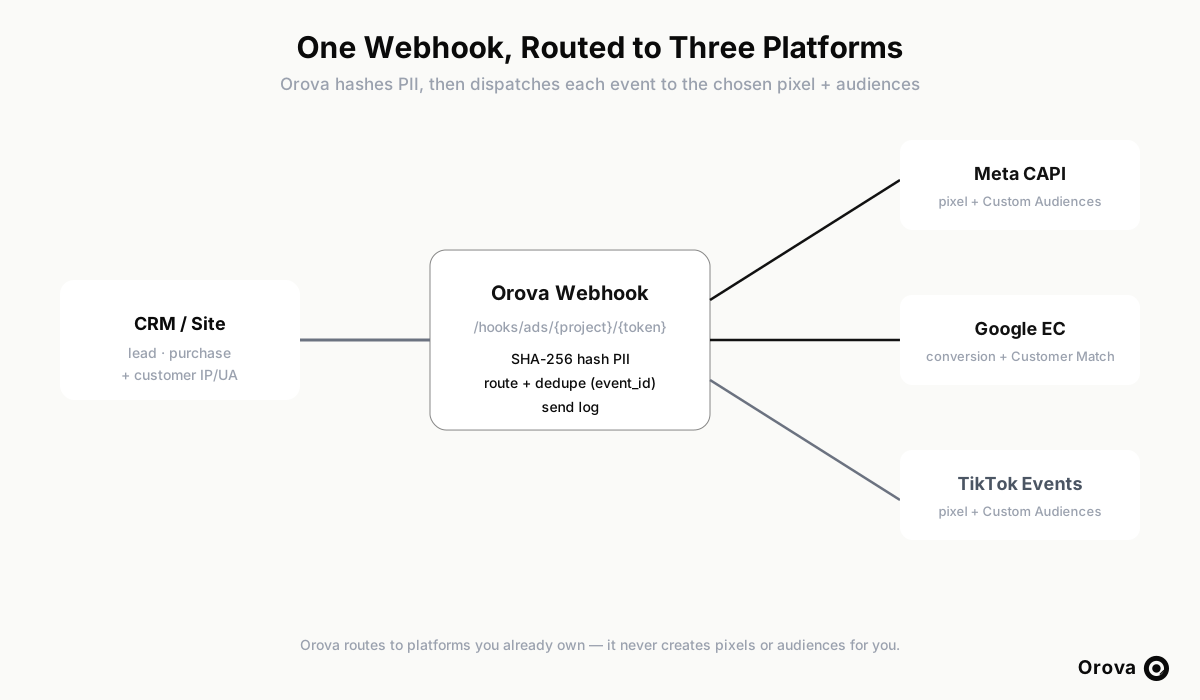
Concretely, the unified layer does the repeated work for you:
- Hashes PII once, correctly: email and phone are normalized and SHA-256 hashed before anything is sent to any platform. You send your data once; raw PII never goes out the door.
- Routes per project: a single webhook dispatches the event to the Meta dataset, Google conversion action, and/or TikTok pixel you have chosen for that project — you pick the destination, the layer handles the platform-specific payload shape.
- Keeps a send log: every dispatch is recorded, so when something fails you can see which event, which platform, and why — instead of debugging three black boxes.
- Does not create pixels or audiences for you: this is an important boundary. Orova routes events to the pixels, conversion actions, and audiences you already own on each platform. It never spins up new pixels or audiences on your behalf, so you stay in control of your own ad accounts and there is no surprise asset sprawl.
That boundary matters for trust. The unified layer is a router and a hashing/logging pipe, not a parallel ad-account manager. You still own and configure your pixels, conversion actions, and audiences inside Meta, Google, and TikTok; Orova just stops you from having to write and maintain three ingestion clients to feed them. If you want to see how this connects to the broader ad-optimization workflow, the Orova Ads documentation walks through the full setup, and the Orova homepage covers how the conversion layer fits alongside campaign optimization.
Which path should you start with?
If you are early and run mostly on one network, start by getting that platform's server API right end to end — match keys, dedupe, customer IP/UA — before adding the others. Depth on one beats shallow coverage on three. If you already run on two or more networks, the marginal cost of each additional integration is what hurts, and that is precisely where a single-webhook router pays for itself: you solve hashing, IP forwarding, dedupe, and logging once, then flip on each platform's destination rather than re-implementing the pattern.
Whatever path you take, the strategic point is settled. The browser pixel is a decaying signal, and the platforms have already moved their optimization and attribution onto the server-side APIs. Server-side conversion tracking is no longer an advanced optimization — it is the baseline for keeping your ad spend accountable. The only real decision left is whether you build and babysit three integrations, or route everything through one.
Frequently asked questions
Does server-side tracking replace the browser pixel?
No — the recommended pattern on Meta and TikTok is to run both in parallel and let the platform deduplicate them with a shared event_id. The pixel still captures rich browser context for users it can reach; the server fills the gaps the browser misses. They are complementary, not mutually exclusive. Google's model differs because it is built around the click and offline import, but the same principle holds: server data supplements rather than replaces.
Why do my conversions count twice after enabling the server API?
Almost always a deduplication failure: your browser pixel and your server are sending different event IDs for the same conversion. Generate one stable event_id (or order ID) per conversion and send the identical value from both the pixel and the server so the platform can collapse the pair into a single event.
Why is my Meta event match quality low?
Two usual causes. First, you are sending too few match keys — add fbc/fbp and hashed email on top of IP and user-agent. Second, you are letting Meta read the IP and user-agent from the connection, which gives it your server's fingerprint instead of the customer's. Capture the customer's real IP/UA at conversion time and pass them explicitly in the payload.
What does USER_PERMISSION_DENIED mean on Google?
The account you connected to the API does not have permission on the target Google Ads account. The sync fails regardless of how correct your event data is. Grant the connected account the right access on the Ads account, then retry. It is a permissions problem, not a payload problem.
Do I need the gclid for Google server-side conversions?
For precise click-based attribution and offline conversion import, yes — capture the gclid at click time and store it against the lead so you can send it back with the conversion. Enhanced Conversions and Customer Match can still match users by hashed email or phone without it, but you lose the exact click attribution Google does best.
What is the file_signature TikTok keeps rejecting?
When you upload a custom-audience file to TikTok, it requires a file_signature, which is an MD5 checksum of the file. If it is missing or computed incorrectly, the upload is rejected. Generate the MD5 of the exact file you send and include it in the request.
Is it safe to send customer data to these APIs?
Send only hashed email and phone (SHA-256) — never raw PII — and only for users whose consent permits it. Server-side tracking changes the transport, not your legal obligations under GDPR and regional consent rules. A unified layer that hashes PII before dispatch and logs every send makes it easier to stay compliant, but you remain responsible for collecting valid consent in the first place.
Can one tool really handle all three platforms?
If TikTok is part of the mix, TikTok Creative Hooks: The First Three Seconds That Decide Your CPA covers why the opening frames carry more weight there than anywhere else.
Yes, because the shared work — hashing PII, generating dedupe keys, forwarding the customer IP/UA, logging sends — is identical across platforms. Orova exposes one per-project webhook, hashes your data once, and routes each event to the Meta, Google, and TikTok destinations you already own, with a send log. It routes to your existing pixels, conversion actions, and audiences; it does not create them for you, so you keep full control of your ad accounts.
Run your business with AI Agents
Orova is the always-on Biz AI Agent — it plans, runs, and optimizes the work for you. Save time, unlock productivity.
Try it free