
What Is a Conversion API (CAPI) and Why It Now Decides Your Ad Performance
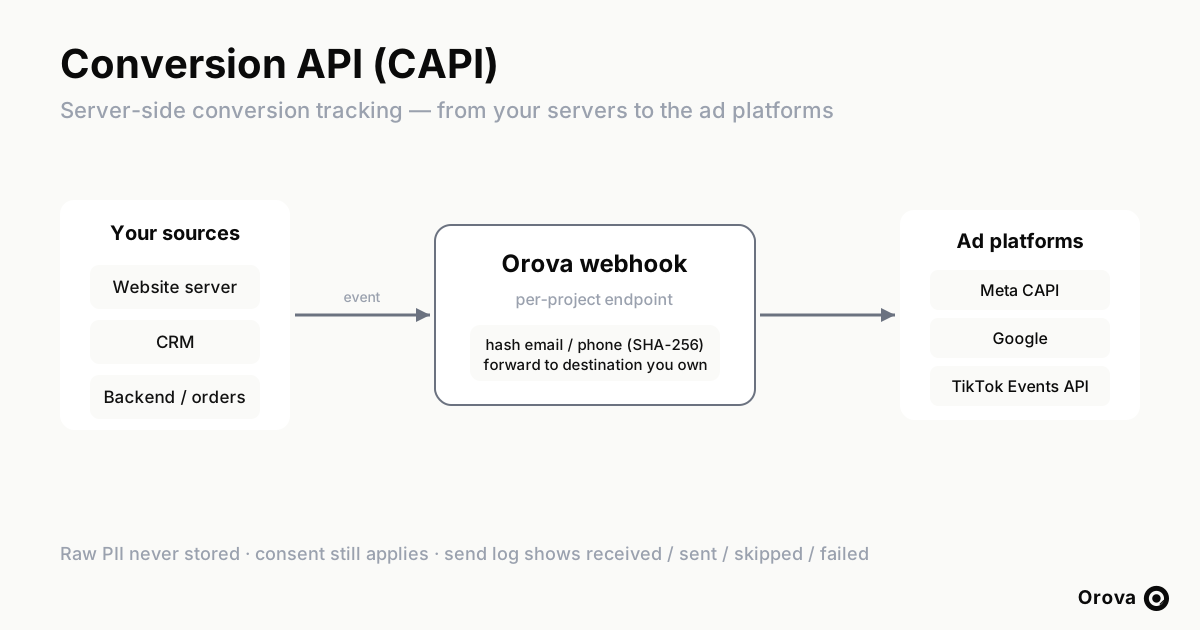
For most of the last decade, measuring whether an ad worked was simple: a small piece of JavaScript — the pixel — sat on your thank-you page, fired in the visitor's browser when a conversion happened, and quietly reported it back to the ad platform. That feedback loop is what made automated bidding feel like magic. The platform learned which clicks turned into customers, and it spent your budget chasing more of them. The pixel was never glamorous, but it was the engine room of performance marketing.
That engine is now running on fewer cylinders. The browser has become a hostile place to track conversions, and the gap between what actually happened and what the ad platform can see is widening every quarter. A Conversion API — often shortened to CAPI, and described more generally as server-side conversion tracking — is the response. Instead of relying on a script in someone's browser, you send conversion events directly from your own servers to the ad platform. This article explains what a Conversion API is, why browser signal is eroding, how server-side events actually reach the platform and get matched, what to watch out for, and how to roll it out without breaking your existing measurement.
What a Conversion API actually is
A Conversion API is a server-to-server channel for reporting conversions to an advertising platform. When a meaningful action happens — a purchase, a qualified lead, a subscription, a booked call — your backend makes a direct request to the platform's API and says, in effect, "this person did this thing, here is what I know about them." No browser is involved in that request. It travels from your server to theirs.
Each major platform has its own implementation, and the naming is inconsistent enough to cause confusion. On Meta (Facebook and Instagram), the server channel is the Conversions API, which is where the abbreviation CAPI comes from. On Google, the same idea is spread across Enhanced Conversions, offline conversion import, and the newer Data Manager API, depending on whether the conversion happens on your site or later in your CRM. On TikTok, it is the Events API. The mechanics differ, but the principle is identical: take the conversion event out of the fragile browser and deliver it from infrastructure you control.
It helps to be precise about what server-side tracking does and does not replace. It does not replace your ad account, your campaigns, your creative, or your audiences. It does not replace the pixel entirely either — in most setups the pixel and the server work together. What it replaces is your sole dependence on the browser as the messenger. The browser is still useful for what it sees in real time; the server is there to make sure the message arrives even when the browser cannot or will not deliver it.
Why browser tracking is losing signal
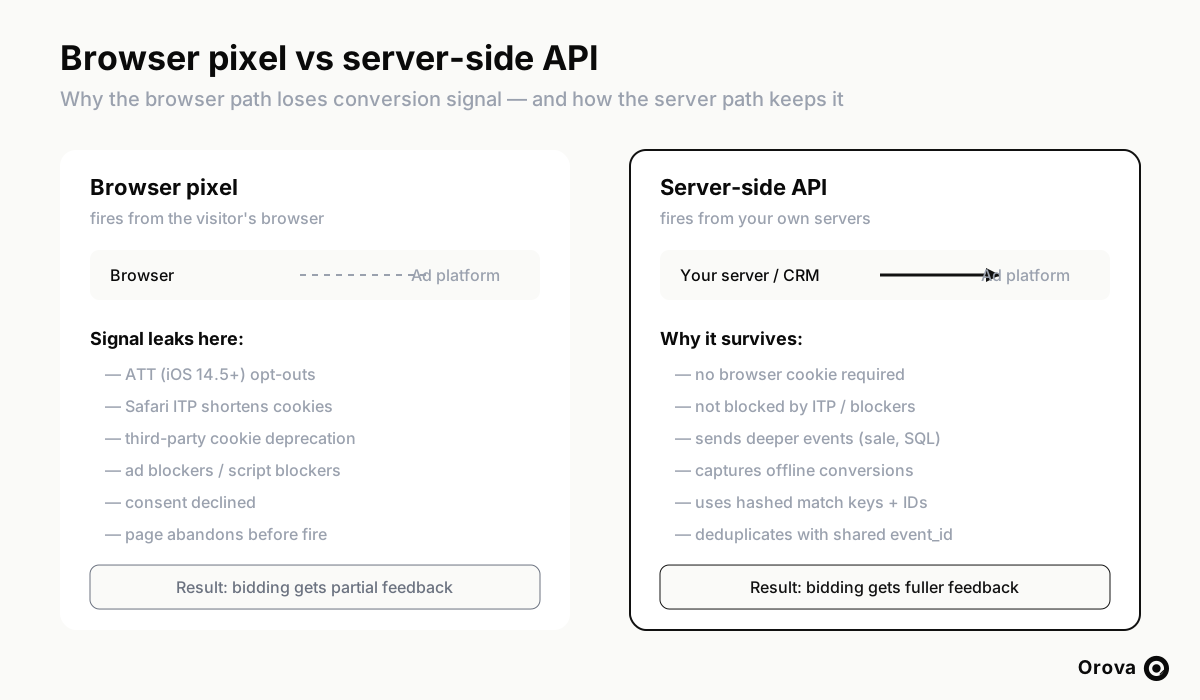
To understand why server-side tracking has moved from "nice to have" to "decides your ad performance," you have to look at everything that now stands between a conversion and the pixel report.
App Tracking Transparency on iOS
Apple's App Tracking Transparency framework, introduced with iOS 14.5, requires apps to ask permission before tracking users across other companies' apps and websites. A large share of users decline. For ad platforms whose mobile traffic flows through in-app browsers, that opt-out removes a chunk of the identifiers that used to tie a click to a later conversion. The conversion still happens; the platform just can no longer reliably attribute it.
Safari's Intelligent Tracking Prevention
Safari's Intelligent Tracking Prevention (ITP) actively shortens the lifetime of cookies set by scripts, sometimes to a single day. Attribution windows depend on a cookie surviving from click to conversion, which can be days or weeks later. When ITP caps the cookie at twenty-four hours, a conversion that lands on day three has no cookie left to match against. The pixel may even fire correctly, but the connecting thread is already gone.
Third-party cookie deprecation
The broader retreat of the third-party cookie compounds the problem. Cross-site identifiers that platforms relied on to stitch behaviour together are being deprecated across browsers. As that scaffolding disappears, browser-based matching gets noisier and less complete.
Ad blockers and script blockers
A meaningful slice of users run ad blockers, privacy extensions, or browsers that block tracking scripts by default. To those users, the pixel simply never loads. Their conversions are invisible to browser-based tracking from the start — and these are often your most engaged, savvy customers.
Declined consent and page abandonment
Where consent banners apply, users who decline tracking remove themselves from pixel reporting by design. And even with willing users on permissive browsers, the pixel still has to fire: pages that close early, slow scripts, and network hiccups all cause events to be lost in the last few hundred milliseconds.
Each of these is a leak. Individually they look survivable. Together they mean a material and growing portion of your real conversions never reach the platform through the browser. The consequence is not just an under-reported dashboard — it is starved optimization. The platform's bidding algorithm learns from the conversions it can see. Feed it a partial, biased sample and it will optimize toward the wrong clicks, raise your cost per acquisition, and quietly cap how much it is willing to scale. You are not only losing reporting accuracy; you are losing the machine learning that spends your money.
How server-side conversion tracking works
The server-side flow is conceptually straightforward, even though the implementation has moving parts. When a conversion occurs, the system that knows about it — your website's backend, your e-commerce platform, your CRM, your order database — assembles an event and sends it to the platform's Conversion API.
An event has three kinds of information. First, the action: what happened (a purchase, a lead, a registration) and when. Second, the value: the order total, the currency, the product, the lead's expected worth. Third, and most important for matching, the identifiers: the signals the platform will use to connect this event to a specific person it has seen before.
Because the request comes from your server rather than the visitor's browser, none of the browser-level obstacles apply. There is no third-party cookie to expire, no script for a blocker to intercept, no consent banner sitting between your database and the API. The event leaves your infrastructure and arrives at theirs. As long as you collected the underlying data with proper consent, the server path delivers what the browser path drops.
This is also why the server path can carry richer events. The browser only knows about what happens on the page in front of it. Your server knows what happens afterward — that the lead from Tuesday closed on Friday, that the trial converted to paid, that the order was not refunded. Those deeper-funnel events are exactly the ones that make bidding smarter, and they are only available server-side.
Match keys: how the platform recognises the person
A conversion event is only useful if the platform can tie it to someone it can target. That tying is done with match keys — the identifiers you include in the event. The more strong keys you send, the higher your match rate, which is the share of your events the platform can successfully connect to a known user.
There are two families of match keys, and they behave very differently.
Hashed personal identifiers
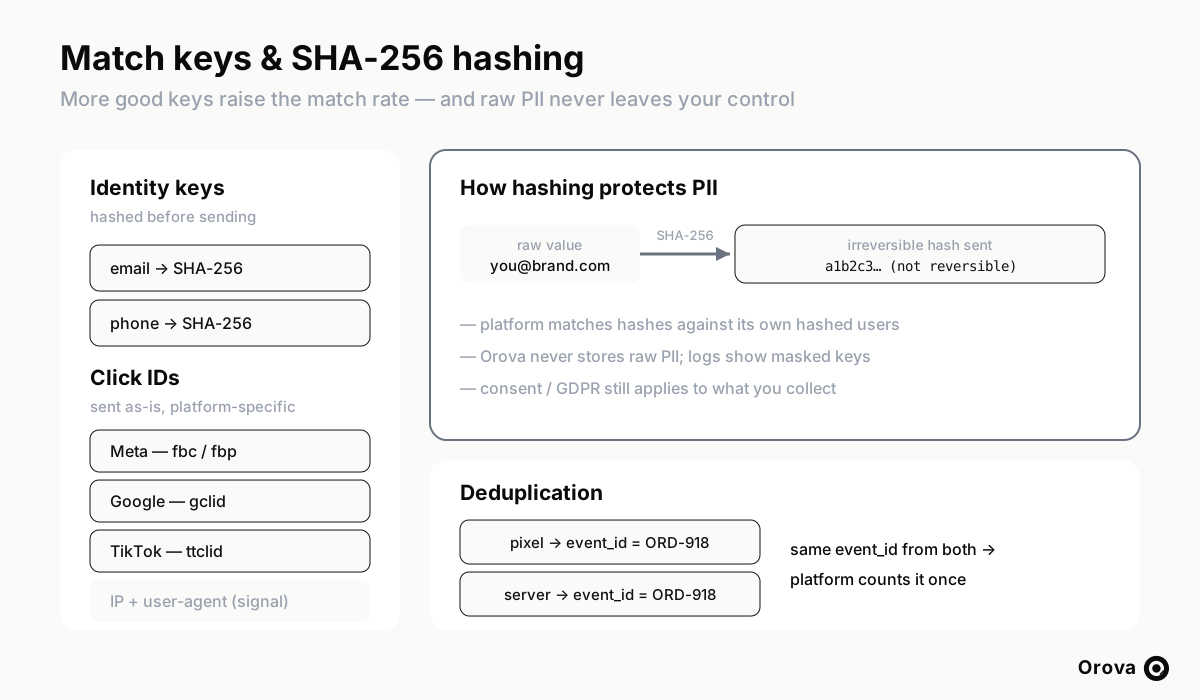
Email address and phone number are the most durable keys, because a person tends to use the same ones everywhere. You never send these in raw form. They are hashed with SHA-256 — a one-way function that turns the value into a fixed string that cannot be reversed back into the original. The platform hashes its own users' emails and phones the same way, then compares hashes. If two hashes match, it is the same person, and at no point did either side handle the raw value in transit. Normalisation matters here: trimming whitespace, lower-casing the email, and putting the phone in a consistent international format before hashing all raise the chance of a match.
Click identifiers
The second family is platform-specific click IDs, captured when the user first arrives from an ad. Meta uses fbc and fbp, Google uses gclid, and TikTok uses ttclid. These are sent as-is, not hashed, because they are not personal data — they are the platform's own tags identifying a specific click. A click ID is the single strongest match key you can send, because it points directly at the ad interaction that should get credit. The practical challenge is capturing it: you have to grab the click ID from the landing-page URL and carry it through your forms and into your CRM so it is still attached to the event days later when the deal closes.
IP address and user agent
Finally, the IP address and user-agent string act as supplementary signals. On their own they are weak and ambiguous, but combined with the other keys they help the platform resolve borderline matches.
The headline rule is simple: send every good key you legitimately have. An event with a click ID and a hashed email and phone will match far more reliably than one carrying only an IP address. Match rate is not a vanity metric — it is the difference between the platform learning from your conversion and discarding it.
Deduplication: running the pixel and the server together
Once you add server-side events, an obvious worry appears: if both the pixel and the server report the same purchase, won't the platform count it twice and inflate your numbers? The answer is that it would — unless you deduplicate, which is a solved problem.
The mechanism is an event_id: a unique identifier you generate for each conversion and attach to both the pixel event and the server event. When the platform receives two events carrying the same event_id, it understands they describe the same conversion and counts it once. The pixel and the server become two messengers for one event, and whichever arrives is enough; if both arrive, no harm done.
This redundancy is the point, not a side effect. The pixel is fast and catches the real-time browser context. The server is reliable and catches everything the browser drops. Running them together with consistent event_ids gives you the best of both: speed where the browser works, coverage where it does not. The only requirement is discipline — the same event needs the same event_id on both paths, which means your order number or a generated event reference has to be available to both the page and the backend.
Privacy, hashing, and consent
It is tempting to read "send data straight from your servers to the ad platform" as a privacy downgrade. Done correctly, it is the opposite of careless.
You never transmit raw personal information. Emails and phone numbers are hashed with SHA-256 before they leave your environment, so what crosses the wire is an irreversible fingerprint, not the value itself. The matching happens hash-to-hash. This is a more controlled exchange than a browser script silently shipping cookies and identifiers to third parties.
That said, hashing is a safeguard for data in transit, not a licence to collect anything you like. Consent and regulations such as the GDPR still govern what you are allowed to gather and what you are allowed to send. If a user has not consented to having their conversion shared with an ad platform, hashing their email does not make it permissible to send. Server-side tracking moves the plumbing; it does not move the legal line. The right posture is to honour consent at the source — only forwarding events for users whose consent permits it — and to treat hashing as the technical floor, not the whole compliance story.
Beyond reporting: what server-side events unlock
If you only think of a Conversion API as a way to recover lost pixel reports, you will undersell it. The deeper value is in three uses that the browser simply cannot serve.
Feeding bidding with deeper-funnel conversions
The browser can usually only see a shallow event — a form submission, a page view. But not every form-fill is worth the same. Some leads are tyre-kickers; some become high-value customers. With server-side events you can report the qualified lead or the actual sale, the events that reflect real business value. When you feed those into the platform's optimization instead of raw form-fills, the bidding learns to find people who become customers, not just people who fill in forms. This single change often does more for cost per acquisition than any creative or audience tweak, because you are correcting what the algorithm is aiming at.
Offline conversions
Many of the most valuable conversions happen nowhere near a web page. A lead comes in through a form, then a salesperson calls them, and the deal closes by phone three days later. The browser never sees that close — it happened offline, in your CRM. Server-side import lets you send that offline conversion back to the platform, attributed to the original click via the click ID you captured at the start. For any business with a sales cycle longer than a single session, offline conversions are where the truth about ad performance actually lives.
Audiences
The same server channel can keep your audiences accurate. You can push a customer list to the platform to exclude people who already bought, so you stop paying to acquire customers you already have. You can push your best customers to build lookalike audiences that find more people like them. Because this data comes from your CRM rather than from browser behaviour, it is cleaner and more complete than anything pixel-built audiences can manage.
Common mistakes to avoid
Server-side tracking is reliable when it is set up carefully and frustrating when it is not. The failure modes are predictable.
- Forgetting deduplication. The classic mistake: turning on server events while the pixel still fires, with no shared event_id. Conversions double, the dashboard looks great for a week, and then you realise your reported numbers are fiction and your bidding is chasing inflated values.
- Sending too few match keys. Shipping events with only an IP address and wondering why match rate is low. If you have a hashed email, a phone, and a click ID, send all of them. Skipping the click ID in particular throws away your strongest signal.
- Losing the click ID before it matters. The gclid, fbc, or ttclid has to be captured on the landing page and carried all the way into the CRM, or it will not be there when the offline conversion fires days later. This is the most common reason offline attribution underperforms.
- Hashing inconsistently. Hashing an email with a trailing space, or a phone in a local format the platform does not expect, produces a hash that never matches. Normalise before you hash — every time, the same way.
- Sending raw PII by accident. A misconfigured integration that forwards an un-hashed email is both a privacy incident and a rejected event. Hash at the boundary and verify nothing raw leaves.
- Ignoring consent. Forwarding events for users who declined tracking because "it's only a hash" is a compliance failure waiting to happen. Filter at the source.
- No visibility into what is actually being sent. If you cannot see which events were received, which were forwarded, which were skipped, and which failed, you are flying blind. A black-box integration that silently drops half your events is worse than no integration, because you will trust numbers that are wrong.
An adoption roadmap
You do not have to boil the ocean. A sane rollout looks like this.
Start by keeping the pixel. Do not rip out browser tracking to "go server-side." The goal is both, working together. Leave the pixel in place so you keep real-time browser context and a comparison baseline.
Pick one high-value event first. Choose the conversion that matters most — usually the purchase or the qualified lead — and send that one server-side before you try to mirror everything. One well-instrumented event delivers most of the benefit and is far easier to verify.
Add deduplication from day one. Generate an event_id for that conversion and attach it to both the pixel and the server event before you go live. Retrofitting deduplication after you have inflated a month of data is painful; doing it first costs nothing.
Capture and carry click IDs. Make sure your landing pages grab the gclid, fbc/fbp, and ttclid, and that your forms and CRM store them with the lead. This is the unglamorous plumbing that makes offline attribution possible later.
Watch the match rate and the send log. After launch, check what share of events are matching and whether anything is being skipped or failing. Treat the send log as your control panel — it tells you whether the integration is healthy or quietly broken.
Then expand. Once one event is solid, add the offline conversion (the lead that closes later), then audience syncs to exclude buyers and build lookalikes, then additional events as you need them. Each step compounds on the last.
How Orova's Conversion API fits in
Wiring a Conversion API up by hand for Meta, Google, and TikTok means three different API formats, three hashing conventions, three sets of match-key rules, and a lot of careful error handling. Orova's Conversion API does that orchestration for you while keeping you in control of your own assets.
The shape of it is deliberately simple. Each project gets its own webhook — a server endpoint that receives lead and order events from your CRM or website. You point your systems at that endpoint when a conversion happens. You then choose a destination you already own: an existing Meta Pixel, a Google Conversion Action, or a Custom Audience. Orova does not create pixels or audiences on your behalf and does not take ownership of anything — it forwards events into the destinations you nominate.
On the way through, Orova hashes the personal identifiers (email and phone with SHA-256) and forwards the event to the right platform: Meta's Conversions API, Google, or TikTok's Events API, plus audience pushes where relevant. You can require an optional X-Orova-Secret header so only your systems can post to your webhook. And critically, every event lands in a send log that shows what was received, what was sent, what was skipped, and what failed — with match keys masked so you can debug without exposing raw data. Orova never stores raw PII: identifiers are hashed in flight and the log shows masked values only.
That combination — a single webhook, destinations you already control, automatic hashing, a multi-platform fan-out, and a transparent log — is designed to give you the coverage of server-side tracking without the integration project. If you want the step-by-step setup, the Orova Ads guide walks through connecting a destination and pointing your CRM at the webhook, and you can see how the whole Marketing AI Agent fits together on the Orova homepage.
Frequently asked questions
Does a Conversion API replace my pixel?
No, and you should not treat it that way. The recommended setup runs the pixel and the server side by side, with a shared event_id so the platform deduplicates and counts each conversion once. The pixel captures real-time browser context; the server captures everything the browser drops to privacy rules, blockers, or offline closes. Together they give you both speed and coverage.
Is server-side tracking compliant with privacy laws?
It can be, and the hashing helps, but compliance is about consent, not just hashing. Email and phone are hashed with SHA-256 before they leave your environment, so raw personal data is never transmitted. However, regulations such as the GDPR still govern what you may collect and forward. You should only send events for users whose consent permits sharing with the ad platform, and honour that at the source. Hashing protects data in transit; consent governs whether you should be sending it at all.
What is a match rate and why does it matter?
The match rate is the share of your conversion events that the platform can successfully tie to a known user. A higher match rate means more of your conversions actually inform bidding. You raise it by sending more good match keys — a captured click ID (gclid, fbc, ttclid), plus a hashed email and phone, beats an IP address alone — and by normalising values consistently before hashing so they actually match.
Will I double-count conversions if I run both the pixel and the server?
Only if you skip deduplication. Generate a unique event_id for each conversion and attach it to both the pixel event and the server event. When the platform sees the same event_id from both sources, it counts the conversion once. Set this up before you go live, because correcting inflated numbers after the fact is much harder than preventing them.
Does Orova store my customers' personal data?
A related read: TikTok Creative Hooks: The First Three Seconds That Decide Your CPA examines the opening seconds that decide whether a TikTok ad gets watched at all.
No. Orova hashes email and phone in flight and never stores raw PII. You forward events to a per-project webhook, optionally protected by an X-Orova-Secret header; Orova forwards them to destinations you already own and records the result in a send log that shows received, sent, skipped, and failed events with match keys masked. It does not create pixels or audiences for you and does not retain raw identifiers.
Run your business with AI Agents
Orova is the always-on Biz AI Agent — it plans, runs, and optimizes the work for you. Save time, unlock productivity.
Try it free