
Question Keywords: The Goldmine Hiding in Google's Own Suggestions
There is a category of keyword that is easier to find than any other, less competitive than most, more closely tied to genuine intent, and — remarkably — published for free by Google itself, directly on the results page, refreshed continuously. Most content teams walk past it every single day without noticing.
These are question keywords: the actual questions people type into search. And Google, far from hiding them, surfaces them everywhere — in autocomplete, in the "People Also Ask" boxes, in related searches. If you learn to read those features as the dataset they are, you have a near-inexhaustible, demand-validated source of content ideas. This article looks at where question keywords live, what the patterns inside them reveal, and how to turn them into pages that rank.
What question keywords are
A question keyword is exactly what it sounds like: a search query phrased as a question. "How do I reduce email bounce rate." "What is a good conversion rate." "Why is my website slow." "When should I rebrand."
They differ from generic keywords in one decisive way. A keyword like "email bounce rate" is ambiguous — the searcher might want a definition, a benchmark, a fix, or a tool, and you are left guessing. A question keyword removes the guesswork. "How do I reduce email bounce rate" tells you precisely what the person wants: a method, a set of steps, a solution. The question is the intent, stated out loud. You are not interpreting a signal; you are reading an instruction.
Why Google hands them to you for free
It is worth pausing on how unusual this is. Search engines guard their query data carefully — exact volumes, click data, the real shape of demand. Yet question keywords are an exception, displayed openly, because showing them serves Google's own purpose: helping searchers refine and explore.
The side effect is a gift. When Google shows a question in "People Also Ask" or autocomplete, it is not guessing — it is reflecting real, aggregated search behaviour. Every question in those features is demand that has been validated by actual searches. You are not brainstorming topics and hoping someone cares. You are reading a list of questions people demonstrably ask, curated and published by the company with the most search data on earth. Treating that as anything less than a primary research source is leaving the easiest win in content strategy on the table.
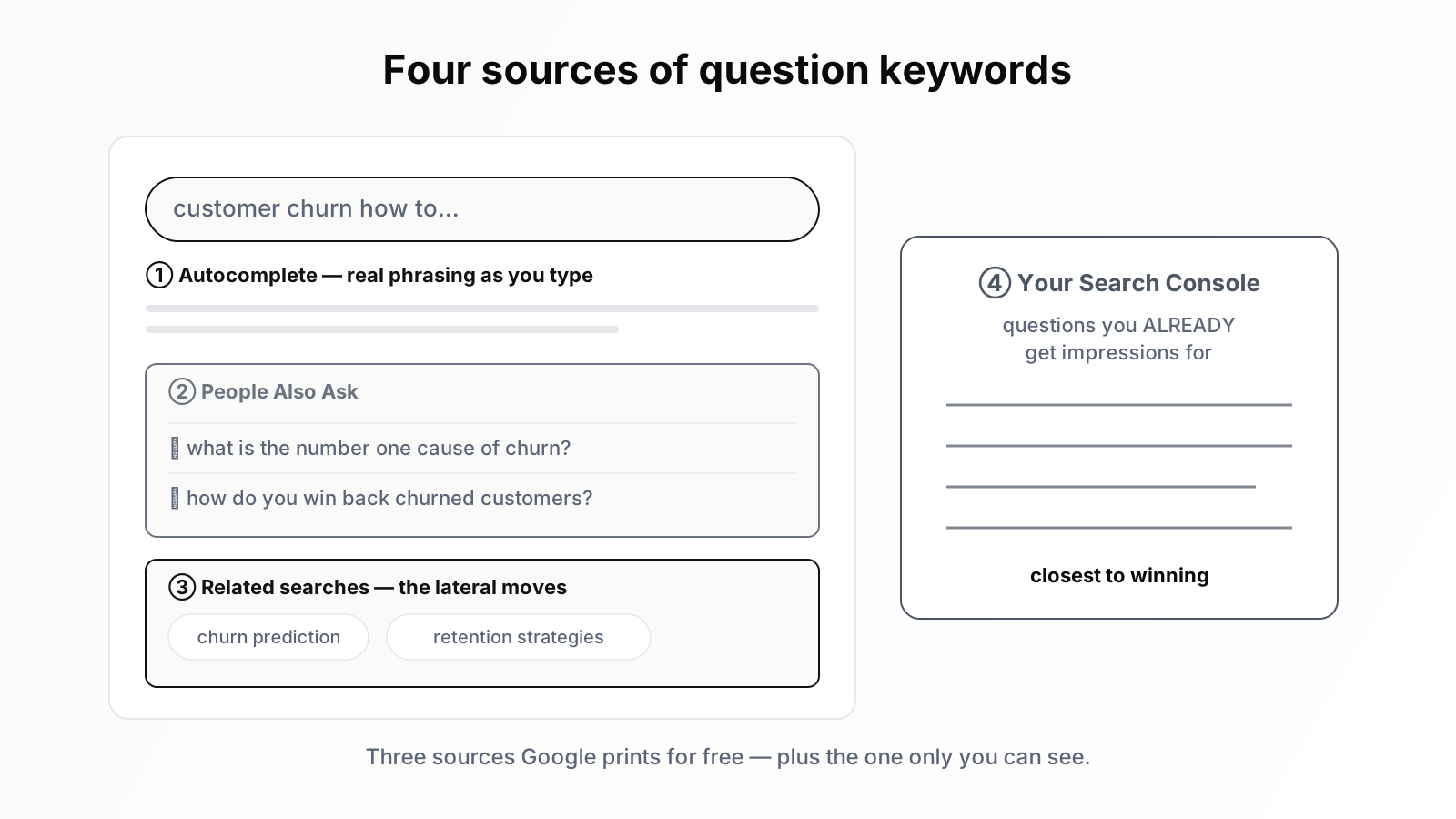
Source one: the "People Also Ask" boxes
The richest source is the "People Also Ask" box — the expandable list of related questions that appears within the results page. Run a search on almost any topic and it is there.
What makes it powerful is its behaviour: it is not a fixed list. Expand one question and the box often generates more, related to the one you opened. Follow that thread and a single starting search unfolds into a sprawling map of how people interrogate the topic — the sub-questions, the follow-ups, the tangents. For research, this is gold. One seed search becomes a structured tour of an entire topic's question-space, and every node on that tour is a validated content idea. Sit with one "People Also Ask" box for ten minutes and you will rarely come away with fewer than a dozen genuine article candidates.
Source two: autocomplete
The second source is the autocomplete suggestions that appear as you type into the search box. Begin typing a topic and Google offers completions — and a great many of them are questions.
Autocomplete reflects what people are actually typing, which gives it two research uses. First, it surfaces the common questions around a term quickly. Second, and more usefully, it reveals phrasing — the exact words people use, which are frequently not the words a marketer would have chosen. A useful technique is to type your topic followed, one at a time, by question words: "how," "what," "why," "when," "can," "should." Each prompt pulls a fresh batch of real questions. It is a few minutes of work and it returns the genuine language of your audience.
Source three: related searches
At the foot of the results page sits the "related searches" block — a set of queries connected to your original search. It is the most overlooked of the three on-SERP sources, and it earns a place in the research routine.
Not every related search is a question, but many are, and the block has a particular value: it shows lateral moves. Where "People Also Ask" tends to drill down into a topic, related searches often step sideways — into adjacent topics, alternative framings, and the next thing a searcher tends to look for. For mapping the broader territory around a subject, and for finding the bridges between one cluster and the next, the related-searches block is quietly indispensable.
Source four: your own Search Console
The fourth source is not on the public results page at all, and it is the most valuable of the lot: your own Search Console. It reports the actual queries that brought people to your site — and a substantial share of them are questions.
This source has an advantage the other three cannot match. Autocomplete and "People Also Ask" show what the whole world searches. Search Console shows what the world searches and then lands on your site for — questions where you already have some relevance, some foothold, some impressions. Those are the question keywords you are closest to winning. Find a question in Search Console where you are getting impressions but ranking too low to earn clicks, build a focused page that answers it directly and completely, and you are not starting cold — you are converting an existing near-miss into a win. It is the highest-return question research available, and it is sitting in an account you already own.
Why question keywords convert above their weight
Question keywords are not just easy to find — they perform. The reason is intent clarity. A person who asks a fully-formed question has a specific, conscious need, and a page that answers it precisely meets that need exactly. Precise match drives engagement: the visitor finds what they came for, stays, reads, and trusts the source that delivered.
They are also, on average, less contested. Many question keywords are long-tail by nature — specific, lower in individual volume — which means a focused, genuinely useful page can rank without an authority war. And they align cleanly with how search itself is evolving. As featured snippets and AI-generated answers grow more prominent, content built to answer clear questions directly is exactly the content those features draw from. A page that answers a real question well is positioned not just for a traditional ranking but for the answer surfaces too.
What the patterns in the questions reveal
Here is the part most teams miss: question keywords are not only content ideas. Read as a dataset, they are market research.
Gather a few dozen questions around your topic and read them as a group, and patterns surface. Clusters of questions reveal which aspects of a subject genuinely confuse people — that is where demand for clear content is highest. The presence of many comparison questions ("X or Y," "is X better than Y") signals a market actively in a buying decision. Recurring "how do I fix" questions expose the pain points your product might directly address. Recurring "is it worth it" or "do I really need" questions reveal the objections a prospect carries — objections your commercial pages had better answer. The questions, in aggregate, are your audience telling you what they do not understand, what they are weighing, and what they are worried about. Few formal research methods deliver that as cheaply or as honestly.
How to turn questions into pages
Collecting questions is not the same as having a plan, so the conversion matters. A few principles. Group related questions before building anything — several near-identical questions deserve one strong page, not five thin ones competing with each other, while genuinely distinct questions each earn their own focused page. Match the page format to the question: a "what is" question wants a clear definition-led explainer, a "how to" question wants a genuine step-by-step. Answer the question directly and early — a searcher who asked a precise question wants the answer near the top, not after a long preamble, and front-loading the answer is also what positions the page for snippets and AI answers. And group the resulting pages into clusters around their shared topic, so they reinforce one another instead of standing alone.
A worked research session
To show how fast this is, walk through a short session. Topic: "customer churn." Ten minutes, the free sources only.
Start with autocomplete. Type "customer churn" and then, one at a time, the question words. "How" returns "how to calculate customer churn," "how to reduce customer churn," "how to predict churn." "What" returns "what is a good churn rate," "what causes customer churn," "what is revenue churn versus customer churn." "Why" returns "why do customers churn," "why is churn so high." Two minutes, roughly ten validated questions, in the audience's own phrasing.
Now the results page. Search "how to reduce customer churn" and open the "People Also Ask" box. It offers more: "what is the number one cause of churn," "how do you win back churned customers," "what is a churn survey." Expand one and fresh questions appear beneath it. Five minutes here yields another dozen, and they are noticeably deeper — the follow-up questions, the ones a person reaches only after the obvious first one. Glance at the related searches at the foot of the page and you pick up the lateral moves: "churn prediction model," "customer retention strategies" — adjacent territory and natural cluster bridges.
Ten minutes, no paid tool, and the haul is around two dozen demand-validated questions. Read together they already show their shape: a cluster about measuring churn, a cluster about causes, a cluster about fixes, and a scattering of comparison and definition queries. That is not a list of ideas. That is the skeleton of a content cluster, assembled before the coffee went cold — and it is repeatable for any topic you sell into.
The mistakes to avoid
Two failure modes are common enough to flag. The first is hoarding: collecting hundreds of questions and turning them, indiscriminately, into hundreds of thin pages — a question keyword still has to clear the same bar as any other, namely that it is relevant to your business and that you can answer it with genuine depth. A question nobody at your company can answer well is not an opportunity; it is a thin page waiting to happen. The second is the buried answer: writing a page that nominally targets a question but makes the reader hunt for the response through paragraphs of throat-clearing. If the keyword is a question, the contract is simple — answer it, clearly, near the top. Break that contract and the page satisfies neither the reader nor the engine.
Where an AI agent helps
Mining question keywords is genuinely productive and genuinely tedious. Working through "People Also Ask" threads, prompting autocomplete with every question word, scanning related searches, cross-referencing Search Console, then grouping the haul and reading it for patterns — that is a real research routine, and routines that depend on a person remembering to run them tend to lapse.
This is structured, repetitive research at volume, which an SEO AI agent handles well. Orova can gather question keywords across these sources, group related questions so you build one strong page instead of several thin ones, flag questions that overlap content you have already published, and surface the patterns in the aggregate — which confusions, comparisons, and objections recur — so the questions become market insight, not just a backlog. The method in this article does not change. The agent removes the friction that stops the routine from being run consistently.
The questions are already there. They are on the results page right now, for your topic, published by Google, validated by real demand, refreshed continuously, and free. The only question left is whether you will start reading them as the goldmine they are. (For how these question keywords fit a larger plan, see turning keywords into a content plan.)
Run your business with AI Agents
Orova is the always-on Biz AI Agent — it plans, runs, and optimizes the work for you. Save time, unlock productivity.
Try it free