
The Technical SEO Audit Checklist I Run Every Quarter
For the first few years I did SEO, I treated technical audits the way most people treat a dentist appointment: something I knew I should do, kept postponing, and only got around to when something already hurt. A site would lose traffic, I would panic, and only then would I crawl it properly and discover the problem had been quietly building for months. The audit was always a reaction, never a routine.
What changed my results was not learning new tools. It was a scheduling decision. I started running the same technical audit every quarter — four times a year, on a calendar reminder, whether or not anything seemed wrong. This article is that audit, written out as the checklist I actually use. It is not exhaustive; there are deeper rabbit holes for specialists. It is the practical, repeatable pass that catches the issues that genuinely cost traffic, in an order that makes sense, in a few focused hours.
Why quarterly, and why a fixed checklist
Two early lessons shaped this. The first: technical SEO problems are usually invisible until they are expensive. A broken canonical tag, a noindex left on a template after a redesign, a sitemap that quietly stopped updating — none of these announce themselves. Traffic does not crash dramatically; it erodes. By the time the erosion is obvious in a report, the problem has been live for weeks. A scheduled audit catches these while they are still cheap to fix.
The second lesson: without a fixed checklist, I audited inconsistently. I would check whatever I happened to remember or whatever I had read about recently, and miss the boring things that actually mattered. A written checklist removes the variance. Every quarter I run the same passes in the same order, so nothing depends on what is fresh in my mind that day. The checklist is not there because the work is hard. It is there because the work is forgettable.
Quarterly is the cadence I have settled on for most sites. Frequent enough to catch problems early, infrequent enough that it does not become busywork. A very large or fast-changing site might warrant monthly; a small, stable site might be fine twice a year. But four times a year is the default I would defend.
Pass one: crawlability and indexation
I start here because everything else is irrelevant if search engines cannot reach and index your pages. A perfectly optimised page that is blocked from crawling or marked noindex contributes nothing.
I open the robots.txt file first and read it line by line. I am looking for one thing above all: a Disallow rule that is blocking more than it should. The most damaging robots.txt mistakes I have seen were not exotic — they were a Disallow: / left over from a staging environment, or a directory rule that accidentally caught important pages. It takes thirty seconds to read and has saved sites from disaster.
Next I check indexation in Google Search Console — the Pages report. I compare the number of indexed pages against the number of pages I expect to have indexed. A large gap in either direction is a flag. Far fewer indexed than expected means pages are being excluded; I read the exclusion reasons to find out why. Far more indexed than expected often means thin, duplicate, or parameter pages have crept into the index and are diluting the site.
Then I crawl the site with a crawler tool and look specifically for stray noindex tags. The classic disaster here: a redesign or migration applies noindex to a template for staging, the site goes live, and the tag is never removed. Whole sections silently drop out of the index. I check that only the pages that should be noindexed are noindexed, and nothing else.
Pass two: the XML sitemap
The sitemap is small, easy to check, and frequently wrong, which makes it excellent return on a few minutes.
I open the sitemap and verify three things. First, it contains the URLs that should be indexed — the real, canonical, valuable pages. Second, it does not contain URLs that should not be there: noindexed pages, redirected URLs, 404s, non-canonical versions. A sitemap full of junk URLs sends mixed signals. Third, I confirm it is actually updating — that recently published pages appear in it. A sitemap that silently stopped regenerating after a CMS change is a common, quiet failure.
Finally I check in Search Console that the sitemap is submitted and being read without errors. This pass takes five minutes and routinely catches a real problem.
Pass three: canonical tags and duplication
This is the pass where I find the subtlest and most damaging issues, so I slow down here.
A canonical tag tells search engines which version of a page is the authoritative one when several similar URLs exist. When canonicals are correct, they consolidate signals onto the right page. When they are wrong, they actively sabotage the site. I crawl the site and review canonical tags, looking for specific failure patterns.
Pages canonicalising to the wrong URL — I have seen entire sections where every page canonicalised to the homepage because of a template bug, which effectively told Google to ignore all of them. Pages with no canonical at all where duplication exists. Canonical tags pointing to a redirected or 404 URL. And parameter or filter URLs (sorting, tracking, faceted navigation) that are not canonicalised back to the clean version, leaving the site to compete with dozens of copies of itself.
I also look at the closely related issue of duplicate and near-duplicate content: multiple URLs serving substantially the same content, often from URL parameters, http/https or www/non-www inconsistencies, or trailing-slash variants. Each cluster of duplicates is a place where the site's authority is split instead of concentrated. This pass is slow and unglamorous, and it is consistently where I find the things that were quietly costing the most.
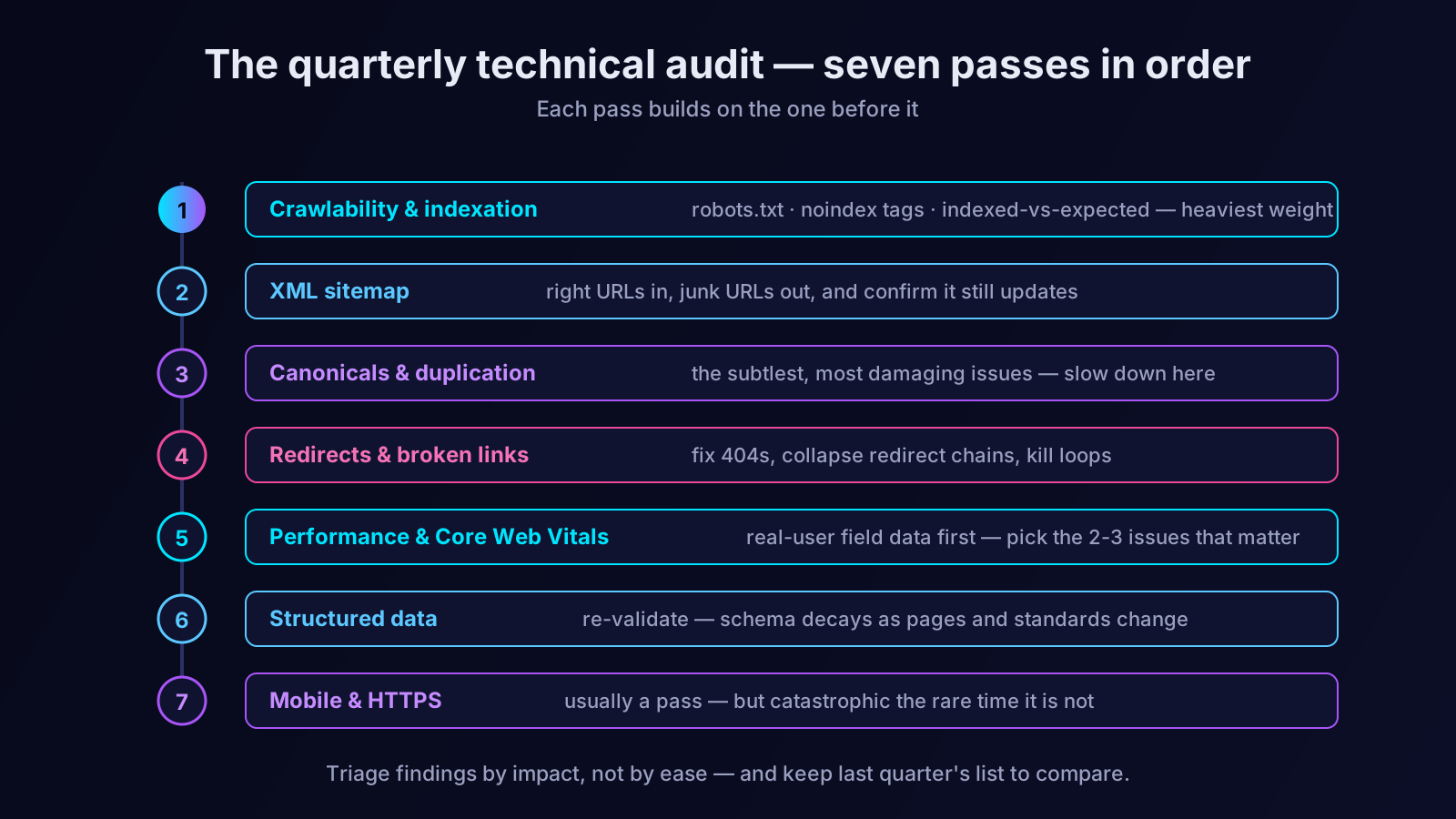
Pass four: redirects and broken links
Broken links and messy redirects waste crawl effort, leak link value, and create a poor experience. They accumulate naturally as a site grows, which is exactly why a scheduled audit is the right tool to manage them.
I crawl the site and pull every broken internal link — internal links pointing to 404 pages. Each one is a small leak: it sends a user and a crawler to a dead end, and it wastes the link value that internal link was meant to pass. I fix them by updating the link to the correct URL or removing it.
Then I examine redirects. I am looking for redirect chains — URL A redirects to B redirects to C — which I collapse so the original points straight to the final destination. I look for redirect loops, which are outright broken. And I check that important old URLs redirect to genuinely relevant pages, not lazily to the homepage, which Google often treats as a soft 404. I also confirm redirects use the correct type: a permanent move should be a 301, not a 302.
Pass five: site performance and Core Web Vitals
Speed is a genuine ranking factor, and beyond ranking it shapes how the site feels. I do not chase a perfect score; I look for real problems.
I check the Core Web Vitals report in Search Console, which uses real-user data — the most honest measure of how the site actually performs. I note how many URLs fall into "needs improvement" or "poor," and on which metric. Then I run a few representative pages — the homepage, a key landing page, a typical blog post — through a lab tool like PageSpeed Insights to see the specific opportunities: oversized images, render-blocking resources, layout shifts from elements loading without reserved space.
I do not try to fix everything. I identify the two or three issues affecting the most pages or the most important pages, and those become the performance work for the quarter. Steady, prioritised improvement beats a frantic optimisation sprint that touches everything and finishes nothing.
Pass six: structured data
If the site uses structured data — and most should — it needs checking, because structured data decays. Schema.org evolves, Google changes which types earn rich results, and page changes can break markup that was valid last quarter.
I validate the structured data on the main page templates with Google's Rich Results Test. I confirm the markup is still valid, still eligible for rich results, and — the rule that matters most — still accurately describes content that is genuinely visible on the page. If a template changed and the markup now references content that is no longer there, I flag it. Structured data that has drifted out of sync with its page is worse than no structured data at all.
Pass seven: mobile and HTTPS
The final pass covers two foundational items that are usually fine but are catastrophic when they are not, so they are worth a deliberate check.
Mobile: Google indexes the mobile version of your site, so I open key pages on a mobile viewport and confirm the full content is present, the layout is usable, and nothing important is hidden or broken on small screens. Sites where the mobile version silently serves less content than the desktop version are handing Google an incomplete page to index.
HTTPS: I confirm the SSL certificate is valid and not near expiry, that the whole site loads over HTTPS, that HTTP versions redirect properly to HTTPS, and that there is no mixed content — secure pages loading insecure resources. An expired certificate is a genuine emergency, and a calendar-driven audit catches an approaching expiry before it becomes one.
What I do with the findings
An audit that produces a list nobody acts on is theatre. When I finish the seven passes, I have a list of issues, and I do two things with it.
First, I triage by impact, not by ease. A noindex on an important template, a sitewide canonical bug, an expiring certificate — these go to the top regardless of how quickly other items could be ticked off. The temptation is always to clear the easy wins first; I resist it, because the expensive problems are the reason the audit exists.
Second, I write the findings down with enough context that they are still actionable weeks later, and I keep the list from the previous quarter. Comparing quarter to quarter shows me whether the site is genuinely getting healthier or whether the same issues keep reappearing — which usually means a process problem, not a one-off bug, and that is worth knowing.
Where an SEO AI agent fits
I have run this audit by hand for years, and I will be honest about the friction: it is repetitive, it depends on me actually remembering to do it, and the long crawls that surface canonical and broken-link issues are tedious to comb through. The audit is valuable precisely because it is boring, and boring is exactly what slips when a quarter gets busy.
This is the part of the work an SEO AI agent genuinely improves. Orova can run these passes continuously rather than four times a year — crawling the site, checking indexation and canonicals, surfacing broken links and redirect chains, monitoring Core Web Vitals, validating structured data — and flag what changed and what needs attention, so issues surface in days rather than at the next scheduled audit. The judgement in this checklist still matters: deciding what is serious, triaging by impact, knowing when a pattern signals a process problem. But the relentless, forgettable monitoring is exactly what an agent should carry. For the structural side of site health, our guide on topic clusters pairs well with this technical pass.
You do not need to wait for traffic to drop to start auditing. Put a recurring reminder on the calendar, run these seven passes in order, triage the findings by impact, and keep the list. The first audit will find more than you expect. Every audit after that keeps a small problem from becoming an expensive one — which is the entire point.
Let an AI Agent handle your SEO
Orova plans, writes, optimizes, and tracks rankings on its own — you just read the results.
Try it free