
SEO Keyword Research: 6 Steps for Beginners Plus Long-tail
You have written blog posts, tweaked your website copy, maybe even paid for a nice design — and still, almost no one finds you through Google. It is not that your content is bad. It is that you are writing about things nobody is actually typing into a search bar. You are cooking a great dish for a menu nobody opens.
The usual fix people try is guessing: picking words that sound right, or copying whatever the competitor uses on their homepage. That is where SEO keyword research — the process of finding out exactly what your customers type into Google before they buy — gets skipped. Without it, you are writing blind, hoping the right people stumble onto the right page. Most of the time, they simply do not, and the search landscape is making this harder: 68% of US Google searches in the first four months of 2026 ended without a click at all, up from 60% in 2024, according to SparkToro.
This article walks you through a simple, six-step way to find the search terms your real customers use, understand which numbers actually matter (and which one is a trap), and figure out which keywords are worth chasing first. By the end, you will know how to pick topics that people are already searching for — instead of hoping they will.
A great kitchen, a great chef — selling a dish nobody searches for
Picture someone pouring their life savings into a restaurant. Top kitchen, great chef, nice location. But they sell a dish nobody in the area wants — some exotic thing they personally love, not what people nearby are looking for. The place is dead empty. They blame bad luck, the location, the weather — never realizing the mistake was in the very first decision: selling something the market never asked for.
Writing content while skipping keyword research is exactly that. You pour effort into articles nobody searches for. The article may be brilliant, well-spelled, beautifully illustrated — but if not a single person types that phrase into Google, it stays in the dark forever, with zero visitors. Worse: you don't even know you're writing into the void, assuming "people will read it eventually".
Keyword research is the map that prevents that tragedy. It tells you exactly what people type when looking for what you sell — in their words, not your internal jargon — then helps you pick the ones worth investing in. Do this well, and every later article aims at a real need. Do it sloppily, and you write in the dark and hope.
This article walks through all of it: what keyword research really is, the three numbers you must understand (and which one is a trap), the 6-step process, why "long-tail" keywords are a goldmine for beginners, how to cluster and prioritize, the toolkit from free to paid, and how to turn it all into a clear writing plan.
What is a keyword? A phrase people type into a search box when they need something. "iced milk coffee", "espresso machine for a small cafe", "how to remove coffee stains from a shirt" — all keywords. Each keyword is a real question or need from a real person.
What is keyword research? The process of finding the keywords people actually type in your field, measuring which ones have demand and which you can realistically compete for, then choosing which to write first. In short: it turns the vague "what should I write?" into a clearly prioritized list.
Why keyword research is a step you can't skip
Many jump straight to writing, thinking "I know my industry, why research?" That's the trap. Because:
- You speak the insider's language, customers speak the outsider's. You call it an "omnichannel cloud contact-center solution"; the customer types "call software for a company". Write in your words and you're invisible to theirs.
- Intuition is often wrong about demand size. A topic you think many care about may have almost no searches; one you dismiss as niche may have huge demand. Only data tells the truth.
- Resources are limited. You can't write everything. Keyword research tells you what to write first for the fastest results, instead of spreading thin and getting nowhere.
In other words, keyword research is the bridge between real market demand and the content you're about to make. Skip it and you're guessing; have it and you're aiming.
The three numbers to understand — and which is the trap
Every keyword comes with a few numbers. Understanding these three correctly is the foundation of every decision.
What is search volume? The average number of times a keyword is searched per month. "Coffee" might be hundreds of thousands; "espresso machine for a small cafe in Da Nang" just a few dozen. Volume shows demand size — but it's the most addictive and trap-prone number (see below).
What is keyword difficulty? An estimate of how hard it is for you to rank for a keyword, based heavily on how strong the pages currently on top are. It's a relative number computed by tools (Ahrefs, Semrush...) — not by Google — so use it to compare, don't treat it as absolute truth. (There's a dedicated Keyword Difficulty article in this guide.)
What is search intent? The real purpose behind a keyword — does the person want to learn, compare, or buy (see the Search Intent guide). This is the most important number that isn't shown as a number — you read it yourself. A high-volume keyword with the wrong intent for what you sell is worthless.
The biggest trap: chasing volume blindly. Beginners often look only at volume and chase the "biggest" keywords. A fatal mistake, because:
- High-volume keywords are usually fiercely competitive — you have almost no shot while your site is young.
- High volume is usually generic, with vague intent and low conversion ("coffee" — what does the searcher want? unclear).
- Volume is an estimate, not an exact number; don't make big decisions on it alone.
What is CPC? Short for Cost Per Click — the price per click if you ran ads for that keyword. It's not an SEO metric, but a useful clue: high CPC usually means the keyword is near money (people pay to get customers from it) → worth attention even if volume isn't high.
The 6-step keyword research process
Rolled into a repeatable process.
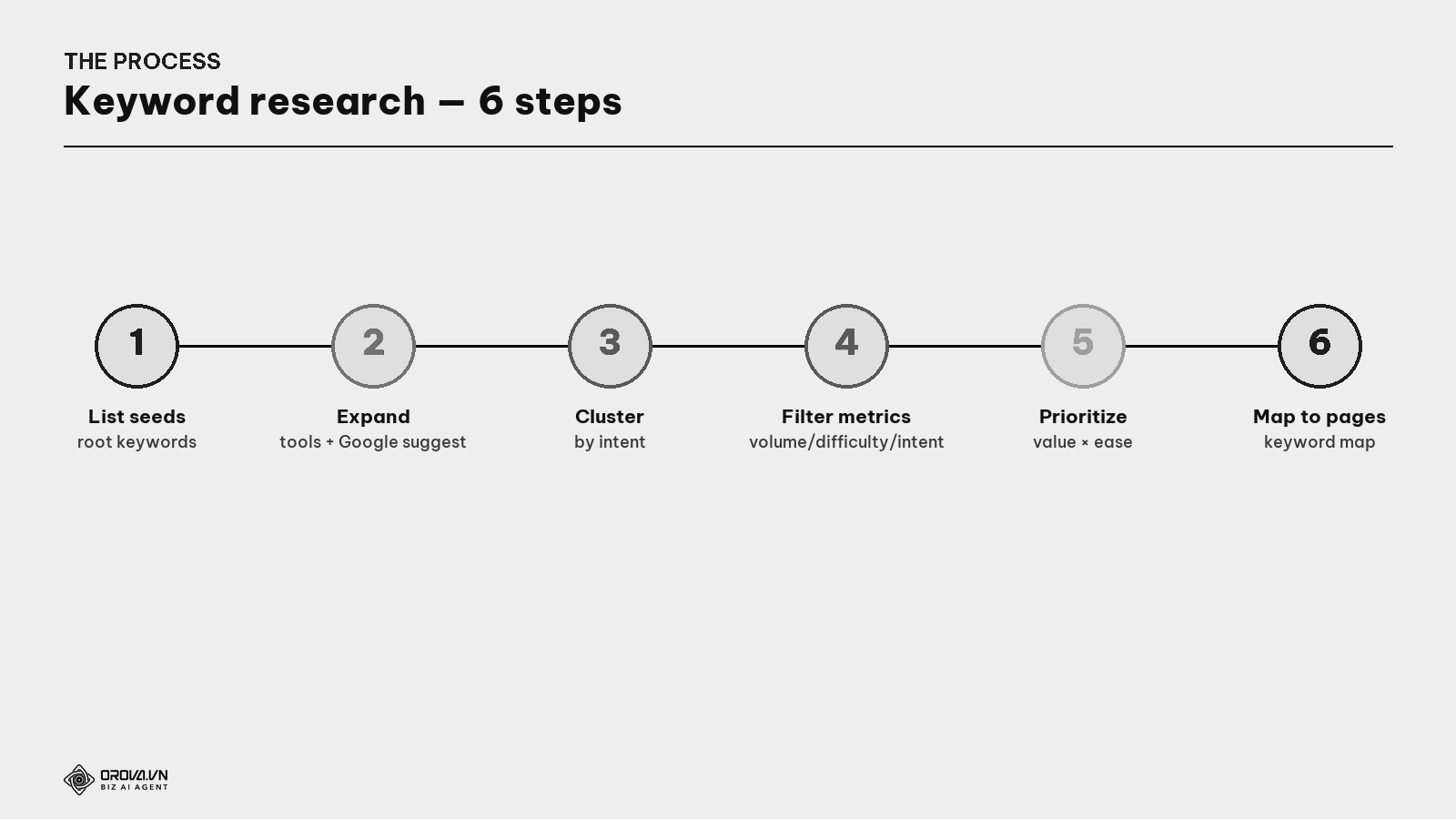
Step 1 — List seed keywords.
What is a seed keyword? A few root, short, obvious keywords describing your field — the starting point to expand from. E.g., selling coffee: "coffee", "espresso machine", "roasted coffee beans". From these few seeds you'll spawn hundreds of sub-keywords.
How to come up with seeds: ask "what would a customer type to find what I sell?", ask your sales/support team (they hear the customer's actual language), look at what customers ask.
Step 2 — Expand from the seeds. Feed seeds into a keyword tool (see the toolkit section) to "spawn" many variations. Don't forget two free mines right on Google: autocomplete (type a seed, see Google's suggestions) and "People Also Ask" / "related searches" at the bottom.
Step 3 — Cluster into topic groups.
What is keyword clustering? Grouping keywords of the same intent so one article serves the whole group — instead of one article per keyword (which dilutes and self-cannibalizes). E.g., "how to brew coffee", "brew good coffee", "coffee brewing guide" → same group, one article.
Step 4 — Filter by metrics. Cut: keywords too hard for your site's strength, keywords with the wrong intent for what you sell, keywords almost no one searches. Keep the groups that are within reach + match real demand.
Step 5 — Prioritize (see the matrix below) — decide which group to write first.
Step 6 — Map keywords to pages.
What is keyword mapping? A table assigning each keyword group to exactly one page you'll make — so you never accidentally create two pages for the same group (avoiding self-cannibalization, see the Cannibalization guide). It's the end product of keyword research: a prioritized writing plan.
Head, body, long-tail: understand the demand curve
This is one of the most important insights, especially for beginners and small sites.
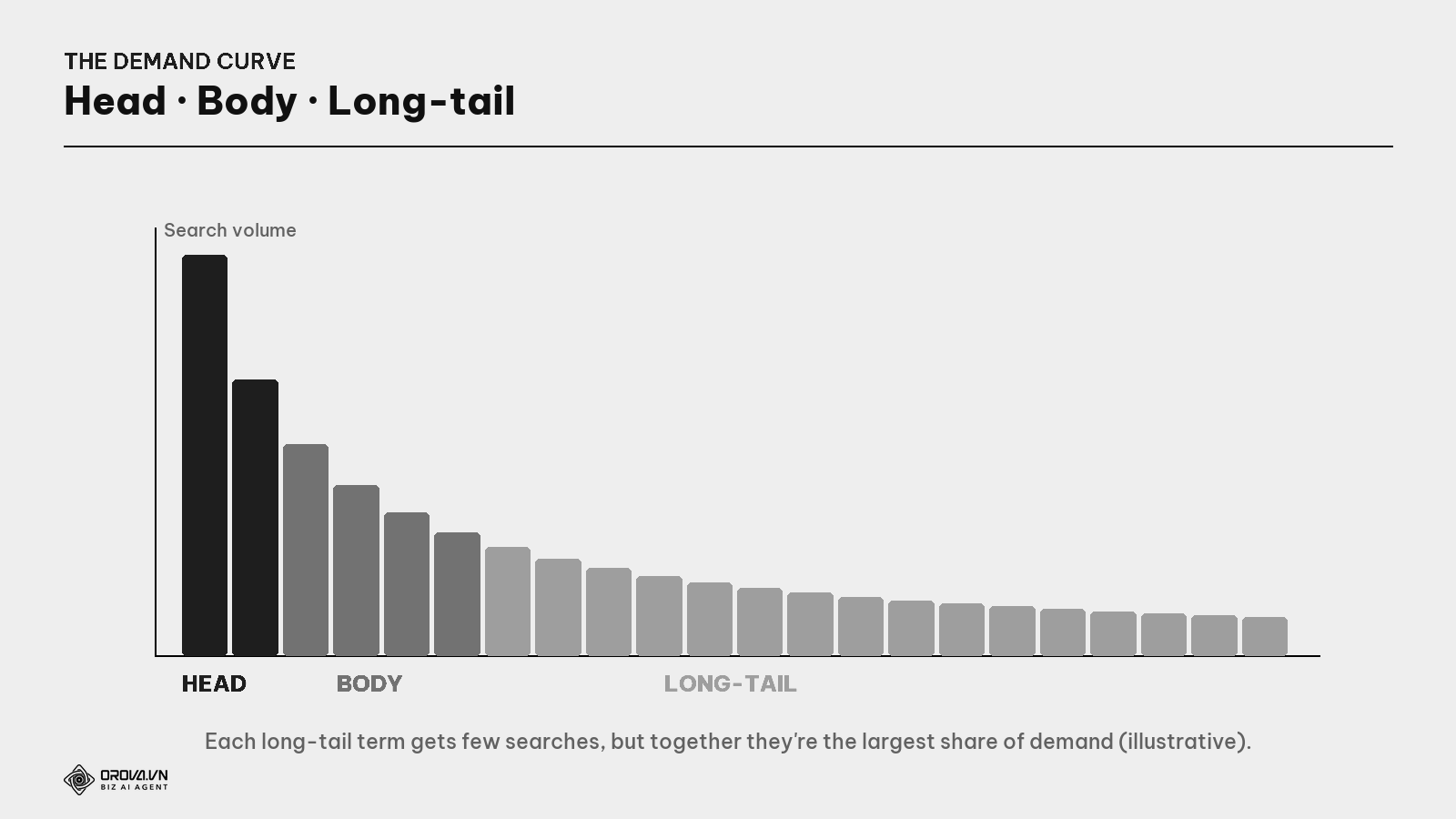
- Head term: short, super-high volume, super-competitive, vague intent. E.g., "coffee". Few of these.
- Body: medium, e.g., "espresso machine". More of them, moderate competition.
- Long-tail: long, specific keywords, each few searches but countless of them, together the largest share of all searches. E.g., "espresso machine for a small cafe under $400".
What is a long-tail keyword? A long and specific keyword, usually 4+ words, describing a clear need. Each gets few searches, but there are thousands of them, and the people typing them are usually much closer to buying than people typing short, generic terms.
Why long-tail is a goldmine for beginners and small sites
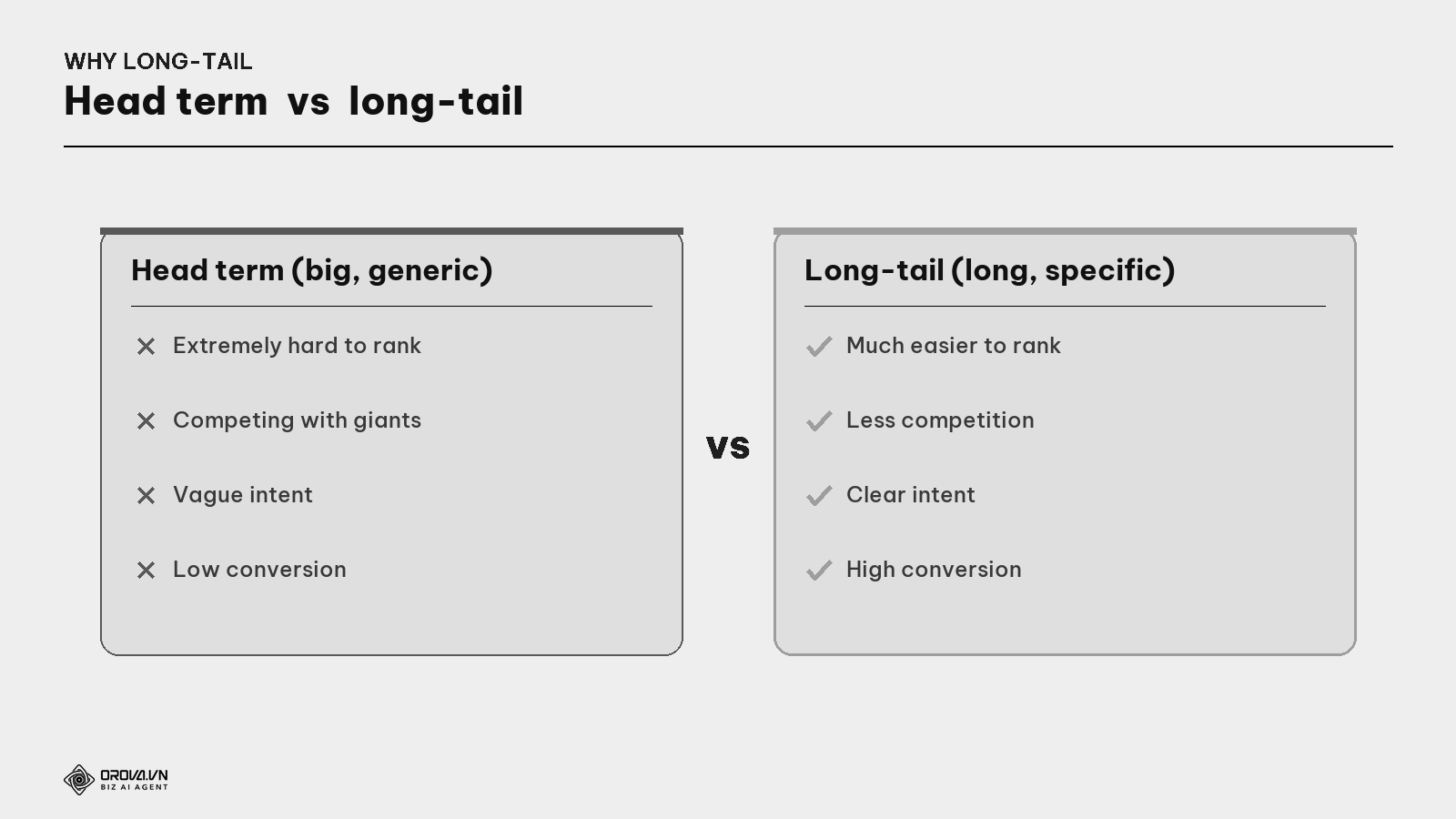
Three reasons long-tail wins for beginners:
- Far easier to rank. Few pages compete for a specific phrase, so a young site has a shot — instead of head-butting a head term a giant has owned for a decade.
- Clear intent → high conversion. Someone typing "espresso machine for a small cafe under $400" knows exactly what they want and is much closer to buying than someone typing "coffee".
- It adds up to a mountain. One long-tail term is a few dozen searches, but cover hundreds and the total traffic (and customers) far exceeds chasing one head term.
Practical strategy: young sites start at the tail, gather small wins to build authority, then gradually climb to bigger keywords once strong enough.
Keywords tied to intent: choose by the customer's stage
Not all keywords are equal value — it depends on intent (covered in depth in the Search Intent guide). When researching, classify keywords by intent to cover the whole journey:
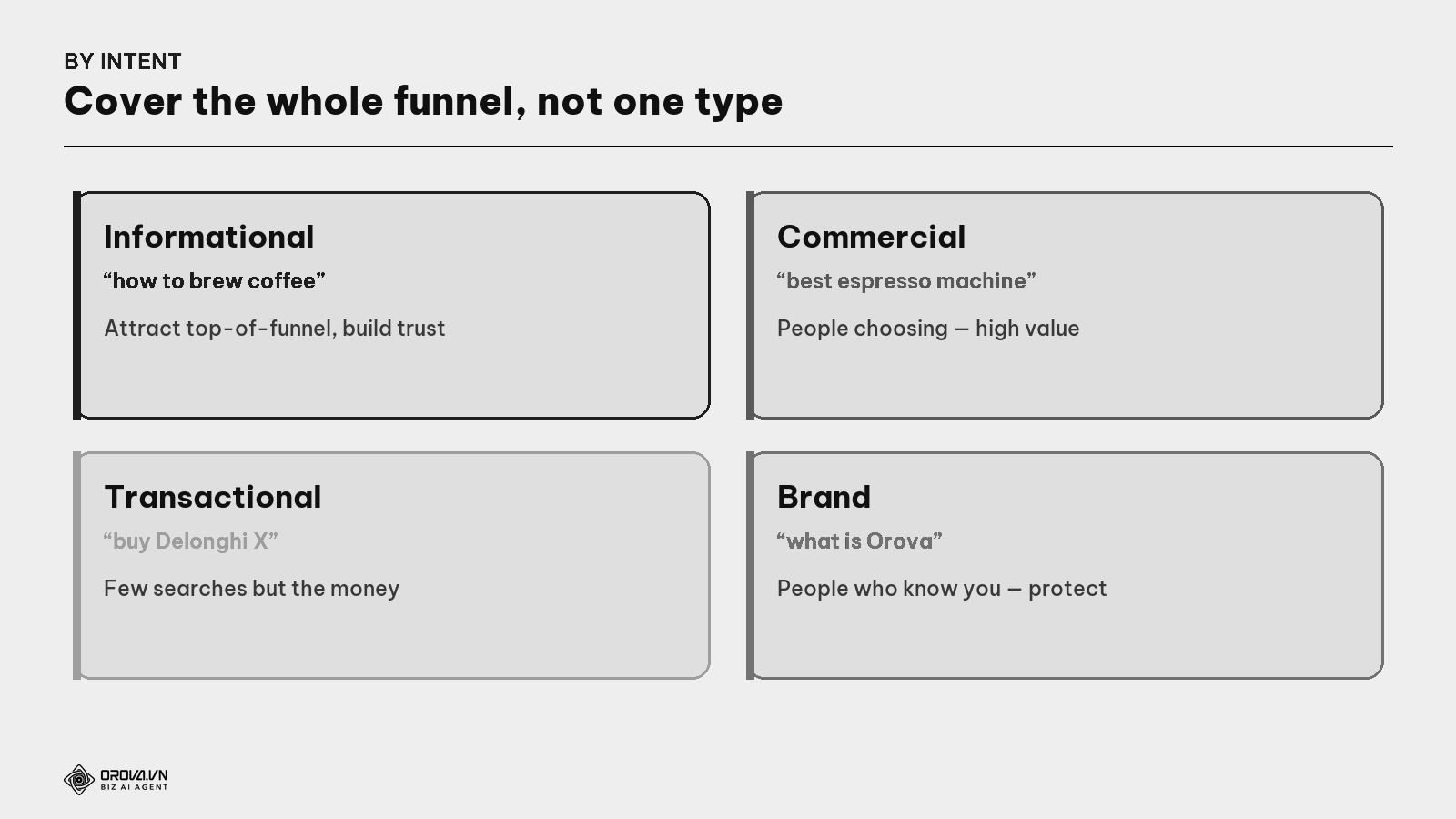
- Informational keywords ("what is", "how to"): attract many in the research stage, build trust.
- Commercial keywords ("best", "compare", "review"): people choosing — extremely valuable.
- Transactional keywords ("buy", "price", "sign up"): few searches but the money.
- Brand keywords (your name): people who already know you — don't forget to protect these.
Common mistake: chasing only informational keywords (because they're easy traffic) while neglecting transactional ones — where deals actually close.
Prioritize: the Value × Ease matrix
You'll have a long list. You can't do it all at once — you must choose. The smart way: rank each keyword group by business value (how near money) and ease (does your site have a shot at the top).
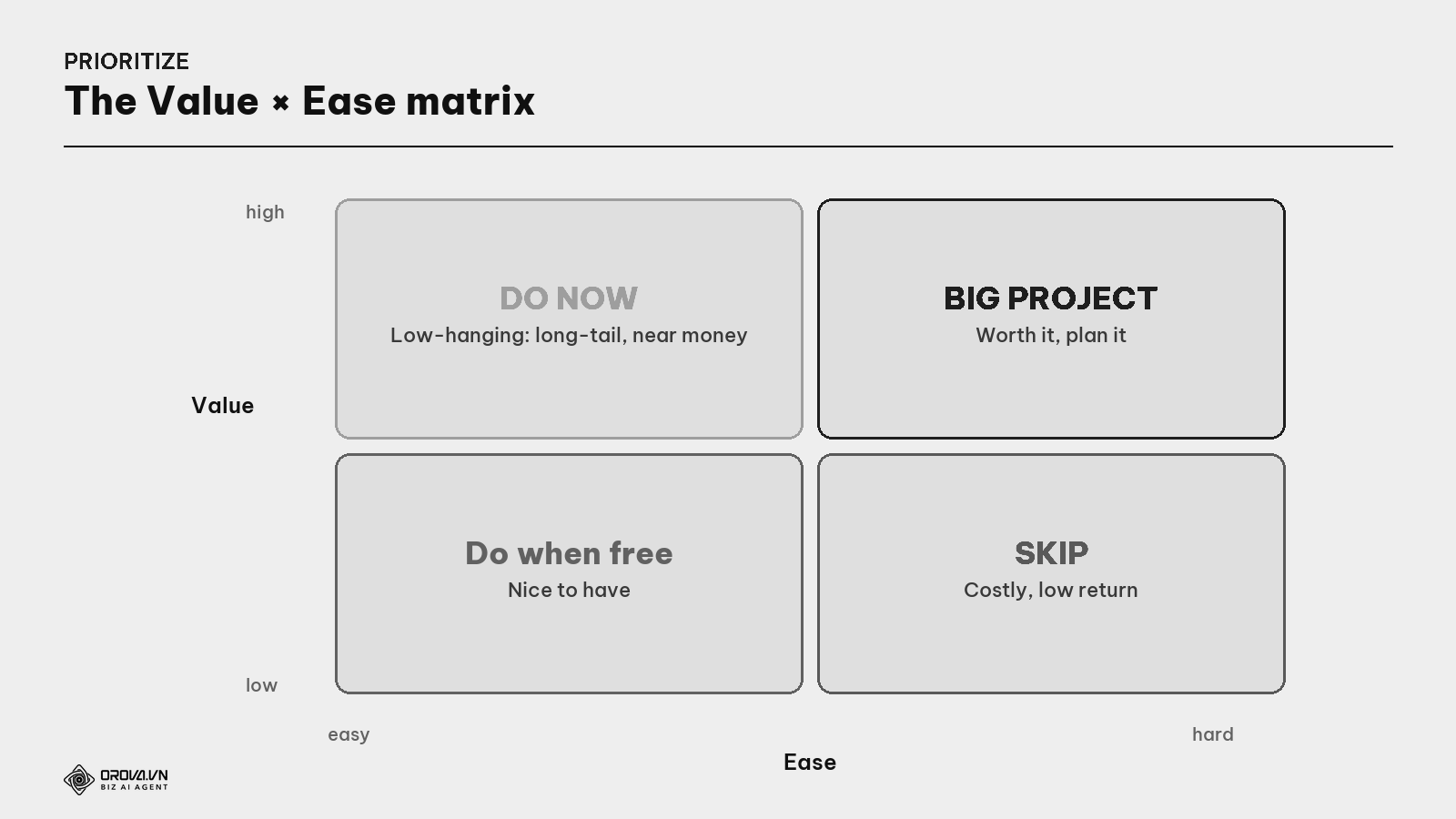
- High value + easy → Do now. Top priority: usually long-tail, near-money, low-competition terms.
- High value + hard → Big project. Worth doing but needs time & pillar content — plan it, do gradually.
- Low value + easy → Do when free. Nice to have, no rush.
- Low value + hard → Skip. Costly, low return — don't touch.
This matrix turns a messy list into a clear action order — and keeps you from wasting resources on flashy but hopeless keywords.
Mapping keywords to pages & the toolkit
The end product is a keyword map — a table assigning each group to one page. This is also where you transition to outlining/briefing (see the Content Brief guide) for each article.
On tools, you don't need expensive software to start:
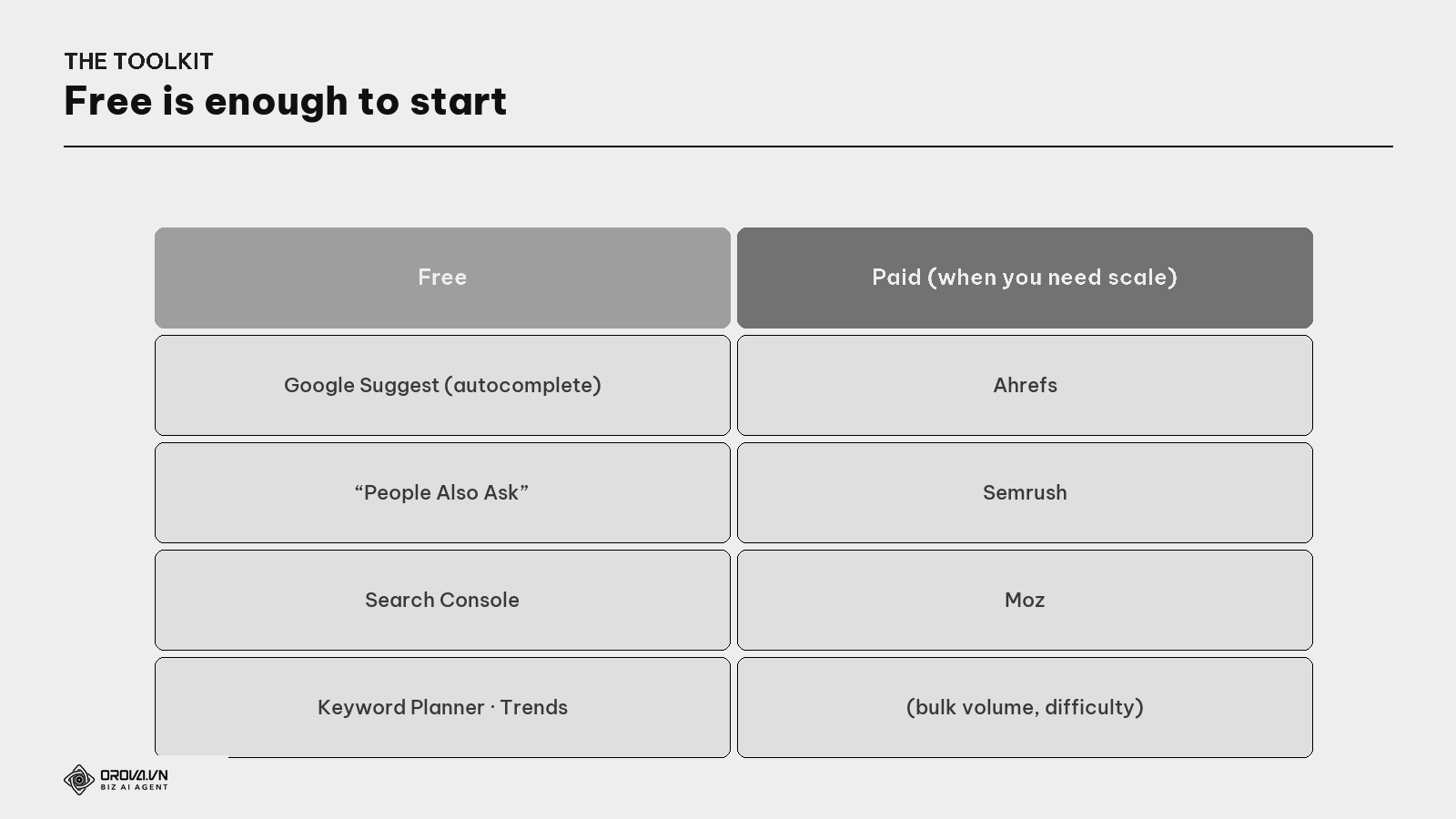
- Free (enough to start): Google autocomplete, "People Also Ask", Google Trends (compare trends), Google Keyword Planner (volume estimates), and Search Console — a goldmine for running sites: it shows which keywords you already appear for, including ones you never targeted.
- Paid (when you need scale): Ahrefs, Semrush, Moz — for volume, difficulty, and spawning ideas fast. Handy at scale, but not required to start.
Quick how-to: if you're just starting with a zero budget — Google Suggest + "People Also Ask" + Search Console alone are enough to find hundreds of worthwhile long-tail keywords. Don't let "no paid tool yet" become an excuse to delay.
Process to apply & the "pass" standard
- List seeds from the customer's real language (ask sales/support).
- Expand with tools + Google Suggest + "People Also Ask".
- Cluster by intent (each group becomes one article).
- Filter out too-hard / wrong-intent / no-demand keywords.
- Prioritize with the Value × Ease matrix.
- Map to pages (keyword map) + move to briefing each article.
"Pass" standard: you have a keyword map — a list of keyword groups, each assigned to exactly one page, with intent & priority; the groups are based on the customer's real language (not internal jargon); you prioritize intent-matched long-tail while your site is young; and no group shares a page with another (avoiding self-cannibalization). At this level, you no longer ask "what should I write?" — you have a queue of articles pre-aimed at real demand.
Benefit: good keyword research is a compounding investment. One thorough pass gives you months of on-target content, fewer write-then-abandon articles, a higher hit-rate to the top, and every article with a clear place in the plan to pull customers. It's the difference between "working hard in the dark" and "writing exactly what the market is asking for".
FAQ
Where should a complete beginner start? With a few seeds describing what you sell, expand via Google Suggest + "People Also Ask", then prioritize intent-matched long-tail terms. Don't target head terms yet — a young site has almost no shot. Gather small wins first.
How much volume is "enough" to write? No hard threshold. A long-tail term with a few dozen searches/month but the right buying intent can be more valuable than a thousand-search vague term. Look at value × ease × intent, not volume alone.
Can I do this without paid tools? Absolutely. Google Suggest, "People Also Ask", Google Trends, Keyword Planner, and Search Console (all free) are enough to find hundreds of good keywords. Paid tools help with speed and scale, not a requirement.
How many keywords should one article target? One group of same-intent keywords (one main term + many variations), not one article per keyword. Writing one article per variation dilutes and self-cannibalizes (see the Cannibalization guide). Cluster, then one article serves the group.
Is keyword difficulty (KD) accurate? It's a relative number computed by tools, not by Google — use it to compare keywords, don't treat it as absolute. Always combine it with checking the SERP yourself to see how strong the top pages are (see the Keyword Difficulty guide).
How do I use Search Console for keyword research? For a running site, it shows which keywords you already appear for — including ones you never intentionally targeted. A goldmine: find terms where you're on page 2 (near the top) to optimize further, or surprising terms to write new articles for.
How often should I redo keyword research? Do one thorough pass at the start / on a strategy change, then review lightly periodically (e.g., quarterly) to catch emerging keywords and shifting trends. Search Console makes this review nearly automatic.
Back to the restaurant owner
Remember the owner with the great kitchen selling a dish nobody searches for? Their tragedy wasn't skill — it was the first decision: choosing to sell something the market never asked for. Had they spent one afternoon standing in that area watching what people actually crave and ask to buy, then sold exactly that — the story would be completely different.
Keyword research is that "afternoon of watching" for your content. Before pouring in the effort, ask: "What do people actually type when they need what I have — and can I realistically show up there?" Answer that, and every article you write has customers waiting. Skip it, and you're the skilled owner counting flies — not from bad luck, but from picking the wrong dish at the very start.
This article is part of Orova's complete SEO guide series. It's a deep-dive within the cluster — see the overview "SEO in 2026", "Search Intent", "Keyword Difficulty", "Keyword Cannibalization", and "Content Brief" for the full picture. Get started with Orova at orova.vn/en/seo.
Sources
Google Search Central (creating content around user needs) · Google Keyword Planner, Trends & Search Console (free keyword data) · Ahrefs, Semrush & Moz (volume, keyword difficulty, long-tail, clustering) · research on search-demand distribution (head/long-tail).
Turning this research into a routine, not a one-time task
Doing keyword research properly is not a one-time task you finish and forget. Search habits shift, new competitors show up, and the terms that used to bring traffic slowly stop working. Keeping this fresh means going back again and again to check numbers, compare terms, and re-prioritize — and doing that by hand, spreadsheet after spreadsheet, eats up hours you probably want to spend running your business.
This is exactly the kind of repetitive, detail-heavy work Orova SEO is built to take off your plate. Instead of manually digging through search terms and juggling numbers to decide what to write next, the tool automates that research and keeps it updated for you. If this sounds like the part of SEO you have been dreading, it might be worth taking a look.
Let Orova SEO handle the repetitive part
Keyword research, drafting, refreshing old posts and rank tracking — running automatically on your own site.
Explore Orova SEO