
Video calls with real-time translation
Right inside your video call: talk to partners worldwide without a human interpreter on call. Host meetings up to 24 hours with live captions and AI voice-over.
- Create a room without an account
- AI meeting translation and dubbing
- 1080p video, screen sharing
Runs in your browser • No card needed • No app install
Language barrier
Partners miss key points. Orova adds live captions/voice-over, so your meetings flow and decisions land.
Time limits kill flow
Long sessions get cut elsewhere. Orova runs up to 24 hours, so you finish when the work is done.
Hard to join
Apps and sign-ups block guests. Orova uses a link, so everyone gets in fast.
Watch 1 minute: four people, four languages, one table
Recorded in a real room: captions per sentence, translation read aloud in the voice you choose.
Free basics, advanced when you sign in
Basic — free, no sign-up
One click gives you a room. Share the link with everyone.
- Meetings up to 24 hours, unlimited participants
- Video up to 1080p, screen sharing with audio
- Chat, file sharing, virtual backgrounds, raise hand
- Guests join by link and just enter a name
- Record to your device
Advanced — sign in to unlock
Orova accounts are free until July 7, 2027; AI uses your workspace quota.
- Live captions, everyone reads their own language
- AI dubbing, 30 voices, mute the original
- AI minutes: summary, decisions, action items
- Attendance log and Excel reports
- Meeting calendar, invites with a calendar file from your company mailbox
- Advanced host controls, co-hosts
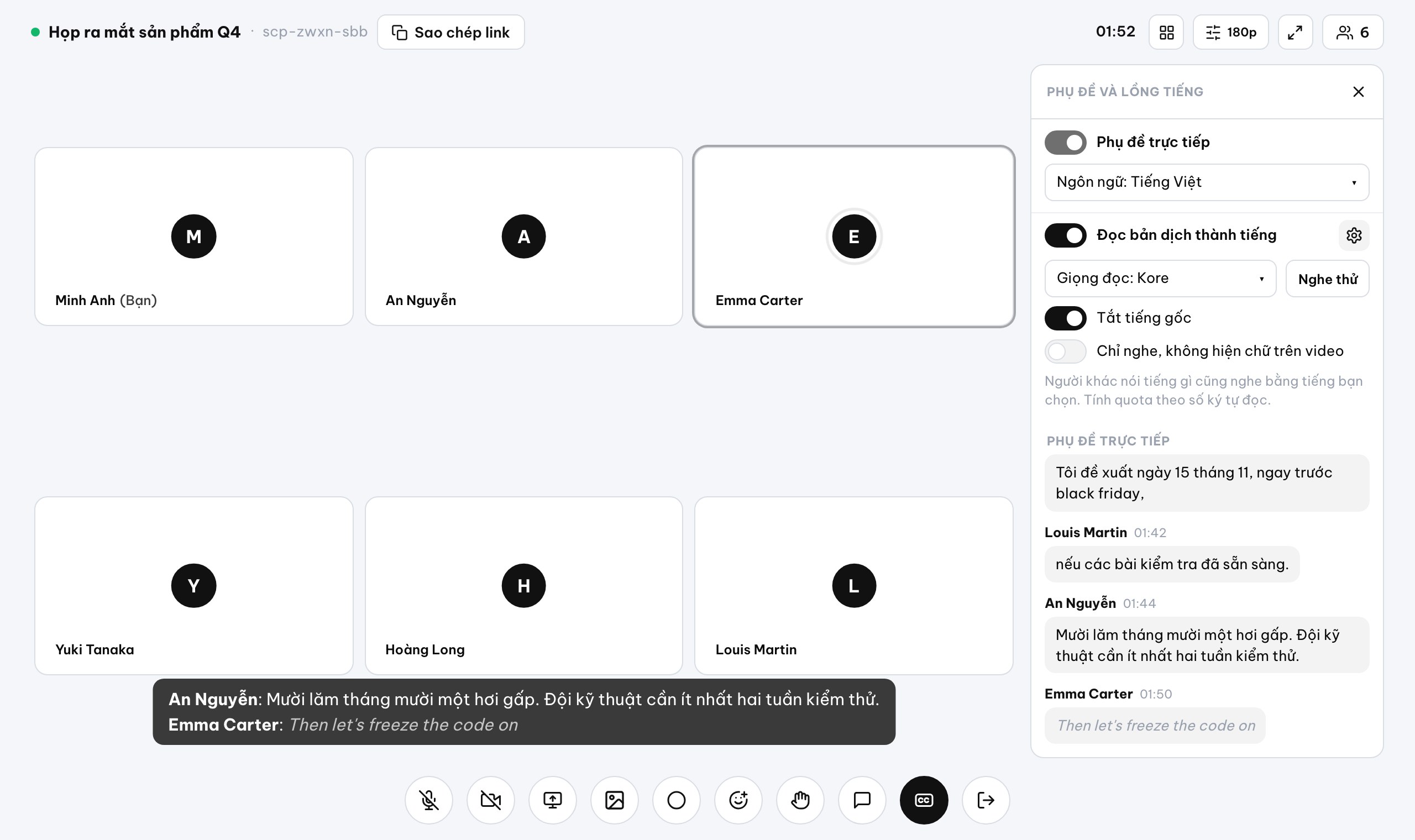
Live caption translation: everyone reads their own language
Translation arrives a few seconds after the speaker, like booth interpreters. Once the host enables it, everyone can see/hear it, including guests.
Chào mọi người, hôm nay mình chốt kế hoạch ra mắt sản phẩm mới trong quý bốn nhé.
ENHello everyone, today we are finalizing the plan for the new product launch in Q4.
Kore ▸ありがとうございます。では発売日はいつにしますか。
ENThank you very much. Now, when should the release date be?
Kore ▸Pour la France, 20000 dollars suffisent au début.
ENFor France, 20000 dollars is enough at the beginning.
Kore ▸Before we talk dates, let's agree on the total marketing budget first.
VITrước khi chúng ta bàn về ngày tháng, hãy thống nhất tổng ngân sách tiếp thị trước đã.
Kore ▸Live captions in my language
Each person sees real-time captions translated into their chosen language.
Hear it in my language
Pick the language you want and the translation is read aloud to you.
Voice-over, choose a voice
Select from 30 voices and mute the original so everyone stays in sync.
Ask host to enable
Request the host to turn on captions; once on, all participants get access.
Free video conferencing with no meeting time limit
Short link, instant guest join
Share meet.orova.vn/<code>; guests can join by link with no account.
24 hours, no cut-offs
Run one meeting continuously for up to 24 hours.
Unlimited people, up to 1080p
Welcome as many as you need; video goes up to 1080p.
Screen share, chat, files
Present with system audio; send messages and files/images in chat.
Backgrounds, hands, layouts
Switch between grid 4-9-16, speaker, or screen-only; blur or set an image.
Full host controls
Mute cameras/mics, remove participants, add co-hosts, and set sharing/chat rules.
An AI note taker in every meeting: notes and minutes when the call ends
Auto-finalize from captions when the room ends (if enabled), or upload an audio/video file to transcribe.
Summarize 4 sections
Key points, Decisions, Action items (owner–task–due), Open questions.
Speaker-labeled transcript
Assigns speakers from the attendee list with timestamps and talk time.
Attendance workbook
Export join/leave times and durations to Excel.
Email attendees
Send the recap to everyone on the invite list.

Calendar and invites
Day/Week/Month calendar
With simple repeats.
Send invites from your company inbox
ICS works with Gmail/Outlook.
Prefer Zoom/Meet?
Paste the link into the event.
Before and after Orova Meet
| Before | With Orova Meet |
|---|---|
| Global guests struggle to understand. | Turn on captions and voice-over so everyone keeps up. |
| Meetings get cut mid-flow. | Go until you finish, up to 24 hours. |
| Time wasted on apps and sign-ups. | Click the link, join without an account. |
| Messy minutes, follow-ups lost. | AI minutes summarize 4 sections and email attendees. |
Three steps to your meeting
- 01
Click Start a meeting now
No sign-up needed. To schedule and invite by calendar, use Orova Connect ▸ Meeting.
- 02
Share the meet.orova.vn/<code> link
Send the invite with a calendar file from your company mailbox, or copy the meet.orova.vn/<code> link.
- 03
Join and enable captions or voice-over when needed
Guests join by link with no account; press CC to pick a language and turn on dubbing.

Pricing and offer
Basic features are free, no sign-up needed.
Captions, translation, voice-over, and minutes use AI according to your workspace quota; the platform is free until July 7, 2027.
Start now to secure the offer before July 7, 2027.
FAQ
How does live translation work inside a call?
Everyone speaks their own language. Orova shows captions, translates into the language you choose and reads it aloud a few seconds later.
Is it really free video meetings no time limit?
Yes. Creating a room, meetings up to 24 hours, chat, files and recording to your device are free with no sign-up. AI features need an account.
Do I need an app or plugin?
No. Orova Meet runs in your browser on desktop and mobile.
Can guests join without an account?
Yes. Share the short link and guests join with their name—no account needed.
Is AI meeting translation included?
Captions, live caption translation, voice-over, and AI minutes use your workspace AI quota.
How fast is the AI interpreter for meetings?
The translation arrives a few seconds after the speaker, like booth interpreters. It’s not instant.
How is my data kept safe?
Recordings save to your device, not the cloud. Hosts control sharing, can mute cameras/mics, and remove participants.
Can I use Zoom or Google Meet links instead?
Sure. Create the event in Orova and paste your Zoom/Meet link into it.
How are minutes delivered?
AI minutes summarize key items and can be emailed to attendees. They also export attendance to Excel.
Start your next meeting now
Open a free room, invite partners, and enable the AI interpreter when you need it.