
GA4 for SEOs: What to Track and What to Ignore
Google Analytics 4 arrived with a reputation for being confusing, and for SEOs that reputation is largely deserved. The interface changed, the metrics changed, the underlying data model changed from the session-based logic everyone had internalised over a decade to an event-based model that feels alien at first contact. Faced with that, a lot of SEO teams did one of two things: they ignored GA4 entirely and leaned on Search Console alone, or they tried to track everything and drowned in reports they never read.
Both responses are mistakes. GA4 answers a question Search Console cannot — what people did after they arrived on your site — and that question is the difference between knowing your SEO produced traffic and knowing your SEO produced value. But GA4 only earns its place if you are deliberate about what you track and, just as importantly, what you ignore. This article is an analytical breakdown of exactly that: the GA4 signals that matter to an SEO, the ones that waste your attention, and how to read the tool without being misled by it.
What GA4 is for, and what it is not
Start with a clear division of labour, because most GA4 confusion comes from asking it the wrong questions.
Search Console covers the journey up to the click. It tells you which queries showed your pages, which pages appeared, how often they were clicked, and at what position. It stops the moment someone lands on your site, because Google's view stops there too.
GA4 covers the journey from the click onward. It tells you what the visitor did once they arrived — which pages they moved to, how long they engaged, whether they triggered the events you care about, and whether they eventually converted. GA4 knows almost nothing useful about what happened in the search results; that is not its job.
An SEO needs both halves, and needs to keep them straight. Confusing the two is the root of most analytics errors. If you want to know why traffic to a page rose, that is a Search Console question. If you want to know whether that traffic was worth having, that is a GA4 question. Hold that division firmly and GA4 stops being confusing and starts being a tool with a defined job.
Signal one: organic traffic, read the right way
The most basic thing an SEO wants from GA4 is the volume of organic search traffic over time. GA4 provides it, but the way you read it matters more than the number itself.
The first discipline is to isolate the organic channel. GA4 groups traffic into default channels — organic search, direct, referral, paid, and so on — and your SEO analysis should almost always be filtered to organic search alone. A site-wide traffic total blends in paid campaigns, email, social, and direct visits, none of which your SEO work controls. Looking at total traffic to judge SEO is like judging a swimmer by the boat's speed.
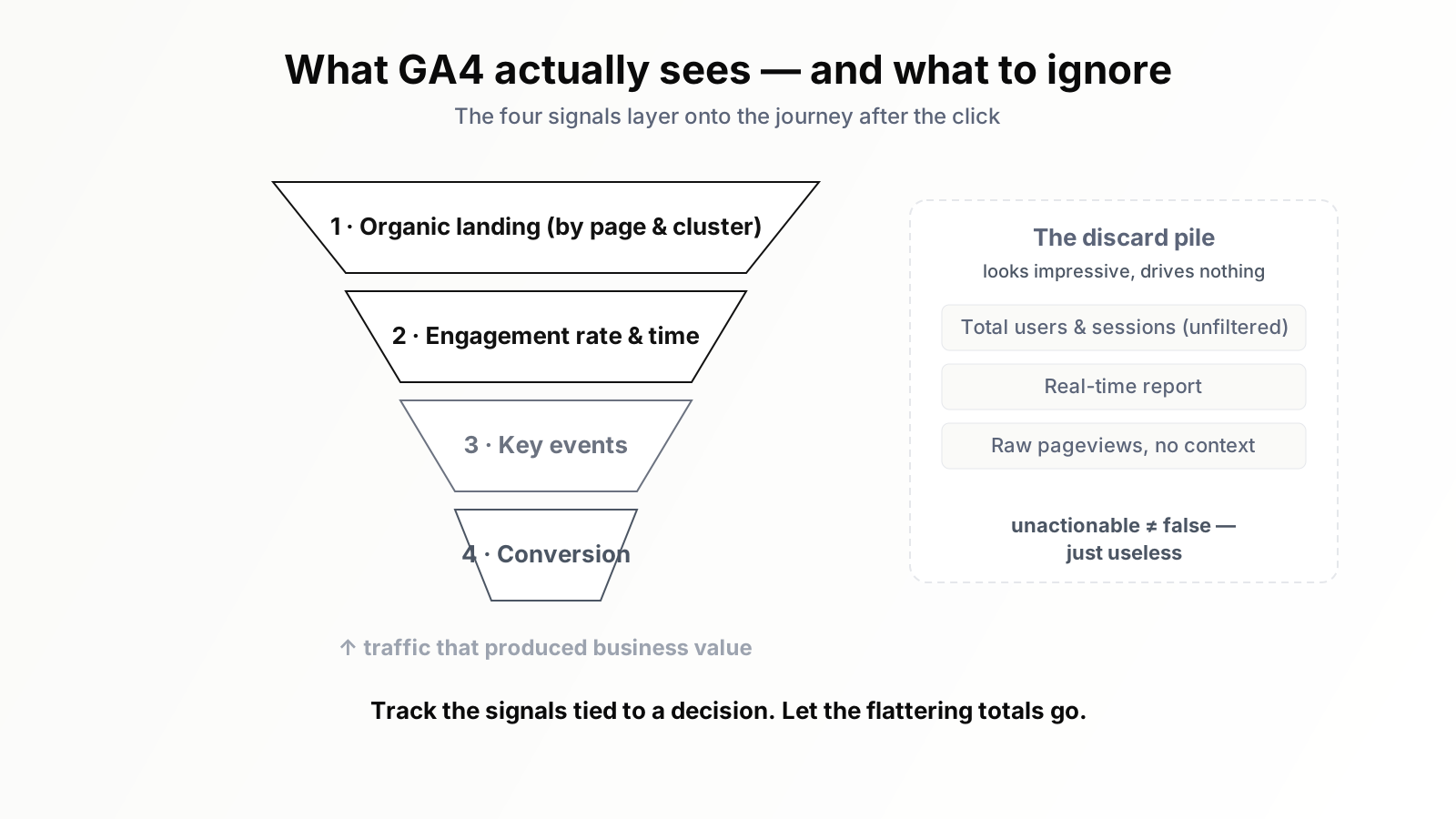
The second discipline is to read organic traffic at the page or page-group level, not just the site level. Site-level organic traffic is a vague mood indicator. Page-level organic traffic is actionable: it tells you which articles are carrying the program, which clusters are gaining, and which pages you invested in are quietly flat. When you arrange content into topic clusters, GA4's page grouping lets you see whether a whole cluster is rising together — a far more meaningful signal than any single page in isolation.
Signal two: engagement, GA4's most useful new idea
The session-based metrics SEOs grew up with — bounce rate as it used to be defined, time on page — were always somewhat unreliable, because they were inferred from page loads in ways that broke easily. GA4 replaced them with engagement metrics, and while the change annoyed people, it was an improvement worth understanding.
GA4 defines an "engaged session" by concrete criteria: the session lasted beyond a short threshold, or it included more than one page view, or it triggered a conversion event. From that it derives the engagement rate and average engagement time. These are not perfect, but they are more honest than the old metrics, because they are built on observed behaviour rather than fragile assumptions.
For an SEO, engagement is the first read on content quality. A page that ranks, attracts clicks, and then shows weak engagement is telling you something: the content did not match what the searcher expected, or it failed to hold them once they arrived. That is a content problem dressed up as a traffic success. Conversely, a page with strong engagement is delivering on the promise that earned the click. Engagement does not tell you what to fix, but it reliably tells you where to look.
Signal three: key events and conversions
This is the signal that turns GA4 from a curiosity into the tool that justifies SEO to the rest of the business. In GA4, important actions are tracked as events, and the events that matter to you are marked as key events — what older versions of Analytics called conversions.
For an SEO, the value is the connection it lets you draw: not just "this page received organic traffic," but "this page received organic traffic and that traffic produced sign-ups, demo requests, trial starts, or purchases." That connection is the entire argument for SEO as a business investment rather than a vanity exercise. A page with modest traffic that consistently produces qualified conversions is worth far more than a high-traffic page that produces none — and without key-event tracking you cannot tell the two apart.
The practical work here is setup. GA4 does not know which actions matter to your business until you tell it. Decide what counts as a meaningful outcome — a sign-up, a contact-form submission, a trial start — configure those as events, and mark them as key events. Until that is done, GA4 can show you traffic but never value, and traffic without value is the most expensive illusion in marketing.
Signal four: landing pages as the organic entry map
The landing-pages view is where GA4 becomes genuinely SEO-shaped. A landing page is the first page of a session — and for organic traffic, the landing page is the page that actually ranked and earned the visit.
Filter the landing-pages report to organic search and you get a precise map of your SEO surface area: every page that is functioning as a doorway from search, ranked by how much traffic it brings and — if your key events are configured — how much value follows. This is the report that answers the questions a content strategist actually has. Which pages are doing the heavy lifting? Which clusters are entry points and which are dead weight? Which page earns traffic but converts nobody, and which quiet page punches above its traffic? The landing-pages report, properly filtered, is the closest GA4 comes to a single screen an SEO can plan from.
What to ignore: the vanity metrics
An analytical breakdown is as much about exclusion as inclusion, and GA4 offers plenty to exclude. Several metrics look impressive in a report and tell you nothing you can act on.
Total users and total sessions, unfiltered by channel, are the headline offenders. They blend every traffic source together, so they cannot tell you anything specific about SEO. They are the metric people screenshot for a slide and the metric that drives no decision.
Real-time reporting is the second trap. Watching visitors arrive live is mildly satisfying and completely useless for SEO, which operates on timescales of weeks and months. The real-time report is a fidget toy, not an analysis tool.
Raw pageview counts without context are the third. A page can accumulate pageviews while contributing nothing — no engagement, no conversions, no movement toward a business outcome. A pageview is not an achievement. It is a number that feels like one.
The discipline is not that these numbers are false. It is that they are unactionable. A metric you cannot make a decision from does not belong in your regular reporting, however large and reassuring it looks. Every minute spent admiring a vanity metric is a minute not spent on a signal that would have told you what to do.
Connecting GA4 to Search Console
GA4 and Search Console each see half the picture, and the two halves are most powerful when joined. GA4 lets you link your Search Console property, which surfaces query and landing-page data from search inside the GA4 interface.
The link is convenient, but the real value is conceptual. It forces the full-journey question: this query produced these impressions, which produced these clicks, which produced these landing-page sessions, which produced this engagement, which produced these conversions. Read that chain end to end and you can locate exactly where a page is leaking. Strong impressions but weak clicks is a problem in the search result — the title and description. Strong clicks but weak engagement is a problem on the page — the content did not deliver. Strong engagement but no conversions is a problem in the path to action — the page persuaded nobody to take the next step. Each break in the chain points to a different fix, and you can only see the breaks when you read both tools as one story.
Reports versus explorations: where to actually look
One reason GA4 feels overwhelming is that it offers two different ways into the same data, and newcomers do not know which to use. There is the Reports section — the standard, pre-built screens GA4 ships with — and there is the Explore section, where you build custom analyses from scratch by dragging dimensions and metrics together.
For most of an SEO's day-to-day work, the standard Reports are enough, provided you go to the right ones. The acquisition reports, filtered to the organic channel, cover traffic. The engagement reports cover the landing-page and engagement signals. The conversions area covers key events. You do not need to build anything; you need to know which standard report holds the signal you want and to apply the organic filter consistently.
The Explore section earns its place for two specific jobs. The first is the recurring SEO analysis you run often — for example, a landing-page exploration that combines organic sessions, engagement rate, and a chosen key event in one table, saved so you reopen it rather than rebuild it. The second is the one-off investigation: a question that the standard reports do not answer in a single screen, where building a custom table for an afternoon is worth the effort. The mistake to avoid is treating Explore as the default. Building a custom report for a question a standard report already answers is wasted effort, and a folder full of half-finished explorations nobody revisits is just clutter in a new form. Use the standard reports for the rhythm, and reach for Explore deliberately, for the analyses that genuinely need it.
Setting a baseline before you read trends
A signal only becomes meaningful when you have something to compare it against, and the something is a baseline. Before GA4 can tell you that organic traffic to a cluster is rising, you need a clear-eyed record of where that cluster started.
The practical discipline is to capture, at a defined moment, the current state of the signals you care about: organic sessions by page and cluster, engagement rate, key-event counts, the conversion figures from organic. That snapshot is your baseline. Every later reading is then a comparison against it, and comparison is what turns a number into a story. "Organic sessions to the measurement cluster are up against the baseline, engagement held steady, and key events rose roughly in proportion" is a sentence you can act on. "Organic sessions are 4,000" is not.
Baselines also protect you from two errors. They stop you celebrating a number that is actually flat — because without a baseline, any reasonably large number looks like success. And they stop you panicking over normal variation — because a baseline that spans enough time shows you the ordinary range of week-to-week movement, so you can tell a real decline from noise. Set the baseline early, revisit it on a sensible rhythm, and GA4 stops being a wall of absolute numbers and becomes a record of direction.
Reading GA4 without being misled
GA4 is honest, but like any analytics tool it can mislead a careless reader, and a few cautions are worth holding.
Treat short-term swings with suspicion. SEO moves over weeks and months; a single bad day or good day rarely means anything. Compare meaningful periods — month over month, or the same period year over year — not yesterday against today.
Remember that consent and privacy controls affect what GA4 records. Depending on your consent setup and your visitors' choices, some behaviour is modelled rather than directly observed. GA4's numbers are a strong estimate, not a perfect census, and decisions should be sized accordingly.
And resist the urge to track everything because GA4 makes it possible. The tool can record an enormous number of events, but a dashboard cluttered with events nobody reviews is worse than a focused one. Track the handful of signals tied to real outcomes, and let the rest go.
From data to decisions
The hard part of GA4 was never the interface. It is the discipline of looking at the right four signals on a sensible rhythm, joining them to Search Console, and turning the combined picture into decisions before the moment passes. A page that earns clicks but converts nobody is a problem only if someone notices the gap and acts on it. A cluster quietly rising in organic landing-page traffic is an opportunity only if someone sees it and doubles down.
That ongoing, cross-tool reading is exactly where an SEO AI agent helps. Orova watches the GA4 signals that matter — organic traffic by page and cluster, engagement, key events, landing-page performance — alongside Search Console, joins them into the full search-to-conversion story, and surfaces the specific gaps worth fixing rather than leaving you to assemble the picture by hand each month. The signals in this article are the right ones to track. An agent simply makes sure they are tracked continuously, read together, and turned into action instead of a slide.
GA4 is not the confusing tool it is reputed to be. It is a focused tool that has been used unfocusedly. Track the four signals that tie to value, ignore the metrics that only look like value, read it alongside Search Console, and GA4 becomes what it should always have been: the proof that your SEO produced not just traffic, but results.
Run your business with AI Agents
Orova is the always-on Biz AI Agent — it plans, runs, and optimizes the work for you. Save time, unlock productivity.
Try it free