
The Dashboard I Built to Track AI Referrals from ChatGPT
The whole thing started with a row in a referral report. I was doing an ordinary end-of-month traffic review in GA4, scrolling through the list of referring sites — a partner blog, a directory we had been listed in for years, a forum thread someone had linked us from — and there, sitting between two perfectly normal websites, was chatgpt.com. Forty-one sessions. I stared at it the way you stare at a name you recognise in a place it should not be. A chatbot was sending me visitors, and it had presumably been doing so for a while, and I had simply never looked. The question that followed kept me up that evening: if forty-one sessions from ChatGPT had been hiding in plain sight, how much AI traffic was I not seeing at all — misattributed, lumped into Direct, or scattered across sources I had never thought to check?
That question turned into a weekend project, the weekend project turned into a dashboard, and the dashboard turned into the single most-discussed report in our marketing reviews. This article is the story of building it: what went into the first version, why the first version failed, the six widgets that survived, the things the dashboard honestly cannot see, and the small weekly ritual that turned it from a pretty chart into something we actually act on.
Here is the short version for anyone who just wants the answer. To track AI referrals, you need three things: GA4, which already records visits from chatgpt.com, perplexity.ai, gemini.google.com and copilot.microsoft.com; a custom channel group that pulls those sources into one "AI Search" bucket; and a Looker Studio dashboard with a weekly trend, a per-engine breakdown, top landing pages, and engagement compared against organic. The data exists today. The dashboard is what makes anyone look at it.
Why build a dashboard at all when the data is already in GA4
This is a fair objection, and it was the first one I got internally. The sessions from AI assistants are sitting right there in GA4's traffic acquisition report. Anyone can filter for them. Why spend time assembling a separate dashboard on top?
Two reasons, and I believe both of them more strongly now than when I started.
The first is that looking at a number once tells you almost nothing, and looking at it every week tells you nearly everything. The day I found those forty-one ChatGPT sessions, I had no idea whether that was growth or decline, whether it was one article driving them or twenty, whether those visitors bounced instantly or read three pages. A single snapshot of AI traffic is a curiosity. A weekly series of the same snapshot is a trend, and trends are where the decisions live. Dashboards exist to make repeated looking effortless, because repeated looking is the part humans skip when it requires six clicks and a filter every Monday.
The second reason is blunter: stakeholders do not open GA4. They never have and they never will, and honestly I do not blame them — the interface is built for analysts, not for a head of marketing with eleven minutes between meetings. If the AI traffic story only exists inside GA4, then for everyone above me in the org chart it does not exist at all. A shared Looker Studio link that loads in five seconds, with the one number they care about rendered at headline size, is the difference between "interesting thing the SEO person mentioned once" and "metric we discuss in the monthly review." I have written before about what SEOs should actually track in GA4, and the uncomfortable theme of that piece applies here too: the bottleneck is rarely the data. It is whether anyone routinely sees it.
The data foundation, briefly
I will keep this section short, because the step-by-step setup deserves — and has — its own article, and repeating it here would waste your time. If you want the full walkthrough of regex conditions and channel group configuration, it lives in our guide to measuring AI search traffic in GA4. The summary is this.
When someone clicks a link inside ChatGPT, Perplexity, Gemini or Copilot and lands on your site, the visit usually arrives with a referrer GA4 records faithfully: chatgpt.com, perplexity.ai, gemini.google.com, copilot.microsoft.com. There are quirks. ChatGPT, helpfully and confusingly, often appends utm_source=chatgpt.com to outbound links, which means some of its traffic shows up under campaign dimensions rather than pure referral, and you need to catch both. Perplexity traffic occasionally arrives from regional or app subdomains. Gemini shares Google's domain family, so the match has to be specific enough not to swallow ordinary Google traffic.
By default, GA4 files all of this under the generic Referral channel — which is exactly why my forty-one sessions were hiding between a partner blog and a forum. The fix is a custom channel group: a rule that says "if the source matches any of these AI domains, call the channel AI Search." Once that rule exists, AI traffic becomes a first-class channel you can trend, segment and compare, instead of lint you pick out of the referral report by hand. One warning from experience: custom channel groups are not retroactive in every view that matters, so the day you create the group is effectively day one of your clean data. Build it before you need it.
That is the entire foundation. A handful of source rules and one channel definition. Everything else in this story is presentation — and presentation, it turned out, was where I made all my mistakes.
Version one: twelve widgets and an audience of nobody
I want to be honest about the first version of the dashboard, because the mistake I made is the mistake I watch other people make constantly, and I made it for the most human reason there is: I was excited.
I had just unlocked a new category of data, and I wanted to show all of it. Version one had twelve widgets. There was a sessions trend, of course, but also a device breakdown of AI visitors, a country map, an hour-of-day heat chart, a new-versus-returning split, a scrolling table of every individual landing page with nine metric columns, a separate trend line per engine on one increasingly spaghetti-like chart, average session duration, scroll depth, and two more I have genuinely forgotten. Every widget was individually defensible. I could explain why each one was there. Together they were unreadable.
I shared it proudly. The reception was polite. Over the following three weeks, the view count told the real story: I was the only person opening it. When I finally asked a colleague why, the answer reorganised how I think about reporting: "I looked at it, and I couldn't tell what you wanted me to do." Twelve widgets meant twelve competing claims for attention and no hierarchy among them. A device split of forty sessions a week is noise wearing the costume of insight. The country map was decoration. The hour-of-day chart answered a question nobody had asked.
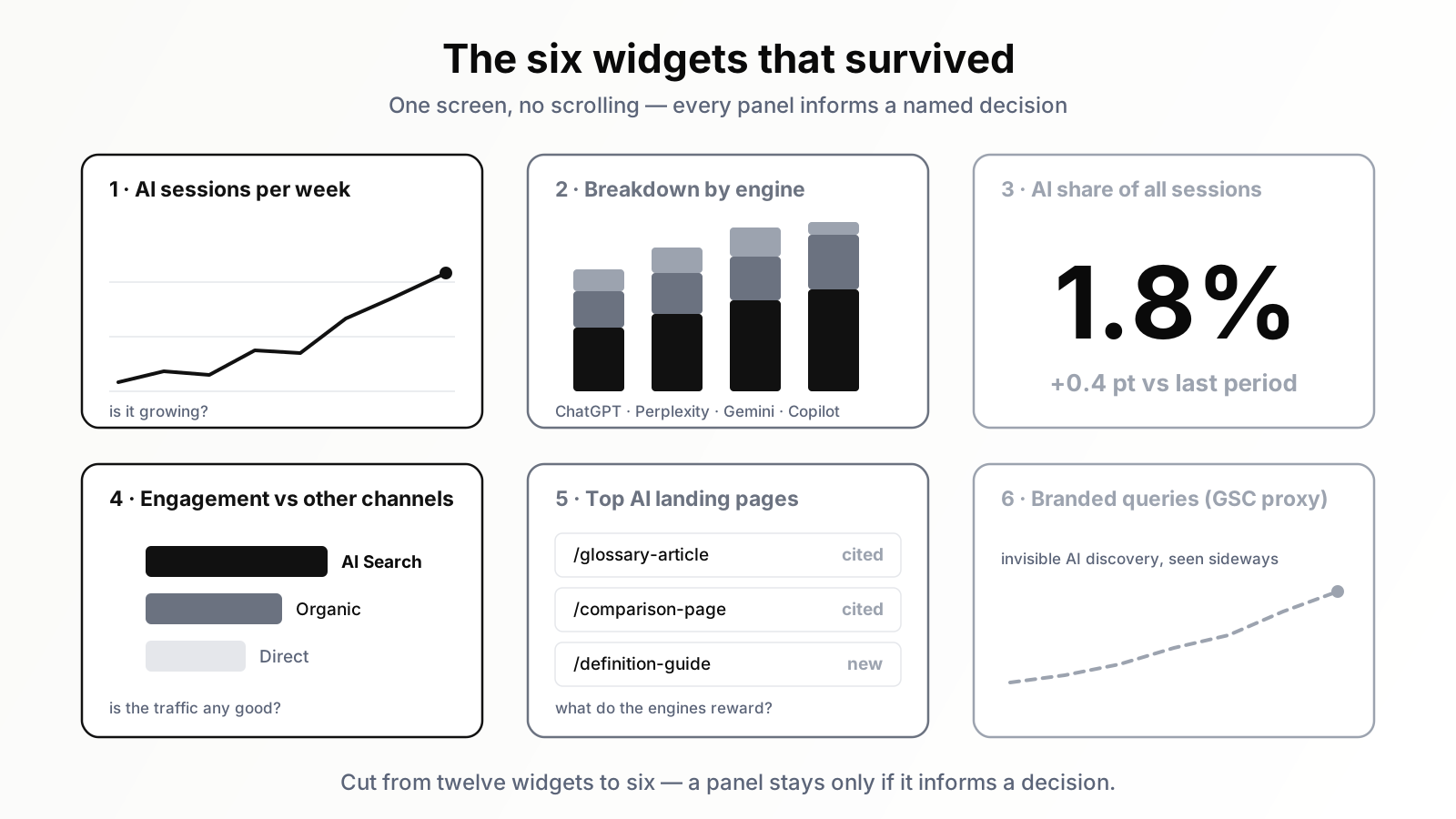
So I did the painful thing and started deleting. My rule for the rebuild was simple: a widget stays only if I can name the decision it informs and the person who would make that decision. Not "this is interesting" — interesting is how dashboards bloat. A decision and a person, or it goes. Twelve widgets shrank to six, and the six that remained are the actual substance of this article.
The six widgets that survived
Here is each survivor, what it shows, and — more importantly — why it earned its place when so many prettier widgets did not.
1. AI sessions per week, as a single trend line
The anchor of the whole dashboard: one line, AI Search sessions by week, going back as far as the channel group allows. Weekly, not daily — that granularity decision matters more than it sounds. AI referral volumes are still small for most sites, and small numbers viewed daily are pure noise; a Tuesday with three sessions and a Wednesday with eleven looks like a 266% surge and means nothing. Aggregated to weeks, the same data resolves into an actual direction. This is the widget that answers the most basic question a stakeholder has — "is this growing?" — and it is the first thing my eyes land on every Monday. When the line bends, everything else on the dashboard exists to explain why.
2. Breakdown by engine, as stacked weekly bars
The same weekly volume, split into coloured segments per source: ChatGPT, Perplexity, Gemini, Copilot. I tried separate trend lines per engine first and it was a tangle; stacked bars keep the total readable while making the composition obvious at a glance. The reason this widget survived is that the engines genuinely behave differently and the differences are actionable. In our data, ChatGPT delivers the volume, while Perplexity delivers fewer sessions of conspicuously higher quality — which matches what we found when we tested whether Perplexity sends real traffic. When one engine's segment suddenly grows, that is usually a signal that something we published started getting cited there, and that is a thread worth pulling the same week.
3. Top landing pages from AI, with engagement columns
A compact table: the ten pages receiving the most AI referral sessions, with engagement rate and conversions alongside. This is the widget that converts the dashboard from observation into action, because it answers the operational question: which of our pages do the AI engines actually like? The pattern that emerged here was the single most useful finding of the whole project — the pages AI assistants cite are very often not our top organic pages. Definitional articles, comparison pieces, articles with clean structures and quotable statements punch far above their organic weight. When a page shows up here consistently, we treat it as a template worth studying and a topic worth expanding.
4. Engagement and conversion: AI versus organic versus direct
A grouped bar chart comparing engagement rate and conversion rate across three channels: AI Search, Organic Search, Direct. This widget exists to answer the sceptic's question, which I was asked in week one and you will be asked too: "fine, it is growing, but is this traffic any good?" Without this comparison the volume numbers are defenceless — a few hundred sessions a month is easy to dismiss. With it, the conversation changes entirely, because in our data (and, increasingly, in most published data I have seen) AI referral visitors engage at meaningfully higher rates than the organic average. That makes intuitive sense: a person who asked an assistant a detailed question and clicked through to the cited source arrives pre-qualified, already deep in the topic. This is the widget that quality-justifies the channel.
5. AI share of total sessions: one large number
A single scorecard, rendered huge: AI Search sessions as a percentage of all sessions, with a small comparison against the previous period. This is, unapologetically, the executive widget. Leadership does not want four hundred and twelve sessions; they want to know whether this thing is material. A percentage answers that in one glance and self-updates its own significance — at 0.8% it says "emerging, watch it," and if it ever reads 5% it will say "reallocate attention" without me writing a single sentence of commentary. I resisted this widget initially because the percentage is small and I worried it would undercut the story. That was backwards. Showing the small number with the trend arrow next to it built more credibility than any amount of enthusiastic framing, because it proved the dashboard was reporting reality rather than selling a narrative.
6. Branded query trend from Search Console, as a proxy
The odd one out: a small table fed from Search Console rather than GA4, tracking impressions and clicks for branded queries — our name, our product names — over time. It is here because of everything the other five widgets miss. People who encounter a brand inside an AI answer frequently do not click the citation; they read the answer, register the name, and search for it directly later, sometimes days later. That visit shows up as branded search or Direct, with no AI fingerprint anywhere on it. A rising branded-query curve that outpaces your overall traffic growth is circumstantial evidence of AI-driven discovery you cannot otherwise attribute. It is the softest data point on the dashboard and I label it as a proxy, but leaving it off entirely would mean pretending the invisible part of the channel does not exist.
What the dashboard cannot see — and why I print that on the dashboard itself
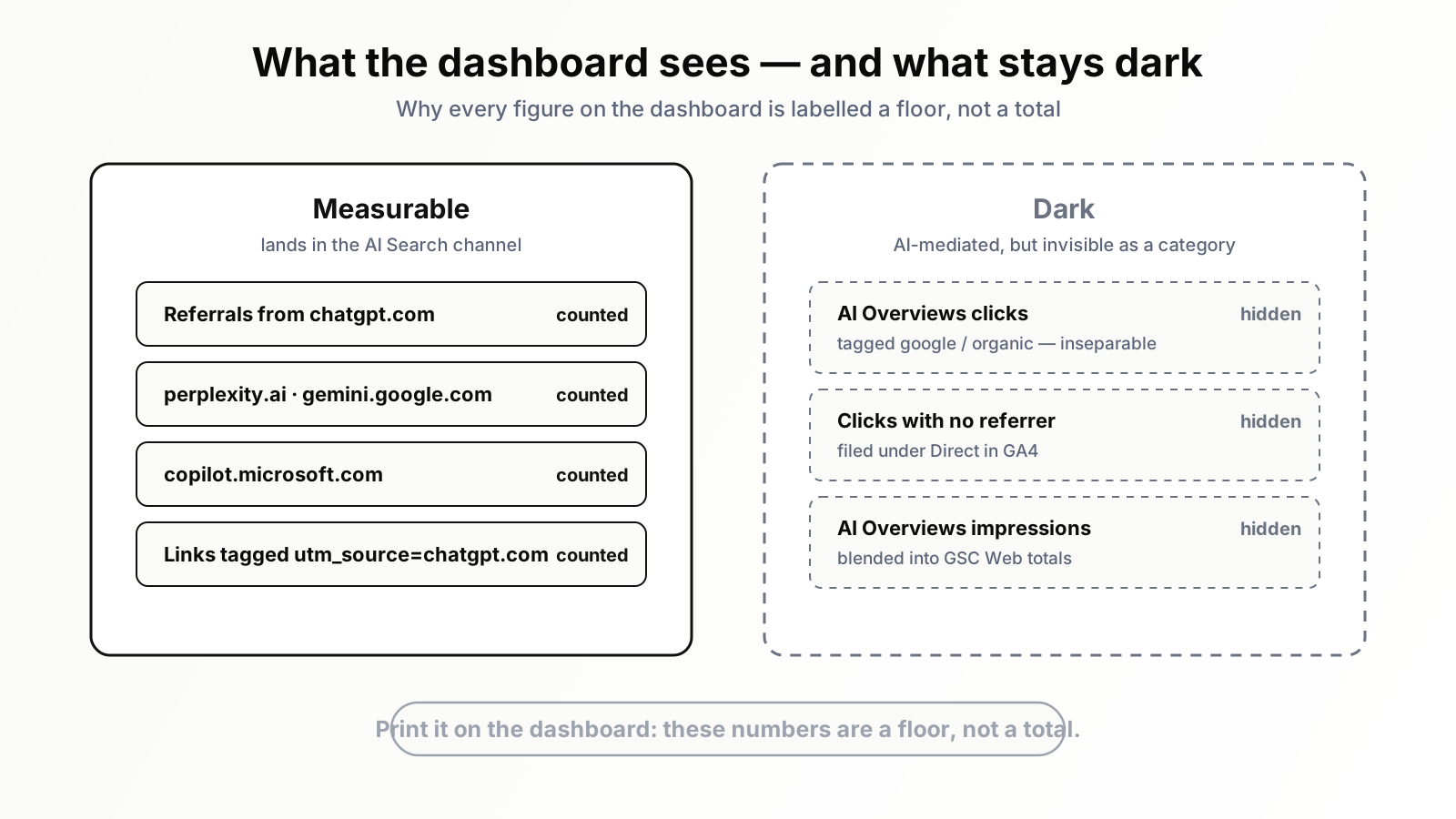
This section matters more than the widget tour, because the most dangerous thing about a confident-looking dashboard is the impression of completeness. Mine is not complete. No AI traffic dashboard currently can be, and I would rather you hear the limitations from me than discover them in a meeting.
First and largest: clicks from Google's AI Overviews are invisible as a category. When someone clicks a link inside an AI Overview at the top of a Google results page, that click is tagged google / organic — identical to a classic blue-link click. There is no dimension, no referrer quirk, no secondary signal in GA4 that separates the two. A growing slice of what is genuinely AI-mediated traffic is therefore sitting inside my Organic Search channel, uncounted by every widget on this dashboard. If you want the full picture of how Overviews behave and what they mean for click behaviour, our complete guide to AI Overviews goes deep on it; for dashboard purposes the summary is simply: that traffic exists, and I cannot put it on a chart.
Second: referrer loss sends AI visitors into Direct. Clicks from some native mobile apps and certain in-app browsers arrive with no referrer header at all, and GA4 files them as Direct traffic. Some unknown fraction of my Direct channel is actually people clicking out of an AI assistant. I cannot measure the fraction; I can only know it is not zero.
Third: Search Console does not separate AI Overviews impressions. Appearances inside an Overview are counted in the ordinary Web search type, blended with classic results. So even my GSC-based proxy widget cannot tell me whether an impressions rise comes from better rankings or from Overview inclusion — a confusion that produces its own strange symptom of impressions climbing while clicks stay flat, which we have dissected separately in why GSC impressions rise while clicks stay flat.
My answer to all three problems is a text box. At the top of the dashboard, in plain type beneath the title, it reads: "These numbers are a floor, not a total. True AI-influenced traffic is higher; some of it is permanently invisible." I added it after watching someone in a review treat the AI share scorecard as an exhaustive measurement and conclude the channel was negligible. That one sentence has done more work than any widget — it converts every number on the screen from a claim into a lower bound, and lower bounds that keep rising are, if anything, a stronger argument.
The Monday ritual: fifteen minutes that make the dashboard worth having
A dashboard nobody reads on a schedule is a screenshot with extra steps. The thing that made this one compound in value was not any widget — it was attaching it to a fixed ritual. Every Monday morning, before the first meeting, I spend fifteen minutes on it with coffee. The routine is always the same, and I am sharing it at this level of detail because the routine, not the dashboard, is the actual product.
Minutes one to three: the trend and the share. Widget one and widget five. Is the line rising, flat, or falling versus the previous four weeks? Is the share creeping up? Most Mondays the answer is "mild growth, nothing dramatic," and that is fine — the point of most checks is confirming nothing needs attention.
Minutes three to seven: the engine mix. Widget two. I am looking for composition changes more than volume changes. ChatGPT growing in line with everything else is background. Perplexity doubling its segment in a fortnight is a signal, because it usually means some specific page started being cited, and citations are recent, inspectable and repeatable.
Minutes seven to twelve: landing pages. Widget three, the action widget. New entries in the top ten get opened and read with one question in mind: what does this page do that the assistants apparently reward? The week a two-year-old glossary-style article we had internally written off appeared at the top of the Perplexity landing list was the week this ritual paid for a year of itself. The page was old, organically mediocre, and structurally perfect for citation: a crisp definition in the first paragraph, clean subheadings, a comparison table. We wrote three sibling articles in the same shape on adjacent subtopics that month. Two of the three were drawing their own AI referrals within six weeks. That is the loop working as designed: observe what gets cited, decode why, produce more of it, watch the trend line for confirmation.
Minutes twelve to fifteen: quality and proxy. Widgets four and six, skimmed. Is AI engagement still beating organic? Is the branded-query curve still drifting upward? These change slowly, so a glance suffices — but the glance has to happen, because slow drifts are precisely the changes that fifteen-minute weekly checks catch and quarterly reviews explain away.
Two rules govern the ritual. First, no action on a single week's movement — small-number channels lurch week to week, and reacting to one spike teaches you to chase noise. Two consecutive weeks pointing the same way earns a closer look; three earns action. Second, anything notable gets one written sentence in a running log. "Week 23: Perplexity segment up again, glossary page still leading, drafted cluster brief." Eight seconds of writing, and at quarter's end the story of the channel assembles itself from the log instead of from memory.
What a quarter of actually watching taught me
After roughly thirteen weeks of Mondays, the patterns settled into findings I would not have predicted, and would never have detected from one-off checks.
The channel is small, and the smallness is the least interesting thing about it. AI referrals stabilised in the low single digits as a percentage of sessions — in the 1-to-3% band that most published accounts seem to converge on right now. If you stop at that number, you file the channel under "negligible" and move on. The quarter of watching is what stops you from stopping there.
Quality inverts the size argument. Consistently, week after week, AI referral visitors engaged at noticeably higher rates than our organic average and converted at a higher rate too. Sessions are small; session value is not. The visitor who arrives from an assistant's citation arrives mid-question, already invested, already trusting the recommendation enough to click it. I stopped describing the channel by its volume and started describing it by its per-session value, and the internal conversation about whether it deserved attention ended that week.
The citation economy rewards different pages than the ranking economy. The overlap between our top organic landing pages and our top AI landing pages was far smaller than I assumed it would be. Several supposedly dead articles turned out to be quiet citation machines, and several organic champions never appeared in the AI list at all. This has practical consequences for content planning: pruning decisions based purely on organic traffic would have deleted pages that assistants cite weekly. The dashboard now gets consulted before any content cull.
Growth arrives in steps, not slopes. Organic traffic tends to drift smoothly. The AI line moved in plateaus and jumps — flat for three weeks, then a step up that held. My working interpretation is that each step is a citation event: some page enters an engine's retrieval set or earns a stable citation for a common question, and the new level persists. It changes how you read the chart. You stop asking "what is the slope?" and start asking "what caused the last step, and how do we cause another one?"
Build it once, read it weekly
The dashboard took one afternoon to build once the channel group existed, and a painful three weeks to learn to prune. The ritual costs fifteen minutes a week. Against that investment, it has reshaped our content templates, saved citation-earning pages from deletion, given leadership a number they check unprompted, and turned "AI traffic" from a vague anxiety into a measured, bounded, weekly-observed channel with a floor that keeps rising. That is about as good a return as anything I have built in analytics.
If you want the same visibility without assembling the channel group, the regex quirks and the Looker Studio wiring yourself, Orova tracks AI referral traffic alongside your organic data out of the box — the dashboard in this story, minus the weekend. Either way, build the thing this month and put fifteen recurring minutes against it. The engines are already sending the visitors. The only question is whether anyone on your side is watching the line.
Related reading: Perplexity AI là gì và nó đang gửi traffic thật tới những ai
Build your reporting with Orova Insight
Pull data from every platform into one dashboard. Ask in plain language and let the AI draw the chart.
Explore Orova Insight