
How to Build an SEO Dashboard People Will Read
Most SEO dashboards are built once, admired briefly, and then quietly abandoned. They start with good intentions — someone connects a few data sources, drags a dozen charts onto a canvas, picks some colours — and for a week or two it gets opened. Then it stops. Not because the data went stale, but because nobody could remember what the dashboard was trying to tell them, or how to act on it. It became a wall of charts, and a wall of charts is something you glance at, not something you read.
A dashboard that people actually read is a different kind of artefact. It is not a data dump with a nicer interface — it is a designed communication, built around a specific audience, a specific set of questions, and a specific intended action. This is a practical guide to building that kind of dashboard. It assumes you can already get the data; the hard and neglected part is everything that happens after you have it.
Decide who the dashboard is for — first, and ruthlessly
The single most common mistake in dashboard design is trying to serve everyone with one dashboard. An executive, a marketing manager, and an SEO specialist need to see almost entirely different things, and a dashboard that tries to satisfy all three satisfies none. The executive is buried in technical detail; the specialist is starved of it; the manager gets a confused middle.
So the first decision, before you touch any data, is to name one primary audience and design for them alone. If the dashboard is for leadership, it should answer "is SEO working and is it worth the money?" in under a minute, with almost no technical metrics. If it is for the SEO team, it should be a working instrument full of diagnostic detail. If it is for a marketing manager, it should sit between the two — outcomes plus enough operational context to plan.
If you genuinely need to serve multiple audiences, the answer is multiple dashboards — or, more elegantly, one dashboard with layered views, where the top layer is the executive summary and deeper layers hold progressively more detail. What you must not do is average the audiences into one compromised page. Pick the primary reader, design for them, and let everyone else's needs be met by a different view. This guide assumes a leadership or manager audience, because that is the dashboard most teams get wrong and most need to get right.
Start from questions, not from available metrics
The second principle is the one that separates a communication from a data dump. Most dashboards are built bottom-up: you look at what metrics your tools can export and put the interesting-looking ones on the screen. The result is a dashboard organised around data availability — and data availability is not a story.
Build top-down instead. Before opening any tool, write down the actual questions the dashboard exists to answer. For a leadership dashboard the list is short and stable: Is organic traffic growing? Is it bringing the right people? Is it producing conversions? How do we compare to competitors? Is it worth what we spend? Five or six questions, no more.
Then — and only then — for each question, choose the one or two metrics that answer it most directly, and design a section of the dashboard around that question. The section's heading is the question itself, in plain language. The chart beneath it is the answer. A reader scanning the dashboard reads a sequence of questions they care about, each immediately answered. That is a dashboard that communicates. The bottom-up version, organised by metric category, forces the reader to do the translation work themselves — and they will not.
Design the top of the dashboard as a verdict
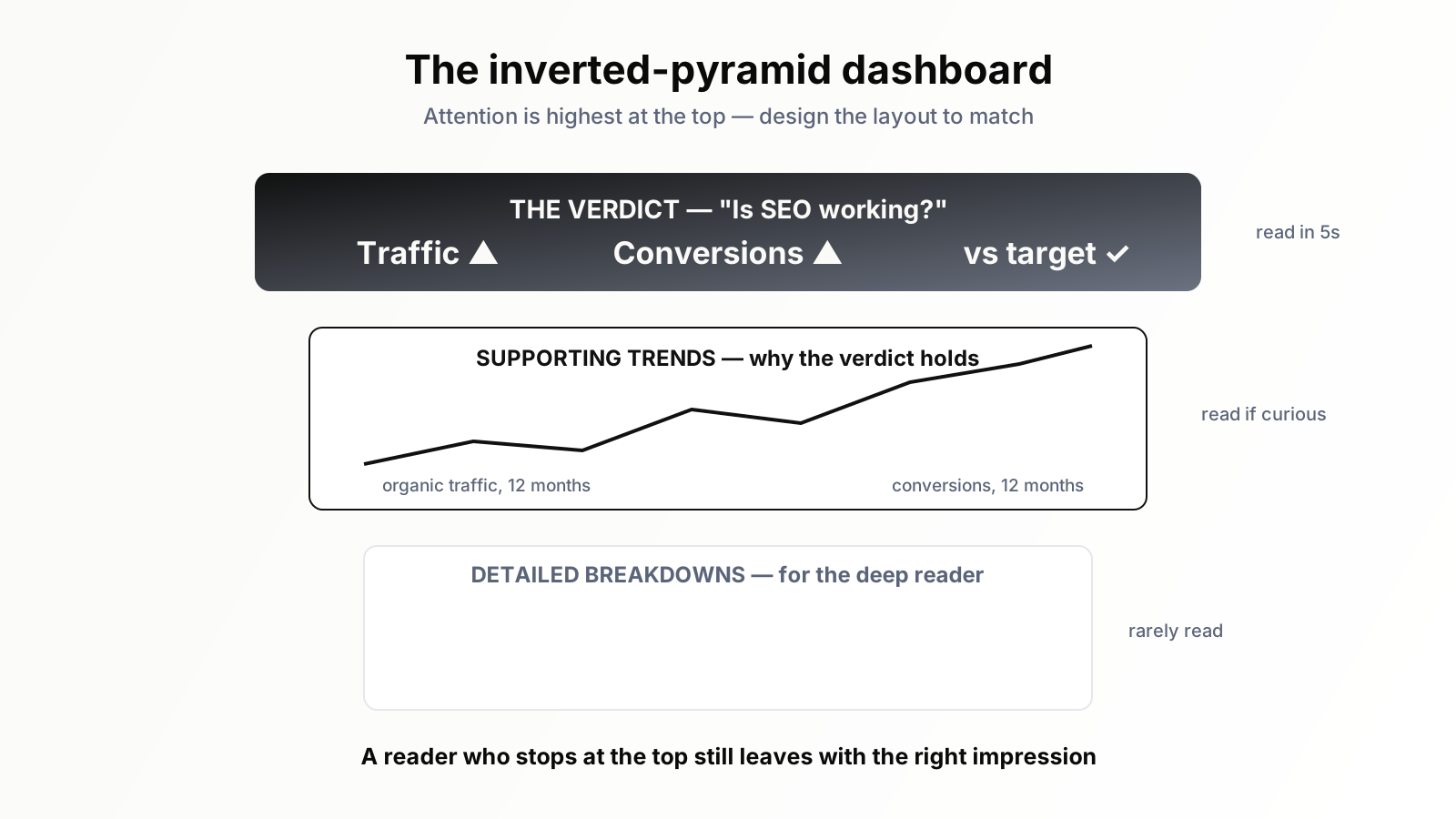
People read dashboards the way they read everything else on a screen: the top gets full attention, and attention decays as they scroll. Design accordingly. The top of the dashboard should not be a chart — it should be a verdict.
The first thing a reader sees should answer the headline question — "is SEO working?" — in a form digestible at a glance. That might be three or four large summary numbers, each with its trend direction and a comparison to the previous period. It might be a single sentence of plain-language status. The point is that someone who reads only the top of the dashboard, and nothing else, should still leave with an accurate overall impression.
Everything below the top is for the reader who wants to understand why the verdict is what it is. The detailed trend charts, the breakdowns, the competitive comparison — these support and explain the verdict, in roughly decreasing order of importance. This inverted-pyramid structure respects how people actually consume information. A dashboard where you have to read all of it to understand any of it will not be read at all.
Give every number context, or do not show it
A number on its own is nearly unreadable, because the reader has nothing to judge it against. "12,400 organic sessions" — is that good? Up or down? Fast or slow? The number cannot say. A dashboard full of context-free numbers forces the reader to either guess or give up, and most give up.
So adopt a strict rule: every number on the dashboard carries context. At minimum, that means a comparison — versus the previous period, versus the same period last year, or versus a target. Better still, it means a trend line, because a line shows direction, pace, and pattern all at once, where a single comparison shows only one of them.
Context also means honest annotation. If traffic dipped because of a known seasonal trough, or jumped because of an algorithm update, or flattened during a deliberate pause in publishing, say so on the chart. Annotations turn a line that invites anxious speculation into a line that explains itself. The aim throughout is a dashboard the reader can interpret unaided — because a dashboard that needs you standing beside it to explain it is not a dashboard, it is a slide.
Use comparison and segmentation to create meaning
Two specific techniques do more than anything else to make a dashboard meaningful: comparison and segmentation.
Comparison places a number against a relevant benchmark — previous period, target, or competitor. It is what converts "we got X" into "we got X, which is better/worse/on track." Without comparison, every figure floats free of judgement.
Segmentation breaks a blunt aggregate into its meaningful parts. Total organic traffic is a blunt instrument; branded versus non-branded traffic tells a real story. Total conversions is blunt; conversions by landing-page type, or by intent of the entry keyword, tells you where value is actually being created. The right segmentation is the one that maps onto a decision the audience can make. Segment by something your reader cannot act on and you have added clutter; segment by something they can — page type, funnel stage, market — and you have added insight. For a leadership dashboard, keep segmentation to the two or three cuts that genuinely change the conclusion, and resist the temptation to expose every possible slice.
Cut relentlessly — the discipline of subtraction
Once a dashboard exists, the strongest pressure on it is additive. Someone asks "can we also see X?" and X gets added. Repeat that over a few months and the clean dashboard you launched has silently become the wall of charts you were trying to avoid.
Resist this actively, because a dashboard's value is inversely related to its clutter. Every chart you add makes every other chart slightly harder to find and slightly less likely to be noticed. The discipline is subtraction: periodically review the dashboard and ask, of each element, "if I removed this, would the dashboard fail to answer one of its core questions?" If the answer is no, remove it.
When someone requests a new metric, the right response is usually not to add it to the main dashboard but to ask which core question it serves — and if it serves none, to put it in a separate detailed view rather than the headline page. A leadership dashboard should probably never exceed what fits on a single screen without scrolling, or close to it. The constraint is not a limitation; it is the entire point. A dashboard that fits on one screen gets read. One that requires scrolling through twenty charts gets closed. This subtraction discipline pairs directly with choosing the right metrics in the first place — our guide to the six SEO KPIs a boss actually cares about covers which numbers earn a place at the top.
Make the dashboard tell a story over time
A dashboard is usually thought of as a snapshot — the state of things right now. But the most persuasive dashboards are the ones that tell a story over time, because SEO is a slow, compounding channel and its whole case rests on trajectory.
Favour time-series charts over single-value tiles wherever you can. A twelve-month trend line makes the compounding nature of SEO visible: the reader sees not just where you are, but the slope you are on, and a healthy upward slope is the most reassuring thing a slow channel can show. Where you must use single-value tiles for the top-of-dashboard verdict, always pair them with a trend indicator so even the snapshot carries a direction.
The narrative framing matters too. A dashboard that shows "here is the long climb, here is where we accelerated, here is the dip and here is the recovery" lets leadership see SEO as a story with momentum. A dashboard that shows only this month's numbers, disconnected from history, invites the worst kind of management — judging a twelve-month channel on a four-week window.
Refresh, ownership, and keeping it honest
A dashboard is only as trustworthy as its data, and trust is fragile. The first time a reader catches the dashboard showing a stale or obviously wrong number, they stop believing all of it — and a dashboard nobody believes is worse than no dashboard, because it actively misleads.
So two operational rules. First, the dashboard should refresh on a known, reliable schedule, and that schedule should be visible on the dashboard itself — "data current as of [date]" — so readers know exactly how fresh what they are looking at is. Second, the dashboard needs an owner: a named person responsible for checking it is accurate, for fixing it when a data source breaks, and for resisting the clutter creep described earlier. An ownerless dashboard decays. A dashboard with a clear owner stays trustworthy.
Honesty is part of this too. A dashboard that only ever shows good news, by quietly choosing flattering comparisons or hiding the metrics that dipped, gets found out — and when it does, it loses the credibility that made it useful. A dashboard that shows the dips alongside the climbs, with honest annotation of why, is one leadership comes to trust precisely because it is not a sales pitch. Trust is the dashboard's real product. Everything else is just charts.
Where an AI agent fits
Building a good dashboard once is achievable for any careful SEO. Keeping it good — refreshed on schedule, accurate when a data source changes shape, segmented correctly, free of clutter creep, and annotated with context — is ongoing work that quietly competes with everything else on your plate. Most dashboards do not fail at launch. They fail in month three, from neglect.
That maintenance burden is what an SEO AI agent is well suited to carry. Orova can connect to your search and analytics sources, keep the underlying data refreshed and segmented consistently, surface the trend lines and comparisons in the structure this article describes, and flag anomalies worth annotating — so the dashboard stays accurate and legible without a person manually rebuilding it every cycle. The design thinking here still has to come from you: who the audience is, which questions matter, what to leave out. The agent simply makes sure the dashboard you designed is still the dashboard people see six months later.
Build your next dashboard as a communication, not a database. Choose one audience, organise it around their real questions, lead with a verdict, give every number context, cut without mercy, and tell the story over time. Do that, and you will have built the rarest thing in SEO reporting: a dashboard people actually read.
Run your business with AI Agents
Orova is the always-on Biz AI Agent — it plans, runs, and optimizes the work for you. Save time, unlock productivity.
Try it free