
Why Google Isn't Indexing Your Pages (And How to Fix It)
You publish a page. You wait. You search for it on Google, maybe with a site: query, and it is not there. A week passes. Still nothing. Search Console shows the URL with a status that is not "Indexed," and a label — "Crawled - currently not indexed," "Discovered - currently not indexed," "Excluded by noindex tag" — that reads like a diagnosis written in a language you do not speak.
Indexing problems are among the most frustrating issues in SEO because they are silent. A page that ranks badly at least exists in the results; a page that is not indexed does not exist to Google at all. No amount of content quality, keyword research, or link building matters if the page never enters the index. This article is an analytical breakdown of why pages fail to get indexed, organised by the stage at which they fail, with the corresponding fix for each. The aim is to turn a vague "Google won't index my page" into a precise diagnosis.
The three gates a page must pass
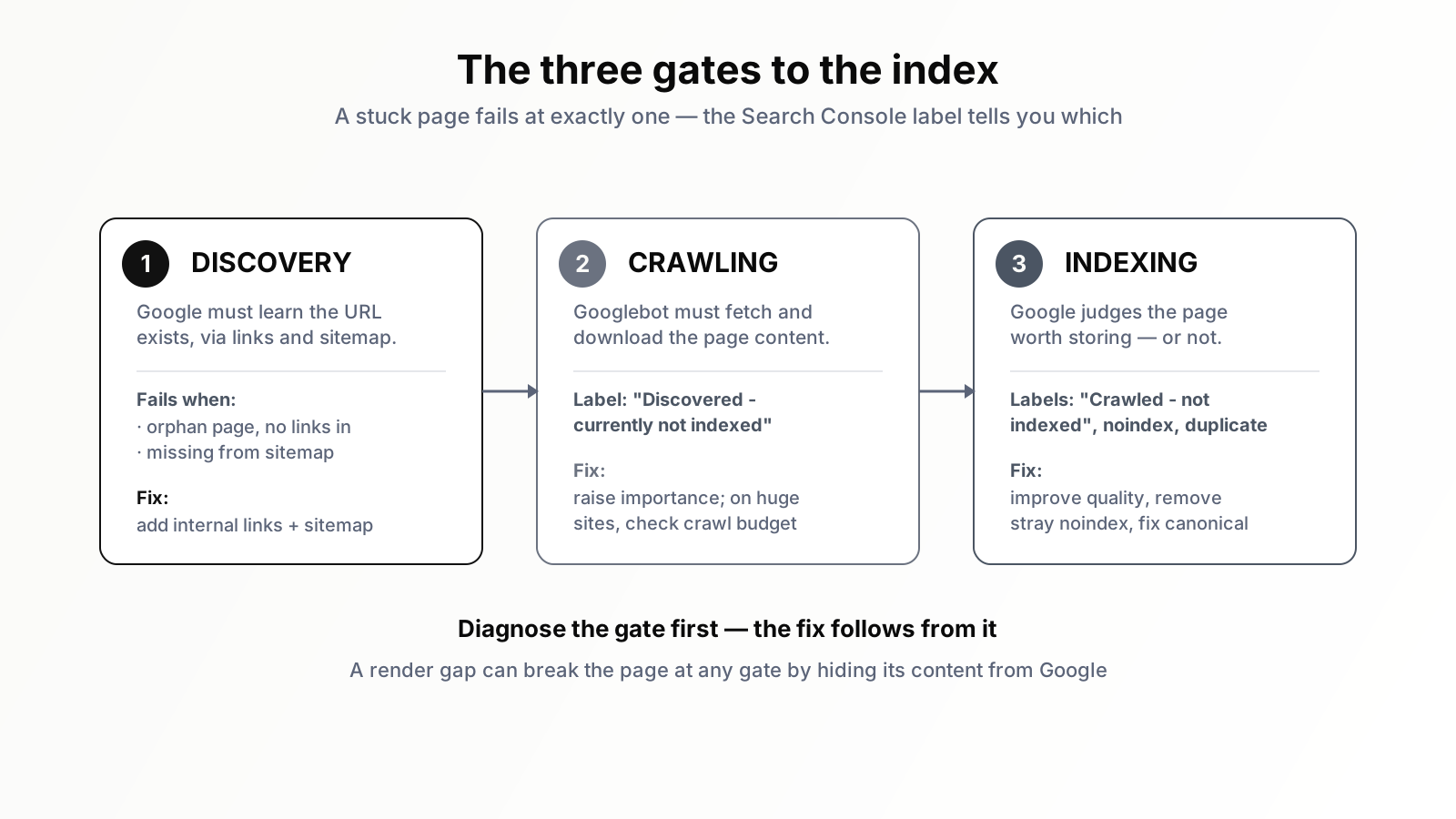
To diagnose indexing, you need a model of how a page gets into Google in the first place. There are three sequential gates, and a page is stuck at exactly one of them.
The first gate is discovery. Google has to learn the URL exists. It discovers URLs by following links, by reading sitemaps, and from a few other sources. A page Google has never discovered cannot be crawled or indexed — it is invisible.
The second gate is crawling. Once Google knows the URL, Googlebot has to fetch it — request the page and download its content. A discovered-but-uncrawled page is known to Google but unread.
The third gate is indexing. After crawling, Google evaluates the page and decides whether to store it in the index and consider it for ranking. A crawled-but-unindexed page has been read and judged not worth keeping — or has been explicitly told to stay out.
Every indexing problem is a failure at one of these three gates, and Search Console's Pages report tells you which one, if you know how to read the labels. Diagnose the gate first; the fix follows from it.
Failure at gate one: the page is never discovered
If Search Console has no record of a URL at all — it does not appear in the Pages report, and the URL Inspection tool says "URL is not on Google" with no crawl history — the page failed at discovery. Google simply does not know it exists.
The most common cause is that nothing links to the page. Google finds pages primarily by following links from pages it already knows. A page with no internal links pointing to it — an orphan page — has no path for Googlebot to arrive by. You published it, but you connected it to nothing. The fix is to link to it: from your navigation, from related articles, from category or hub pages. A page that matters should be reachable from the rest of your site.
A related cause is absence from the sitemap. Your XML sitemap is a direct channel for telling Google which URLs exist. If a new page is not in it — because the sitemap is static, or generated infrequently, or simply broken — you have removed one of the main discovery routes. Ensure the sitemap is generated dynamically, includes all canonical indexable URLs, and is submitted in Search Console.
Discovery can also be slow rather than failed. A brand-new site with little authority and few links gets crawled cautiously; Google may take days or weeks to find new pages. The fix here is patience plus the discovery fundamentals above — strong internal linking and an accurate sitemap accelerate it. You can also use URL Inspection's "Request indexing" to nudge a specific important page, though this is a prompt, not a guarantee.
Failure at gate two: discovered but not crawled
Search Console label: "Discovered - currently not indexed." This is a precise statement — Google knows the URL exists but has not yet crawled it. The page is in a queue, waiting.
On a small or medium site, "Discovered - currently not indexed" affecting a handful of pages is usually temporary; Google gets to them. When it affects many pages, or persists for weeks, it points to one of two underlying issues.
The first is a crawl prioritisation problem. Google has decided these pages are not important enough to crawl promptly. This is a signal about perceived value: pages buried deep in the site, poorly internally linked, or on a site with thin overall authority get deprioritised. The fix is to raise their apparent importance — better internal linking from prominent pages, a flatter architecture, and improving the overall quality and authority of the site so Google treats its URLs as worth fetching.
The second, on very large sites, is a genuine crawl budget constraint — Googlebot's crawl is spread too thin across too many URLs. If your site has hundreds of thousands of pages and many sit in "Discovered - currently not indexed," crawl budget is a live concern, and our piece on crawl budget and when to care covers the fix: reduce the low-value URL surface so crawl flows to the pages that matter. For most sites, though, "Discovered - not indexed" is a value signal, not a budget one.
Failure at gate three: crawled but not indexed
This gate has several distinct labels, and they need separating because they mean very different things.
"Crawled - currently not indexed"
Google fetched the page, read it, and decided not to index it. This is the most disheartening label because it is a quality judgement. Google is effectively saying: we have seen this page, and it is not worth a spot in the index right now.
The usual causes are quality and uniqueness. The page may be thin — too little substantive content to satisfy the query it targets. It may be near-duplicate — too similar to other pages on your site or across the web, offering nothing distinct. It may be low-value in Google's estimation — a tag page, a thin category page, a programmatically generated page with little real substance. The site's overall quality also weighs in: on a site Google views as low quality, individual pages face a higher bar.
The fix is not technical, it is editorial. Make the page genuinely worth indexing: more depth, a clear unique angle, real usefulness for its intended query. If the page is structurally low-value and cannot be made worthwhile — a thin tag archive, an empty filter page — the honest fix is to noindex it or remove it rather than fight to index something that should not be indexed. Not every URL deserves a place in the index, and accepting that for genuinely low-value pages is part of the discipline.
"Excluded by 'noindex' tag"
This one is mechanical and usually accidental. The page contains a noindex directive — in a meta robots tag or an HTTP header — explicitly telling Google to keep it out. If a page you want indexed shows this label, something is applying noindex unintentionally. Common causes: a staging-environment setting that shipped to production, a CMS toggle left in the wrong state, a template or plugin applying noindex to a whole section, a theme default. The fix is to find and remove the directive. Use URL Inspection to confirm Google sees the change, then request indexing.
"Blocked by robots.txt"
The page is disallowed in robots.txt, so Googlebot will not crawl it. Note the subtle trap: a page blocked by robots.txt can still occasionally appear in results as a bare URL with no description, because Google knows it exists from links but cannot read it. If you want a page indexed, it must not be blocked in robots.txt. And critically — robots.txt and noindex conflict: if a page is blocked in robots.txt, Google cannot crawl it, so it cannot see a noindex tag on it. To reliably keep a page out of the index, allow crawling and use noindex; to get a page in, do neither.
"Duplicate" and canonical labels
Labels like "Duplicate without user-selected canonical," "Duplicate, Google chose different canonical than user," and "Alternate page with proper canonical tag" all concern canonicalisation. Google has decided this URL is a duplicate of another and is indexing the other one instead. Sometimes that is correct and intended — an alternate URL pointing its canonical at the main version is working as designed. Sometimes it is a problem: Google picked a canonical you did not want, often because of inconsistent internal linking, conflicting canonical tags, or genuinely duplicative content. The fix is to make your canonical signals consistent and unambiguous — one canonical URL per piece of content, internal links pointing to it, and the canonical tag confirming it — so Google indexes the version you intend.
The render gap: when Google sees an empty page
One cause cuts across the gates and deserves its own section because it is easy to miss: the rendering gap. If your page relies on JavaScript to load its main content, Google has to render the page — execute the JavaScript — to see that content. If rendering fails, is delayed, or the content depends on an interaction Googlebot does not perform, Google may crawl the page and see an almost empty shell. It then either does not index it or indexes a contentless version.
Use URL Inspection's "View crawled page" and "Test live URL" to see the rendered HTML Google actually got. If your main content is missing from it, you have a rendering problem. The fix depends on your stack — server-side rendering, static generation, or ensuring critical content is in the initial HTML rather than loaded by client-side script after the fact. A page can pass discovery and crawling perfectly and still fail because Google never saw the content that would have made it worth indexing.
A diagnostic sequence you can follow
Put the analysis into an order. Start with URL Inspection on the specific URL. If Google has no record of it, you are at gate one — fix discovery with internal links and the sitemap. If the status is "Discovered - currently not indexed," you are at gate two — raise the page's perceived importance, and on a huge site, check crawl budget. If the status involves a noindex tag or robots.txt block, you have a mechanical exclusion — find and remove the directive. If the status is "Crawled - currently not indexed," you have a quality judgement — improve the page substantially or accept it should not be indexed. If it is a duplicate or canonical label, fix your canonical signals. And at any stage, use "View crawled page" to confirm Google actually sees your content and is not stuck on an empty rendered shell.
Worked in this order, "Google won't index my page" stops being a mystery and becomes a sequence of yes/no questions, each with a known fix. The frustration of indexing problems comes almost entirely from skipping the diagnosis and guessing at fixes — requesting indexing repeatedly on a page that has a noindex tag, or rewriting content on a page that is actually an orphan.
What slows everyone down: scale
The diagnostic sequence is straightforward for one page. It becomes punishing across a site of thousands of pages, where indexing failures are scattered, the Pages report aggregates them into categories without telling you which individual URLs matter, and new failures appear every time you publish. Manually inspecting URLs, cross-referencing sitemap inclusion, checking for stray noindex tags, and reading rendered HTML — page after page — is exactly the kind of work that gets done once during an audit and then never again.
This is repetitive, rule-based diagnosis at volume, which is what an SEO AI agent is built for. Orova can monitor your indexing status continuously, group unindexed pages by which gate they failed at, flag the mechanical problems — stray noindex tags, robots.txt blocks, missing sitemap entries, orphan pages — and surface the pages that failed on quality so you can decide whether to improve or retire them. The editorial judgement of what a page should say stays yours; the agent makes sure no page sits silently outside the index without you knowing why. Indexing is the gate before every other SEO effort. A page that is not indexed is not slow — it is absent. Diagnose the gate, apply the matching fix, and get your pages into the index where the rest of your work can finally count.
Run your business with AI Agents
Orova is the always-on Biz AI Agent — it plans, runs, and optimizes the work for you. Save time, unlock productivity.
Try it free