
Crawl Budget: What It Is and When You Should Actually Care
Few phrases in technical SEO get misused as confidently as "crawl budget." It surfaces in audit reports for ten-page brochure sites, in panicked Slack messages, in agency proposals as a line item nobody questions. It is treated as a universal problem — something every site has, something every site should worry about, something a consultant can always find and bill against. Most of that is wrong. Crawl budget is real, it matters enormously for a specific kind of site, and it is almost completely irrelevant for the majority of sites that fret about it.
This article is a working explanation of what crawl budget actually is, how Google decides how much of it to spend on you, the small set of sites that genuinely need to manage it, and the practical levers that move it. The goal is to leave you able to answer one question with confidence: should I care about this, or should I close the tab and go fix something that matters?
What crawl budget actually is
Start with the mechanics. Google does not have infinite resources, and the web is effectively infinite. Every page Googlebot fetches costs computing power, bandwidth, and time. So Google rations its crawling. For any given site, there is a practical ceiling on how many of its URLs Googlebot will fetch in a given window — a day, a week. That ceiling, loosely, is what people call crawl budget.
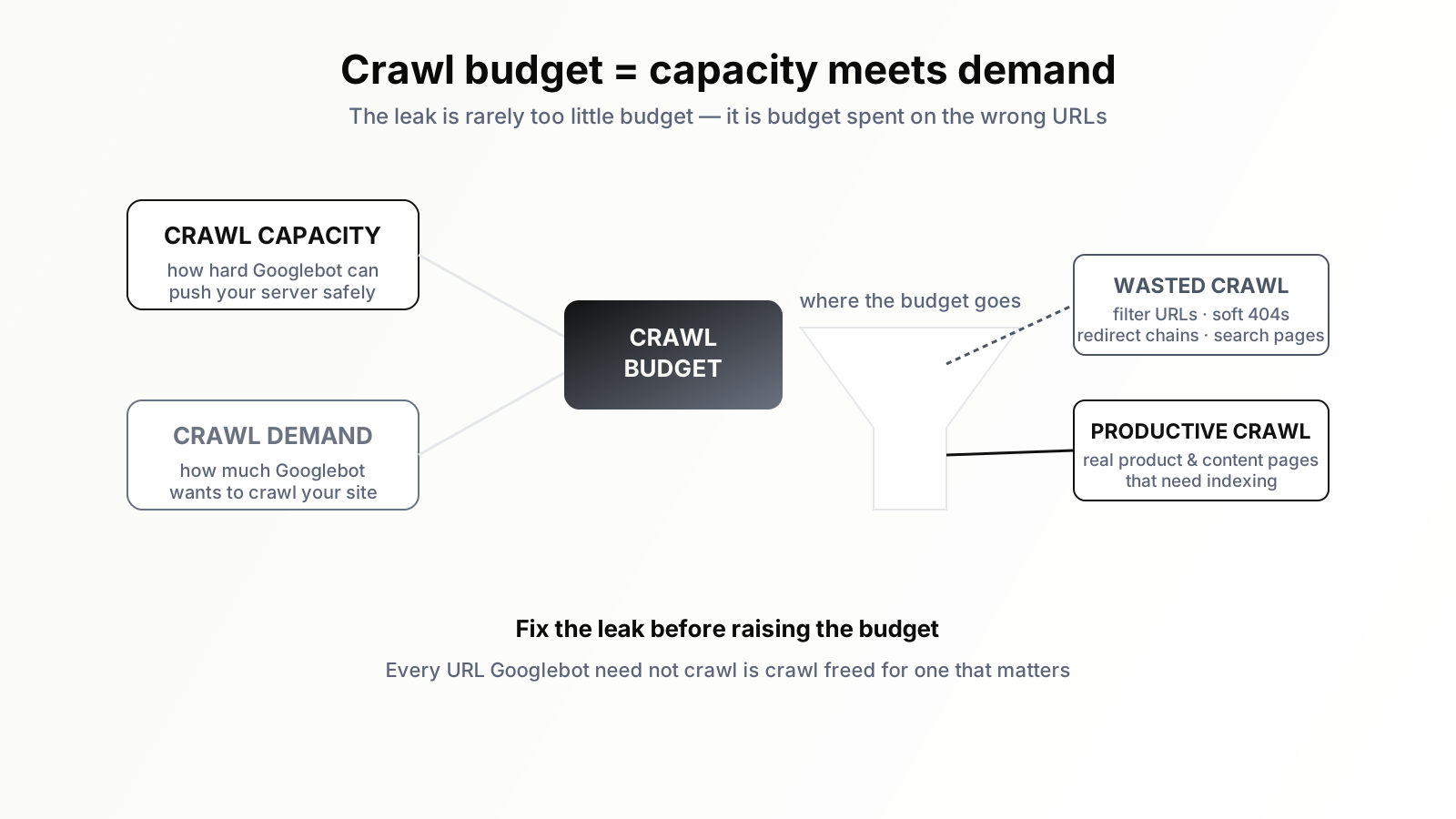
Google itself prefers to break the concept into two parts, and the distinction is genuinely useful. The first part is crawl capacity — sometimes called the crawl rate limit. This is how hard Googlebot is willing to push your server without degrading it. If your site responds quickly and never errors, Googlebot will crawl more aggressively. If your server slows down or returns server errors when crawled, Googlebot eases off, because its job is to fetch your content, not to knock your site over. Crawl capacity is a politeness mechanism.
The second part is crawl demand — how much Googlebot actually wants to crawl your site. Demand is driven by popularity and freshness. Pages that are linked to often, that rank well, that change frequently, generate demand. Pages that are stale, obscure, and unlinked generate almost none. Google will not spend capacity it has if there is no demand to justify it. A fast server with a thousand forgotten pages nobody links to will not be crawled exhaustively just because it could be.
Crawl budget, then, is the meeting point of capacity and demand: how much Googlebot is able to crawl, capped by how much it cares to. Understanding it as two forces rather than one number is the first step to managing it sensibly, because the two are fixed by completely different things and respond to completely different interventions.
The sites that genuinely need to care
Here is the part most crawl-budget content skips, because it deflates the urgency. For the overwhelming majority of websites, crawl budget is not a constraint. If your site has a few hundred pages, or a few thousand, Googlebot can and will crawl all of it comfortably. There is no budget to run out of. Optimising crawl budget on a 500-page site is like optimising fuel efficiency for a trip to the corner shop — technically a real concept, practically a waste of attention.
Crawl budget becomes a genuine concern under a specific set of conditions, and it is worth being precise about them. The classic case is the very large site — hundreds of thousands or millions of URLs. Large e-commerce catalogues, big marketplaces, sprawling publishers, sites with programmatically generated pages at scale. When the URL count runs far ahead of the crawl Google is willing to spend, some pages get crawled rarely or not at all, and pages that are not crawled cannot be indexed, updated, or ranked.
The second case is the site that is not enormous but generates an enormous number of URLs — usually faceted navigation and parameters. An e-commerce site with a few thousand real products can, through filter combinations (colour, size, price, brand, sort order), expose millions of crawlable URL variations. The catalogue is small; the crawl surface is vast. Googlebot can burn most of its crawl on near-duplicate filtered pages while the real product pages wait.
The third case is the site with frequently updated content where crawl speed is the business — large news operations, job boards, listings sites. If a new page takes days to be crawled, it has lost most of its value by the time it can rank. Here the issue is less "will everything get crawled" and more "will the right things get crawled fast enough."
If your site fits none of these — and most do not — you can treat crawl budget as background trivia. Your effort is far better spent on content, internal linking, and the indexing fundamentals covered in our companion piece on why Google isn't indexing your pages.
How to tell if you actually have a problem
Suspecting a crawl problem and confirming one are different things, and the confirmation is free. Open Google Search Console and find the Crawl Stats report under Settings. It shows how many requests Googlebot made to your site over the last ninety days, the total download size, and average response times. It also breaks crawling down by response code, by file type, by Googlebot type, and by purpose — refresh versus discovery.
Read it like a diagnostician. Look at the total crawl requests per day and compare that, roughly, to the number of URLs you actually want indexed. If Googlebot makes far more requests than you have valuable pages, it is spending crawl somewhere — and that somewhere is usually low-value URLs. Look at the response codes: a healthy site is mostly 200s with a modest tail of 301s and 404s. A large share of server errors, or a swelling pile of redirects, signals waste. Look at the "by purpose" split: if discovery is tiny and refresh dominates, Google may be re-crawling old pages while barely finding new ones.
The single most revealing exercise is to compare the URLs Googlebot crawls against the URLs you want it to crawl. Crawl your own site with a crawler, pull the list of URLs Google is requesting, and look at the gap. If Googlebot is spending its visits on filtered listing pages, internal search results, session-ID URLs, paginated archives ten pages deep, and tag pages nobody reads — while your genuinely important pages get crawled infrequently — you have a crawl budget problem, and now you know exactly where the leak is. If the crawl maps cleanly onto your real pages, you do not have a problem, whatever the audit tool claimed.
The levers that actually move crawl budget
Once you have confirmed a problem, the interventions fall into two families: stop wasting crawl, and increase the crawl you get. Stopping waste is almost always the bigger win.
Reduce the low-value crawl surface
The dominant fix on most large sites is shrinking the number of pointless URLs Googlebot can reach. Faceted navigation is the usual culprit. Decide which filter combinations deserve to be indexable pages — often a small, deliberate set — and make the rest uncrawlable: block parameter patterns in robots.txt, or render filters in a way Googlebot does not follow as links. Internal search result pages should generally be blocked from crawling entirely; they are an infinite, low-value URL space. Calendar and archive structures that generate endless thin date-based pages should be pruned or blocked.
The principle is simple: every URL Googlebot does not have to crawl is crawl freed up for a URL that matters. On a site with millions of junk URLs, this single category of fix can transform crawl coverage. Be careful with the robots.txt mistakes that can backfire here — our piece on the robots.txt mistakes that quietly kill traffic covers the ways this goes wrong.
Fix what wastes crawl inside the pages you keep
Even among legitimate URLs, crawl gets wasted. Long redirect chains make Googlebot follow three hops to reach one page — collapse them to a single redirect. Broken internal links send Googlebot to 404s; fix or remove them. Soft 404s — pages that return a 200 status but have no real content — trick Google into crawling and re-crawling emptiness; return a proper 404 or 410. Duplicate content under multiple URLs splits crawl across copies; consolidate with canonical tags and consistent internal linking so Googlebot learns one canonical address per piece of content.
Improve server response
Crawl capacity rises when your server is fast and reliable. If Googlebot consistently gets quick, error-free responses, it crawls more freely. If your server is slow under crawl load or returns 5xx errors, Googlebot throttles itself to protect you. So genuine server performance work — faster response times, stable infrastructure, eliminating intermittent errors — directly raises the ceiling. This is one of the few cases where a pure performance improvement has a direct, mechanical crawl benefit.
Strengthen internal linking and sitemaps
Crawl demand is partly about discoverability and importance signals. Pages buried twenty clicks from the homepage, or reachable only through pagination, signal low importance and get crawled rarely. A flatter architecture, where important pages are few clicks from the homepage and well linked from relevant content, raises their crawl priority. A clean, accurate XML sitemap — listing only canonical, indexable URLs, with honest lastmod dates — helps Google find and prioritise the right pages. The sitemap is not a magic crawl multiplier, but a wrong one (full of redirects, 404s, and non-canonical URLs) actively wastes crawl, so accuracy matters.
What does not move crawl budget
Some commonly recommended tactics do little or nothing, and naming them saves effort. The crawl-delay directive in robots.txt is ignored by Googlebot entirely — it does not honour it. The old crawl rate setting in Search Console was retired; you no longer manually throttle Googlebot up. Adding a sitemap to a small site that is already fully crawled does not increase crawling, because there was no shortfall. And buying a faster server when your server is already fast and your problem is ten million junk URLs solves nothing — you have raised a ceiling that was not the constraint. Diagnose first; the right fix depends entirely on which of capacity or demand is actually limiting you.
Crawl budget and indexing are not the same thing
A frequent confusion worth clearing up: getting crawled is not the same as getting indexed. Crawling is Google fetching the page. Indexing is Google deciding the page is worth storing and potentially showing in results. A page can be crawled and then deliberately not indexed because Google judged it thin, duplicative, or low quality. So if pages are missing from the index, crawl budget is only one possible cause, and often not the one. Fixing crawl budget on a site whose pages are crawled fine but not indexed because the content is weak will change nothing. Always confirm whether the failure is at the crawl step or the index step before choosing a fix — they need different remedies.
A sensible default posture
Pulling this together into a practical stance: most sites should not think about crawl budget at all, and should redirect that energy to content quality and internal linking, which help everyone. Large sites, URL-explosion sites, and freshness-critical sites should think about it seriously — but should diagnose with the Crawl Stats report and a crawl comparison before acting, because the fix depends on whether the leak is capacity or demand and where exactly the crawl is being wasted. And every site, large or small, benefits from the basic hygiene that happens to also help crawl: no broken links, no redirect chains, no soft 404s, accurate sitemaps, a reasonably flat architecture. Do that hygiene because it is good practice; the crawl benefit is a bonus.
Where an SEO AI agent fits
The hard part of crawl budget management is not understanding it — it is the sustained, unglamorous monitoring. Crawl Stats need reading regularly, not once. Crawled-URL lists need comparing against your real page inventory to spot leaks as they emerge. Redirect chains, soft 404s, broken links, and sitemap drift accumulate quietly between manual audits. On a large site, by the time someone notices crawl coverage has slipped, weeks of indexing have already been lost.
This is continuous, pattern-based monitoring at scale, which is exactly what an SEO AI agent does well. Orova can watch your crawl stats over time, compare what Googlebot fetches against what you actually want indexed, surface the low-value URL patterns quietly draining crawl, and flag the redirect chains, soft 404s, and sitemap errors that waste it — turning a quarterly panic audit into a steady signal you can act on early. The judgement of which filters deserve indexing and which structures to prune stays yours. The agent simply makes sure the leak is visible long before it costs you rankings. Decide first whether you are one of the sites that needs to care. If you are, do not guess at crawl budget — measure it, and fix the specific waste the measurement reveals.
Run your business with AI Agents
Orova is the always-on Biz AI Agent — it plans, runs, and optimizes the work for you. Save time, unlock productivity.
Try it free