
Meta Conversions API: Why Server-Side Tracking Is Non-Negotiable Now
Open your Meta Events Manager and look at the number next to "Purchase" for last week. Now open the orders report in your own e-commerce backend for the exact same date range. If you are like most advertisers running on the browser pixel alone, Meta is reporting somewhere between 12% and 40% fewer purchases than actually happened. That gap is not a rounding error. It is the difference between an algorithm that knows who buys and one that is guessing, and it directly determines how much money you waste on the wrong audiences.
The browser pixel — the little snippet of JavaScript you paste into your site that fires when someone views a product or completes checkout — has been quietly degrading for years. Safari's Intelligent Tracking Prevention caps cookie lifetimes. Around 30% of users globally run some form of ad blocker, and that number is far higher among younger, tech-literate audiences. Apple's App Tracking Transparency, rolled out with iOS 14.5 in 2021, let users opt out of cross-app tracking with a single tap, and the overwhelming majority did. Every one of those mechanisms strips signal away from the pixel. The Meta Conversions API, almost always shortened to CAPI, is the fix. It is not a nice-to-have or a future project. For anyone spending real money on Meta in 2026, server-side tracking is the baseline, and this article explains exactly why.
What the pixel actually does, and where it breaks
To understand why CAPI matters, you first have to understand what the browser pixel is and how it fails. When a visitor lands on your site, the Meta pixel script loads in their browser. As they navigate — viewing a product, adding to cart, starting checkout, purchasing — the pixel fires "events" and sends them from the user's browser to Meta's servers. Each event carries a payload: what happened, when, the value of the transaction, and crucially a set of identifiers Meta uses to figure out who the person is and whether they ever saw or clicked one of your ads.
That last part is everything. An event is only useful for optimization if Meta can match it back to a person in its system. The pixel does that matching primarily through browser cookies (the _fbp first-party cookie and the _fbc click cookie set when someone arrives via an ad) plus whatever the browser is willing to expose. When that chain holds, attribution works and the optimization engine learns. When any link breaks, the event either never arrives or arrives unmatched — present in your raw count but useless for teaching the algorithm.
The four leaks draining your pixel
- Ad blockers and privacy extensions. uBlock Origin, Brave's built-in shields, and dozens of others block the pixel script outright. If the script never loads, the event never fires. No graceful degradation — it simply vanishes. With ad-blocker penetration around 30% and concentrated in exactly the demographics many advertisers chase, this alone can erase a quarter of your conversions.
- Safari ITP. Apple's Intelligent Tracking Prevention caps client-side cookies, in many cases to seven days or even 24 hours. A user who clicks your ad on Monday and converts the following week may have lost the click cookie that ties the purchase to the ad. The event fires, but it lands unattributed.
- iOS App Tracking Transparency. Inside the Facebook and Instagram apps on iPhone, traffic flows through the in-app browser. When a user has opted out of tracking — and most have — the signal Meta receives is heavily limited and modeled rather than observed.
- Network failures and slow pages. A user closes the tab before the page finishes loading, a flaky mobile connection drops the request, the page errors out mid-checkout. The conversion is real in your database but the browser never got the chance to report it.
None of these are edge cases. Stacked together across a typical month of traffic, they explain why the pixel routinely undercounts by double digits. And the trend only goes one way. Privacy regulation tightens, browsers harden, users grow savvier. A measurement setup that depends entirely on the browser is a setup that erodes every quarter.
How the Conversions API closes the gap
The Conversions API moves the reporting of conversion events from the user's browser to your own server. Instead of relying on a script in a hostile, locked-down environment, your backend — the same system that already knows, with perfect certainty, that order #48213 was placed for $94.50 by a specific customer — sends that event directly to Meta's servers over a server-to-server connection.
This single architectural change sidesteps almost every leak described above. An ad blocker in the browser cannot block a request your server makes. Safari's cookie caps do not apply to a server that already holds the order record. A dropped browser connection is irrelevant when the source of truth is your transactional database. The event happened; your server knows it happened; it tells Meta. Clean and direct.
The implementation typically takes one of a few forms. Platforms like Shopify offer a native CAPI integration you can enable in a few clicks. Server-side Google Tag Manager can relay events. A custom backend can call the Conversions API directly through Meta's Graph API or one of the official SDKs. Many advertisers run a hybrid through a tag manager. Whatever the plumbing, the principle is identical: the authoritative record of the conversion comes from your infrastructure, not from a browser you do not control.
This is not "instead of the pixel" — it is "as well as"
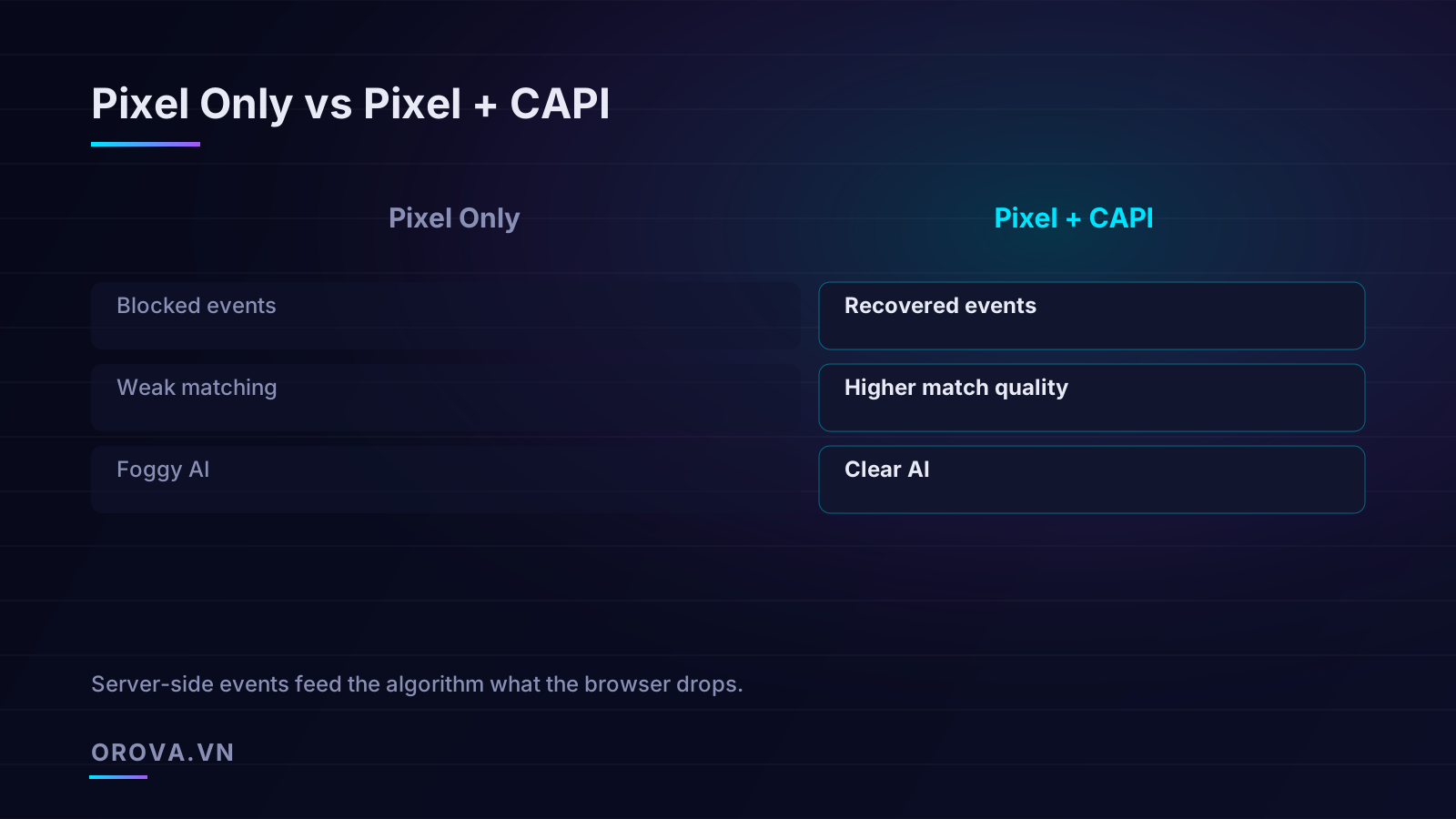
A common misunderstanding is that CAPI replaces the pixel. It does not, and you should not remove the pixel when you add CAPI. The two are complementary. The browser pixel captures rich signals the server often lacks — the full sequence of pageviews, the referrer chain, the browser-side click cookie, the granular on-site behavior that helps Meta model intent. The server captures the events the browser misses and the deep-funnel conversions (like a refunded order, a subscription renewal, or a sale closed days later by phone) the browser will never see at all.
Run both, and you get the union of two coverage maps rather than the intersection. The browser fills in behavioral richness; the server fills in the gaps and guarantees the money events. That redundancy is the entire point. Which raises the obvious question: if you send the same purchase from both the browser and the server, does Meta count it twice?
Deduplication: sending the same event twice, on purpose
No — provided you set it up correctly. Meta deduplicates overlapping events using two fields it expects you to send from both sources: an event ID and an event name. When the browser pixel and the server both report a "Purchase" carrying the same unique event ID, Meta recognizes them as one event and keeps only one. If only one source reports it — say the browser was blocked but the server got through — Meta keeps that one. You get full coverage without inflation.
The mechanics are straightforward but unforgiving of sloppiness. For every conversion, generate a single unique identifier (an order ID works perfectly, or a generated UUID) and attach it to both the browser event and the server event for that same conversion. The event names must also match exactly — "Purchase" in the browser and "Purchase" on the server, not "Purchase" and "purchase" and not "Purchase" and "CompletePurchase."
The most common CAPI failure is not under-counting. It is double-counting from a botched event ID, which silently inflates your reported conversions, corrupts your cost-per-acquisition, and quietly trains the algorithm on a lie.
Get deduplication wrong and you create a worse problem than the one you set out to solve. If the IDs do not line up, Meta counts both the browser and the server purchase, your dashboard shows roughly double the real conversions, your reported cost per purchase looks suspiciously great, and you start scaling spend against phantom results. This is exactly the kind of data-integrity trap that makes downstream automation dangerous: any optimization system, human or AI, is only as trustworthy as the numbers feeding it. We cover that dependency in more depth in our explainer on what an AI ads agent actually does — the short version is that clean conversion data is the non-negotiable input, and CAPI is how you produce it.
A practical deduplication checklist
- Generate one unique event ID per conversion and reuse it across browser and server.
- Use the order ID as that event ID where possible — it is unique, stable, and already in your system.
- Keep event names byte-for-byte identical across both channels.
- Send the server event close in time to the browser event; Meta's dedup window is generous but not infinite.
- Verify in the Events Manager "Test Events" tool that overlapping events show as deduplicated, not as two separate counts.
- Audit weekly during the first month — dedup bugs are subtle and tend to surface only at scale.
Event Match Quality: the metric that decides everything
Recovering lost events is only half the win. The other half — and arguably the more important half — is Event Match Quality, or EMQ. This is a score Meta assigns to your events, on a scale from roughly 0 to 10, reflecting how confidently it can tie each event to a real person in its system. A recovered event that cannot be matched to anyone is barely better than no event at all. Matching is what turns a raw conversion into a usable training signal.
Here is the leverage CAPI gives you that the browser never could. The browser pixel is limited to the identifiers available in the browser — mostly cookies and whatever the user agent leaks. Your server holds far more, and far stronger, identifiers: the customer's email address, their phone number, their name, their physical address, all collected legitimately during checkout. When you pass these to Meta — always hashed with SHA-256 before they ever leave your server, so Meta receives an irreversible fingerprint and never the raw value — your match rate climbs dramatically.
Which identifiers move the needle
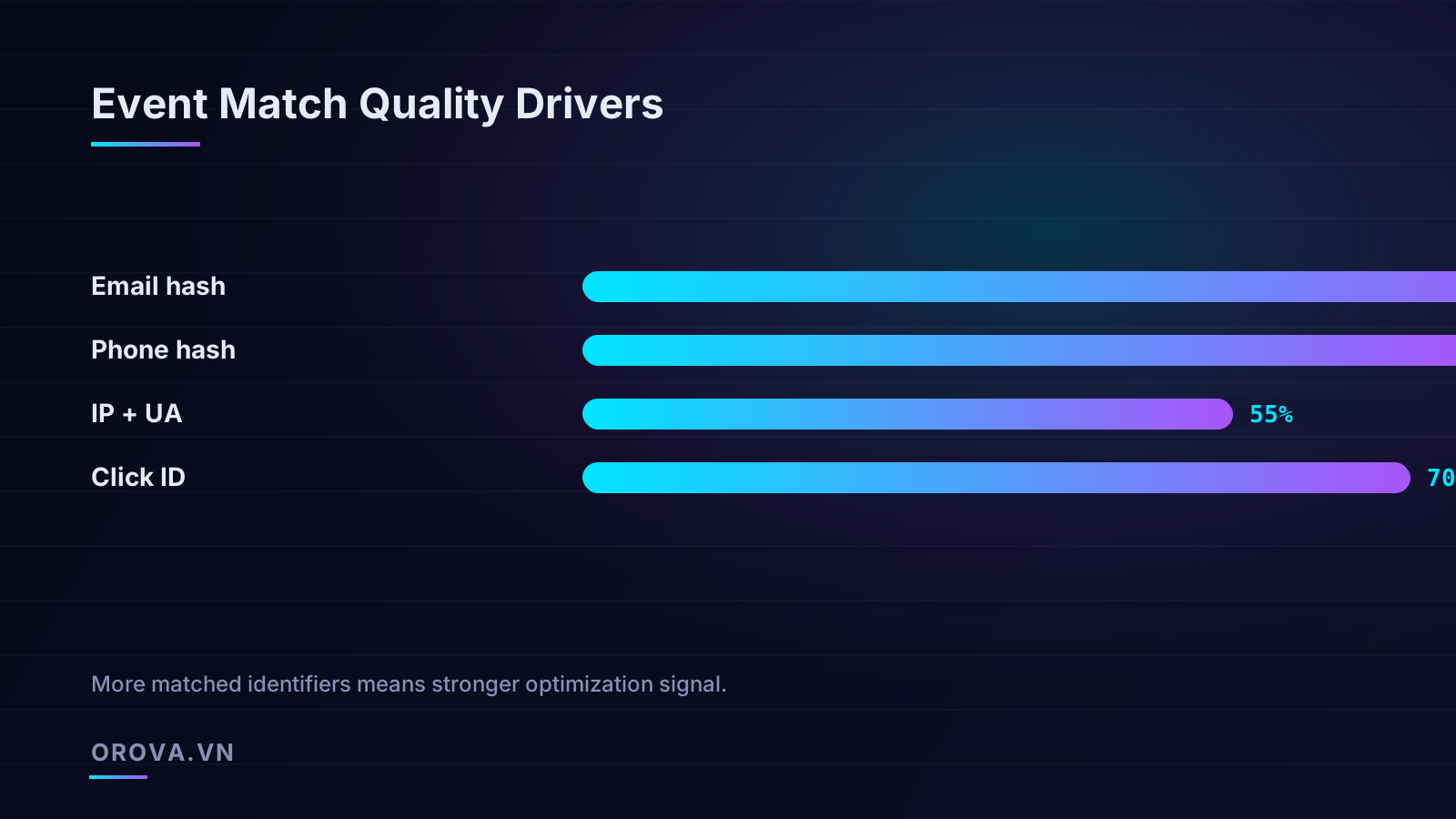
Not all identifiers carry equal weight. Based on how reliably each one resolves to a single person, the rough hierarchy looks like this:
- Hashed email (highest impact). Email is the closest thing to a universal personal identifier online. Most people use one email for their Meta account and their shopping, so a hashed email match is the strongest single signal you can send. If you optimize for only one thing, pass hashed email on every server event.
- Hashed phone number. Nearly as strong as email and often present at checkout, especially for markets where phone is the primary identifier. Send it in the international format (with country code) before hashing for the best results.
- Click ID (fbc) and browser ID (fbp). These come from Meta's own cookies and are exact when present. The click ID in particular directly ties the conversion to the specific ad click that drove it, which is gold for attribution. Capture them on the landing page and store them with the order so your server can include them later.
- IP address and user agent. The weakest of the common signals, because many people share an IP (households, offices, mobile carriers) and user agents are far from unique. Useful as a supporting signal, never as your primary one.
The compounding effect matters: each additional matched identifier raises the probability of a confident match, and they reinforce one another. An event carrying hashed email and hashed phone and a click ID will match far more reliably than any one of them alone. This is why a well-built server-side setup, with access to your full customer record, can push EMQ well above what a browser-only pixel could ever reach. Aim to keep your core conversion events scoring 7 or higher; below 5, you are leaving meaningful optimization power on the table.
Why clean data is the prerequisite for any optimization
Step back and consider what Meta's delivery system actually is: a machine-learning model that decides, in real time, which person to show your ad to and how much to bid for that impression. It makes those decisions by learning the patterns that connect impressions to conversions. The quality of those decisions is bounded — hard-bounded — by the quality of the conversion data you feed it.
Think about what happens with a leaky, browser-only pixel. The model is being told that certain conversions happened and others did not, but the truth is that many of the "did not" cases simply went unreported. The model dutifully learns from this distorted picture. It concludes that audiences heavy with ad-blocker users or Safari users do not convert, when in fact they convert fine — their conversions just never got reported. So it stops serving them. It optimizes away from real, valuable customers because the data lied to it. You pay for that misallocation on every single day of the campaign.
Garbage in, garbage out is not a cliché in performance marketing — it is the literal mechanism by which a leaky pixel quietly bleeds your budget into the wrong audiences.
Now feed the same model clean, deduplicated, high-EMQ data through CAPI. It sees the real conversion landscape. It learns that those Safari users do convert, finds more like them, and bids appropriately. Reported conversions rise — partly because you are recovering events that were always happening, and partly because the optimizer is genuinely making better decisions. Advertisers who implement CAPI properly commonly see reported conversions climb and cost per acquisition fall in the weeks after launch, and the two effects reinforce each other.
The dependency chain, in order
- Capture every conversion — server-side, beyond the reach of blockers and cookie limits.
- Match it to a person — with strong hashed identifiers, driving high EMQ.
- Deduplicate cleanly — so counts are accurate, never inflated.
- Feed the optimizer — which now learns from reality instead of a distortion.
- Optimize and automate — confident that decisions rest on solid ground.
Each step depends on the one before it. You cannot leapfrog to sophisticated automation while step one is broken. This is the uncomfortable truth for advertisers chasing AI-driven optimization: the most advanced bidding strategy or autonomous optimization agent in the world is worthless if it is reasoning over conversion data that is 25% missing and partly double-counted. The fancy layer on top can only amplify the quality of the foundation underneath. CAPI is that foundation.
Common mistakes that quietly undermine CAPI
Implementing CAPI is not hard, but several recurring mistakes turn a powerful tool into a source of bad data. Watch for these:
- Sending raw PII instead of hashed. Email, phone, and name must be SHA-256 hashed before they leave your server. Sending them in the clear is both a privacy violation and, in practice, a setup that Meta will reject. Most SDKs hash automatically, but verify it — do not assume.
- Inconsistent normalization before hashing. The hash of "Jane@Email.com " and "jane@email.com" are completely different strings. Lowercase, trim whitespace, and normalize phone numbers to international format before hashing, on both the browser and server sides, or your matches will silently fail.
- Mismatched event IDs. The single most damaging error, as covered above. Test it explicitly and re-test after any deploy that touches checkout.
- Dropping the click ID. Many setups never capture
fbcon the landing page, so the server event arrives without the strongest attribution link. Grab it on arrival, persist it with the session or order, and include it on the server event. - Firing server events for the wrong moments. Send the conversion when it is genuinely confirmed — payment captured, not merely "checkout button clicked." Premature events teach the model to value abandoned carts.
- Set it and forget it. EMQ and event coverage drift as your site, checkout flow, and consent setup change. Check the Events Manager diagnostics monthly. A CAPI integration that worked at launch can quietly degrade.
Consent and compliance are part of the build, not an afterthought
Server-side tracking does not exempt you from privacy law. If anything, sending richer personal data to Meta raises the bar. Respect user consent: if a visitor declines tracking, your server should not forward their personal identifiers. Honor regional regimes — GDPR in Europe, similar frameworks elsewhere — and use Meta's consent and limited-data-use signals where they apply. Done right, CAPI and compliance coexist comfortably; the hashing requirement itself is part of a privacy-preserving design. But treat consent handling as a first-class part of the implementation, not a checkbox you bolt on after launch.
What good looks like, six weeks in
If your CAPI setup is healthy, here is the picture you should see roughly a month and a half after launch. Reported conversions in Events Manager track much more closely to your backend numbers — the double-digit gap has shrunk to single digits or less. Your core conversion events score 7 or higher on Event Match Quality, with hashed email and phone passing reliably. The "Test Events" tool shows browser and server events deduplicating cleanly, with no inflation. Your cost per acquisition has stabilized or improved, and the optimizer is finding pockets of audience it previously ignored.
Just as important is what you should not see: no sudden doubling of conversions (that is a dedup bug), no flood of unmatched events (that is a hashing or identifier problem), no events firing for unconfirmed actions. The diagnostics panel in Events Manager is your friend here — Meta surfaces match quality, dedup status, and missing-parameter warnings directly, and reading it weekly during ramp-up will catch problems before they cost you.
Get to this state and you have done the unglamorous, foundational work that every layer of optimization above it depends on. The targeting, the creative testing, the bidding strategy, the automation — all of it now rests on conversion data that reflects reality. That is the whole reason CAPI has moved from optional to non-negotiable. It is not a measurement nicety. It is the prerequisite for spending your budget on people who actually buy.
Clean conversion data is exactly the foundation an AI optimizer needs to do its job well. Orova Ads is an AI agent that manages your paid campaigns across Google, Meta, and TikTok — it reads your performance data every day, recommends concrete optimizations, and executes them (budgets, bids, on/off, audiences) with human-in-the-loop approval and a full audit log of every change. Feed it the high-quality signal that the Conversions API recovers, and it has the clarity to make decisions you can trust. See how it works at orova.vn/ads.
Let an AI Agent handle your SEO
Orova plans, writes, optimizes, and tracks rankings on its own — you just read the results.
Try it free