
How to Measure Website Traffic: Tools and What Counts
People are already asking ChatGPT to recommend a tool, asking Perplexity to compare vendors, asking Gemini to explain something — and clicking through to sites like yours as a result. Those visits are real: real sessions, real time on page, sometimes real purchases. But if you try to measure website traffic in GA4 today, you won't find a single row that tells you this is happening.
The reason is simple: GA4's default traffic report was built before AI assistants existed, so it has no idea what to do with a click coming from one. Instead of showing up as "AI," these visits get dumped into vague buckets like Referral, Direct, or Unassigned — the same three buckets most business owners never bother opening. Plenty of teams look at those buckets, see nothing obvious, and conclude AI sends them zero visitors. The truth is their reports were simply never set up to show it.
This guide fixes that using tools already sitting inside your GA4 account, no extra software required. By the end, you'll know exactly which visits are coming from AI assistants, how to set up a clear "AI Search" view for them, and what to actually do with that information once you can see it.
How to Measure Website Traffic Properly
Measuring traffic sounds simple until two tools give you two numbers. Here is what each one counts.
Google Analytics 4 counts sessions from visitors whose browser ran your tracking code. It reports where they came from and what they did, and it undercounts by 10–30% because of ad blockers and cookie refusals.
Google Search Console counts only clicks from Google search, but counts them accurately, because Google records them at its own end rather than yours.
Which metrics matter: users rather than sessions for audience size, traffic by channel for where to invest, and landing pages for what is actually working. Bounce rate and time on page are the two most over-read numbers in analytics.
Use both, for different jobs: Search Console to know whether search is working, GA4 to know what happened after arrival.
What is newly difficult is traffic from AI answers — it often arrives with no referrer at all and lands in "direct". The rest of this article covers how to separate it out.
Where AI traffic hides in GA4 by default
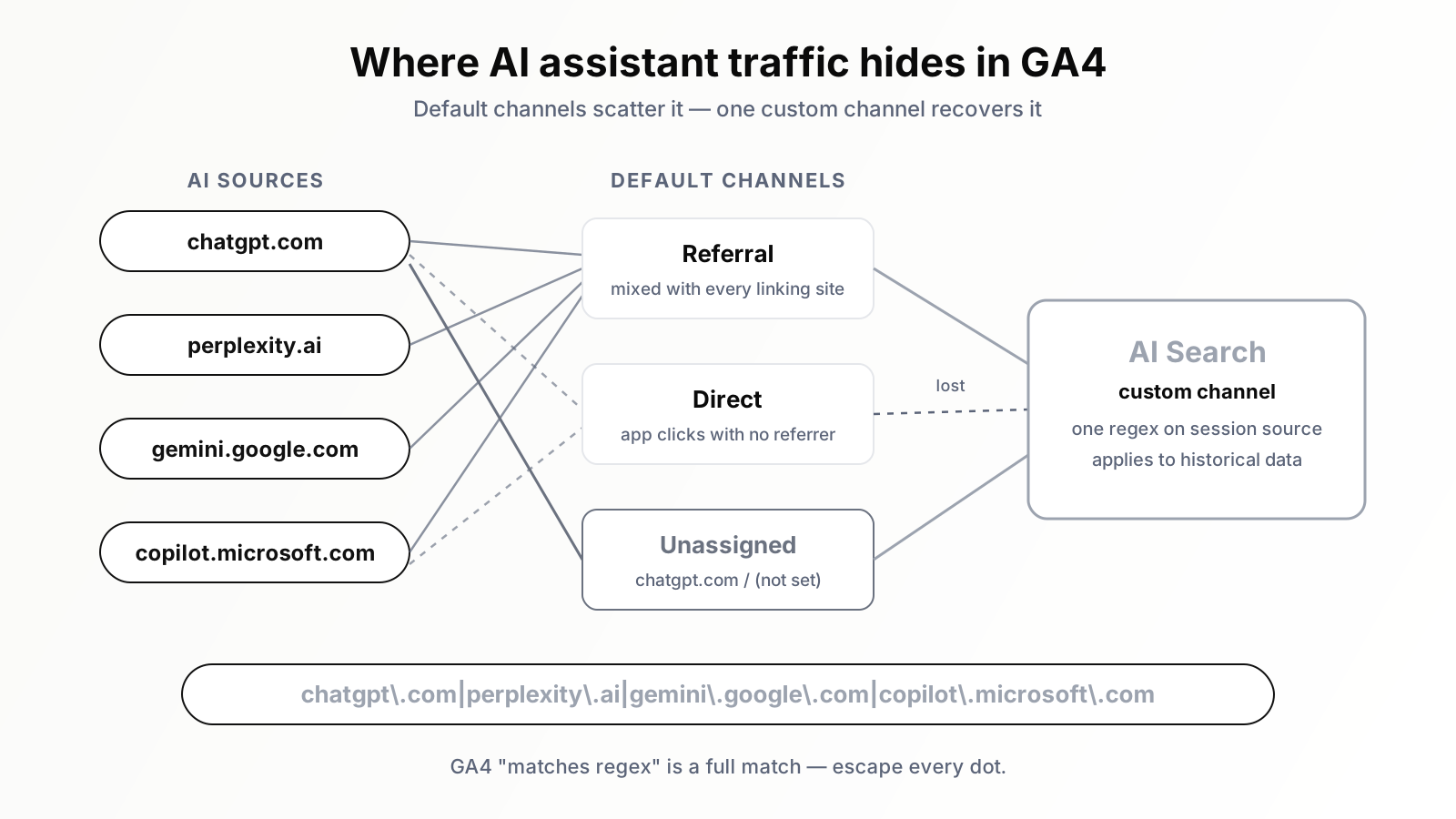
GA4 assigns every session to a channel in the default channel group using a fixed set of rules that evaluate the session's source and medium. Those rules know about organic search, paid search, social, email, and display. They know nothing about AI assistants, because the rule set predates them. So when a visit from an assistant arrives, it falls into whichever existing bucket its source and medium happen to resemble. In practice that means three places.
Referral. When someone clicks a citation inside the browser version of ChatGPT, Perplexity, Gemini, or Copilot, the click usually carries a referrer header. GA4 records the source as the assistant's domain and the medium as referral, and the default rules file it under the Referral channel — mixed in with every site that has ever linked to you. The data is there, but buried in a list nobody reads row by row.
Direct. A large share of assistant usage happens inside mobile and desktop apps rather than the browser. Clicks from apps frequently carry no referrer at all, and a session with no referrer and no campaign parameters is recorded as (direct) / (none). It lands in the Direct channel alongside bookmark visits, typed URLs, and everything else analytics cannot explain. This portion of AI traffic is genuinely unrecoverable in GA4 — hold that thought, because it shapes how you should read every number this setup produces.
Unassigned. The strangest bucket. When a session's source and medium combination matches none of the default rules, GA4 gives up and labels it Unassigned. A specific ChatGPT behaviour — covered below — produces exactly this kind of combination, which is why sites with growing ChatGPT traffic often see Unassigned creep upward and assume it is a tagging bug. It is not a bug. It is AI traffic wearing a disguise.
Before you build anything, run a two-minute diagnostic: in Reports, open Acquisition, then Traffic acquisition, switch the primary dimension to Session source / medium, and search "chatgpt", then "perplexity", "gemini", and "copilot". Most site owners are surprised the rows exist at all. This guide assumes your core measurement hygiene is already in order — if the property itself needs attention first, start with our guide to what SEOs should actually track in GA4 and come back.
The source list: which domains count as AI search
A channel definition is only as good as the source list behind it. Here are the four domains that belong in every AI Search channel, plus optional additions.
- chatgpt.com — by far the largest assistant referrer for most sites. Older sessions may show chat.openai.com, the domain ChatGPT used before its 2024 move; if you care about long historical comparisons, include both.
- perplexity.ai — the most search-like of the assistants and typically the most generous with citations. It passes a referrer reliably from its web product, which makes it the cleanest of the four to measure. Our breakdown of how Perplexity sends real, converting traffic makes the case in detail.
- gemini.google.com — Google's assistant, distinct from Google Search and from AI Overviews. Historical data may contain bard.google.com from the product's earlier branding. Note: this domain captures the Gemini app and web product only — not AI Overviews clicks, which arrive as ordinary Google organic (more on that later).
- copilot.microsoft.com — Microsoft's assistant. Copilot answers also surface inside Bing and Windows, and clicks from those surfaces arrive under Bing's domain, blended into your Bing traffic. Only the standalone Copilot product is separable by host.
Two more domains are worth considering, and I would call them optional rather than mandatory. claude.ai sends citation clicks when its web search features are in play, and you.com still appears in some industries. Decide from your own data, not anyone's published list: run the Traffic acquisition search for each candidate domain and add the ones that actually show rows. A channel definition stuffed with domains that never send you a session is clutter, not coverage. Revisit the list quarterly — new assistants launch and domains change.
The ChatGPT quirk that breaks naive setups
Here is the detail that separates a working setup from one that quietly undercounts: ChatGPT appends ?utm_source=chatgpt.com to many of the outbound links it presents. When a user clicks one of those links, GA4 sees an explicit campaign parameter and uses it, recording the session source as chatgpt.com regardless of whether a referrer header survived the journey.
In one way this is a gift: clicks from the ChatGPT apps that would otherwise have arrived referrer-less — and vanished into Direct — now carry an identifying parameter, making a slice of app traffic measurable. But the parameter comes alone: there is no accompanying utm_medium. GA4 records the medium for these sessions as "(not set)", and the resulting combination — source chatgpt.com, medium (not set) — matches none of the default channel rules. That session falls into Unassigned — and a naive condition built on the source/medium pair, or on medium alone, misses a substantial share of ChatGPT traffic.
The lesson is worth stating as a rule: build your AI Search condition on session source only. A source-based condition catches both populations — referrer-based sessions where the medium is referral, and parameter-based sessions where the medium is (not set) — without caring which path the click took. Perplexity, Gemini, and Copilot behave more conventionally: their web clicks pass a referrer and arrive as source / referral, so they would survive a medium-based condition — but a stricter rule has no benefit and a real cost, so match on source and move on.
One side effect: landing page URLs from ChatGPT traffic often carry ?utm_source=chatgpt.com in reports that include query strings — harmless, but those rows split from their clean counterparts, which matters for the landing page analysis below.
Step by step: building the AI Search custom channel group
Now the build itself. You need Editor or Administrator access on the GA4 property. The whole process takes under fifteen minutes.
Step 1 — Open channel group settings
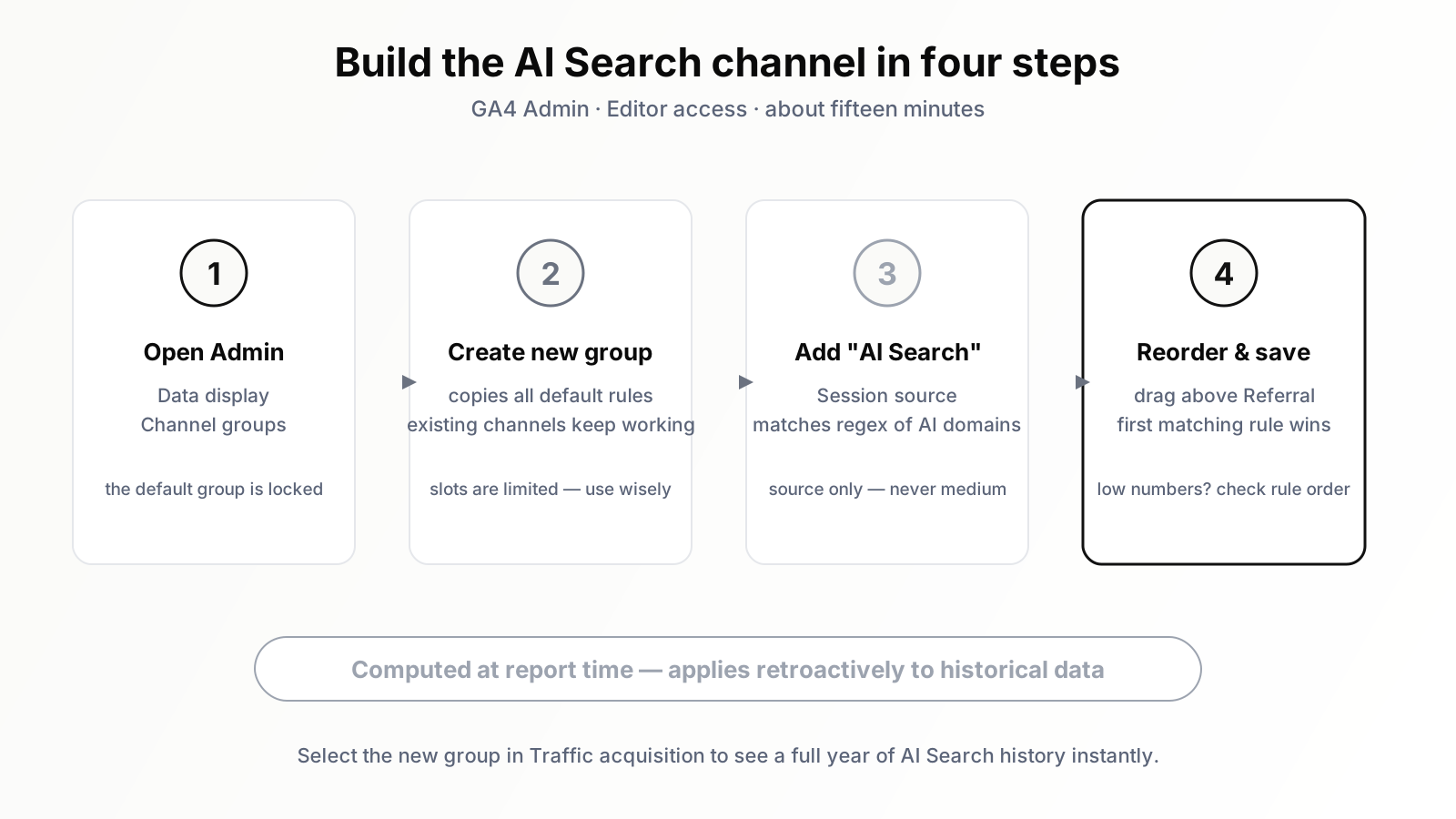
In GA4, click Admin (the gear icon, bottom left), then under Data display choose Channel groups. You cannot edit the default channel group — Google locks its definitions — which is exactly why custom channel groups exist.
Step 2 — Create a new channel group
Click Create new channel group. GA4 copies the entire default rule set into your new group as a starting point, so everything that already works — Organic Search, Paid Search, Email, and the rest — keeps working. Give it a name your team will recognise in a report dropdown, something like "Channels incl. AI Search". GA4 allows only a small number of custom channel groups per property, so treat the slots as scarce.
Step 3 — Add the AI Search channel with the regex condition
Inside the new group, click Add new channel and name it AI Search. For the condition, choose Session source, set the operator to matches regex, and enter:
chatgpt\.com|perplexity\.ai|gemini\.google\.com|copilot\.microsoft\.com
Three technical points here, and each one is a place where published tutorials get it wrong.
- GA4's "matches regex" is a full match, not a partial match. GA4 uses the RE2 regex engine, and in channel conditions the pattern must account for the entire value of the field. A pattern like "chatgpt" on its own will not match the source value "chatgpt.com", because it only covers part of the string. The pattern above works because each alternative is a complete domain exactly as GA4 records it in session source. If you ever see source values arriving with a subdomain prefix in your property — www.perplexity.ai, for instance — make the pattern tolerant by prepending an optional group: (.*\.)?(chatgpt\.com|perplexity\.ai|gemini\.google\.com|copilot\.microsoft\.com). Check your actual source values first.
- Escape the dots. In regex, an unescaped dot matches any character. Writing chatgpt.com instead of chatgpt\.com will still match the real domain, but it is sloppy in a full-match context and a bad habit anywhere precision matters. Escape every dot, every time.
- RE2 has no backreferences and no lookahead. If a clever pattern borrowed from a generic regex tutorial gets rejected or silently matches nothing, this is usually why. Keep it a plain alternation of escaped domains — boring regex is correct regex.
If you decided to include the optional domains, extend the alternation: append |claude\.ai or |you\.com inside the same pattern. For long historical continuity, append |chat\.openai\.com and |bard\.google\.com as well.
Step 4 — Reorder the channel, then save
Almost everyone misses this step. Channel rules are evaluated top to bottom, and the first match wins. Your new AI Search channel is appended at the bottom of the list, below Referral — so a session with source chatgpt.com and medium referral gets claimed by Referral before your rule is consulted. Drag AI Search up the list so it sits above Referral. Then save the group. If your AI Search channel ever reports suspiciously low numbers, rule order is the first thing to check.
Step 5 — Use it in reports, including on historical data
Custom channel groups do not replace the default in your standard reports; you select them. In Traffic acquisition, click the primary dimension dropdown — where it says "Session default channel group" — and switch it to the session-scoped version of your new group. Your AI Search row appears, alongside all the familiar channels.
And here is the property that makes this worth doing today rather than "once we have data": custom channel groups are applied retroactively. Unlike the default channel group, which reflects how sessions were classified as they were collected, a custom group is computed at the moment a report runs. Select your new group, set the date range to the past twelve months, and you get a year of AI Search history instantly — no waiting for data to accumulate under the new definition. For a traffic source this young, an immediate twelve-month baseline is the difference between a trend line and a guess.
Exploration reports: making the channel earn its keep
A channel row tells you volume. The interesting questions — is this traffic any good, where does it land, what does it do — live in Explorations.
In Explore, create a new Free form and import the dimensions Session source / medium and Landing page + query string, and the metrics Sessions, Engaged sessions, Engagement rate, Average engagement time per session, and your Key events. Add a filter: Session source matches regex, using the same pattern from your channel definition. (Explorations use the same RE2 full-match syntax — one pattern, maintained in two places.)
Start with Session source / medium as the row dimension. This view shows you the composition of your AI traffic: how much arrives as chatgpt.com / referral versus chatgpt.com / (not set), how Perplexity compares to Gemini, whether Copilot registers at all. The split between the referral and (not set) mediums for ChatGPT is also a rough sanity check that the parameter-tagged app traffic is being captured.
Then build the comparison that actually changes decisions: AI traffic versus organic search. Create two segments — a session segment where session source matches your AI regex, and a session segment for organic search — and place them side by side against the same metrics. You are looking for relative engagement rate, time on page, and conversion to key events. Some sites find AI sessions engage noticeably better, on the logic that an assistant's answer pre-qualifies the visitor before the click; others find AI visitors already got their answer in the assistant and bounce quickly. Both patterns show up in the wild, and the only version that matters is the one in your data. Whatever you find becomes your baseline for judging whether AI traffic deserves deliberate investment.
The landing page view: what assistants choose to cite
Switch the row dimension to Landing page + query string, keeping the AI filter, and you get something subtly more valuable than a traffic report: a citation report. Every landing page in this list is a page an AI assistant chose to reference in an answer, and a user found compelling enough to click. That is information no other report in your stack gives you directly.
Expect the pattern to differ from your organic landing pages. Assistants disproportionately cite deep, specific pages — comparison pages, how-to content, pages that answer one question thoroughly — and rarely send anyone to a homepage. Read it with two questions. First, what shape of content earns citations in your niche? Whatever is overrepresented is the shape to produce more of. Second, are these pages prepared to receive a visitor who arrives mid-journey? A page that earns assistant citations is functioning as a front door, and it deserves front-door treatment: a clear next step, internal links to commercial pages, no dead ends. And as noted earlier, ChatGPT's appended parameter splits some URLs into tagged and untagged rows in this view, so mentally merge them.
What this setup cannot show you
This is the section most tutorials omit. The setup above is the best available in GA4, and it still has three hard limits — state them plainly to your stakeholders before someone else discovers them for you.
First: AI Overviews clicks are invisible inside organic. When Google shows an AI Overview at the top of a results page and a user clicks one of its cited links, that click is recorded in GA4 as source google, medium organic — identical to a classic blue-link click. There is no parameter, no referrer variation, no dimension anywhere in GA4 that separates the two. Your AI Search channel will never contain AI Overviews traffic, and anyone who claims their GA4 segment isolates it is overpromising. The influence of AI Overviews has to be inferred from other evidence — position-versus-CTR anomalies, query-level patterns — a different methodology we cover in our complete guide to AI Overviews.
Second: your number is a floor, not a total. Clicks from assistant apps that carry neither a referrer nor a tagging parameter land in Direct, indistinguishable from a typed URL, and no configuration recovers them. The dark fraction's size depends on assistant, platform, and privacy settings, and shifts as products update — nobody can honestly give you a correction multiplier. The right posture is to treat the AI Search channel as a lower bound and to lean on its trend rather than its level. If the floor is rising steadily, the building is rising too.
Third: Search Console will not rescue you. Google Search Console does not break out AI Overviews impressions or clicks either — they are folded into the standard Web search type with everything else. GSC remains essential for the query-level half of this picture, but it does not contain a hidden AI report. And beyond all three limits sits the influence you will never see in any analytics tool: the user who asked an assistant, read an answer your content shaped, and never clicked anything. That exposure is real even when the session is not — the same logic explored in why zero-click search doesn't mean zero value.
What to do with the data once it flows
Configuration without a routine is decoration. Four practices turn this channel into something that changes decisions.
Set the baseline immediately. Because the group is retroactive, you can compute today what share of your sessions AI Search represented over the past quarter and the past year. For most sites that share is currently small — low single digits is typical. The point of the baseline is not the size; it is that growth becomes provable. "AI Search went from under one percent of sessions to several percent in two quarters" is a sentence that moves strategy discussions, and you can only say it if you measured the starting point.
Review weekly, judge monthly. AI referral volume is lumpy — a single citation in a popular answer can spike a day — so look weekly, but judge the trend on a four-week basis. Remember that you are watching a floor: consistent direction matters far more than any individual number.
Annotate everything you change. GA4 now supports annotations directly on reports, and this channel is exactly where they pay off. Published a cluster of comparison pages? Annotate it. Restructured content to answer questions more directly? Annotate it. Changed how AI crawlers access your site? Annotate that too — our guide to GPTBot, ClaudeBot and PerplexityBot crawling covers that half of the pipeline. Assistant citation behaviour shifts gradually, and in six months you will not remember what you changed in which week unless the chart itself tells you.
Feed the citation report back into content planning. The landing page exploration is a standing answer to "what do assistants cite from us?" Put it in front of whoever plans content, monthly. The pages earning citations define a template; the commercial pages earning none define the gap. And when you want a permanent home for all of this rather than an exploration you rebuild, we cover assembling a standing dashboard for tracking AI referrals separately.
Thirty minutes that put you ahead of the curve
None of this is glamorous work: one regex, one channel group, one exploration, one recurring calendar slot. But the gap between teams that can answer "what is AI search doing for us?" with a chart and teams that answer with a shrug is exactly this configuration. The traffic is already in your property, mislabeled. Half an hour of setup relabels a year of history and every session from here forward.
If you would rather not maintain source lists and regex by hand, this is work an SEO platform should simply absorb: Orova tracks AI assistant referrals and the pages they cite automatically, so the measurement runs whether or not anyone remembers the calendar slot. Either way — automated or hand-built — measure it. The assistants are already sending the traffic; the only question is whether your analytics admits it.
Let Someone Else Watch This For You
Doing this properly by hand means going through GA4's settings, entering the right sources one by one, testing that they actually match, then checking back regularly to make sure nothing new slips through unnoticed. It works, but it takes real time to set up and even more time to maintain as new AI tools keep showing up.
If that's more than you want to manage yourself, Orova Insight is built to handle this kind of tracking automatically, so you get the visibility without doing the setup work every time something changes. If you'd rather see your AI traffic without touching a single setting, it's worth a look.
Build your reporting with Orova Insight
Pull data from every platform into one dashboard. Ask in plain language and let the AI draw the chart.
Explore Orova Insight