
Dayparting and Seasonality Adjustment: A Practical Guide

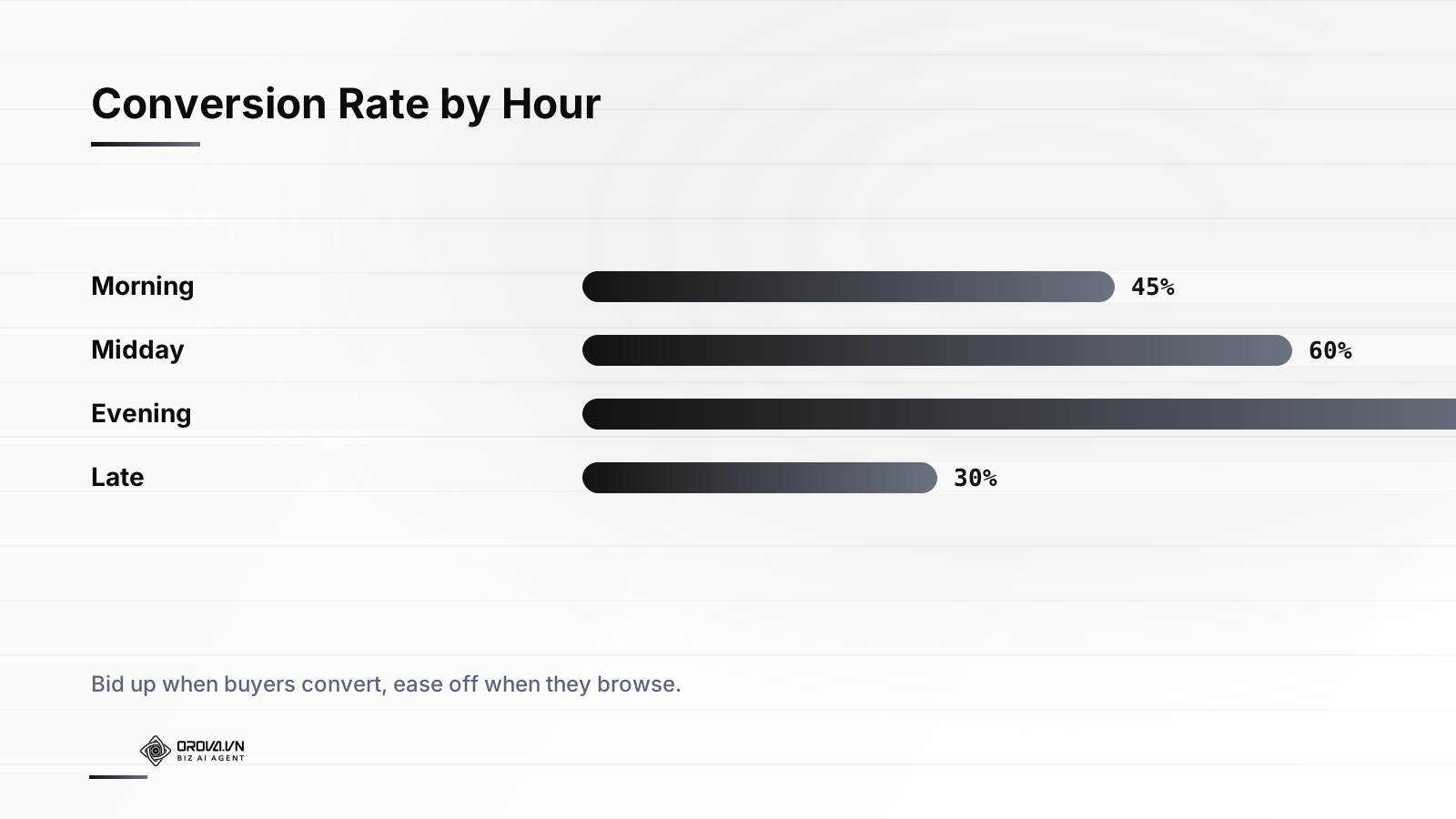
A pet-supply retailer we worked with was convinced their Google Search account had hit a ceiling. Same budget, same creative, same bids for eleven straight months, and a cost per acquisition that refused to budge below $42. Then someone pulled a simple report: conversions by hour of day. It turned out that 38% of their orders landed between 7pm and 11pm, while the 9am-to-noon block — where roughly a third of the daily budget was being spent — produced conversions at less than half the rate. They had been pouring money into the part of the day when people were researching at work and starving the window when those same people actually pulled out a credit card at home. No new ad copy, no new landing page, no bigger budget. Just moving spend to when it converted dropped their CPA to $31 inside three weeks.
That gap between when you spend and when buyers convert is the single most overlooked lever in paid media. Demand is not a flat line. It rises and falls across the year, across the days of the week, and across the hours of a single day, and the platforms will happily spend your money evenly against a pattern that is anything but even. This article is about reading those patterns — seasonality at the macro level and dayparting at the micro level — and then aligning budget and bids so your money shows up when it pays.
Why demand is never flat
Every account has rhythm. Some of it is obvious: a ski-equipment store sells more in November than in July, a tax-software company lives and dies by April, a florist's entire year can hinge on two weeks around Valentine's Day and Mother's Day. But the more useful rhythms are the ones that hide in plain sight because they repeat so reliably that nobody questions the flat spend running against them.
There are three layers worth separating, because they behave differently and you respond to each one differently.
Annual and seasonal cycles
This is the slow wave — the macro demand curve that plays out over weeks and months. Retail has its Q4 ramp into Black Friday and the holidays. B2B software softens through summer and the last two weeks of December, then surges in January as new budgets unlock. Travel books in waves tied to holidays and school calendars. Even categories that feel "always on," like insurance or legal services, have measurable swells — people shop for car insurance when their renewal arrives, and renewals cluster.
The mistake here is treating the seasonal peak as a single day to react to. By the time Black Friday traffic is flooding in, the auction is already at its most expensive and your competitors have already trained their campaigns. The work happens in the weeks before.
Weekly cycles
The day-of-week pattern is the most consistent signal most accounts have, and it is shockingly stable month over month. A B2B lead-gen account will typically convert hardest Tuesday through Thursday and fall off a cliff on weekends, when decision-makers are not at their desks. A direct-to-consumer brand often sees the opposite — strong Saturday and Sunday browsing that converts because people have time to shop. Food delivery peaks Friday and Saturday nights. Mortgage refinance inquiries cluster around the start of the week.
You can usually spot a clean weekly pattern with as little as four to six weeks of conversion data, and it rarely lies.
Hour-of-day cycles (dayparting)
The finest grain is the hour. This is where "dayparting" lives — the practice of dividing the 24-hour clock into parts and treating them differently. The pet retailer above is a textbook case: research happens during the workday, purchases happen in the evening. A roadside-assistance or emergency-locksmith advertiser sees the inverse, with conversion intent spiking late at night when something has gone wrong. A coffee subscription might convert in a tight morning window. The shape is entirely category-specific, which is exactly why generic advice is useless and your own data is gold.
The goal is never to advertise less. It is to advertise proportionally — to put each dollar where the conversion rate justifies it, and to pull dollars out of the hours where you are paying for browsing.
Reading your own demand curve
Before you touch a single bid, you need to know your real pattern, and you need to read it correctly. This is where most dayparting projects go wrong: people look at clicks or impressions instead of conversions, and they end up optimizing for the hours when traffic is cheap rather than the hours when it pays.
Pull the right report
In Google Ads, the segment you want is "Day & hour" or the "Hour of day" and "Day of week" views under the campaign or ad-group level. In Meta, you can break results down by time of day in Ads Manager, with the important caveat that Meta reports time in the ad account's timezone, not the viewer's local time — a trap that ruins a lot of analysis. In TikTok, the same kind of breakdown is available, and the platform skews so heavily toward evening and late-night usage that the curve is often dramatic.
Look at three metrics together for each hour and each weekday:
- Conversion rate — conversions divided by clicks. This tells you the quality of intent in that window.
- Cost per conversion — what you actually pay to acquire in that window, which blends conversion rate with how expensive the auction is at that time.
- Conversion volume — the raw count, so you do not over-index on a window with a great rate but almost no traffic.
Get enough data, and the right kind
A single week of data can be misleading — a holiday, an outage, or one large order can warp the picture. Aim for four to eight weeks at minimum, and if your conversions are sparse (say, fewer than a few hundred per month), widen the buckets. Instead of 24 individual hours, group into four or six dayparts: early morning, daytime, evening, late night. Coarser buckets are statistically safer when volume is thin, and they are usually all you need to act on.
Also be honest about your conversion lag. If your average customer clicks an ad at 2pm but does not buy until 9pm that evening, a naive hour-of-day report attributes that conversion to the click hour, not the purchase hour, depending on your attribution setup. For considered purchases with a long path, dayparting the click time can actually mislead you. The longer the consideration window, the more you should lean on day-of-week patterns and seasonal pre-loading rather than aggressive hour-by-hour cuts.
From insight to action: bids, budgets, and multipliers
Knowing your curve is half the job. The other half is choosing the right instrument to act on it, because there are several and they do very different things.
Bid adjustments versus ad scheduling
The classic dayparting tool is the ad schedule with bid adjustments. You define time blocks and apply a percentage modifier — for example, +25% on weekday evenings, -40% during the dead late-night hours. This keeps the campaign technically running at all times but changes how aggressively you compete. The alternative, hard scheduling (turning ads off entirely outside chosen hours), is blunter and riskier: it surrenders the long tail of conversions that trickle in during off-peak windows and can amputate volume you did not realize you needed.
As a rule, prefer bid modifiers over hard on/off scheduling. Reducing a bid by 50% during a weak window still lets a genuinely high-intent searcher convert if they happen to be there; switching the campaign off guarantees you miss them. Reserve hard scheduling for cases where serving at certain times is actively harmful — a B2B form that nobody staffs on weekends, a delivery service that physically cannot fulfill after midnight.
The smart-bidding complication
Here is the wrinkle that trips up experienced advertisers: if you are running automated bidding strategies — Target CPA, Target ROAS, Maximize Conversions — Google ignores manual bid adjustments for time of day, because the algorithm is already factoring time-of-day signals into every individual auction bid. Stacking a manual +30% evening modifier on top of Target ROAS does nothing useful and can confuse your own analysis.
So your lever depends on your bidding model:
- Manual or enhanced CPC: bid adjustments by hour and day are your primary tool, and they work directly.
- Smart bidding (tCPA/tROAS): the algorithm handles intraday timing, so you act through budget and through your targets instead. You can lower a Target CPA for high-converting windows to push the system to compete harder, or use seasonality adjustments for known short-term spikes.
- Either model: budget allocation across the week and across the season is always in your hands.
Use seasonality adjustments for known spikes
Google Ads has a specific feature — seasonality adjustments — built for short, predictable events like a one-day flash sale or a holiday where you expect conversion rates to jump. You tell the system "expect conversion rate to be +40% for these 36 hours," and the smart-bidding model adjusts in advance rather than scrambling to learn the spike in real time. This is not for slow seasonal waves; it is for sharp, bounded events of a few hours to about a week. Used correctly, it prevents the algorithm from under-bidding at the exact moment demand peaks.
Pre-loading budget before the peak
The most expensive seasonality mistake is waiting until demand arrives to prepare for it. Smart-bidding systems and the auction itself have inertia, and that inertia works against latecomers in three ways.
The auction gets crowded exactly when you need it
When everyone in your category floods in for Black Friday, CPCs and CPMs spike. If you ramp your budget on the day, you are buying at the peak of the cost curve alongside every competitor. Advertisers who started widening their footprint two to four weeks earlier captured cheaper inventory, built up conversion data while costs were lower, and entered the peak with momentum.
Algorithms need a runway
This is the subtle one. Automated bidding learns from recent conversion patterns. If you dramatically raise a budget the morning of a big sale, the system has no learned behavior for spending that much at that efficiency, and it may either underspend cautiously or overspend wildly while it recalibrates. Ramping budgets gradually in the days before — and using a seasonality adjustment to telegraph the coming spike — gives the algorithm a runway so it is already operating near your target efficiency when the wave hits.
Demand often leads the transaction
People research before they buy. Holiday gift shoppers start browsing well before they purchase; the searches that convert in late November began as awareness clicks in early November. If you only show up once purchase intent is white-hot, you are competing for bottom-funnel clicks at premium prices instead of having captured those users cheaply on the way up. Pre-loading budget is partly about being present during the consideration build-up, not just the spending moment.
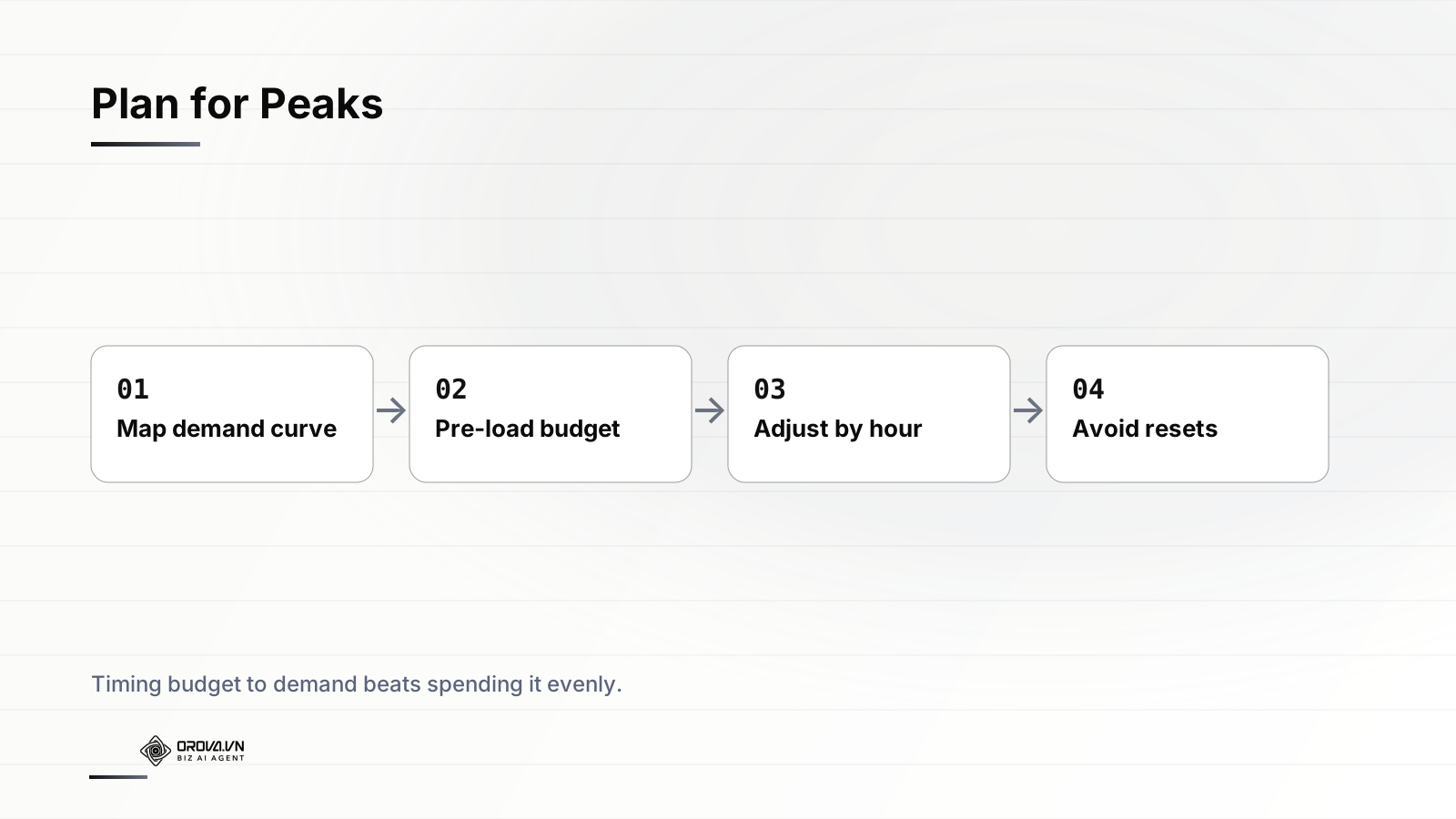
A practical pre-load sequence for a known seasonal peak looks like this:
- Three to four weeks out: confirm tracking is airtight, expand budgets modestly, and let smart bidding accumulate data at the new spend level.
- One to two weeks out: step budgets up again toward peak levels so the algorithm is comfortable spending at scale before the rush.
- The peak window itself: apply a seasonality adjustment for the sharp spike, monitor pacing closely, and resist the urge to make large mid-flight changes.
- The wind-down: taper budgets back down gradually rather than slamming them off, which protects learning and avoids a jarring efficiency drop.
The thing nobody warns you about: learning resets
Every change you make to a smart-bidding campaign carries a hidden tax. Large edits to budget, target CPA or ROAS, or campaign structure can trigger or extend the learning period, during which performance is volatile and often worse while the algorithm re-stabilizes. The cruel irony of seasonality is that the moments you most want to adjust — the run-up to a peak — are exactly the moments when a botched adjustment can knock a campaign into a learning reset right before the most valuable traffic of the year.
This is why how you adjust matters as much as the adjustment itself.
Make changes gradually, not violently
A common guideline is to avoid changing budget or target by more than roughly 20% in a single step, and to space steps out by enough time for the system to absorb them — typically a few days. Doubling a budget overnight is far more likely to destabilize bidding than two or three 20% steps over a week, even though the end state is the same. The same logic applies to targets: nudge a Target CPA down toward an aggressive peak goal in increments rather than one big cut.
Prefer the tools designed for temporary change
For short, sharp events, seasonality adjustments exist precisely so you can signal a temporary spike without permanently altering your targets and triggering a reset. Use them. Changing your steady-state Target ROAS for a three-day sale and then changing it back is a recipe for two learning disruptions instead of zero.
Don't undo your own work in a panic
Peaks are stressful, and the temptation to react hourly is strong. But every reactive edit resets the clock. If you have done the preparation — read the curve, pre-loaded budget, set the right adjustments — the discipline during the peak is to hold steady and let the system execute, intervening only for genuine problems like a tracking break or a runaway spend, not for normal hour-to-hour variance.
The advertisers who win seasonal peaks are rarely the ones making the most changes during the peak. They are the ones who made the right changes before it and then had the nerve to leave things alone.
Common mistakes that quietly cost you
After enough accounts, the same dayparting and seasonality errors show up again and again. Watch for these.
Optimizing on clicks instead of conversions
Cheap-click hours are seductive. Late night might offer the lowest CPC in your account, which makes the spend look efficient until you notice almost nobody buys then. Always anchor your time-of-day decisions to conversion rate and cost per conversion, never to click volume or click cost alone.
Ignoring timezone mismatches
If your ad account timezone differs from where your customers live — common for national or international advertisers — your "evening" in the report may be someone else's afternoon. Reconcile the reporting timezone against your actual buyer geography before drawing conclusions, especially on Meta, which reports in account time.
Slicing too thin on too little data
Twenty-four hourly buckets across seven days is 168 cells. If your account does a few hundred conversions a month, most of those cells are statistical noise. Trusting a "0% conversion rate" on a Tuesday at 3am that had eleven clicks all month is a great way to switch off a window that would have been fine. Aggregate until each bucket has enough conversions to mean something.
Treating the curve as permanent
Demand patterns drift. A back-to-school surge moves earlier as competitors push earlier. Remote work reshaped the daytime conversion curve for entire categories. Re-pull your reports quarterly at least, and after any major business or market change, rather than running a schedule you built two years ago on instinct.
Letting timing fix nothing else
Timing optimization is a multiplier on an offer and creative that already work. If your conversion rate is poor across every hour, dayparting will not save you — you have a different problem. Get the fundamentals right first, then use timing to squeeze more from them.
Where dayparting meets pacing
Seasonality and dayparting are really one half of a larger discipline; the other half is how your budget flows through time on a normal day. It is entirely possible to have a perfect day-of-week schedule and still waste money because your daily budget burns out by noon, missing the evening peak you carefully identified. Timing and pacing have to be solved together — there is no point bidding up for the 8pm window if the budget is already exhausted by then.
This is why the smartest approach treats the whole system as one: read the seasonal wave, respect the weekly rhythm, allocate within the day according to conversion rate, and make sure budget actually survives to the hours that matter. If you want to go deeper on the second half of that equation, our guide to keeping budget pacing on autopilot covers how to stop early burnout and end-of-period dumps from sabotaging an otherwise well-timed account.
Putting it together across platforms
Each platform expresses these levers a little differently. Google gives you ad schedules, bid adjustments, seasonality adjustments, and smart-bidding targets. Meta leans on campaign budget optimization and scheduled delivery, with the timezone caveat. TikTok offers dayparting and skews so far toward evening and weekend usage that the curve is usually steep and worth respecting. Managing all three by hand means three reports, three sets of edits, three places to forget to pre-load before a holiday. The operational overhead is the real reason most accounts never do this work consistently — not because it is hard to understand, but because it is tedious to maintain across channels, week after week.
Letting a system handle the timing for you
Everything in this article is doable manually. The problem is that doing it well requires pulling reports every week, re-checking curves every quarter, pre-loading budgets on a calendar, applying adjustments at the right increments, and resisting the urge to over-edit during peaks — across Google, Meta, and TikTok at once. Few teams sustain that. The patterns are stable, the actions are repeatable, and the discipline is hard for humans precisely because it is repetitive and time-sensitive. That combination — predictable rules, relentless cadence — is exactly what software does better than people.
This is what Orova Ads was built to handle. It is an AI agent that reads your campaign data every day across Google, Meta, and TikTok, spots the seasonal and hour-of-day patterns automatically, and recommends the budget shifts, bid multipliers, on/off schedules, and audience changes that align spend with when buyers actually convert — then executes the ones you approve, with human-in-the-loop sign-off and a full audit log of every change. You keep control of the strategy and the approvals; it handles the tedious, time-sensitive timing work that otherwise never gets done. See how Orova Ads manages timing for you.
Related reading: Smart Bidding + Broad Match Done Right
Orova Ads optimises campaigns for you
Connect Google, Meta and TikTok in one place. AI reads the numbers, proposes changes and executes under the rules you set.
Explore Orova Ads