
The Above-the-Fold Test: Five Seconds to Earn a Scroll
The term "above the fold" is older than the web by about a century. Newspapers were stacked folded on news-stands, so the only real estate that sold the paper was the top half of the front page — the part visible above the fold. Editors fought over it, because they understood something that has survived every change of medium since: the first thing a reader sees either earns the next moment of attention or loses all of it. On the web, the fold became the bottom edge of the first screen, and the fight became about what deserves to live in those first few hundred pixels.
Then responsive design arrived, screens fragmented into thousands of sizes, and a generation of designers declared the fold dead. "Everyone scrolls now," the argument went, "so the fold doesn't matter." Half of that sentence is true. People do scroll — scrolling is the cheapest gesture on a touchscreen and users do it almost reflexively. But they scroll selectively, and the decision about whether your page deserves a scroll is made in the first screen, in roughly the time it takes to read this sentence. The fold did not die. It turned from a layout boundary into a judgment window.
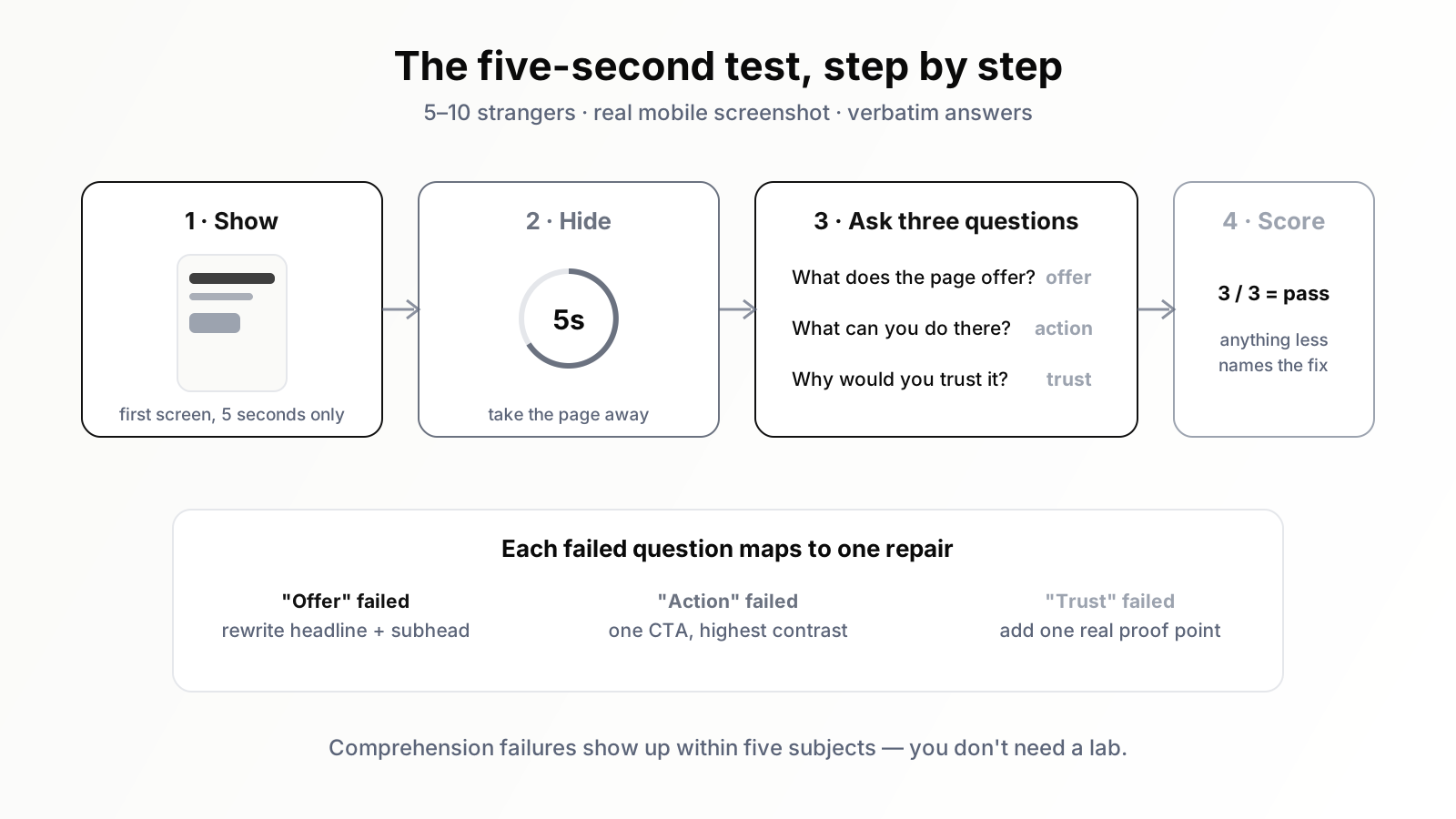
The above-the-fold test is simple: show a stranger your page's first screen for five seconds, then ask what the page is about, what they can do there, and why they should trust it. If they cannot answer all three, the visitors you worked so hard to earn are deciding against you before reading a single paragraph.
This article is the expert's version of that test: how to run it properly, what the first screen must contain, what it must not, and how to verify the results with data instead of taste. It assumes you already understand that the landing experience is where SEO traffic lives or dies — this is the chapter about the first five seconds of that experience.
Why five seconds is the right number
Five seconds is not a magic constant handed down from usability heaven; it is a practical approximation of how first impressions actually form. Research on web perception has shown repeatedly that users form aesthetic and credibility judgments about a page in well under a second, and that those snap judgments anchor everything that follows — a page judged ugly or untrustworthy in the first glance has to work uphill for the rest of the visit. Comprehension takes a little longer than aesthetics: a user needs a few seconds to parse a headline, register the layout, and locate the obvious action. Five seconds is roughly the budget within which a motivated visitor decides between three options: engage, scroll with skepticism, or hit back.
The back button is the detail that makes this commercially urgent for SEO traffic specifically. A visitor from search arrived with nine alternatives one tap away. They are not committed to you; they are sampling you. When your first screen fails the five-second judgment, they do not persevere the way a visitor who typed your URL might. They bounce back to the results and sample your competitor, and search engines watch that pattern of quick returns at scale. The first screen is therefore not just a conversion asset. It is part of how your page defends the ranking it won.
How to run the five-second test properly
The test is old usability practice and most teams have heard of it, but the execution is usually sloppy enough to invalidate the result. Here is the disciplined version.
Prepare the stimulus honestly
Take a screenshot of the page exactly as a first-time mobile visitor would see it — on a mid-range phone viewport, with the cookie banner, the announcement bar, and whatever else actually loads in the first second included. Testing a pristine desktop screenshot with the clutter removed is the most common way teams cheat without realising it. Your visitors do not see the design file. They see the artifact, with all its furniture.
Recruit strangers, not colleagues
Five to ten people who have never seen the page and do not work in your industry. Colleagues fail as subjects because they already know what the company does, so their brains autofill the gaps your real visitors fall into. Remote testing panels work; so does the unglamorous method of asking people in your extended network who match your audience roughly. Sample size purists will object that ten people is not statistics — correct, and irrelevant. You are not measuring a conversion rate; you are hunting for comprehension failures, and comprehension failures show up reliably within five subjects.
Ask the three questions, in order, without leading
Show the screenshot for five seconds, take it away, then ask: First, what does this company or page offer? Second, what could you do on that page if you wanted to act? Third, did anything make you trust or distrust it? Record verbatim answers. Do not explain, do not defend, do not say "well actually." The wince you feel when a subject misdescribes your product is the data.
Score it like an expert
A pass is not "they said something vaguely related." A pass on question one is the subject naming your actual category and audience — "it's some kind of accounting tool for small businesses" — not "it's a tech company." A pass on question two is them naming the primary action you intended. A pass on question three is at least one concrete trust element recalled: a number, a recognisable proof, a professional impression. Three out of three from most subjects means your fold works. Anything less tells you exactly which of the next sections to fix.
The five elements the first screen must contain
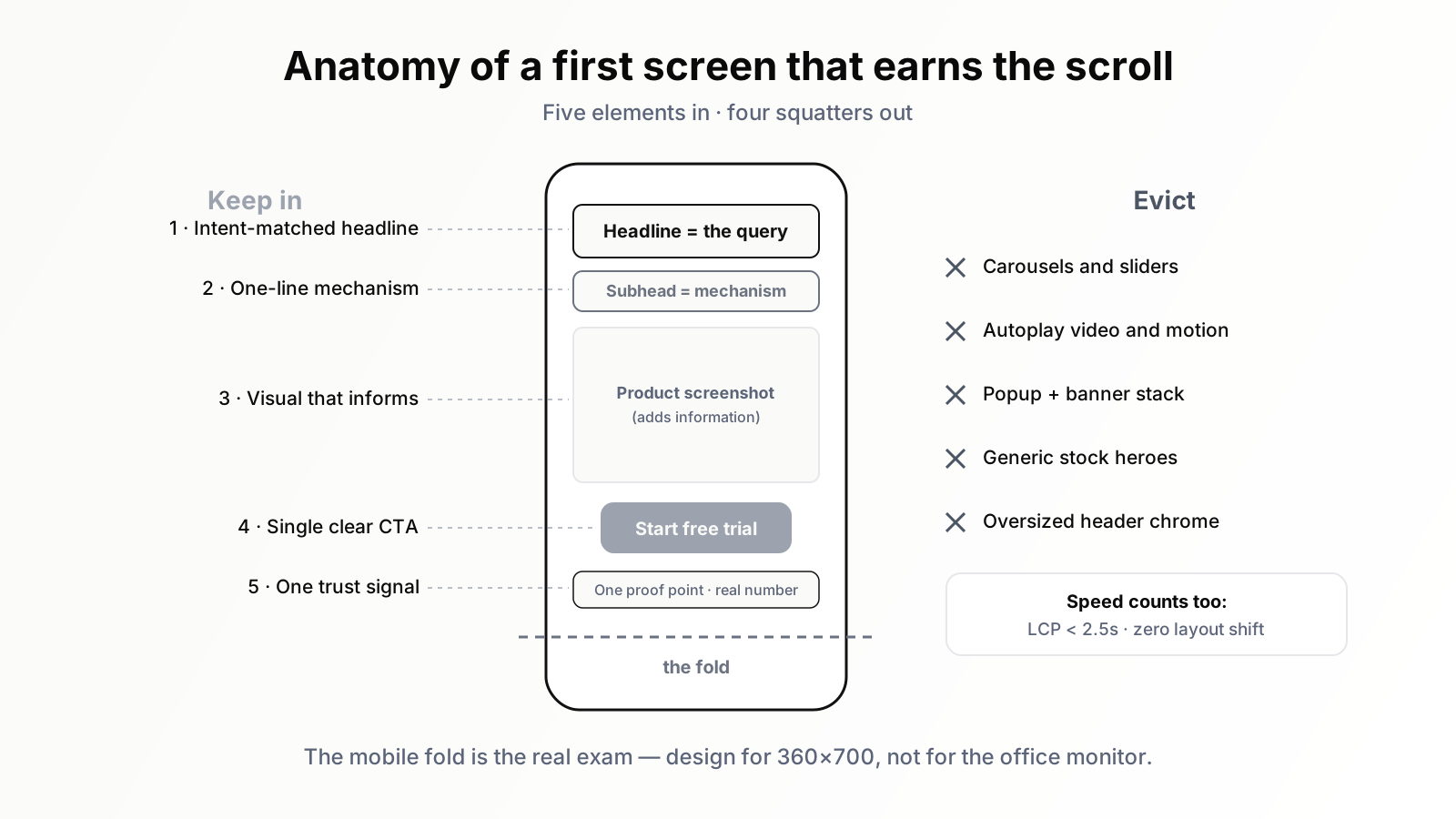
Decades of landing page practice converge on a short list of what belongs above the fold. Not all of it fits comfortably on a phone screen, which is precisely the discipline: the fold forces you to rank what matters.
One: a headline that finishes the visitor's thought
The headline's job is not to be clever and not to introduce your brand. Its job is message match: the visitor arrived from a query or a link with a thought already in motion, and the headline must continue that thought. If the query was "automate invoice reminders," a headline about "reimagining financial workflows" is a comprehension tax; a headline about getting invoices paid without chasing them is a continuation. For organic landing pages, pull the page's real queries from Search Console and read your headline against the top ten of them. The headline should feel like an answer to most. When the same page ranks for divergent intents, that is not a headline problem but a page-structure problem — one we dissected in the landing page autopsy.
Two: a subheadline that converts the claim into a mechanism
The headline claims a result; the subheadline explains the mechanism in one sentence — what the thing is and how it produces the result. "Get invoices paid faster" becomes credible when followed by "automatic, polite reminder sequences that escalate on your schedule." Specificity is the entire game here. A subheadline that could be pasted onto a competitor's site without anyone noticing is a placeholder, not a sentence.
Three: one primary call to action, visually unmistakable
One. The fold is the worst possible place to offer a menu of actions, because the visitor has not yet earned enough context to choose between them. Pick the action that matches the page's dominant intent, give it the highest visual contrast on the screen, and label it with a verb phrase that describes what happens — "Start free trial," "See pricing," "Get the checklist" — not "Submit" or "Learn more." Secondary actions can exist below, in lower-contrast clothing. If the action involves a form, every field you show above the fold raises the price of the click; forms are a deep enough swamp that we drained it separately in our anatomy of form friction.
Four: one proof element
A single, fast-to-parse trust signal: a customer count, a rating, a recognisable client set, a concrete outcome statistic you can actually defend. The mistake is stacking five proof elements until they crowd out the message — one strong signal beats a trust-badge flea market. The other mistake is fake specificity: invented numbers and stock-photo testimonials read as exactly what they are, and a fold that triggers the visitor's pattern-matching for "scammy" fails question three instantly.
Five: a visual that adds information
The hero visual should answer "what am I looking at?" faster than words can — a product screenshot for software, the actual thing for physical products, the actual result for services. The test for any hero visual: if a subject describes your page after five seconds and the visual contributed nothing to their description, it is decoration, and decoration on the most expensive screen real estate you own is negligence. Generic stock imagery of smiling teams pointing at laptops contributes negative information, because visitors have learned it signals a company with nothing real to show.
What to evict from the fold
Expertise above the fold is mostly subtraction. The list of common squatters, in rough order of damage:
Carousels and sliders. A rotating hero is five messages taking turns being missed. Click-through on slides beyond the first is famously negligible, the motion competes with the headline for attention, and the rotation timer guarantees that some visitors get a message you did not choose for them. If you have one strong message, the carousel hides it; if you have five weak ones, the carousel will not save them.
Autoplaying video and animation. Motion grabs the eye even when the value is elsewhere. Reserve it for the rare case where the motion itself is the proof — a product demonstration that shows the outcome in two seconds. Otherwise it is a tax on comprehension and on load time simultaneously.
The interruption stack. Cookie banner, newsletter modal, chat widget greeting, app install banner, notification permission prompt. Each one was added by a different owner with a defensible reason, and together they mean the visitor's first five seconds are spent closing things. Audit the stack as a whole and make someone accountable for its total weight. The fold cannot pass a five-second test if the visitor never sees it.
Oversized navigation and announcement clutter. On a phone, a fat header plus an announcement bar can eat a third of the viewport before the headline begins. Shrink the chrome; the message is the page.
The mobile fold is the real fold
Most organic traffic for most sites is now mobile, which means the fold that matters is around 360 by 700 logical pixels — brutally small. The desktop fold is the comfortable version of the exam; the phone fold is the real one. Three technical disciplines follow.
First, speed is part of the fold. The first screen does not exist until it renders. Largest Contentful Paint under two and a half seconds is the established good threshold, and on landing pages the LCP element is usually your hero image or headline — so the most important conversion asset and the most important performance metric are literally the same pixels. Compress the hero, preload it, and do not lazy-load the one image that must appear instantly.
Second, stability is part of the fold. Cumulative Layout Shift in the first screen — the headline jumping as a font swaps in, the CTA migrating as an image above it inflates — does not just annoy; it causes misclicks and erodes the credibility judgment forming in those first seconds. Reserve space for everything that loads late.
Third, the thumb is part of the fold. The primary CTA should sit where a thumb naturally rests, sized for a fingertip, with breathing room from anything tappable nearby. A perfect message with an unreachable button is a desktop design wearing a mobile costume.
The fold on content pages: answer first, then earn the depth
Everything above applies to commercial landing pages, but most organic landings happen on articles, and the article fold has its own expert pattern: answer first. A visitor landing on a how-to or definition query should see the direct answer — or an unmistakable signpost to it — within the first screen. The old habit of opening with four paragraphs of throat-clearing before addressing the query is a fold failure dressed up as storytelling.
This matters double in the AI search era. Google's AI Overviews and other answer engines favour content that states the answer cleanly and early, and the same first-screen answer paragraph that serves an impatient human also serves the machine deciding whether to cite you. The visitors who do still click through from an increasingly zero-click results page arrive wanting depth — but they check, in the first screen, that the depth exists and the answer is here. Give them the answer up top, a scannable structure visible immediately below it, and they grant you the scroll. Hide the answer and they take it from someone who didn't.
Verify with data: the fold has metrics
The five-second test finds comprehension failures; analytics confirms their cost and tracks the fix. Three numbers do most of the work.
Engagement rate by landing page. In GA4, an engaged session requires ten-plus seconds, a conversion, or multiple pageviews — which makes the engagement rate of a landing page a rough proxy for "survived the first screen." A page whose engagement rate sits far below your site's norm for similar intent is failing people early. Our guide to what SEOs should actually track in GA4 covers the setup.
Scroll depth. Instrument a scroll event at twenty-five percent — crossing it means the visitor granted you the scroll the fold was asking for. The ratio of landings to twenty-five-percent scrolls is as close to a direct "fold pass rate" as analytics offers. Heatmap and session-recording tools add the qualitative layer: watch ten real sessions on a failing page and you will usually see the same hesitation, the same dead taps on something un-tappable, the same exit.
Before-and-after, one change at a time. When you rewrite a fold, change the headline-subheadline-CTA unit as one coherent message, ship it, and compare engagement rate and scroll-through for the same page across comparable periods. Folds are also a natural first A/B test for teams ready to run one properly — small surface, big effect, fast reads.
A worked example: rewriting a failing fold
To make the method concrete, here is a composite of a rewrite we have performed many times, with the details generic. A B2B tool's highest-traffic organic landing page greeted visitors with: headline "Work smarter, not harder," subheadline "The all-in-one platform for modern teams," a stock photo of a meeting, and two equal buttons, "Book a demo" and "Watch video." Five-second test results: zero of eight subjects could say what the product was. Three guessed consulting. Engagement rate ran twenty points below the site median.
The rewrite followed the five elements mechanically. The page's Search Console queries clustered around scheduling shift workers, so the headline became "Build your team's shift schedule in minutes, not evenings." The subheadline named the mechanism: "Drag-and-drop scheduling that handles availability, swaps, and overtime rules automatically." The stock photo became a product screenshot of an actual schedule. The two buttons became one — "Try it free" — with a quiet text link for the demo. One proof line went beneath the button. No other section of the page changed.
The retest: seven of eight subjects described the product correctly; engagement rate climbed into the site's normal range within weeks; trial signups from that page roughly doubled. Nothing in the rewrite required talent. It required taking the first screen as seriously as the ranking that feeds it — treating the fold not as a branding canvas but as the answer to three questions a stranger asks in five seconds.
When the rules bend
Expertise includes knowing the exceptions. Luxury and brand-led sites sometimes withhold clarity deliberately, trading comprehension for intrigue — defensible when the visitor arrived on a branded search and already knows who you are, indefensible on a non-branded organic landing. High-consideration purchases can justify a softer fold CTA, because nobody buys enterprise software from a hero button; there the fold's job narrows to clarity and credibility, and the action becomes "see how it works." And pages serving returning, logged-in users play by different rules entirely, since familiarity has already answered the three questions.
What never bends: the visitor's right to know, within one screen, where they are and whether it relates to what they wanted. Every exception above is a variation in what you ask for, not in whether you make sense. The five-second test still applies to all of them — only the pass criteria for question two shift with the context.
The discipline, summarised
The fold is a judgment window, not a layout line. Test it with strangers, five seconds, three questions. Stock it with exactly five things: an intent-matched headline, a mechanism subheadline, one unmistakable action, one piece of proof, one informative visual. Evict the carousels, the autoplay, the interruption stack. Treat the mobile rendering, its speed and its stability, as the real exam. On articles, answer first. Then confirm everything with engagement rate and scroll depth instead of opinions.
Running that loop across every page that earns meaningful traffic is where teams stall — the audit is easy once, tedious always. This is the kind of continuous, page-by-page watching that an SEO agent like Orova handles well: tracking which landing pages attract which queries, flagging the ones whose engagement says the first screen is failing, and keeping the repair queue honest while you apply the judgment this article just gave you. Five seconds is all your visitors will give you. Spend the time to be worth it.
Run your business with AI Agents
Orova is the always-on Biz AI Agent — it plans, runs, and optimizes the work for you. Save time, unlock productivity.
Try it free