
Forms: The Conversion Killer Hiding in Plain Sight
Imagine spending a year earning a first-page ranking, building a landing page so persuasive it could sell sand in a desert, walking a visitor all the way to the moment of commitment — and then, at the threshold, handing them a clipboard and saying: "Wonderful. Now, your job title, company size, phone number with country code, how you heard about us, and please create a password containing an uppercase letter, a number, a symbol, and the tears of a system administrator."
This is not a hypothetical. This is your signup form. Forms are where motivated humans go to change their minds. They are the least glamorous element in the entire funnel — nobody puts "form designer" on a conference badge — and yet they sit at the exact point where interest becomes revenue, like a toll booth installed at the finish line of a marathon. We spend fortunes getting people to the form, as covered in our autopsy of landing pages, and then lose shocking percentages of them inside it, field by optional field.
Forms kill conversions because every field, every confusing label, every gratuitous requirement adds friction at the moment of highest commitment — and most forms contain two to three times more fields than the business actually uses. Cutting a form to its essential fields is routinely one of the highest-return changes a team can ship.
What follows is a tour of the crime scene, an investigation into how forms get this way (spoiler: meetings), and the repair list, ordered by impact. It is written with affection, because every horror below is one we have either built ourselves or filled in, sighing, as customers.
The crime scene: a perfectly normal lead form
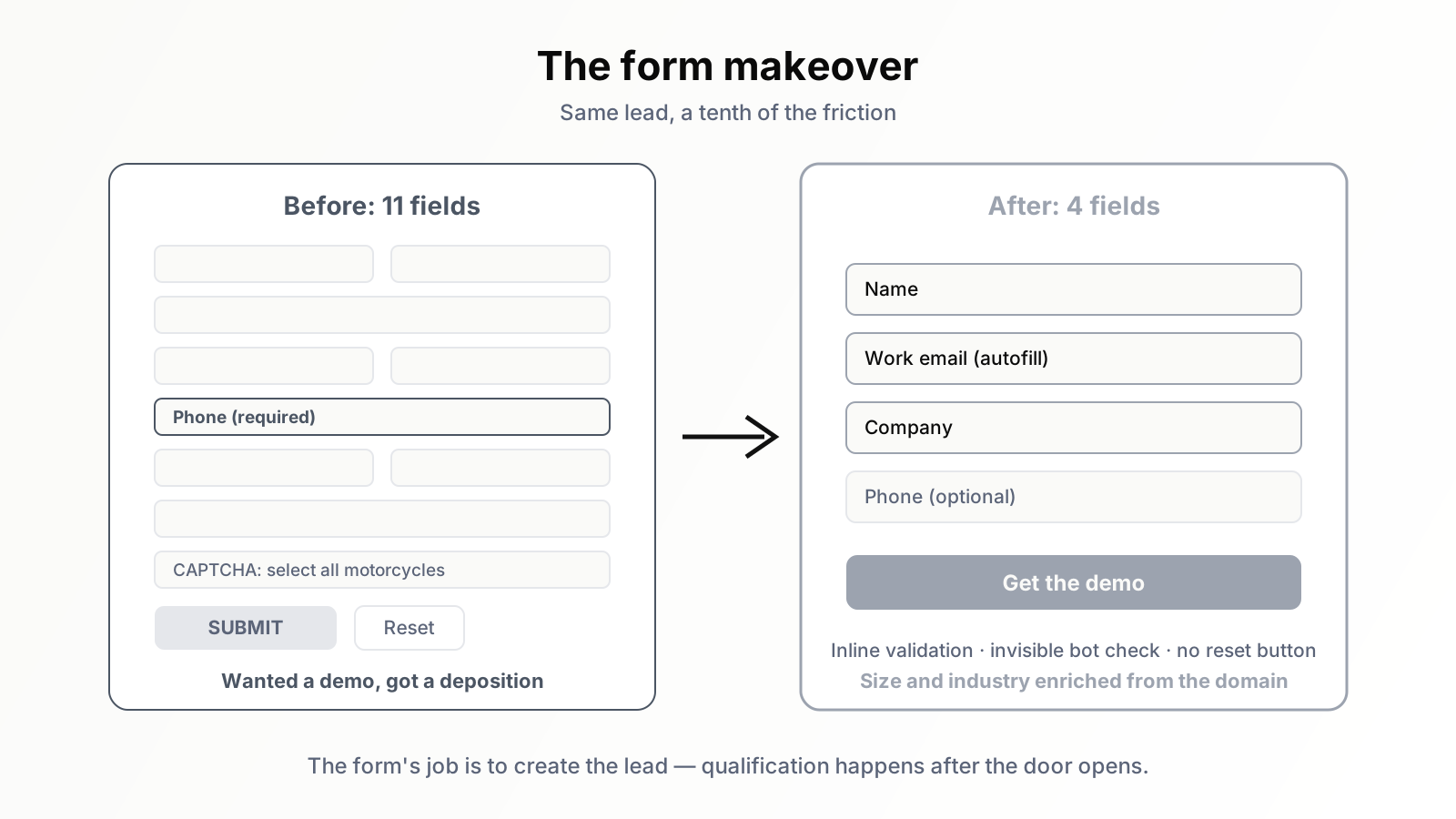
Let us examine a typical B2B "Get a demo" form, the kind currently running on thousands of respectable websites. It has eleven fields. Eleven. The visitor wanted to watch a product video; the company wants their shoe size.
First name. Last name. Work email — with a validator that rejects anything from a free mail provider, because nothing says "we value you" like arguing about your email address. Company name. Company size, a dropdown whose options were clearly negotiated in a sales meeting ("Is 49 employees '1–50' or '50–200'? Both. Neither. Don't think about it"). Industry, another dropdown, alphabetised so that "Agriculture" greets everyone and your industry is somewhere under "Other." Job title. Phone number, marked required, validated against a format used by no nation on Earth. Country, a dropdown of every sovereign state — and the form does not even use your country for anything; it just wanted to watch you scroll. "How did you hear about us?", the field whose data has never once been read by a human. And finally a message box, "Anything else you'd like to tell us?", as if the previous ten fields left anything unsaid.
Below all of this: a checkbox about marketing communications phrased as a double negative ("Do not uncheck this box if you would prefer not to receive..."), a CAPTCHA asking you to identify motorcycles in photographs taken from space, and a button that says — in the year 2026, after everything we have learned as a species — "SUBMIT."
The visitor wanted a demo. The form wanted a deposition.
How forms get this way: an archaeology of meetings
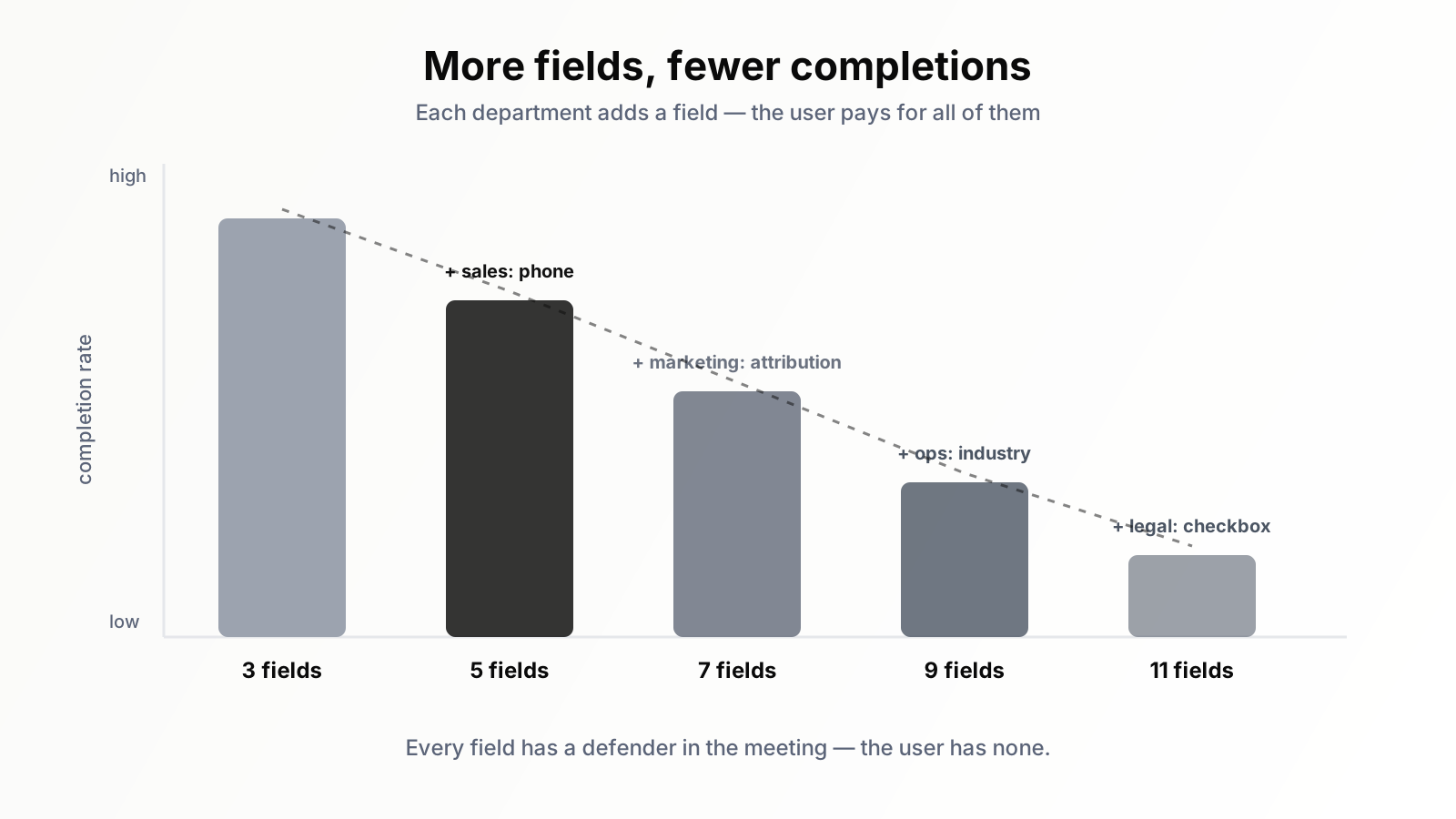
No one designs an eleven-field form. Eleven-field forms accrete, the way shipwrecks gather barnacles. The original form, years ago, had three fields and converted beautifully. Then sales asked for phone number, "just to speed up follow-up." Then marketing added the attribution question, because the analytics setup couldn't answer it — a problem that proper GA4 instrumentation solves without interrogating users. Then operations added industry for the CRM segmentation project, which was cancelled, though the field survived it the way fields always do. Then legal added a checkbox. Then someone's quarterly OKR added another dropdown, because someone's quarterly OKR always does.
Here is the structural truth that makes form bloat inevitable: every field has a defender, and the user has none. Each field costs its requester nothing and earns them a column in a report. The cost — measured in abandoned forms and lost revenue — is paid by a stranger who isn't in the meeting and can't object. Multiply by a few years of meetings and you get a form that represents the org chart perfectly and the user not at all. A form is the only place where every department of a company gets to ask a stranger for a favour simultaneously, and it shows.
The numbers behind the comedy are not funny. Field count correlates with abandonment so reliably that "fewer fields, more conversions" is among the most replicated findings in conversion work — not perfectly linear, and yes, exceptions exist where qualification matters more than volume, but the burden of proof sits firmly on every field past the essential few. Forms with three to five fields routinely outperform their ten-field ancestors by margins that would justify a quarter of engineering work, achieved instead by an afternoon of deletion.
The greatest hits of form pain
Beyond raw field count, forms have developed a rich repertoire of specific cruelties. A field guide to the classics:
The required phone number
The single most studied conversion killer in form history. Visitors correctly interpret a required phone field as "a salesperson will call you during dinner," and a large share simply leave. If sales genuinely needs it, ask after the signup, when trust exists — or make it optional and watch how eloquently its emptiness expresses user preference.
The password creativity exam
Minimum twelve characters, uppercase, lowercase, number, symbol — but not that symbol — no repeated characters, must not resemble your last five passwords at a company you have never used before. The user, who arrived to try software, is now performing cryptography. Length requirements plus a strength meter outperform rule checklists for both security and sanity, and offering single sign-on removes the exam entirely.
The error message that gaslights
"Invalid input." Which input? Invalid how? The form knows. The form will not say. Its cousin: the red asterisk that appears only after submission, atop a form that has — and this is the unforgivable part — cleared every field, inviting you to perform the entire ritual again from memory. Form abandonment studies consistently find that unclear error recovery, not the error itself, is what ends the attempt.
The placeholder that vanishes with the label
Some designer decided labels were visual clutter and put them inside the fields as placeholder text. The user clicks, the label evaporates, and halfway through typing they can no longer remember whether this box wanted their email or their employer. Accessibility guidelines have begged against this pattern for a decade. The labels float above the fields now in civilised lands; visit one.
The dropdown for things that are not dropdowns
Birth year selected from a list scrolling back to 1900, one wrist-flick at a time. A country picker for a form that ships nothing. "Number of employees" in bands that match no census ever taken. The dropdown is where data that should be typed, inferred, or simply not collected goes to inconvenience people.
The CAPTCHA at the wedding
The visitor is trying to give you money, and you are asking them to prove they are not a robot by identifying traffic lights — a task at which, humblingly, robots now outperform humans. Modern invisible verification exists precisely so your most committed visitors are not pop-quizzed at the altar.
Three more misdemeanours from the archive
The classics above are felonies. These three are misdemeanours — smaller, pettier, and somehow more enraging for it.
The "confirm your email" field. A second box in which you must type your email again, on the theory that people who mistype things once will not mistype them twice. The theory is wrong — typo studies have shown for years that confirmation fields mostly collect the same typo twice or a copy-paste of the first error — and meanwhile every fast typist on Earth pastes the first field into the second, defeating the mechanism while resenting it. If you genuinely fear bad emails, validate the syntax inline and verify with a confirmation message. One box. We have the technology.
The session timeout. Beloved of banks, governments, and enterprise procurement portals: a form that expires while you are off doing exactly what the form asked of you — fetching a card, finding a tax code, locating the one drawer in the house that contains the passport. You return, triumphant, document in hand, and the form greets you with "Your session has expired" and a login screen. The security rationale is real; applying it to a newsletter preference centre is not. If a timeout truly must exist, save the draft. Punishing people for obeying you is poor manners even by form standards.
The reset button. A button whose only function is to destroy everything the user has typed, positioned — by ancient convention — directly beside the submit button, styled almost identically, waiting. No user in recorded history has ever wanted to clear a form they spent four minutes completing. The reset button exists because an HTML specification in the 1990s permitted it, and it survives because nobody's OKR has ever included deleting it. Yours could. Imagine the performance review.
Mobile: all of the above, but with thumbs
Now take every sin in the previous section and experience it on a phone, where most of your organic traffic actually lives. The numeric phone field that summons the alphabet keyboard. The email field that doesn't, so the @ symbol requires keyboard spelunking. Tap targets sized for the fingers of a woodland sprite, placed adjacently so that selecting "Vietnam" deposits you in "Vanuatu." The dropdown that opens a native picker covering the very field you were reading. The form that, upon keyboard appearance, scrolls itself somewhere private and refuses to scroll back.
The fixes are unglamorous attribute-level work, which may explain why they are so widely skipped: correct input types so the right keyboard appears, autocomplete attributes so the browser can fill the form in one tap — autofill is the single greatest form-completion technology ever shipped, and forms that fight it deserve their numbers — and fields sized and spaced for actual human thumbs. A form that respects autofill can be completed in three seconds. A form that fights it gets abandoned in five — the same five seconds, incidentally, that your first screen gets to make its case.
The repair list, in order of return
Enough autopsy. Here is the fix list, sequenced by impact per unit of effort, suitable for printing and taping to the monitor of whoever owns your forms — once you determine who that is, an investigation that may itself take a quarter.
One: delete fields. The big one. For each field, ask two questions: do we act on this data within thirty days, and could we obtain it any other way? "Nice to know someday" is not acting on it. Company size and industry can be enriched from the email domain by entirely standard tools. Attribution lives in your analytics. The message box is duplicating your follow-up call. Most eleven-field forms contain a four-field form wearing a trench coat.
Two: ask later instead of asking now. Progressive profiling is the polite name for "get the relationship first, run the census afterward." Signup needs an email and a password — arguably just an email. Everything else can be requested inside the product, during onboarding, when the user has received value and answering feels like setup rather than interrogation. The same total data, collected at a tenth of the cost.
Three: make the phone number optional, or remove it. Yes, sales will object. Show them the arithmetic: more total signups times a slightly lower contact rate still beats fewer signups with mandatory phone numbers, in almost every realistic scenario. Run it as an A/B test if the argument stalls — the same discipline we applied to twelve CTA variants applies here, and forms produce even faster reads because they sit at higher intent.
Four: fix the failure path. Inline validation that checks each field as the user leaves it, error messages that say what is wrong and how to fix it ("This email is missing its @" beats "Invalid input" forever), and — sacred rule — no clearing of completed fields, ever, under any circumstances, including error, refresh, and acts of war.
Five: respect the basics. Visible labels above fields. Correct input types and autocomplete attributes. One column, top to bottom — multi-column forms make eyes zigzag and skip. A button that describes the outcome ("Create my account," "Get the demo") rather than honouring the ancient god Submit. Single sign-on options for account creation. Invisible bot protection instead of photographic pop quizzes.
Six: for long forms, go multi-step. When a form genuinely must be long — applications, configurators, anything regulated — break it into steps with a progress indicator, easiest questions first. Commitment compounds: a user three steps in finishes; a user shown all thirty fields at once never starts. Just never use multi-step to hide length that deletion should have solved.
Checkout: the form with a price tag attached
Everything said so far applies double to checkout, the one form where abandonment has a literal invoice. The visitor is holding their card. They have decided. All that stands between the decision and the revenue is a form — and checkout forms, as a genre, behave as though their job is to test that decision under laboratory stress.
The catalogue of checkout-specific sins is short but expensive. Forced account creation before purchase — "register to continue" — remains one of the most consistently documented causes of cart abandonment, because it converts "buy this thing" into "begin a relationship," and the visitor only agreed to the first. Offer guest checkout and propose the account on the confirmation page, after the money exists, when an account is one click of "save my details" instead of a prerequisite ritual. Surprise costs revealed at the final step — shipping, fees, taxes materialising like a plot twist — are the other heavyweight; no form layout fixes a pricing ambush, so show totals early. And the coupon code box deserves special mention: a large, optimistic, empty field whose primary function is to announce "other people are paying less than you," sending your committed buyer off to a search engine to hunt for codes, from which expedition some percentage never return. If codes are rare, collapse the field behind a quiet link. The buyer who has no code should never be made to feel like the only person at the party without an invitation.
Then there is the address. Billing address, retyped identically below the shipping address, because a checkbox saying "same as above" was apparently too great an engineering lift. Address autocomplete exists, is standard, and cuts both typing and delivery errors; a checkout that makes a customer hand-type their city in 2026 is performing a historical reenactment with someone else's patience.
The thank-you page: do not waste the only guaranteed pageview
One more scene, after the crime: the user survives the form, clicks the button, and lands on... "Thank you. Your submission has been received." A page with the warmth of a fax confirmation, wasting the single pageview in your entire funnel with a one hundred percent view rate among new leads.
The post-submit moment has exactly three jobs, and most thank-you pages do none of them. Confirm what just happened, specifically — "Your demo request is in" beats "submission received," which sounds like the form ate them. Set the expectation — who contacts them, through what channel, and when, because a lead who knows a reply comes within one business day does not mark your follow-up as spam. And offer one next step while attention still exists: the relevant case study, the getting-started guide, the calendar link that lets an eager lead skip the email tennis entirely. If your flow uses double opt-in, this page has a fourth job: say so, plainly, with a "check your spam folder" instruction — a meaningful share of confirmation emails die unclicked simply because nobody mentioned they were coming.
"But sales needs those fields"
Every form rescue eventually meets this sentence, so let us treat it with the respect it deserves — because it is half right. Sales does need qualification data. The error is the assumption that the form must collect it, at the moment of maximum fragility, from the person least obligated to provide it.
Qualification has three cheaper suppliers. Enrichment services resolve a work email into company, size, and industry more accurately than self-reported dropdowns — users lie to dropdowns; domains do not. Product behaviour qualifies better than any field: what someone does in a trial says more than what they claimed in a form. And the follow-up conversation — the thing sales actually wanted — collects the rest naturally, from a person who has already received something of value. The form's job is not to qualify the lead. The form's job is to create the lead. Qualification is everything that happens after the door opens, and doors do not open better by being heavier.
Finding your own bodies
You do not know how bad your forms are, because abandoned forms scream silently. The diagnostic kit: instrument form-start and form-complete as events, and the gap between them is your leak, per form, in numbers your CFO can read. Add per-field analytics — time spent per field, refocus counts, which field was last touched before abandonment — and the murder weapon usually identifies itself within a week; it is the phone field, but now you can prove it. Session recordings supply the qualitative horror: ten minutes of watching real humans fight your country dropdown will fund the repair project better than any deck. Then test your own form, on your own phone, on cellular, while mildly distracted — the conditions your users actually face — and count the seconds honestly.
Forms are the cheapest conversion wins left in most funnels precisely because they are beneath everyone's dignity to fix. The traffic is paid for, the persuasion is done, the visitor is willing — all that remains is to stop tripping them in the doorway. An agent like Orova can keep watch on the upstream half of this — which pages earn the traffic, where engagement says the experience is failing — so your team's attention lands where the revenue leak is largest. The downstream half is yours, and it starts with opening your own signup form and counting to eleven.
Run your business with AI Agents
Orova is the always-on Biz AI Agent — it plans, runs, and optimizes the work for you. Save time, unlock productivity.
Try it free