
Attribution Windows Explained: 1-Day, 7-Day and 28-Day
Two media buyers look at the same campaign on the same day and walk away with opposite conclusions. One says the campaign is a winner with a 4.2x return. The other says it is barely breaking even at 1.8x. Neither is lying, and neither has made an arithmetic mistake. They simply opened their dashboards with different attribution windows selected: one was looking at 28-day click, the other at 1-day click. The campaign did not change. The lens did. That single setting, buried in a dropdown most people never touch, quietly decides which conversions get counted, which campaigns look like heroes, and where your next budget dollar goes.
Attribution windows are the most consequential reporting setting almost nobody configures on purpose. They are usually left at whatever the platform defaults to, which means most advertisers are making allocation decisions on numbers they never actually chose. This article walks through exactly what a window is, the difference between click and view windows, how shorter windows undercount while longer ones overcount, and how to match the window to your real purchase cycle so the same sale never gets credited three times across three platforms.
What an attribution window actually is
An attribution window is a span of time after an ad interaction during which a conversion can be credited back to that ad. If someone clicks your Meta ad on Monday and buys on Thursday, whether that purchase shows up in your Meta reporting depends on the window. Under a 7-day click window, Thursday is well within range and the sale is counted. Under a 1-day click window, Thursday is three days too late and Meta reports nothing, even though the click genuinely started the journey.
The window has two dimensions that people routinely conflate. The first is length: 1 day, 7 days, 28 days, or some custom span. The second is the type of interaction that opens the window: a click or a view. Every reported window is really a pair, like "7-day click" or "1-day view." When a platform says it counted 90 conversions, that number is meaningless until you know which pair produced it.
Here is the part that trips up even experienced buyers: the window does not change what happened in the real world. The same 100 people bought the same products regardless of your setting. What changes is how many of those purchases the platform is willing to claim. A longer window does not make your ads work better. It makes the report show more conversions, because the platform is reaching further back in time to grab credit for sales that may or may not have anything to do with the ad.
Why platforms default to generous windows
Meta's historical default was 28-day click plus 1-day view. Google Ads leans on data-driven attribution with conversion windows that often stretch 30 days or more. These defaults are not neutral. A platform that counts more conversions looks more effective, which makes its ad inventory look cheaper per result, which keeps you spending. This is not a conspiracy; it is a structural incentive. The platform measuring its own performance will, given the choice, choose the measurement that flatters it. Your job is to override that choice with one that reflects reality.
The practical consequence is that two of your platforms can both claim the same sale. Someone sees a TikTok ad, clicks a Google search ad two days later, scrolls past a Meta retargeting ad on day five, and buys on day six. With wide default windows, all three platforms count that one purchase. Add up the dashboards and you appear to have generated three sales from one. Your blended return on ad spend, the number your finance team actually cares about, tells a much soberer story.
Click windows versus view windows
The distinction between click and view attribution is where most of the inflation hides, so it deserves careful treatment.
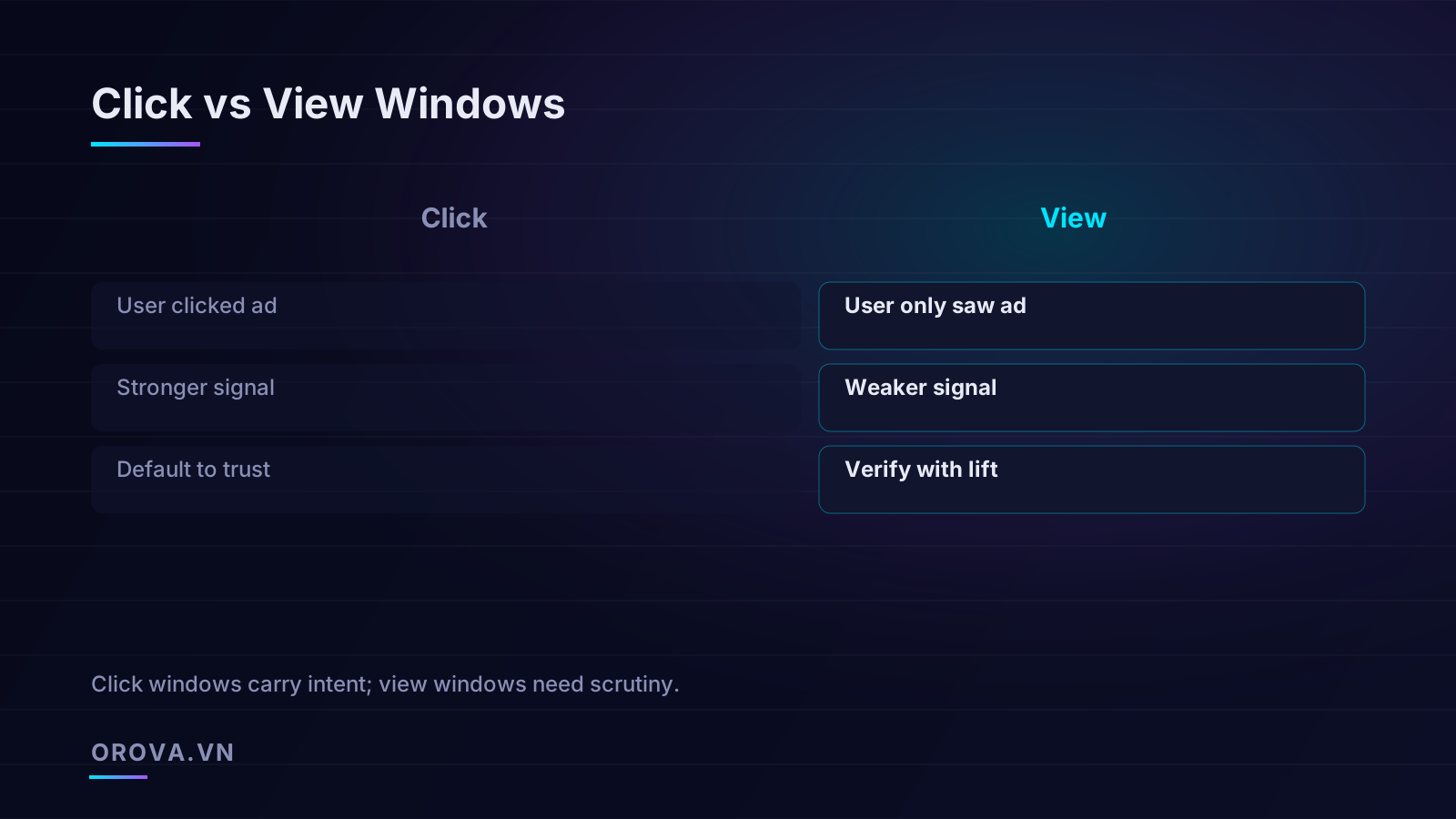
A click window credits a conversion when the person actively clicked the ad before converting. Clicking is a deliberate act. It tells you the person stopped scrolling, decided your offer was worth a tap, and went to your site. That is a strong signal of intent. When a click is followed by a purchase inside a reasonable window, the causal link is plausible: the ad did something.
A view window, sometimes called view-through attribution, credits a conversion when the person merely saw the ad and did not click, then converted later. The ad rendered on their screen. They may have glanced at it, ignored it, or scrolled past in half a second. View-through credit assumes that impression nudged the eventual purchase. Sometimes it genuinely did, especially for upper-funnel brand work. Often it did not, and the person would have bought anyway.
The danger with view windows is that they scoop up coincidental purchases. Consider a brand running broad awareness campaigns to millions of people. A large share of those millions are existing customers or were already going to buy. If the ad served an impression to someone the day before a purchase they had already decided to make, view-through attribution claims it. The campaign looks like it drove the sale when it merely witnessed it. This is why a campaign reporting strong view-through numbers but weak click numbers should be treated with suspicion until proven with an incrementality test.
How to treat each signal in practice
A useful default discipline: trust click windows, verify view windows. Click conversions carry intent and can usually be taken at close to face value, adjusted for the window length you choose. View conversions should be held to a higher standard. If a campaign's value rests heavily on view-through credit, run a geo holdout or a conversion lift study before you scale it. The platform's view-through number is a hypothesis, not a measurement.
Concretely, when comparing two prospecting campaigns, line them up on the same click window first. If campaign A wins on 7-day click and campaign B only wins once you add 1-day view, campaign A is probably the safer bet. The view-through advantage of campaign B may evaporate the moment you measure incrementality. None of this means view-through is worthless. It means it is unverified until you do the work to verify it.
How shorter windows undercount and longer windows overcount
Every window length sits on a tradeoff between two kinds of error, and there is no setting that escapes both.
A short window, like 1-day click, undercounts. It is strict about causation: only conversions that follow quickly get credited. The upside is that whatever it counts is very likely real, because little time has passed for other influences to creep in. The downside is that it ignores the slow burn. Anyone who clicked, thought about it for a week, and came back to buy is invisible. For products with any consideration phase, a 1-day window can make a perfectly healthy campaign look like a failure, because most of its real sales land on days three through ten.
A long window, like 28-day click, overcounts. It is generous: it credits the ad for purchases that happen up to four weeks later. The upside is that it captures the full consideration journey for considered purchases. The downside is that four weeks is a long time, and a lot of other marketing happens in that span. The person who clicked your ad on day one may have bought on day twenty-six because of an email, a friend's recommendation, a discount, or a separate search. The 28-day window hands all that credit to the original click, inflating the campaign's apparent contribution.
The right window does not eliminate error. It chooses which error you can live with. Short windows risk missing real sales; long windows risk claiming sales you did not cause. Pick the one whose mistake costs you less given how your customers actually buy.
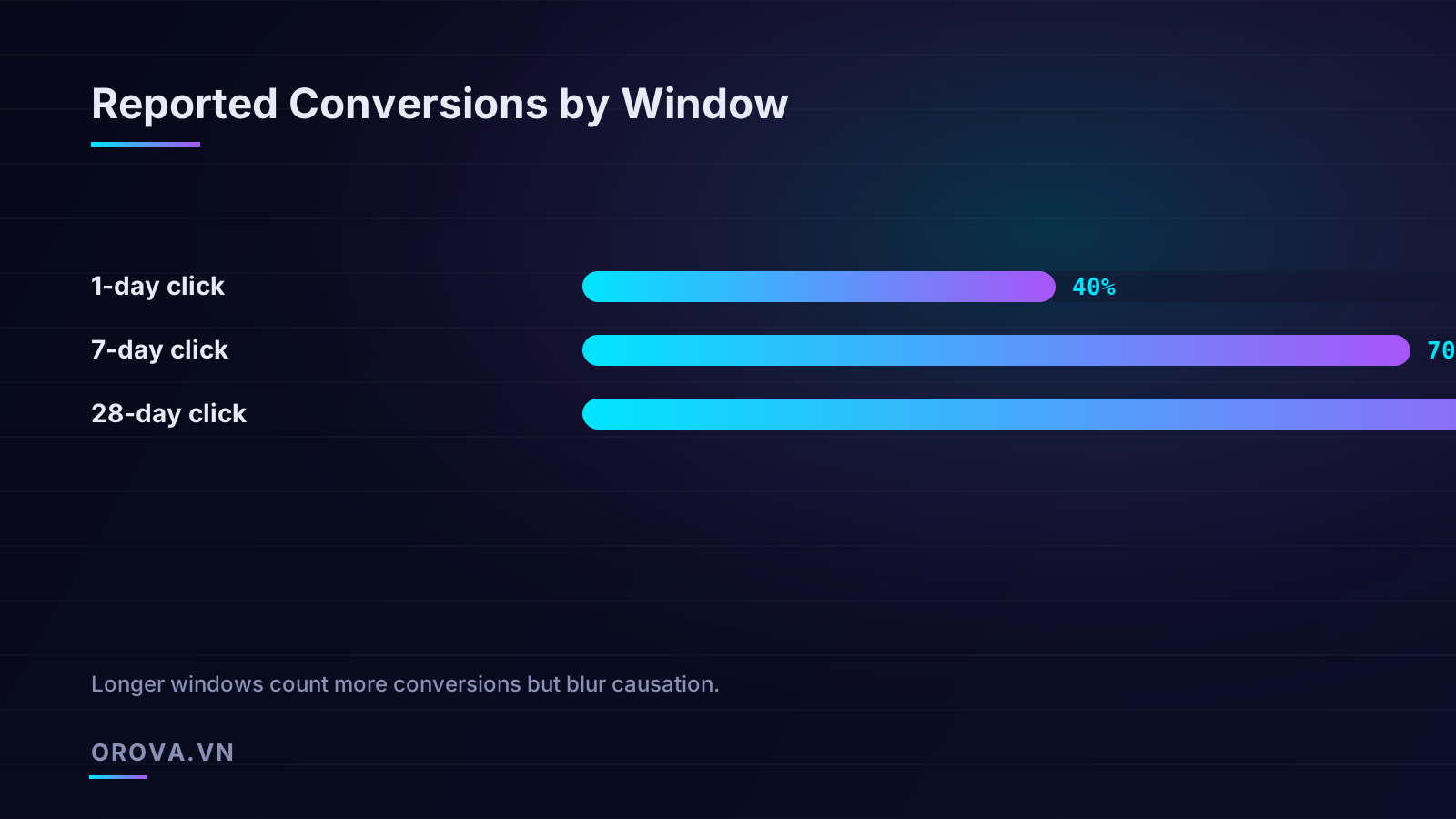
You can see the mechanical effect in the spread between window lengths. For a typical considered-purchase campaign, you might report 40 conversions on 1-day click, 70 on 7-day, and 90 on 28-day. The gap between 40 and 90 is not 50 extra sales the ad created. It is 50 sales the ad may or may not deserve credit for, with the probability of genuine causation falling the further out you go. The first few days after a click carry the strongest causal weight; by week four, the link is thin.
The compounding problem when calculating ROAS
Window choice does not just change conversion counts; it directly distorts efficiency metrics. Your return on ad spend is conversions multiplied by value, divided by spend. The numerator moves with the window while the denominator stays fixed, so switching from 1-day to 28-day click can more than double reported ROAS without a single thing changing in the account. This is exactly the trap that makes the same campaign look like a winner to one analyst and a loser to another.
If you are deciding how to read efficiency numbers, it helps to understand how the underlying metric is constructed and where it breaks. Our breakdown of CPA versus ROAS and which metric to trust goes deeper on why a single efficiency figure can mislead when the inputs behind it, including the attribution window, are not pinned down. The headline takeaway: never compare two ROAS figures unless they were produced under identical windows. A 3x at 1-day click and a 3x at 28-day click describe completely different realities, and the first is far healthier than the second.
Matching the window to your purchase cycle
The single most useful principle in this whole topic is that the window should mirror how long your customers actually take to buy. The platform's default knows nothing about your business. You do.
Start by measuring your real time-to-conversion. Most platforms and analytics tools can show the distribution of days between first ad interaction and purchase. Pull that data and find where the bulk of conversions land. If 90 percent of your buyers convert within 24 hours, a 1-day window captures almost everything and a 28-day window mostly adds noise. If your sales cluster around days five through twelve, a 7-day window cuts off a meaningful chunk and you should look at a longer span.
Short-cycle businesses
Impulse and low-consideration purchases, like a cheap consumer good, a food delivery order, or an app install, typically convert within hours to a day. For these, a 1-day or at most 7-day click window is appropriate. The decision is fast, so a fast window captures the truth without dragging in unrelated influences. Using a 28-day window here is actively harmful: it credits the ad for repeat buyers and routine purchases that would have happened regardless, making your acquisition look more efficient than it is and tempting you to overspend.
Long-cycle businesses
Considered purchases, high-ticket items, B2B software, furniture, travel, anything where people research and deliberate, often take one to four weeks. For these, a 1-day window is far too strict and will make genuinely productive campaigns look broken. A 7-day window is a reasonable middle ground for many considered consumer goods, while a 28-day or custom 30-day window may be justified for longer B2B cycles. The key discipline is to verify with your own data, not to reach for the longest window because it produces the prettiest dashboard.
A practical method for finding your window: look at the cumulative conversion curve by day-since-click. Find the day where roughly 80 to 90 percent of eventual conversions have already happened. Set your window near that point. Going further adds few real conversions while importing growing amounts of coincidental credit. This gives you a window grounded in your customers' behavior rather than in a platform's default or a competitor's guess.
Consistency across platforms for fair comparison
Choosing a sensible window is only half the job. The other half is using the same window everywhere so your platforms can be compared on equal terms.
Imagine you run Google, Meta, and TikTok. Google is set to a 30-day data-driven window, Meta to 7-day click, and TikTok to 1-day click because that was the default you never changed. Now you compare their reported ROAS to decide where to shift budget. Google looks best, but partly because it is reaching back 30 days to grab credit, while TikTok looks weakest partly because it only counts same-day conversions. You might cut TikTok and pour money into Google based on a comparison that was rigged by inconsistent settings, not by actual performance.
To compare platforms fairly, align the windows as closely as the platforms allow. Not every platform exposes identical options, and Google's data-driven attribution does not map cleanly onto Meta's fixed windows, but you should get as close as you can: pick a common length, such as 7-day click, and set every platform to it where possible. When a platform cannot match exactly, note the gap and adjust your interpretation rather than pretending the numbers are equivalent.
The double-counting reckoning
Even perfectly aligned windows cannot solve cross-platform double-counting, because each platform only sees its own touchpoints. The TikTok view, the Google click, and the Meta retarget that all preceded one sale will each be claimed by their respective platform. Summed, your platform-reported conversions will exceed your actual conversions, often by 20 to 60 percent for accounts running multiple channels heavily on retargeting.
The fix is to anchor every platform comparison against a single source of truth: your backend, your order system, your CRM. That number is the real count of sales. The platform numbers are competing claims on those sales. When the sum of platform claims is 140 but your backend shows 100, you know there is 40 sales' worth of overlap to discount. You can then use the platforms for directional, in-flight optimization while trusting your backend for the final allocation verdict.
- Pick one window length and apply it across every platform that allows it, so reported efficiency is comparable rather than apples-to-oranges.
- Separate click from view in your reporting, and treat view-through credit as a hypothesis to be tested, not a result to be banked.
- Match the length to your sales cycle using your own time-to-conversion data, not the platform default.
- Reconcile to your backend regularly to size the gap between platform-claimed conversions and real ones.
- Re-state historical numbers whenever you change a window, so trend charts do not show fake jumps caused purely by a setting change.
Common mistakes that quietly corrupt decisions
A few recurring errors do more damage than any single misconfigured dropdown.
The first is silent window changes. A platform updates its default, or a teammate adjusts a setting, and suddenly last month's conversions look 30 percent higher this month. The campaign did not improve; the accounting did. Always check whether a sudden performance shift coincides with a window or attribution-model change before you celebrate or panic.
The second is mixing windows within one analysis. Pulling a Meta number on 28-day click and a Google number on 1-day click into the same spreadsheet row produces a comparison that looks rigorous and is actually nonsense. Label the window next to every metric so nobody downstream assumes they match.
The third is treating view-through as click-through. Reports often blend the two into a single "conversions" column. If you do not separate them, a campaign propped up entirely by coincidental view-through credit can masquerade as a strong direct-response performer, and you will scale it into a wall.
The fourth is over-trusting the longest window because it hits the target. It is tempting to widen the window until the ROAS clears your goal. That is not analysis; it is moving the goalposts. Set the window based on your purchase cycle first, then judge performance against it, never the reverse.
A quick audit you can run this week
- Document the current window setting on every active platform, including both length and click-versus-view.
- Pull your time-to-conversion distribution and identify the day where 80 to 90 percent of conversions have occurred.
- Set every platform to the closest common window to that point that each one supports.
- Sum platform-reported conversions for a recent period and compare against your backend count to size the overlap.
- Re-state your recent performance trend under the new consistent window so future comparisons are honest.
None of these steps require new tools or budget. They require deciding, on purpose, how you will count, and then counting that way everywhere. The advertisers who do this consistently are not smarter than their competitors. They are simply not fooling themselves with numbers they never chose.
The bottom line
Attribution windows are not a technical footnote. They are the frame around every performance number you act on. A short window is honest but stingy and can hide real, slow-burning value. A long window is generous but credulous and can manufacture value that is not there. View windows add another layer of optimism that demands verification. And inconsistent windows across platforms turn budget allocation into a guessing game dressed up as data.
The discipline is straightforward even if the topic is not: choose a window that matches how your customers actually buy, apply it consistently everywhere, keep click and view credit separate, and always reconcile against the one number that cannot lie, your real sales. Do that, and the next time two people look at the same campaign, they will at least be looking through the same lens.
Keeping windows consistent and reconciled across Google, Meta, and TikTok is exactly the kind of tedious, daily discipline that gets dropped when a team is busy. Orova Ads is an AI agent that reads your cross-platform ad data every day, flags where attribution settings and efficiency numbers diverge, and recommends and executes optimizations across budgets, bids, on/off states, and audiences, with human-in-the-loop approval and a full audit log so you always see what changed and why. If you want your reporting and your spending decisions to finally run on the same honest numbers, take a look at Orova Ads.
Let an AI Agent handle your SEO
Orova plans, writes, optimizes, and tracks rankings on its own — you just read the results.
Try it free