
Ad Policy Compliance & Disapprovals
The first time a disapproval cost me real money, I didn't even know it had happened. A retail client's best-converting Google Shopping ad — the one driving roughly 40% of paid revenue — went dark on a Friday afternoon. Nobody noticed until Monday. The reason, when we finally dug into it, was almost insulting: a single product feed attribute flagged the listing as a "restricted product" because the title contained the word "knife" (it was a kitchen knife set). Three days of the highest-intent traffic in the account, gone, because a status field changed quietly in a dashboard nobody was watching over the weekend.
That is the real cost of ad disapprovals. It is rarely the dramatic account suspension that makes headlines. It is the slow, silent bleed of individual ads, ad groups, or product listings getting switched off one at a time — often your best performers, because high-volume ads get more scrutiny — while your reporting still shows the campaign as "active." Spend reallocates to weaker creatives, your blended cost per acquisition creeps up, and unless someone is specifically monitoring approval status at the ad level, you can lose a week before anyone asks why performance dipped.
This article is a practitioner's guide to the whole lifecycle: why ads get disapproved across Google, Meta, and TikTok; how to monitor for disapprovals before they hurt you; and — the part most people get wrong — how to decide whether to fix the ad or appeal the decision, and how to do each one well. I'll keep the platform mechanics concrete, because the difference between a two-hour recovery and a two-week recovery usually comes down to knowing exactly which lever to pull.
Why disapprovals matter more than most teams think
Every major ad platform runs a two-stage review system: an automated pass that happens within minutes to a few hours of submission, and a human or semi-automated review layer that can re-flag an ad days or even weeks later. This is the part that surprises people. An ad can run cleanly for a month, accumulate thousands of impressions, and then get disapproved during a routine re-scan or after a competitor reports it. "Approved" is not a permanent state. It is the platform's current opinion, and that opinion is revisited constantly.
When an ad is disapproved, the consequences compound in ways that don't show up on a single screen:
- Spend silently reallocates. In a campaign with automated bidding, when one ad stops serving, the budget doesn't disappear — it flows to whatever else can serve. If your disapproved ad was the highest-converting one, the algorithm is now buying worse traffic with the same money.
- Learning phases reset. On Meta in particular, disabling and re-enabling an ad set, or editing an ad enough to trigger re-review, can throw the ad set back into the learning phase. You pay a performance tax for several days while the system re-optimizes.
- Account-level trust erodes. Platforms track your disapproval rate. A pattern of policy violations — even minor, fixable ones — increases the odds of stricter review, slower approvals, and eventually account-level limitations. Each disapproval is a small ding on your account's reputation.
- Quality and relevance signals suffer. A disapproved-then-fixed ad has lost its accumulated performance history. You often restart from a colder position even after re-approval.
The teams that handle disapprovals well treat them as an operational reliability problem, not a creative inconvenience. They measure time-to-detection and time-to-recovery the way an engineering team measures incident response. The teams that handle them badly find out about disapprovals when a client emails asking why sales dropped.
The metric nobody tracks: time-to-detection
Ask most advertisers their click-through rate or their ROAS and they'll answer instantly. Ask them how long it typically takes to notice a disapproval and you'll get a blank look. Yet that number is often the single biggest driver of how much a disapproval costs you. A disapproval caught in two hours is a non-event. The same disapproval caught in four days, on a flagship ad, during a sale, can erase a month of optimization gains.
The reason time-to-detection is so bad in most accounts is structural: approval status lives in a column you have to deliberately look at, and dashboards default to showing performance, not health. If an ad serves zero impressions because it's disapproved, it quietly drops out of the "top performers" view you actually check. The disapproved ad hides precisely where you stop looking.
Common disapproval reasons across platforms
Disapprovals feel infinite when you're staring at a cryptic policy code, but in practice the overwhelming majority cluster into a handful of categories. Knowing the categories lets you pattern-match a new disapproval in seconds instead of reading policy documentation for an hour.
1. Misleading or unsubstantiated claims
This is the largest single bucket across all three platforms. It covers superlatives you can't prove ("the best CRM in the world"), guarantees of outcomes ("lose 10kg in a week"), unrealistic financial promises ("turn $100 into $10,000"), and "before/after" framing in sensitive categories like health and finance. Meta is especially aggressive here, and its definition of an "unrealistic" claim is broader than most advertisers expect — implying a personal attribute about the viewer ("Struggling with debt?") can trip the personal-attributes policy even when the claim itself is mild.
The fix is almost always to soften the language and add substantiation. "Rated #1 by [named third party] in 2025" survives where "the #1 platform" dies. "Customers report saving an average of X hours" survives where "save 20 hours guaranteed" dies.
2. Restricted or prohibited goods and services
Every platform maintains a list of categories that are either banned outright or require pre-certification: alcohol, gambling, supplements, weapons (including, as I learned, kitchen knives), CBD, financial products, pharmaceuticals, dating, political content, and more. The painful part is the false positives — legitimate products caught by keyword matching. A "shot glass" gets flagged as alcohol; a "gun cleaning kit" as weapons; a "fat burner" recipe blog as a supplement.
For genuinely restricted-but-permitted categories (alcohol, gambling, finance in some regions), the fix isn't editing the ad — it's completing the platform's certification or allowlisting process and ensuring your targeting respects geographic and age restrictions.
3. Landing page and destination issues
Reviewers don't just look at the ad — they visit the page it points to. Disapprovals here come from broken or slow-loading pages, missing required information (no clear contact details, no privacy policy on a lead form), a mismatch between ad and page (the ad promises a discount the page doesn't mention), aggressive interstitials, or content that itself violates policy even though the ad is clean. Google's "destination not working" and "insufficient original content" disapprovals fall here, as does Meta's frequent flag for landing pages that don't function on mobile.
This category is sneaky because the ad can be perfect and still get disapproved. It's also the one most likely to recur: if your page is occasionally slow or your CDN hiccups during review, you can get disapproved intermittently for no reason you can reproduce.
4. Trademark and intellectual property
Using a competitor's brand name in ad copy, running unauthorized resale of a trademarked product, using copyrighted images or music (a constant issue on TikTok), or implying an endorsement you don't have. Trademark complaints are often filed by the rights holder rather than caught by automation, which is why they appear suddenly on long-running ads. These are also the disapprovals most likely to require an appeal with documentation — if you are an authorized reseller, you'll need to prove it.
5. Format, technical, and editorial policy
The mundane but high-volume category: excessive capitalization ("BUY NOW!!!"), too much text in an image (a Meta classic, though the hard limit has softened into a relevance penalty), gimmicky symbols, non-functional buttons or features depicted in the creative, poor grammar, or video specs that violate length and aspect requirements. These are the easiest to fix and the easiest to prevent with a pre-flight checklist.
Platform-specific texture worth knowing
The categories above are universal, but each platform has its own personality:
- Google Ads gives the most specific disapproval reasons and the clearest policy mapping. Disapprovals appear at the ad, keyword, and extension level, and Shopping adds a whole second surface (Merchant Center) where product-level disapprovals live separately from your campaign view. Google's appeals process is the most mature of the three.
- Meta (Facebook/Instagram) is the most opaque. Reason text is often generic ("This ad doesn't comply with our advertising policies"), the real cause can be the landing page or even your Page rather than the ad, and the Account Quality dashboard is where the truth lives. Meta also reviews ad sets and applies restrictions at the account and Business Manager level that can cascade.
- TikTok reviews creatives heavily and is strict on music licensing, "low-quality" or watermarked content (especially recycled content with another platform's logo), and exaggerated claims in the fast-paced video format. Its review can be slower, and its reason codes sit somewhere between Google's specificity and Meta's vagueness.
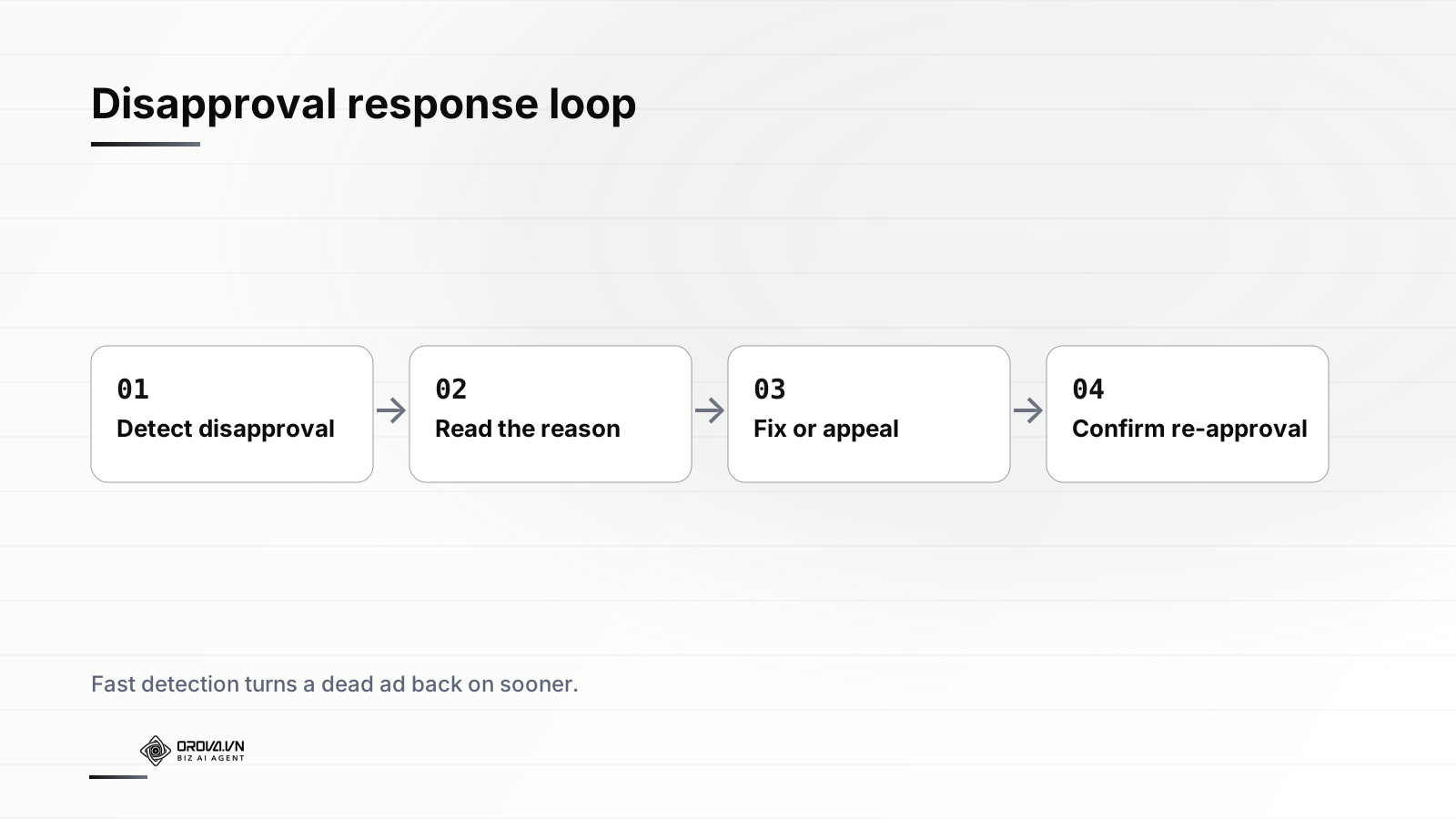
A useful mental model: roughly four categories — claims, restricted goods, landing page, and trademark — drive the large majority of disapprovals you'll ever see. If you build your prevention and response process around those four, you've covered most of the surface area. The long tail of obscure policy codes is real but rare.
Monitoring: catching disapprovals before they cost you
The single highest-leverage change most advertisers can make isn't writing better ad copy — it's shortening the gap between "ad gets disapproved" and "someone knows about it." Here's how to actually do that, from least to most robust.
Manual checks (the floor)
At minimum, build a daily habit of filtering each platform by approval status. In Google Ads, save a filter for "Ad status: Disapproved" and "Ad status: Eligible (limited)" — the latter is the quiet killer, an ad that's technically approved but restricted in where it can show. In Meta, the Account Quality dashboard (in Business Manager) is the canonical source; the regular Ads Manager view will under-report. In TikTok Ads Manager, the review status column needs to be added explicitly to your custom columns or you won't see it.
"Eligible (limited)" deserves special attention. It is not a disapproval — the ad still serves — which is exactly why it slips through. But "limited" can mean the ad is barred from a chunk of your target geography or audience, silently capping your reach. I've seen accounts where half the ads sat in this state for months, and nobody flagged it because the status wasn't a red "Disapproved."
Alerts and automated rules (the practical middle)
Manual checks fail on weekends, holidays, and the days you're heads-down on something else — which is when disapprovals love to strike. Automated rules close that gap. Google Ads lets you create rules that email you when an ad's status changes or when impressions drop to zero (a strong proxy for a stealth disapproval). Meta's automated rules and TikTok's rule engine offer similar triggers. A simple "alert me if any active ad logged zero impressions in the last 12 hours" rule catches a huge share of silent disapprovals, because a disapproved ad's impressions flatline immediately.
The limitation is that platform-native rules are siloed. If you run across Google, Meta, and TikTok, you're maintaining three separate alerting systems with three different vocabularies, and you still have to log into the right place, find the right ad, read the reason, and decide what to do. Alerting tells you something broke; it doesn't help you fix it.
Continuous AI monitoring (the ceiling)
This is where an AI ad agent changes the economics of compliance. Instead of three siloed rule engines and a human checking dashboards once a day, an agent reads approval status across every platform on a continuous loop, the same way it reads performance data. The difference is qualitative, not just faster:
- It detects the disapproval within the monitoring cycle rather than whenever a human next logs in — collapsing time-to-detection from days to minutes.
- It reads and normalizes the reason across platforms, so a Meta "doesn't comply" and a Google "misleading claims" land in the same human-readable bucket.
- It correlates the disapproval with the spend impact, so you immediately know whether this is a $5/day experiment or your flagship ad.
- It can propose the specific remediation — and, with your approval, execute it — rather than just notifying you that something is wrong.
Crucially, an agent that can act also needs to be accountable. Every detection, recommendation, and action should be logged so you can review exactly what changed and why. If you're evaluating any autonomous ad tooling, the ability to audit an AI ad agent's decisions after the fact is non-negotiable — compliance is precisely the area where you want a paper trail.
The fix-vs-appeal decision flow
Here's where experience separates from theory. When an ad is disapproved you have two doors: fix the ad to comply, or appeal the decision arguing it was wrong. Choosing the wrong door wastes days. The decision hinges on one question: Is the platform right?
When to fix
Fix when the disapproval is correct — the ad genuinely violates policy, even if unintentionally. This is the majority of cases. If your copy says "guaranteed results," the platform is right; appealing is a waste of time and will be rejected, costing you another review cycle. Edit the ad to comply and resubmit.
Fixing is also the right move when it's faster than arguing. Even when you suspect a false positive, if the fix is trivial — rephrasing one line, swapping one image, splitting a Shopping listing's title — just fix it. An edit usually re-enters review immediately, while an appeal can take longer and isn't guaranteed. The bias should be toward fixing whenever the fix is cheap, because the goal is to get the ad serving again, not to win an argument.
A few fixing tactics that matter:
- Make the minimal change. Edit only what's flagged. Wholesale rewrites can trigger re-review of elements that were previously fine and reset performance history unnecessarily.
- Don't repeatedly resubmit the same ad. Resubmitting an ad you haven't actually changed, hoping a different reviewer approves it, is treated as a policy circumvention attempt and can escalate to account-level penalties. Change something real each time.
- Check the landing page, not just the ad. When the reason is vague, the destination is the most common hidden culprit. Confirm it loads fast on mobile, matches the ad's promise, and has required elements (privacy policy, contact info).
When to appeal
Appeal when the disapproval is genuinely wrong — a false positive — and the cost of editing would be a real performance hit. The classic cases:
- A legitimate product caught by keyword matching (the kitchen-knife problem).
- A claim you can actually substantiate, where the substantiation just wasn't visible to the reviewer.
- A trademark flag where you are, in fact, an authorized reseller or the rights holder.
- An "approved-then-flagged" reversal on a long-running ad you're confident is compliant.
A good appeal is short, specific, and evidentiary. Don't argue policy philosophy; state plainly why the ad complies and provide proof — a link to the substantiating page, a reseller authorization, the third-party rating you're citing. Appeals reviewed by a human respond far better to "here is the certificate proving we're licensed" than to "I think your system made a mistake."
The both-doors play
For high-value ads, the pragmatic answer is often do both, in parallel: appeal the original ad to preserve its accumulated history and quality signals, while simultaneously launching a compliant variant so you're not losing spend efficiency during the appeal. Whichever resolves first wins; pause the loser. This hedges against the slowest, most uncertain part of the process — the appeal timeline — without leaving budget stranded.
Confirming re-approval — the step people skip
Submitting a fix or an appeal is not the end. The loop only closes when you confirm the ad is actually serving again. Three things to verify:
- Status returned to approved/eligible — and not "eligible (limited)," which means you fixed one issue but another constraint remains.
- Impressions resumed — status can flip to approved while delivery stays stuck if the ad set re-entered learning or the bid is now uncompetitive. Approved-but-not-serving is its own failure mode.
- No recurrence within a few days — for re-scan-driven disapprovals, confirm it stays approved through the next review cycle. A fix that gets re-flagged 48 hours later isn't a fix.
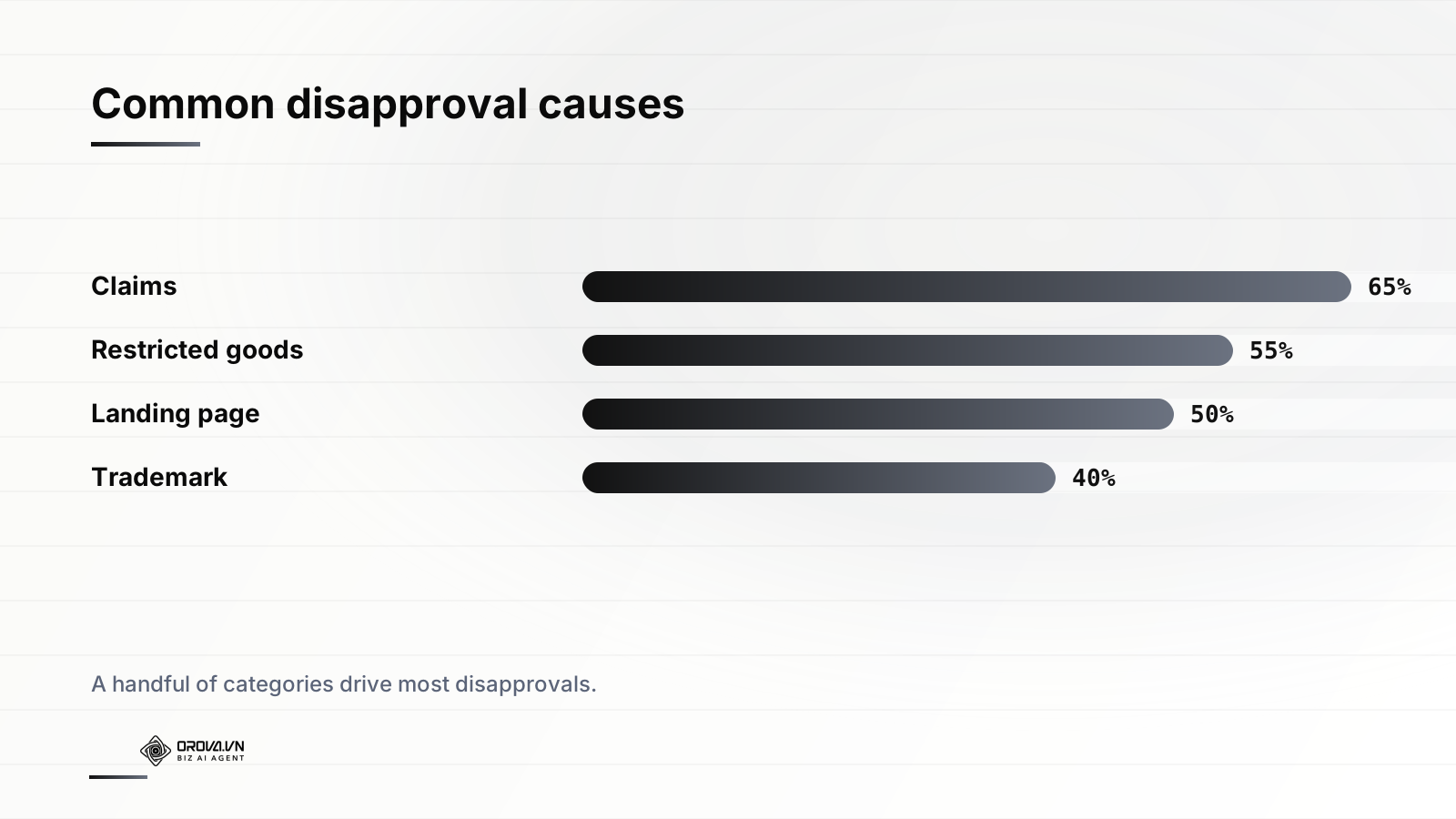
This is the four-step loop in practice: detect the disapproval, read the reason, fix or appeal, confirm re-approval. The loop is simple. The advantage comes entirely from how fast and reliably you run it — and from not dropping the last step, which is where manual processes routinely fail.
Building a prevention system, not just a response process
Recovering fast is good. Not getting disapproved in the first place is better, and it's mostly a matter of discipline at submission time. The compounding benefit is account reputation: a clean disapproval history earns faster reviews and more leeway, while a messy one earns scrutiny on everything you launch.
A pre-flight checklist that prevents the common four
Before any ad goes live, run it against the categories that cause most disapprovals:
- Claims: Is every superlative or outcome claim substantiated and attributed? No guarantees, no unrealistic promises, no "you" statements that imply a personal attribute in sensitive verticals?
- Restricted goods: Does any product or keyword fall into (or near) a restricted category? If so, is certification or allowlisting complete and targeting compliant?
- Landing page: Does it load fast on mobile, match the ad's promise, and include required elements? Is the offer in the ad actually present on the page?
- Trademark/IP: Are all brand names yours or authorized? Is all imagery and music properly licensed (the big TikTok pitfall)?
- Format: Capitalization, symbols, text-in-image, spec compliance — all within editorial norms?
Treat compliance as a system property
The most resilient accounts I've worked on don't rely on any one person remembering the rules. They bake compliance into the workflow: a shared checklist gating launch, automated alerts on status changes, a documented fix-vs-appeal playbook, and — increasingly — an agent watching status continuously so a human is never the single point of failure. When compliance is a property of the system rather than a habit of one diligent person, it survives vacations, handoffs, and the inevitable busy week.
The goal isn't zero disapprovals — across enough volume, some are inevitable, especially on re-scans and false positives. The goal is that no disapproval ever runs for more than a few hours before it's detected, triaged, and routed to the right door.
That reframing matters. You will get disapprovals; the platforms are too automated and too cautious for any active advertiser to avoid them entirely. What you control is the response loop. Measure your time-to-detection and time-to-recovery, drive both toward minutes, and disapprovals stop being a threat to performance and become a routine, managed part of operating at scale.
If keeping a daily eye on approval status across Google, Meta, and TikTok is exactly the kind of grind you'd rather not own manually, that's the problem Orova Ads is built for. It's an AI agent that reads your ad data every day across all three platforms, surfaces disapprovals and policy issues the moment they appear, recommends the specific fix or appeal, and — with your approval and a full audit log of every change — executes the budget, bid, on/off, and audience adjustments needed to get your best ads serving again fast. Let the agent watch the status column so you can focus on the strategy.
Related reading: Brand Safety in Automated Ads
Orova Ads optimises campaigns for you
Connect Google, Meta and TikTok in one place. AI reads the numbers, proposes changes and executes under the rules you set.
Explore Orova Ads