
Video SEO Test: 15 Blog Posts, Dwell Time Doubled
You have probably heard someone tell you to slap a video on your blog posts because it will make people stick around longer. So you try it, or you keep meaning to, and you are left wondering if it actually does anything for your traffic or if it is just one more task added to your plate with no real payoff.
The problem is that most of the advice floating around about video seo comes from companies that sell video hosting, or from vague correlations that could mean almost anything. Nobody seems to have actually tested it on a normal blog with normal traffic and shown their work, so business owners are left guessing whether it is worth the effort of sourcing or making videos and embedding them. That guesswork matters more now than ever, since SparkToro found that 68% of US Google searches in the first four months of 2026 ended without a click, up from 60% in 2024, which means every ranking signal you can add, video included, has to earn its keep.
This article is our own test, done on our own blog, with the honest results laid out end to end. You will see how we picked the posts, where we placed the videos, what it did to page speed, and what it actually did and did not do for rankings. By the end, you will know whether adding video to your posts is worth your time, and exactly how to try it yourself without guessing.
Why we ran this experiment
Three things pushed us from "interesting idea" to "actually test it." First, our GA4 data showed a pattern we did not like: several of our deepest tutorial posts had strong traffic but average engagement times under two minutes. People were arriving, skimming, and leaving before reaching the sections that actually answer their question. For a 2,500-word tutorial, a sub-two-minute visit means most readers never saw most of the content.
Second, we had just finished building a video production workflow for a separate project — our work on video SEO across YouTube and Google — which meant the marginal cost of producing a screen-recorded walkthrough had dropped from "a day per video" to "about 90 minutes per video." When production gets cheap, experiments that used to be irrational become rational.
Third, and honestly, we were skeptical. The claim that "pages with video keep visitors 2.6x longer" appears in dozens of vendor blog posts, almost always without a methodology section. We wanted a number we could trust because we generated it ourselves, with a control group, on content we understood. If the effect was real, we would expand video production. If it was noise, we would save the budget.
One framing decision mattered before we started: we deliberately defined success as engagement and conversions, not rankings. Dwell time is not a confirmed direct Google ranking factor, and we did not want to design an experiment around a mechanism Google has repeatedly declined to confirm. More on that distinction later, because it is the part most write-ups fudge.
The setup: 15 treated posts, 15 controls, 120 days of data
How we picked the posts
We pulled every blog post that met four conditions: at least 12 months old (so seasonality and freshness decay were stable), at least 500 organic sessions per month (so we would have statistical signal), no major edits in the prior six months (so we would not confuse the test with a content refresh), and a topic where video genuinely adds something — a process to demonstrate, an interface to show, a comparison to visualize. That last filter is subjective but important. A video bolted onto a glossary page is decoration; a video on a "how to configure X" page is a second, better explanation.
That gave us 41 candidates. We ranked them by monthly sessions and walked down the list in pairs, assigning one of each matched pair to treatment and one to control. Pairs were matched on topic category, word count (within about 15%), traffic volume (within about 20%), and current average engagement time (within about 20 seconds). We ended with 15 treated posts and 15 controls. The matching is not perfect — no observational pairing ever is — but it is far better than comparing treated posts against the site average, which is how most public case studies quietly inflate their numbers.
Custom videos versus borrowed videos
We split the treatment group into two arms, partly by design and partly by budget reality. Nine posts received a custom walkthrough video: a 4-to-8-minute screen recording with voiceover, made specifically for that post, covering the same process the post describes but showing it instead of describing it. Six posts received an existing, relevant, high-quality video on the same topic — embedded from a public source — because producing fifteen custom videos in one sprint was not feasible.
This split turned out to be one of the most useful accidents of the experiment. It let us ask not just "does video help?" but "does it matter whose video it is?" The answer, previewed: yes, a lot — though our sample sizes per arm are small enough that we treat the gap as directional, not definitive.
What we measured and how
Everything ran through GA4. Our primary metric was average engagement time per active user on each page — GA4's replacement for the old time-on-page metric, and a more honest one because it only counts time the tab is actually in focus. If you have not set up your reporting around engagement metrics yet, our guide to what SEOs should actually track in GA4 covers the exact events and dimensions we used here.
Secondary metrics: scroll depth (we fire a custom event at 25/50/75/90%), engaged sessions share (GA4's bounce-rate replacement — sessions lasting 10+ seconds, converting, or viewing 2+ pages), video engagement events (start, 25/50/75% progress, complete), newsletter signups attributed to each page, and average position plus impressions from Search Console for each post's primary queries. Measurement window: 60 days before the embed date and 60 days after, with a one-week buffer around the change date excluded from both windows to avoid contaminating the data with cache-transition weirdness.
One methodological note we want to flag honestly: GA4's engagement time pauses when a tab loses focus, but it does count time spent watching an embedded video in an active tab. So part of our "doubled dwell time" is, mechanically, people watching the video. We do not consider that a flaw — watching a relevant video on your page is engagement — but if you expected the text-reading time alone to double, that is not what happened, and no honest experiment would claim it did.
The headline numbers
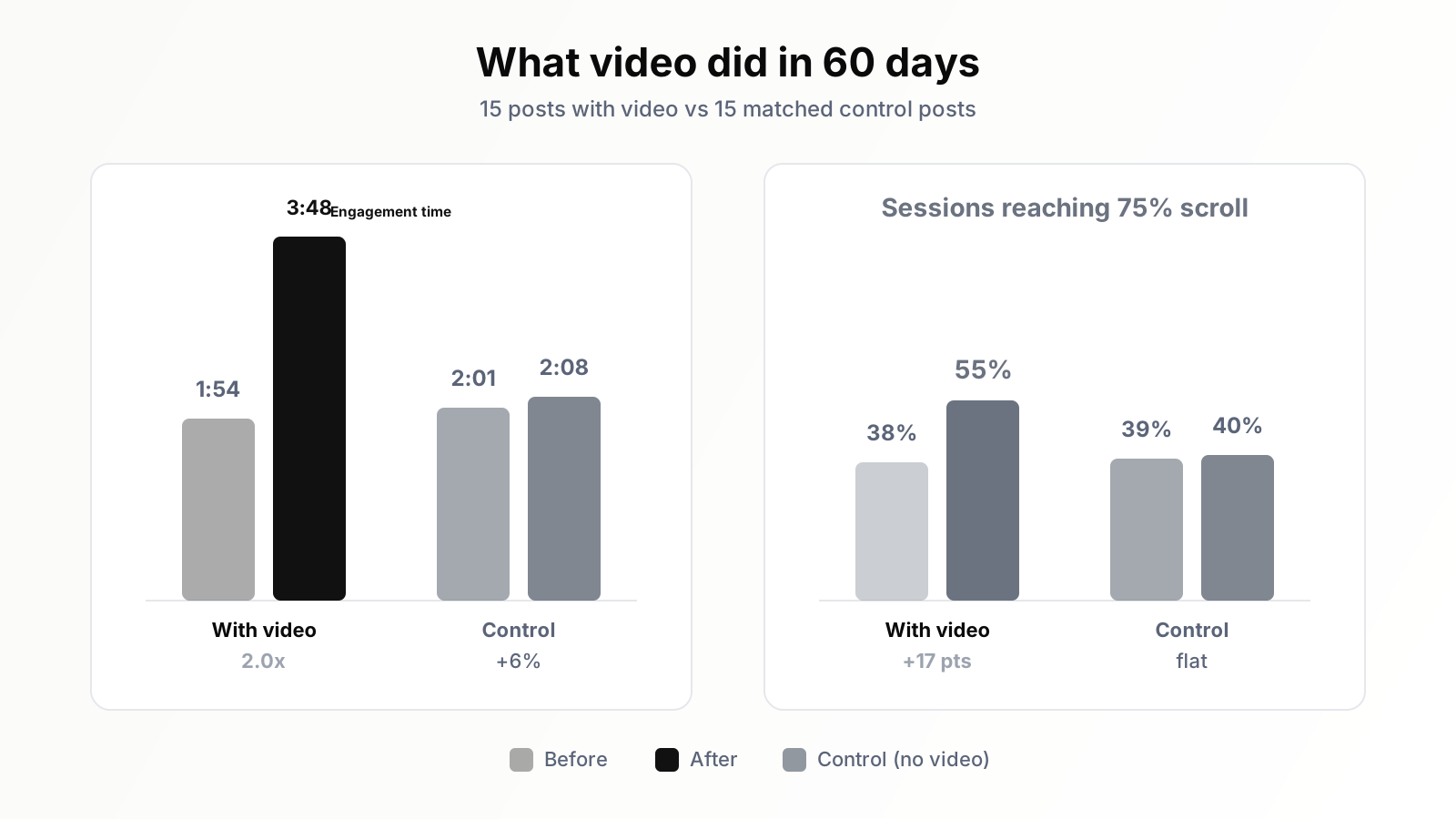
Across all 15 treated posts, average engagement time per active user went from 1:54 in the before-window to 3:48 in the after-window — almost exactly 2.0x. The control group went from 2:01 to 2:08, a 6% drift we attribute to normal variance and a slightly more engaged seasonal audience. The gap between treatment and control is the number that matters, and it is large enough that we are confident it is not noise: every single treated post improved, with the weakest gaining 31% and the strongest gaining 174%.
Scroll depth told a story we did not expect. The share of sessions reaching the 75% scroll marker rose from 38% to 55% on treated posts. Read that again, because it is counterintuitive: adding a video near the top of the page made more people read further down. Our pre-experiment worry was the opposite — that the video would cannibalize reading, that people would watch and bounce. Instead, the video seems to function as a commitment device. Someone who invests two minutes watching a walkthrough has decided this page is worth their time, and they continue into the text to get the details the video glossed over.
Engaged sessions share — GA4's inverse-of-bounce metric — rose from 61% to 74% on treated posts and was flat on controls. Video engagement events showed that 47% of users who saw a video started it, 31% of starters reached the halfway mark, and 19% finished. Completion skewed heavily toward the shorter videos; nothing we embedded over seven minutes broke 12% completion.
And the metric that pays the bills: newsletter signups on treated posts rose about 31% compared to the before-window, against a 4% rise on controls. We think the mechanism is simple — people who spend four minutes on a page see the inline signup module more often and trust the brand more by the time they see it. Whatever the mechanism, engagement that does not eventually convert is a vanity metric, and this one converted.
Custom versus borrowed: the arm comparison
The nine posts with custom walkthrough videos gained an average of 127% engagement time. The six posts with borrowed topical videos gained an average of 64%. Both arms beat control decisively, but custom video delivered roughly twice the lift of borrowed video. Three plausible reasons: custom videos matched the post's exact content instead of approximately matching the topic; our videos referenced sections of the article ("the table below this video lists every setting"), creating loops between video and text; and a borrowed video's branding sends some viewers off to that creator's channel instead of deeper into our page.
Caveat we must state plainly: this was not a randomized comparison. We assigned custom videos to the posts where we could produce them well, which correlates with topics we know deeply, which may correlate with better posts. The custom-versus-borrowed gap is the finding we trust least and would most like to re-test properly.
What surprised us
Beyond the scroll-depth result, three findings genuinely changed how we think about video on blog posts.
First, the lift was not evenly distributed. Five posts produced more than half of the total engagement gain. They shared a profile: procedural content (step-by-step processes), high commercial intent, and an existing engagement time below the site median. In other words, video helped most where the text was underperforming — where readers were arriving with intent but the wall of text was losing them. Posts that already engaged readers well gained the least, presumably because there was less broken to fix. If you can only produce three videos, give them to your high-traffic, low-engagement pages, not your best pages.
Second, video changed which traffic engaged, not just how much. Segmenting by source, the biggest engagement gains came from mobile organic traffic — historically our worst-engaging segment. Mobile engagement time on treated posts went from 1:21 to 3:02, a 124% gain, versus 81% on desktop. A plausible reading: reading 2,500 words on a phone is work; watching a five-minute video on a phone is not. Video meets mobile visitors in the format they prefer.
Third, the videos generated a small but real second-order effect we had not planned for: the custom videos, also published on our YouTube channel, began ranking in YouTube search and sending referral traffic back to the posts — a few hundred sessions over the test window. It is a reminder that a custom video is an asset with its own distribution, not just a page element. We later systematized this; each video's transcript alone can become several derivative assets, which we documented in our breakdown of five assets hiding in every transcript.
Placement: above the fold won by a wide margin
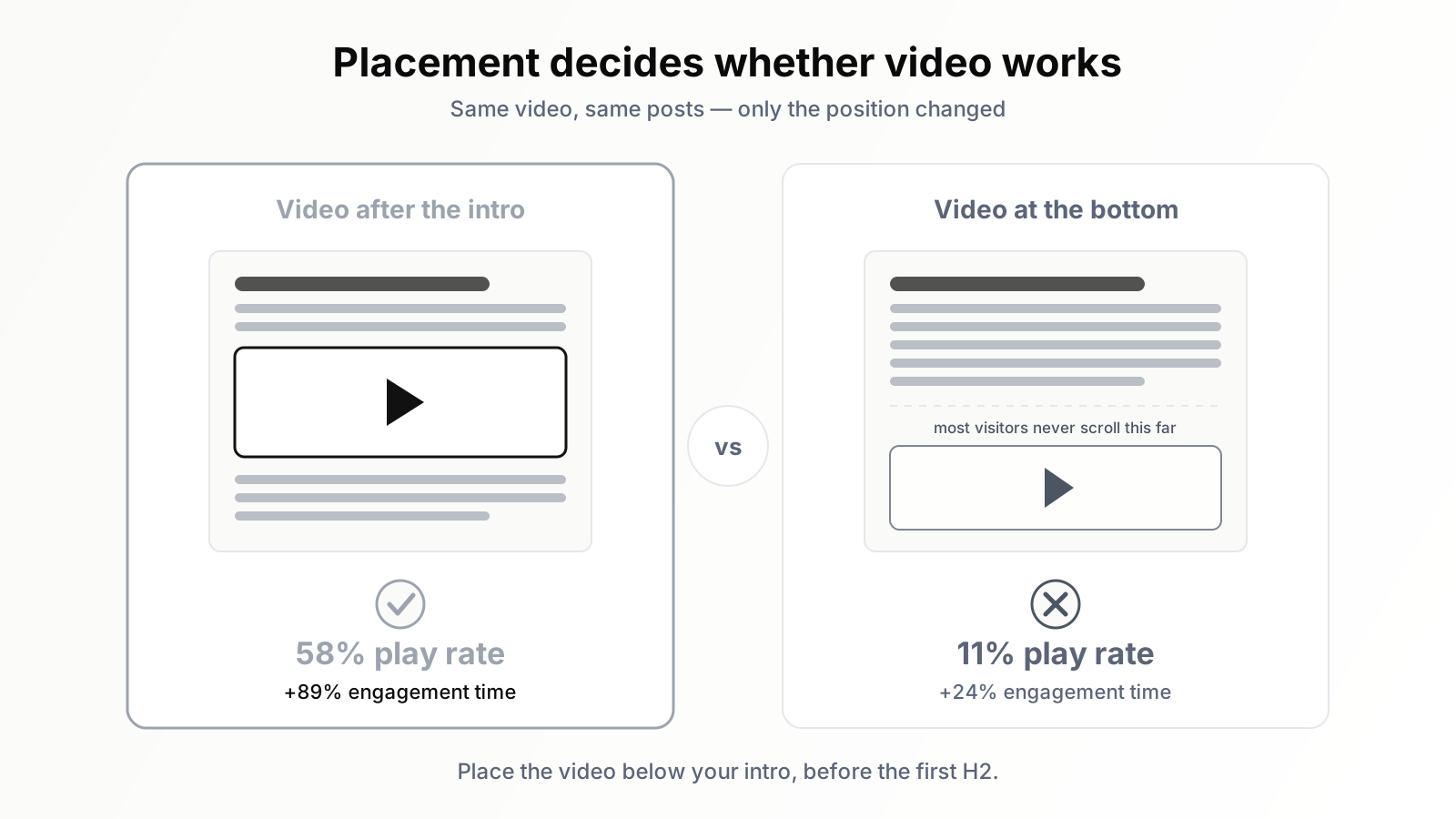
Midway through planning we almost made what we now believe would have been the experiment's biggest mistake: putting the videos at the end of the posts, as a "bonus" for finishing readers. Instead we tested it. For the first 30 days of the after-window, 8 treated posts had the video placed directly after the introduction (above the fold on desktop, one scroll on mobile) and 7 had it placed at the end, after the final section. At day 30 we moved the bottom-placed videos up, which gave us a within-post comparison too.
The difference was not subtle. Posts with the video after the intro saw 58% of page visitors start the video. Posts with the video at the bottom saw 11% start it — because, per our scroll data, only about 40% of visitors ever got near it, and those who did were finishing the article and leaving. Engagement-time lift during the split period: roughly +89% for top-placed videos versus +24% for bottom-placed. When we moved the bottom videos up after day 30, those seven posts' engagement curves bent upward within days and converged toward the top-placed group.
Our placement rule now: the video goes immediately after the intro and the quick-answer paragraph, before the first H2. The intro earns the click and frames the problem; the video delivers the fastest version of the answer; the article delivers the depth. One refinement — do not lead with the video above any text. We tried that on one post in a pilot and it felt like a YouTube page with an article attached; the intro paragraphs do real work setting context, and search engines still primarily read text.
Related and worth saying: the thumbnail your embed shows acts like a second headline. A dark, unreadable auto-generated frame depresses play rates the same way a bad title tag depresses CTR — a dynamic we covered in our piece on thumbnails, title tags, and better lighting. Setting a custom, high-contrast poster frame on the facade (next section) measurably improved start rates on two posts where we initially shipped the default frame.
Technical implementation: embeds without wrecking Core Web Vitals
The page-speed tax and the facade fix
Here is the part that nearly killed the experiment in week one. A standard YouTube iframe embed loads roughly 500KB to over 1MB of JavaScript — the player, analytics, and assorted scripts — before the visitor touches anything. On our first three treated posts, Largest Contentful Paint degraded by 0.8 to 1.4 seconds on mobile and Total Blocking Time spiked. We were running an engagement experiment and simultaneously making the pages slower, which both muddies the data and risks the very Core Web Vitals assessment we care about.
The fix is well established: a lite-embed, or facade. Instead of the iframe, the page initially renders a static thumbnail image with a play button — a few KB of HTML, CSS, and the poster image. The real YouTube iframe is injected only when the visitor clicks. The visitor perceives no difference (click, then video plays), but the browser never pays the player's cost for the majority of visitors who do not click. We used a lightweight web-component approach; several open-source implementations exist, and some performance plugins and frameworks now ship facades natively.
After switching all 15 posts to facades, LCP returned to within 0.1s of pre-experiment baselines and TBT normalized. If you take one technical instruction from this article: never ship a raw YouTube iframe on a page you care about. The facade pattern costs an hour to set up and removes the entire trade-off between video engagement and page speed.
VideoObject schema — and what it actually gets you in 2026
We added VideoObject structured data to all 15 treated posts: name, description, thumbnailUrl, uploadDate, duration, contentUrl/embedUrl, and for the custom walkthroughs, Clip markup for key moments. Schema is cheap insurance and the only way to be eligible for video presentation in search. We validated everything against the rich results test, the same hygiene we recommend in our guide to winning rich results with structured data.
But set your expectations correctly, because Google changed the rules in 2023 and most advice has not caught up: a page is only eligible for a video thumbnail in regular web results when the video is the main content of the page. A video embedded inside a long article — which is exactly what we built — generally does not qualify, and Search Console will report these as "video indexed but not shown" or simply not surface them in the video indexing report as thumbnail-eligible. Of our 15 posts, 4 gained video rich result presence — and those were the four where the video sits high on the page, is referenced throughout, and arguably co-leads the content. The other 11 got no thumbnail in web results, exactly as documented behavior predicts. The schema still matters: it feeds the video tab, Google's video indexing, and machine understanding of the page. It is just not a thumbnail vending machine.
The transcript below the video
Under each custom video we added a collapsed, expandable transcript — lightly edited for readability, with timestamps. Three reasons. Accessibility: deaf and hard-of-hearing visitors get the full content. Indexability: search engines cannot watch your video, but they can read your transcript, and several of our posts began ranking for long-tail phrases that appear only in the spoken walkthrough, not the original article text. And user choice: a meaningful minority of visitors expanded the transcript and read it instead of watching — engagement we would otherwise have lost. The transcript is also where the repurposing pipeline starts, as covered in the transcript-assets piece linked above.
What video did NOT do: the rankings honesty section
Now the part vendor case studies skip. Did doubling engagement time improve our rankings? In the 60-day after-window: no. Average position for the treated posts' primary queries moved within normal fluctuation — some up a few tenths, some down. The control group fluctuated similarly. If you embed videos this quarter expecting a rankings jump next month, our data says you will be disappointed.
Over the following quarter, the picture softened slightly: 6 of the 15 treated posts gained modest positions (one to four spots) on their primary queries, against 2 of 15 controls. We report that with a heavy disclaimer: it is correlation over a small sample in a moving search landscape, not proven causation. A dozen confounders — links earned in the interim, query-level competition shifts, the YouTube referral traffic, two core-ish updates — could explain it. We genuinely do not know whether the videos caused those gains, and neither would anyone else running this test.
This is the right moment to be precise about dwell time. Google has never confirmed dwell time, time on page, or GA4 engagement time as direct ranking factors, and representatives have repeatedly pushed back on the idea that Google consumes your analytics data at all. What the DOJ trial documents and the 2024 documentation leak did show is that Google uses click-and-interaction signals (systems like Navboost) at scale — aggregate behavioral data from search results, not your GA4 dashboard. So the honest causal chain is: video makes pages more satisfying; satisfied users click back to search less, return to your site more, convert more, and link more; some of those behaviors plausibly feed aggregate signals Google does use; none of it is a lever you can pull and watch a position counter move. Engagement is worth buying for the conversions alone — ours rose 31% — and any ranking benefit is a slow, indirect dividend, not the purchase price. That logic mirrors why we tell people not to despair over zero-click results either: visibility produces value through more channels than the blue-link click, as we argued in why zero-click search doesn't mean zero value.
Limitations: what we would do differently
Every experiment buys answers at the price of caveats, so here are ours, unhedged.
- Sample size. Fifteen treated posts is enough to detect a 2x effect; it is not enough to slice by topic, intent, or video length with confidence. Thirty-plus posts per arm would let us say more.
- Window length. Sixty days captures engagement shifts well but is far too short for SEO effects, which play out over quarters. A 6-to-12-month observation window would make the rankings section more than anecdote.
- The custom-versus-borrowed confound. We assigned arms by production feasibility, not randomly. A clean test would randomize which posts get custom video, even when it hurts.
- Placement test contamination. Moving bottom videos to the top at day 30 was the right call for the site and the wrong call for the science — it shortened our clean split-comparison window.
- Self-measurement. We knew which posts were treated, and we wrote the videos. Unconscious bias in small editorial touches cannot be fully ruled out, although we froze the article text in both groups for the duration.
- One site, one audience. Our readers are professionals researching how-to topics. A recipe blog, a news site, or an e-commerce catalog could see very different numbers. Treat our results as a hypothesis for your site, not a guarantee.
Replication checklist: run this on your own blog
If you want a number you can trust for your own site, here is the full protocol in nine steps.
- Pull candidates. Posts 12+ months old, stable traffic (500+ organic sessions/month if possible), no recent major edits, and a topic where video demonstrably adds explanation value.
- Build matched pairs. Match on topic, length, traffic, and current engagement time. Assign one of each pair to treatment, one to control. Freeze the text of both groups.
- Set the baseline. Record 60 days of GA4 data first: engagement time per active user, scroll-depth events, engaged sessions, conversions per page, plus Search Console position and impressions.
- Produce or select videos. Custom walkthroughs of 4–7 minutes outperformed everything else for us. If borrowing, pick the best topical match, not the most popular video.
- Place after the intro. Directly below your opening paragraphs and quick answer, before the first H2. Do not bury it at the end.
- Use a facade embed. Static thumbnail plus click-to-load iframe. Verify LCP and TBT before and after on mobile. A raw iframe will cost you up to a second of LCP.
- Add VideoObject schema and a transcript. Validate the schema; collapse the transcript under the player. Expect video rich results only where the video is genuinely main content.
- Wait 60 days, excluding a one-week buffer around the change date. Resist peeking and reacting; mid-test changes destroy the comparison.
- Compare treatment lift against control lift, not against zero. The control group is the whole point — seasonality and site-wide trends will otherwise masquerade as your effect.
Budget guidance from our cost sheet: a custom screen-recorded walkthrough cost us roughly 90 minutes of work once the pipeline existed (script outline from the article, one recording pass, light edit, captions). Across nine videos that was about two working days — for a doubling of engagement on our most valuable pages and a 31% conversion lift. Few content investments we have made returned more per hour.
The bottom line
Video on blog posts is one of the rare tactics where the popular claim survived contact with a controlled test — engagement really did double — but the mechanism is narrower and slower than the hype suggests. Video rescues underperforming pages more than it improves great ones; placement decides whether it works at all; the page-speed tax is real but fully refundable via facades; and the rankings payoff, if it exists, arrives quarters later through indirect channels, not weeks later through a dwell-time dial. Run the test on your own blog before you scale production, and let your control group keep you honest.
The unglamorous bottleneck in all of this is measurement: knowing which posts have high traffic but weak engagement, watching treated pages against controls for months, and turning GA4 exports into decisions. That is exactly the grunt work an SEO AI agent like Orova absorbs — it tracks engagement metrics page by page, flags the posts whose numbers say they deserve a video, and automates the before-and-after reporting so your experiment reads itself out while you make the next video.
Want the engagement boost without doing the manual work
Running a test like this by hand takes real time: picking the right posts, finding or building matching videos, placing them correctly, checking that page speed does not tank, and then tracking the numbers before and after. Most business owners do not have a spare block of weeks to do this carefully, and doing it sloppily can waste effort or even hurt your pages.
If you like the idea but not the manual grind, Orova SEO is built to handle this kind of optimization work for you automatically, so you get the engagement upside without the trial and error. Feel free to take a look and see if it fits how you work.
Let Orova SEO handle the repetitive part
Keyword research, drafting, refreshing old posts and rank tracking — running automatically on your own site.
Explore Orova SEO