
YouTube Video SEO Optimization: Rank on YouTube and Google Too
You made a genuinely good video, uploaded it to YouTube, dropped it on your site somewhere, and it went nowhere. No views from search, no ranking, nothing. If that sounds familiar, you are not doing anything unusual — most business owners run into this exact wall, and it is the reason so many teams quietly give up on youtube video seo optimization after one or two tries.
The advice you probably followed is the same advice everyone follows: write a good title, add some tags, hope for the best. That advice is outdated and it only addresses half the problem. Your video actually has to win two separate contests — one on YouTube itself, and one on Google Search, which now has its own strict rules about when it will even show a video result at all, especially as AI Overviews now appear on more than 20% of Google searches, according to SparkToro. Optimizing for one and ignoring the other means you are leaving most of your possible traffic on the table, no matter how good the video is.
This guide walks you through both games at once, in plain terms. You will learn how to tell which of your topics actually deserve a video instead of a blog post, what actually makes YouTube push a video to more viewers, what Google specifically checks before it will rank your video in search results, and how to set up your video and page so both platforms reward the same piece of content instead of fighting each other for it.
Two Ranking Systems, Two Different Winners
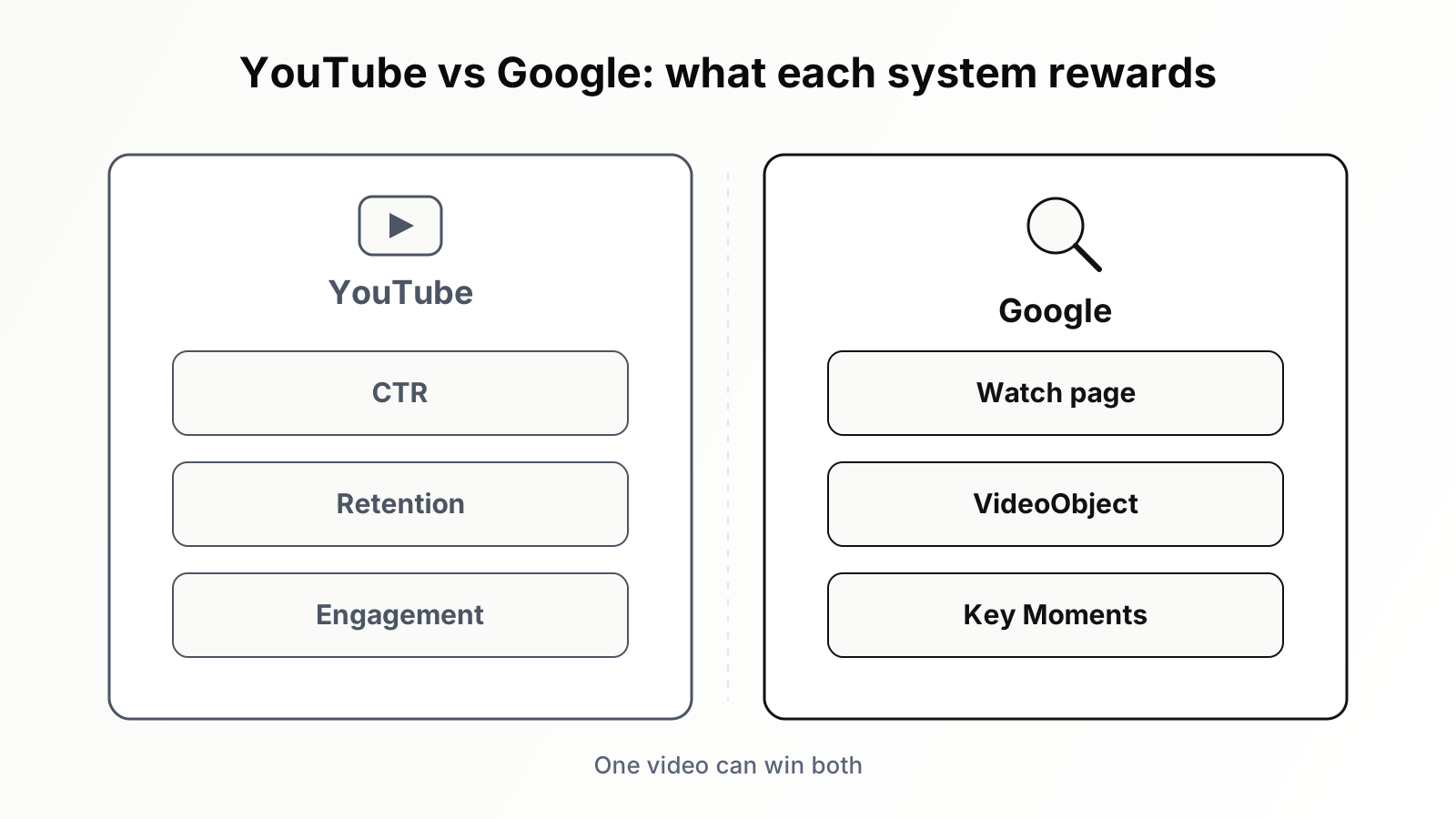
The single most useful mental model in video SEO is this: YouTube is a recommendation engine that happens to have a search box, while Google is a search engine that occasionally shows videos. They evaluate completely different evidence.
YouTube's ranking systems, for both search and recommendations, are built around predicted viewer satisfaction. The observable proxies are click-through rate on the impressions YouTube serves, watch time and audience retention once the click happens, and engagement signals such as likes, comments, shares, and subscriptions driven by the video. Metadata, your title, description, chapters, and captions, matters primarily for retrieval: it helps YouTube understand what the video is about and which queries and viewers it might satisfy. But metadata does not rank the video by itself. A perfectly optimized title attached to a video that viewers abandon at the 20-second mark will sink. A merely decent title attached to a video that holds 55 percent of its audience to the end will climb. And tags, the field an entire generation of "YouTube SEO tools" was built around, contribute almost nothing; YouTube has said for years that they play a minimal role, useful mainly for commonly misspelled terms.
Google Search plays by different rules entirely. Google does not care how many subscribers your channel has when deciding whether to show a video thumbnail in web results. It cares about the page hosting the video. Since a major change in 2023, Google only shows a video thumbnail next to a web result when the video is the main content of that page. A blog post with a video tucked under the third subheading no longer earns a thumbnail. Beyond that threshold, Google looks for machine-readable evidence: VideoObject structured data describing the video, Clip or SeekToAction markup enabling Key Moments, a video sitemap aiding discovery, and a crawlable, indexable page. These are deterministic, technical requirements, far closer to classic on-page SEO than to anything YouTube measures.
The consequence: the same video can be a top-three YouTube result and completely invisible in Google, or vice versa. Different winners emerge in each system for the same query, which means there are two separate opportunities for you to claim, and most competitors are only contesting one.
Video Keyword Research: Which Queries Deserve Video
Before you optimize anything, decide where video belongs at all. Producing video is expensive relative to writing, so spending production budget on queries where nobody wants video is the most common and most costly mistake in this discipline.
Reading video intent from the SERP
The fastest, most reliable video-intent detector is the search result page itself. Google has already run the experiment for you at massive scale: if a query's results include a video carousel, a prominent video pack, or YouTube results in the top organic positions, Google has learned that searchers for that query click and stay on video. That is a green light. If the SERP is wall-to-wall text articles with no video features, Google has learned the opposite, and you will be fighting both the intent and the layout.
Run this check systematically across your keyword list. For each target query, record three things: whether any video feature appears, where it appears on the page (a carousel at position two is a different opportunity than one buried below eight organic results), and who owns the current video results. When the carousel is filled with three-year-old, low-effort videos, you have found a soft target. When it is filled with recent, high-production videos from channels with deep authority in the niche, factor the real cost of competing.
Certain query patterns carry video intent almost by default: "how to" queries with a physical or visual component, "tutorial," "review," "vs" comparisons of physical products or software interfaces, "setup," "install," and anything where the searcher needs to see a process rather than read about it. Question-form queries are especially fertile because they map cleanly to a video that answers one thing well; the mining techniques in our guide to finding question keywords at scale apply directly here, with one extra filter: ask whether the answer is fundamentally visual.
Mining YouTube suggest and the platform's own demand signals
Google keyword tools describe Google demand, not YouTube demand, and the two diverge more than most people expect. A query can be tiny in Google and substantial on YouTube, where people search differently: more conversational, more task-oriented, more tolerant of long content. To read native YouTube demand, use YouTube's own autosuggest. Type your seed term and harvest the completions, then iterate with letters appended ("video editing a", "video editing b") the same way you would mine Google suggest. These completions are ordered by real search behavior on the platform.
Then validate demand by looking at supply-side evidence: search your candidate query on YouTube, sort the results by upload date and by view count, and study the gap between them. If recent videos on the topic are accumulating views quickly despite coming from small channels, demand exceeds supply, which is exactly the situation you want. If only five-year-old videos from huge channels have meaningful views, the topic may be saturated or the demand may be evaporating. YouTube Studio's research tab adds another layer for channels that already have data, surfacing searches your existing viewers perform and flagging content gaps where search volume is high and satisfying results are scarce.
Finish your research by assigning each query a destination: YouTube-first (high YouTube demand, weak Google video features), Google-first (video pack present, modest YouTube volume), or dual-target (both systems show appetite). That assignment drives everything downstream, from the video's length and structure to where you spend your packaging effort.
Ranking on YouTube: Packaging, Retention, and Structure
Everything on YouTube flows from a simple loop: YouTube shows your video to a test audience as impressions; if enough of them click, and the clickers stay, YouTube shows it to more people. Your job is to win both halves of that loop, the click and the stay, and to give the retrieval systems enough clean metadata to put you in front of the right test audience in the first place.
Packaging: the title and thumbnail decide your CTR
Packaging, the combination of title and thumbnail, is the highest-leverage work on the entire platform, because it determines click-through rate on impressions, and CTR is the gate everything else sits behind. A video that never gets clicked never gets the chance to demonstrate its retention. Experienced YouTube teams now design the packaging before they shoot the video: if you cannot articulate a title and thumbnail concept that would make a stranger click, the video concept itself is probably weak.
The title needs to do two jobs at once. For the retrieval system, it should contain the natural phrasing of the target query, ideally near the front. For the human, it should open a curiosity gap or promise a specific payoff. "Video SEO Tutorial 2026" does the first job only. "Video SEO: Why Your Best Videos Rank Nowhere" does both. The thumbnail's job is purely human: it must be legible at the size of a postage stamp, communicate the payoff in under a second, and contrast against the wall of competing thumbnails it will sit inside. Three words of text maximum, one focal point, faces with readable emotion when relevant. We covered the production side, including the underrated impact of lighting on thumbnail quality, in our piece on thumbnails and title tags, and the short version is that thumbnail iteration is the cheapest A/B test in marketing: YouTube's built-in thumbnail testing lets you run variants against each other on a published video and keep the winner.
Retention: the curve that actually ranks you
Once the click happens, the retention curve takes over. Open the audience retention report on any of your videos and you will see the same shape: a cliff in the first 30 seconds, then a slope. Your two jobs are to shrink the cliff and flatten the slope.
The cliff is a promise-matching problem. Viewers leave in the first half minute when the video does not immediately deliver on what the title and thumbnail promised. So deliver it immediately: state what the viewer will get, show a glimpse of the payoff, and get into the substance. Cold opens that tease the best moment of the video consistently outperform logo animations, channel introductions, and "before we start" housekeeping, all of which are retention poison. If your analytics show intro drop-off above roughly 40 percent in the first 30 seconds, the intro is the problem, not the topic.
The slope is a pacing problem. Long unbroken segments at one visual register cause steady decay; pattern interrupts, a cut to a screen recording, a chart, a location change, a tonal shift, reset attention. Study your retention graphs for spikes as much as dips: spikes mark moments people rewatched, which tell you what your audience actually values so you can build more of it. And resist the urge to pad length. Watch time matters, but it is a function of retention multiplied by duration; a 9-minute video held at 60 percent beats a 22-minute video that bleeds to 20 percent, both in total watch time per impression and in the satisfaction signals that follow.
Chapters, captions, and descriptions: metadata that earns its keep
Chapters, timestamped segments declared in the description or the editor, do three jobs. They improve retention by letting viewers skip to what they need instead of abandoning the video. They give YouTube labeled segment-level understanding of your content. And they become the raw material for Key Moments treatments when your video surfaces in Google. Write chapter titles as mini-keywords, the natural phrases someone would search for that exact step, not clever labels.
Captions deserve more care than almost anyone gives them. Upload a real, corrected caption file rather than relying on YouTube's auto-captions. Auto-captions mangle product names, technical vocabulary, and accented speech, and the caption track is a transcript-level signal of what your video actually says, far richer than a title and description. A clean caption file improves accessibility, watchability in muted environments, and machine comprehension simultaneously. It also becomes a reusable asset: a corrected transcript can be turned into the blog post, the FAQ block, and the social copy for the same topic, a workflow we broke down in turning one transcript into five assets.
The description's first two to three lines are the part that matters most, since they show in search results and above the fold; write them as a direct, query-matching summary of what the video covers. Below that, add the chapter list, relevant links, and a fuller prose description in natural language. Skip the keyword-stuffed tag blocks and hashtag walls; they read as spam to humans and contribute essentially nothing to ranking.
Playlists, end screens, and the session you build
YouTube rewards videos that start good sessions, not just videos that perform alone. Curated playlists ordered as a learning path keep viewers inside your content for multiple videos. End screens that point to the single most relevant next video, not four random options, convert finishers into binge sessions. Pinned comments and on-screen prompts that ask a specific question drive the comment engagement that correlates with distribution. None of this is a trick; it is the video equivalent of internal linking, and it compounds the same way a well-built cluster of articles does, an architecture we covered in why topic clusters beat standalone posts. A channel organized as clusters of mutually reinforcing videos behaves like a site organized the same way.
Ranking Video in Google: The Technical Side
Google's video requirements are stricter and more mechanical than YouTube's, which is good news: they are checkable, fixable, and most of your competitors ignore them.
The main-content rule changed everything in 2023
Start with the rule that invalidated a decade of habit. Since 2023, Google only shows a video thumbnail in web search results when the video is the main content of the page. Before that change, any page with any embedded video could pick up a thumbnail in results, and SEO teams scattered embeds across blog posts to harvest them. Those thumbnails are gone. Today, a 2,500-word article with a supporting video embedded mid-page is, in Google's eyes, an article, full stop, and it will be treated and displayed as one. The page can still rank, and the embed can still help it, but it will not earn video treatment in the SERP.
The dedicated watch page
The practical answer to the main-content rule is the dedicated watch page: a URL on your own domain where the video is unambiguously the star. The video sits prominently above the fold, large, immediately visible, ideally the first substantial element on the page. Supporting text exists to serve the video: a concise summary, a timestamped outline mirroring the chapters, a transcript or cleaned-up version of it, and links to related watch pages. Think of how YouTube's own watch pages are structured and build your equivalent.
One watch page per video, each with a unique title and meta description targeting the video-intent query you mapped during research. A thin "/videos" gallery page that lists forty embeds satisfies nobody: Google cannot tell which video is the main content, and users cannot deep-link to any of them. Galleries are fine as navigation, but each video needs its own canonical home to be eligible for video results.
VideoObject structured data
The watch page makes the video the main content; structured data proves it in a machine-readable way. Add VideoObject markup, as JSON-LD, declaring at minimum the video's name, description, thumbnailUrl, uploadDate, and a contentUrl or embedUrl. Duration, via the ISO 8601 duration field, is strongly recommended. This markup is what makes Google's video understanding deterministic instead of inferred, and it is a prerequisite for the richer treatments that follow. If your team is new to structured data, the implementation patterns, JSON-LD placement, validation, and monitoring, are the same ones we documented in our guide to using structured data to win rich results; VideoObject is simply another schema type plugged into the same workflow.
Key Moments: Clip markup and SeekToAction
Key Moments are the timestamped jump links Google shows beneath some video results, letting a searcher land at the exact segment that answers their query. They effectively let one video rank for several sub-queries, and you can enable them two ways. Clip markup is the manual route: inside your VideoObject, you declare named clips with explicit start and end offsets, giving you full editorial control over segment names and boundaries, exactly parallel to your YouTube chapters. SeekToAction markup is the automated route: you tell Google how to construct a URL that seeks to any timestamp in your player, and Google identifies the key moments itself. Use Clip when you want control and your segments are deliberate; use SeekToAction when you have a large library and a player that supports timestamp URLs. For videos hosted on YouTube, you do not add this markup at all; Google pulls moments from YouTube directly, with chapters as its strongest hint.
Video sitemaps and the Search Console video report
A video sitemap, either a dedicated file or video extensions inside your existing sitemap, tells Google which pages host videos and carries the metadata for each: title, description, thumbnail, content location, duration. It does not boost rankings, but it accelerates and stabilizes discovery, which matters most on large sites and on new watch pages that have few internal links pointing at them yet.
Then verify what Google actually did with all of this in Search Console's video indexing report, which lists pages where Google found a video and, crucially, whether the video on each page was indexed, along with the reason when it was not. The recurring offenders are predictable: video not the main content of the page, missing or unparseable thumbnail, video file or embed blocked from crawling, or lazy-loaded players that never render for Googlebot. Treat this report exactly like the page indexing report: review it on a schedule, fix by issue type rather than page by page, and validate the fix.
The Hosting Decision: YouTube Embed or Your Own Player
Every video strategy eventually hits the same fork: host on YouTube and embed it, or self-host with your own or a third-party player. There is no universally correct answer, only a trade you should make with open eyes.
YouTube gives you the audience and the infrastructure for free. Its recommendation system is the largest video distribution engine in existence, the player handles every device and bandwidth condition, and you pay nothing for storage or delivery. The cost is strategic: when your embedded YouTube video earns a video result in Google, the result frequently resolves to YouTube's watch page rather than yours, complete with YouTube's sidebar of competing videos, possibly your competitor's, one click away. You built the asset; YouTube collects the visit.
Self-hosting, or using a third-party video platform with a clean embeddable player, inverts the trade. Your watch page becomes the only canonical home of the video, so the Google video result points at your domain, the viewer lands in your environment, and the session, the next click, and the conversion all happen on property you control. The costs are real: you forfeit YouTube's discovery audience for that asset, you take on player performance and delivery, and you must implement VideoObject and Key Moments markup yourself because no platform does it for you.
A defensible split that many teams converge on: top-of-funnel, broad-audience content goes to YouTube, where discovery upside is the entire point; high-intent product, demo, and customer-education content is self-hosted on watch pages, where owning the result and the session is worth more than borrowed reach. Whichever way you go for a given video, decide deliberately per asset rather than defaulting to one pipeline for everything.
The Combined Strategy: One Video, Two Destinations
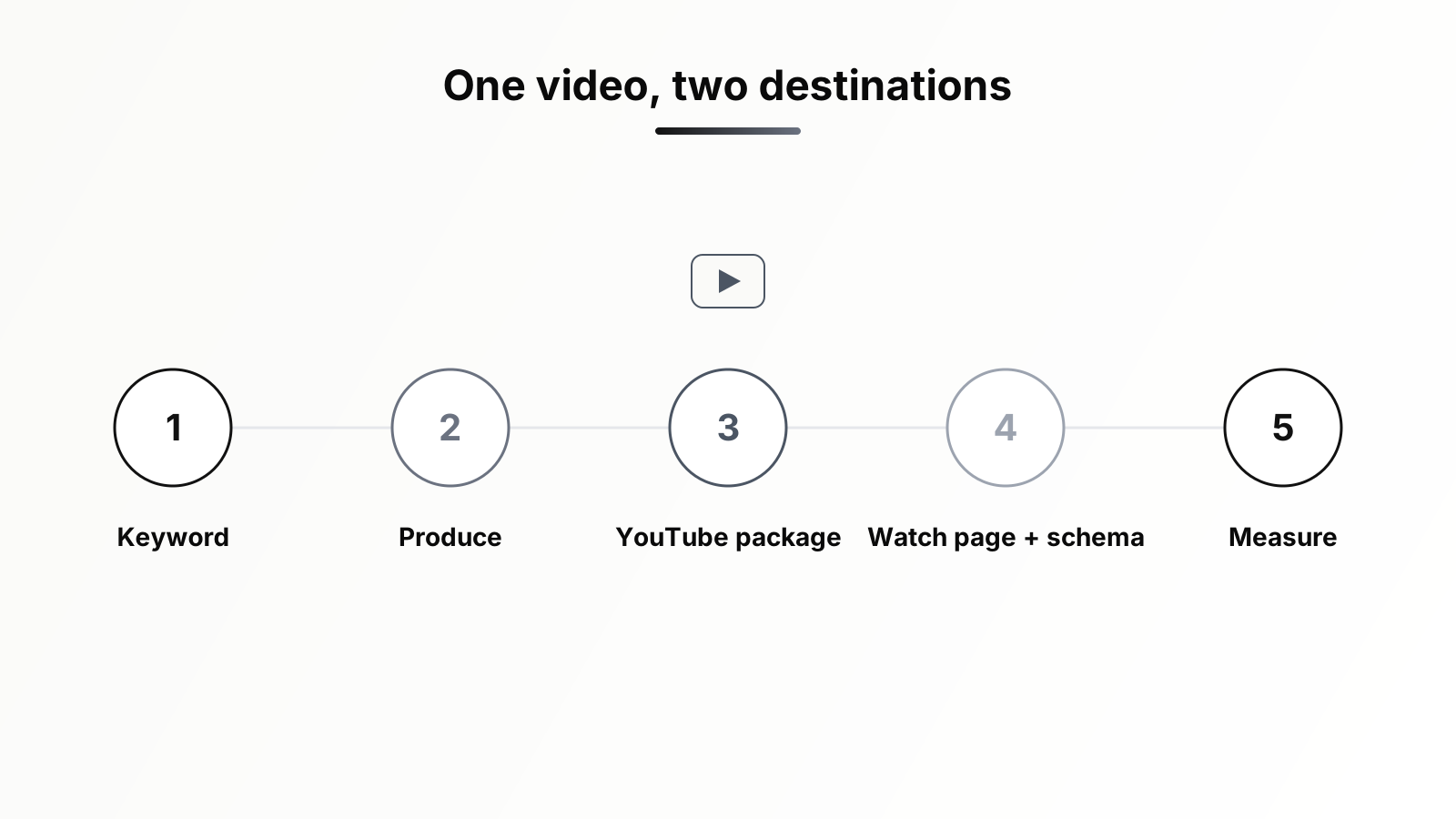
Here is the architecture that makes the two systems reinforce each other instead of colliding. For each dual-target topic, produce one video and give it two deliberately different jobs.
On YouTube, the video competes in YouTube search and recommendations under YouTube's rules: packaging tuned for CTR, a cold open tuned for retention, chapters, a corrected caption file, an end screen pointing to the next video in the cluster. On your site, the same video is embedded at the top of a companion blog post or watch page that targets the query's text-intent variant, surrounded by the article-depth treatment of the topic, with the transcript-derived sections, the FAQ, and the internal links into the rest of the cluster.
The self-competition worry, "won't my page and my YouTube video fight each other in Google?", mostly dissolves when you differentiate intent. Let the YouTube upload chase the explicitly visual phrasing ("how to set up X, step by step") while the page chases the informational phrasing ("X setup guide, settings explained"). The two assets then occupy different SERPs, or different slots in the same SERP, which is strictly better than occupying one. What you should not do is publish a thin page whose only content is the same embed with two sentences under it; that page loses to the YouTube watch page every time and earns nothing.
The embed also pays a second dividend on the page itself. A relevant video at the top of an article gives a meaningful share of visitors a second way to consume the content, and visitors who press play stay measurably longer. When we added videos to existing posts and measured the result, engagement time moved enough to justify the production cost on its own; the full numbers are in our case study on what happened when we added video to 15 posts. Just remember the 2023 rule when you do this: a mid-article supporting embed improves the page experience but will not earn a video thumbnail, and that is fine, because that is not its job. Thumbnails belong to the watch pages.
Operationally, the combined workflow per topic looks like this. One: confirm video intent and assign the destination during keyword research. Two: script with both endpoints in mind, an opening that works as a YouTube cold open, segments that map cleanly to chapters and clips. Three: publish to YouTube with full packaging and the corrected caption file. Four: build or update the companion page, embed the video as main or supporting content according to its job, add VideoObject (and Clip markup if self-hosted), and ship the sitemap entry. Five: route the transcript into derivative assets. The marginal cost of the Google side, once the video exists, is a few hours; the marginal traffic is frequently comparable to the YouTube side.
Measuring Video SEO Across Three Dashboards
No single tool shows you whether this is working, because the value accrues in three places with three different measurement systems.
YouTube Studio: the platform loop
In YouTube Studio, the metrics that matter map directly to the ranking loop. Impressions and impressions click-through rate tell you whether packaging is working and whether YouTube is expanding or contracting your test audience. Average view duration and the audience retention curve tell you whether content is keeping the promise. Traffic sources tell you where distribution is coming from: YouTube search confirms your retrieval optimization is landing, suggested videos confirms the recommendation engine has picked you up, and external traffic shows what your own embeds and other sites contribute. Watch CTR and retention together, never alone; a thumbnail change that raises CTR but attracts the wrong audience will show up as a retention drop within days.
Search Console: the Google loop
In Search Console, two reports carry the load. The performance report filtered to the video search appearance shows the impressions, clicks, and queries your video results earn in Google, which is the direct measure of whether your watch pages and markup are paying off. The video indexing report, as covered above, is your health check: every video Google found, indexed or not, and why. A growing gap between videos found and videos indexed is your earliest warning that templates, markup, or rendering broke somewhere.
GA4: what happens after the click
GA4 answers the question the other two cannot: what video traffic is worth. Landing-page reports for your watch pages show engagement time and conversion events for visitors arriving from video results. Embedded YouTube players can emit video start, progress, and complete events into GA4, letting you compare engagement on pages with and without video and attribute downstream conversions to video-assisted sessions. Configure those video events deliberately rather than assuming defaults cover you; our walkthrough of what SEOs should actually track in GA4 covers the event setup and the reports worth building. The composite picture you are after is one funnel: impressions in two systems, clicks to two destinations, sessions and conversions in one analytics property.
Play Both Games on Purpose
Video SEO in 2026 rewards teams that respect the split. YouTube is a satisfaction engine: win the impression with packaging, keep the promise with retention, and let chapters and real captions make the content legible to the machine. Google is a technical gate: give each video a page where it is unmistakably the main content, prove it with VideoObject and Key Moments markup, ship the sitemap, and audit the video indexing report like you audit everything else. One video, two destinations, two sets of rules, and a measurement loop that spans YouTube Studio, Search Console, and GA4. None of it requires guessing at algorithm weights; all of it requires doing the unglamorous work in the right order.
The order is exactly where most teams need help, because the workflow crosses keyword research, content production, technical implementation, and reporting, four functions that rarely sit in one head. That is the kind of multi-step grind Orova was built for: as an SEO AI agent, it automates the keyword and SERP-intent research that tells you which topics deserve video, generates the content briefs and drafts for the companion pages, runs the technical checks on your markup and indexing, and folds the results into one report, so your team's time goes into the part no agent can do for you, making a video worth watching.
Ready to Stop Guessing on Video SEO
Doing all of this by hand is doable, but it eats time in the wrong places: digging through queries to see which ones deserve a video, checking whether your page structure and markup actually qualify for a video result on Google, then tracking performance across YouTube, Google Search, and your website analytics separately just to see if any of it worked.
Orova SEO is built to take that manual grind off your plate — it handles the research, technical checks, and tracking side automatically so you can focus on making good videos instead of babysitting spreadsheets. If that sounds useful, it is worth taking a look and seeing how it fits into what you are already doing.
Let Orova SEO handle the repetitive part
Keyword research, drafting, refreshing old posts and rank tracking — running automatically on your own site.
Explore Orova SEO