
Pricing Page SEO: Rewriting It for Search and for People

If your pricing page is just a table — three plans, a toggle, a row of checkmarks, a button — you probably built it in an afternoon and never touched it again, because pricing pages feel dangerous to edit. That silence is costing you more than you think. People searching for search engine optimization cost, or "[your category] pricing," or "is this kind of software worth it," are landing on that page with money in their hands and money on their mind — and leaving without clicking, because the page never actually answers their question.
The old approach treats the pricing page as a static artifact: something you set once, protect, and never touch, out of fear that any change might break revenue. But a page that's afraid to be edited is a page that's slowly losing ground in search results — showing up, getting seen, and getting passed over, again and again, for the same set of cost-related searches. The table format wasn't built to answer questions; it was built to display options to people who had already decided to buy. And the ground underneath that table has already shifted: 68% of US Google searches in the first four months of 2026 ended without a click at all, up from 60% in 2024, according to sparktoro — which means a static table sitting quietly on your site is increasingly invisible before it even gets the chance to convert anyone.
This post walks through how we rebuilt a pricing page to work as both a sales tool and a search asset — what we changed, why, and what happened afterward. By the end, you'll know exactly what a pricing page needs beyond the table itself, how to make that change without spooking your team about revenue risk, and where to start if you're the one who's been too nervous to touch yours.
The audit: what a pricing page is actually asked to do
Before rewriting anything, I spent a week treating our pricing page like a stranger's and collecting evidence from three sources. Each one embarrassed us in a different way.
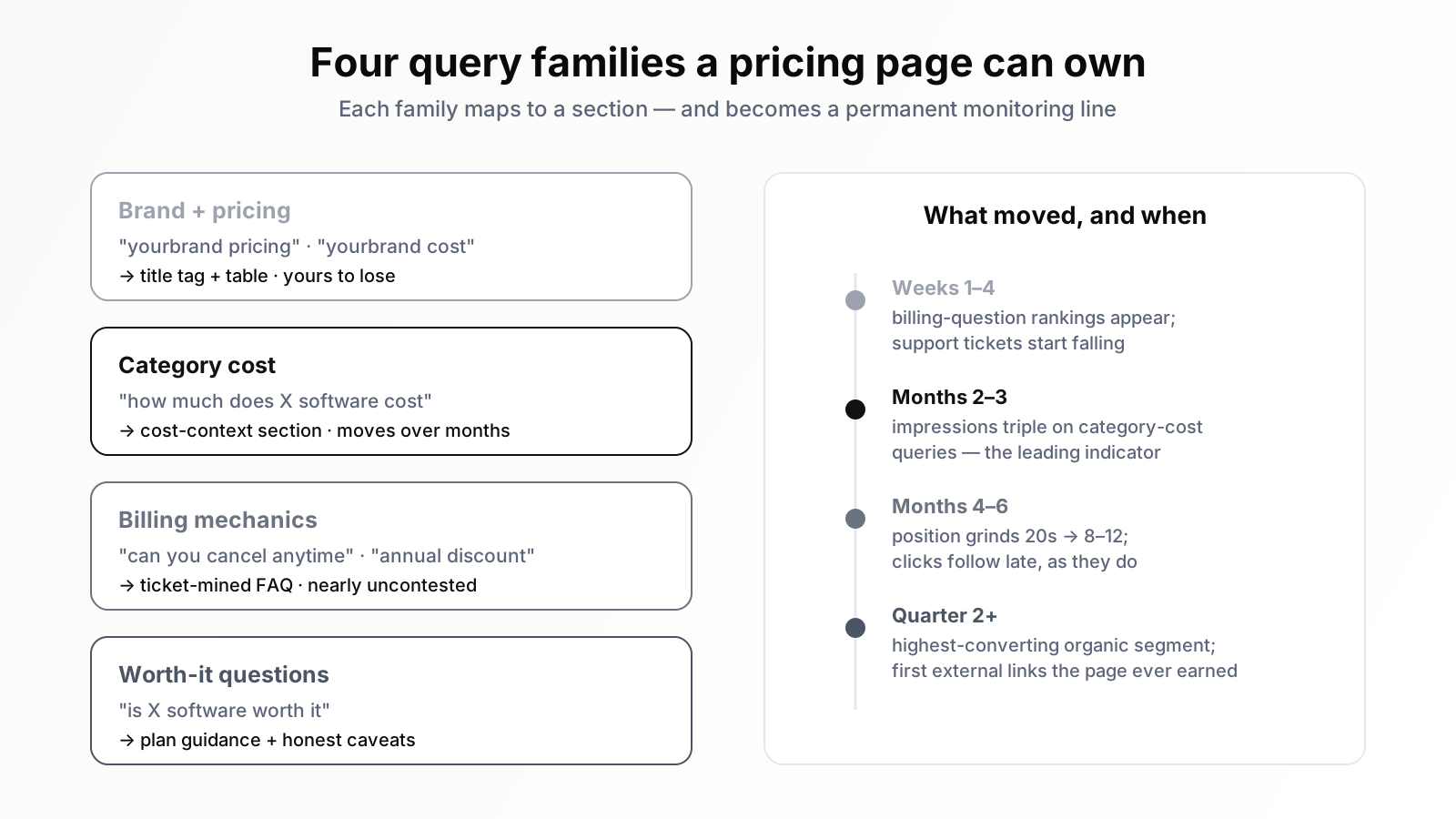
Search Console told the demand story. I exported every query the page had impressions for over six months and sorted them into themes. Theme one: brand-plus-pricing queries — ours to lose, and we were ranking first, fine. Theme two: category cost queries — "how much does X software cost", "X pricing comparison", "X tool price" — hundreds of impressions a month, position twenty-something, essentially zero clicks. Theme three, the one that stung: question-shaped queries about billing mechanics. "Can you cancel X anytime", "does X charge per user", "X annual discount". People asked these before buying, our page contained the answers to none of them, and the SERPs for those queries were being answered by review sites and forum threads — third parties explaining our own billing to our own prospects, occasionally wrong.
Support tickets told the comprehension story. I asked our support lead to pull every pre-sales ticket from the previous quarter that was really a pricing-page question in disguise. There were a lot. The same questions, over and over: what happens when I hit the plan limit, what counts as a "project", do unused seats roll over, what is the difference between the two middle tiers really. Every one of those tickets was a person who had been on the pricing page, failed to find the answer, and cared enough to write to us. Behind each of them, statistically, stood some larger number of people who failed to find the answer and simply left.
Session recordings told the behaviour story. Watching people use the page was the most humbling part. Visitors bounced between the two middle plans, hovering the tooltip icons, opening the feature list of one and then the other, visibly trying to construct the sentence we had never written: "choose this one if you are this kind of team." Several scrolled below the table looking for something — more detail, reassurance, anything — and found a footer. The page answered "what are the numbers" and went silent on every question after that, and every question after that was where the decision actually lived.
The reframe: a pricing page is a landing page for cost queries
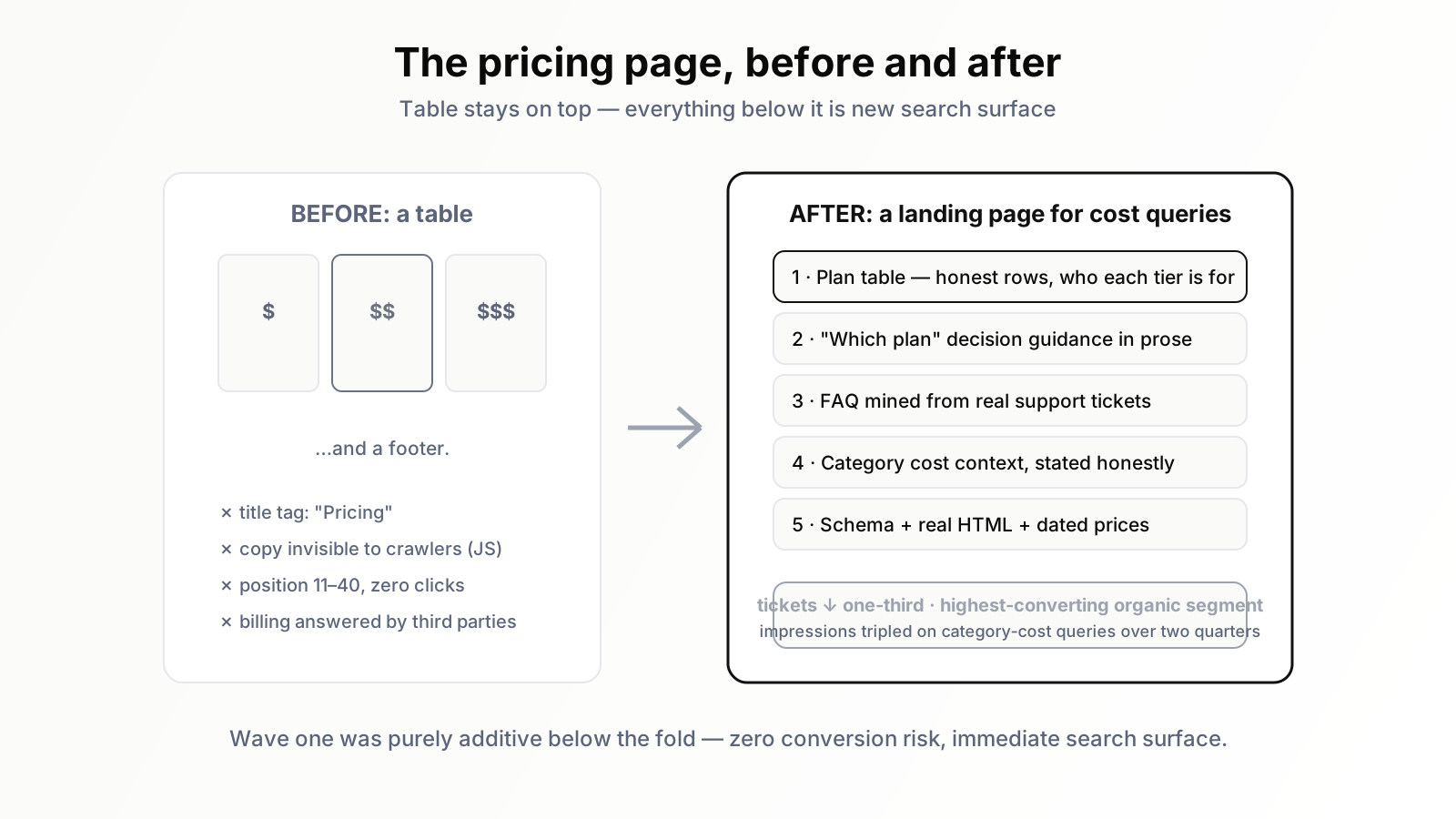
The audit forced a conceptual change that drove everything else. We had thought of the pricing page as an internal junction — a page our own visitors pass through between interest and signup. The data said it was also, whether we liked it or not, a landing page: an entry point from organic search for an entire family of cost-related queries, competing in SERPs against review sites and aggregators. We had simply never written it for that job. It had no real headline, no prose for a search engine to understand, a title tag that just said "Pricing", and — the detail that still makes me wince — the entire plan comparison was rendered from a JavaScript component in a way that left half the feature text out of the static HTML.
Once you see the page as a landing page for cost queries, the rewrite brief writes itself, and it is the same brief as for any commercial landing page: answer the visitor's question fast, then answer all the questions behind it, in crawlable text, without burying the conversion path. The craft is in doing that without turning a clean table into a wall of words — everything we knew about why landing pages quietly kill SEO traffic applied here, with the extra constraint that this particular landing page carried our entire revenue stream and a redesign that hurt conversion would not be forgiven by any amount of ranking improvement.
What we actually changed
We shipped the rewrite in stages over about six weeks, table first, copy after, measuring as we went. Here is the final anatomy, in the order a visitor meets it.
The table stayed on top — and got more honest. Whatever else changed, the people arriving from our own homepage wanted numbers in the first screen, and they kept getting them. But we rewrote the table itself. Plan names went from cute to descriptive. Under each plan name we added one sentence of who it is for — "for solo consultants", "for teams of 3–15 running client work" — which turned out to be the single most-praised change in later user tests. And we audited every checkmark row for honesty: a few features marked present on cheaper tiers had limits that only surfaced post-purchase, which we now state in the row. Conversion did not drop when we added the caveats. Refund requests in the first month of subscriptions did.
A "which plan" section in prose. Directly below the table, the sentence our session recordings begged for, expanded into three short paragraphs: the honest decision logic between tiers, including the sentence "most teams under ten people do not need the Growth plan" — which our sales-minded instincts fought and our data defended; the visitors who read that section converted better and churned less, presumably because they bought the right thing.
A real FAQ, mined from tickets. Twelve questions, taken verbatim from the support audit, answered in two to four plain sentences each: cancellation, proration, what counts toward limits, seat handling, annual-versus-monthly math, invoicing, what happens to data after cancellation. No marketing in the answers — we wrote them the way our best support agent writes, because she reviewed the drafts. This block is where most of the new long-tail rankings eventually arrived, exactly the dynamic that makes question keywords such a reliable goldmine: each ticket-derived question turned out to be a query, because of course it was — the people writing tickets and the people typing into Google were the same people at different stages of patience.
Cost context for the category. One section we debated hard: a few paragraphs answering "how much does [category] software cost" honestly — the typical range across the market, what drives the price differences, where we sit in that range and why. Writing about the market's pricing on your own pricing page felt strange. It is also precisely the content that the category-cost queries from the audit were asking for, and the third-party pages outranking us all had it. We wrote it factually, without naming competitors' numbers (those belong on comparison pages, where they can be properly maintained), and it earned its keep: our impressions for category-cost queries roughly tripled over the following two quarters and the page began clicking through for them.
Technical repairs. The title tag became "Pricing — [what the product is], from $X/month", which alone fixed our snippet for every brand-pricing query. We made sure the full plan comparison existed as real text in the rendered HTML. We added Product schema with the offer range, kept it strictly consistent with the visible numbers, and resisted decorating with markup beyond what the page honestly supports — the lesson of most schema myths being that markup describes a page, it does not improve one. And we put a visible "prices last updated" date by the table, mostly for trust, partly to force ourselves to keep it true.
What happened: the numbers and the surprises
I will report this the way I wish more case studies did: directionally precise, with the caveats attached. Nothing here is a controlled experiment; we changed several things over six weeks, our traffic was growing anyway, and pricing pages have seasonal moods.
The search outcomes arrived on the slow curve we should have expected. Brand-plus-pricing queries: already won, no change. The question-shaped billing queries started ranking within weeks — they were nearly uncontested once we actually contained the answers, and several produced first-page positions from a standing start. The category-cost queries moved over months, not weeks: impressions tripled early (Google trying the page against more queries — the leading indicator I now check first), average position ground upward from the twenties into the eight-to-twelve band, and clicks followed late, as they do. Organic entrances landing directly on the pricing page grew several-fold from a small base over two quarters. Per visitor, those entrances became our highest-converting organic segment by a wide margin — which surprised exactly nobody once we said it out loud: they typed a cost query, they got a cost answer, they were one click from buying the thing they had already decided to price.
The human outcomes were faster and, internally, more persuasive. Pre-sales billing tickets fell by roughly a third within the first quarter — the support team noticed before the dashboard did. Sales calls changed texture: prospects arrived having read the "which plan" section, asking confirmation questions instead of orientation questions. And the refund-and-downgrade pattern in new subscriptions eased, which we attribute to the honesty edits steering people to the right tier before they paid rather than after. None of these show up in a rank tracker. All of them are why the rewrite paid for itself even before the rankings landed.
The surprise: the pricing page became one of our better-crawled, better-linked internal pages and started lifting the pages around it. Once it contained real content, other sites occasionally cited it — a pricing-transparency roundup here, a forum answer there — the first external links that page had ever earned. A table cannot be cited. An answer can.
The internal fight, and how we de-risked it
I have skipped the part that nearly killed the project, which is that for three weeks it did not have permission to exist. The pricing page was, formally, owned by nobody and informally owned by everybody: product had opinions, sales had opinions, the founder had the strongest opinions of all, and every one of those opinions reduced to the same fear — "the page works, and you want to experiment on the cash register."
The fear was legitimate, so we answered it with process rather than persuasion. Three commitments got the rewrite approved, and I would reuse all of them.
First, nothing above the fold changes in wave one. The table, the toggle, the buttons — untouched. Wave one only added content below the existing page: the plan guidance, the FAQ, the cost-context section. Additive changes to the bottom of a page carry near-zero conversion risk and let the search experiment start immediately, which meant the scary edits later rode on the credibility of early results rather than projections.
Second, a defined rollback trigger. We agreed in advance what failure looked like — a sustained drop in pricing-page-to-signup progression beyond normal weekly noise — and committed to reverting within a day if we hit it. Writing the trigger down transformed the conversation; objections that were really anxiety had nowhere to live once the worst case had a procedure. We never came close to invoking it, but I am convinced we only got the yes because it existed.
Third, a single owner with an editorial calendar. The page got what it had never had: a name attached to it and a quarterly review slot. Part of why pricing pages rot is that pages owned by committees are maintained by no one. Ownership, it turns out, was the actual deliverable of the whole project — the rewrite was just its first act.
One more thing made the politics easier: framing the project around the support-ticket data instead of the SEO data. "We can rank for category cost queries" moved nobody outside marketing. "A third of pre-sales tickets are questions this page fails to answer" moved everybody, because every team had felt that cost. If you are about to pitch your own version of this rewrite, lead with the tickets.
What I would do differently
Three lessons, at the price of experience.
I would stage the honesty edits separately from the structure edits. We shipped both waves together in places, which muddied our read on what drove the early conversion movement. The honesty changes (caveats in the table, "you probably don't need Growth") were the controversial ones internally, and I ended up defending them with confounded data. They held up — but cleaner sequencing would have made the argument once instead of quarterly.
I would involve support from day one, not week two. The ticket mine was the single richest input to the rewrite, and the support lead's review of the FAQ drafts caught wrong answers we were about to publish about our own billing. The marketing team does not actually know the product's pricing edge cases. The people who answer for them daily do.
I would set up query-level measurement before touching anything. I reconstructed the "before" picture from exports after the fact, and lost resolution I will never get back. The right order: define the query families, snapshot impressions and positions per family, then ship. The families themselves became our permanent monitoring structure — brand-pricing, category-cost, billing-questions, worth-it — and the page's health is now a four-line check instead of a vibe. The mechanics are ordinary GA4 and Search Console discipline; the improvement was deciding what to count before the experiment instead of after.
And the standing obligation we accepted without quite realising it: a pricing page with real claims on it has to be maintained like the commercial page it is. Every pricing change now has a checklist line — update the page, the schema, the FAQ math, the "last updated" date. Twice, the checklist caught a mismatch between announced pricing and page copy before customers did. That alone justified it.
If you are about to do this: the short version
For the reader who skimmed here with their own bare-table pricing page open in another tab, the whole project compresses into a sequence you can start this week.
- Pull the evidence first. Export six months of Search Console queries for the pricing URL and sort into families: brand-pricing, category-cost, billing-questions, worth-it. Pull a quarter of pre-sales support tickets and tag the ones the page should have answered. Watch ten session recordings. The rewrite brief is the union of what those three sources complain about.
- Snapshot the baseline. Impressions and average position per query family, pricing-page-to-signup progression, weekly pre-sales ticket count. Thirty minutes now buys you a defensible results story later.
- Ship the additive wave. Below the existing table: who-each-plan-is-for prose, a ticket-mined FAQ in plain language, honest cost context for your category. No above-the-fold risk, immediate search surface.
- Ship the honesty wave. Descriptive plan names, one-line audience sentences in the table, caveats where checkmarks oversell, a visible last-updated date. Agree the rollback trigger before this wave, not during.
- Fix the plumbing. Title tag with the price floor in it, plan content present in rendered HTML, schema matching the visible numbers exactly.
- Institutionalise. One owner, a quarterly review, and a pricing-change checklist that includes the page. The rewrite is an event; the asset is the routine.
Expect the human metrics — tickets, call quality, plan fit — to move within weeks, and the search metrics to take quarters, with impressions leading position and position leading clicks. Both timelines are fine. The page compounds in both currencies at once.
The page you're most afraid to touch
The pricing page sat untouched for two years because it felt like the riskiest page on the site, and the lesson of the rewrite is that the risk pointed the other way: leaving it as a bare table cost us rankings we did not know we were losing, support hours we were paying for monthly, and buyers who churned off the wrong plan. The pages that exist to take money deserve at least the editorial care we lavish on blog posts that exist to take attention. Ours turned out to be the highest-leverage two thousand words we shipped that year — and the queries were sitting in Search Console the whole time, waiting for someone to scroll past the blog rows.
These days the watching is delegated: Orova tracks those pricing-query families alongside the rest of our commercial keywords and flags movement in either direction, which is how a page we once feared touching became a page we tune as routinely as any other — on evidence, not nerve.
The part you don't have to do by hand
Doing this properly by hand means constant work: watching search performance, noticing which cost-related queries you're almost ranking for, rewriting page copy so it actually answers what people are asking, and then checking back again and again to see if it worked. Most business owners don't have hours to spend digging through search data every week — and that's exactly where this kind of project stalls out after the first pass.
Orova SEO is built to handle that ongoing watching-and-adjusting part automatically, so you're not the one manually re-checking search performance every week. If this sounds like the piece you keep meaning to get to but never do, it's worth a look.
Related reading: Best AI Search Engine: Everything You Need on One Page
Let Orova SEO handle the repetitive part
Keyword research, drafting, refreshing old posts and rank tracking — running automatically on your own site.
Explore Orova SEO