
Use-Case Pages: The Underrated SEO Asset for SaaS

Open the navigation menu of almost any SaaS website and you will find the same set of pages. A homepage. A features page, or a few. A pricing page. A blog. Maybe an integrations directory. What you will often not find — or will find buried, thin, and neglected — is a proper set of use-case pages. And that absence is one of the most consistent missed opportunities in SaaS SEO.
This is an analytical breakdown of why use-case pages are undervalued, what they actually do that other pages cannot, and how to build a use-case cluster that captures search demand competitors leave on the table. The argument is not that use-case pages are a clever growth hack. It is that they sit at a structural gap between how SaaS companies describe their products and how buyers actually search for them — and that gap is worth understanding precisely.
The gap: feature language vs. job language
Start with a mismatch that runs through almost all SaaS marketing. Companies describe their products in terms of features — the capabilities the software has. "Automated reporting." "Real-time collaboration." "Custom workflows." "API access." This is natural; it is how the product team thinks, how the roadmap is organised, how the engineering effort is measured.
But buyers, at the point of search, rarely think in features. They think in jobs — the specific outcome they are trying to achieve, in their specific situation. A marketing agency owner does not search "custom workflows software." They search "project management for marketing agencies." A freelance designer does not search "automated invoicing feature." They search "invoicing tool for freelance designers." The buyer's query is framed around who they are and what they need done, not around the mechanism that does it.
Feature pages answer feature queries. Use-case pages answer job queries. And here is the analytical point: job queries are, in aggregate, an enormous share of decision-stage search demand — and on most SaaS sites, no page is built to capture them. The feature page is too generic; it describes the capability but never names the buyer or their situation. The homepage is too broad. The blog post is too informational. The query "project management for marketing agencies" falls through the gap. A use-case page is the page built precisely to catch it.
What a use-case page actually is
A use-case page is a page dedicated to one specific application of your product — one job, for one type of buyer, in one context. Not "our project management features," but "project management for marketing agencies." Not "our invoicing capabilities," but "invoicing for freelance designers." Not "our reporting tools," but "client reporting for SEO consultants."
The defining trait of a use-case page is specificity along two axes: the buyer (who they are) and the job (what they need done). A generic product page varies on neither — it speaks to everyone and therefore to no one in particular. A use-case page pins both axes down, and that pinning-down is the source of all its power, both for search and for conversion.
Why use-case pages convert: the mirror effect
The conversion advantage of a use-case page comes from a simple psychological mechanism worth naming precisely. Call it the mirror effect.
When a buyer lands on a generic product page, they have to do translation work. The page says "custom workflows" and the buyer has to think: "I run a marketing agency — does that apply to me? Would that solve my client-project chaos? Probably? Maybe?" Every sentence requires the reader to bridge the gap between the generic description and their specific situation. Translation work is friction, and friction loses conversions.
When that same buyer lands on a page titled "Project management for marketing agencies," the translation work disappears. The page already speaks their language. It names their role, references their specific pains — juggling multiple client accounts, tracking billable hours, managing creative review cycles — and shows the product solving exactly those. The reader sees themselves in the page. There is no gap to bridge. And a reader who sees their exact situation reflected back at them is dramatically closer to "yes" than a reader doing translation work, even when the underlying product is identical. The use-case page converts better not because it describes a better product, but because it removes the friction of self-recognition.
The SEO mechanics: less competition, clearer intent
Use-case pages are not only conversion assets; they are search assets, and the SEO logic is worth breaking down.
First, lower competition. The query "project management software" is brutally competitive — every major player, every review site, every aggregator fights for it. The query "project management for marketing agencies" is far less contested, because it is more specific and because, as established, most companies never build a page for it. You are competing in a thinner field for a query with clearer intent. That is the structural definition of a good keyword opportunity. (Our piece on why long-tail keywords convert better covers this dynamic in depth.)
Second, unambiguous intent. A use-case query tells you exactly who is searching and what they want. You can build a page that matches that intent with no guesswork — the right language, the right pains, the right proof, the right call to action. Pages that match intent precisely rank better and convert better, and use-case queries hand you the intent on a plate.
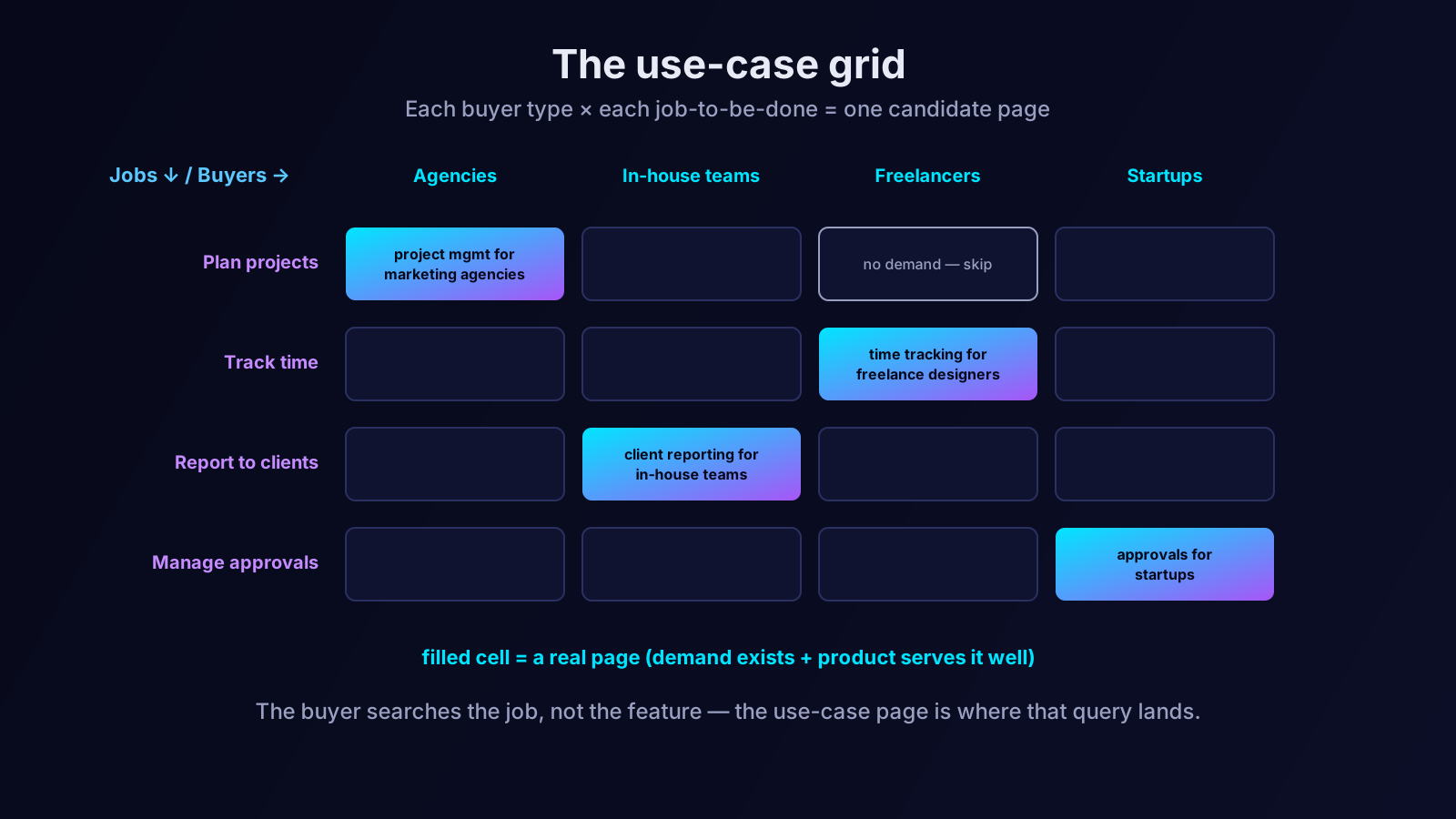
Third, multiplication. Because a use-case page is defined by a buyer-and-job intersection, and because most products serve several buyer types and do several jobs, the number of legitimate use-case pages multiplies. A product serving five buyer types and doing four distinct jobs has, potentially, twenty use-case pages — twenty decision-stage queries, each with a dedicated, intent-matched page. Not all twenty will have real search demand, and you should never build a page for a query nobody searches. But the multiplication explains why use-case pages can become a substantial cluster rather than a handful of pages.
Building the use-case grid
The practical method for finding your use-case pages is to build the grid the figure above describes.
Down one axis, list your buyer types — the distinct kinds of customer your product serves. Be specific: not "businesses," but "marketing agencies," "in-house marketing teams," "freelance consultants," "startups." Across the other axis, list the distinct jobs your product does — the separate outcomes it delivers. Each cell of the grid, each intersection of a buyer type and a job, is a candidate use-case page.
Then qualify the candidates. A cell becomes a real page only if two things are true: there is genuine search demand for that intersection (check whether people actually search for that buyer-and-job combination), and your product genuinely serves it well (if the product is weak for that use case, the page will attract poorly-fitting buyers who churn). Cells that pass both tests are your use-case cluster. Cells that fail either test stay empty — building a page for a query nobody searches, or for a use case the product handles badly, is worse than building nothing.
What a strong use-case page contains
Once you have identified a real use-case page to build, its content should follow a consistent pattern.
It should name the buyer and the situation explicitly and early, so the reader knows in the first few seconds that the page is for them. It should describe the specific pains of that buyer in that job — accurately enough that the reader feels understood. It should show the product solving those exact pains, framed as outcomes rather than features: not "we have custom workflows" but "agencies use this to keep every client project on a separate, clear track." It should include proof relevant to that buyer where you have it — a customer in that segment, a result from that kind of team. And it should end with a call to action fitted to the use case: not a generic "start free trial" but something like "see how agencies run client projects in [product]."
Critically, a use-case page must avoid being a thin reskin. If your twenty use-case pages are the same generic copy with the buyer's name swapped in, search engines will see near-duplicate content and readers will sense the hollowness. Each use-case page must contain genuinely specific material — real pains, real language, real proof for that segment. This is the cost of the strategy: use-case pages only work if each one is genuinely about its use case. A grid of twenty real pages is an asset; a grid of twenty thin variations is a liability.
Use-case pages versus landing pages: a useful distinction
A reasonable question at this point: is a use-case page just a landing page? They look similar — both speak to a specific audience, both have a call to action. But the distinction matters, because conflating them leads teams to build the wrong thing.
A paid landing page is built primarily for conversion and is usually fed by advertising. It is often deliberately stripped down — minimal navigation, a single focused message, no distractions — because its job is to convert traffic the company paid to send there. It is frequently not built to rank in organic search at all; it may even be excluded from indexing.
A use-case page is built to do both jobs at once. It must convert, like a landing page, but it must also rank — it has to earn organic traffic for its buyer-and-job query, which means it needs the depth, structure, internal linking, and genuine substance that search engines reward. A use-case page that is as thin as a typical paid landing page will not rank, and a use-case page that is as bare as a paid landing page will not give a search-driven reader enough to act on. The use-case page is the more demanding artefact: it carries the conversion burden of a landing page and the ranking burden of a content page simultaneously. Treating it as just a landing page produces something too thin to rank; treating it as just a blog post produces something too unfocused to convert. It has to be both.
Maintaining the use-case cluster over time
Like all decision-stage content, use-case pages are not a write-once asset. Three forces erode them, and a cluster left unmaintained slowly decays.
The first is product change. A use-case page describes how your product solves a specific job for a specific buyer. As the product evolves — new capabilities, changed workflows, retired features — the page's description drifts out of date. A use-case page that confidently describes a workflow the product no longer has is worse than no page at all, because it sets an expectation the trial will then break.
The second is shifting demand. The search behaviour of a buyer segment is not static. New phrasings emerge, new sub-segments appear, the language a market uses for its own job changes over a few years. A use-case page optimised for how a segment searched three years ago can quietly lose relevance even though the page itself never changed.
The third is competitive entry. The thin competitive field that made a use-case query attractive will not stay thin forever. If a use-case page proves valuable, competitors eventually notice the query and build their own pages. A page that ranked comfortably when the field was empty needs genuine upkeep — refreshed depth, better proof, sharper specificity — to hold its position once rivals arrive.
None of this argues against building use-case pages. It argues for treating the cluster as a living asset: scheduling periodic reviews, updating pages when the product changes, and watching which use-case queries are gaining or losing demand. The cluster is one of the highest-return assets on a SaaS site, and like any high-return asset, it rewards maintenance.
Where use-case pages sit in the funnel
It is worth placing use-case pages precisely. They are bottom-of-funnel content — decision-stage pages for buyers who are evaluating, not learning. A reader on "project management for marketing agencies" is not asking what project management is; they are asking whether your project management fits their agency. That places use-case pages alongside comparison pages and pricing pages as part of the revenue-stage cluster, and it means they should be built and maintained with the same seriousness. They also pair well with topic clusters built around the informational stage — the educational content brings the buyer into your orbit, and the use-case page closes the recognition gap when they are ready to decide. Our guide to topic clusters shows how the informational and decision stages link together.
Why competitors leave the grid empty
The final piece of the analysis: if use-case pages are this effective, why is the grid empty on so many SaaS sites? Three reasons. First, the feature-language habit is strong — product-led companies naturally describe what the product is, not the jobs it does for specific buyers. Second, building a real use-case cluster is genuine work — each page must be specifically researched and written, which is more effort than one generic product page. Third, use-case pages are invisible to a casual content audit; they do not trend, they do not earn shares, they just quietly capture decision-stage demand. So they get postponed, and the grid stays empty — which is precisely why the company that fills it finds a thin competitive field waiting.
Where an SEO AI agent fits
Building a use-case cluster means constructing the buyer-job grid, qualifying every cell against real search demand, and then producing a genuinely specific page for each surviving intersection — a structured, sizable body of work that competes for time against more visible projects and usually loses. That is where an SEO AI agent earns its place. Orova can build out the buyer-and-job grid, check which intersections have genuine search demand so you only build pages buyers actually look for, and draft each use-case page with the specific language and pains of its segment so your team refines rather than starts from nothing. The judgement about which buyers the product truly serves well stays with you; the agent removes the volume of work that keeps the use-case grid empty on most SaaS sites. The grid is sitting on your site right now, mostly blank. Filling it is one of the most underrated moves in SaaS SEO — and the field is thin because almost nobody bothers.
Let an AI Agent handle your SEO
Orova plans, writes, optimizes, and tracks rankings on its own — you just read the results.
Try it free