
We A/B Tested 12 CTAs on Blog Posts — One Tripled Signups

For two years, the calls to action on our blog were chosen the way most blogs choose them: someone picked a banner design in an afternoon, it shipped, and it became permanent through the sheer force of nobody ever questioning it again. The banner said something like "Ready to grow? Start your free trial," it sat at the end of every post, and it converted a number of readers we never measured precisely because measuring it felt like admitting it might be bad.
Last year we finally ran the experiment that afternoon-decision deserved. Over roughly nine months, we systematically tested twelve different CTA treatments across our blog — different formats, placements, and degrees of relevance to the article being read — with proper instrumentation and proper patience. This article is the full write-up: the methodology, the twelve variants, the numbers, the winner that roughly tripled signups over the control, and the four findings that surprised us enough to change how we think about blog conversion entirely.
The short version: a contextual inline CTA — a box placed mid-article offering a next step specific to that article's topic — converted readers to signups at roughly three times the rate of the generic end-of-post banner. Relevance beat placement, placement beat format, and the popups that captured the most emails produced the least valuable ones.
One framing note before the data. Numbers from someone else's blog are directional, not prescriptive — our audience, topics, and product shape every figure below. The transferable part is the method and the pattern of what won. Run the same program on your own traffic before reorganising anything around our percentages.
Methodology: what we tested and how we kept it honest
The testing surface was our blog's organic article traffic — a few hundred thousand sessions over the program, concentrated in a long tail of how-to and explainer posts. We excluded the homepage, product pages, and pricing, because those are different animals with different intent; this was strictly a test of what converts a reader who arrived on an article from search. If your articles have a landing experience problem upstream of the CTA — slow loads, intent mismatch, the defects covered in our landing page autopsy — fix those first, because no CTA outruns a page people abandon.
The primary metric was signups per article session: a visitor who landed on a blog article and completed a product signup in that session or within a seven-day attribution window. We tracked email captures separately as a secondary metric, because — as you will see — emails and signups turned out to behave very differently. Everything was instrumented as events in GA4 with the CTA variant attached as a parameter, which made per-variant reporting a single exploration report; our guide to GA4 for SEO work covers the event setup pattern we used.
Tests ran as randomized assignments at the session level, one comparison at a time against the reigning champion, each running until it reached either statistical significance at the ninety-five percent level or a four-week cap. We committed to three honesty rules upfront, because CTA testing is notoriously easy to fool yourself with. First, no peeking declarations: a test ends at its planned threshold, not when the chart looks exciting. Second, novelty discounting: any winner had to hold its margin for two additional weeks after being declared, because new elements often win temporarily just by being new. Third, downstream tracking: every captured email and signup was followed to thirty-day activation, so a variant that won on volume but delivered dead-weight contacts could be exposed for it.
The twelve variants
The twelve treatments fell into four families. Formats first, then the relevance dimension that ended up mattering more than any of them.
The static placements
Variant 1 — end-of-post banner (control). The incumbent: a full-width branded banner after the last paragraph, generic trial pitch. Variant 2 — sidebar card. A persistent card in the desktop sidebar with the same pitch. Variant 3 — sticky top bar. A slim bar pinned to the top of the viewport throughout the read. Variant 4 — author-bio CTA. A soft pitch woven into the author box at the article's end.
The interrupters
Variant 5 — timed popup. A modal at forty-five seconds offering the trial. Variant 6 — exit-intent popup. The same modal, triggered by cursor movement toward the tab bar on desktop and rapid scroll-up on mobile. Variant 7 — scroll-triggered slide-in. A panel sliding from the corner at fifty percent scroll depth — interruption's polite cousin.
The in-content treatments
Variant 8 — inline text link. A single sentence mid-article, written into the prose, linking to the product. No box, no design, just a relevant sentence. Variant 9 — generic inline box. A visually distinct box at the article's midpoint with the same generic trial pitch as the control. Variant 10 — contextual inline box. The same box, but the offer rewritten per article topic to continue the article's specific thought: a post about keyword research offered "run this analysis on your own site"; a post about content audits offered the audit feature. Same destination, different framing per topic cluster.
The value-exchange treatments
Variant 11 — content upgrade. A downloadable asset matched to the article — a checklist or template version of the post — in exchange for an email, with a product nurture afterward. Variant 12 — category-matched end banner. The control banner's position, but with artwork and copy swapped per content category, as a test of whether relevance alone could rescue the end-of-post slot.
The results
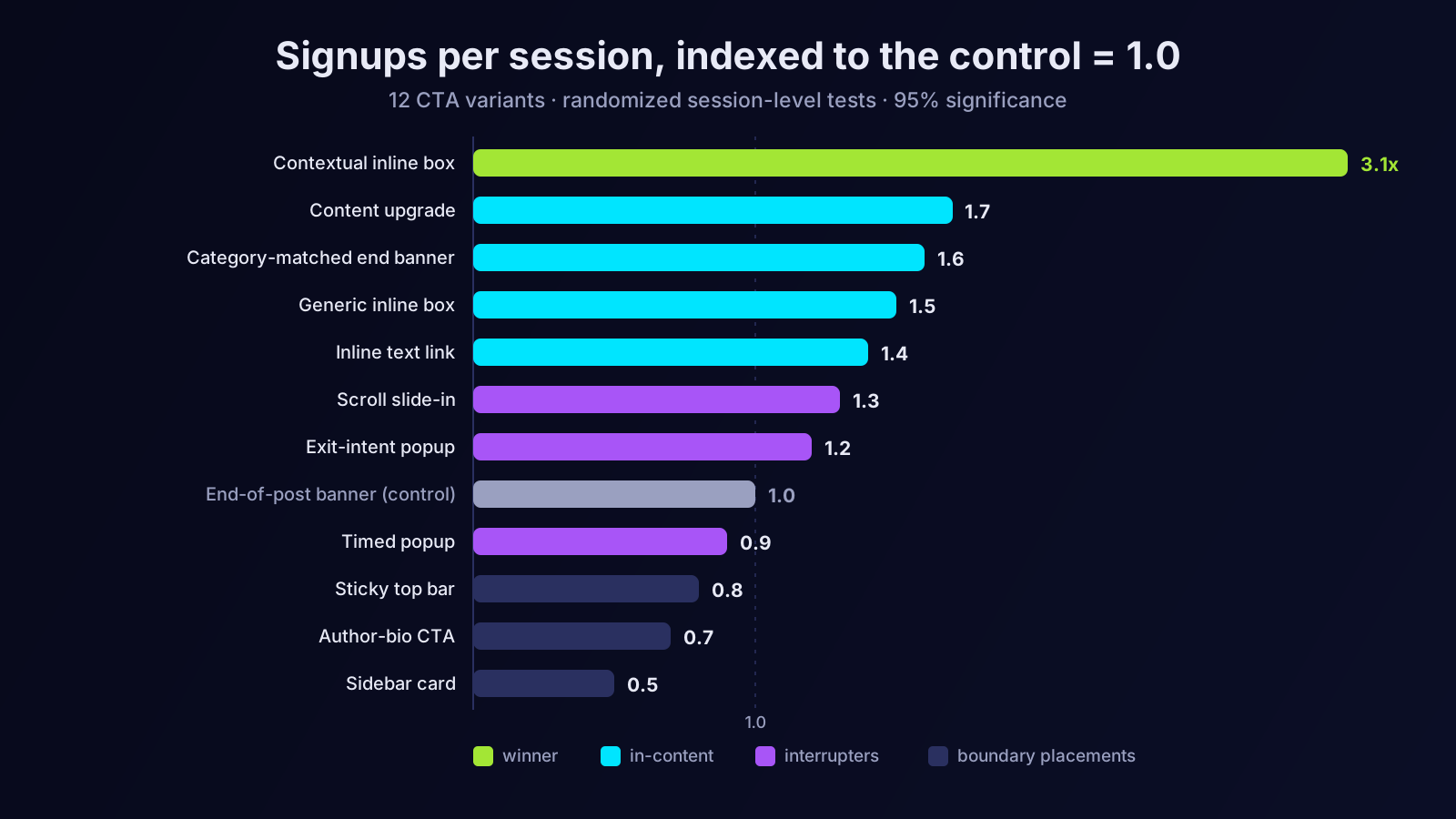
Indexing the control banner at 1.0 for signups per session, the final standings looked like this. The contextual inline box (variant 10) finished at roughly 3.1 — the tripling in this article's title. The content upgrade (11) reached about 2.4 on email captures but only about 1.7 on eventual signups. The category-matched end banner (12) managed about 1.6. The generic inline box (9) hit roughly 1.5, and the humble inline text link (8) about 1.4. The slide-in (7) landed near 1.3. Exit-intent (6) and the timed popup (5) captured emails at two to three times the control's rate but converted to signups at only about 1.2 and 0.9 respectively. The sticky bar (3) came in around 0.8, the author bio (4) around 0.7, and the sidebar card (2) effectively tied with doing nothing at 0.5 — banner blindness measured in the wild.
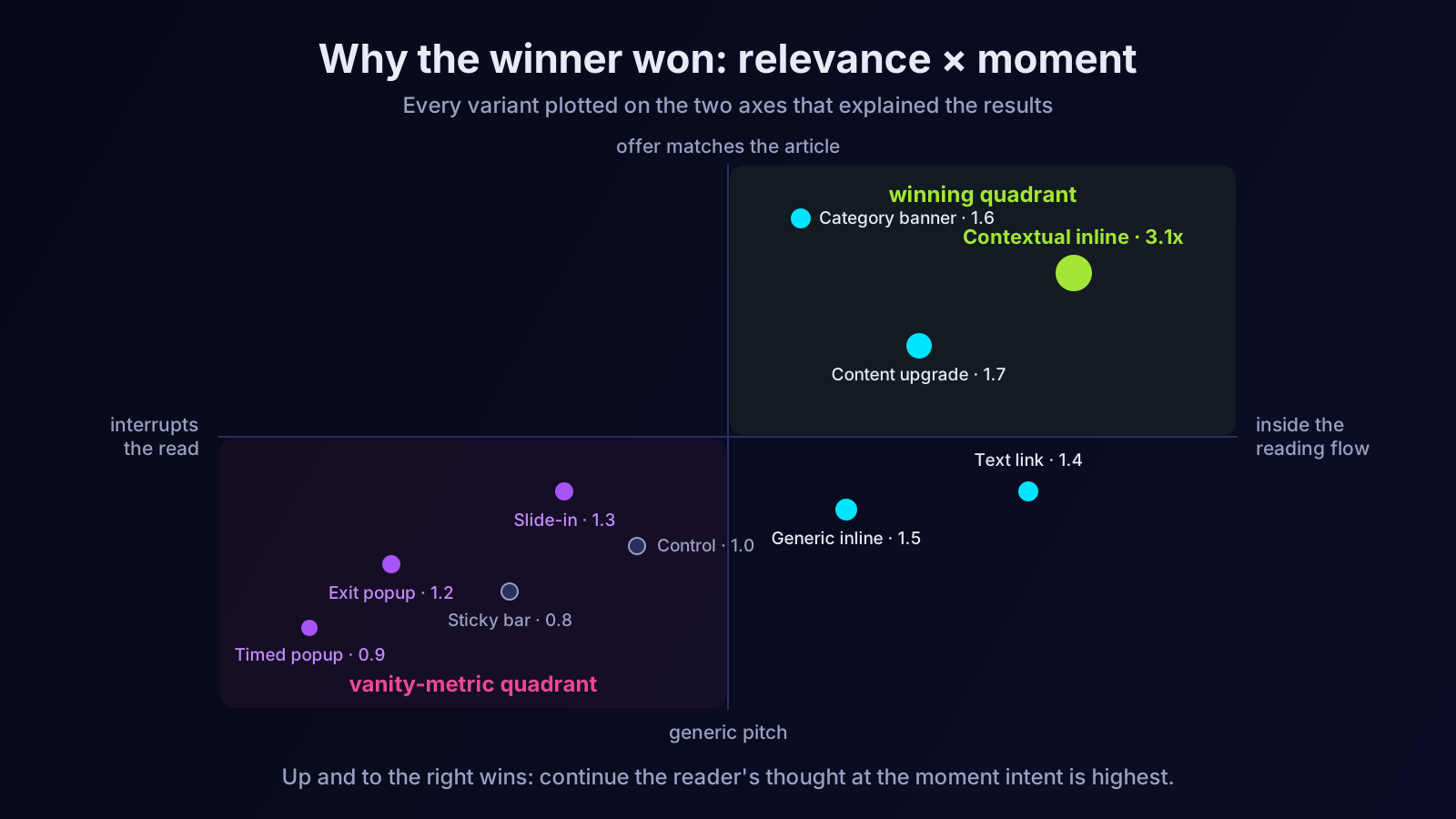
Three patterns jump out of the table before any interpretation. In-content treatments beat boundary treatments: everything placed inside the reading flow outperformed everything placed at the edges of it. Relevance beat format: the same inline box doubled its performance when its copy became topic-specific, and even the dreary end-of-post slot improved by sixty percent when its message matched the category. And interruption inflated the wrong metric: the popups won the email-capture leaderboard decisively while losing the signup race — a divergence that turned out to be the study's most important finding.
Why the contextual inline box won
Our explanation, after watching session recordings and reading the numbers for months, comes down to three aligned factors.
It catches the reader at the moment of activated intent. Mid-article, a reader of a how-to post is mentally rehearsing doing the thing. An offer to do the thing right now, with the tool, is not an advertisement interrupting the content — it is the content's logical next sentence. By the end of the post, that activation has already cooled; the end-of-post banner was pitching to people whose moment had passed. The wins for variants 8, 9, and 10 over their end-of-post equivalents all point the same direction: the middle of a useful article is the most undervalued real estate on a blog.
It continues a thought instead of changing the subject. The generic box said, in effect, "and now, a word from our product." The contextual box said "here is how to apply what you just read." The reader never had to context-switch, and offers that ride an existing motivation reliably beat offers that try to manufacture a new one. This is the same logic that makes question keywords such efficient targets — you are joining a thought already in progress rather than starting one.
It filters for the right people. A topic-specific offer self-selects readers who care about that topic enough to act — which is precisely why its signups activated downstream while popup emails went dormant. The contextual box converted fewer total contacts than exit-intent but several times the eventual paying users. Volume metrics flatter interruption; value metrics expose it.
The four surprises
Surprise one: the sidebar is furniture. We expected the sidebar card to underperform; we did not expect it to be statistically indistinguishable from absence. Heatmaps showed the pattern plainly — readers' eyes traced the content column and treated everything outside it as chrome. If your conversion strategy lives in a sidebar, you may not have a conversion strategy.
Surprise two: the plain text link nearly matched the designed box. Variant 8 — one well-written sentence, zero design effort — reached 1.4 against the generic designed box's 1.5. The lesson we took: the words and the moment do almost all the work, and the visual container adds a sliver. Teams that spend design sprints on CTA modules and ten minutes on CTA copy have the ratio backwards.
Surprise three: exit-intent popups are a vanity machine. Triple the email captures, barely above control on signups, and the worst thirty-day activation of any variant — under a third of those contacts ever opened the product. People type an email to dismiss a modal the way they sign a delivery tablet: as a gesture of escape, not intent. If we had judged the program on email volume, we would have crowned the worst variant.
Surprise four: mobile and desktop disagreed. The slide-in performed respectably on desktop and badly on mobile, where it covered too much screen and collected hostile dismissals. The contextual inline box, by contrast, was the rare variant that won on both form factors — another argument for treatments that live inside the content column, which degrades gracefully on every screen size.
What we changed permanently
The program ended with a standing pattern we have run since. Every article in a topic cluster gets a contextual inline box at roughly its midpoint, written per cluster — about forty minutes of copywriting per cluster, the highest-leverage writing time we log. High-traffic how-to posts additionally get a content upgrade where a genuinely useful asset exists; we refuse to gate junk, because the nurture sequence afterward only works on people who got real value. The end-of-post slot carries the category-matched banner — variant 12 — as a second exposure for finishers. The popups, the sticky bar, and the sidebar card were retired entirely. Net effect across the blog, measured across comparable quarters: signups per article session a little over two and a half times the old baseline, with the gap between that figure and the winner's 3.1 explained by imperfect rollout across older articles.
One operational note: the signup form itself was held constant across all twelve variants, precisely so form friction could not confound the comparison. That constant was doing more damage than we knew — a discovery that became its own article on form friction and a second, separate testing program.
How to run this on your own blog
The method transfers even where the numbers will not. A few hard-won rules for the replication.
Start with the comparison most likely to matter. If you test only one thing, test generic-versus-contextual in the inline position; it was both our largest effect and the one with the soundest theory behind it. Group articles by topic cluster so one piece of contextual copy covers many posts — per-article copy does not scale and cluster-level relevance captured most of the gain in our data.
Instrument before you test. Every variant needs an impression event and a click event with a variant parameter, and signups need attribution back to the landing article. Without this, you will end the quarter with opinions instead of a table.
Respect the statistics on low-traffic surfaces. Blog conversion rates are small numbers; small numbers need large samples. If a variant needs months to reach significance on your traffic, test bigger swings — format changes, not shade-of-green changes — so the effect sizes are large enough to detect quickly. And follow every test through to activation or revenue, not capture volume, or exit-intent will lie to you exactly as it tried to lie to us.
Expect your ranking to be different. An e-commerce content blog, a developer-tool blog, and a B2B services blog will produce different leaderboards — different reader moods, different next steps, different tolerance for interruption. The pattern we would bet transfers: in-content beats boundaries, relevance beats volume, and the metric that counts is the one closest to revenue.
The SEO cost we almost ignored
A conversion study on organic traffic has to account for one more column: what the treatments do to the traffic itself. Two of our variants carried search risk. Google has penalised intrusive interstitials on mobile for years — a full-screen modal between the search click and the content is exactly the pattern the guidance describes — and our timed popup flirted with that definition on small screens. Beyond explicit policy, there is the behavioural loop: a reader who hits a popup and bounces back to the results is a quality signal moving in the wrong direction, page after page, month after month.
We watched rankings and engagement rate on the test cohorts throughout. The popup cohorts showed measurably worse engagement rates — several points below the in-content cohorts on the same articles — though nine months was too short to attribute ranking movements to any single variant with confidence. We did not need the attribution to act. The popups were already losing on activation; the possibility that they were also taxing the rankings that feed the entire funnel made retiring them the easiest decision of the program. In-content treatments carry no such risk: they are, structurally, just more content. When a CTA strategy and a search strategy point in opposite directions, the search strategy is carrying the heavier load — especially now that every click from an AI-summarised results page is harder won and correspondingly more valuable.
What we deliberately left out
Honest research names its boundaries, so here are the treatments we excluded and the reasons. Chat-widget prompts and "talk to sales" CTAs were out of scope because our blog audience is self-serve; on a high-touch B2B blog they deserve a slot in the twelve. Gated full articles — paywalling the second half of a post behind an email — we refused on principle, because the SEO cost of hiding indexable content is not worth measuring. Personalised CTAs driven by visitor attributes (returning versus new, industry guesses from firmographics) were cut for sample-size reasons: splitting modest blog traffic across personalisation segments multiplied the time-to-significance past usefulness. And we did not test CTA copy micro-variants — "Start free" versus "Try it now" — because the program's premise was that structure and relevance dwarf wording at this scale. The plain-text-link result (variant 8) suggests wording deserves its own program later; it earned that follow-up by nearly matching a designed component on the strength of one good sentence.
Limitations, stated plainly
Four caveats belong next to every number above. The traffic was ours: a SaaS audience reading practitioner content, which plausibly over-rewards "apply this now" offers relative to other niches. The attribution window was seven days, which undercounts slow-considering readers and may flatter high-intent variants slightly. Seasonality overlapped some comparisons despite the sequential-testing design, and although each test included its own control period, quarter-to-quarter audience drift is never fully removable. And the program tested one CTA at a time per page; interaction effects — a contextual box plus a content upgrade on the same article — were measured only informally afterward, where they appeared additive but with wide error bars. None of these caveats threatens the headline ordering, which was consistent across segments and seasons. All of them are reasons to treat our table as a hypothesis generator for your blog rather than a settled ranking for the industry.
The principle under the percentages
Strip away the variant numbers and the study says one thing: a call to action is not a slot to fill but a sentence in a conversation, and it converts in proportion to how well it continues the conversation the reader was already having. The blogs that convert are not the ones that ask most loudly or most often; they are the ones whose ask arrives at the right moment, on the right topic, as the natural next step. Everything we retired — the popups, the bars, the sidebar furniture — failed because it talked at readers. Everything we kept talks with them.
The unglamorous bottleneck in all of this is the per-cluster work: knowing which articles belong to which topic, what the right next step is for each, and whether the numbers are holding month over month. That is structured, repetitive work of exactly the kind Orova exists to carry — it maps your content into clusters, tracks per-page conversion behaviour alongside rankings, and flags the articles where traffic and signups have come apart, so your testing program starts where the math is biggest. Run the experiment, follow the contacts all the way to activation, and keep the variant your revenue prefers — not the one your email list flatters. Your afternoon-decision banner has been costing you signups for years, and now you know exactly how to prove it.
Let an AI Agent handle your SEO
Orova plans, writes, optimizes, and tracks rankings on its own — you just read the results.
Try it free