
Absorb LMS Pricing: How That Quote Is Put Together
You have been asked to bring a number to a meeting, so you search for Absorb LMS pricing, click the pricing link, and get a dialog asking how many learners you have. Eight brackets, from one to fifty all the way up to twenty-five thousand and above. Pick one, press Next, and you are asked for your business email, name, phone number, country and company. Then a message thanking you and saying you will hear from them soon.
That is not evasiveness on the part of one vendor. Check Docebo and you get "custom pricing tailored to your organization's needs". Check Canvas and you get three tier names and an invitation to connect for a personalised quote. This is simply how the enterprise learning platform market prices itself, and no amount of searching will produce the figure you were sent to find.
Which means the useful preparation is different from what you set out to do. You cannot arrive with the price. You can arrive knowing exactly what will drive it, which lines will appear beside it, which of those are negotiable, and what the whole thing costs across three years rather than one. That is a stronger position than a number, and this piece is how to get into it. Everything quoted below was read from the vendors' own public pages on 22 August 2026 — check them again before you rely on any of it, because pages and models change.
How much does Absorb LMS cost?
Absorb does not publish prices. Its pricing page asks how many learners you have, offering eight brackets from 1–50 up to 25,000+, then collects your contact details for a sales conversation. The quote you receive will be shaped by learner count, how users are counted, which modules you take, and one-off implementation and integration work that sits outside the licence figure.
If you need a planning figure before that call, the honest approach is to build a range from the cost structure rather than to guess at a price. The rest of this article is how to do that.
The pricing page is a lead form, and that tells you something
It is worth looking at what actually happens when you go looking for the number, because the shape of the page is itself information.
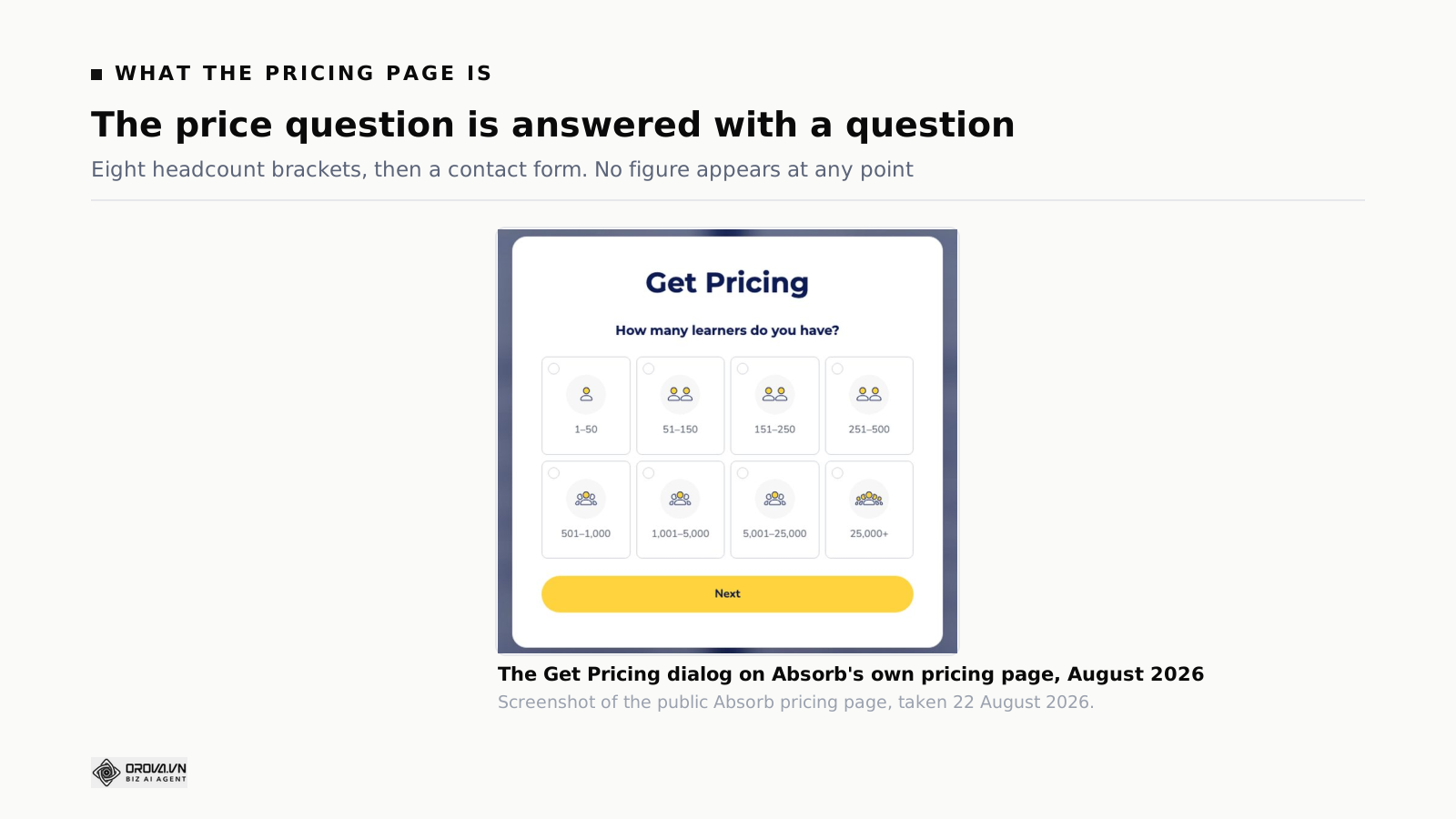
Two things follow from that dialog.
Headcount band is the primary input. The very first question is how many learners you have, offered as eight ranges. Whatever else goes into the calculation, the band you sit in is where it starts. That makes your position within a band — comfortably inside it or two people over the line — a real commercial fact rather than an administrative detail.
The price is set per customer. A vendor that publishes prices is committing to the same number for everyone. A vendor that quotes is deciding per deal, using whatever it knows about you: your size, your urgency, your quarter, whether you mentioned a competitor. This is not sinister. It does mean the number you are given is a starting position rather than a fact, and it should be treated accordingly.
One practical note before you fill the form in. The contact details go to a sales team whose job is to qualify and then to sell, and the clock starts when you submit. If you are eight months from a decision, you will spend those months in a nurture sequence. If you are eight weeks out, submit and take the call. Timing your entry into the process is one of the few pieces of leverage available to a buyer.
Three shapes an LMS quote can take
Before the number matters, the shape matters. Most regretted purchases in this category are shape mismatches rather than feature mismatches — the platform did what it said, and the way it charged did not fit how the organisation actually behaves.
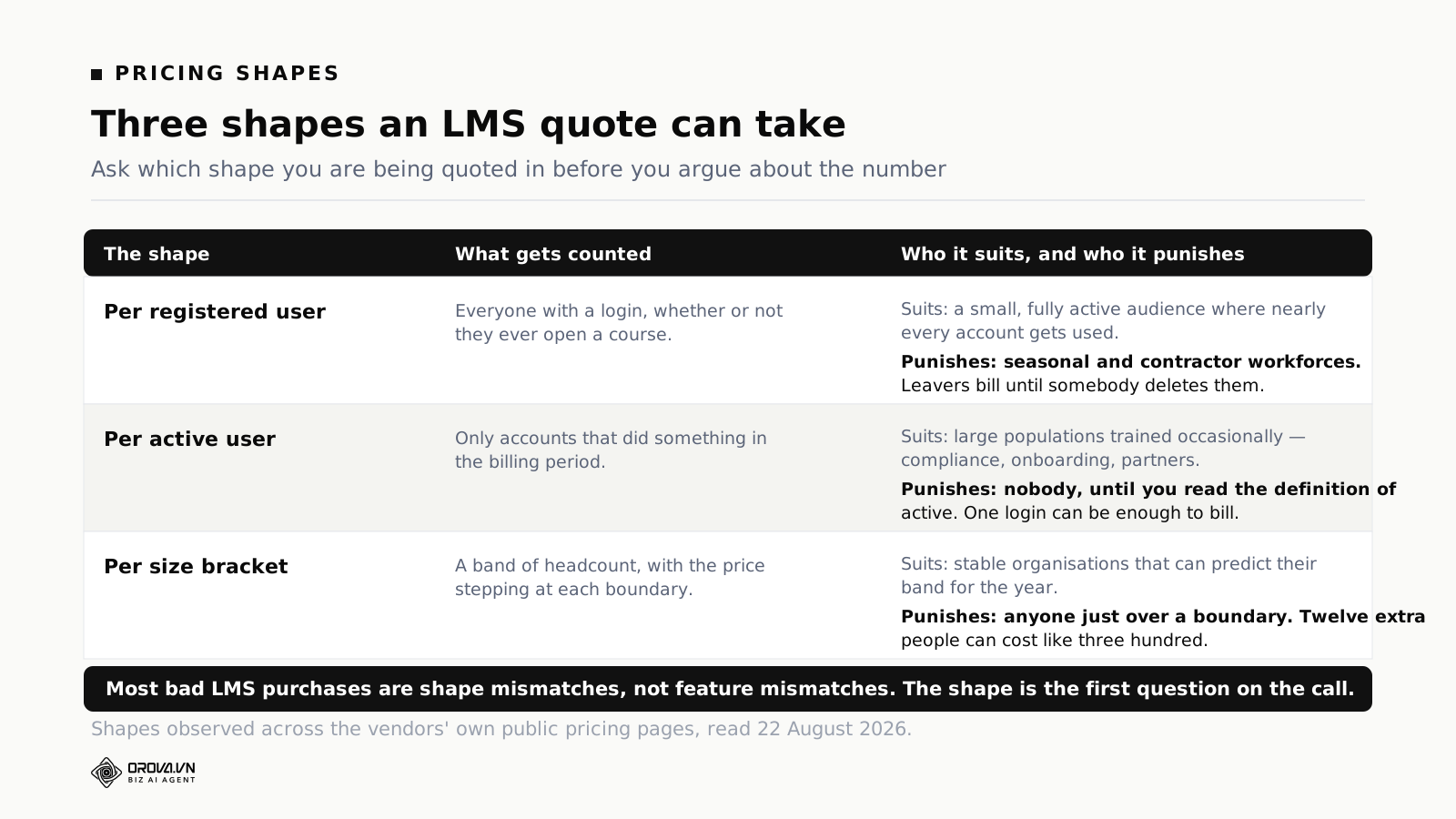
Per registered user
Everyone with an account is chargeable, whether or not they ever open a course. Simple to forecast, and merciless if your population churns.
The failure mode is administrative rather than commercial: nobody deletes leavers. Accounts accumulate, the bill grows, and it takes a year before somebody works out that a fifth of the licences belong to people who no longer work there. If you buy on this model, put account housekeeping on somebody's monthly list on day one, because it is now a budget task rather than a hygiene task.
Per active user
Only accounts that did something during the billing period count. This is the model most buyers assume they want, and it is the one where the definition matters most.
Ask exactly what makes a user active. A single login? Opening a course? Completing one? Ask what the counting period is and whether it resets. Ask what happens in the month you run annual compliance training and your whole workforce logs in at once — because if your training is seasonal, the active-user model can concentrate your entire year's cost into two billing periods.
Per size bracket
The price steps at headcount boundaries. Absorb's own dialog shows eight of them, and if the licence follows that structure then your cost is flat within a band and jumps between bands.
Flat within a band is genuinely valuable — hire forty people and the bill does not move. Crossing a boundary is a cliff, and the cliff is what to ask about. Where is the next boundary, what does it cost on the other side, and what happens if you cross it in month seven rather than at renewal.
Registered, active, enrolled: the word decides the bill
These three words get used interchangeably in conversation and mean different things in a contract. On the same company, they produce materially different invoices.
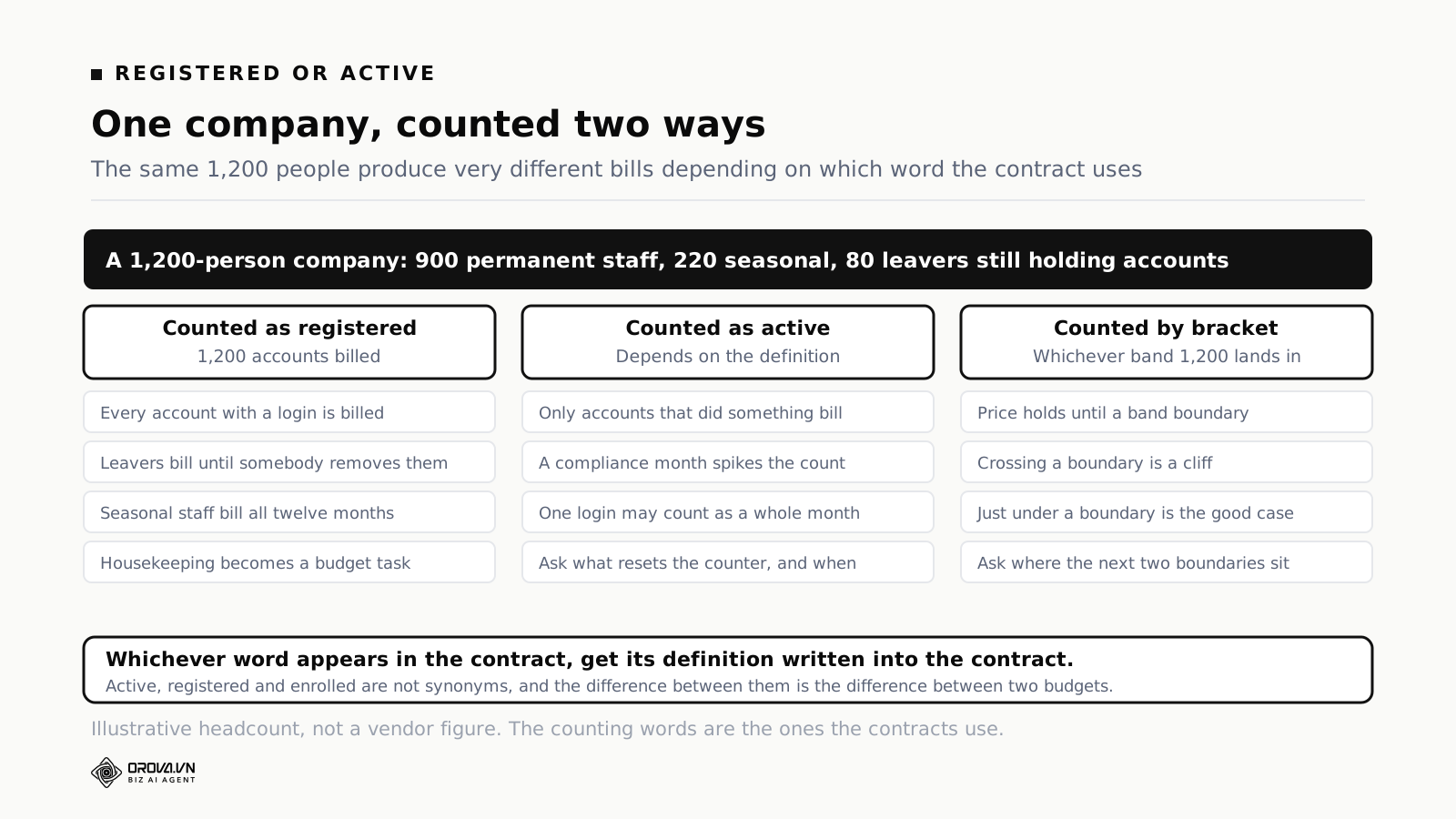
Take a company with 1,200 people on the payroll: 900 permanent, 220 seasonal who work four months of the year, and 80 leavers whose accounts are still open because nobody has cleaned them up.
Counted as registered, that is 1,200 chargeable accounts, including 80 that belong to nobody and 220 that are idle for two-thirds of the year.
Counted as active, it depends entirely on the definition. If active means logged in during the month, a compliance push produces one very expensive month. If it means opened a course, the seasonal workforce costs you for four months instead of twelve.
Counted by bracket, 1,200 sits in whichever band contains it, and the interesting question is not this year's figure but where the boundaries above and below you are.
The instruction that follows is short: whichever word appears in your contract, get its definition written into the contract. Not into the proposal, not into an email from the account executive who may have moved on by renewal. Into the document that governs the relationship.
What sits outside the licence number
The licence figure is the number that gets quoted and the number that gets remembered. The gap between it and what you actually spend in year one is where budget overruns live.
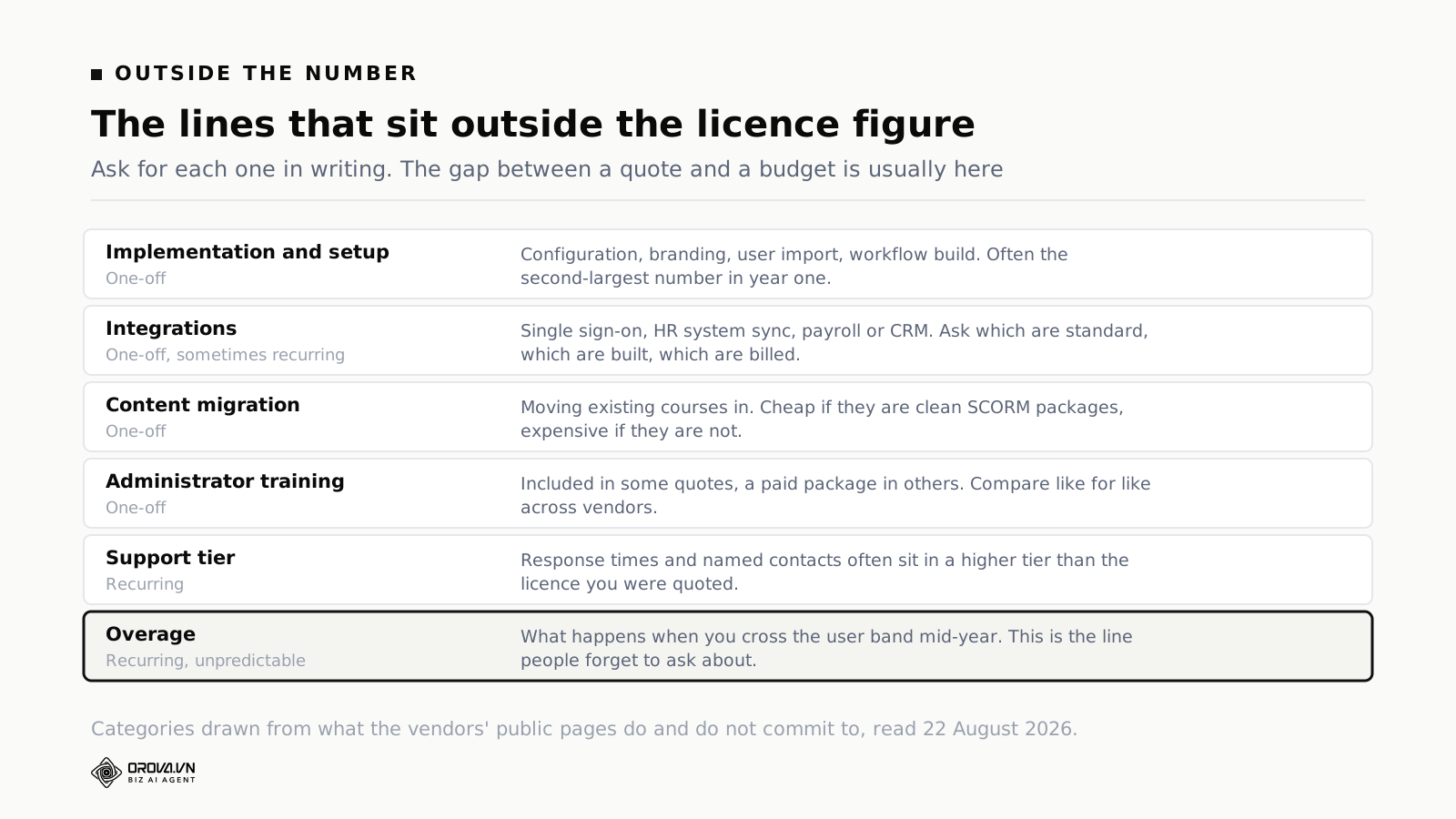
Implementation and setup
Configuration, branding, importing users, building the workflows you described in the demo. Frequently the second-largest number in year one, and the one most likely to be quoted as a range rather than a figure.
Ask what "implementation" includes in their standard package and what falls outside it. Ask specifically who does the work — their team, a partner, or your team with their guidance — because the answer changes both the price and your internal effort estimate.
Integrations
Single sign-on, syncing users from your HR system, pushing completion data back out, connecting to payroll or a CRM. Three questions per integration: is it a standard connector, does it need building, and is it billed once or annually.
Single sign-on deserves separate attention. It is the integration most likely to be assumed included and most likely to be a paid line, and it is also the one that determines whether people can actually get into the system without a support ticket.
Content migration
Moving what you already have. If your existing material is clean, standards-compliant packages, this is cheap. If it is a decade of slide decks, videos in three formats and courses built in a tool nobody has a licence for any more, it is not.
Audit your existing library before you ask for a migration quote, because the quote depends entirely on that audit and the vendor cannot do it for you. Our note on what SCORM compliance actually buys you covers what makes a package portable and what makes it stuck.
Administrator training
Included in some quotes, sold as a package in others. This matters more than it sounds: an under-trained administrator is the most common reason a competent platform gets a reputation for being difficult.
Support tier
Response times, named contacts, escalation paths. These are routinely bundled by tier, so the support you assumed you were getting may sit one level above the licence you were quoted. Ask for the response-time commitments in writing, and ask what happens outside your business hours if the vendor is in a different time zone.
Overage
The forgotten line. What happens when you cross a user band, or exceed a storage limit, or add a second brand mid-year. Ask for the mechanism and the price in writing before you sign, because after you sign it is not a negotiation any more.
Which lines actually move
Not everything on a quote is negotiable, and pushing on the fixed parts wastes the goodwill you will need for the parts that move. In this category, in rough order of flexibility:
Contract length against price. The most reliable lever. Docebo's own pricing FAQ states that most customers sign a three to five year contract while the minimum is a single year — which tells you both that long terms are standard and that a one-year term is available if you want it. Longer terms buy discount; shorter terms buy the option to leave. Know which you are trading before the call.
Implementation fees. Often the first thing a vendor will move on, because it is a one-off and does not damage the recurring revenue their business is measured on. It is also where a discount is worth the most to you, since it lands entirely in the year where your budget is tightest.
Ramp on user counts. If you are rolling out in phases, ask to pay for phase one now and step up as you go. Vendors often accept this because it accelerates the deal, and it moves real money out of the first year.
The renewal uplift cap. The most valuable and least requested concession in software buying. A capped percentage increase at renewal costs the vendor nothing today and protects you from the moment when switching is hardest — the moment your content, your history and your habits all live inside their platform.
Timing. Vendors have quarters and years. This is well known and still works. It is not a reason to buy something you do not need, but if you are buying anyway, when you sign is worth money.
What rarely moves: the per-user rate at your band, published support commitments, and anything that would set a precedent across their customer base. Push there and you get a polite no and a slower process.
Where Absorb sits beside Docebo and Canvas
Comparing prices is impossible when none of the three publish one. Comparing what they publish is still useful, because the shape of their public pages tells you who each product is built for.
Docebo lists two core tiers as of August 2026. Elevate covers personalisation, white-labelling, certification tracking, AI content creation, multilingual support, automation, an AI copilot, learning insights and blended learning. Enterprise adds advanced analytics, up to six tool integrations, extended enterprise across up to ten domains, two sandbox environments, a branded mobile app, upgraded API access, a dedicated database and elite support. Its own FAQ notes it is typically best suited to organisations training at least 250 or more learners.
Read that tier split carefully, because it is the standard enterprise pattern: the second tier is not more features for learners, it is more capability for the IT and analytics side. If nobody in your organisation is going to use a sandbox environment or a dedicated database, that tier is not for you regardless of how the demo felt.
Canvas publishes three tiers — Core, Plus and Next — described respectively as a reliable accessible learning experience, enhanced visibility and engagement, and reimagining the LMS for the age of AI. No prices, and an invitation to connect for a personalised quote. Instructure notes that its AI capabilities are built into each tier rather than sold separately, and can be controlled at account, sub-account or course level.
Canvas's centre of gravity is education rather than corporate training, and that shows in the vocabulary. It is a genuine option for structured, course-based learning with instructors. It is a less natural fit for compliance-driven corporate training where the audience is the whole workforce and the content is short.
Absorb publishes neither prices nor a public tier comparison at the pricing entry point — the pricing route is the headcount dialog and a form. Positioning it against the other two therefore has to be done in the demo rather than in advance, which is exactly why going in with a structured question list matters.
The pattern across all three: enterprise learning platforms sell through conversations, tier by IT capability rather than by learner features, and expect a multi-year commitment. If that pattern does not suit how your organisation buys, that is a legitimate reason to look at a different tier of the market — which brings us to the useful comparison.
The tier below does publish prices
It is worth knowing what transparent pricing looks like in this category, because it gives you a floor to reason from.
TalentLMS, as published in August 2026, lists Core at $119 a month for up to 100 users with one branch, Grow at $229 a month for up to 500 users with three branches, and Pro at $449 a month with fifteen branches plus $6 per additional user. Annual billing is discounted twenty per cent against monthly. Enterprise starts at 1,000 users and is quote-based. There is a free plan for up to five users and ten courses with no card required.
That is a different market segment with a different product, and the comparison is not apples to apples. What it gives you is a sense of scale for a few hundred users at the self-service end, which is useful context when an enterprise quote arrives with no reference point at all. It also tells you where the transparency boundary sits in this industry: roughly at the point where deals start needing a salesperson.
If your organisation is at the smaller end, the honest question is whether you need the enterprise tier at all. Our guide for small teams works through where the line falls, and the corporate LMS overview covers what the enterprise tier actually adds.
Cost it over three years, not one
Year one flatters every vendor, because the discount is deepest when they are winning you and the switching cost is lowest. The decision should be made on the shape of years two and three.
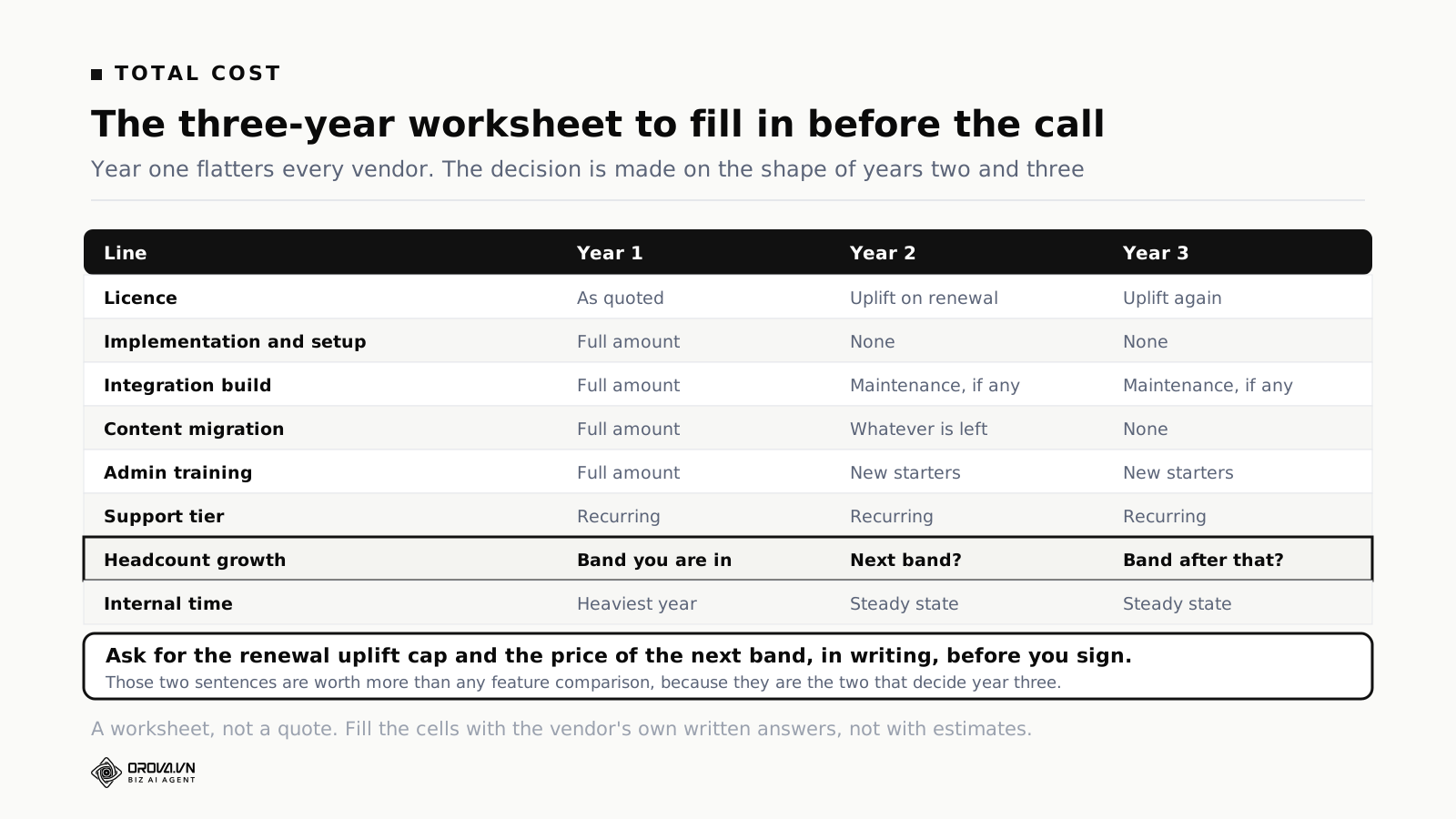
Build the table with a row for each cost line and a column for each of three years. Most rows are obvious. Three deserve comment.
The licence row in years two and three. This is where the renewal uplift lives, and where an uncapped contract becomes expensive. If you have no cap, put a realistic increase in and see what it does to the total. If the total changes the decision, you have just discovered that the cap is the most important thing you will negotiate.
The headcount row. Take your actual hiring plan and see which bands you cross. A company growing fifteen per cent a year will cross a boundary inside three years, and if you do not know what is on the other side you are budgeting blind.
Internal time. The row nobody fills in. Somebody in your organisation will spend a significant part of year one on this: configuration decisions, content, testing, chasing people. It is a real cost even though no invoice arrives for it, and leaving it out is how a project that looked affordable turns into a project that ate a quarter.
When the table is full, the comparison between two vendors is often not close, and it is frequently not the one the year-one numbers suggested.
Five ways the cost moves after you sign
The quote is a snapshot of one moment. What you actually pay is what the snapshot becomes over three years, and it moves for five ordinary reasons.
You grow into the next band. The most predictable one, and the easiest to plan for, and still the one that surprises people. Take your hiring plan, find the boundary, and ask what is on the other side before you need to know.
Accounts accumulate. On a registered-user model, the bill grows unless somebody actively removes leavers. This is not the vendor being sharp; it is an administrative gap on your side that has a monthly price. Assign it to a named person before go-live, not after the first surprising invoice.
A second audience appears. The platform was bought for staff. Six months in, somebody wants to train the distributor network, or customers, or contractors. That often means a different licence, sometimes a different product tier, and it is worth asking at the outset whether extended audiences are possible and what they cost — even if you have no plan to use them today.
An integration turns out to be needed. The one that was going to be a manual upload for now becomes urgent when the manual upload fails during an audit. Get the price for the integrations you might need, not only the ones you have decided on, because the price of an unplanned integration mid-contract is not the price it would have been in the bundle.
The renewal arrives. Covered above, and worth repeating as the last item because it is the largest single move. Everything else on this list is a few per cent. An uncapped renewal on a platform you now depend on is the one that can change the number materially.
None of these are reasons not to buy. They are reasons to write the three-year table with these five rows in it, so that the figure you take to your finance team is the figure you will still recognise in eighteen months.
The business case is not the price
The number you eventually get will be compared to something, and what it is compared to decides whether it looks reasonable. Most business cases for a learning platform compare it to nothing, which is why they turn into arguments about whether the licence is expensive.
Three comparisons that work better.
What you spend now, doing it the current way. Trainer days, room hire, travel, the hours administrators spend chasing completion in a spreadsheet, the cost of running the same induction session eleven times a year. Most organisations have never added this up, and the total is usually larger than the platform.
What the failure costs. For compliance training, the relevant comparison is not convenience but exposure: what happens at an audit when completion cannot be evidenced. That is a risk figure rather than a cost figure, and it belongs in the case explicitly rather than as an implication.
What the delay costs. If new starters currently reach competence in eight weeks and structured onboarding gets that to five, the value is three weeks of productivity per hire, multiplied by hiring volume. It is an estimate, and it should be labelled as one, but it is the kind of estimate a finance team can work with because the arithmetic is visible.
Write the case around whichever of these three is genuinely true for you, and put the platform cost inside it rather than at the top of it. A number presented alone invites the question "can we get it cheaper". A number presented against what it replaces invites a decision.
Ten questions for the call
Take these in this order. Each is answerable in one sentence, and the answers together are the quote before the quote.
1. Is the licence priced per registered user, per active user, or by headcount band?
2. If it is active, what exactly makes a user active, and what is the counting period?
3. Where are the band boundaries above and below us, and what is the price on the other side?
4. What happens if we cross a boundary in month seven rather than at renewal?
5. What is included in standard implementation, and what is billed separately?
6. Is single sign-on included, and which HR systems have standard connectors?
7. What is the renewal uplift, and will you cap it in the contract?
8. What support response times come with this tier, in writing?
9. If we leave, what can we export, in what format, and how far back?
10. What does the same quote look like on a one-year term instead of three?
Question nine is the one that separates vendors. Everyone answers "of course you can export your data". The useful answer names the fields, the format and the retention period — and a vendor who will put that in writing is telling you something real about how they expect to keep your business.
Where Orova Training fits, and where it does not
Since this is published by a company with a training product, here is the honest placement.
Orova Training tiers by quota alone. Every plan can use every feature — SCORM export, quizzes, certificates, AI flashcards, your own theme and fonts — because tiering by capability is a policy we do not use. The practical effect for a buyer is that the question "which tier do I need for the thing I actually want to do" does not arise; the only question is volume.
What it does: courses, and documents up to 10MB across the common formats with video uploads up to 500MB. From a document it will generate printable slides, an audio version, a video and a set of AI flashcards, and you can attach a quiz and a certificate at the end. Learners and learner groups, your own theme, and SCORM export when you need the content to live somewhere else. If your problem is that turning existing material into courses is slow, that is the part this addresses — and the authoring tools comparison explains why that job is usually a separate purchase.
What it is not: an enterprise LMS in the sense this article has been describing. If your requirement list includes extended enterprise across ten branded domains, a dedicated database, sandbox environments and named-contact elite support with contractual response times, that is what the enterprise tier of this market sells and it is a reasonable thing to buy. Comparing on price alone between those two things would be comparing different products.
The genuine overlap is the middle: an organisation that needs to turn documents into courses, assess people, issue certificates and track completion, without a dedicated learning technologist to run the platform. If engagement mechanics and content generation are what you were shopping for rather than enterprise administration, the middle is where the money is best spent.
Getting out: the cost nobody quotes
Every quote prices getting in. None of them price getting out, and the exit cost is real even though it never appears on a proposal.
It has three parts. The content you built inside the platform, which may or may not leave in a usable form. The completion history, which is the part regulators and auditors care about and the part most likely to be thin in an export. And the habits — the integrations, the reports somebody depends on, the process built around a particular screen.
Two questions asked at purchase time make the exit survivable. What can we export, in what format, and how far back does the history go? And can we take our courses out as standards-compliant packages, or only as files that need rebuilding?
The second question is where the answer varies most. Content authored inside a platform's own tools is often exportable only in a form that the same platform can read, which means leaving involves rebuilding rather than moving. Content that exists as clean, portable packages moves. That difference is worth knowing before you commit three years of course production to a particular authoring environment, and it is the strongest practical argument for keeping your source material outside the platform in the first place.
None of this means planning to leave. It means that the ability to leave is what makes the renewal conversation a negotiation rather than an invoice, and it costs nothing to establish while you are still being sold to.
Common questions
Why will nobody publish LMS prices?
Because the deal size varies enormously with headcount, modules and services, and because quoting per customer lets a vendor price to the value each buyer perceives. It also means competitors cannot read the price list. None of that is unusual in enterprise software; it is simply the norm above a certain deal size.
Is a per-active-user model always cheaper?
No. It is cheaper when a large population trains rarely and more expensive when a moderate population trains constantly. Model it against your own pattern of use rather than accepting the general claim, and pay particular attention to your heaviest month.
How much should implementation cost relative to the licence?
There is no reliable public benchmark, and any specific ratio you read is somebody's estimate rather than a measured figure. The useful discipline is to get it quoted as a number, not a range, with a written scope — and to treat a vendor who will not do that as having told you something. If two vendors quote implementation very differently, read the two scopes side by side before concluding that one is cheaper: the difference is usually in who does the configuration work and how much of your own team's time is assumed. A low implementation figure that quietly moves forty days of work onto your side is not a saving, it is a transfer, and it lands on people who already have jobs.
Can we start small and grow?
Usually yes, and it is worth asking explicitly. Phased rollouts suit both sides: you spread the cost, the vendor gets the deal sooner. Ask what happens to the price at each step, in writing, before the first step.
What happens at renewal?
The price goes up unless it was capped. Renewal is also when your negotiating position is weakest, because your content and your history are inside the platform. Negotiate the renewal terms at the start, when you still have alternatives.
Do we need the enterprise tier?
Look at what the second tier actually adds in each vendor's own description. In most cases it is administration, integration and analytics depth rather than learner experience. If nobody in your organisation will use those, the tier is not for you regardless of how the demo felt.
Is a three-year contract a bad idea?
Not automatically — it buys a better rate, and there is a real cost to re-tendering every year. It is a bad idea when you are uncertain about the requirement, because you are locking in a decision made with the least information you will ever have about the product. Uncertain means one year, at a worse rate, with the option to leave.
How long does buying an LMS take?
Longer than the project plan says, because most of the elapsed time is not the vendor's. Content decisions, integration access, security review and stakeholder sign-off are all internal, and all of them run at the speed of people who have other jobs. Start the internal work before the vendor conversation, not after it.
What to do before you fill in that form
Four things, and none of them require talking to anybody.
Count your users honestly, in three numbers. How many accounts will exist, how many people will realistically use it in a normal month, and how many in your heaviest month. Those three numbers determine which pricing shape suits you, and you will be asked for them anyway.
Audit the content you already have. How many courses, in what formats, produced in which tools, and how much of it is worth moving. This is the input to every migration quote and it is work only you can do.
Write your ten questions. Take the list above, add whatever is specific to your organisation, and send it before the call rather than asking on it. A vendor who answers in writing before a demo is a vendor who will answer in writing later.
Build the three-year table with empty cells. Every empty cell is a question. Filling it is the entire purpose of the sales conversation, which turns a demo you sit through into a meeting you run.
Then submit the form. You still will not know the price before the call — nobody does, in this part of the market. But you will know what the price is made of, which is the part that decides whether the number you are eventually given is a good one.
Every plan, every feature, quota is the only tier
Orova Training tiers by quota alone: every plan can use every feature, so SCORM export, quizzes, certificates, AI flashcards and your own theme are never held behind an upgrade. Load a document and it becomes printable slides, an audio version, a video and a set of flashcards, with a quiz and a certificate at the end. There is no separate authoring licence to buy.
See Orova Training