
What Corporate Learning Management Systems Must Do
The auditor's email lands on a Tuesday and asks for one thing: evidence that all two hundred and forty people who handle customer records finished this year's privacy module. You have a shared drive of PDFs, an attendance sheet from a session in March, and a long email thread. Here is the honest answer to what you are about to go shopping for: corporate learning management systems are not defined by having courses in them, because every tool on earth has courses. They are defined by what happens around the course — who it gets assigned to without anyone remembering to do it, what counts as finished, what proof exists afterwards, and which report lands on a manager's desk on Monday morning.
That distinction is easy to miss during a demo, because demos are built around the part every product does well. You get shown a clean library, a video player, a progress bar filling up, a certificate with a nice border. All of that is real and all of it is the same everywhere. Nobody demonstrates the ugly parts: a person who moved from warehouse to dispatch last month and now needs a different mandatory set, twelve people whose forklift certificates expire in the same fortnight, a manager who wants to know which of her nine reports are overdue and has neither the patience nor the permission to go looking.
Those ugly parts are the entire job. A training team that gets them right can run mandatory training for a thousand people with two staff. A team that gets them wrong ends up doing what you are doing on this Tuesday: reconstructing a year of activity from a spreadsheet, hoping the dates line up, and privately knowing that at least a dozen of those ticks are somebody's best guess.
This article works through what actually makes a system corporate: the four kinds of training a company library ends up carrying, how assignment by department and group works, what a compliance audit trail has to contain, running onboarding at scale, what completion enforcement genuinely proves, certificates as evidence, the reports HR and L&D get asked for, the mistakes that waste the first year, and a ninety-day rollout that does not collapse in week three.
What makes corporate learning management systems different?
Three things. Training is assigned to people who did not ask for it, so the system has to push it by department, group or role. Completion has to be defensible to somebody outside the training team. And the reports are read by managers and auditors, not by learners. Everything else is shared with consumer course tools.
Training nobody asked for
Consumer learning platforms are pull systems. A person decides they want to learn something, finds a course, enrols themselves, and drops out whenever they lose interest. Every design decision in those products follows from that: recommendation engines, streaks, catalogues you can browse for an hour.
Corporate training is a push system. The organisation decides that a group of people need to know something by a date, and the people concerned did not choose it, may not want it, and in most cases will do it because it is required rather than because it is interesting. Once you accept that, half the feature list of a consumer platform becomes irrelevant and a different half becomes essential. Nobody browses a catalogue when the training is compulsory. What matters is that the right thing appeared on the right person's list without an administrator typing their name, that the deadline is visible, and that not doing it produces a consequence somebody notices.
Completion has to survive a question
Inside a training team, "she completed it" means a row in a spreadsheet. Outside the training team — in front of an auditor, a regulator, an insurer or a lawyer after an incident — that row is a claim, not evidence. The question that follows is always the same: how do you know?
The gap between a claim and evidence is what most of the money in this category buys. A timestamped record of what version of the material a named person opened, how long they had it in front of them, what score they got on questions graded somewhere they could not reach, and a certificate carrying a code anyone can check against a public page — that survives the question. A tick in a column does not, and neither does a signed attendance sheet from a session in March, because an attendance sheet proves a body was in a room.
The report is not for the learner
In a consumer product the progress screen exists to motivate the person looking at it. In a company, four different people need four different views of the same data. The learner needs to know what is outstanding and when it is due. The line manager needs to know which of her direct reports are overdue, and nothing else. The training team needs to know which module has a completion rate that fell off a cliff, and whether that is the content or the deadline. The auditor needs one export, for one course, for one date range, with names, dates and scores.
A system that only builds the first view will be adopted by nobody, because the three people who decide whether it stays are the other three.
The four kinds of training a company library has to carry
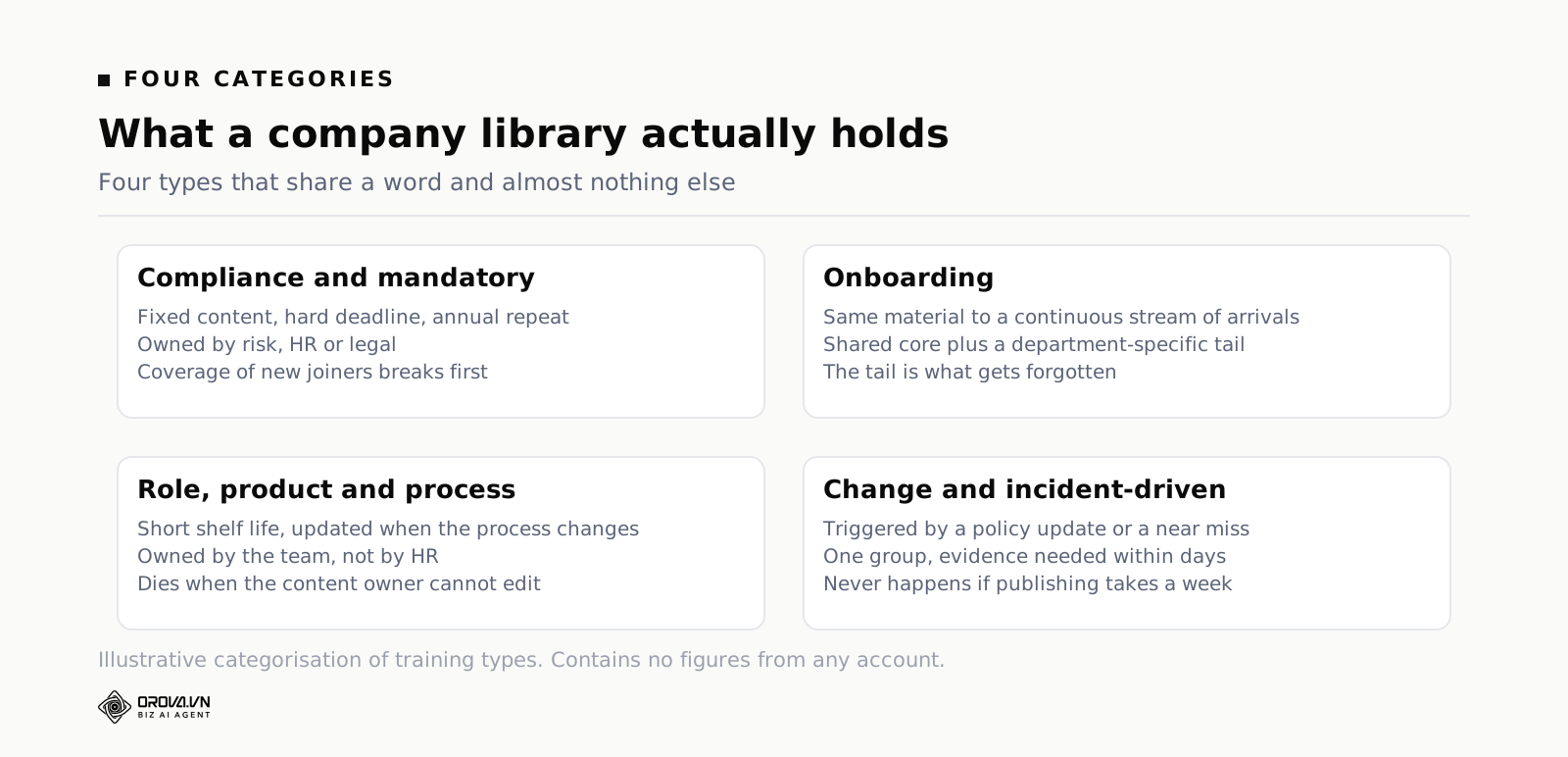
Almost everything a corporate library holds falls into one of four types, and they have almost nothing in common except the word "training". Buying a system without knowing which of the four is your real problem is the most common way to end up with an expensive shared drive.
Compliance and mandatory training
Fixed content, fixed audience, a hard deadline, and a repeat every year or two. Health and safety, data protection, anti-bribery, information security, harassment, sector-specific rules. The content itself is often dull and rarely changes. What matters is coverage — every single person in scope, no exceptions, with evidence — and recurrence, because the obligation comes round again whether or not anybody remembers.
Onboarding
The same material delivered over and over to a stream of individuals who arrive on different days. Highly repetitive, front-loaded into someone's first fortnight, and mostly identical across the company with a department-specific tail. Onboarding is where a system pays for itself fastest, because the manual version costs a senior person the same afternoon every single time somebody joins.
Role, product and process training
Short shelf life, owned by a team rather than by HR, and updated whenever the thing it describes changes. A new pricing table, a changed returns policy, a release of the software your support staff answer questions about. This is the category that dies first in a badly run library, because the person who knows the content is not the person with access to edit it.
Change and incident-driven training
Triggered by an event: a policy update, a near miss, a complaint, a regulator's letter. Small, urgent, aimed at one group, and needing evidence of delivery within days rather than months. If publishing something to a specific group takes you a week of administration, this category simply never happens, and the corrective action recorded after the incident stays theoretical.
| Type | Who owns it | Cadence | What proves it | What breaks first |
|---|---|---|---|---|
| Compliance | Risk, HR or legal | Annual or biennial | Score plus dated certificate | Coverage of new joiners |
| Onboarding | HR and the hiring manager | Continuous, per person | Progress through a fixed path | The department-specific tail |
| Role and product | The team that owns the process | Whenever it changes | Assessment on the change | Content going stale silently |
| Change and incident | Whoever owns the corrective action | Ad hoc, urgent | Evidence of delivery by a date | Time to publish to one group |
Assigning training by department, group and named person
Assignment is the single feature that separates a corporate lms from a course website, and it is the one people evaluate least carefully. The question to ask a vendor is not "can you assign courses" — everyone can. It is "what happens on the day somebody changes department".
Three ways to assign, and when each is right
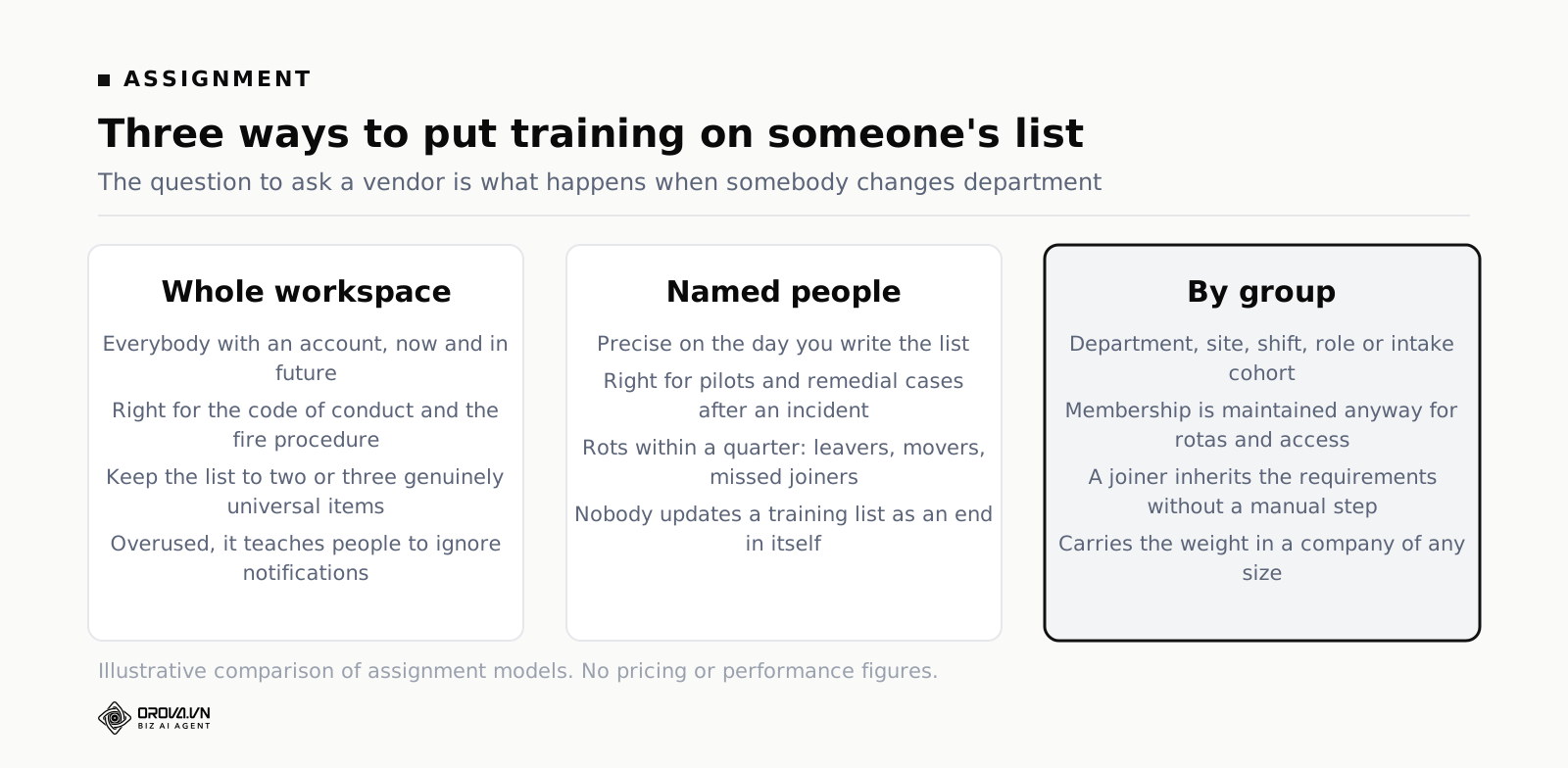
There are only three sensible models, and a working system gives you all three. The first is assignment to the whole workspace: everybody who has an account gets it, now and in future. Use this for the small number of things that genuinely apply to every person without exception — the code of conduct, the security basics, the fire procedure.
The second is assignment to named people. Use it for exceptions and for small groups that do not correspond to any structure: the six people piloting a new process, the three who need remedial training after an incident. It is precise and it is a maintenance burden, so keep the list of things assigned this way short.
The third is assignment by group, where a group is a department, a site, a shift, a role or a cohort. This is the one that carries the weight in a company of any size, because the group membership is a thing somebody maintains anyway for other reasons, and the training assignment rides along on it for free.
Why groups win after the first quarter
Named lists rot. On the day you build one it is perfect. Three months later two people have left, one has moved to a different team, four have joined, and the list is quietly wrong in a way nobody notices until an audit. Nobody updates a training list as an end in itself.
Group membership is different because it is maintained for reasons that have nothing to do with you. Somebody has to know who works in dispatch in order to run a rota. If your assignment hangs off that group, the rota keeps your training accurate as a side effect. The practical rule: assign to groups by default, to named people only for genuine exceptions, and to the whole workspace only for the two or three things that truly are universal.
Joiners, movers and leavers
Three events break every assignment scheme, and you should test all three during any trial. A joiner: does a person added to the dispatch group on Thursday automatically inherit the four things dispatch has to complete, with sensible deadlines counted from their start date rather than from a date last February? A mover: when somebody transfers from warehouse to dispatch, do they pick up the new requirements, and what happens to the old ones they had already completed — are those records kept? A leaver: does their completion history survive their account being deactivated, given that an audit two years from now may ask about a person who no longer works there?
Most products handle the joiner. Fewer handle the mover cleanly. The leaver question is the one that catches people out, because the natural instinct is to delete the account and the record goes with it.
Access modes, and the people without a desk
Not everyone in a company has a company laptop or reads email at work. Drivers, shop floor staff, site workers, seasonal hires and contractors all need training and often have nothing but a phone. This is where sharing modes matter: a link that is genuinely public, a link that requires a login so only internal people get in, and a link restricted to the learners a course was assigned to. A printed QR code taped next to the machine or handed out at the start of a shift is not a gimmick for this population — it is the only realistic route in.
Compliance training, certificates and the audit trail
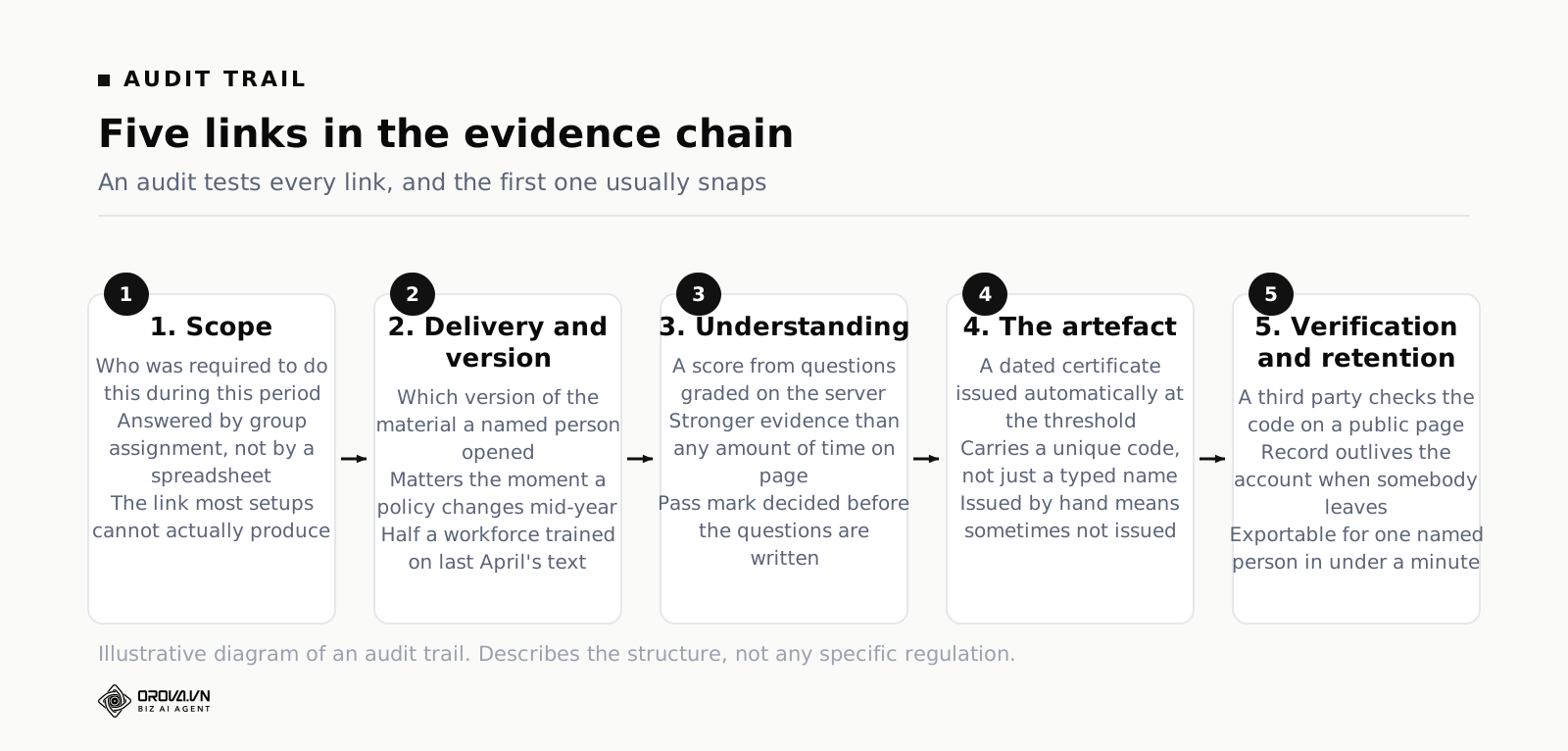
Compliance is where the difference between a claim and evidence becomes expensive, so it is worth being precise about what the chain of evidence has to contain and where most setups snap.
What an auditor actually asks for
In practice you get asked five questions, in this order. Who was in scope for this requirement during this period? Of those, who completed it, and on what date? What exactly were they shown — which version of the material, since the policy changed in April? What evidence is there that they understood it rather than scrolled past it? And can you produce all of the above for one named person in under a minute, because there is a specific complaint about that person?
Notice that only the second question is about completion. The first is about scope, which is an assignment problem. The third is about versioning, which almost nobody thinks about until the day the policy changes mid-year and half the workforce has been trained on the old text. The fourth is about assessment. The fifth is about how the records are stored.
Recurrence and the rolling due date
Annual training can be scheduled two ways, and the choice has consequences that show up a year later. Cohort dating means everybody is due in the same window — say every January. It is simple to communicate and it creates an annual cliff, where a quarter of the workforce is chased at once, completion quality drops because people are clicking through in a hurry, and the training team does nothing else for three weeks.
Anniversary dating means each person is due twelve months after their own last completion. The load spreads evenly across the year, the chasing becomes routine instead of a campaign, and people take it more seriously because they are not doing it alongside everyone else in a rush. The cost is that you can never say "we are done" — there is always somebody due. For most obligations, anniversary dating is the better trade. Keep cohort dating for the cases where a single event genuinely applies to everyone at once, like training on a policy that takes effect on a fixed date.
The certificate as the artefact
A certificate is not a decoration and it is not a reward. In a compliance context it is the portable, dated artefact that says a named person met a defined standard on a defined day, and it needs three properties to be worth anything. It has to be issued automatically when the standard is met, because a certificate issued by hand is a certificate that sometimes does not get issued. It has to carry a unique code. And the code has to be checkable by somebody outside your organisation on a public page, without a login, because the whole point is that a third party can verify it.
The format matters less than people think, though having landscape, portrait and square versions of the same design is useful in practice — landscape for the PDF that goes in a file, portrait for printing and pinning up on a site, square for the one people put on a professional profile.
Expiry, renewal and the leaver problem
Anything with a validity period needs a report of what is expiring in the next sixty and ninety days, because the useful moment to act is before the lapse, not after. A first-aid certificate that expired last week is an operational problem today.
And plan for leavers before you need to. Somebody who left eighteen months ago may still be the subject of a question about an incident that happened while they were employed. Whatever your data retention policy says, make sure the completion record can outlive the active account, and make sure you know how to export it.
Onboarding at scale without a person in the loop
Onboarding is the most repetitive thing a company does and the thing most often delivered by an experienced person improvising. It is also the easiest win available, because the content changes rarely and the audience arrives continuously.
Write the first fortnight once
Sit down and write the path a new person walks: what they need on day one, what can wait until day three, what belongs in week two. Day one is orientation and the things that are legally required before somebody starts work. Days two to five are the systems and processes they need to do anything useful. Week two is the deeper material that would have been meaningless on Monday.
Writing this down is the actual work, and it takes an afternoon. Once it exists, every future hire gets the version that survived a hundred previous hires instead of the version a busy colleague remembered on the day.
A shared core and a department tail
Roughly seventy per cent of onboarding is identical for everyone and thirty per cent is specific to the department — the exact split does not matter, the structure does. Build the shared part once and assign it to the whole workspace. Build the tail per department and assign it to the department group. A new joiner added to the group inherits both without anyone assembling a list.
The mistake to avoid is duplicating the shared part into each department's course so that it can be tweaked slightly. You will end up with nine copies of the code of conduct, and when it changes you will update four of them.
The part a system cannot do
No platform introduces somebody to their team, tells them where people actually eat lunch, or explains which of the written rules everybody quietly ignores. What a system does is take the mechanical load off the manager so the manager has time for the part only a human can do. Be explicit about the division: the system covers policies, systems, safety and the standard process; the manager covers people, context and the first real piece of work.
Measure the right thing
Onboarding completion rate is a weak measure because it will be high and it does not distinguish a good programme from a fast clicker. Better signals: how long it takes a new person to complete their first piece of real work unsupervised, how many questions the manager fields in week three that the onboarding material was supposed to answer, and what new joiners say when asked at the thirty-day mark which part was a waste of time. That last one is the cheapest content-improvement mechanism available and almost nobody runs it.
Completion enforcement: what it proves and what it does not
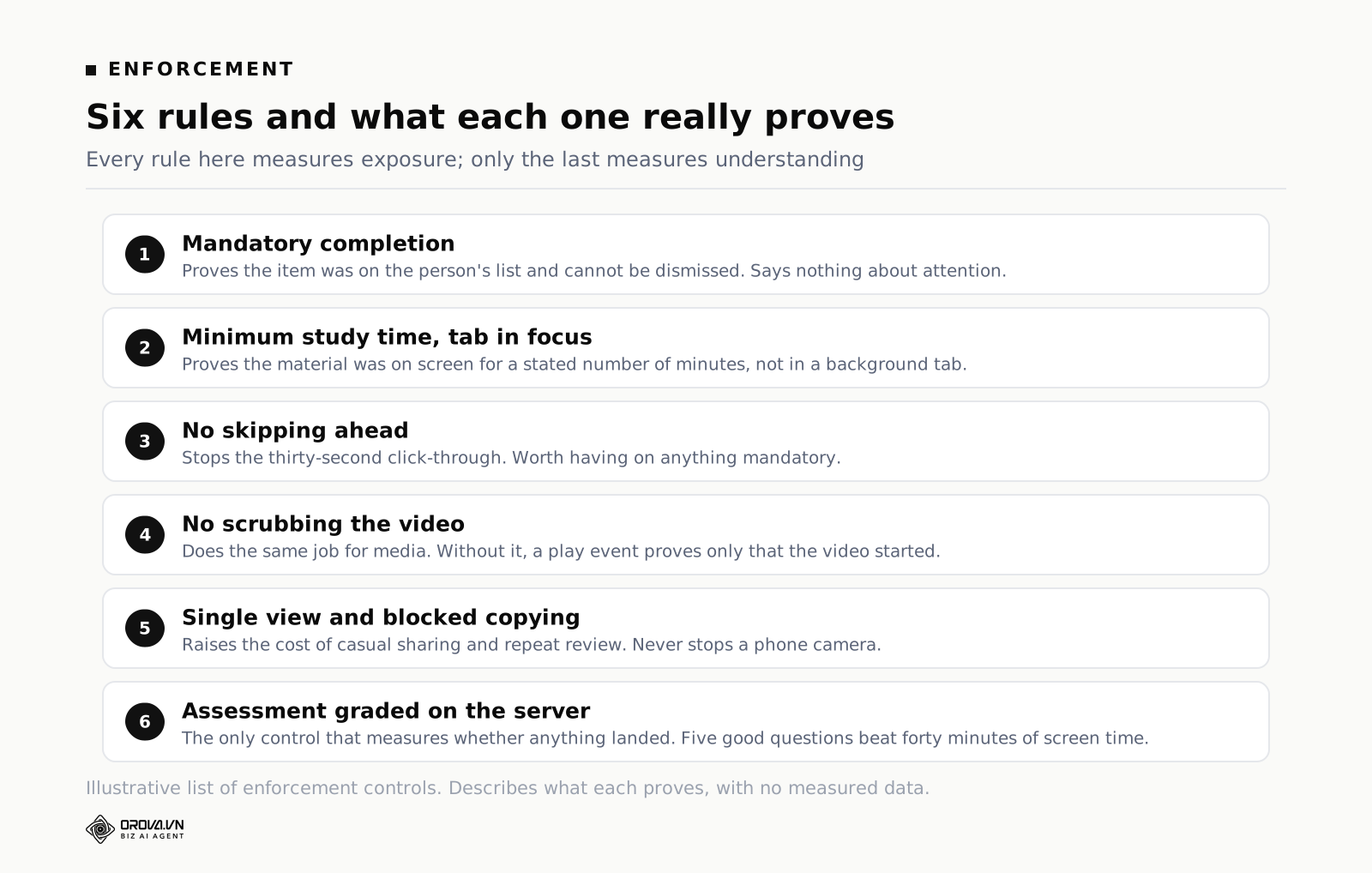
Every corporate system has a set of rules designed to stop somebody opening a module, going to lunch, and coming back to click finish. They are useful. They are also routinely oversold, and understanding exactly what each one proves keeps you honest when you present the numbers.
Minimum study time, counted properly
A minimum time on a page is the most common rule and the easiest to defeat, because the obvious implementation counts wall-clock time from open to close. Somebody opens the module in a background tab and does something else. The implementation that means something counts time only while the tab is actually in focus, which turns a meaningless number into a defensible one: this person had this material in front of them, on screen, for eleven minutes.
It still does not prove they read it. Nothing proves they read it. It proves they were not somewhere else, which is a lower bar than people pretend but a real one.
No skipping, no scrubbing, view once
Blocking the ability to jump forward, disabling the video scrub bar, and limiting a document to a single viewing are the other standard controls. Blocking skipping stops the fast click-through and is worth having on anything mandatory. Disabling scrubbing on a video does the same job for media. Single-view is a different tool entirely — it exists to stop an assessment or a confidential document being reviewed repeatedly or captured, and it is the one to apply sparingly, because there are legitimate reasons somebody needs to look at a safety procedure twice.
Blocking copying of the content sits in the same bracket. It raises the cost of casual sharing. It does not stop a determined person with a phone camera, and pretending otherwise leads to bad decisions about what you put in the system at all.
A score beats a timer
Every one of these rules measures exposure. None of them measures understanding, and if you have to choose one piece of evidence to defend, choose a score from an assessment graded on the server over any amount of time-on-page. Five well-written questions answered correctly is stronger evidence than forty minutes of confirmed screen time, and it takes the learner less of their day. The practical setup for mandatory training is a short module with light enforcement, followed by a short assessment with a pass mark set in advance — the mechanics of writing that assessment are covered in the guide to choosing an online quiz maker for staff training.
Where enforcement backfires
Three failure modes are worth watching. The first is resentment: enforcement applied to material that everybody knows is padded teaches people that the training team does not respect their time, and that reputation is very hard to undo. The second is accessibility — timers and single-view restrictions can penalise people who read slowly, use assistive technology, or are working in their second language, and a rigid minimum time is a blunt instrument against all three. The third is displacement: turn the screws hard enough and people stop trying to defeat the timer and start sitting through the module with the sound off while doing other work, which produces perfect compliance data and zero learning.
Reporting that HR and L&D can act on
Reporting is where a purchase justifies itself, and where most implementations quietly stop short. The test is simple: can the report be read by somebody who does not work in training, and does reading it lead to an action?
The four reports you will be asked for
Whatever else exists, you will be asked for these. Overdue by department, so a manager can chase her own people. Completion by course for a stated period, which is the compliance number the board sees. The full history for one named person, which is what you produce when there is a complaint or a grievance. And expiring in the next ninety days, which is the only one of the four that prevents a problem rather than reporting one.
If a system makes any of those four take more than a couple of minutes, you will end up rebuilding them in a spreadsheet, which is exactly the situation you were trying to leave.
Completion rate is a floor, not a result
A ninety-eight per cent completion rate with an average score of fifty-five per cent describes an organisation where nearly everybody sat through something and roughly half of them did not understand it. Reported on its own, the completion rate hides that entirely. Always publish the two numbers together, and add the distribution behind the average, because an average of seventy can be everybody at seventy or half the workforce at ninety-five and half at forty-five. Those two situations need completely different responses.
Per-person data, used carefully
A corporate system will show you real study time, how many times somebody opened a document, and their score on each assessment. This is genuinely useful for spotting a person who is struggling and needs help before a deadline turns into a disciplinary conversation. It is also the fastest way to destroy trust in the whole programme if it is used to rank people or leaks into a performance review without anyone being told.
Decide the policy before you switch it on, write it in one sentence, and say it out loud when you launch: this data is used to find people who need support and to fix broken material, and it is not used to rank anyone. Then hold to it, because you only get to say it once.
Four levels, and why most teams stop at the first
The Kirkpatrick model, still the standard vocabulary in this field, describes four levels of evaluation: reaction (did they like it), learning (do they know it), behaviour (are they doing it differently) and results (did anything change in the business). Most corporate training reporting lives entirely at level one and a half — a feedback star rating and a completion percentage.
You will not get to level four with a learning system alone, and you should be suspicious of anyone who says otherwise. But level two is entirely within reach with an assessment, and level three is reachable for one or two priority topics with a simple follow-up: pick the specific behaviour the training was supposed to change, agree how it is observed, and check at ninety days. Doing that properly for one topic a year is worth more than dashboards for all of them.
Common mistakes
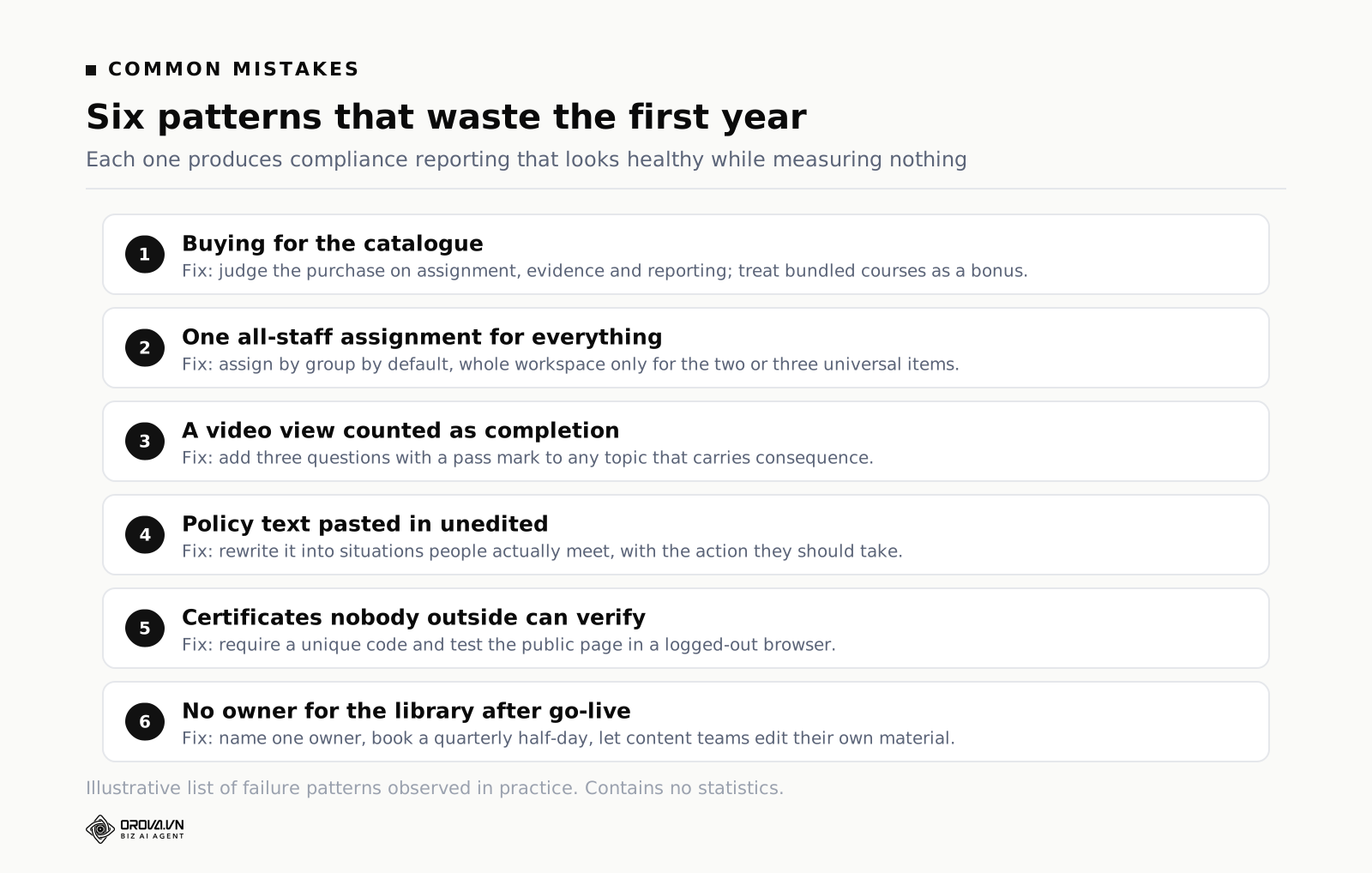
Mistake 1: buying for the catalogue instead of the assignment
The demo shows a library of thousands of ready-made courses and it is genuinely impressive. Twelve months later the usage report shows that the courses people actually took were the six you built yourself about your own processes, and the licence fee was mostly for the shelf. Judge the purchase on whether it delivers your material to the right people with evidence, and treat any bundled catalogue as a bonus rather than a reason.
Mistake 2: one "all staff" assignment for everything
It is quick and it feels safe: assign everything to everyone and nobody is missed. What happens is that people receive four modules a month that are obviously not aimed at them, they learn that the notifications can be ignored, and the one that genuinely mattered gets ignored along with the rest. Relevance is the mechanism by which any of this works, and blanket assignment destroys it in about two months.
Mistake 3: treating a video view as completion
A play event proves a video started. With scrubbing enabled it does not even prove it finished. Any topic that carries consequence needs a question at the end, and three good questions are enough — this is a ten-minute job that changes what your reports mean.
Mistake 4: compliance content written by the risk team and never edited
The policy document is the source, not the training. Forty slides of legal text pasted into a module produces the compliance data you need and none of the understanding, and it teaches people that mandatory training is something to endure. Somebody has to rewrite it into scenarios: here is a situation you will actually meet, here is what you do. That rewriting is skilled work and it is the highest-value hour in the whole exercise.
Mistake 5: certificates nobody outside can verify
A PDF with a name typed into it proves nothing to a client, an insurer or a regulator, because anyone can make one. If a certificate does not carry a unique code that a third party can check on a public page, it is internal decoration. Test this properly during a trial: issue one, then open the verification page in a browser where you are not logged in.
Mistake 6: no owner for the library after go-live
Implementation projects have an owner and a deadline. The steady state usually has neither, and within a year the library contains three versions of the expenses policy, a course referring to a system that was replaced, and a module owned by somebody who left. Name one person responsible for the library, give them a recurring half-day each quarter, and give the teams that own the content the ability to edit their own material — because the alternative is that they email you a new PowerPoint and wait a fortnight.
Your first ninety days
The failed rollouts are almost always the ambitious ones: everything migrated, everyone enrolled, twelve courses live in month one. Do the opposite. The point of the first ninety days is to prove the loop works end to end on something small enough to fix.
Days 1 to 30: one course, one group, one deadline
Pick the single most defensible obligation you have — usually a compliance topic with a real external requirement. Build one course, write one short assessment with a pass mark decided in advance, assign it to one department group, set one deadline. Then run the full cycle including the awkward parts: chase the stragglers, deal with the two people who cannot log in, issue the certificates, and export the evidence as if an auditor had asked. You will find three things wrong. Finding them now, with forty people, is the entire purpose.
Days 31 to 60: the compliance cycle end to end
Widen to the full population for that one topic, and add recurrence. Decide cohort or anniversary dating and set it. Build the four reports and send each one to the person who should be reading it, then ask them whether it told them anything they could act on. Their answer is more useful than any internal review. This is also the point at which you should look seriously at the wider question of choosing employee training software for the parts of the problem a learning library does not cover.
Days 61 to 90: hand over the controls
Bring in the second and third categories — onboarding and one team's role training — and give that team the ability to edit their own material rather than routing it through you. Set the quarterly review in the calendar with a named owner. If at day ninety you are still the only person who can publish anything, the system has not been adopted; it has been installed, and the two are not the same.
Frequently asked questions
Is a corporate LMS different from an enterprise LMS?
The terms overlap heavily and no standards body owns either. In common usage, an enterprise lms implies scale and integration — thousands of users, single sign-on, connection to an HR system so that joiners and leavers flow automatically. "Corporate" is used more loosely for anything aimed at companies rather than schools or individuals. Ignore the label and check the specifics: how assignment works, what the audit export contains, and whether group membership can come from somewhere else. A product marketed as enterprise can still be weak on all three.
Do we need one if we only have thirty people?
Probably not for the training itself, but possibly for the evidence. Thirty people is small enough to run onboarding by hand and remember who has done what. The trigger is not headcount, it is obligation and repetition: if you have a recurring requirement you must prove to somebody external, or you hire steadily enough that the same afternoon gets repeated monthly, the arithmetic changes well below thirty. If neither applies, a folder and a checklist are honestly fine.
Can we move our existing PowerPoints and PDFs in?
Slide decks and PDFs upload directly in most systems and remain what they are — documents somebody scrolls through. That is a legitimate starting point and far better than leaving them on a shared drive with no record of who opened them. The upgrade path is to add a short assessment to each one, which costs ten minutes and converts an unverifiable view into a measurable result. Existing videos are usually linked rather than uploaded, which keeps them where they already live.
How long until the first course is genuinely live?
If the content exists, a day of focused work: half a day to structure the material and write the assessment, an hour to set up groups and assignment, and the rest on the trial run with a few colleagues. If the content does not exist, the content is the project and the system is a detail. Teams that spend six weeks on configuration before writing anything are almost always avoiding the writing.
Who should own the system — HR, L&D or IT?
Day-to-day ownership belongs with whoever owns the obligation, which is usually HR or a dedicated L&D function. IT owns access, accounts and integration and should not be the team deciding what training exists. The arrangement that fails is the one where IT owns the platform and HR owns the content, with neither owning whether anybody actually completed anything.
Does mandatory training change behaviour?
On its own, weakly. A module people click through the week before a deadline changes very little, which is why compliance completion rates and incident rates so often move independently. What does help is spacing — short, repeated checks through the year instead of one annual event — content built from situations people genuinely encounter, and a manager who refers to it afterwards. The system makes spacing and repetition cheap enough to be practical. It does not supply the other two.
When a shared drive stops being enough
What you can genuinely run by hand
One department, one recurring obligation, a folder of documents, a spreadsheet with names and dates, and a calendar reminder will carry you further than most vendors would like you to believe. Building it by hand also teaches you exactly which parts are painful, and that knowledge is what stops you buying the wrong thing. Run one full cycle manually before you buy anything.
The symptoms that say you have outgrown it
The wall is multiplication, not complexity. Six obligations times nine departments times an annual cycle plus a stream of joiners is a very large number of small administrative acts, and each one is a chance to miss a person. The recognisable symptoms: you cannot answer "who in dispatch is overdue" without opening several files; a new joiner's training depends on somebody remembering; the policy changed in April and you do not know who saw which version; certificates are made one at a time in a document; and the answer to "how do you know she completed it" is "it is ticked in the sheet".
What a corporate system changes
Orova Training keeps the whole chain in one place: courses, documents, quizzes, certificates and learners as five parts of the same workspace. Material can be written in the built-in editor, uploaded as slides or a podcast, linked as video, or drafted by AI as an article, a slide deck, a narrated audio piece, a flashcard set or a subtitled video and then edited by you. Courses, documents and quizzes are shared by link or QR code in three access modes — public, login-required or learners only — and assigned to the whole workspace, to named people or to groups. Enforcement covers mandatory completion, minimum study time counted only while the tab is in focus, blocked skipping, single viewing and blocked copying. Assessments are graded on the server, and passing a threshold issues a certificate automatically in landscape, portrait or square, with a unique code and a public verification page. Per-person tracking records real study time, opens and score per assessment, the interface runs in six languages, and new accounts get 1,000 quota so you can build a real course before deciding anything.
What no platform will do is decide what your people need to know, rewrite a policy into a scenario, or make a manager care. It will deliver weak content faster, to more people, with better reporting on how weak it is. The order stays what it was on day one: work out which of the four categories is your real problem, get the assignment right, make completion mean something, and only then worry about the library.
What to do this week
Take your single most defensible obligation — the one an auditor is most likely to ask about — and try to answer the five audit questions from your current records. Who was in scope, who completed, on what date, which version they saw, and what evidence there is that they understood it. Time yourself. The question you cannot answer inside five minutes is your actual requirement, and it is usually the first one rather than the second.
Second, look at how your training is currently assigned. If the answer is a named list in a spreadsheet, open it and check it against the current staff list. Count the people who have left, the people who have moved, and the people who joined and were never added. That count is the size of the gap you have been reporting as compliance, and it is almost always bigger than expected.
Third, pick one module that currently ends with a page saying "you have completed this" and write three questions for it. Set the pass mark before you write them. Three questions take ten minutes and change the module from something people were exposed to into something you can defend, and defending it is the whole reason you are looking at this category.
If you are starting from nothing, the first week is smaller than it looks. One obligation, one department group, one course, one short assessment, one deadline. Run it all the way through to a certificate with a code you can check in a logged-out browser, and export the evidence as though somebody had asked for it. Everything you will ever need to know about whether a system fits your organisation is visible by the end of that one cycle.
Assign training by group and prove who finished it
Orova Training assigns courses to the whole workspace, to named people or to groups, enforces completion, grades on the server and issues verifiable certificates automatically.
Try it free