
Employee Training Software: How to Choose and Roll It Out
A new hire started on Monday. By Wednesday they had been shown the coffee machine, added to four chat groups, and handed a folder of slides someone made two years ago. Nobody is quite sure whether they have read the refund policy, and the person who would know is on leave. This is not a story about a badly run company. It happens in well run ones, because onboarding is everybody's job, which means it is nobody's job.
Employee training software exists to make that failure impossible rather than unlikely. Not by producing better slides, but by turning a set of good intentions into something that happens on its own: the right course reaches the right person, the person cannot quietly skip the part that matters, and on Friday you can answer the question of who has actually done it.
This guide is written for the person who has been handed that problem without being handed a training department. It covers what the software category actually contains, the four training situations that pull software in different directions, the questions that separate a real product from a demo, and a thirty day plan that assumes you are doing this alongside your day job.
What is employee training software and what should it do?
Employee training software delivers and tracks training for people inside a company. It assigns courses to the right staff, records who completed what, enforces the rules that matter, and produces evidence afterwards. Content creation is a separate job that some products also do.
The category is wide enough to be confusing, so it helps to split it by the job being done rather than by the label on the website. There are three jobs, and most products are strong at one and adequate at the others.
The first job is making the material — writing, recording, building slides, producing questions. The second is delivery and administration — who gets what, by when, with what consequences for not doing it. The third is proof — certificates, records, and the ability to reconstruct what happened six months later.
A tool built for the first job will feel wonderful in a demo and thin the moment you have forty people to keep track of. A tool built for the second will handle your forty people beautifully and leave you making the content somewhere else and uploading it. Knowing which one you are looking at, before you get attached to the interface, saves months.
Why employee training is different from selling courses
This distinction matters more than the size of your company. When you sell courses, your problem is attention: people paid, and you need them to come back. Almost every feature is built to persuade — landing pages, previews, drip schedules, reminders that read like marketing.
When you train employees, attention is not the problem. They are contractually obliged to be there. Your problem is coverage and evidence: did everyone who needed this get it, and can you show that. The features you need are unglamorous — group assignment, deadlines, completion rules, exportable records.
Products built for course selling will happily sell to internal training teams, and they will work, badly. You will find yourself paying for a checkout system you never switch on while doing group assignment by hand.
The loop you are actually buying software for
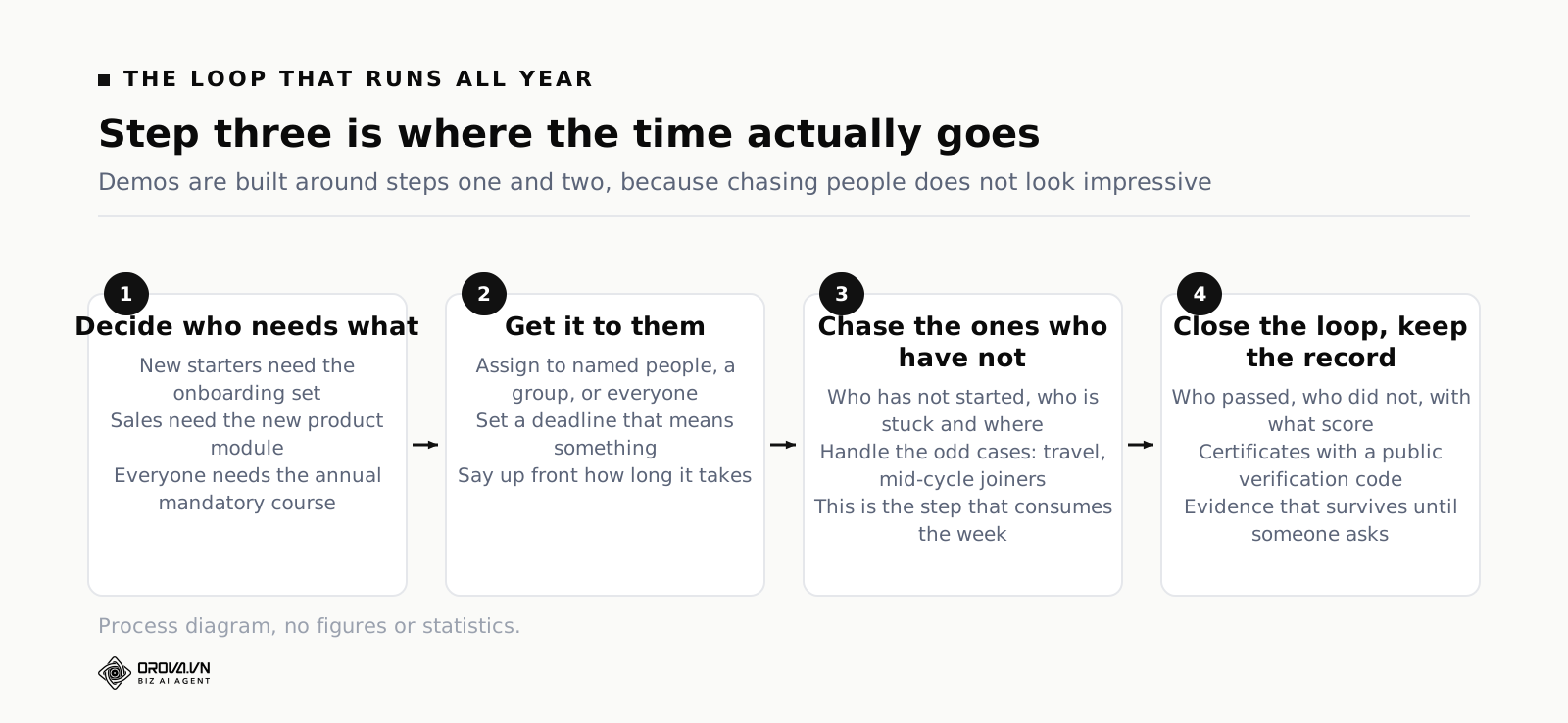
Strip away the vocabulary and internal training is a loop that runs all year. Decide who needs what. Get it to them. Chase the ones who have not done it. Close the loop and keep the record.
The third step is where the time goes, and it is the step most buyers forget to test. Demos are built around the first two, because assigning a course to a group looks impressive and chasing people does not. When you evaluate, spend your time on step three.
Four training situations that pull software in different directions
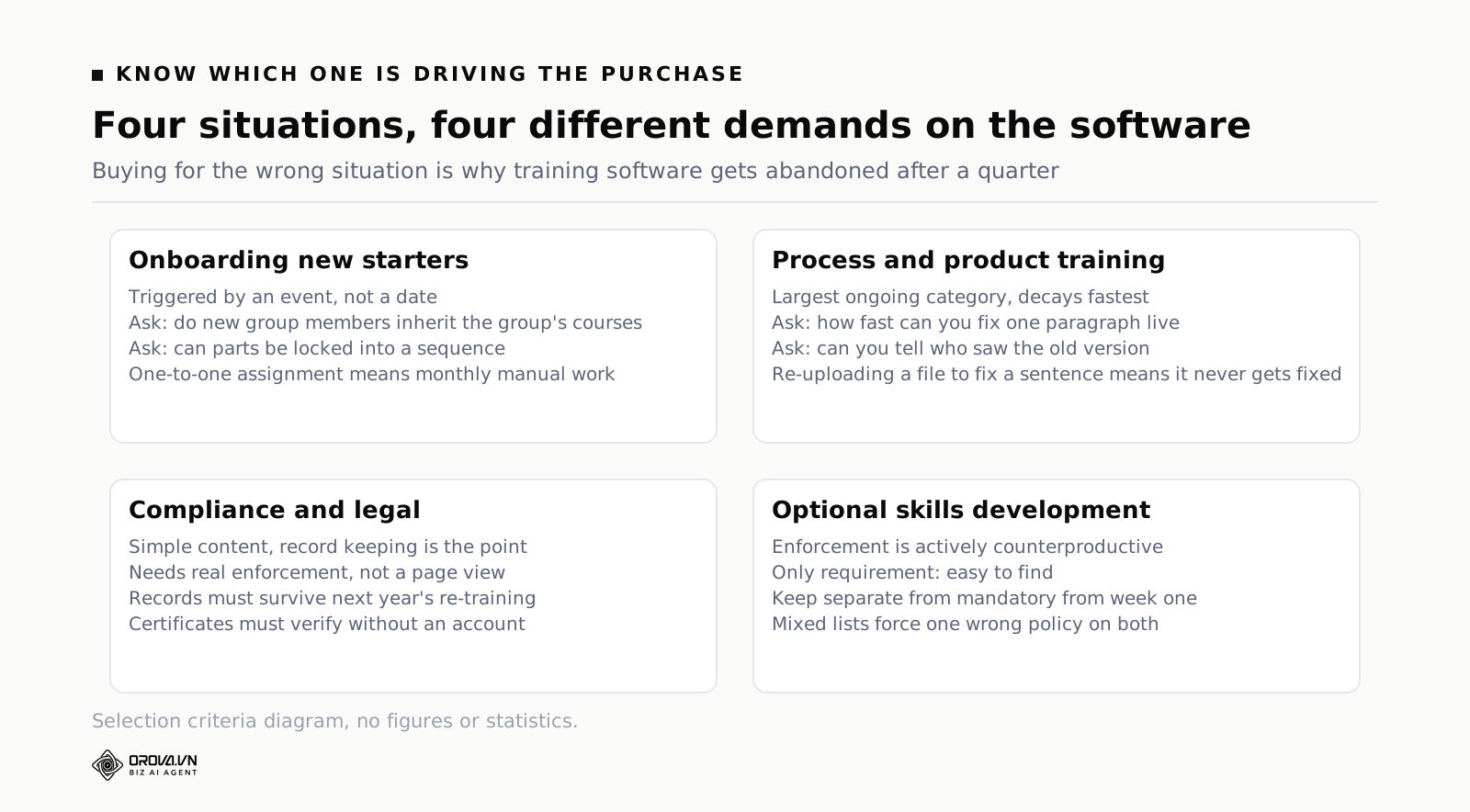
Most companies run more than one of these at once, but one of them is usually the reason you started looking. Knowing which one is driving the purchase keeps you from being sold features that belong to a different situation.
Onboarding new starters
The defining feature of onboarding is that it is triggered by an event, not a date. Someone joins, and a fixed sequence should begin without anyone remembering to start it.
The software question that follows is specific: can you assign to a group and have new members of that group inherit what the group already has. If assignment is one to one, you will be doing it by hand every month, and the person who slips through will be the one who joined during a busy week.
The second onboarding question is about sequence. New starters should meet things in order, and some parts should not be skippable. A product that treats a course as an unordered pile of materials will not do this.
Process and product training for people already here
This is the largest ongoing category and the one that decays fastest. A process changes, a course written six months ago now teaches the old way, and nobody notices until someone follows it and causes a problem.
What matters here is not delivery but editing. How fast can you fix one paragraph in a live course, and does everyone see the corrected version immediately. If updating a course means re-uploading a file, your content will go stale, because nobody re-uploads a file to fix a sentence.
The related question is whether you can tell who saw the old version. When a process changes materially, you often need to re-run the training for people who learned the previous version, and that requires knowing who they are.
Compliance and anything with a legal edge
Here the training itself is often simple and the record keeping is the whole point. You need to prove, to someone external and unsympathetic, that a named person completed a specific thing on a specific date.
Three requirements follow. Completion has to mean something more than opening a page, so you need enforcement — minimum time, no skipping, a passing score. Records must survive re-training, because next year's completion should not overwrite this year's evidence. And certificates should be verifiable by someone who does not have an account in your system.
This is also the category where automatic issuing matters. If a person has to sit and issue certificates by hand, then at three hundred employees they will not, and the feature effectively does not exist.
Skills and optional development
The odd one out. Here you are not enforcing anything; you are trying to make good material easy to find and pleasant to use. Deadlines and completion rules are actively counterproductive.
The practical implication is that optional material should be kept clearly separate from mandatory material from the very first week. Mixed together, you either enforce things that should not be enforced, or you go soft on the things you cannot afford to go soft on.
Three expensive misreadings
Reading completion rate as effectiveness
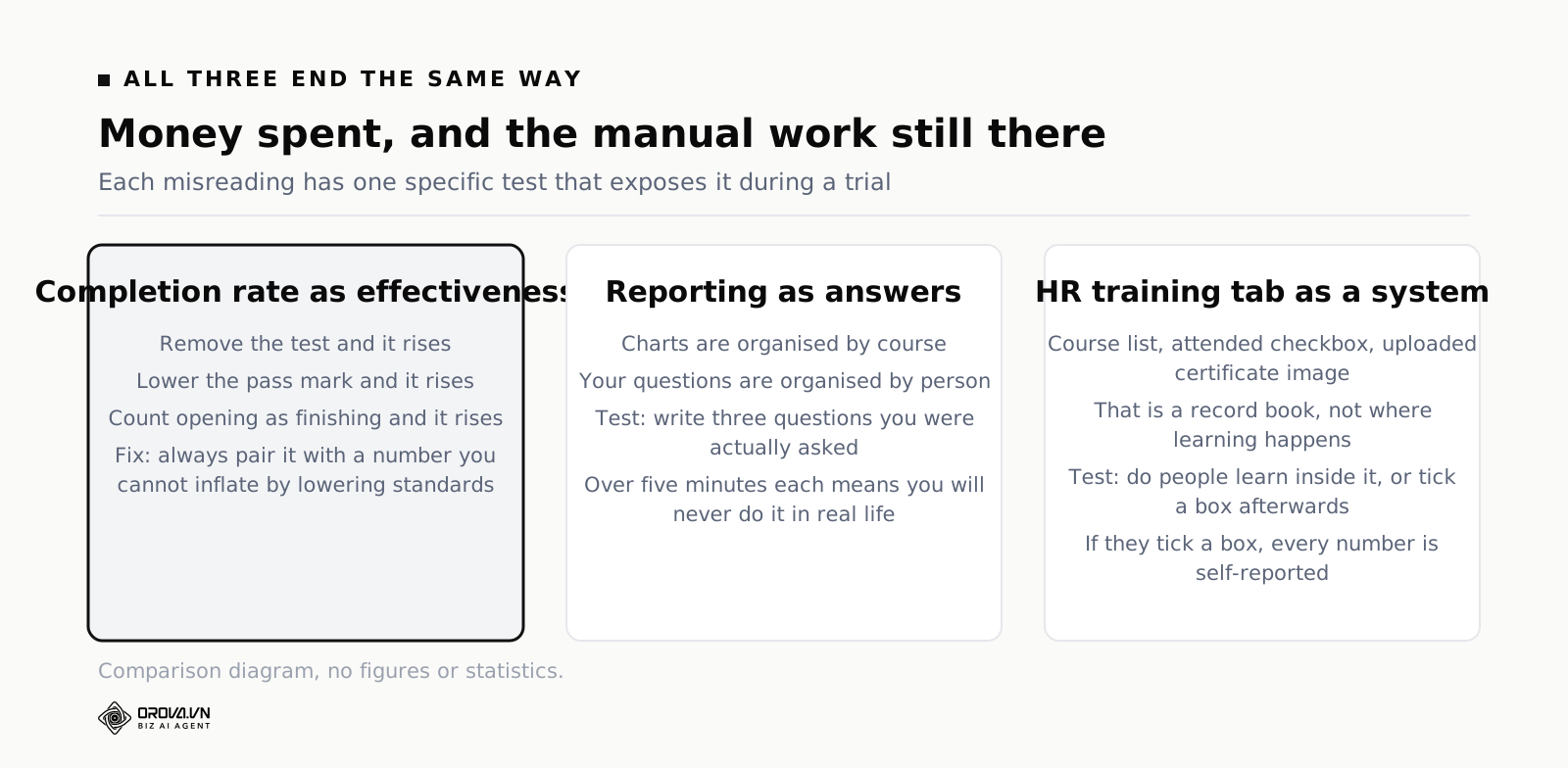
Completion rate is the most comfortable number in any training report and the easiest one to inflate. Remove the test and it rises. Lower the pass mark and it rises. Count opening as finishing and it rises. None of those changes mean a single person learned more.
The fix is not to abandon the number but to never show it alone. Put it next to something that cannot be improved by lowering standards — the average score on the end-of-course test, or the failure rate on one specific question. When standards drop, the pair separates immediately: completion up, score down.
Reading "has reporting" as "answers my questions"
The questions you will be asked are awkwardly specific. Have the people who joined since April finished onboarding. Which ones have not. Where did they stop. Plenty of systems have twenty charts and cannot answer that, because the charts are organised by course while the question is organised by person.
During a trial, ignore the sample dashboard. Write down three questions you were actually asked in the last six months and try to answer them in the product. If any of them takes more than five minutes, you will not do it in real life, and you will drift back to a spreadsheet.
Reading a training tab in the HR system as a training system
Many HR platforms have a training section. Open it and you usually find a list of courses, a checkbox for attended, and somewhere to upload a certificate image. That is a record book, not a place where learning happens.
The test is simple: do people learn inside it, or do they learn elsewhere and come back to tick a box. If it is the second, every number in it is self-reported. Record books are useful, but do not buy one expecting it to replace the place the work happens.
Eight things to test with your own hands
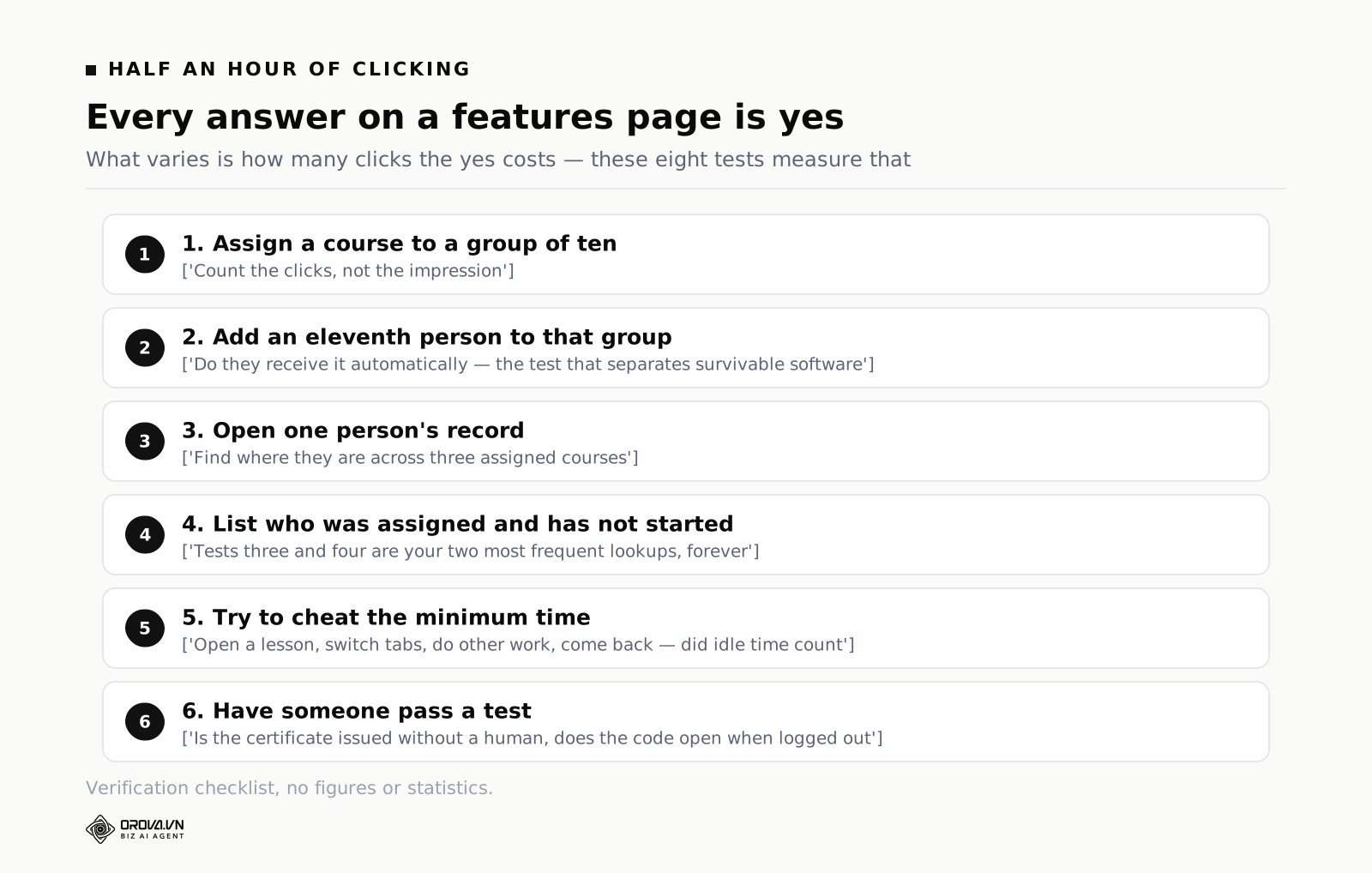
Every answer on a features page is yes. What varies is how many clicks the yes costs. These eight tests take about half an hour and tell you more than a long call.
One, assign a course to a group of ten and count the clicks. Two, add an eleventh person to that group and see whether they receive the course without you doing anything else. This second test is the one that separates software that survives staff changes from software that does not.
Three, open one person's record and find where they are across three assigned courses. Four, produce the list of people who were assigned something and have not started. Three and four are the two lookups you will do most often for the rest of your working life with this tool.
Five, set a minimum time on a lesson and then try to cheat it: open the lesson, switch to another tab and do unrelated work, then come back and see whether that counted as studying. If idle time counts, the setting is decorative.
Six, have someone pass a test and check whether the certificate is issued without human intervention, and whether its verification code opens from a device that is not logged in. Seven, export a course's completion list and open it in a spreadsheet — this tells you whether your records are portable if you ever leave.
Eight, ask what happens when the same course is assigned again next year. Specifically, whether last year's completion record survives, or is overwritten. This only becomes a problem in year two, which is exactly why nobody tests it in year one.
Build one real thing in an afternoon
The fastest way to evaluate two products is not a comparison table. It is building the same real scenario in both and noticing where you get irritated.
Use onboarding, because it is small enough to finish in an afternoon and touches all four core jobs. Build a course with three parts: a written introduction to the company, an existing slide deck about a process, and a ten question test. Mark the test as required with a pass mark of seven.
Then do the part that actually matters. Create a group called new starters, assign the course to the group, add two colleagues, and have them go through it for real while you watch. While they work, try to answer four questions: who has started, who has not, where is the person who is stuck, and which test question is being failed most.
At the end, add a third person to the group. If they receive the course without you touching anything, that product has passed the hardest test in this guide.
A thirty day plan when you are starting from nothing
This assumes no dedicated training person and no existing library — just some slide decks and a lot of knowledge sitting in the heads of people who have been there a while.
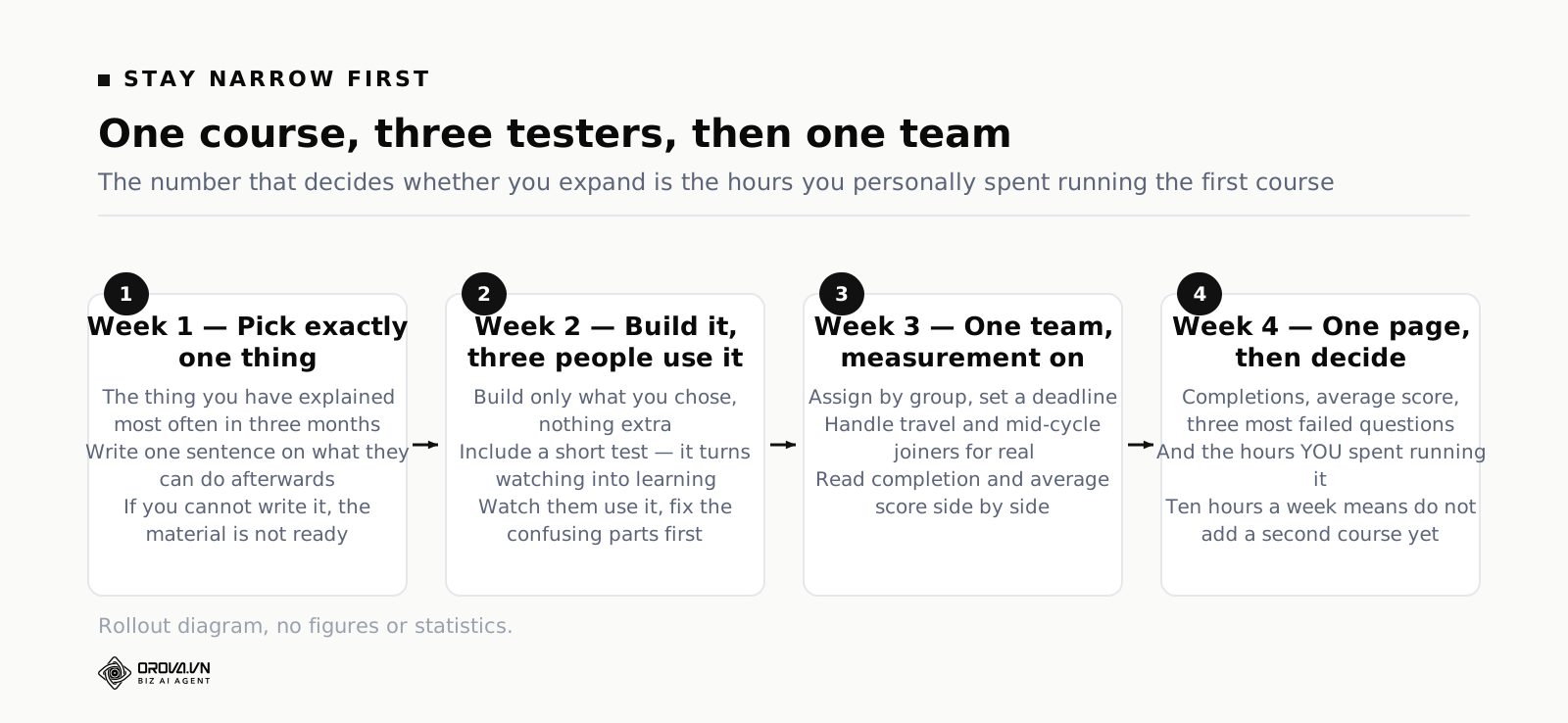
Week one: pick exactly one thing
Do not start by building a library. Start by choosing the single thing you have explained most often in the last three months. Usually that is onboarding, or a process that changed recently and is still being done wrong.
Write one sentence describing what someone can do after finishing. That sentence is what stops the course from swelling into a three hour recording nobody watches. If you cannot write it, the problem is not the software — the material is not clear enough yet.
Week two: build it and have three people use it
Build only what you chose. Include a short test, because a test is what turns watching into learning and gives you your first real data.
Have exactly three people go through it while you sit nearby. You will immediately see which paragraph is confusing and which button nobody finds. Fix those before you widen. Fixing for three people is cheap; fixing after thirty have already seen the broken version costs you both time and credibility.
Week three: give it to one team and turn on measurement
Pick one team, assign by group, set a deadline. This is where you use the management side for real: chasing, tracking, and handling the awkward cases like someone travelling or someone joining halfway through.
At the end of the week look at two numbers side by side: how many finished, and the average test score. High completion with low scores means the content has a problem, not the people.
Week four: write one page and decide
Summarise four things: how many people completed, the average score, the three most failed questions, and how many hours you personally spent running it. The last number is the important one, because it tells you whether this model scales.
If running one course for one team consumed ten hours a week, do not add a second course. Find which part of those ten hours was repetitive and let the system take it. If it consumed two, you are ready for the next course.
When paying for one system starts to make sense
The threshold is not headcount. It is repetition. When you re-assign the same set of courses every month because people keep changing, when chasing takes more of your week than writing, and when every request for evidence costs you an evening of stitching data together, a tool stops being a nice-to-have and starts buying back your time.
That is the point where having creation and administration in one place earns its keep. Orova Training puts five areas next to each other: courses, materials, quizzes, certificates and learners. Materials come in ten types — five you build yourself, including text, slides, video, podcast and flashcard decks, and five where the machine drafts for you: written lessons, slides with per-slide chat editing, podcasts with one or two hosts drawn from thirty voices you can preview, three-dimensional flip card decks, and slide videos with subtitles. Quizzes run either as individual exams graded on the server or as a live ranked mode people join by QR code. Certificates are issued automatically when someone reaches the pass mark, carry a public verification code and export to PDF. On the administration side there are learner groups, three ways to assign a course — whole workspace, by group, or to named people — plus completion rules and real study time per person. If you already run another learning platform, courses export as SCORM packages so you are not locked in. The interface runs in six languages and new accounts get a thousand quota to build something real.
The honest limit is worth stating: no tool rescues a training programme that has no content. It delivers faster than you, chases more reliably than you and keeps better records than you — on exactly what you put in. If the process you are teaching is out of date, the system will simply distribute the out of date version more efficiently and record that everyone has read it.
What it looks like from the employee's side
Buyers evaluate this software from the administrator's chair, which is reasonable, since that is where the work happens. But adoption is decided in a different chair entirely. If the experience of being trained is irritating, people will do the minimum required to make the notification go away, and every number you collect afterwards will be about compliance rather than learning.
Three things shape that experience more than any feature on a comparison page.
Knowing how long this will take
The single most common source of resentment is not the requirement to learn. It is opening something with no idea whether it will take eight minutes or ninety. People with a full calendar respond to that uncertainty by postponing, and postponing is what turns into your chasing work later.
So look at what a learner sees before they start. Is there an honest indication of length. Can they see how many parts there are and where they are in the sequence. Can they stop halfway and come back to the same spot tomorrow without losing progress. That last one sounds trivial and is not: a course that forgets where someone was will be started three times and finished never.
Doing it on the device they actually have
A large share of internal training gets done in gaps: on a phone between shifts, on a tablet in a warehouse, on a laptop borrowed from someone else. If a course only behaves properly on a desktop browser with a wide screen, the people most likely to be squeezed for time are the ones who cannot use it.
Two things are worth checking on a phone rather than trusting a claim of mobile support. First, whether a slide deck or a document is actually readable, or whether it renders as a wide page you have to pinch and drag. Second, whether progress survives an interruption — someone gets called away mid-lesson, the screen locks, and they come back an hour later. If that loses their place, they will not start it again during a shift.
Related and easy to overlook: how much data a lesson costs to load. Video-heavy material studied on a personal phone plan is a cost you are quietly passing to staff, and it is a reason people put training off without ever telling you why.
Not being treated as a suspect
Enforcement features exist for good reasons, and every one of them also carries a message. Minimum time says we think you might skim. No skipping says we think you might jump ahead. Copy blocking says we think you might leak this. Applied to a safety course that carries legal weight, all three are reasonable and people accept them. Applied to an optional lunchtime session on spreadsheet tips, they are insulting.
The judgement call is not which settings exist but where you apply them. A useful habit is to write a one line reason for each restriction on each course. If you cannot write the reason, remove the restriction. This single habit does more for adoption than any amount of internal communication about how much the company values learning.
Where the real cost sits
The number on the pricing page is the most visible cost and rarely the largest one. Three other costs decide whether this turns out cheap or expensive after a year, and none of them appear in a contract.
Building the first content
This is the biggest cost and the most consistently underestimated. A decent onboarding course is not a pile of old slides collected into one place. It is someone sitting down and deciding what a new person genuinely needs in week one, rewriting it so an outsider can follow it, and cutting the parts that only feel important to people who have been there for years.
The way to reduce this cost is not to work faster. It is to build less. Package the thing you repeat most often and leave the rest as reference material people look up when they need it. Plenty of teams fail here by trying to move the entire company's knowledge into the system in the first quarter, then running out of energy at course five with nothing finished.
There is a second trap inside this one. The first course is usually built by the person who knows the subject best, which is often the person with the least spare time. If that person has no protected hours, the course stalls at eighty percent complete and stays there. Naming the hours matters as much as naming the person.
Running it every month
This cost is small each time and never stops. Assigning to new starters, chasing the ones who have not finished, handling odd cases, answering questions from team leads. This is precisely the cost that good software removes most of, and precisely the cost that badly chosen software does not touch at all.
To estimate it, spend one month measuring. Every time you touch anything training related, note what it was and how long it took. The total at the end of the month is usually larger than people expect, and it is by far the most persuasive number you can bring to a budget conversation — more persuasive than any vendor's claims, because it is your own company's number.
The cost of choosing wrong and switching later
Switching systems mid-stream costs three things: rebuilding content in a new format, migrating the completion history, and the goodwill of your learners. The third is the hardest to recover. Asking an entire company to learn a second new system within a year is the fastest way to get them to ignore both.
Two cheap habits reduce this risk substantially. First, run one real course through a trial before signing anything long. Second, check the exits at the start rather than the end — if you can export completion data as a file and package courses in a standard format another platform can read, you keep your options. If you cannot do either, you are not choosing a tool, you are choosing a landlord.
The training that repeats every year
Recurring training is the category that wears operators down, because it never finishes. Safety, information security, code of conduct, whatever your industry requires — one cycle a year, across everyone, each cycle leaving evidence behind.
What makes it hard is not the content, which barely changes. It is that every person has their own expiry date. Someone who joined in March expires in March; someone who joined in October expires in October. Managed in a spreadsheet, year two becomes unmanageable, because you are tracking three hundred separate dates rather than one.
Three questions specific to recurring courses
First, when you assign a course to someone who completed it last year, does the previous record survive or get overwritten. Overwritten means you have lost last year's evidence, which is exactly what an auditor will ask for.
Second, how many steps does it take to list everyone approaching their renewal date. If the answer involves exporting everything and filtering by hand, you will do it late, every time.
Third, can certificates be told apart by issue date, so that the current one is distinguishable from last year's. This sounds pedantic until the first time someone produces a two year old certificate as proof of this year's training.
These three rarely come up in a sales conversation, because they only become problems in year two. That is exactly why they are worth asking in year one.
Separate mandatory from optional on day one
Mixing the two into a single list is a common early mistake and an expensive one to unpick. Mandatory courses need deadlines, chasing, evidence and strict completion rules. Optional courses need one thing: to be easy to find. Put them in the same place and you either enforce things that should not be enforced, or you go soft on things you cannot afford to go soft on.
Split them at course two, while the library is still small. Splitting once you have forty courses and three hundred people mid-way through them costs many times more.
Content decay is the quiet killer
A course written in March teaches the March version of a process. By September the process has changed twice and the course has not. Sharp employees notice within minutes, and from that point they treat the entire training system as theatre — which quietly undoes all the work you put into it.
The cheapest defence needs no special feature. Give every course a named owner and a date when it gets reviewed, and keep both visible. The second defence does need a feature: editing a live course should take seconds and reach everyone immediately. If updating means re-uploading a file, nobody will fix a single wrong sentence, and decay is guaranteed.
Common questions
How small is too small for employee training software
Size is the wrong measure. A thirty person company with three new starters a month and a process that keeps changing needs this sooner than a stable company of two hundred. Count how many times in the last quarter you re-assigned or re-explained the same thing; that number tells you more than headcount.
How is this different from a learning management system
In practice the two labels usually describe the same family of products from different angles — one emphasises running training inside an organisation, the other emphasises the system that delivers the learning. If you want the system side in depth, that is covered separately in the corporate LMS guide. If your bottleneck is assessment rather than delivery, start with choosing a quiz tool instead.
Can we reuse our existing slide decks
Yes, and you should, but not as they are. Slides were built to accompany a speaker, so read alone they usually skip the connective tissue. The quickest approach is to split them: move the information into written lessons where it is easy to edit later, and keep the genuinely visual parts as slides. That is faster than starting over and avoids handing people fifteen screens of bullet points.
How do we enforce training without making everyone resent it
Enforce selectively and explain why. Reserve strict settings for the courses with real consequences — safety, legal, anything that touches customer money. Leave everything else light. One small thing helps more than it should: state up front how long a course takes. Most of the resentment comes from not knowing how much time is about to disappear, not from having to learn.
Who should be able to see individual results
Decide this before you launch, not after someone complains. The two questions are whether managers see results for people outside their own team, and whether individual scores are visible to peers. Setting the boundary early is far easier than retrofitting it once people have discovered a report they were not meant to read.
What if we already have a learning platform we cannot replace
Then the question shifts from replacement to portability. Ask whether courses can be exported in a standard package format that your existing platform can import, and whether completion data can be exported as a file. With both, you can build where building is comfortable and deliver where delivery already happens, instead of running two disconnected systems.
What to do this week
Do not open ten comparison tabs. Do these four things in order; all of them are free and fit inside a week.
One, write down three questions about training you were asked in the last six months that took you more than an hour to answer. Those three questions are your real specification, and every product should be scored on how fast it answers them.
Two, choose the single thing you explain most often and write one sentence describing what someone can do after learning it. Three, name the person who will run this and the hours per week they actually have for it — without a name and a number, everything after this is an intention rather than a plan.
Four, open trials of two products and build the same onboarding course in both in one afternoon, then try to answer your three questions in each. That afternoon will tell you more than any comparison table, and whichever you choose, you will already have your first course ready to assign next week.
Assign, track and certify from one place
Orova Training keeps courses, materials, quizzes, certificates and learners together. Assign by group or by name, set completion rules, track real study time, and issue certificates automatically when someone passes.
Try it free