
Training Management Software: Which Half Do You Need?

Two people ask for training management software in the same week. The first has three hundred staff doing self-paced modules and needs to know who has finished. The second runs classroom sessions with external instructors and needs to stop double-booking the training room on Thursdays. Both searches return the same twenty products, and roughly half of those products solve one problem while barely acknowledging the other.
This is the least discussed reason training software purchases go wrong. The phrase covers two genuinely different jobs, and vendors on both sides use it, because it is the phrase buyers type. If you evaluate without knowing which job is yours, you will end up in a demo that looks impressive and answers a question you did not ask.
This guide separates the two. It covers what each side actually does, how to tell within five minutes which one a product belongs to, what happens when you need parts of both, and how to run an evaluation that does not depend on trusting a feature list.
What does training management software actually manage?
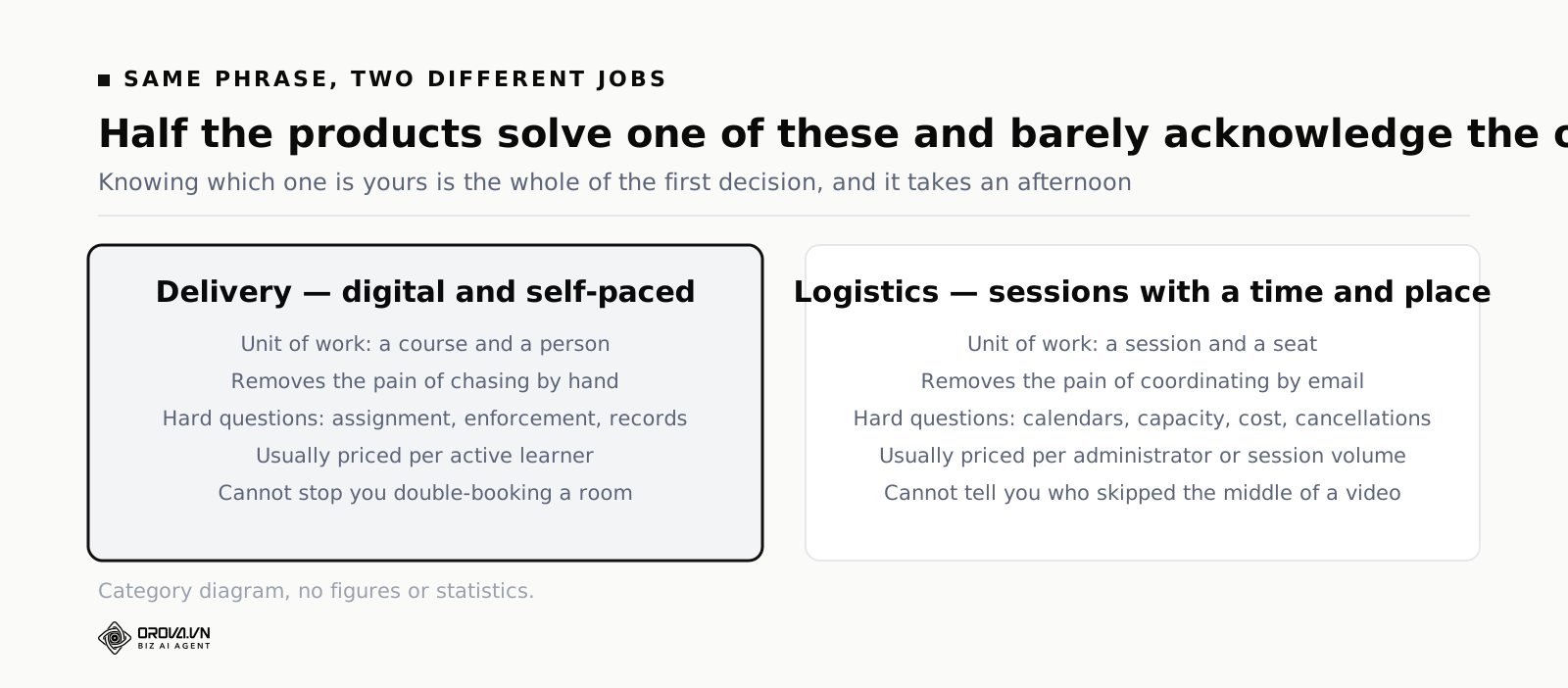
Two different things, depending on the product. One kind manages content delivery: who is assigned what, who completed it, and what evidence exists afterwards. The other manages training logistics: sessions, dates, instructors, rooms, attendance and budgets. Very few products do both halves well.
Both are legitimate meanings, and both are called training management. The distinction is not marketing noise — it reflects two different operational problems that happen to share a name.
The delivery kind assumes the training is digital and self-paced. Its unit of work is a course and a person. Its hard questions are about assignment, enforcement and records.
The logistics kind assumes training is an event with a time and a place. Its unit of work is a session and a seat. Its hard questions are about calendars, capacity, cost and cancellations.
The delivery side, in concrete terms
Here the software's job starts when a course exists and someone needs to take it. It assigns to individuals or groups, enforces completion rules, records scores, issues certificates and produces the report someone asks for later.
The characteristic pain it removes is chasing. Without it you are sending reminders by hand and keeping a spreadsheet that is out of date the moment two people join. With it, the chasing is a filtered list you look at once a week.
The logistics side, in concrete terms
Here the software's job is a calendar with consequences. A session has a date, a maximum number of seats, an instructor who might be external and invoiced, and a room that cannot hold two sessions at once. People request seats, get approved or waitlisted, attend or do not.
The characteristic pain it removes is coordination by email. Without it, someone maintains a shared calendar, chases approvals in a chat thread, and reconstructs attendance from a photographed sign-in sheet.
Notice that neither side helps with the other. A product that assigns e-learning brilliantly will not stop you double-booking a room. A product that schedules classrooms beautifully will not tell you who skipped the middle of a video.
Telling which side a product is on, in five minutes
You do not need a trial for this. Three signals on a product's own website will tell you, and they are more reliable than the feature list because they are harder to fake.
Signal one: what the first screenshot shows
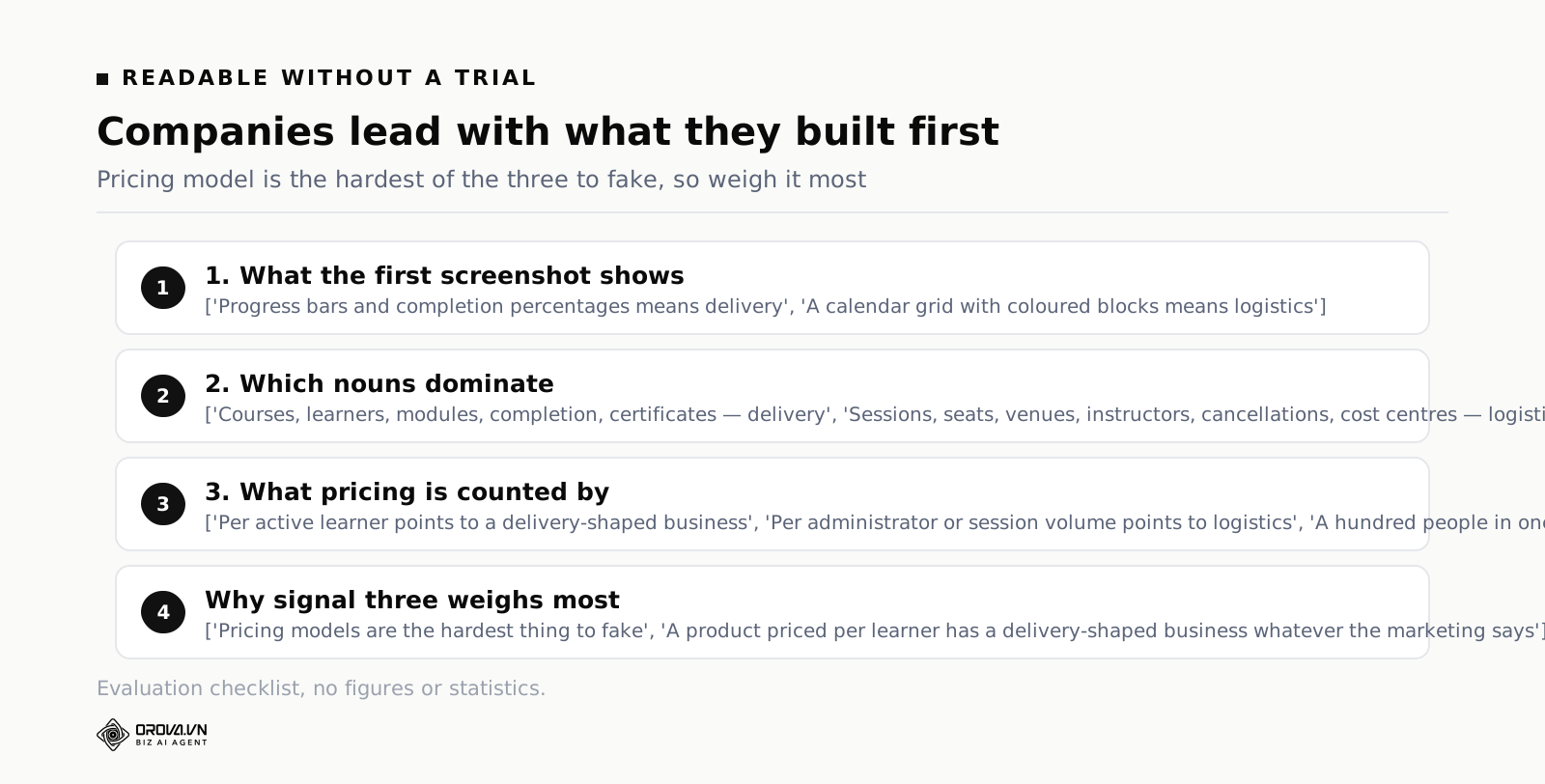
Look at the main image on the home page. If it shows a course with progress bars and completion percentages, you are on the delivery side. If it shows a calendar grid with coloured blocks, you are on the logistics side. Companies lead with what they are proud of, and what they are proud of is what they built first.
Signal two: which nouns dominate
Delivery products talk about courses, learners, modules, completion, certificates. Logistics products talk about sessions, seats, venues, instructors, cancellations, cost centres. Both will mention the other set somewhere, but one set will run through every page and the other will appear in a single paragraph on a features page.
Signal three: what the pricing is counted by
Delivery products almost always price per active learner or per registered user, because that is what scales with their cost. Logistics products more often price per administrator or per session volume, because a hundred people attending one session is one unit of work for them and a hundred units for a delivery product.
This third signal is the most useful, because pricing models are the hardest thing for a company to fake. A product priced per learner has a delivery-shaped business, whatever the marketing says.
When you genuinely need parts of both
Plenty of organisations do. A manufacturer runs classroom safety training with an external instructor and self-paced product modules. A bank runs in-person induction weeks and annual online compliance courses. In these cases the temptation is to find one product that does everything, and it is usually the wrong instinct.
Why the all-in-one search often disappoints
A product that covers both usually does so by having a strong core and a thin extension. You will get excellent delivery and a calendar that cannot handle instructor conflicts, or excellent scheduling and a course player that cannot enforce anything. The thin half is thin because their customers did not push on it, and yours will be the first.
The failure is not dramatic. You will use the strong half properly and quietly go back to a spreadsheet for the weak half, while paying for both.
The question that decides your approach
Ask which side carries the consequences in your organisation. If getting the logistics wrong means a wasted instructor day and an annoyed department, but getting delivery records wrong means failing an audit, then delivery is your core and logistics is the thing you can run loosely.
Pick your core on that basis, buy the best tool for it, and accept a simpler arrangement for the other side. Two tools that each do their job, with a monthly export from one into the other, beats one tool that half does both. It sounds less elegant and it works.
What to check if you are stitching two together
Two things, both about getting data out. First, can each side export a list — completions from one, attendance from the other — as a file you can open in a spreadsheet. Second, do both use the same identifier for a person, ideally a work email address, so you can join the two lists without matching names by hand.
If both are true, combining them is a monthly half-hour task. If either is false, you will be reconciling by hand forever, and you should weigh that cost before choosing.
One more thing worth settling early: decide which of the two holds the record you would show an outsider. Keeping the authoritative copy in both places means keeping it in neither, because the moment they disagree nobody knows which to believe. Pick one, and treat the other as a working view.
Three mistakes that survive both meanings
Buying for the annual report rather than the weekly work
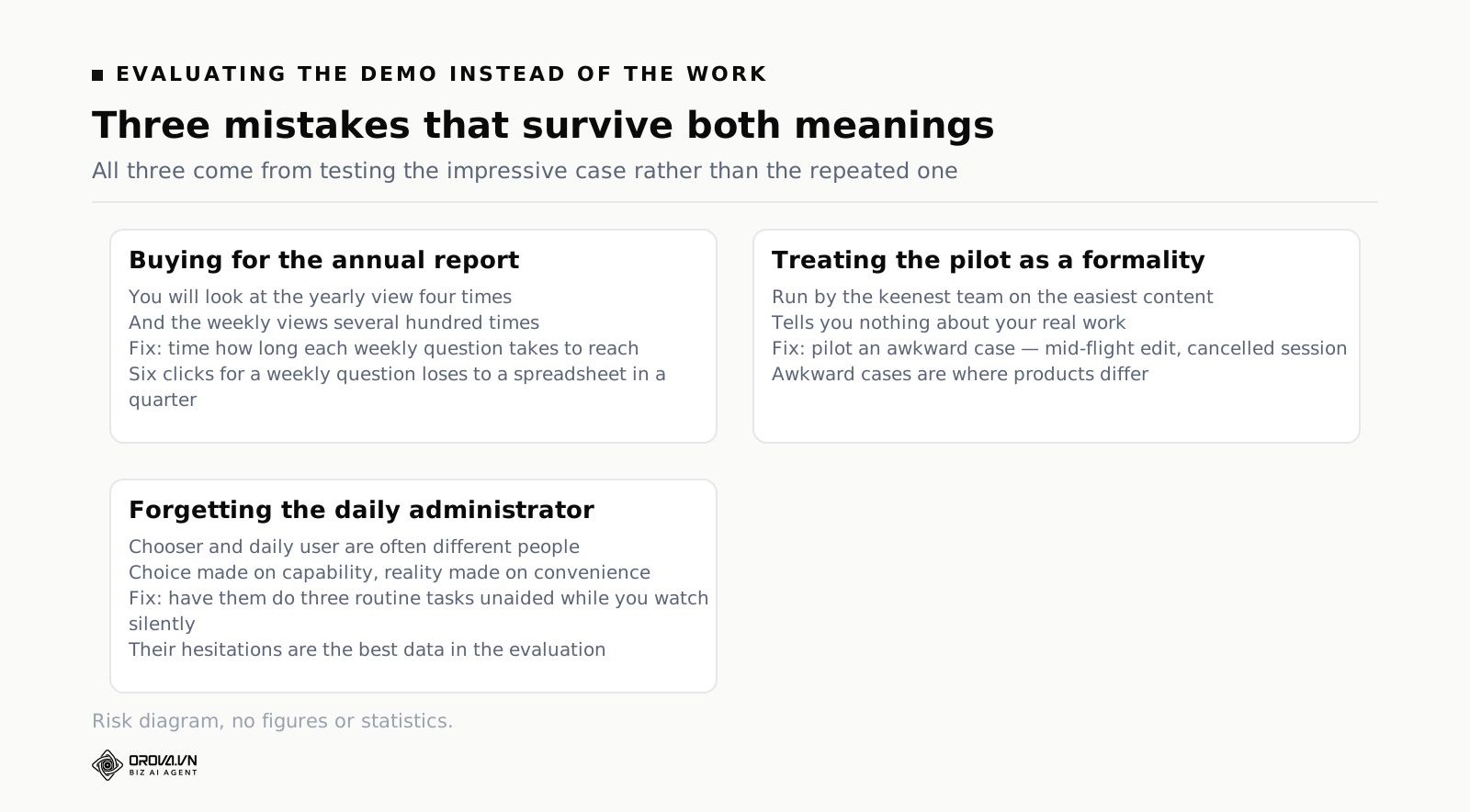
Evaluations tend to focus on the impressive end-of-year view: charts, totals, trends. But you will look at that view four times a year and the weekly working views several hundred times.
The weekly views are unglamorous. Who has not started. Who is overdue. Which session next week is under-booked. Ask to see those, and time how long each takes to reach. A product that needs six clicks to answer a weekly question will lose to a spreadsheet within a quarter, no matter how good the annual chart is.
Treating the pilot as a formality
Pilots often get run by the most enthusiastic team on the easiest content, which tells you almost nothing. The result is a decision made on a scenario you will never repeat.
Run the pilot on something awkward instead: a course with an attachment that needs updating mid-flight, or a session that gets cancelled and rescheduled. Awkward cases are where products differ. Easy cases are where they all look the same.
Forgetting who administers it day to day
The person choosing the software is often not the person who will use it every week. When that gap exists, the choice gets made on capability and the daily reality gets made on convenience — and convenience wins.
The fix is simple and often skipped: have the person who will run it perform three routine tasks in the trial, unaided, while you watch and say nothing. Their hesitations are the best data in the whole evaluation.
An evaluation that does not rely on trust
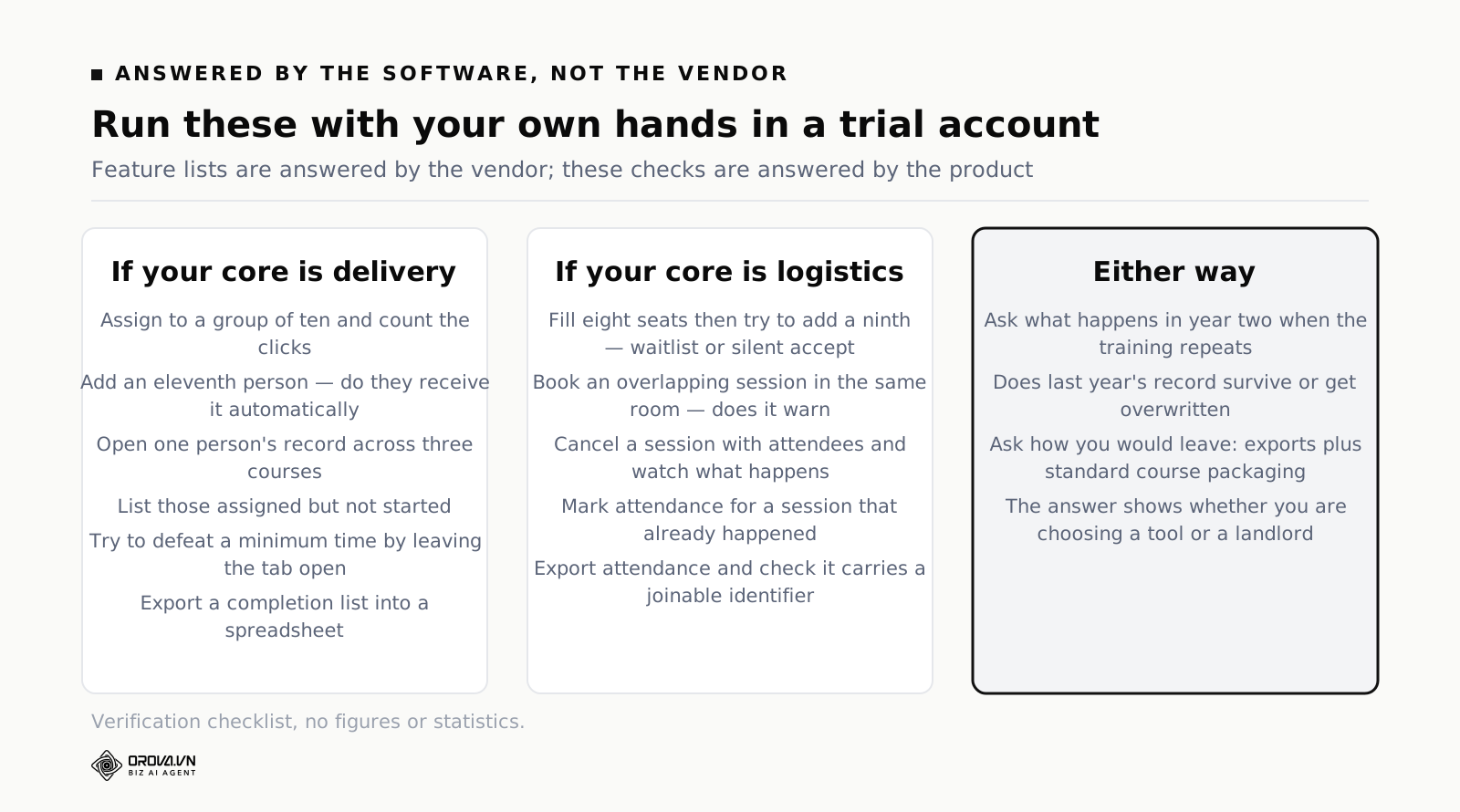
Feature lists are answered by the vendor. These checks are answered by the software. Run them in a trial account with your own hands.
If your core is delivery
Assign a course to a group of ten and count the clicks. Add an eleventh person to that group and see whether they receive it without further action — this is the single most predictive test, because it decides whether staff changes create work for you every month.
Then open one person's record and find their position across three courses. Produce the list of people assigned but not started. Set a minimum time on a lesson, then try to defeat it by leaving the tab open while you do something else. Finally, export a completion list and open it in a spreadsheet.
If your core is logistics
Create a session with eight seats and fill it, then try to add a ninth person and see what happens — a good product waitlists them, a weak one silently accepts them. Book a second session in the same room at an overlapping time and see whether it warns you.
Then cancel a session that has attendees and watch what the system does about notification and about the record. Mark attendance for a session that has already happened, because retroactive edits are normal life and some products make them painful. Finally, export the attendance list and check whether it includes the identifier you would use to join it to other data.
Two checks that matter whichever side you are on
First, ask what happens in year two when the same training repeats. Specifically whether last year's record survives or is overwritten. This only becomes a problem after twelve months, which is exactly why nobody tests it before signing.
Second, ask how you would leave. Not because you plan to, but because the answer tells you how the vendor thinks. Being able to export your records and, on the delivery side, package courses in a standard format another platform can import, is the difference between choosing a tool and choosing a landlord.
Approvals and budgets, the part that quietly decides adoption
On the logistics side there is a whole layer that rarely appears in evaluations and frequently decides whether the system gets used: who is allowed to say yes, and where the money comes from.
It matters because a training request is not just a calendar entry. Someone wants a seat on a course that costs money and takes them away from work for a day. Two people need to agree — usually their manager and whoever owns the budget line — and until they do, the seat is neither booked nor free.
The approval chain is where systems get abandoned
If requesting a seat means filling a form that goes into a queue nobody watches, people will stop using the form and go back to asking their manager directly. From that moment your system holds a partial picture, which is worse than holding none, because you will make decisions from it without knowing what is missing.
Three things to check. Does a request notify the approver somewhere they actually look, rather than only inside the system. Can an approver act without learning the interface, ideally from the notification itself. And what happens when the approver is on leave — a chain with no deputy stalls quietly, and quiet stalls are the ones nobody reports.
Budgets: per department or per course
Products differ in a way that is easy to miss and painful to discover later. Some attach cost to a session — this course costs this much to run. Others attach it to a department — this team has this much to spend this year. Which model you need depends on how your finance team thinks, not on which is better in the abstract.
Mismatched models create permanent manual work. If finance allocates by department and your system only knows session costs, someone rebuilds the departmental view in a spreadsheet every quarter. Ask which model the product uses before you ask anything about reporting.
External instructors and the invoice problem
External training has a shape internal training does not: a supplier, a quote, an invoice, and a cancellation policy with a deadline. If your system does not hold those, the coordinator holds them in their inbox, and when they leave the arrangement leaves with them.
You do not necessarily need a full procurement feature. What you need is somewhere to record the supplier, the agreed cost, the cancellation deadline and where the signed quote lives. That is often a few fields, and its absence is often why the finance team distrusts training numbers.
Reporting that survives contact with an auditor
Most reporting conversations are about dashboards. The conversation that matters is about a specific request from someone unsympathetic: prove that this named person completed this specific training on this date.
That request has three properties dashboards do not handle. It is about one person, not a trend. It is about a moment in the past, not the current state. And the answer has to be defensible without you standing next to it explaining.
Current state versus history
This is the distinction that catches people out. Many systems show you what is true now: this person has completed this course. Fewer preserve what was true then: this person completed version two of this course on this date, with this score, when the pass mark was this.
The difference appears the first time content is updated after someone completed it. If the record points at the current version, you can no longer say what they actually studied. For ordinary training that is tolerable. For anything with a legal edge it is not, and the time to find out is before you need it.
What an external party will accept
In practice three things: a record with a name, a date and an outcome; something that identifies the specific training, ideally including its version or issue date; and a way for the other party to verify it without an account in your system. The third is where certificates with a public verification code earn their place — they turn your internal record into something a third party can check independently.
The test to run
During the trial, complete a course as a test learner. Then edit the course materially — change a section, adjust the pass mark. Now go back and look at the completion record. If it still describes what the learner actually did, the product keeps history. If it now describes the edited course, it keeps only current state, and you should know that before you rely on it for anything consequential.
Where the cost actually lands
The subscription is the visible cost and rarely the one that decides whether this was a good idea.
Setting up the structure
Both kinds of product need your organisation modelled inside them before they are useful: groups, departments, roles, approval chains, cost centres. This is a week of unglamorous work that nobody budgets for, and skipping it is why systems end up with one group called Everyone and assignment done by hand.
The way to keep it small is to model only what you will use in the first quarter. You can add the rest later; you cannot easily remove a structure that thirty courses already depend on.
Running it every week
Small each time, permanent in total. Assigning, chasing, approving, rescheduling, answering questions from managers. This is the cost that a well chosen product removes most of, and a badly chosen one leaves untouched while adding a login.
Measure it before you buy. Spend one month noting every training-related task and how long it took. That number is the most persuasive thing you can bring to a budget conversation, because it is your own.
Switching later
Migrating history, rebuilding structure, and asking everyone to learn a second system within a year. The last one costs the most and appears in no spreadsheet. Two cheap habits reduce the risk: run one real thing through a trial before signing anything long, and check the exports at the beginning rather than the end.
A thirty day plan
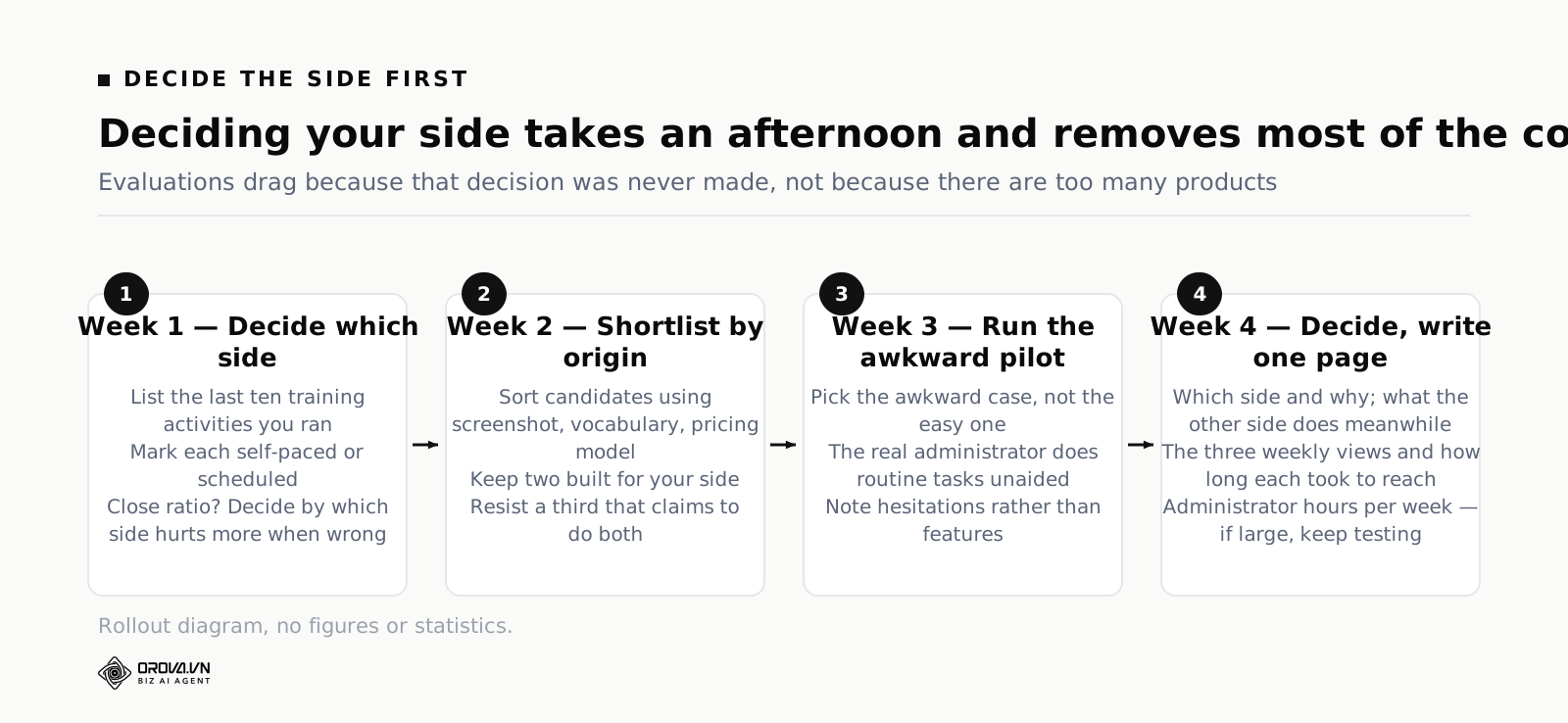
Week one: decide which side you are on
Write down the last ten training activities your organisation ran and mark each one as self-paced or scheduled. The ratio decides your core. If it is heavily one-sided, you are done in an afternoon. If it is close to even, decide by consequence: which side hurts more when it goes wrong.
Week two: shortlist by origin, not by feature list
Use the three signals — screenshot, vocabulary, pricing model — to sort candidates by which side they were built for. Keep two that were built for your side. Resist keeping a third because it claims to do both; you can revisit that after you know what your side feels like done properly.
Week three: run the awkward pilot
Pick the awkward case, not the easy one. Have the person who will actually administer it do the routine tasks unaided while you watch. Run the hands-on checks for your side. Take notes on hesitations rather than on features.
Week four: decide and write one page
One page: which side you chose and why, what the other side will do in the meantime, the three weekly views you will rely on and how long each took to reach, and the hours per week the administrator estimates. If that last number is large, you have not finished evaluating — you have found the next thing to test.
When one place for the delivery side earns its keep
If your answer in week one was self-paced, the threshold is repetition rather than headcount. When the same courses get re-assigned every month because people keep moving, when chasing takes more of your week than building, and when every request for evidence costs an evening of stitching data together, a tool starts buying back time.
Orova Training covers that delivery side with five areas side by side: courses, materials, quizzes, certificates and learners. Materials come in ten types — five you build yourself, including text, uploaded slides, video, podcast and flashcard decks, and five drafted by machine: written lessons, slides with per-slide chat editing, podcasts scripted for one or two hosts using thirty previewable voices, three-dimensional flip card decks and slide videos with subtitles. Quizzes run as server-graded individual exams or as a live ranked mode people join by QR code. Certificates are issued automatically at the pass mark, carry a public verification code and export to PDF. Administration covers learner groups, three ways to assign — whole workspace, by group, or to named people — completion rules and real study time per person. Courses export as SCORM packages if you need to move them into another platform. The interface runs in six languages and new accounts get a thousand quota to build something real.
The honest boundary is worth stating plainly: this is the delivery side. It does not book rooms, schedule instructors or manage session budgets. If your week one answer was scheduled classroom training, a calendar-shaped product is the right core for you and this would be the wrong purchase.
Common questions
Is training management software the same as an LMS
An LMS is the delivery meaning of the phrase — it manages courses and learners. Training management software sometimes means the same thing and sometimes means the logistics side, so the label alone does not tell you. If you want the delivery side explained in depth, that is covered in the corporate LMS guide. If your concern is buying for internal staff development, start with choosing employee training software.
We run mostly classroom training. Do we need any of the delivery side
Often yes, for one narrow reason: the material you hand out. Slide decks emailed after a session get lost, and the version people keep is whichever one landed in their inbox first. Putting session material in one place with a link, even without any assignment or tracking, solves a real problem cheaply. That is a small use of the delivery side alongside a calendar-shaped core.
Can we start with spreadsheets and move later
Yes, and many should. The signals that you have outgrown it are consistent: two versions of the truth exist, chasing has become your main activity, and new joiners get missed because nothing happens automatically when someone arrives. Until those appear, a spreadsheet plus a shared calendar is a reasonable system, and it has the advantage that everyone already knows how to use it.
How do we handle external training that we do not run ourselves
Treat it as a record-keeping problem rather than a delivery problem. What you need is somewhere to store that a named person attended a named external course on a date, with the certificate attached. Both kinds of product can usually do this, and it is worth checking early if a meaningful share of your training is bought in — otherwise it ends up in a folder nobody can search.
Who should own this system internally
Whoever answers the questions when they arrive. If audit requests land on HR, HR should own it. If department heads chase their own teams, they need direct access rather than asking for reports. The common failure is giving ownership to whoever ran the purchase, then discovering they are not the person people ask.
How long should an evaluation take
Four weeks is comfortable and two is possible if you narrow hard. What makes evaluations drag is not the number of products but the absence of a decision about which side you are on — without that, every demo introduces new criteria and the shortlist keeps growing. Decide the side in an afternoon, keep two candidates, and give yourself a fixed date to choose. A decision made in three weeks on the right criteria beats one made in three months on a spreadsheet of ninety features, most of which you will never switch on.
What if leadership wants a single system for everything
Ask for the two lists — self-paced activities and scheduled sessions — and put them side by side. The conversation usually changes on its own, because the ratio makes the trade-off concrete. If it remains a firm requirement, then evaluate the all-in-one candidates specifically on their weaker half, and be prepared to accept a compromise there rather than discover it in month four.
What to do this week
Four things, in order, none of them requiring a budget.
One, list the last ten training activities you ran and mark each as self-paced or scheduled. That ratio decides which half of this category you are shopping in, and it is the decision that makes every later step easier.
Two, write down the three weekly questions you actually need answered — not the annual ones. Those three are your real specification. Three, name the person who will administer this and the hours per week they genuinely have; without both, everything after this is an intention.
Four, open trials of two products built for your side and have that named person run three routine tasks unaided while you watch without helping. Their hesitations will tell you more than any comparison table, and you will have made the decision on the work rather than on the demo.
For the delivery side: assign, track and certify in one place
Orova Training handles courses, materials, quizzes, certificates and learners, with group assignment, completion rules and automatic certificates. It does not book rooms or schedule instructors.
Try it free