
Recruiting Software: Six Layers, and Which Gap Is Costing You
Shopping for recruiting software is confusing because the phrase covers at least six distinct product categories that solve different parts of the same journey. Teams routinely buy two tools that overlap heavily and leave the actual gap unfilled — and then conclude that recruiting software does not work, when what happened is that they bought two of one thing and none of another.
This is a map of the stack. What each layer does, which layers a small team genuinely needs, where the overlaps are, and how to work out which gap is costing you most before you spend anything.
What counts as recruiting software?
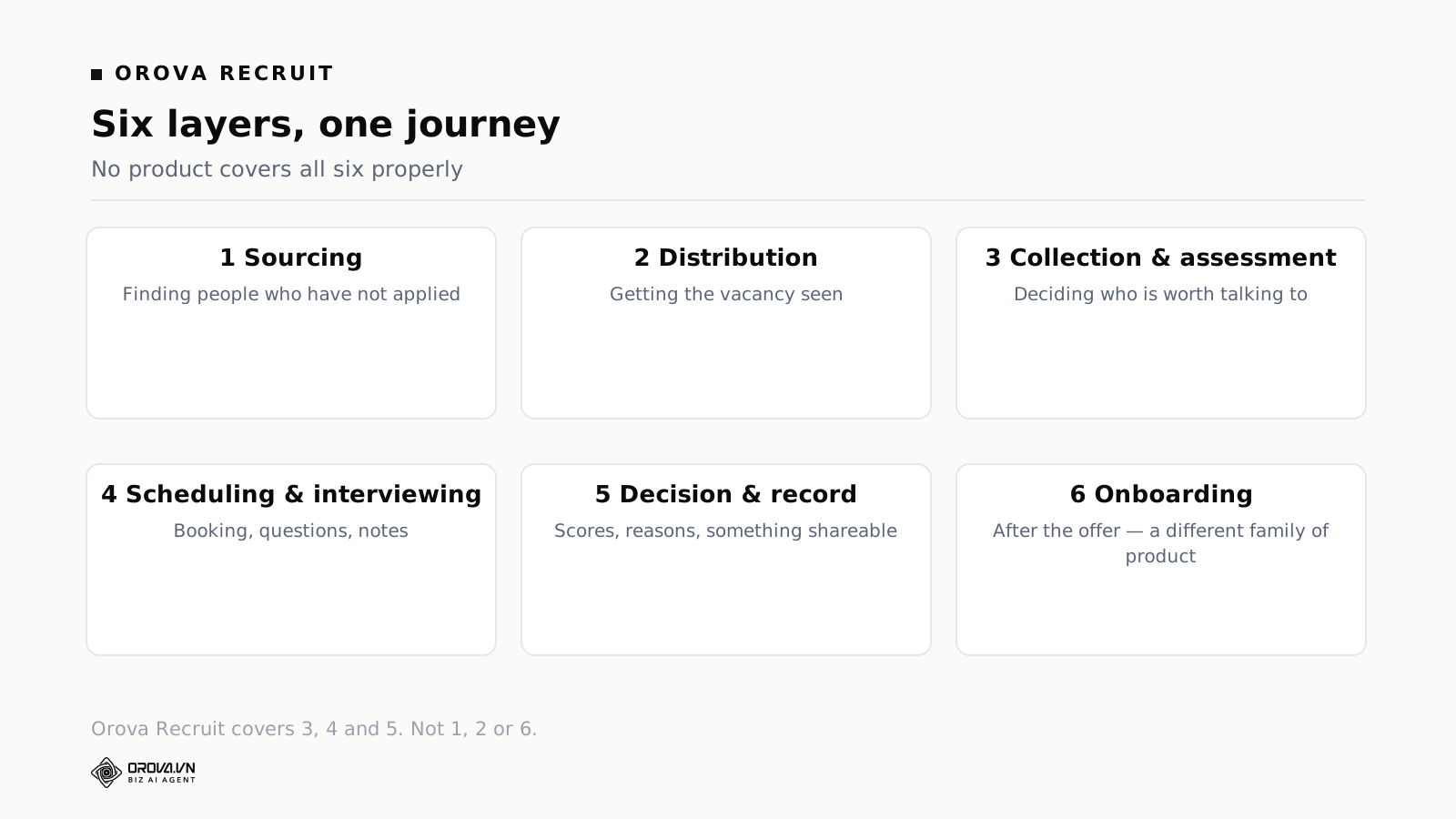
Six layers: finding candidates, publishing and distributing the vacancy, collecting and assessing applications, scheduling and interviewing, deciding and recording, and onboarding after the offer. A tool usually covers two or three of them well and mentions the rest. No product covers all six properly, and anything claiming to is either enormous or shallow.
The six layers
1. Sourcing
Finding people who have not applied. Database search, outbound messaging, browser extensions that capture profiles, and increasingly automated sequences.
This layer is built for people who hire continuously, and its economics reflect that: it is priced for recruiters and it rewards volume of outreach. A small company hiring three times a year rarely gets value here, because the skill of writing outreach that gets replies is itself a practised thing, and the tool does not supply it. Sourcing is the layer most often bought too early.
2. Distribution
Getting the vacancy in front of people: a careers page, and syndication to job boards and aggregators. The value is reach, and reach is mostly a function of which boards matter in your market and your discipline rather than of the software.
Worth knowing: many applicant tracking systems include a hosted careers page and some board integrations, which is why teams often discover they were paying separately for something they already had.
3. Collection and assessment
Receiving applications and working out who is worth talking to. This is where the hours are, and it is the layer with the widest quality range — from systems that store files to systems that read them against criteria.
For most small teams this is the layer that matters most, and it is frequently the one they buy last, after sourcing and distribution have been solved for a problem they did not have.
4. Scheduling and interviewing
Getting people booked, and running a structured conversation: question sets, scorecards, notes, and increasingly recording and transcription.
The scheduling half is a well-defined problem with good standalone solutions. The interviewing half is only useful if it connects to the assessment layer — question sets that come from the same criteria the shortlist was built on are worth something; a generic question bank is a document you could have written.
5. Decision and record
Scoring, comparing, recording a decision with its reasoning, and producing something shareable. Rarely sold separately, usually the weakest part of whatever you bought, and the layer whose absence you notice three weeks later when a chosen candidate declines and nobody can reconstruct why the runner-up was the runner-up.
6. Onboarding
Everything after the offer: paperwork, equipment, first-week training, and the handover into employment. This belongs to a different family of products — human resources systems rather than recruiting ones — and the boundary is worth respecting when buying, because a tool that spans both is usually strong on one side and thin on the other.
Which gap is actually costing you?
The productive question is not which tools exist but which layer is currently losing you candidates or hours. Four diagnostic questions, each pointing at a different purchase.
| Symptom | Layer at fault | What to buy |
|---|---|---|
| Too few applications, and the ones you get are wrong | Distribution, and the advert itself | Boards that matter in your market — and rewrite the advert first, it is free |
| Plenty of applications, nobody has time to read them | Assessment | Something that reads against criteria, not a tidier database |
| Good candidates go cold before you speak to them | Scheduling and communication | Scheduling with automatic replies, or standing interview windows for free |
| You cannot reconstruct why you chose someone | Decision and record | Structured scoring with reasons attached, exportable |
Most teams can name their symptom in one sentence, and the sentence points at one layer. What goes wrong is that vendors sell across layers, so a conversation started about the assessment gap ends with a quote for sourcing — which is more expensive, more impressive in a demo, and irrelevant to the stated problem.
A useful discipline: write the symptom down before the first demo, in the team's own words, and read it again before signing anything. If the product being bought does not address the sentence, either the sentence was wrong or the purchase is.
What a small team actually needs
For a company of five to fifty hiring a handful of times a year, the honest minimum is three layers.
A place applications arrive and are assessed. This is the one that saves real hours, and it is the anchor of the stack. If you buy nothing else, buy here.
A way to schedule and reply without anyone remembering. Either inside the same system or as a cheap standalone. The failure this prevents — candidates going cold in the gap — is the one that costs you the strongest people, and it is entirely a coordination failure rather than a judgement one.
Somewhere the reasoning lives. Scores against criteria, notes from conversations, a decision that can be reconstructed. This is not glamorous and it is what makes reopening a shortlist possible without redoing the work.
Everything else is optional at this size. Sourcing tools, dedicated assessment platforms, structured video interviewing, onboarding suites — each solves a real problem, and none of them is the problem a small team has. They become worth buying when hiring becomes continuous rather than episodic, which is a different stage with a different budget.
The overlaps that waste money
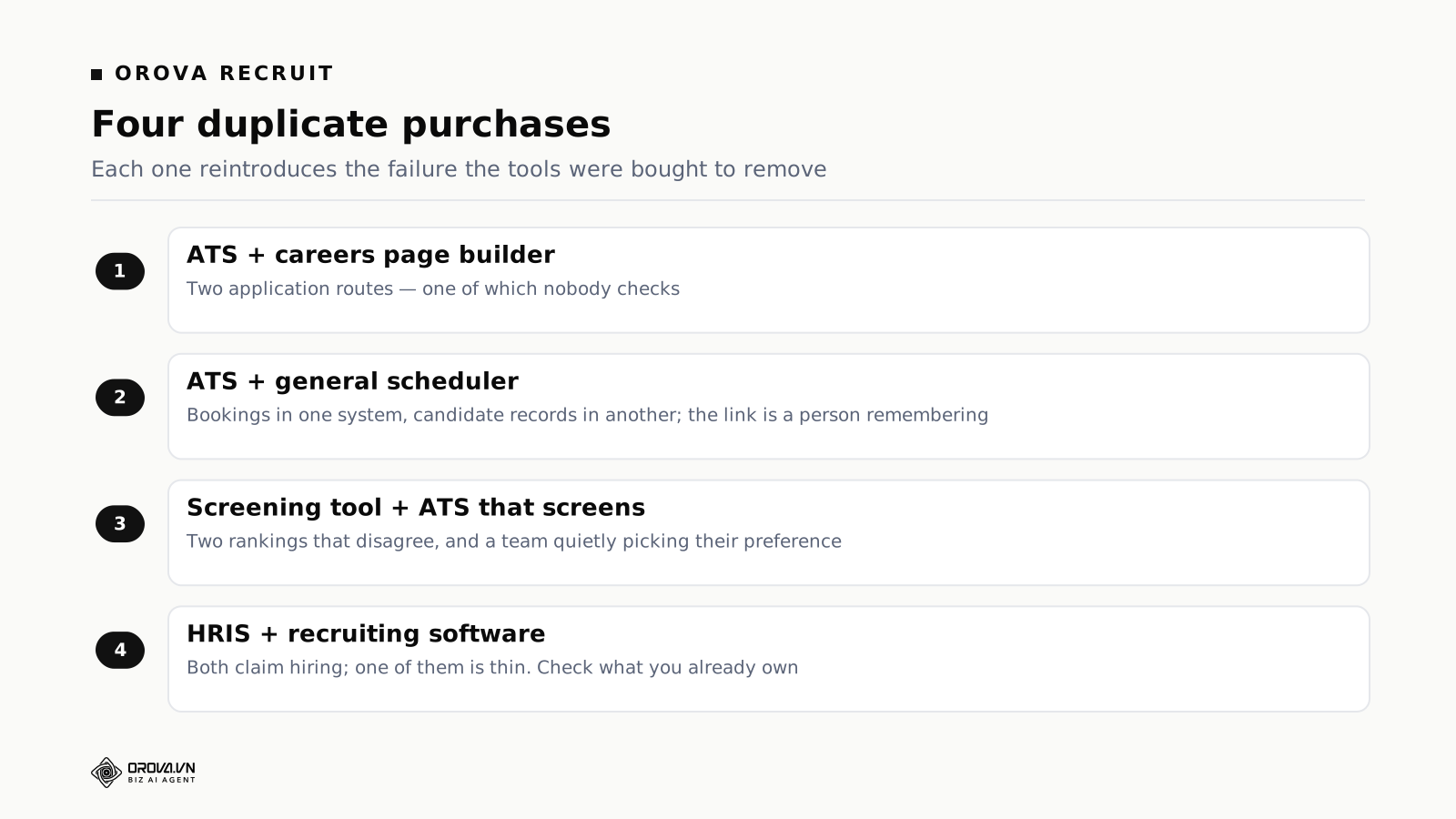
Four pairs of purchases that duplicate each other, in rough order of how often they happen.
An ATS plus a standalone careers page builder. Nearly every applicant tracking system hosts a careers page. Teams buy one first, then the other, and end up with two application routes — which produces the genuinely bad outcome of applications arriving in two places, one of which nobody checks.
An ATS plus a general scheduling tool. Defensible, and often the right choice, because general schedulers are cheap and good. But check whether the ATS already schedules; if it does, using both means bookings exist in one system and candidate records in another, and the connection between them is a person remembering.
A screening tool plus an ATS that also screens. This one produces two rankings that disagree, and a team quietly picking whichever they prefer — which is worse than either alone, because it reintroduces exactly the inconsistency the tools were bought to remove.
An HRIS plus recruiting software, both claiming to do hiring. Human resources platforms often include a hiring module, usually thin. Teams with an HRIS should check what it already covers before buying, and be honest about whether "thin but included" is good enough — for four hires a year it frequently is.
Where Orova sits
Orova Recruit covers three of the six layers and does not pretend about the others.
Collection and assessment. Positions carry criteria derived from the job description; applications upload in bulk — up to 500 per position, 10 MB per file — and land in one of six states: pending, processing, meets the criteria, worth considering, does not meet, or could not be read. The fourth outcome exists because unreadable files exist in every intake, and the middle one exists because most applications genuinely belong there.
Scheduling and interviewing. Rooms and declared slots for booking; interview questions generated from the same criteria the shortlist was built on, refinable and applicable across a whole position; notes typed, dictated, or transcribed from an uploaded audio recording of the conversation.
Decision and record. Candidates scored, a recommendation produced, decisions recorded individually or in bulk, and the outcome exportable as a PDF for people who will never log in. Contact templates — including AI-drafted ones with image attachments — carry rules for automatic sending, so replies go out whether or not anyone remembered.
The three layers it does not cover
Sourcing. No candidate database, no outbound sequences, no browser extension. If your problem is finding people who have not applied, this is not the tool.
Distribution. It does not post to job boards or syndicate to aggregators. Vacancies can be shared by link; that is not distribution. If too few people apply, screening quality is irrelevant to your problem and buying here will disappoint you.
Onboarding and everything after. No payroll, no employee records, no performance management. It ends at the offer, deliberately, because the alternative is being thin at both ends.
Buying in the right order
If you are starting from a spreadsheet and expect to make several purchases over two years, the order matters more than the individual choices.
First: the layer where hours disappear. For nearly every small team that is assessment. Buying here first also gives you a spine — a place where candidates and their reasoning live — that later purchases can attach to. Buying a peripheral tool first means the spine arrives later and everything gets migrated into it.
Second: whatever your symptom sentence named, if it was not assessment. Scheduling, usually, or distribution if applications are genuinely scarce.
Third: nothing, for at least two hiring rounds. This is the step people skip. Two rounds with the new setup will change your view of what the remaining gap is, and the gap you would have named at the start is frequently not the one that remains. Buying the whole stack in one quarter guarantees at least one purchase solving a problem that had already gone away.
Later: sourcing, if hiring becomes continuous. The trigger is a real one — when someone's job is substantially hiring, the economics of sourcing tools change completely. Before that trigger, the tool is a subscription plus a skill nobody has time to practise.
Build, buy, or arrange
There is a third option that gets ignored, and for small teams it is often the best value: arranging the process better with tools you already have.
Standing interview windows. Two fixed hours, twice a week, blocked in every interviewer's calendar while a role is open. Candidates are offered those and nothing else. This removes most scheduling negotiation without buying anything, and it protects the hours from being colonised by other work.
Batch the decisions. Do not read applications as they arrive. Set a day, read everything, decide everything, send every invitation the same afternoon. Batching produces better comparisons — candidates judged against each other rather than against whoever came before — and converts scheduling from a trickle of negotiations into one action.
One owner, one check. A named person whose Friday job is to confirm nobody is waiting on you. Fifteen minutes. This catches the failure everything else in this article is really about: a candidate sitting in a state nobody is responsible for advancing.
A shared document with an owner column. Not a status column — an owner column. Status tells you where someone is; owner tells you who moves them next, and the absence of that field is why spreadsheets lose candidates.
These four capture a surprising share of what the software would do. They are also the test of whether software will help: a team that cannot sustain four free habits will not be rescued by a subscription that encodes them, because the encoding still requires someone to look. What software genuinely adds is that the habits survive the fortnight when the person holding them together is on holiday — which over a year is worth more than the hours saved on any individual task.
Questions that cut through a demo
Vendors sell across layers, so the useful questions are the ones that establish boundaries.
- Which of the six layers do you cover properly, and which do you mention? A good vendor answers this directly and it is a strong signal about the rest of the conversation.
- What happens to a CV between upload and appearing in a list? The single most informative question in recruiting software. A vague answer means nothing happens.
- Show me the careers page and the application form on my phone. Most applications arrive on phones, and most demos happen on laptops.
- Does every interviewer need a paid seat? This moves the annual cost for a small team more than any discount.
- What does a manager see when they log in after three weeks away? A list of people waiting on them, or a dashboard of metrics? The answer tells you who the product was designed for.
- Export everything, now. Open the file. Does it contain notes and scores, or only names and stages?
- What happens with no maintenance for six months? In a company without a talent operations function, this is the realistic scenario.
- Show me a rejection arriving at a real address. Read it. Would you want to receive it?
Five mistakes with the stack
Buying sourcing first because it is the most impressive demo
Sourcing demos are genuinely exciting — a search returns two hundred plausible people in seconds. The problem is the next step, which is writing messages that get replies, and that is a practised skill the tool does not supply. Teams who buy here first typically send one enthusiastic batch, get a low response rate, and stop.
Letting the stack define the process
Each tool arrives with an implied workflow, and a stack of four tools implies four. Nobody reconciles them, so the actual process becomes whatever the tools make easiest, which is not the process anyone designed. Write your process down first, in six lines, and buy tools that fit it rather than adjusting it to fit them.
Integrating everything
Every integration is a thing that can break silently and a thing that needs an owner. Two tools connected by a person copying a status once a week is often more robust than an integration nobody maintains — and the person notices when something is wrong, which the integration does not.
Forgetting that candidates see the seams
A stack shows. Applying in one system, booking in another, receiving mail from a third with different branding and different tone reads as disorganised. This is the cost of stacking that never appears in a comparison table, and it lands on exactly the people you are trying to impress.
Never removing anything
Tools accumulate. A trial becomes a subscription becomes a line item nobody questions. Once a year, list what you pay for and name the layer each tool covers. Anything covering a layer twice, or covering a layer whose symptom has gone away, is a cancellation.
What changes as you grow through this
The right stack at fifteen people is wrong at eighty, and the transitions are predictable enough to plan for.
Somewhere around the point where hiring becomes continuous — a role always open rather than occasional bursts — sourcing starts paying for itself and the assessment layer stops being the bottleneck. Someone now has hiring as a substantial part of their job, and the tools built for that person become appropriate.
Somewhere around the point where several managers hire independently, consistency becomes the problem rather than throughput. Different managers use different criteria, ask different questions, and record decisions in different amounts of detail. This is when structured scoring and shared question sets stop being nice-to-have, because the alternative is a company that hires differently depending on which team you applied to.
Somewhere around the point where someone asks for hiring reports, the record-keeping layer becomes the constraint. Questions like "how long are roles taking" and "where do candidates drop out" cannot be answered retrospectively from a system that only stored stages. This is worth anticipating: the data you will want in a year is data you have to be collecting now.
Two conclusions. Buy for the stage you are entering rather than the one you are leaving, but do not buy for a stage two transitions away — you will pay for capability you never reach and navigate around it daily in the meantime. And weight the export question heavily at every stage, because the realistic future is outgrowing something in one specific direction.
The candidate's view of your stack
Every layer is invisible to candidates except where it touches them, and it touches them in four places. Each is worth checking from their side once a year.
The advert. Not software, and the highest-leverage thing on this list. An advert that describes the work, the team, and roughly what it pays gets better applications than one listing requirements. Most teams have never read their own advert as a candidate would.
The application form. Open it on a phone and complete it yourself, honestly, timing it. Anything over ten minutes filters for people with time and patience rather than capability. Forms that ask candidates to retype their CV into fields have a measurable abandonment cost.
The wait. The single thing candidates complain about most is silence, and silence is a stack failure rather than a decision failure — nobody decided to ignore them. Automatic acknowledgement plus a genuine reply at the first real decision point covers most of it.
The rejection. Read the one your system sends. If it is a form letter with a merge field, ask what the candidate learns from it. A rejection that names one specific thing takes thirty seconds to write and is remembered for years, in both directions.
None of these four require buying anything. They are also, collectively, most of what determines whether people apply to you again or tell a friend to.
A note on who the software is designed for
Every product in these six layers was designed with a particular daily user in mind, and that decision shapes everything about how it feels. It is rarely stated on a website and it is the most useful thing to work out.
Built for a full-time recruiter. Dense lists, keyboard shortcuts, many statuses, bulk actions everywhere. Efficient for somebody who lives in it and bewildering for a manager who opens it fortnightly and has to relearn the layout each time.
Built for an HR generalist. Process-forward, with forms and stages and a preference for completeness. Comfortable for someone whose job includes maintaining records, and slow for someone who wants to make a decision and get back to their actual work.
Built for a hiring manager. Opens on "these four people are waiting on you", few states, an obvious next action. Less powerful, and dramatically more likely to be used by the person who has to use it.
For a company of twenty, the third is almost always right, and it is the least represented in the market because the buyers with budgets are usually the first two. This is worth knowing when a demo feels impressive: ask yourself whether it felt impressive because it was capable, or because the person driving it uses it every day and you will not.
The practical test is the one above — what does someone see after three weeks away — and it separates products faster than any feature list. Software that a manager can pick up cold, twice a month, without relearning anything is a specific design achievement rather than a simplification.
Two layers that are worth less than they look
Both appear in almost every recruiting stack discussion and both underdeliver for small teams, for reasons worth stating so the money goes elsewhere.
Structured video interviewing
Candidates record answers to set questions; reviewers watch later. The pitch is scale and consistency, and the consistency claim is real — everyone answers the same questions in the same conditions.
The problem is the drop-off. Recording yourself answering questions to nobody is an unpleasant experience, and the candidates most likely to decline are the ones with other options. You have introduced a filter that selects against exactly the people you wanted, and the filter is invisible because declines do not appear as declines — they appear as candidates who went quiet.
It works where application volume is genuinely enormous and the alternative is no conversation at all. Below that, a fifteen-minute phone call is better on every dimension except reviewer convenience.
Assessment platforms with generic tests
Off-the-shelf tests for aptitude, personality, or general skills. The generic ones predict job performance weakly, correlate with test-taking familiarity, and add a stage that costs candidates an hour.
The exception is a work sample specific to the actual job — a short version of the real task, reviewed against criteria. That does predict performance, and it does not need a platform: it needs a well-designed exercise and someone willing to review it consistently. Small teams get more from spending an afternoon designing one good exercise than from any subscription in this layer.
The rule that covers both: a stage that costs the candidate significant time needs to earn it by telling you something the previous stage could not. Most added stages fail that test, and every one of them lengthens the interval where good candidates disappear.
The trial that tells you which one you bought
One exercise settles the question of who a product was designed for, and it takes twenty minutes during a trial.
Give the tool to the person who will use it least often — the manager who hires twice a year — with no training and no walkthrough. Ask them to do three things: find the candidates waiting on them, record a decision on one, and send a reply. Watch without helping.
What you learn is not whether they succeed but where they hesitate. Hesitation marks the places the product assumes familiarity, and those places will produce avoidance rather than questions once the trial ends. A manager who cannot find the waiting candidates in thirty seconds will not open the tool at all; they will ask in chat, and the pipeline will drift out of date while looking maintained.
Run the same exercise on two products and the choice usually makes itself, in a direction that surprises whoever was impressed by the more capable demo. Capability that requires daily practice is not capability for a team that hires episodically — it is a cost paid in relearning, every time, by the person least willing to pay it.
One number to watch across the whole stack
Each layer has its own metrics and most of them are activity measures that rise whenever the tool is used. One number cuts across all six and is worth more than the rest combined: the median gap between an application arriving and the candidate hearing something true from a human being.
Median rather than mean, so one forgotten candidate does not distort it. And "something true" rather than an automatic acknowledgement, which is politeness rather than information.
It works as a cross-stack metric because every layer failure shows up in it. Applications piling up unread lengthens it. Scheduling negotiation lengthens it. A decision stage where nobody has authority lengthens it. Silence after an interview lengthens it. You do not need to instrument each layer separately; the composite tells you something is wrong, and then you look.
It also predicts the outcome you care about. Short, and the candidates with options stay engaged. Past a week, and you systematically lose the strongest applicants — not randomly, but selectively, in the direction that hurts. Teams who track it find that the arguments about which tool to buy get shorter, because the question becomes which layer is contributing most to the number rather than which product demos best.
Write down the current figure before you change anything. It takes ten minutes with an email archive, and it is the only baseline you will get — once the process improves, nobody will be able to reconstruct how slow it used to be, and the question of whether the spend was worth it becomes a matter of impression.
A realistic first-year plan
For a team of twenty hiring five people over a year, starting from a spreadsheet.
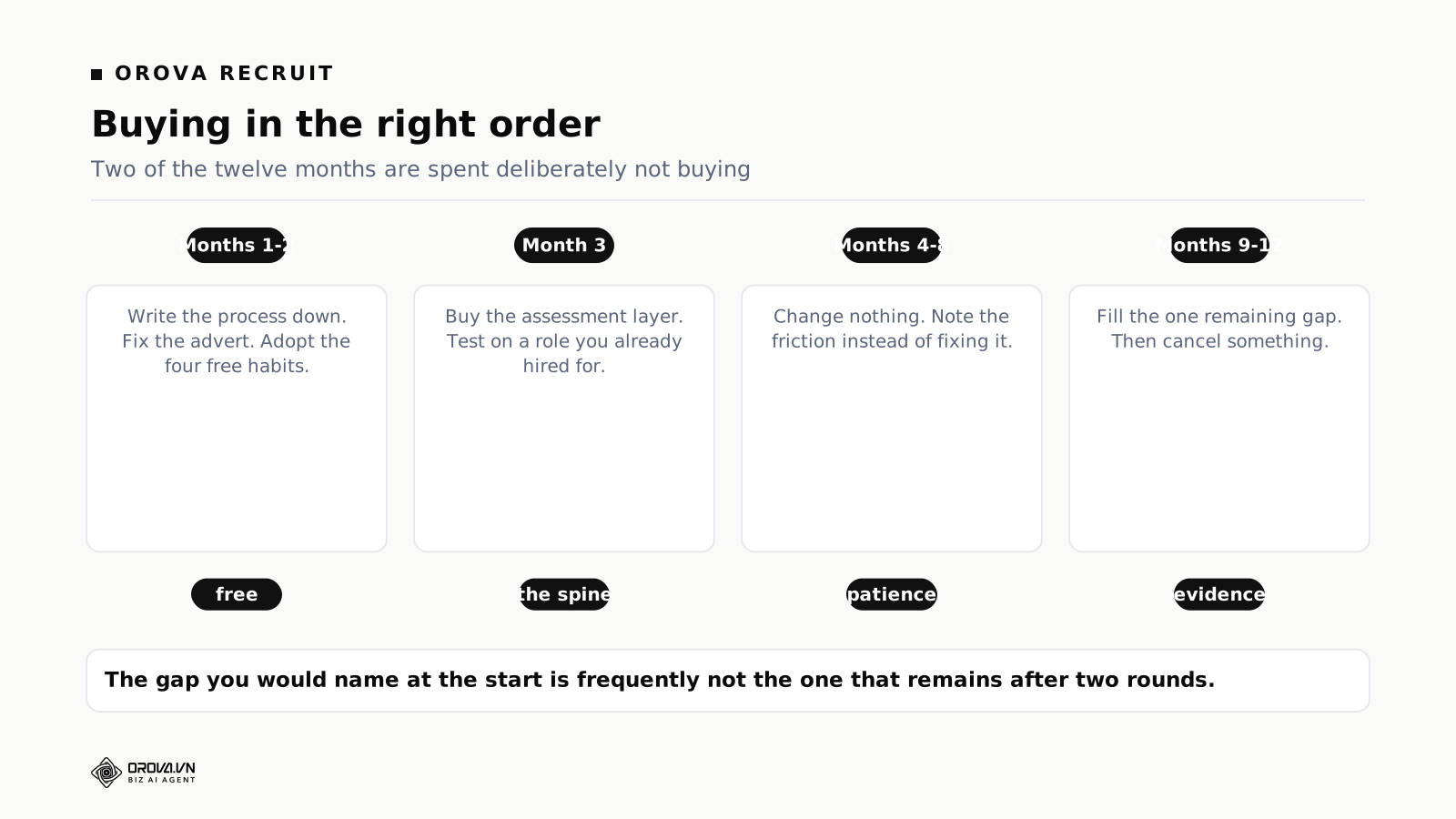
Month one: write the process down and fix the advert. Six lines describing what happens from application to offer, one owner named, and a reply commitment. Rewrite the advert for one open role and compare the applications you get. Cost: nothing.
Month two: adopt the free habits. Standing interview windows, batched decisions, the Friday check, an owner column. Run one full role this way. This establishes whether the discipline exists, which determines whether software will help or merely record.
Month three: buy the assessment layer. Trial two products from the same category, run thirty real CVs from a role you already hired for through both, examine the disagreements, and read twenty reasons. Choose, then use it for the next two roles without adding anything.
Months four to eight: change nothing. Note the friction rather than fixing it. Most of it turns out to be one-off, and the list of recurring problems at month eight is shorter and different from the list you would have written at month three.
Month nine: fill the remaining gap. Usually scheduling, occasionally distribution. By now you know which, from evidence rather than from a vendor's framing.
Month twelve: cancel something. There will be a candidate — a trial that became a subscription, a tool covering a layer twice, a product bought for a symptom that has gone.
That sequence spends less than the usual approach and ends with a stack that fits, mainly because two of the twelve months are spent deliberately not buying.
What to do if you have already bought badly
A common situation: three subscriptions, overlapping coverage, and a process that still loses candidates. Untangling it is cheaper than it feels.
Map what you have against the six layers. One line per tool, naming which layers it covers properly rather than which it advertises. Most teams find two tools claiming the same layer and one layer with nothing in it.
Pick the spine, deliberately. One system where candidates and their reasoning live. It should be the one covering assessment, because that is where the reasoning originates. Everything else becomes a satellite that either connects to the spine or gets cancelled.
Cancel the duplicate rather than integrating it. The instinct is to connect the two overlapping tools. That produces a synchronisation problem, an owner requirement, and a silent-failure risk, all to preserve a subscription. Cancelling is faster and the migration is usually a single export.
Leave the empty layer empty for one round. Run a full hiring cycle with the reduced stack and the free habits. A meaningful share of teams discover the gap was being caused by the tangle rather than by a missing tool, and the purchase they were about to make is unnecessary.
The reason this works is that most stack problems are coordination problems wearing a software costume. Three tools mean three places to look, and three places to look means people stop looking and ask in chat instead — which is exactly the failure the tools were bought to prevent. Fewer tools, one spine, and a named owner beats a well-integrated tangle almost every time, and it costs less.
The short version
Recruiting software is six layers, not one product: sourcing, distribution, collection and assessment, scheduling and interviewing, decision and record, and onboarding. No tool covers all six well. Most wasted spend comes from buying two tools that overlap while leaving the expensive gap open.
Name your symptom in one sentence first, because the sentence points at a layer. For most small teams the layer is assessment, and it is the one they buy last. Buy the spine first, then whatever your sentence named, then nothing for two hiring rounds — the remaining gap after two rounds is frequently not the one you would have named at the start.
Take the free version before the paid one: standing interview windows, batched decisions, one owner on Fridays, an owner column rather than a status column. If those four cannot be sustained, software will record their absence more neatly. If they can, software keeps them alive through the fortnight when the person holding them together is somewhere else.
And check the four places your stack touches a candidate — the advert, the form, the wait, and the rejection. None of them require a purchase, and together they decide more about your hiring than any tool in the six layers.
The stack is worth thinking about as a whole rather than as a shopping list, precisely because the failures happen in the joins between layers rather than inside any one of them. Each layer bought separately makes sense; the seams between them are where candidates go quiet and where hours disappear into copying a status from one place to another.
Whatever you end up buying, keep the six-layer map somewhere you will see it again in a year. Purchases accumulate quietly, and the map is what turns an annual subscription review from a list of costs into a question about coverage — which layer does each of these serve, and is any layer served twice.
Related reading: what an applicant tracking system actually does, hiring process steps for small teams, and where to start with recruitment automation. If the layer you need is assessment, scheduling or the decision record, you can see how those three fit together on a real position at orova.vn — and if the layer you need is sourcing or distribution, this is the point at which we would tell you to look elsewhere.
Three of the six layers
Orova Recruit covers assessment, scheduling and the decision record — and does not post to job boards or run payroll. If distribution is your gap, we will tell you to look elsewhere.
See the layers