
Applicant Tracking System: What ATS Software Really Does
It is Tuesday morning, and the folder for one open role is packed with applications. Every file is stored, timestamped, and sitting neatly in the "New" column, and you still have no idea which candidates you should call this week. This is the gap most business owners hit right after buying an applicant tracking system: the software is very good at collecting and organizing applications, but it does not read them for you.
So the actual work, deciding who is worth a call, still lands back on you, one CV at a time, with a hiring manager waiting for names. You end up opening file after file, comparing notes in your head, and trying to remember why one candidate felt stronger than another. That memory fades fast, and by the time you are three weeks into hiring, you cannot explain your own decisions, let alone defend them to a manager who asks why someone got skipped. It does not help that applications per job have more than doubled over the past year, according to Greenhouse, so the pile you are working through by hand keeps getting bigger even as your time to review it stays the same.
This article walks through what an ATS actually does at each step of hiring, where that screening gap sits, and why small teams keep saying "we bought recruiting software and I still read everything by hand." By the end, you will have a simple way to make screening repeatable: fixed criteria, weights you set in advance, and evidence quoted from the CV instead of a gut feeling you cannot explain later.
What is an applicant tracking system?
An applicant tracking system is software that collects job applications in one place, stores each candidate's file and history, and moves them through stages such as new, screening, interview and offer. It handles admin and record keeping. It rarely decides who is worth interviewing — that judgement stays with you.
Strip away the marketing and an ATS is three things bolted together.
The first is a container. Every CV, cover note, portfolio link, referral note and email thread for a role lands in one place instead of five inboxes. The container is the reason ATS software exists at all. Before it, applications lived in whoever's mailbox the candidate happened to write to, and half of them were never seen by the person making the decision.
The second is a state machine. Each candidate has a status: new, screening, phone screen, interview, offer, hired, rejected. Moving a card from one column to another is the whole interaction model of modern recruiting software. The state is what lets you answer "where is this person right now" without opening a thread and reading backwards.
The third is a record. Who applied, when, from which source, who looked at the file, what the interviewer wrote, when the rejection went out. This part is boring until the day it is not. Selection records are exactly what employment regulators expect an employer to be able to produce — the US Uniform Guidelines on Employee Selection Procedures (29 CFR Part 1607) is built around the idea that a selection procedure should be consistent, job-related, and documented.
Notice what is not in that list. Nowhere in "container, state machine, record" is there a step that reads the content of a CV and forms a view about the person. The ATS knows a file exists. It usually does not know what is in it, beyond a few fields it managed to parse.
What an ATS does at each stage of hiring
It helps to walk the whole path and mark, at each step, what the system genuinely carries and what it merely stores.
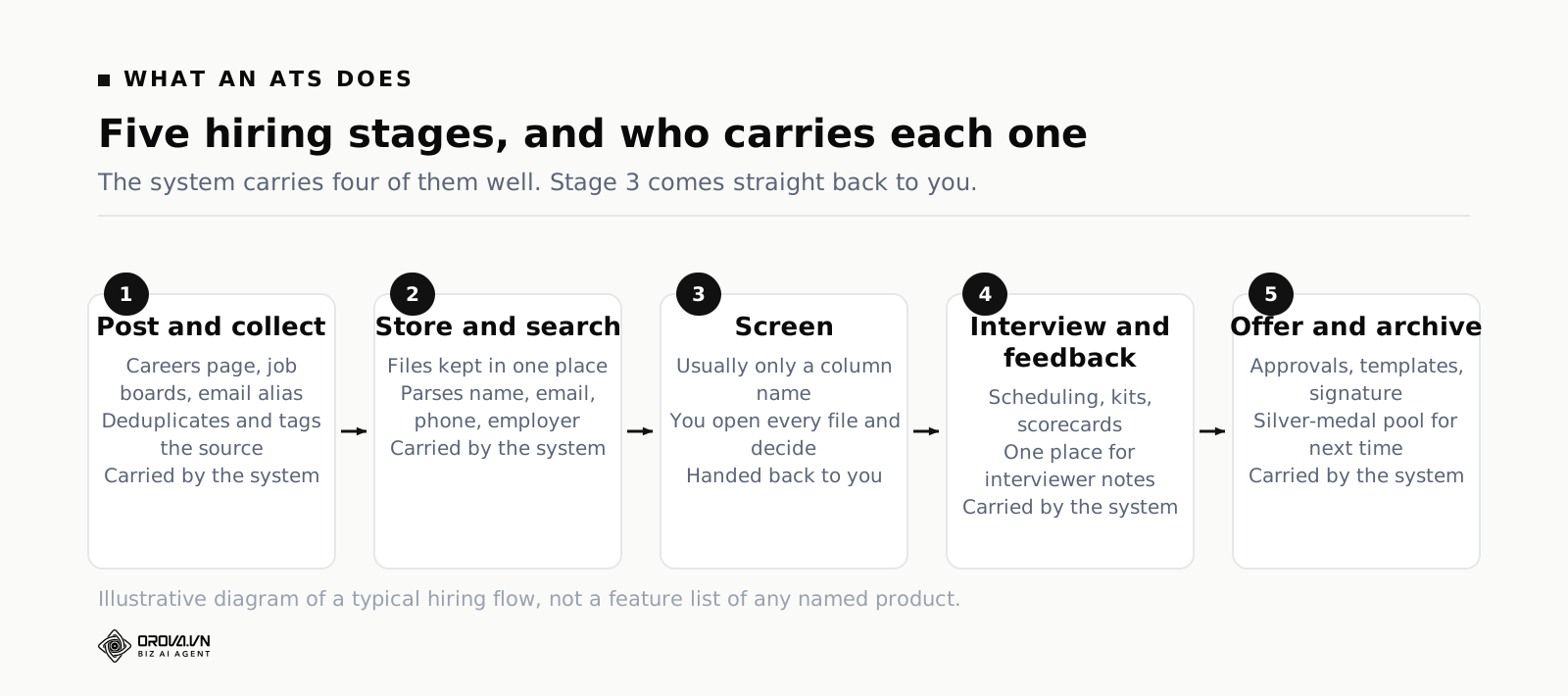
Stage 1 — Posting and collection
You write the job, publish it to your careers page, and syndicate it to job boards. Applications arrive through a form, an email alias, or a board integration. The system deduplicates repeat applicants, tags the source, and files everything under the role. This part works well. If your ATS is not doing this cleanly, the problem is configuration, not the category.
Stage 2 — Storage and search
Files are stored, usually with a parsed summary: name, email, phone, maybe employer and dates. You can search the pool, filter by tag, and revisit past applicants for a new role. The quality of this stage depends entirely on the parser. A clean single-column PDF parses well. A two-column designer CV, a scanned document, or a file exported from a phone often parses into mush.
Stage 3 — Screening
Here is where the path breaks. In most systems, "screening" is a column name, not a function. The system shows you a list. You open file 1, read it, form a view, move the card. Then file 2. The software has not reduced the work; it has organised the queue. Some systems add knockout questions on the application form — do you have a work permit, do you have three years of experience — which help with hard filters but say nothing about quality.
Stage 4 — Interviewing and feedback
Scheduling links, calendar invites, interview kits, scorecards, and a place for interviewers to write feedback. Good ATS products are genuinely strong here, and a shared scorecard is worth having even if nobody fills it in perfectly. The risk is that scorecards get written after the decision, as justification rather than as evidence.
Stage 5 — Offer, hire, and the archive
Offer approvals, templates, e-signature, handoff to payroll or your HR system, and the archive of everyone who did not make it. The archive is more valuable than teams think: a silver-medal candidate from March is often the fastest hire in September.
The part ATS systems leave to you
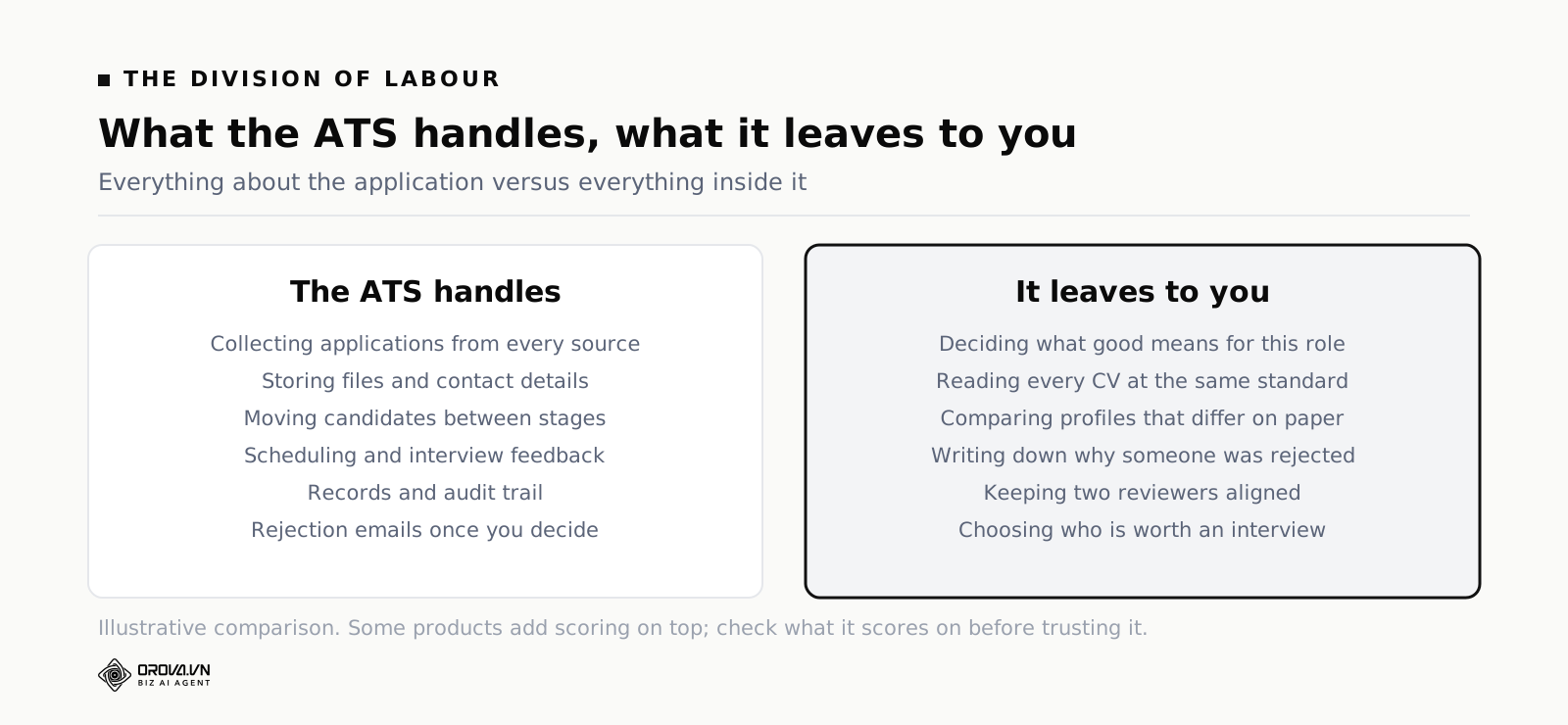
Line up the stages and a pattern appears. Everything the ATS does well is about the application: where it came from, where it sits, who touched it. The one thing it mostly does not do is read inside the application and form a defensible view of fit.
That is not a design flaw. It is a consequence of what these products were built to solve. The original problem was chaos: applications scattered, statuses unknown, compliance records missing. Solving chaos means building a container. Judging fit is a different problem — it needs to understand what the role actually requires, and it needs to read prose written by hundreds of different people in hundreds of different styles.
Concretely, here is what still lands on your desk after the ATS has done everything it does:
- Deciding what "good" means for this role. The job description is usually a wish list, not a scoring rubric. Nobody has said which requirements are pass/fail and which are nice to have.
- Reading 214 CVs and keeping the same standard from the first to the last. This is the expensive part, and it is the part where humans are least reliable.
- Comparing candidates who are not comparable on paper. Four years at a big company versus two years at a startup where they built the function from scratch.
- Writing down why. Three weeks later, when the hiring manager asks why you rejected the person they just met at a meetup, "did not feel like a fit" is not an answer you want to give.
- Staying consistent across reviewers. Two people screening the same pool with different mental bars produce a shortlist that reflects who read which half.
Some modern products do add scoring or "matching" on top. Read what they are matching on before you trust it. Keyword overlap between a CV and a job description is a weak proxy: it rewards candidates who mirror your wording and punishes people who describe the same work in different words. A candidate who wrote "handled customer complaints over chat and phone" is doing your job; a keyword matcher looking for "customer support" may score them below someone who listed the phrase and never did the work.
Why small teams say "we bought an ATS and still read every CV by hand"
This complaint is so common it deserves its own diagnosis. It is rarely because the software is bad. It is usually one of five reasons.
The volume arrives in bursts
Hiring is not a steady flow. A role goes live, a post gets shared, and two hundred applications land in five days. Then nothing for a month. Software that saves you a few minutes per candidate is invisible during the quiet month and irrelevant during the burst, because the burst is a wall of reading, not a wall of admin.
The parser only captures the easy fields
Name, email, phone, maybe last employer. Useful for contacting people, useless for judging them. The interesting part of a CV — what they actually did, at what scale, with what result — sits in free prose that a field-based parser does not touch. So the fields fill in, and you still open the PDF.
Nobody wrote down the bar
Ask three people on a hiring panel to list the five things that matter most for a role and rank them, and you will usually get three different lists. Without a shared list, every CV is judged against a private standard that shifts with mood, fatigue, and whoever you read immediately before. No software fixes a standard that was never written down.
Screening is treated as a chore, not a step
Sourcing gets a budget. Interviewing gets a process and a training session. Screening gets whatever is left of Tuesday. It is the highest-volume decision in the whole funnel and usually the least designed part of it.
The knockout questions are too blunt
Teams try to reduce volume with application-form filters: minimum years, specific certification, exact location. These are binary and they cut wrongly in both directions. They reject a strong candidate with two years and eleven months, and they let through anybody who ticked a box. Fit is rarely binary; it is a set of weighted judgements.
Put these together and the picture is clear. The ATS removed the chaos and left the thinking. The thinking is the part that costs a full day a week when a role is live.
Cloud based ATS, on-premise, and the spreadsheet you actually use
Most teams evaluating a system will meet three shapes. It is worth knowing what changes between them, and what does not.
A cloud based ATS is the default now: you log in through a browser, the vendor runs the servers, updates arrive without you doing anything, and access is managed by user accounts and roles. The practical wins are that remote interviewers can reach it, integrations with calendars and job boards are maintained for you, and your data survives a laptop dying. The practical costs are per-seat pricing, dependence on a vendor's roadmap, and a data processing relationship you need to document if you operate under GDPR or similar rules.
An on-premise or self-hosted system puts the software on infrastructure you control. Some regulated employers still need this. The trade is obvious: more control, more work, slower improvement.
And then there is the spreadsheet. Be honest about this one, because a large share of small teams run their real hiring pipeline in a sheet even when they own a licence for something better. The sheet wins on flexibility — you add a column in three seconds. It loses on everything else: no file storage, no audit trail, no permissions worth the name, and a permanent risk of someone sorting one column without the others.
Here is the important point, and it holds across all three shapes: none of them changes the screening problem. Moving from a spreadsheet to a cloud based ATS makes your records better, your handoffs cleaner and your compliance position stronger. It does not make the 214 CVs shorter. If you are choosing a system, judge the container features on their own merits, and plan for the screening step separately, because the container will not solve it.
How to make screening consistent: criteria, weights, evidence
The fix for inconsistent screening is not more discipline. It is structure. Three pieces, in this order.
Piece one: fixed criteria, decided before you read anything
Take the job description and convert it into a list of things you will check on every single CV. Eight to sixteen items is a workable range — fewer and you are back to gut feel, more and nobody completes the sheet.
Sort each item into a group, because "required" and "helpful" should not be treated the same way:
- Must-have — if this is missing, the person cannot do the job. Work authorisation. The language the team works in. A licence the role legally requires.
- Important — strongly predicts success but a strong candidate could compensate. Years in a comparable role. Experience at your scale of operation.
- Preferred — a real advantage, not a requirement. Your industry. A tool your team uses.
- Basic — table stakes you still want to confirm. Spreadsheet literacy. Clear written communication.
- Flexible — nice signals that should never sink anyone. Side projects, certifications, tenure patterns.
The act of sorting is where most of the value is. Half the arguments a hiring panel has in week three are arguments that should have happened in week zero, when someone asked whether five years was truly a must-have or just a number that got typed into the ad.
Piece two: weights, so the score reflects your priorities
Give each criterion a weight from 1 to 10. Weights are how you say "writing quality matters twice as much as knowing our ticketing tool" without arguing about it on every candidate. Do not spread the weights evenly — if everything is a 7, you have expressed no priority at all.
Then compute the total as a weighted average, not a sum of ticks. Multiply each criterion score by its weight, add those products, divide by the sum of the weights. You get a number on the same 0–100 scale for every candidate, which means shortlists are comparable across reviewers and across weeks.
One rule saves you from the classic failure: a must-have below the floor forces a fail, whatever the total says. Otherwise a candidate with a brilliant profile and no work authorisation will float to the top of your list on the strength of everything else, and someone will waste an interview slot finding out why.
Piece three: evidence, quoted from the file
A score with no evidence is an opinion with a number attached. For every criterion, the screener — human or machine — should be able to point at the line in the CV that produced the score. "Led a five-person support team at a fintech, 2021 to 2024" is evidence. "Seems senior" is not.
Evidence does three jobs. It makes the score checkable, so a hiring manager can disagree with the reasoning instead of the vibe. It makes rejections explainable, which matters both for candidate experience and for the regulatory direction of travel — New York City's Local Law 144 requires bias audits and candidate notice for automated employment decision tools, the EU AI Act lists recruitment and selection among its high-risk uses, and GDPR Article 22 restricts decisions made solely by automated means. And it makes the whole thing auditable later, when you want to know whether your screening standard actually predicted who succeeded.
The principle is the same one that applies to any automated decision system: if the output cannot be traced back to a reason, you cannot trust it and you cannot improve it. We wrote about that in the advertising context in AI Advertising: What It Actually Does for Your Ads, and the logic transfers to hiring without much editing.
A worked example: three candidates, one scoring sheet
Numbers make this concrete. Everything below is an invented example to show the arithmetic — not data from any real hiring round.
Say you are hiring a Customer Support Specialist. Your criteria and weights:
| Criterion | Group | Weight |
|---|---|---|
| Clear written communication in both working languages | Must-have | 10 |
| Two or more years in a customer-facing role | Must-have | 9 |
| Hands-on with a ticketing tool | Important | 7 |
| Available for shift work | Important | 6 |
| Familiar with our product category | Preferred | 4 |
| Comfortable with spreadsheets and basic reporting | Basic | 3 |
| Stable tenure pattern | Flexible | 2 |
The weights add up to 41. Now three candidates, each criterion scored 0–100 from evidence in the file:
| Criterion | Candidate A | Candidate B | Candidate C |
|---|---|---|---|
| Written communication (10) | 90 | 95 | 70 |
| Two years customer-facing (9) | 80 | 40 | 95 |
| Ticketing tool (7) | 70 | 85 | 55 |
| Shift availability (6) | 100 | 90 | 60 |
| Product category (4) | 40 | 80 | 30 |
| Reporting (3) | 60 | 85 | 50 |
| Tenure (2) | 50 | 70 | 80 |
| Weighted total | 76.8 | 77.1 | 66.6 |
Read the result carefully, because it contains the whole argument for doing screening this way.
Candidate B has the highest total. On a naive ranking, B goes to the top of your call list. But B scored 40 on a must-have: eight months in a customer-facing role, not two years. The must-have floor rule fires, B is marked as not a fit for this role, and the reason is written down in one line. If you had no floor rule, B's strength on the softer criteria — product knowledge, reporting, ticketing tool — would have carried them past a candidate who can actually do the core job.
Candidate A wins on the criteria you said mattered. A is weaker on product familiarity, which you weighted at 4 because you can teach it in a fortnight. That weighting was a decision made in week zero, and it is doing its job now.
Candidate C is a clear third, but look at where C's points come from: 95 on the second must-have. If C's total sat inside a "maybe" band rather than clearly below it, that profile is worth a fifteen-minute call rather than a rejection email.
That last point argues for a third outcome. Instead of pass and fail, use three bands: a pass threshold, a consideration band just below it, and everything under that. The consideration band is where your reversible decisions live. It stops you from throwing away people whose CV undersells them, without forcing you to interview everybody.
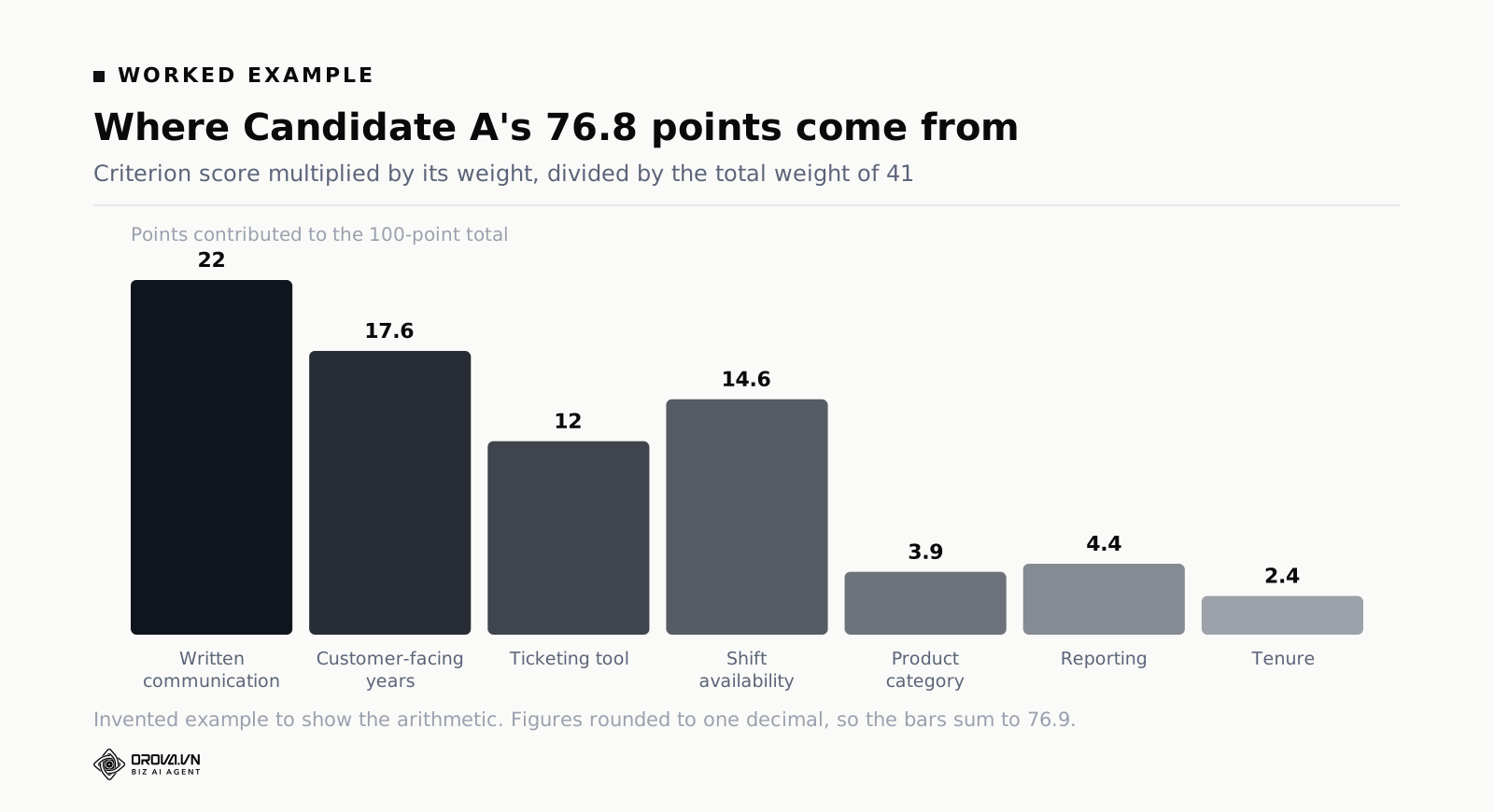
Break the score into contributions like this and weights stop being abstract. Written communication contributes 22 points of the 76.8; tenure contributes 2.4. If that ratio does not match how you actually think about the role, the weights are wrong and you should fix them now, before you have screened fifty people against them.
Six mistakes that make ATS screening worse than a spreadsheet
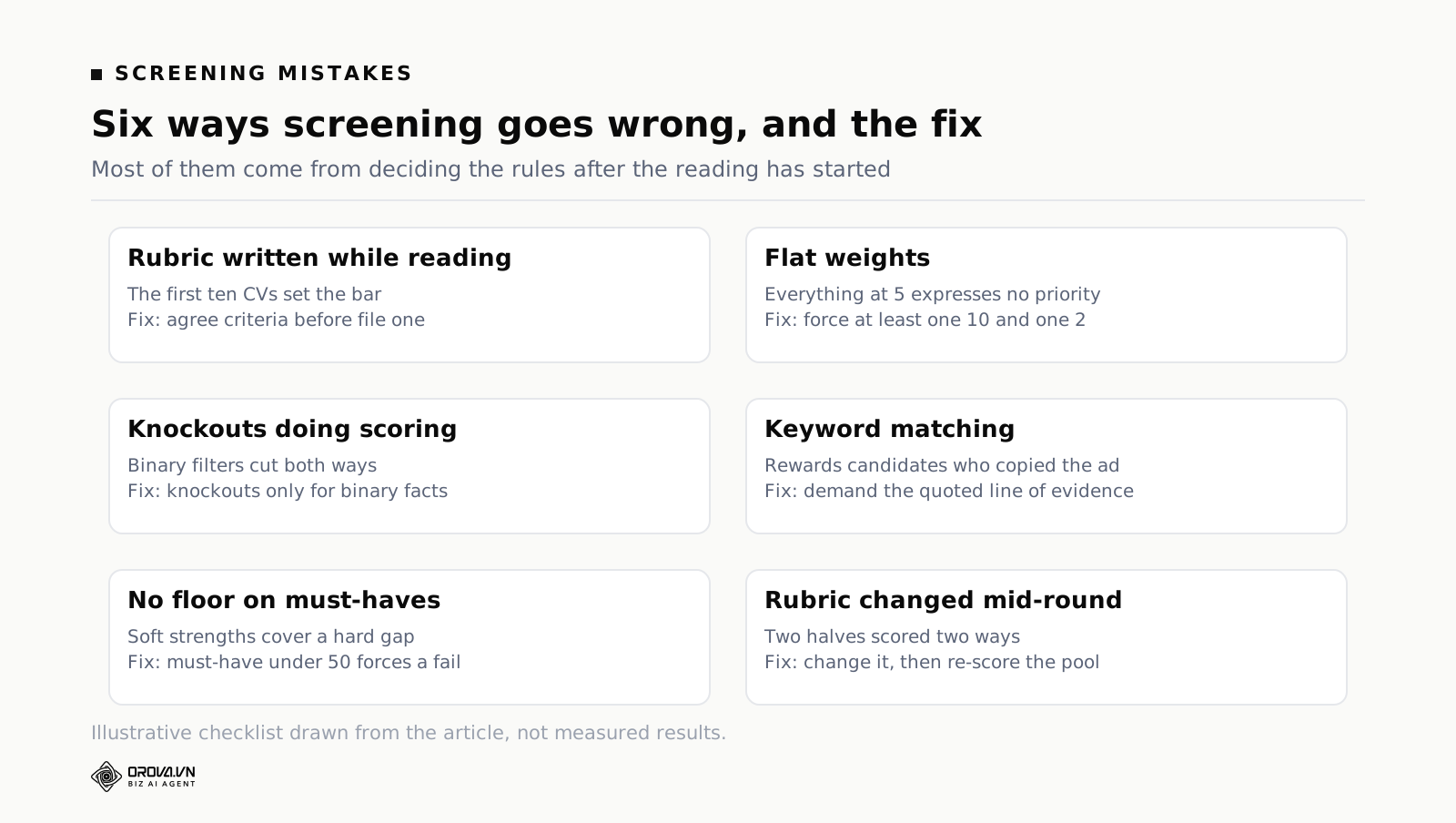
Mistake 1: writing criteria after you start reading
If you build the rubric while reading, the first ten CVs write the rubric and the next two hundred are judged against those ten. Decide the criteria before you open the first file, and write them somewhere the whole panel can see.
Mistake 2: flat weights
Every criterion at weight 5 produces a ranking driven by whichever criteria happen to have the most variance in your pool, not by what matters. Force yourself to make at least one criterion a 10 and at least one a 2.
Mistake 3: knockout questions doing a weighted criterion's job
"Do you have 5+ years of experience? Yes/No" is a binary filter on a continuous quality. Use knockouts only for genuinely binary facts — work authorisation, a required licence, willingness to relocate — and score everything else.
Mistake 4: keyword matching mistaken for understanding
Any scoring that counts phrase overlap rewards candidates who copied your job ad. It systematically penalises career changers, people from other industries, and anyone who writes plainly. If a scoring feature cannot show you the sentence it based the score on, treat the score as decoration.
Mistake 5: no floor on must-haves
Already shown above with Candidate B. A weighted average alone will always let strength in soft criteria compensate for a missing hard requirement, because that is what averages do.
Mistake 6: changing the rubric mid-round without re-scoring
Halfway through, someone says the tool experience matters more than you thought. Fine — but if you change the weight, re-run the whole pool against the new weights. A ranking where the first hundred were scored one way and the second hundred another way is not a ranking at all.
A weekly routine that keeps the pipeline honest
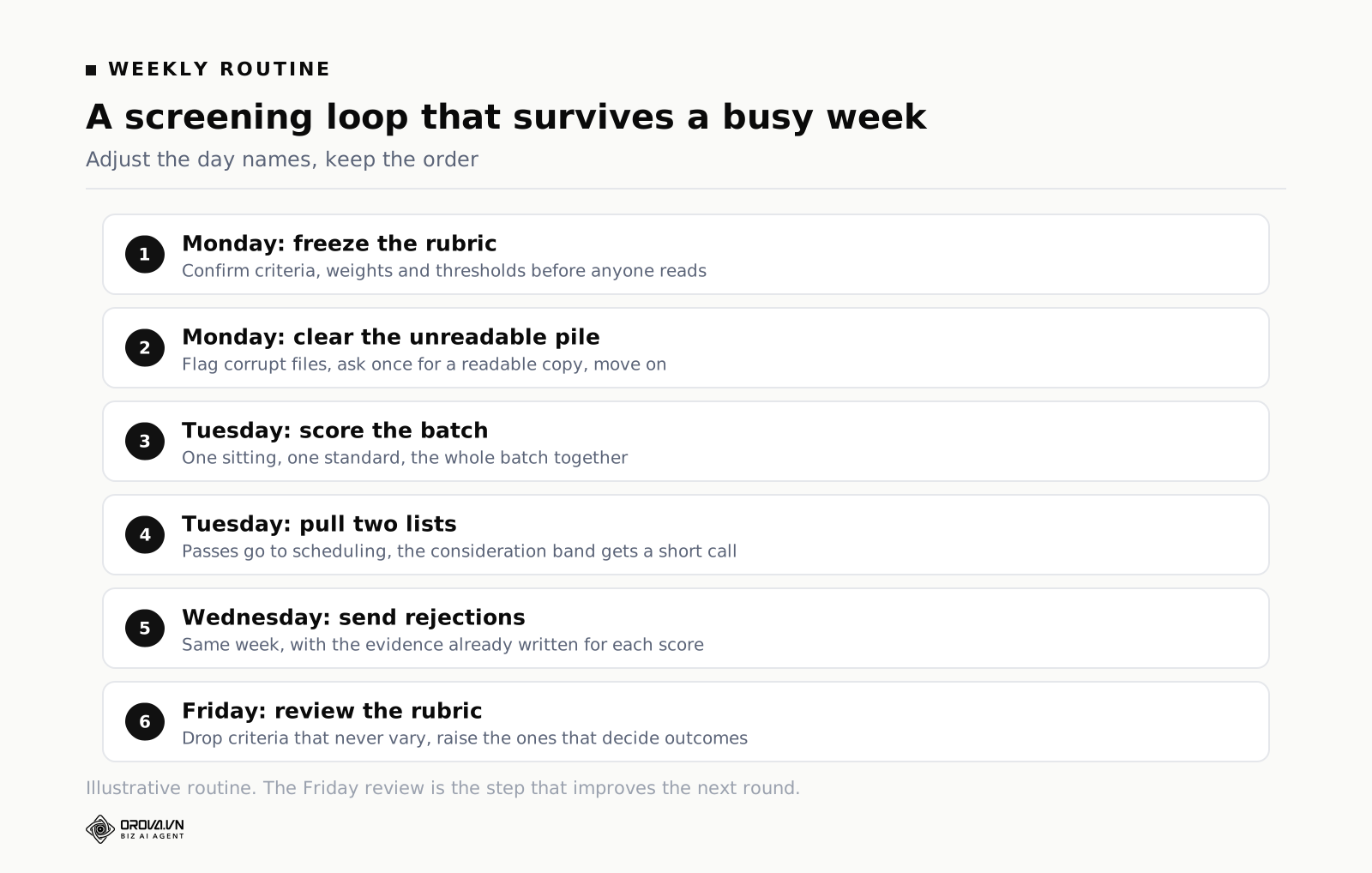
Structure only helps if it survives a busy week. Here is a routine small teams can actually keep. Adjust the day names; keep the order.
- Monday — freeze the rubric. For every live role, confirm the criteria, groups, weights and thresholds are unchanged. If someone wants a change, make it now and re-score what is already in the pool.
- Monday — clear the unreadable pile. Some files will not open, will be corrupt, or will be a photo of a photo. Mark them, ask the candidate for a readable copy once, and stop touching them after that.
- Tuesday — score the new batch. One sitting, one standard, whole batch. Splitting a batch across three days across two people is how the standard drifts.
- Tuesday — pull the shortlist and the consideration band. Passes go straight to scheduling. The consideration band gets a fifteen-minute call, not a full interview.
- Wednesday — send the rejections. Same week, always. Every score has evidence attached, so the message can be specific without being cruel, and you are never guessing what you thought.
- Friday — check the rubric against reality. Take the people who reached final interview and look at which criteria actually separated them. If a criterion never varies, drop it. If a criterion keeps deciding outcomes, raise its weight for the next role.
That last step is the one everybody skips, and it is the only one that makes next month better than this month. A rubric that never changes after contact with real candidates is a guess that got frozen.
When a tool earns its place, and how far manual work gets you
Be fair to manual screening: it works, up to a point. If a role brings in thirty applications, a person with a written rubric will do a fine job in an afternoon, and no software will beat them on judgement. Below roughly that volume, the honest advice is to write the rubric, score by hand, and spend the saved money on better sourcing.
The point where manual work stops paying has three markers, and you usually hit all three at once:
- Volume. A few hundred applications for one role, arriving inside a week. Reading them all at a consistent standard is no longer realistic, and the standard silently degrades from CV 40 onwards.
- Repetition. The same role, opened again every quarter. You are re-reading the same shapes of CV against the same criteria, which is exactly the kind of work worth encoding once.
- Multiple reviewers. Two or three people screening in parallel. Without a shared scoring sheet the shortlist depends on who read which half of the pool.
What a screening tool should do at that point is narrow and specific. It should take your job description and turn it into criteria you can edit, not a black box. It should let you set the weights, the pass threshold and the consideration band yourself. It should read every file, including the scanned ones, and score each criterion with the line from the CV that justified the score. It should compute the total on the server from your weights rather than trusting a number a model wrote. And it should hand you back a ranked list that you then use as the input to a human decision, never as the decision itself.
That is the design we built Orova Recruit around: you upload the JD as a file or paste it, the AI extracts eight to sixteen criteria across five groups with a weight of 1 to 10 and a suggested pass threshold, and you edit all of it before a single CV is scored. Then you upload CVs one by one, in bulk, or as a whole folder — up to 500 per position, 10MB per file, PDF, Word, text or images — and each one comes back with a 0–100 score per criterion, the evidence quoted from the file, the extracted contact details and years of experience, and a verdict of pass, consider or no fit. Files that cannot be read are flagged rather than guessed at, and a must-have below 50 forces a no-fit regardless of the total.
Where it parts company with a conventional applicant tracking system is what happens after the shortlist exists. The same criteria produce interview questions written for each individual candidate, each question carrying what to listen for and its own weight. Notes are taken live in the room — type them, or press the mic and let the browser transcribe while you keep eye contact — and the interview is then scored against that rubric, with anything you never asked recorded as zero and labelled as not covered rather than quietly averaged away. Rooms and opening hours live in the same product, so double bookings are refused at the point of booking, and candidate email goes out from your own company mailbox on rules tied to a candidate's status. One tool for the loop, rather than a tracker plus four workarounds.
Two guardrails matter more than any feature. First, the tool ranks; you decide. Nothing in this category should be allowed to send a rejection on its own, and the regulatory direction — Local Law 144, the EU AI Act's high-risk classification for recruitment, GDPR Article 22 — is moving firmly against fully automated rejections. Second, keep a stop condition: a defined point where the automation pauses and a person looks. The same instinct we described for automated ad spend in ad Tech: What the Stack Does and Where to Put Limits applies here, and the stakes are higher, because the thing being processed is somebody's job application.
What happens after the shortlist — the half an ATS leaves to you
Suppose the biggest gap is now closed: you have criteria, you have scores, and you have twenty names worth calling. It feels like the hard part is behind you. In practice the second half of a hiring round eats more hours than the first, and it is precisely where an applicant tracking system offers the least help.
Count what is left for those twenty people. Someone has to write questions for each of them, because asking twenty candidates the same generic set tests nothing specific to any of them. Someone has to find a slot that works for two interviewers and a room, avoiding lunch and avoiding a clash. Someone has to take notes while listening — and anyone who has tried knows you get either good listening or good notes, rarely both. Someone has to turn scattered notes into a conclusion that can be compared against another candidate's. And someone has to reply to all twenty, seventeen of whom are receiving a rejection nobody enjoys writing.
An ATS handles exactly one item on that list: it remembers who is at which stage. The other five stay with you, which is why teams with expensive recruiting software still find every month as busy as the last.
The four biggest leaks
Writing questions. Done carefully, this takes fifteen to twenty minutes per candidate, because it means rereading the CV and deciding what actually needs verifying. Twenty candidates is most of a working day, and in reality by candidate eight most people fall back on the generic list.
Taking notes. Handwritten notes are thin; typed notes cost eye contact. The usual pattern is detailed notes for the first three candidates and progressively shorter ones after that. At comparison time the first three simply look clearer — a bias created by the process, not by the candidates.
Scheduling. Each interview costs several messages back and forth. The problem is not difficulty but fragmentation: it chops your day into unusable pieces, and one double-booked room costs you credibility with a candidate before they have even sat down.
Replying to candidates. This is the task that gets dropped most often, because it is never urgent and nobody chases it. A candidate who hears nothing tells other people, and that story outlives any employer branding campaign you run.
How to close them without new software
If you are not changing tools this quarter, four habits do most of the work. First, write one question per important criterion as a shared base set, then add only two candidate-specific questions per person to probe what the CV leaves unproven. Second, reuse the weights from your CV scorecard on the interview rubric, so both stages speak the same language and the numbers can be read side by side. Third, agree that a question you never asked is recorded as not covered rather than given a middling score — an invented number is worse than an honest blank. Fourth, write three email templates once — invitation, rejection, offer — and hold yourself to one rule: when a candidate's status changes, the email goes out the same day.
None of that requires a purchase. It is also, not coincidentally, exactly the set of tasks worth handing to software eventually, because all four repeat identically on every role and none of them require human judgement. When you notice you know all four by heart, that is the point at which the question of tooling has an honest answer.
Frequently asked questions
Does an ATS reject candidates automatically?
By default, no. Most systems only reject when a knockout question on the application form returns a disqualifying answer, and those are rules you configured. The widespread belief that "the ATS threw my CV away" usually describes something simpler and sadder: the application was stored correctly and nobody opened it. That is a process problem, not a robot.
Do I need to format my CV for the ATS?
If you are a candidate, yes, within reason. Use a single-column layout, real text rather than an image, standard section headings, and a common file format. The parser is looking for structure. Creative layouts, text inside graphics, and important information in headers or footers are the usual reasons a file parses badly. None of this changes what you should say, only how reliably a machine can read it.
What is the difference between an ATS and a recruitment CRM?
An ATS manages people who have already applied to a specific role — it is organised around vacancies and stages. A recruitment CRM manages relationships with people who have not applied yet: talent pools, outbound campaigns, nurture sequences. Many products now do both, but the mental split is useful: the ATS is reactive and role-shaped, the CRM is proactive and person-shaped.
Is a cloud based ATS safe for candidate data?
It can be, and the questions to ask are the same as for any processor. Where is the data stored, who inside the vendor can access it, how are files secured and are they publicly addressable by URL, how long is data retained after a role closes, is there a documented deletion path, and is the data used to train anything. Get the answers in writing before you upload a pool of real CVs, because candidate data is personal data and you remain the controller of it.
Can AI scoring be biased?
Yes, and pretending otherwise is how teams get into trouble. Any scoring system inherits bias from the criteria it is given. If you weight "graduated from a top-tier university" heavily, you have encoded a bias regardless of whether a human or a model applies it. Two defences: keep criteria tied to what the job requires, and demand evidence for every score so you can inspect what drove it. A score you can trace is a score you can challenge.
Should we replace our ATS to fix screening?
Usually not. If your system files applications reliably, schedules interviews, and keeps records, it is doing its job. Ripping it out and migrating years of candidate history to solve a problem in one stage is expensive and disruptive. Add structure to the screening step instead — a written rubric first, and a scoring tool alongside it if the volume justifies one.
What to do this week
Do not redesign hiring. Pick your busiest open role and do four small things.
One. Open the job description and write out eight to sixteen criteria from it. Sort each into must-have, important, preferred, basic or flexible. This takes about forty minutes and it will surface at least one disagreement inside the hiring panel that was going to cost you a week later on.
Two. Put a weight from 1 to 10 on each criterion. Force a spread. Then write down the pass threshold and the consideration band — actual numbers, agreed before anyone reads a CV.
Three. Score twenty CVs against the sheet, by hand, with one line of evidence per criterion. Twenty is enough to find out whether your criteria are checkable from a CV at all. Some will not be — "collaborative" is not something a CV can prove — and those belong in the interview, not the screen.
Four. Compare your twenty scores against the shortlist you would have picked on instinct. Where they disagree, work out which one was right. That comparison, more than any software decision, tells you whether your screening standard is real or imagined.
The applicant tracking system will keep doing what it is good at: holding everything, moving cards, keeping records. Once you accept that the screening judgement was never in the box you bought, you can build that part deliberately — and stop waiting for the container to become a decision-maker.
Let the system shortlist, so you only read the ones worth reading
Doing this by hand works, but it costs you the same hour every week: opening each CV, checking it against the same criteria in your head, and writing down why a candidate made the cut so you can defend that decision later. Multiply that by 214 applications and three open roles, and the cost is not the tool, it is your time.
Orova Recruit is built to take over exactly that part: it applies your criteria and weights to every application automatically and hands you a ranked shortlist with the evidence attached, so you open the twelve CVs that matter instead of all 214. If that sounds useful for the role you are hiring right now, it is worth a look.
Where the manual work actually ends
Everything in this article points to the same wall: sorting and storing applications is easy, but reading each one, scoring it fairly, and writing down why is the part that eats your week. That part does not go away just because you have software that logs applications neatly. It stays a manual job unless something actually reads and scores the CVs for you, using the criteria you set.
Orova Recruit is built to take on exactly that part: applying your criteria and weights to every CV automatically, so you get a ranked shortlist with the evidence already pulled out, instead of a folder of unread files. If reading CV after CV is the part slowing you down, it is worth taking a look at how Orova Recruit handles it.
Let AI read and score resumes against your JD
Orova Recruit turns your job description into weighted criteria and scores every CV with evidence quoted from the file.
Try it free