
Greenhouse Applicant Tracking: What It Does Well
Most teams meet greenhouse applicant tracking the same way: someone senior has used it before, says it is the serious option, and the evaluation quietly stops there. Six weeks later the contract is signed, the implementation call is booked, and nobody in the room can say which specific piece of the hiring process is about to get better.
That is an expensive way to buy, and the bill does not arrive until the second year. An applicant tracking system is not a filing cabinet you switch on. It is a set of opinions about how hiring should work, enforced on every hiring manager, every week. Buy one whose opinions match yours and it removes real work. Buy one aimed at a company four times your size and you spend two years navigating around features you never asked for.
This guide covers what Greenhouse is genuinely good at, what its tiers now include, what the first year really costs, and when it is the wrong purchase. Its plans and features were checked against Greenhouse's own pages in August 2026, because the tier names changed and most comparison articles still have the old ones.
What company size is greenhouse applicant tracking built for?
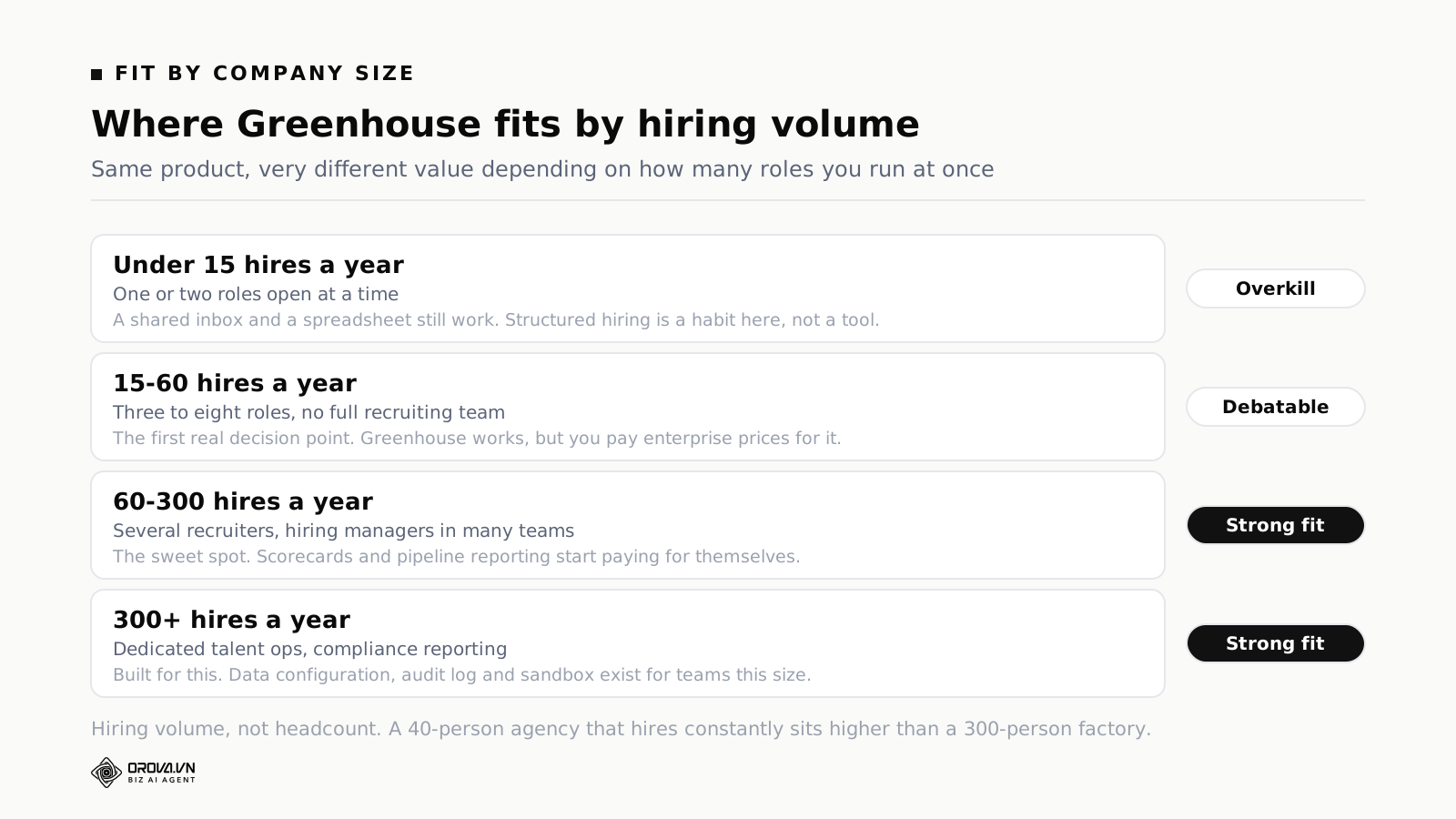
Greenhouse fits companies running roughly 60 to 300 hires a year with several recruiters and hiring managers spread across teams. Below about 15 hires a year it is more process than the problem needs. Between 15 and 60 it works, but you pay mid-market prices for coordination features a small team can get elsewhere.
The number that matters is concurrent open roles, not employee count. A company of 90 people that opens two roles a quarter has a hiring process that fits in one person's head. A company of 90 people that runs fourteen roles at once, across engineering, sales and support, does not, and that is the point at which a shared inbox starts silently dropping people.
Greenhouse is designed for the second situation. Its core assumption is that hiring decisions are made by people who are not recruiters, in meetings the recruiter does not attend, and that the job of the software is to make those decisions comparable to each other. Every major feature follows from that assumption. If your hiring decisions are currently made by two founders over lunch, the software is solving a problem you do not have yet.
There is a second qualifying question, which buyers skip more often than the volume one. Do your hiring managers actually do the work the system will ask of them? Structured hiring means an engineering lead writes scored feedback within a day of the interview, on a form somebody else designed, before hearing what anyone else thought. That is a behaviour change. The software can prompt it and report on who is late, but it cannot create the willingness. Teams that buy Greenhouse to fix an accountability problem usually end up with an accountability problem plus a licence fee.
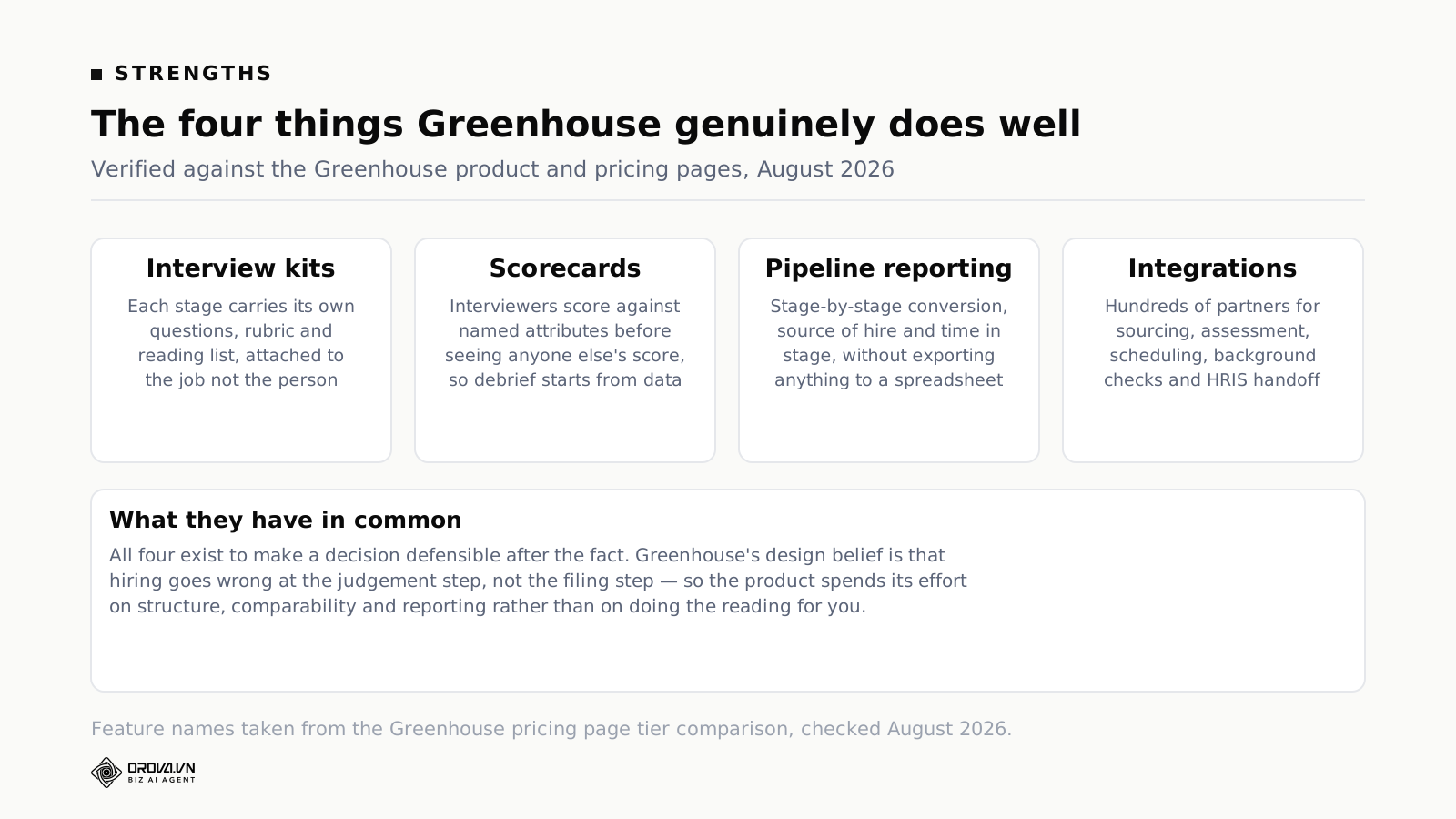
The four things Greenhouse does well
These are the capabilities worth paying for, described in terms of the work they remove rather than the feature names on the pricing page.
1. Interview kits that travel with the stage, not the person
An interview kit in Greenhouse belongs to a stage on a job, not to a candidate or an interviewer. When someone is scheduled for the technical screen, the kit for that stage arrives with them: the questions to ask, the attributes being tested, the rubric for scoring each one, and whatever the interviewer is meant to read beforehand.
The practical effect is that a new interviewer's fifth interview looks like their fiftieth. Without a kit, what actually happens is that each interviewer develops a private favourite question, the questions drift over eighteen months, and by the time you compare two candidates from different quarters you are comparing two different assessments that happen to share a job title. Kits are unglamorous and they are the single most useful thing in the product.
The failure mode is worth naming: teams build kits once, during implementation, from the job description, and never revisit them. A kit written before you have seen a single candidate for a role is a guess. The kits that work get edited after the first four interviews, when you find out which question actually separates people and which one everyone answers identically.
2. Scorecards submitted before the debrief
A scorecard forces each interviewer to rate the candidate against named attributes, and Greenhouse's structure pushes those scores in before the group conversation. That sequence is the whole value. Once one senior person says "I loved them" out loud, the other three scores in the room stop being independent data and become social agreement.
Scorecards also produce the only defensible record you will have if a rejected candidate asks why, or if a manager six months later asks how a bad hire got through. Notes in a shared document do not survive that question. Attribute-level scores from four people, timestamped, do.
What scorecards do not do is make the attributes correct. If your scorecard asks interviewers to rate "culture fit" on a five-point scale, you have built a structured way to record a gut feeling. The attributes have to be things a person can demonstrate in an hour. Our guide to scoring behavioural interview questions covers how to write attributes that two different interviewers score the same way.
3. Pipeline reporting you do not have to export
Greenhouse reports stage-by-stage conversion, source of hire, and time spent in each stage without an export step. That last part matters more than it sounds. Every ATS can produce a CSV; the question is whether anyone actually looks. Reporting that lives one click from the pipeline gets checked weekly. Reporting that requires an export, a pivot table and forty minutes gets checked when something has already gone wrong.
The report that changes behaviour is time in stage. It is the one that shows you the bottleneck is not sourcing, it is that candidates sit for nine days between the recruiter screen and the hiring manager's first look, and by day nine a third of them have accepted something else. That number is invisible in a spreadsheet and obvious in a stage report.
4. An integration surface that is genuinely deep
Greenhouse connects to hundreds of partner tools across sourcing, assessment, scheduling, background checks and HRIS handoff, and the depth of those connections is a real differentiator rather than a marketing count. If your assessment vendor, your background check provider and your HR system all have first-class Greenhouse integrations, a large amount of manual copying disappears on day one.
Check the specific ones you need, not the total. A directory of several hundred integrations is not useful if the payroll system you actually run is the one connected through a third-party middleware that costs extra and syncs nightly. Bring your own list of five tools to the demo and ask for each one by name.
What the Greenhouse tiers include, as of August 2026
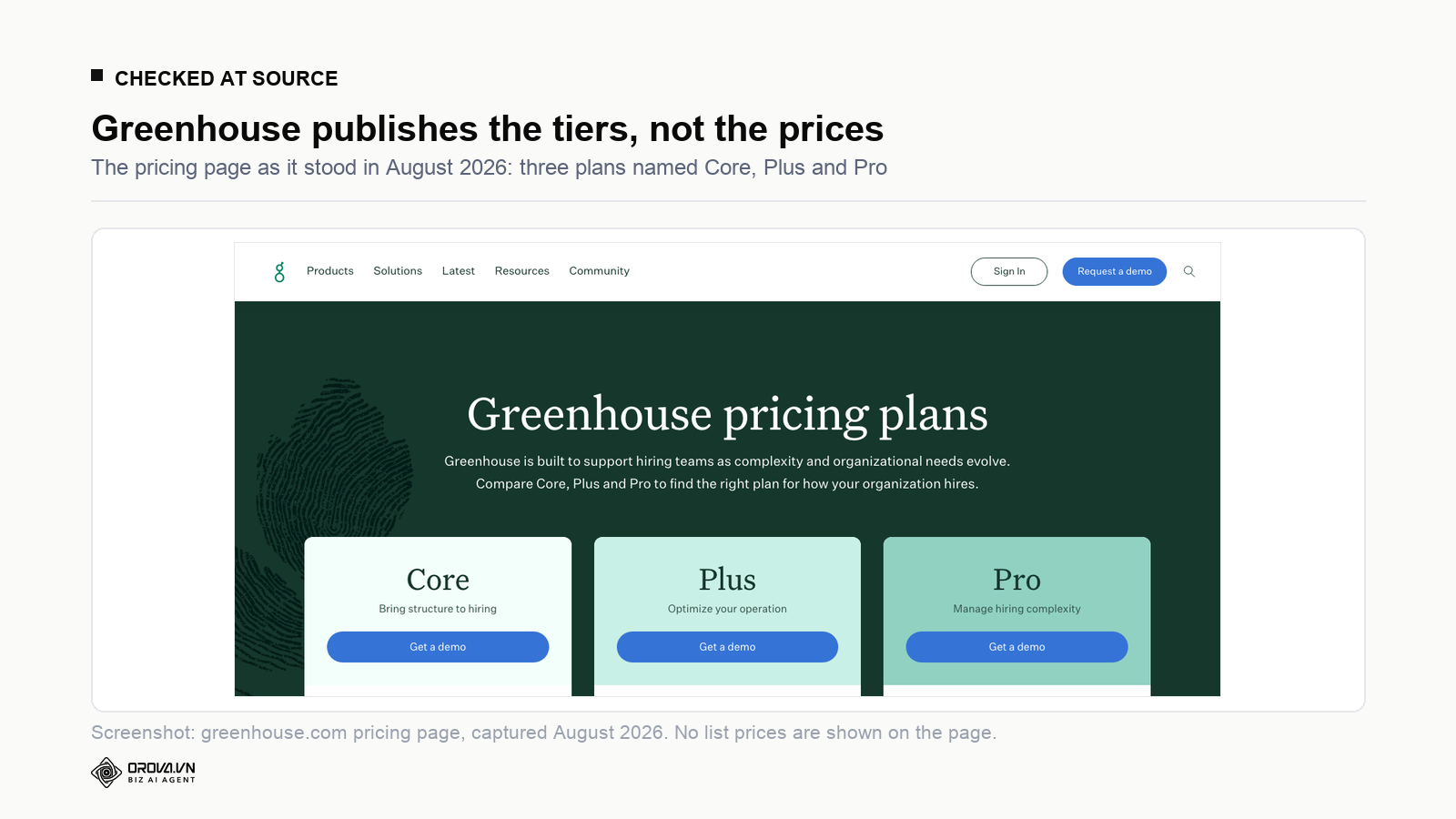
Greenhouse's pricing page now lists three plans: Core, Plus and Pro. If you are reading a comparison article that talks about Essential, Advanced and Expert, it is describing an older lineup, and the feature split is not the same. Everything below was read off the Greenhouse pricing page in August 2026.
Core is described by Greenhouse as bringing structure to hiring, and includes sourcing and CRM, structured interview kits and scorecards, an AI notetaker, scheduling, reporting and analytics, single sign-on, and the talent matching part of Greenhouse Real Talent.
Plus adds AI-powered report filters, a business intelligence connector, Greenhouse Sourcing Automation, candidate texting, and the fraud and spam detection parts of Real Talent.
Pro adds unlimited CRM events, enterprise-level data configuration and security, an audit log, a developer sandbox with sync, and the enterprise portions of Real Talent.
Real Talent itself is worth understanding before you assume it solves your screening problem. According to Greenhouse's own announcement, it combines AI talent matching with spam protection, fraud detection based on signals like phone number, email, IP address and location, and identity verification through CLEAR. It is aimed at a specific 2026 problem: application volumes inflated by automated and fraudulent applicants. That is a different problem from "we have 400 real applications and no time to read them", and it is worth being clear with yourself about which one you have.
Four things you have to move up a tier to get
The tier list above is easy to skim past, so here are the four upgrades that most often force a decision, and what they mean in practice.
- Sourcing automation. Outbound sequences to passive candidates sit on Plus. If your hiring depends on outbound rather than inbound applications, the entry tier is not the tier you are buying.
- The business intelligence connector. Getting Greenhouse data into your own warehouse or BI tool is a Plus feature. Teams that promise their board a hiring dashboard tend to discover this after signing.
- Candidate texting. Also on Plus. For high-volume or hourly hiring, where email response rates are poor, this is not a nice-to-have.
- Audit log and developer sandbox. Pro only. If you have a compliance function that asks who changed what, or an engineering team that wants to test API changes safely, you are looking at the top tier.
None of this is unusual for enterprise software. It matters because the entry tier is what gets quoted, and the features that push teams up a tier are the ones you discover in month four rather than in the demo.
What greenhouse applicant tracking actually costs
Greenhouse does not publish list prices. The pricing page says pricing is customised based on your company's hiring needs, and directs you to a conversation. That is normal for this category and it does mean any single number you see quoted online is somebody's sample rather than a rate card.
Two named sources give useful reference points as of August 2026. The software buying platform Vendr reports a median annual Greenhouse contract of roughly $26,600, drawn from around 865 recorded purchases. The buyer-reported database PriceLevel puts its median closer to $12,250. The gap between those two is not a contradiction, it is a sampling difference: Vendr's population skews towards larger negotiated deals, PriceLevel's towards smaller self-reported ones. Read them as the shape of the range rather than as a price.
The more useful exercise is to stop looking for the licence number and start listing everything else in the first year.
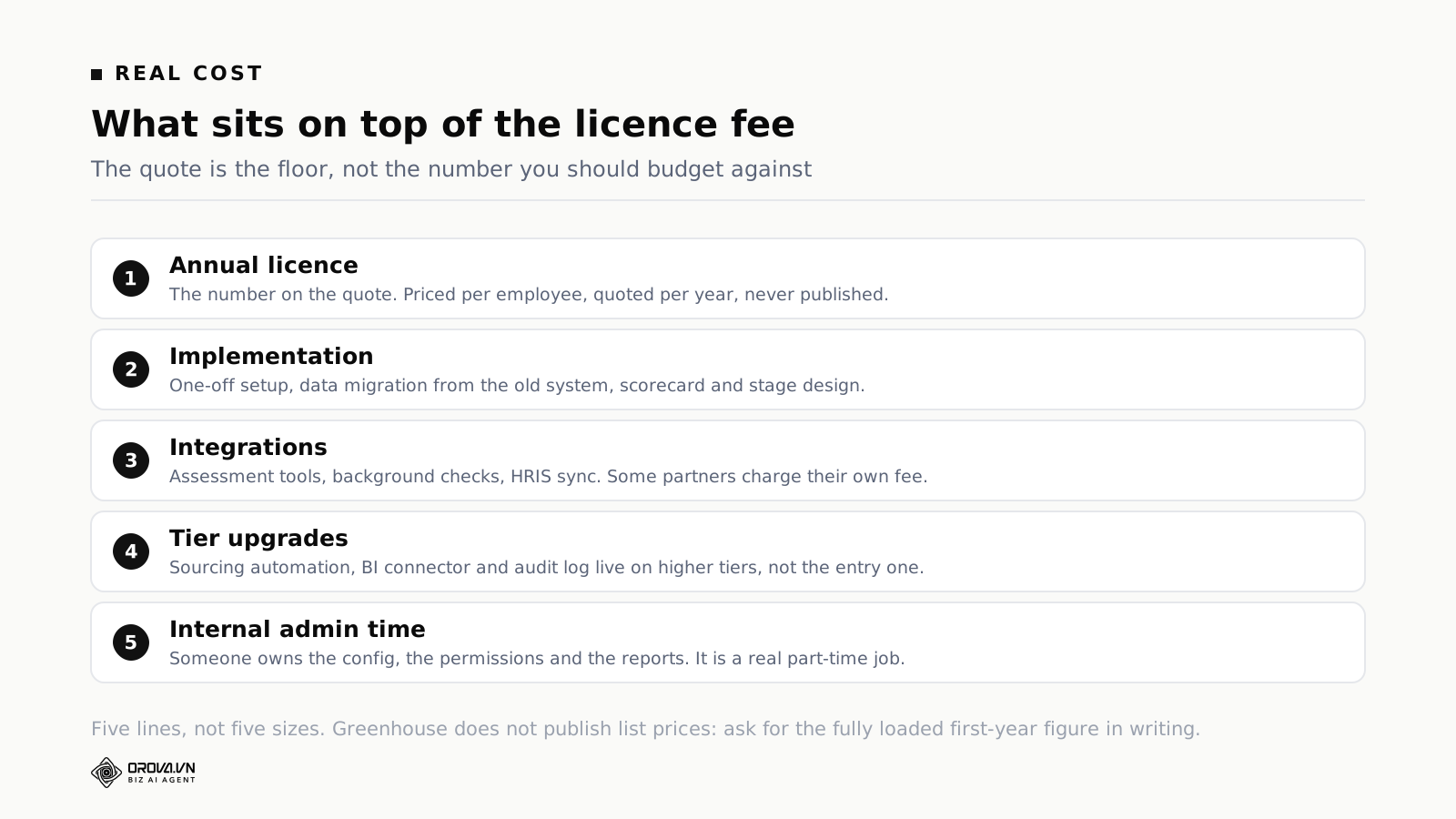
The five lines to budget
- The annual licence. Quoted per year, generally scaled to employee count rather than to how much hiring you do. Companies that grew headcount without growing hiring volume tend to feel this at renewal.
- Implementation. A one-off cost for setup, migrating candidate data out of whatever you are leaving, and designing your stages, kits and scorecards. Budget calendar time as well as money: this is where the project usually slips.
- Integrations. Some partners are free, some charge their own subscription, and a few need middleware. Price the specific five you need rather than assuming the directory covers it.
- Tier upgrades. See the previous section. Assume a reasonable chance you move up one tier within eighteen months, and ask what that costs before you sign, not after.
- Internal administration. Somebody owns the configuration, the permission model, the report definitions and the answer to "why can't I see this candidate". At mid-market volumes this is a genuine part-time job and it is never in the business case.
For context on why any of this is worth spending, the SHRM Benchmarking Report puts the average US cost per hire at about $5,475 for non-executive roles. Against that, an ATS that shortens a search or prevents one bad hire pays for itself quickly. The argument for buying is easy. The argument for buying this specific tier of this specific product is the one that needs the numbers above.
When Greenhouse is too much
Five situations where the honest answer is no, or not yet.
You hire in bursts, not continuously
Seasonal hiring, agency hiring against won projects, or a company that does one intake a year and then goes quiet. You will pay twelve months for a system you use for three, and the process discipline it enforces will have decayed by the time the next burst starts. Per-year pricing punishes bursty hiring more than most buyers expect.
Your bottleneck is applications, not organisation
If your roles get eleven applicants and you would like forty, an ATS does not help. It organises the eleven beautifully. The problem is upstream, in where the role is advertised and how the description reads, and no amount of pipeline reporting fixes it. Our piece on the job description template that doubles as a scorecard is a better first move than a software evaluation.
Your hiring managers will not fill in scorecards
Every structured hiring product depends on people outside the recruiting team doing homework. If two rounds of gentle reminders have already failed on a Google Form, they will fail in Greenhouse too, and you will have paid for the privilege. Fix the expectation first; the tool amplifies a habit, it does not install one.
You need one specific job done, not a system
Some teams have exactly one painful step. It is usually either scheduling or reading. If the whole of your pain is "we cannot get five people into a room", a scheduling tool solves it for a fraction of the cost. If the whole of your pain is "four hundred CVs arrived and nobody has time", a screening layer solves that instead. Buying a full ATS to fix one step means paying for the other nine.
You are replacing a system you never configured
If your current ATS is disliked because nobody ever set up the stages properly, migrating will reproduce the same result at a higher price. This is the most common failed purchase in the category. Before you evaluate anything, spend a week finding out whether the existing tool was ever configured to match how you actually hire.
Lighter options for teams under 50
If the volume bands put you below the Greenhouse line, there are four shapes of alternative. They are shapes rather than product names because the right answer depends on which step hurts.
| Shape | Best when | What you give up |
|---|---|---|
| Entry-tier ATS built for small teams | You need pipeline visibility and simple job posting, and you hire steadily but not heavily | Reporting depth, integration breadth, custom permissions |
| ATS bundled inside your HR system | You already pay for an HR platform and hiring volume is modest | Recruiting-specific features; the ATS is rarely the strongest module in an HR suite |
| Scheduling tool plus a shared pipeline board | Coordination is the only real pain and volume per role is low | Any decision record; you keep notes in documents, which does not survive scale |
| A screening layer on top of whatever you have | Applications arrive in volume and reading them is the bottleneck | Job board posting, offers, onboarding — none of that is in scope |
How to pick between the four shapes
Take the last three roles you filled and reconstruct where the calendar time went. Not where it felt slow, where it measurably went: date the role opened, date the first application arrived, date the shortlist reached the hiring manager, date of the first interview, date of the offer. Five dates, three roles, fifteen numbers. Almost every team finds one gap that is three times larger than the others.
If the largest gap is between the role opening and applications arriving, none of the four shapes helps and you have a distribution problem. If it is between applications arriving and the shortlist landing, you have a reading problem, and shape four is the direct answer. If it is between the shortlist and the first interview, you have a coordination problem, and shape three is the cheapest fix. If the gaps are all moderate but nobody can tell you the dates without digging through email, you have a record-keeping problem, and shapes one or two apply.
There is a cost sanity check worth running alongside that. Take the hours your team spends per filled role on the step that hurts, multiply by a loaded hourly cost, and multiply by the number of roles you expect to fill in a year. If that number is smaller than the annual licence of the thing you are considering, the purchase does not pay for itself on time saved alone, and you are buying it for a different reason. That is allowed, but it should be a decision rather than an accident. The usual different reason is risk: a defensible record of why you rejected someone, or a pipeline that does not evaporate when one person leaves.
One warning about entry tiers. Products in shapes one and two often price attractively at small headcount and then step up sharply at a threshold you will cross without noticing, usually somewhere between 50 and 100 employees. Ask for the price at your current size and at double it before you commit, because migrating an ATS a second time in eighteen months is worse than paying slightly more the first time.
The fourth shape is the least understood, so it is worth being precise about it. A screening layer does not manage your hiring process. It takes a defined role and a pile of applications and turns them into a ranked, justified shortlist. Everything before the application and everything after the decision stays wherever it already lives. If you want the longer version of that argument, we wrote it up in choosing an applicant tracking system for a small business, and the plain description of the category is in what an applicant tracking system actually does.
Where Orova does not replace Greenhouse
This section exists because comparison articles usually skip it, and skipping it is how buyers end up disappointed in month two.
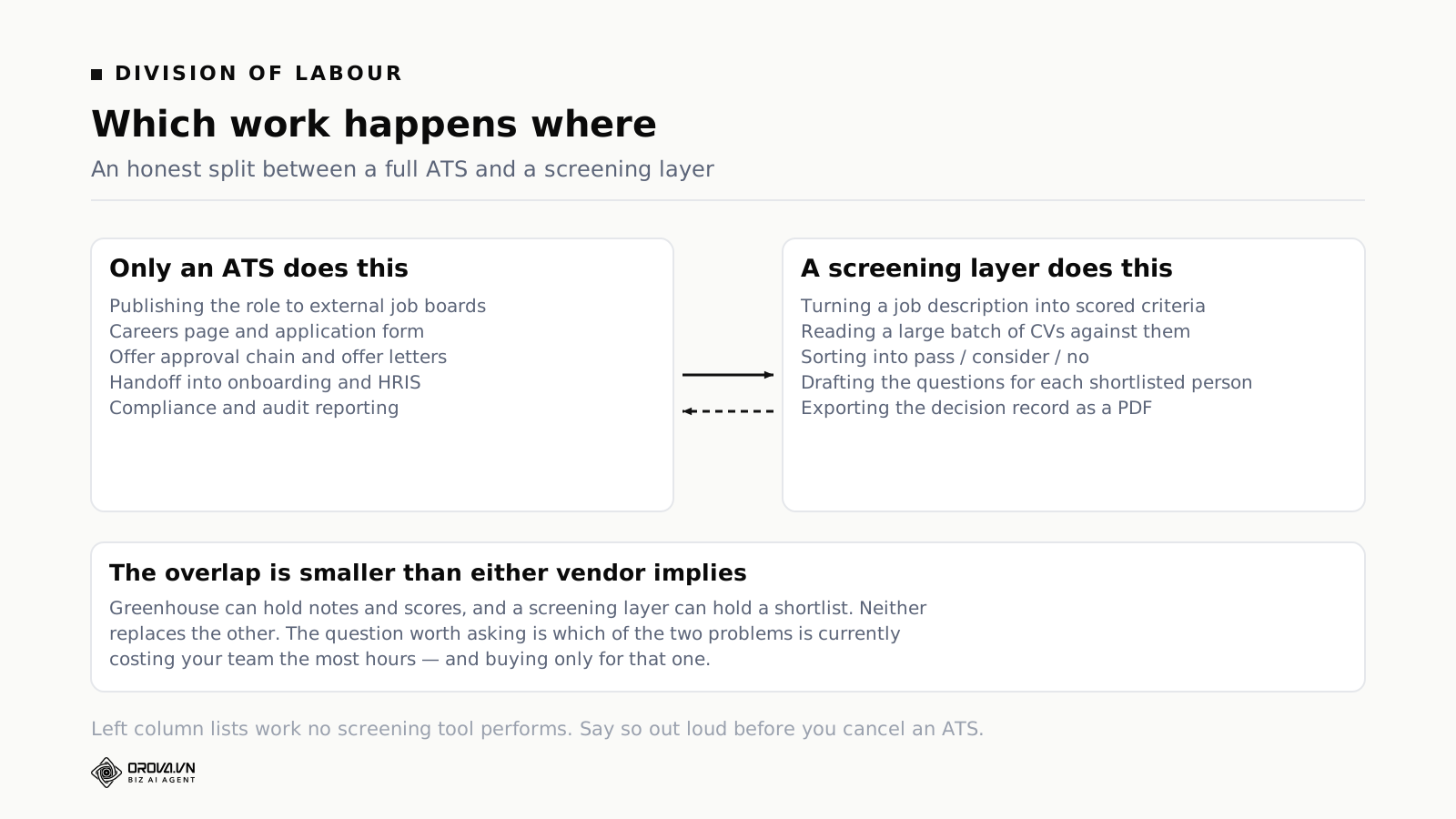
Orova Recruit does not post jobs to job boards. There is no careers page builder, no syndication to Indeed or LinkedIn Jobs, no application form hosted on your domain. Greenhouse does all of that, including free job post distribution through built-in integrations. If getting the role in front of candidates is part of what you are buying, Orova is not a substitute for it and never will be.
Orova Recruit does not source candidates. No outbound sequences, no CRM of passive prospects, no scraping of external profiles. Recruit begins at the moment applications have already arrived. Greenhouse's sourcing and CRM sit in Core, with automation on Plus, and there is no equivalent on our side.
Orova Recruit does not manage offers or onboarding. No offer approval chain, no offer letters, no e-signature, no handoff into an HR system, no first-day workflows. Once a decision is exported, the paperwork happens somewhere else.
Orova Recruit does not do compliance or audit reporting. There is no audit log of who changed what, no enterprise data configuration, no developer sandbox. A regulated employer that needs those should treat that requirement as disqualifying, not as a gap to work around.
What Recruit does cover is one specific block of work: turning a role plus a stack of applications into a defensible shortlist. You write or analyse the job description and set the criteria for the role. You load up to 500 CVs per position and the system scores each into pass, consider or no, with a fourth state for files it could not read. It generates and refines the interview questions for the people who made the shortlist. It records or transcribes the interview itself from a file. Then scoring becomes a recommendation, the recommendation becomes a decision made individually or in bulk, and the decision exports as a PDF. There is also room and slot scheduling and templated invitation emails with rules for sending them.
That block is the one Greenhouse charges for by employee count rather than by how much reading you actually do, which is why the two can sit side by side in a stack rather than competing for the same budget line. If that is the block that hurts, Orova Recruit is built for it.
Greenhouse and Orova Recruit, step by step
The table below is the version to bring to an internal discussion. Read it as a map of your own process, marking which rows currently cost you time, before deciding what to buy.
| Step in hiring | Greenhouse | Orova Recruit |
|---|---|---|
| Write and analyse the job description | Templates and approval workflow | Writes and analyses it, then turns it into scored criteria |
| Publish to external job boards | Yes, including free post distribution | No |
| Careers page and application form | Yes | No |
| Source passive candidates | Sourcing and CRM in Core, automation in Plus | No |
| Detect fraudulent or spam applications | Real Talent fraud detection, Plus tier | No |
| Read and score a large batch of CVs | Talent matching prioritises the pipeline | Up to 500 per position, scored pass / consider / no |
| Generate interview questions for a shortlist | Interview kits, built by you | Generated per candidate, then refined |
| Structured scorecards from multiple interviewers | Yes, the core strength of the product | Interview notes and evaluation, single-team scale |
| Schedule interviews | Yes, with an AI notetaker in Core | Room and slot scheduling; recording and transcription |
| Record the decision and its reasoning | Scorecards and stage history | Decision made single or in bulk, exported as PDF |
| Offer approval and offer letters | Yes | No |
| Onboarding and HRIS handoff | Via integrations | No |
| Pipeline and conversion reporting | Yes, with BI connector on Plus | Per-position results, not company-wide analytics |
| Audit log and enterprise data controls | Pro tier | No |
Two conclusions usually fall out of filling this in honestly. The first is that most teams have three or four rows that hurt, not fourteen. The second is that the rows that hurt are rarely the rows that get demoed.
How to run the evaluation in two weeks
An ATS evaluation expands to fill whatever time you give it, largely because everybody has an opinion and nobody has data. Two weeks is enough if you fix the order.
Days one and two: write down what is actually broken
Not "our process is a mess". Specific, countable statements: it takes nine days to get a hiring manager to look at a shortlist; we lost two candidates last quarter to slow scheduling; nobody can tell me our offer acceptance rate. Three to five statements. If you cannot produce three, you have a preference, not a problem, and you should stop here.
Days three and four: measure the two worst ones
Go into whatever you use now, including the shared inbox, and get real numbers for the two worst statements. Days between application and first response. Hours spent reading CVs for the last filled role. Number of candidates who withdrew during scheduling. These numbers are the only defence you will have against a demo that is very good at making everything look important.
Days five to eight: demos, with your own list
Send the vendor your three to five statements before the call and ask them to demo those, in that order, using data shaped like yours. Refuse the standard tour. Ask each vendor which of your statements their product does not address, and treat a vendor who claims all five as less trustworthy than one who names a gap.
Days nine and ten: price the whole first year
Ask in writing for the licence, implementation, any integration fees for your named five tools, and the cost of the next tier up. Ask what happens to the price if headcount grows 30% but hiring volume does not. Get renewal uplift in writing. The answers to those three questions separate vendors more reliably than feature lists do.
Days eleven to fourteen: test the boring path
In a trial, run one real role end to end with two real interviewers who are not on the buying committee. Watch where they hesitate. The feature that fails in a trial is almost never the impressive one; it is the scorecard form nobody can find, or the notification that arrives three days after the interview.
Questions to ask on the demo call
Nine questions, in the order that gets useful answers. Ask the pricing ones last, after the vendor has shown you enough to be invested in the conversation.
- Which of my three problem statements does this product not solve?
- Show me the scorecard exactly as an interviewer who has never logged in sees it, on a phone.
- How does a hiring manager who ignores two reminders get chased, and what does the report of late feedback look like?
- What is in the tier above the one you have quoted me, and which of those features do customers of my size usually end up needing?
- Which of these five specific tools do you integrate with directly, and which need middleware?
- If we leave in three years, what exactly can we export, and in what format?
- How long is implementation for a company our size, measured from contract to first live role?
- What does the price do at renewal if our headcount grows but our hiring volume does not?
- Who at your company owns our account after the sale, and what is their caseload?
Question six is the one most often skipped and most often regretted. Data portability is cheap to ask about before signing and expensive to discover afterwards. Question nine tells you whether the responsiveness you are experiencing during the sale is what you will get in month seven.
Common mistakes with an ATS rollout
Assume you buy something. Five things go wrong most often, and all five are avoidable.
Configuring everything on day one. Teams design twelve stages, nine scorecard attributes and four approval steps before running a single role through the system. Most of it is guesswork and all of it becomes permanent, because nobody wants to reopen a configuration project. Start with the minimum: four stages, four attributes, one approval. Add friction only when you feel the absence of it.
Migrating every historical candidate. The instinct is to bring five years of records across. In practice nobody searches records older than about eighteen months, and old records import badly, with broken stage mappings that make your first reports meaningless. Migrate what is active plus the last year.
Letting the ranking make the decision. Any tool that scores or matches candidates draws a line, and the line is a suggestion. The candidate at position twelve who took two years out is not automatically worse than the candidate at position three. Read past the line on every role until you have enough hires to know how your own criteria behave. We covered where automated scoring helps and where it misleads in what actually works with AI in recruitment.
Nobody owning the pipeline being true. An ATS is only useful if the stage a candidate sits in matches reality. That requires one named person to check on a fixed day each week. Without that, the reports are confidently wrong within a month, which is worse than having no reports.
Training only the recruiters. The people who will use the system worst are hiring managers who log in twice a quarter. They need a two-page instruction sheet, not a training session they will have forgotten by their next interview.
Frequently asked questions
Does Greenhouse publish its prices?
No. As of August 2026 the Greenhouse pricing page lists the Core, Plus and Pro tiers with their feature sets, and states that pricing is customised based on your company's hiring needs. Any specific dollar figure you find online comes from a third-party buying platform or a customer report, not from Greenhouse.
What are the Greenhouse plan tiers called now?
Core, Plus and Pro. Older articles refer to Essential, Advanced and Expert. If a comparison you are reading uses the old names, check the publication date before trusting its feature breakdown, because the split between tiers moved as well as the names.
Is Greenhouse worth it for a 30-person company?
Usually not on volume alone, but it depends on how many roles you run at once. Thirty people hiring two roles a year should not be looking at this category yet. Thirty people hiring twelve roles a year, with managers in three time zones, is a genuine candidate. Count concurrent open roles, not employees.
Can Greenhouse screen CVs automatically?
Greenhouse's Real Talent uses AI talent matching to prioritise a pipeline and to flag likely fraudulent or spam applications, according to Greenhouse's own product materials. That is prioritisation and filtering rather than a scored assessment against criteria you defined for one role. If your problem is specifically the reading and justification of a large batch, check how the matching explains its ranking before assuming it replaces that work.
How long does a Greenhouse implementation take?
Greenhouse does not publish a standard timeline and it varies with company size, data migration scope and how many integrations you need on day one. Ask the vendor for the number measured from contract signature to first live role, not to first login, and ask for a reference customer of your size who can confirm it.
What happens to our data if we leave?
Ask before signing, in writing, and get the answer at field level rather than as a yes. The specific things worth naming: candidate records, attachments such as CVs, scorecard scores and free-text feedback, and stage history with timestamps. Scorecard text and stage history are the two most likely to come out in a form that is technically an export and practically unusable.
Do we still need an ATS if we use a screening tool?
If you post roles publicly and make offers, yes, something has to hold the job posting, the application form and the offer. A screening layer does not replace that. What it changes is which tier of ATS you need, because the reading and shortlisting work that pushes teams towards heavier products moves elsewhere.
Is Greenhouse better than Lever or Workable?
They optimise for different things and the honest answer is that the comparison depends on which step hurts. Greenhouse's centre of gravity is structured evaluation. Others lead with candidate relationship management or with job distribution breadth. Rank the four steps that cost you the most time and compare the products only on those.
The short version
Greenhouse is a strong product with a clear opinion: hiring goes wrong at the judgement step, so the software should make judgements comparable. Interview kits, scorecards and stage reporting all follow from that, and they work. As of August 2026 the plans are Core, Plus and Pro, prices are not published, and the features that most often force an upgrade are sourcing automation, the BI connector, texting and the audit log.
Buy it if you run enough concurrent roles that nobody can hold the process in their head, and if your hiring managers will genuinely do the homework structured hiring asks of them. Do not buy it to fix a shortage of applicants, to fix an accountability problem, or to solve one painful step out of ten.
And whatever you buy, be honest about which block of work you are actually paying to remove. The teams that get value from this category are the ones that could name, before the first demo, the three things that were costing them time. The teams that do not are the ones that bought the serious option because someone senior had used it before.
Related reading: interview questions worth asking candidates and where to start with recruitment automation.
Screen the CVs already in your inbox
Orova Recruit turns a job description into scored criteria, sorts up to 500 CVs per position into meets, consider and does not meet, generates the interview questions, and exports the decision as a PDF.
Try a position