
Recruitment Automation: Automate the Reading, Not the Deciding
Your Monday looks like this. Sixty-one applications arrived over the weekend for two open roles. The system sent every one of them a polite acknowledgement within four seconds, which is genuinely nice. It tagged them by source, deduplicated three people who applied twice, and dropped them into a neat pipeline view. Then it stopped, because the next thing that has to happen is that a human being reads sixty-one documents and forms a view. That human is you, and you have four hours of meetings today. This is what recruitment automation usually looks like six months after you buy it: the cheap parts got faster and the expensive part did not move at all.
By Thursday you have skimmed maybe forty of the sixty-one, in three sittings, in different moods. The first ten got two minutes each. The last fifteen got twenty seconds each because you were behind. You know, without wanting to think about it too hard, that a candidate who applied on Saturday morning was read more carefully than one who applied on Sunday night. The tool did not cause that. But it also did not prevent it, and you paid for it partly because you hoped it would.
Meanwhile the parts that did get automated created their own small taxes. The auto-reply promises a response "within five working days", which nobody is tracking, so people who were quietly dropped are still waiting. The scheduling link works, except when the hiring manager moves a meeting and two candidates get an automated reminder for a slot that no longer exists. And the weekly pipeline report lands in a channel nobody reads, because it reports the number of applications, which is not a number anyone can act on.
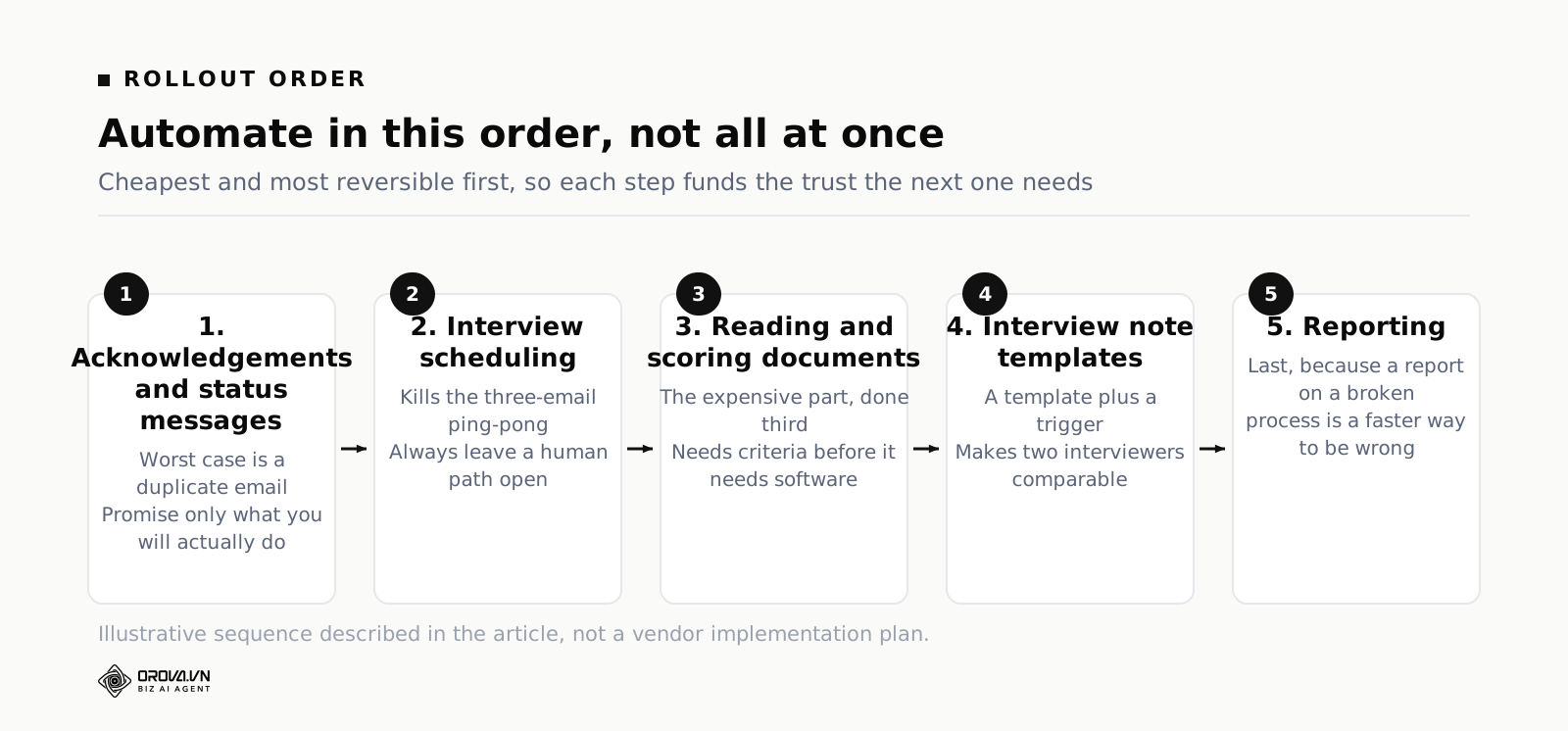
Here is the short version. Automate in this order: acknowledgements and status messages, then scheduling, then reading and scoring documents, then interview note templates, then reporting. Automate the reading; do not automate the deciding. Every step that can end someone's candidacy keeps a person on the button, and every automated step writes down what it did so you can explain a rejection nine months later. The rest of this article is the sequence, the plumbing, the failure modes, and how to tell whether any of it paid for itself.
What does recruitment automation actually mean?
Recruitment automation means handing repeatable, rule-bound work to software: acknowledgements, scheduling, file reading, scoring against fixed criteria, and reporting. It does not mean handing over decisions. The test is simple. If a mistake can be undone by resending an email, automate it. If it ends someone's application, keep a person on the button.
The word covers three quite different things, and most bad purchases come from confusing them.
The first is movement: getting information from one place to another without retyping it. An application form that populates a candidate record. A calendar invite that appears in three diaries. A status change that triggers a message. This is plumbing, it is well understood, and it is where an applicant tracking system earns its keep. If you are unclear on the boundary between tracking and judging, the piece on what an applicant tracking system actually does lays out where that boundary sits.
The second is reading: turning a document into structured facts and a judgement against fixed criteria. Extracting a phone number is reading. Deciding whether nine months at an agency plus two years freelance counts as "three years of experience" is also reading, just harder. This is the part that eats your week, and it is the part most tools quietly leave to you.
The third is deciding: choosing who advances, who is rejected, who gets the offer. Software can propose. It should not dispose. Not because machines are untrustworthy in principle, but because a decision you cannot explain is a decision you cannot defend, improve, or apologise for.
Almost every disappointment with HR automation software comes from buying movement and expecting reading, or from letting a tool slide from reading into deciding because nobody drew the line explicitly. Draw it explicitly. Write it down. It is the single most useful hour you will spend on this.
Start with an audit: where do your recruiter hours actually go?
You cannot sequence automation until you know what is expensive. Most teams guess, and most guesses are wrong in the same direction: people overestimate time spent interviewing and underestimate time spent on scheduling emails and document reading, because interviews feel like work and email feels like the gaps between work.
Run a one-week log. Not a time-tracking system, not a new tool. A note file with rough blocks. Every time you switch tasks, write the task and the elapsed minutes. Round to five minutes. Do it for five working days across however many openings you have live. It is tedious for about ninety minutes and then it becomes automatic.
Use these categories, because they map cleanly onto the automation decisions you are about to make:
- Sourcing and outreach — writing the ad, posting it, searching profiles, sending cold messages.
- Correspondence — acknowledgements, status updates, chasing, answering "did you get my CV".
- Scheduling — proposing times, rescheduling, room and video links, reminders.
- Reading and screening — opening files, reading, forming a view, writing the reason down.
- Interviewing — the calls themselves.
- Write-up — turning interview memory into notes someone else can use.
- Reporting and coordination — status updates to hiring managers, pipeline reviews, chasing feedback.
- Admin — offer paperwork, agency invoices, ATS hygiene.
Here is a made-up week to show the shape of the answer. Invent nothing about your own numbers; this is only an illustration of how the arithmetic works. A recruiter running three open roles logs a forty-hour week like this: reading and screening 9 hours, scheduling 6, correspondence 4, sourcing 5, interviewing 6, write-up 3, reporting 2, admin 5.
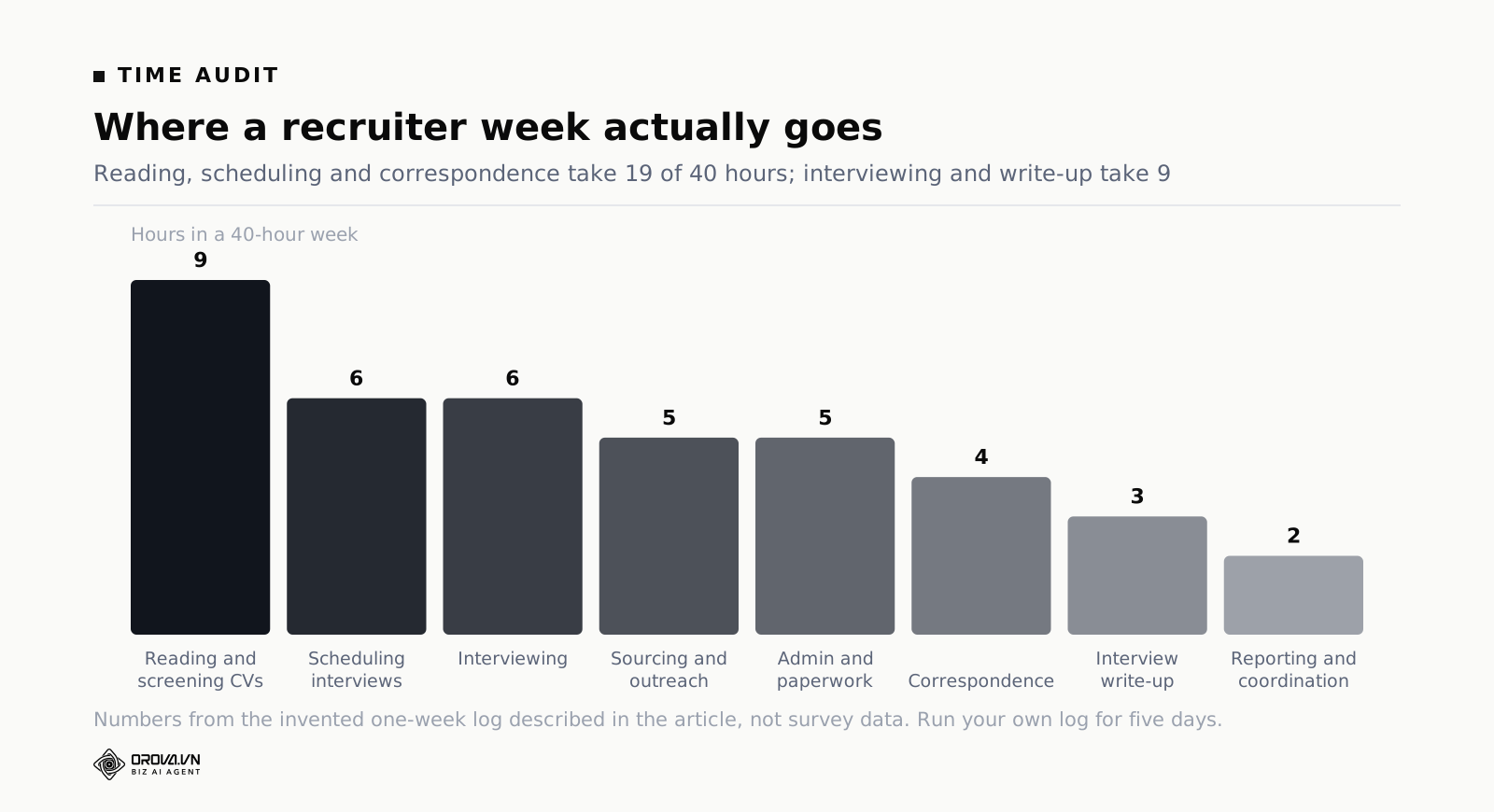
Two things fall out of a log like this. First, the three categories that are pure repetition — reading, scheduling, correspondence — add up to 19 of 40 hours, while the two categories that require judgement — interviewing and write-up — take 9. Second, you can now express the expensive part per opening: 9 hours of screening across 3 roles is 3 hours per opening per week. That is your baseline. When someone later claims the new tool "saved loads of time", you have a number to argue with.
One warning about the log. Do not let it turn into a productivity exercise about the individual. The point is to find which tasks are repetitive, not which person is slow. If people suspect the second thing, the log stops being honest within a day.
The automation order: first, second, and never
Sequence matters more than tool choice. When you automate recruiting tasks, do it in order of risk, cheapest and most reversible first. Each step buys you time and trust that funds the next one.
First: acknowledgements and status messages
Start here because the blast radius is an email. Auto-acknowledge every application within the hour, and auto-send a status message when a candidate's stage changes. This is the lowest-risk automation in the entire recruiting workflow and it removes an entire category of interruption: people writing to ask whether you received their CV.
Three rules make it work. Promise only what you will actually do — if you cannot reliably respond in five days, do not write five days. Make every automated message answerable by a real person at a monitored address, not a no-reply mailbox. And set a rule that no candidate sits in one stage past a fixed number of days without either a human touch or an automatic nudge into your queue.
Second: scheduling
Scheduling is the classic ping-pong tax: three emails to find a slot, one to confirm, one to reschedule, one to remind. Automating it is standard, cheap, and gives you back hours that show up immediately in the log you just made.
The plumbing that actually matters here is not the booking link. It is the connection between the booking system and the calendar of the person doing the interview, including their real availability rather than their aspirational availability. A booking link on top of a diary that is not kept up to date does not remove the ping-pong; it moves it to a more annoying place, where the candidate has already told everyone they have an interview on Thursday.
Two guardrails. Always leave a human path — "these times do not work for me" must reach a person. And never let an automated reschedule fire without telling the candidate what changed and why in plain words.
Third: reading and scoring documents
This is the big one, and it is third rather than first for a reason: it is the step where an error is expensive and quiet. Do it after the two easy wins because by then you have a working control layer and a team that trusts the tooling for small things.
Reading breaks into two sub-steps that are worth separating in your head. Extraction is mechanical: pull the text out of the file, find name, email, phone, years of experience, most recent title. Scoring is judgement against a rubric: for each criterion in your job description, a score and the evidence from the document that justifies it. Extraction can be fully automated. Scoring can be automated with review, which is a different thing and needs the whole control layer described further down.
The prerequisite is that you actually have criteria. Not a job ad with a wish list, but a set of weighted, checkable requirements. If your job description is a paragraph of adjectives, no amount of software will screen against it consistently, because there is nothing to screen against. The article on job Posting Template: Write One, Get a Hiring Scorecard Too covers how to write the requirements so they convert directly into criteria.
Fourth: interview note templates
Do not automate the interview. Automate the paperwork around it. When an interview is booked, the system should create the note document, pre-filled with the criteria being tested in that round, the questions, and an empty score field with the rating scale printed next to it. When the interview ends, the interviewer fills in a form rather than writing prose from memory.
This is barely automation at all — it is a template plus a trigger — and it is one of the highest-return steps on this list, because it fixes the problem where every interviewer records something different and nothing can be compared. If you want the scoring side of this in detail, the piece on behavioral Interview Questions: Asking Is Easy, Scoring Is t goes through what a usable rubric looks like.
Fifth: reporting
Reporting comes last because a report on a broken process is a faster way to be wrong. Once the first four steps are stable, the data underneath the report is worth reading. Automate a weekly pipeline summary that shows movement, not volume: how many people entered each stage, how many left, how long they waited, and which stage has the oldest untouched candidate.
Never: the decision, and the criteria
Two things stay off the automation list permanently. The decision to reject or advance a specific person, and any change to the criteria or thresholds mid-round. Both are covered in detail below.
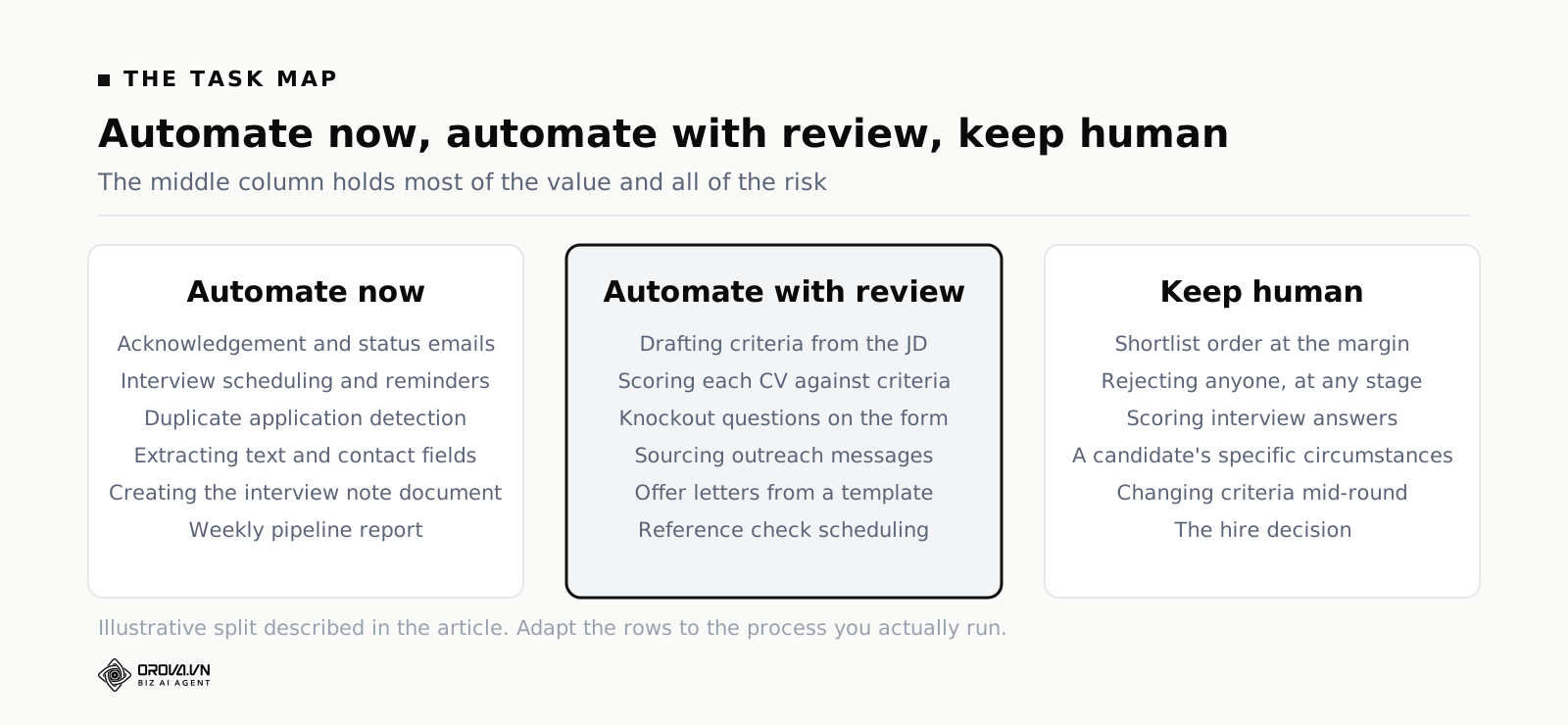
The task map: automate now, automate with review, keep human
Below is the map applied to a normal recruitment process. "Automate now" means a machine can do it end to end and a failure is recoverable. "Automate with review" means the machine produces a draft or a score and a named person signs it off before it has consequences. "Keep human" means a person does the work, and software's only job is to make that work faster to record.
| Task in the hiring process | Verdict | Why |
|---|---|---|
| Application acknowledgement email | Automate now | Worst case is a duplicate email. Removes a large slice of inbound "did you get it" traffic. |
| Stage-change status updates to candidates | Automate now | Same low risk, and it is the single biggest driver of candidates feeling ignored. |
| Duplicate application detection | Automate now | Pure matching on email and phone. Flag, do not merge silently, so a real second application is not lost. |
| Interview scheduling and calendar booking | Automate now | Rule-bound, high volume, immediately reversible. Keep a human path for people the link does not suit. |
| Interview reminders | Automate now | Cheap, reduces no-shows. Must be cancelled automatically when the slot is. |
| Extracting text and contact fields from CV files | Automate now | Mechanical. The only requirement is that failures are visible rather than silent. |
| Creating the interview note document | Automate now | A template and a trigger. Makes rounds comparable without touching any judgement. |
| Weekly pipeline report | Automate now | Reading data you already have. Report movement and waiting time, not application volume. |
| Turning a job description into weighted criteria | Automate with review | A machine drafts a good first list fast, but you decide which are must-haves and what the weights are. |
| Scoring each CV against the criteria | Automate with review | The main time win, but every score needs quoted evidence and a sampled human check. |
| Knockout questions on the application form | Automate with review | Only safe for hard, verifiable facts. Review the wording quarterly; badly worded knockouts silently delete good people. |
| Sourcing outreach messages | Automate with review | Drafting is fine, sending in bulk without a read-through damages your name for months. |
| Offer letter generation from a template | Automate with review | Merge fields are fine. Numbers, dates and terms get read by a person before it goes. |
| Reference check scheduling | Automate with review | Booking is mechanical. Who is asked, and when, is a judgement about the candidate's situation. |
| Deciding the shortlist order | Keep human | A sorted score column is a reading order, not a ranking of merit. Two points apart is noise. |
| Rejecting a candidate after screening | Keep human | The only irreversible step in screening. A machine may flag; a named person presses the button. |
| Rejecting a candidate after interview | Keep human | Same, plus the reason has to be written by whoever formed it. |
| Scoring interview answers | Keep human | The evidence exists only in the room. Software's job is to hold the rubric, not to fill it in. |
| Handling a candidate's specific circumstances | Keep human | Accessibility needs, notice periods, visa timing, a gap with a reason. Rules cannot see context. |
| Changing criteria, weights or thresholds mid-round | Keep human | Changing the ruler halfway means two candidates were measured differently. Requires a decision and a log entry. |
| The hire decision | Keep human | Not automatable, and not delegable to a score. Everything above exists to make this decision better informed. |
What must stay manual, and why
It is worth being precise about the reasoning here, because "keep a human in the loop" is repeated so often that it has stopped meaning anything operationally.
Irreversibility
A rejection cannot be taken back. You can email someone to say there was an error, and occasionally that works, but in practice a rejected candidate is gone. Any step that is irreversible from the candidate's side gets a person on it. Not a person who rubber-stamps a list of eighty, which is the same as automation with extra steps, but a person who looks at each name and can be identified later as the one who decided.
Context that is not in the document
A two-year gap on a CV might be a caring responsibility, an illness, a failed business, or a country where the applicant could not legally work. The document does not say. A rule that penalises gaps cannot know, and neither can a model reading only the file. If a factor requires asking, it cannot be scored from the document, and it should not be scored from the document.
Comparison at the margin
Scores are useful for separating obviously strong from obviously weak. They are not useful for choosing between 74 and 78. Anyone who treats a sorted list as a ranking will systematically pick candidates who write CVs in the format the rubric expects, which is a real skill but not usually the one you are hiring for.
Anything that changes the rules
Criteria, weights, thresholds and the consider band are the ruler. If they change during a round, earlier and later candidates were measured with different instruments and the round is no longer internally comparable. Change them between rounds, deliberately, with the change written down. Never mid-round because a batch came in weak.
The control layer: approvals, audit trails and what to log
Automation without a control layer is not efficiency, it is unlogged delegation. The control layer is three things: approval gates, an audit trail, and a set of alerts for when something silently did not happen.
Approval gates that are real gates
A gate is real if three conditions hold. It has a named owner, not a group inbox. It presents enough information to make a judgement, which for a rejection means the score, the evidence and the file itself in one click. And it is small enough to be done properly — batching a hundred rejections into one confirmation box is a gate in name only.
A practical shape for screening: the system scores every CV and sorts them into pass, consider and fail. A person reviews all of the consider band and a sample of the fails, then presses the button that sends outcomes. The sample matters. If nobody ever looks at a fail, you will never find out that your rubric has been quietly deleting a category of good candidate for six months.
What to log, so a decision can be explained months later
Assume that nine months from now someone asks why a specific person was rejected. Maybe the candidate asks. Maybe a hiring manager wants to reopen a pipeline. Maybe it is a complaint. You need to be able to reconstruct the decision without relying on anyone's memory. That requires storing the state of the world at the moment the decision was made, not just the outcome.
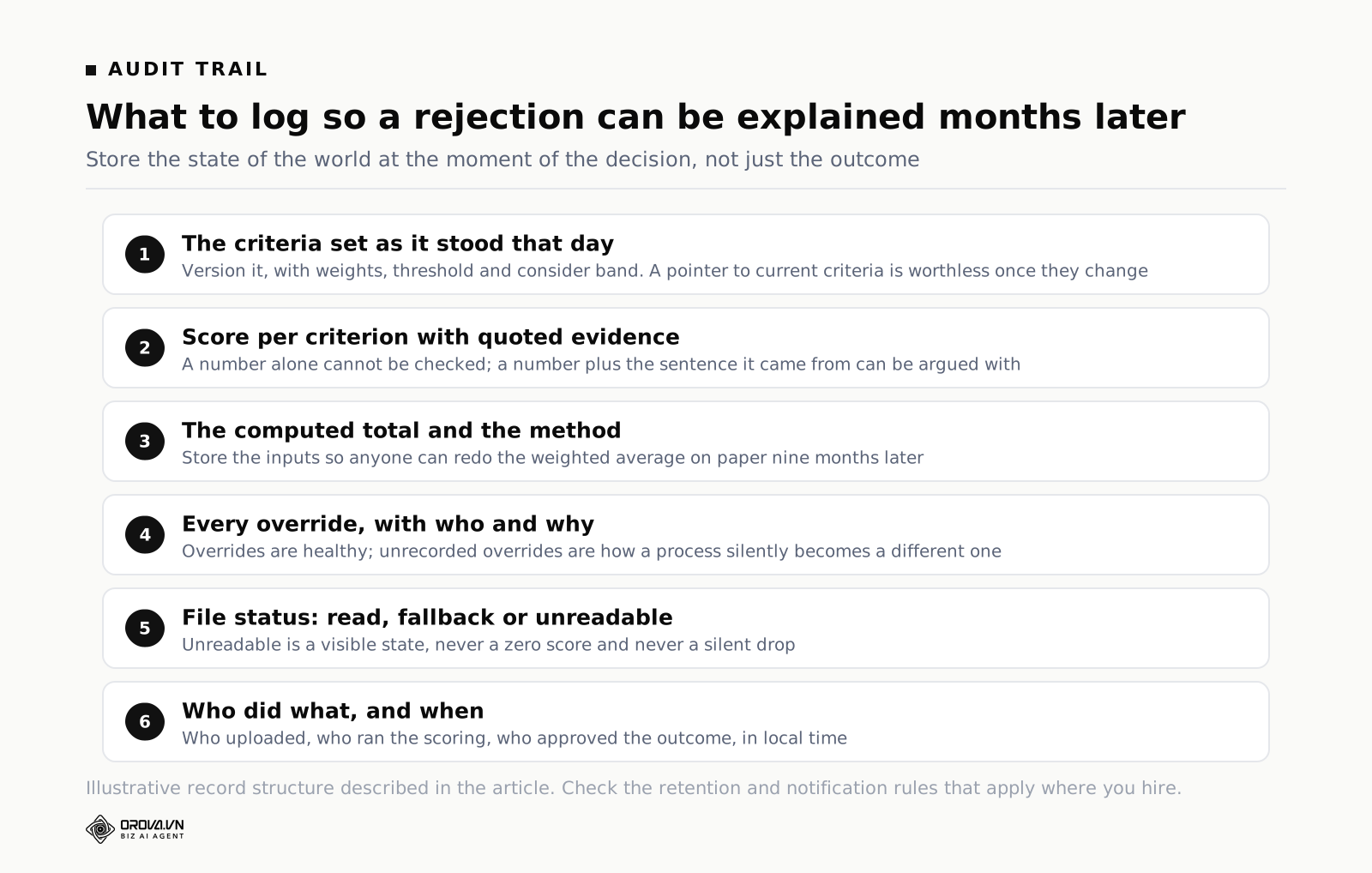
In practice, log these per candidate:
- The criteria set as it stood that day, including weights, thresholds and the consider band. Version it. A pointer to "the current criteria" is worthless once the criteria change.
- The score on every criterion, with the evidence quoted from the file. A number alone cannot be checked. A number plus the sentence it came from can be argued with, which is the point.
- The computed total and the method. If the total is a weighted average, store the inputs so anyone can redo the arithmetic on paper.
- Any override, who made it and why. Overrides are healthy. Unrecorded overrides are how a process silently becomes a different process.
- File status. Read successfully, read by fallback, or unreadable. Unreadable must be a visible state, never a zero score.
- Who did what, and when. Who uploaded, who ran the scoring, who approved the outcome, in local time.
Two further points on the plumbing. Keep the original file, not just the extracted text, because a dispute about a score is usually a dispute about what the document said. And decide your retention period deliberately: long enough to answer questions, short enough that you are not holding personal data with no purpose. Check the rules that apply where you hire; they vary, and this article is not legal advice.
Alerts for silence
The failure you will not notice is the one where nothing happens. Set alerts for: a batch that finished with fewer results than files submitted, a candidate sitting in one stage past your limit, a scheduled message that failed to send, and any run that stopped partway through. Silence is the most expensive failure mode in any automated recruiting workflow, precisely because nothing appears in your inbox to tell you about it.
Failure modes, and how each one shows up
Automating a broken process
This is the big one. If your screening is inconsistent, automating it produces inconsistent results faster and with a veneer of objectivity that makes them harder to challenge. If your job descriptions are vague, automated scoring against them is theatre. Fix the process on paper first, run it manually for one round, then automate the version that worked. The order is not optional. A tool inherits every flaw in the process it is pointed at, and adds volume.
Over-filtering
Over-filtering has two causes: thresholds set too high, and knockout rules written too literally. The literal knockout is the nastier of the two because it never appears in your metrics. A rule requiring "degree in Computer Science" removes self-taught engineers. A rule requiring five years removes someone with four years and eleven months. You will never see these people, because the whole point of the rule was that you would not have to.
The counter-measure is a sampled read of the fail pile every round, plus a specific check: of the people you actually hired in the last year, how many would this rule have removed? If the answer is more than none, the rule is wrong.
Silent failures on files that cannot be read
A meaningful share of CVs are scans, phone photographs, files exported by tools that write text as images, or documents that are simply corrupt. What a system does with those files determines whether your automation is trustworthy. There are three behaviours and only one is acceptable.
- Unacceptable: score it zero. The candidate fails for owning the wrong scanner.
- Unacceptable: drop it silently. Your counts no longer match and nobody knows.
- Acceptable: mark it as unreadable, exclude it from the scored set, show it in a queue for a human to open, and do not charge for a read that did not happen.
Test this before you commit to any tool. Upload a deliberately awkward file — a photo of a printed CV, a password-protected PDF, a zero-byte file — and see what the interface says. What happens on broken inputs tells you more about the engineering than any feature list.
The notification tax
Every automation that pings a human has a cost. Ten alerts a day that require no action train people to ignore alerts, including the one that mattered. Budget your interruptions. If an alert has not caused an action in a month, delete it.
Drift with no owner
Automations rot. The hiring manager changes, the criteria template gets copied and edited, someone adds a knockout question for one urgent role and it stays for two years. Give every automated rule a named owner and a review date. Anything with neither gets switched off at the next review, and you will find that almost nobody notices.
Confusing speed with quality
The last failure mode is a management one. Once screening gets fast, the temptation is to increase volume: post to more boards, accept more applications, keep the top of the funnel wide because processing is now cheap. Sometimes that is right. Often it converts a screening bottleneck into an interview bottleneck, which is more expensive because interviews cost two people's time. Decide deliberately whether the time you saved goes into more candidates or into more care per candidate.
How do you measure whether the automation paid off?
Pick a small number of measures, take a baseline before you change anything, and compare like with like. Three measures cover most of it, and a fourth catches the damage the first three miss.
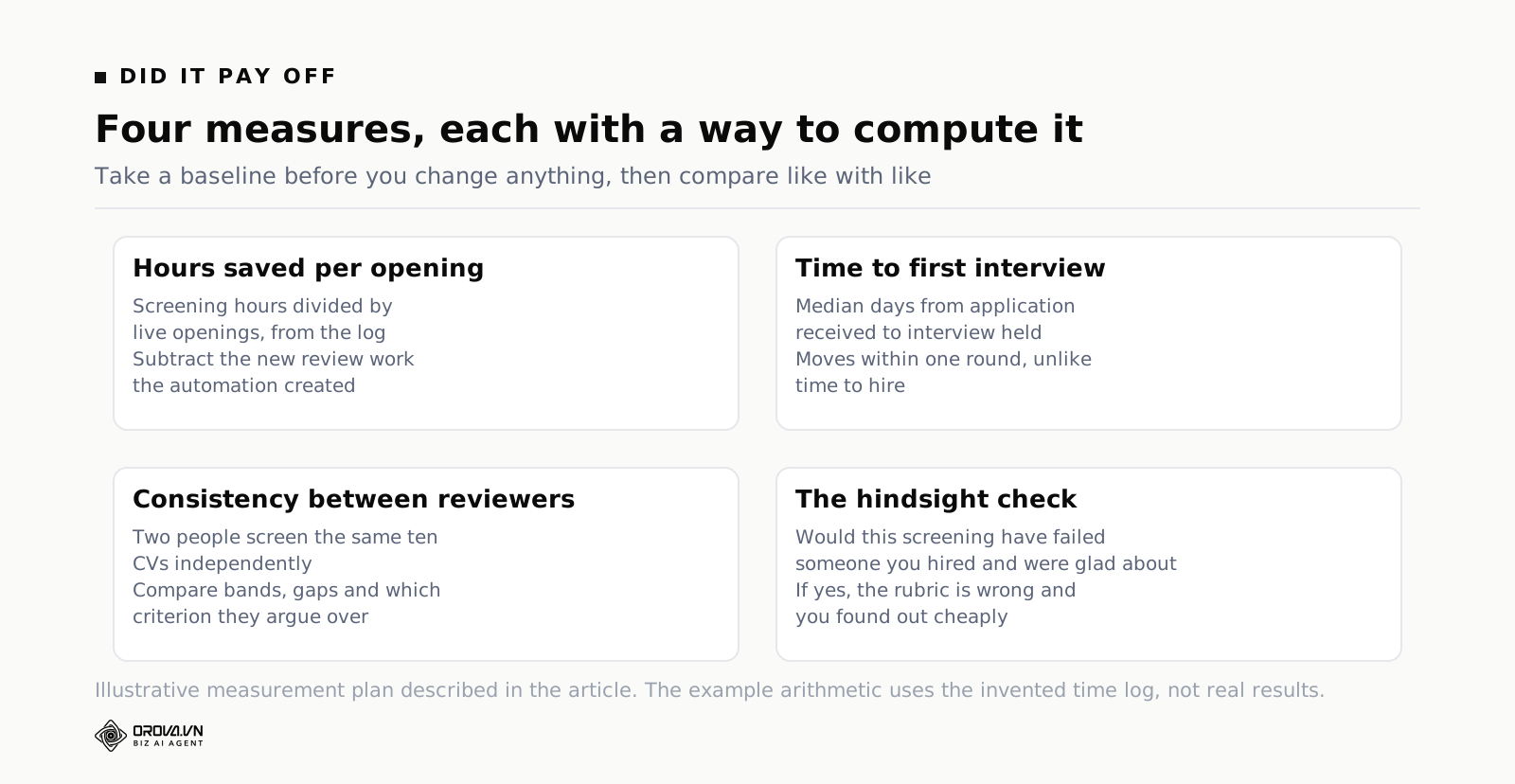
Hours saved per opening
From your one-week log you have hours by category, and you can divide by the number of live openings. Take the same measurement one month after the change, with a comparable number of applications per opening. Continuing the invented example above: screening was 9 hours across 3 roles, so 3 hours per opening per week. If the same log a month later shows 4 hours across 3 roles, that is 1.33 hours per opening, a saving of about 1.67 hours per opening per week. Multiply by roles and weeks to see whether it justifies the cost.
Adjust for volume. If applications doubled, hours per opening is the wrong comparison and you should use minutes per application instead. And subtract the new work the automation created: reviewing the consider band, checking failures, maintaining the criteria templates. Automation almost never removes work entirely; it converts a lot of shallow work into a little deep work, and the conversion rate is the thing worth knowing.
Time to first interview
Measure the median days from application received to first interview held. This is a better early indicator than time to hire, because it isolates the part of the process you actually changed, and it moves within one hiring round rather than one quarter. It is also the number candidates feel. If screening got faster but time to first interview did not move, your bottleneck was never screening — it was hiring manager availability, and you automated the wrong thing.
Use the median rather than the mean. One candidate who was on holiday for three weeks will wreck an average and tell you nothing.
Consistency between reviewers
This is the measure almost nobody takes and it is the one that tells you whether the process is fair. Take ten CVs from a closed round. Have two people screen them independently against the current criteria, without seeing each other's results or the system's. Then compare three things: how many of the ten they put in the same band, how far apart the totals are on average, and whether the disagreements cluster on one criterion.
Disagreement clustering on one criterion is the most useful output. It usually means the criterion is badly worded rather than that one reviewer is wrong. Rewrite it and the disagreement often disappears. Repeat the exercise once a quarter and after any change to the criteria template. If you want the underlying reasoning on why consistent measurement beats individual judgement here, the piece on what AI in recruitment genuinely does well covers where automated reading holds up and where it does not.
The check that catches quality damage
Efficiency measures cannot see the good candidate you never met. So run a hindsight check every few months. Take the people you actually hired and the people who reached final interview, and ask what the current automated screening would have done with their original applications. If it would have failed someone you hired and were glad about, you have found a real problem in the rubric, and you found it cheaply.
Do the same in the other direction with anyone who did not work out. This is not a scientific exercise and the sample is tiny, but it is the fastest way to spot a criterion that is measuring the wrong thing.
Choosing HR automation software without buying a second problem
By this point you know which category of tool you need, which is most of the decision. If your log says correspondence and scheduling are the cost, you need workflow plumbing and your existing tracking system may already do it with settings you have not switched on. If your log says reading and screening is the cost, workflow plumbing will not help, because moving a document faster does not read it.
For the reading problem specifically, the questions worth asking a vendor are narrow and answerable in a trial:
- Does it read the file formats you actually receive, including scans and photographs?
- Does it score against your criteria and weights, or against a generic model of a good candidate?
- Does every score come with the evidence quoted from the document?
- Is the total computed by the system from the stored scores, or produced by the model as a free-form number?
- What happens to a file it cannot read?
- Can a must-have requirement override a high total?
- Can you export the full record — criteria, scores, evidence, who approved — for a candidate?
- Who can see the files, and how long are they kept?
To make that concrete, here is one worked example of a tool built around exactly this split. Orova Recruit takes a job description as a file or pasted text and drafts eight to sixteen criteria across five groups — must-have, important, preferred, basic, flexible — each with a weight from one to ten and a suggested pass threshold, which you then edit, reweight or delete before anything is scored. It accepts PDF, DOCX, DOC, TXT, MD, RTF, ODT and image files up to 10MB each, to a limit of 500 CVs per position, sending scans and photographs to the model to read directly when text extraction is not possible. Each CV gets a 0 to 100 score per criterion with the evidence quoted from the document, plus extracted name, email, phone, years of experience and most recent title. The total is a weighted average computed by the server rather than a number the model invents, any must-have scoring under 50 forces a fail regardless of the total, and a file that cannot be read is marked unreadable without calling the model or spending quota.
Past the screening stage the same split holds. Interview questions are drafted per candidate from the approved criteria, each with a scoring line and a weight; notes are typed line by line with the author and timestamp kept, or dictated through the browser's own speech engine in one of 56 languages at no quota cost; the call is recorded and treated as the primary source when the interview is scored 0 to 5 per question. Scheduling is automated only where that is safe: each room declares its hours per weekday and the system refuses a double booking or an out-of-hours slot before sending the invitation. What stays manual by design is the hire-or-pass click, recorded with the person and the time, and who can see which position at all, which is granted per role rather than per workspace.
The same product carries the two automations most teams reach for second and third: an interview calendar where rooms have opening hours per weekday and clashes are refused at the moment of booking, and status-driven candidate email sent from your own company mailbox, where each rule fires once per candidate and a log prevents duplicates. Interview questions, live note transcription and interview scoring sit between them, all running off the criteria you approved at the start. Signing up is free and includes 1,000 quota, with no card required, which is enough to try one real position and check the answers against your own reading before you trust any of it.
Whatever you choose, run the parallel test: screen one real batch by hand and with the tool, then compare. Not to see whether the tool agrees with you — it will disagree sometimes and it should — but to see whether the disagreements are ones you can understand when you read the evidence.
The automation nobody starts with: candidate email on status
Ask a team where they would automate first and the answer is almost always screening. It is the visible bottleneck, so it gets the attention. But there is a second automation that costs far less to set up, carries almost no risk of a bad decision, and fixes the failure candidates actually notice: replying to them.
Why replies get dropped
It is not carelessness. Replying to candidates has three properties that guarantee it loses: it is never urgent, nobody chases it, and it takes longest at exactly the moment you are busiest — the week the applications land. So the messages that do go out are the ones with a deadline attached (interview invitations) and the ones that go nowhere are the rest.
The cost is invisible on your side and very visible on theirs. A candidate who hears nothing does not conclude that you were busy; they conclude that the company does not think much of people. They then tell other people, in the same networks you will be recruiting from next quarter.
The rule-based version
The fix is to stop treating the email as a task someone must remember and start treating it as a consequence of a status change. Written as rules, the whole thing is short:
Application received → confirmation. One sentence and a realistic timeframe is enough. This single message removes most of the "any update?" emails you would otherwise answer individually.
Screened out → rejection, sent within a week. If your criteria are written down, you can add a specific line about which requirement was not met, which is what turns a rejection into something the recipient can use.
Interview scheduled → invitation with date, time, duration, room and address, filled from the calendar entry rather than typed.
Interview verdict recorded → the next step or a rejection, depending.
Final decision made → offer or final rejection.
Five rules, five templates, written once.
Three things to get right
Send from your own mailbox. Mail arriving from a vendor's domain looks like spam to a candidate and is treated like spam by mail providers. Whatever you use should send through your own account so the reply-to address is a real human at your company.
Guarantee once-per-candidate. Two identical rejections to the same person is a memorable error and an awkward apology. Any rule engine you rely on should keep a log of what has already been sent to whom.
Keep an override. Some candidates deserve a personal note instead of the template — the near-miss you want to keep warm, the referral from a colleague. Automation should be the floor, not the ceiling, so the system must let you send something different without fighting it.
Why this one first
Compare the two automations honestly. Automating screening changes who gets interviewed, so it needs validation, calibration and oversight; it is worth doing, but it deserves care. Automating replies changes nothing about who you hire — it only means the people you were never going to hire find out promptly and politely. The downside risk is close to zero, the setup is an afternoon, and the effect on how your company is talked about is larger than anything else on the automation list. That combination is rare enough to be worth starting with.
Questions people ask
Can I automate rejections if the candidate is clearly unqualified?
You can automate the detection and keep the send manual, which gets you nearly all the time saving with none of the risk. In practice, review the whole consider band and a sample of fails, then send in one action. The only rejections worth fully automating are hard factual knockouts the candidate stated themselves — no right to work in the country, unwilling to relocate for a role that cannot be remote — and even those need the wording reviewed regularly.
How long does this take to set up?
Acknowledgements and scheduling are usually configuration rather than a project: an afternoon each in most systems. Reading and scoring takes longer, but the time goes into writing the criteria rather than the software. Budget a couple of hours per role template the first time, less afterwards as you reuse them. Reporting is quick once the data underneath is clean, which is why it comes last.
We hire four people a year. Is any of this worth it?
Some of it. Auto-acknowledgement and a scheduling link pay for themselves at any volume because they remove interruptions rather than hours. Automated scoring pays off when a single opening brings more documents than you can read carefully in one sitting, which for most people is somewhere around forty. Below that, a written scorecard used consistently gets you most of the fairness benefit for no cost at all. The tracking system article covers what you get from plumbing alone.
Will candidates know they are being screened by software?
Assume yes, and write your messages as though a real person will read them, because one will. Be straightforward about the fact that applications are read with software assistance and that a person makes the decisions. Rules on notification and on automated decision-making differ by country and are changing; check what applies where you hire. The safest position is also the honest one: software reads, people decide, and you can explain any outcome.
What if the tool and I disagree about a candidate?
Open the evidence. Nine times out of ten the disagreement resolves into one of three things: the tool found something you skimmed past, you know context the document does not contain, or the criterion is worded ambiguously. The first is the tool doing its job, the second is you doing yours, and the third is a fix you should make before the next round. Log the override either way.
How do I stop the automation drifting over time?
Give every rule an owner and a review date, keep the criteria templates in one place rather than copied per role, and put a fifteen-minute review of active automations into a recurring meeting you already have. Anything nobody can justify at that review gets switched off. This takes almost no time and prevents the slow accumulation of rules that nobody understands.
What to do this week
Three concrete things, in order.
- Run the log for five days. Rough blocks, eight categories, no new tools. At the end of the week you will know which of reading, scheduling or correspondence is actually costing you, and you will have a baseline in hours per opening.
- Switch on acknowledgements and a scheduling link, if you have not. These are configuration, the risk is an email, and the time comes back this month. Add one rule: no candidate sits in a stage more than a set number of days without a human touch.
- Write down the line between automate, review and keep human for your own process. Use the table above as a starting point, cross out what does not apply, and name an owner for every row in the middle column. Then, and only then, look at tools for the reading step.
The sequence is the whole idea. Automate movement first because it is reversible, reading second because it is expensive, and never the deciding, because a decision you cannot explain nine months later is not a decision you should have made.
Let AI read and score resumes against your JD
Orova Recruit turns your job description into weighted criteria and scores every CV with evidence quoted from the file.
Try it free