
Resume Parser vs Resume Screening: Reading Is Not Judging
The folder for your open role holds 240 files. Last quarter you bought a tool the sales deck called a resume parser, you dragged the whole folder in, and forty minutes later you had a very tidy spreadsheet: 231 names, 229 email addresses, 224 phone numbers, a column of most recent job titles, and nine rows where every cell was blank. It was accurate. It was fast. It was also completely useless for the only question you actually had, which was which of those 240 people deserve an hour of your Thursday.
Here is the short answer, in two sentences. A parser turns a document into structured fields — name, email, phone, employers, dates, skills — and that is the entire job; it never forms a view on whether the person can do the work. Screening is the separate step that judges one candidate against one role, and buying the first thing while expecting the second is the most common disappointment in this whole software category.
The confusion is not your fault. The two functions are sold in the same breath, often by the same vendor, often on the same slide, and the words are used interchangeably in half the product pages you will read this week. So this article separates them properly. It covers how extraction actually works on each file type, including the hard cases nobody demos — scanned PDFs and phone photos of a printed CV. It covers why a beautifully designed two-column CV is the thing most likely to produce garbage. It covers what should happen to a file that simply cannot be read, and why the answer must never be a quiet zero. Then it draws the line between matching keywords and scoring criteria with evidence, with a comparison table you can hold a vendor to, and it ends with the boring practical part: what file formats and size limits to put in your job ad so that fewer files arrive broken in the first place.
What is a resume parser, and what does resume screening software do?
A resume parser converts a CV file into structured data: name, email, phone, employers, job titles, dates, skills. Resume screening software takes that content and judges it against criteria for one specific role, producing a score or a verdict. Parsing answers what the document says. Screening answers whether this person fits.
Think of it as two machines bolted together, where you are usually only shown the outside of the box.
The first machine is an extractor. Its input is a file — some arrangement of bytes that a human would recognise as a CV. Its output is data: strings in named fields. It has no opinions. Given a CV from a brilliant candidate and a CV from someone catastrophically wrong for the job, it produces two structurally identical records, and it considers both a success. Its failure modes are all about the document: the file would not open, the text came out in the wrong order, the phone number got mangled because it was written inside an image.
The second machine is a judge. Its input is the content of the CV plus a description of what the role needs. Its output is a verdict about one person for one job: a score, a pass or fail, a ranked position, ideally with the reasoning attached. It has opinions by design — that is the point of it. Its failure modes are all about judgement: it rewarded the wrong thing, it missed evidence that was right there, it was fooled by a well-written paragraph that describes work the person watched somebody else do.
Almost every real complaint about this software comes from the two machines being confused. If you bought an extractor and expected a judge, you get exactly what happened to your 240 files: a clean spreadsheet and no shortlist. If you bought a judge but the extractor underneath it is weak, you get something worse — confident scores computed from text that was scrambled before the judging even started. That second case is more dangerous, because it looks like it worked.
There is a third thing that often lives in the same product and confuses matters further: the storage and workflow layer, the place candidates sit while they move from applied to screened to interviewed. That is a tracking system, and it is a different job again. We wrote about the gap it leaves in what an applicant tracking system actually does. The short version: it holds records and moves them between states, and the reading and the judging are both somebody else's problem.
How a resume parser actually reads each file type
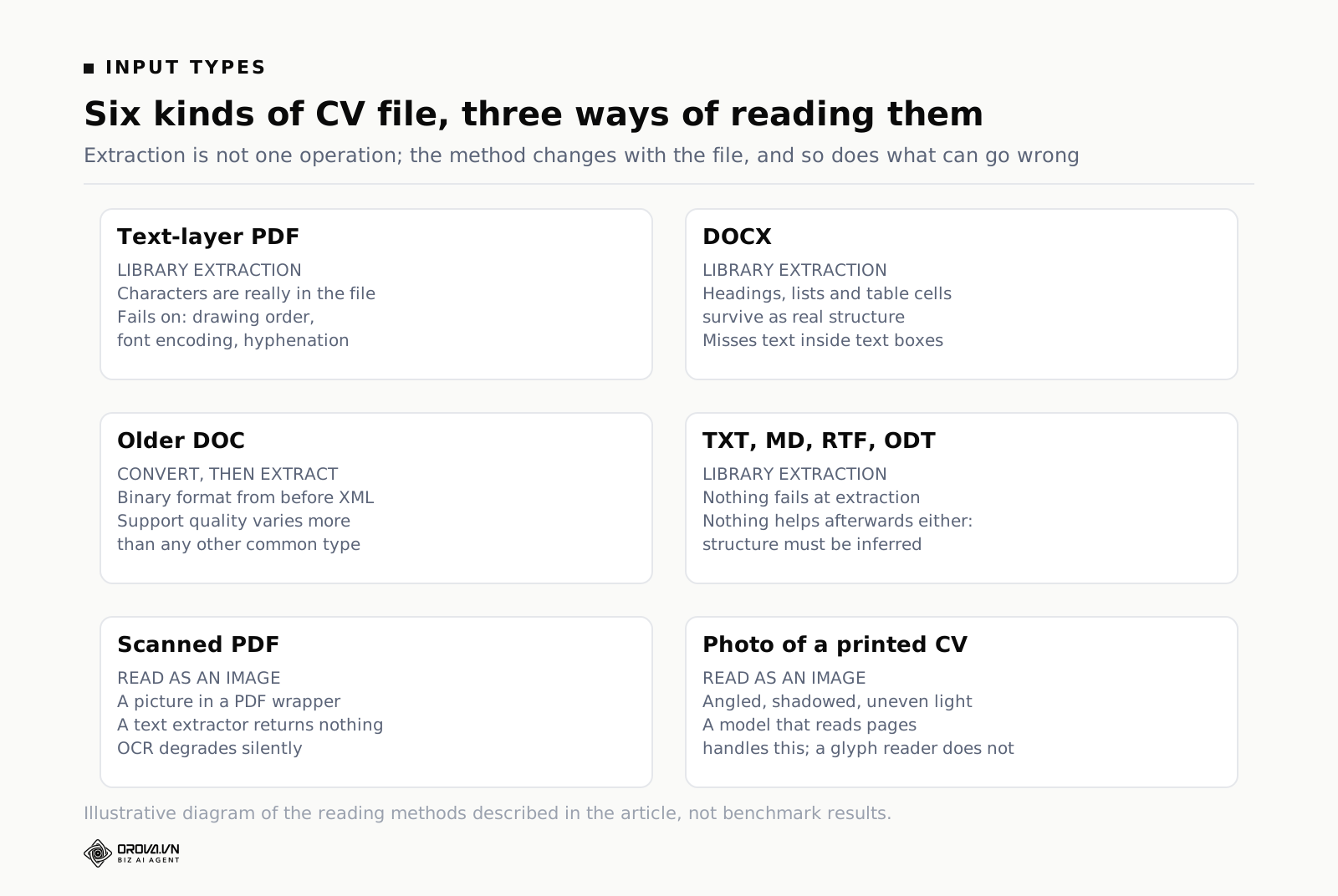
Parsing is not one operation. It is a different operation for each kind of file, with different reliability, different cost and different ways of going wrong. This matters to you practically, because the mix of file types in your applicant folder determines how much of your screening you can trust. A hundred clean PDFs behave very differently from a hundred phone photos, and any tool that tells you it handles all of them "seamlessly" is skipping over the part you most need to understand.
Text-layer PDFs: the easy majority
Most CVs you receive are PDFs exported from Word, Google Docs, Pages or a CV builder. These carry a real text layer — the file contains the actual characters, along with the font, size and position on the page where each one should be drawn. Nothing needs to be recognised, because nothing is a picture. A library walks the internal objects, pulls the characters with their coordinates, sorts them into lines and lines into blocks, and hands back text.
This works well, and it is fast and cheap. It is where "we support PDF" almost always means. But three things still go wrong, and they are worth knowing because they explain most of the odd output you have seen.
First, a PDF stores drawing order, not reading order. The file says "put these characters here, then these characters there". It does not say "this is the left column and you should finish it before starting the right one". A well-behaved export from Word usually happens to draw text in reading order, which is why it usually works. A design tool laying out a two-column CV frequently does not.
Second, encoding. Some embedded fonts map characters to non-standard codes, particularly for accented letters, ligatures like "fi", curly quotation marks, en dashes and bullet glyphs. When the mapping is missing or wrong, extraction returns the right shapes as the wrong characters, and you get a name spelled with a stray symbol in the middle or a skills list separated by odd boxes. Vietnamese, French and Turkish names get hit by this more than English ones.
Third, hyphenation and line wrapping. The extractor sees lines, not sentences. A word broken across a line break comes back split, and a job title wrapped onto two lines becomes two fragments unless something reassembles it. Reassembly is a guess, and the guess is occasionally wrong.
Word files: the most structured input you will get
A DOCX file is a zip archive containing XML. Inside it, the document is described as paragraphs and runs, with styles attached — heading level one, heading level two, list item, table cell. That structure is real information, and it survives extraction. A parser reading DOCX does not have to infer that "EXPERIENCE" is a section header from its font size, because the file says it is a heading.
So DOCX is, ironically, the friendliest format for a machine, even though PDF is the more common one. If you have any influence over how candidates submit — an internal referral form, an agency you brief, a hiring partner — asking for DOCX is quietly one of the highest-value things you can do.
Two catches. Text inside text boxes, shapes and SmartArt lives outside the main document flow, and a naive reader that walks only the body paragraphs will skip it entirely. Designers love text boxes. If a candidate put their contact block in one, it disappears. And the older binary DOC format is a different beast — a proprietary structure that predates the XML era and needs a converter rather than a reader. Most tools support it; support quality varies a lot more than for DOCX.
Plain text, Markdown, RTF and ODT: easy to read, hard to structure
A TXT or MD file is trivial to extract: the characters are simply there. RTF and ODT sit in between, carrying some formatting information in a form that is straightforward enough to walk through.
The difficulty flips. With plain text there is nothing to fail at during extraction, but there is also nothing to help you afterwards. No heading styles, no table cells, no font sizes. Everything about the structure — where the experience section starts, which line is an employer and which is a job title, whether "2021–2023" belongs to the line above or the line below — has to be inferred from the words themselves. This is where a language model reading the text substantially outperforms a rules-based parser, because it works from meaning rather than typographic signals that are not present.
Scanned PDFs and photos of a CV: the case that separates tools
Now the hard one. A scanned PDF is a picture wrapped in a PDF container. So is the JPG a candidate sent you from their phone, taken at a slight angle on a kitchen table with a shadow across the lower third. To a text extractor these files contain no text at all. Run a standard library over them and you get an empty string, or occasionally three characters picked up from a printer's watermark.
This is the single biggest source of the "nine blank rows" in your spreadsheet. It is not that the tool failed at something difficult. It is that the tool was asked to do something structurally impossible: extract characters from a file that contains no characters.
There are two ways out. The traditional route is optical character recognition — software that looks at the image, finds shapes that look like letters, and converts them to text. Classic OCR is decent on clean, straight, high-contrast scans of standard fonts. It degrades quickly on everything else: a photo taken at an angle, uneven lighting, a page with a coloured background, a two-column layout, a handwritten annotation in the margin. And crucially, when it degrades, it does not usually announce that it degraded. It hands back plausible-looking text with words silently wrong, which then gets scored as if it were accurate.
The second route is to send the image to a model that reads images directly, rather than to a text extractor. This is a genuinely different capability, not a faster version of the same one. A multimodal model looks at the page the way you would: it sees that there is a narrow sidebar on the left with contact details and a wide column on the right with work history, it reads them in the order a human would, and it copes with the photo being slightly rotated because it is interpreting a page rather than isolating glyphs. For scanned and photographed CVs, this is the difference between a stack of unreadable files in the corner and every application actually being considered.
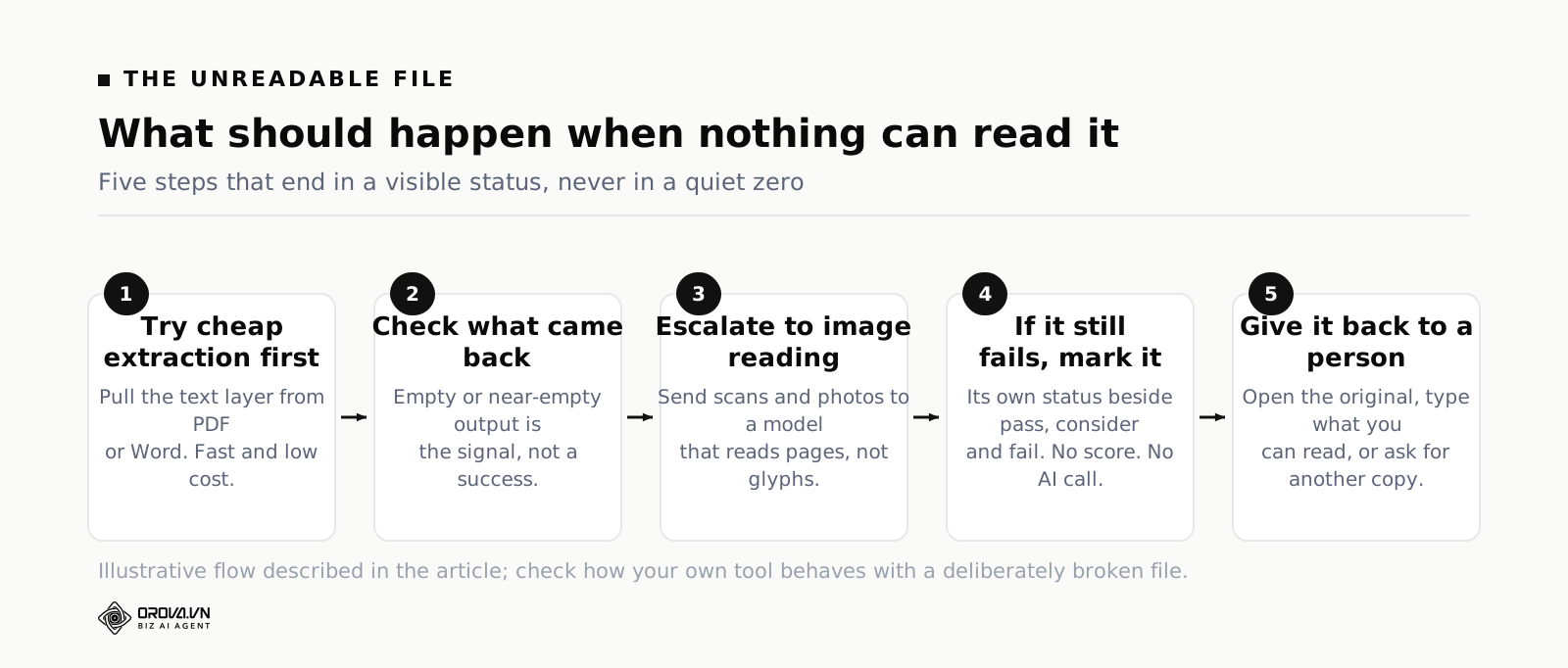
The trade-off is honest and worth stating: reading an image with a model costs more per file and takes longer than pulling text out of a PDF that already has text in it. A sensible system therefore does not use it for everything. It tries cheap extraction first, checks whether what came back is real content, and only escalates to image reading when it is not. That escalation logic is worth asking a vendor about directly, because it tells you whether they have thought about the hard case at all.
What happens when the format is right but the file is not
There is a fourth category that people forget: files that are the right type and still cannot be read. A PDF that was truncated during upload. A password-protected document. A DOCX that a candidate saved from a phone app in a slightly non-standard way. A file with a .pdf extension that is actually a renamed image. A zero-byte file from a failed drag and drop.
These are not rare enough to ignore. In any batch of a few hundred applications you should expect a handful. They matter because they are the cases where a badly built system does the worst possible thing, which we will come to shortly.
Why creative layouts break CV parsing software
Everything above assumed a reasonably conventional document. Now add the CVs designed to stand out, which is an increasing share of what arrives — especially for marketing, design and any role where candidates believe presentation is part of the pitch.
The core problem is reading order. A human reading a page uses layout cues effortlessly: you see a boxed sidebar, you understand it is a sidebar, you read it as a unit. A parser working from character coordinates has to reconstruct that understanding from geometry, and geometry is ambiguous.
The two-column CV
This is the classic failure and it is worth walking through slowly, because once you have seen it you will recognise its fingerprints everywhere.
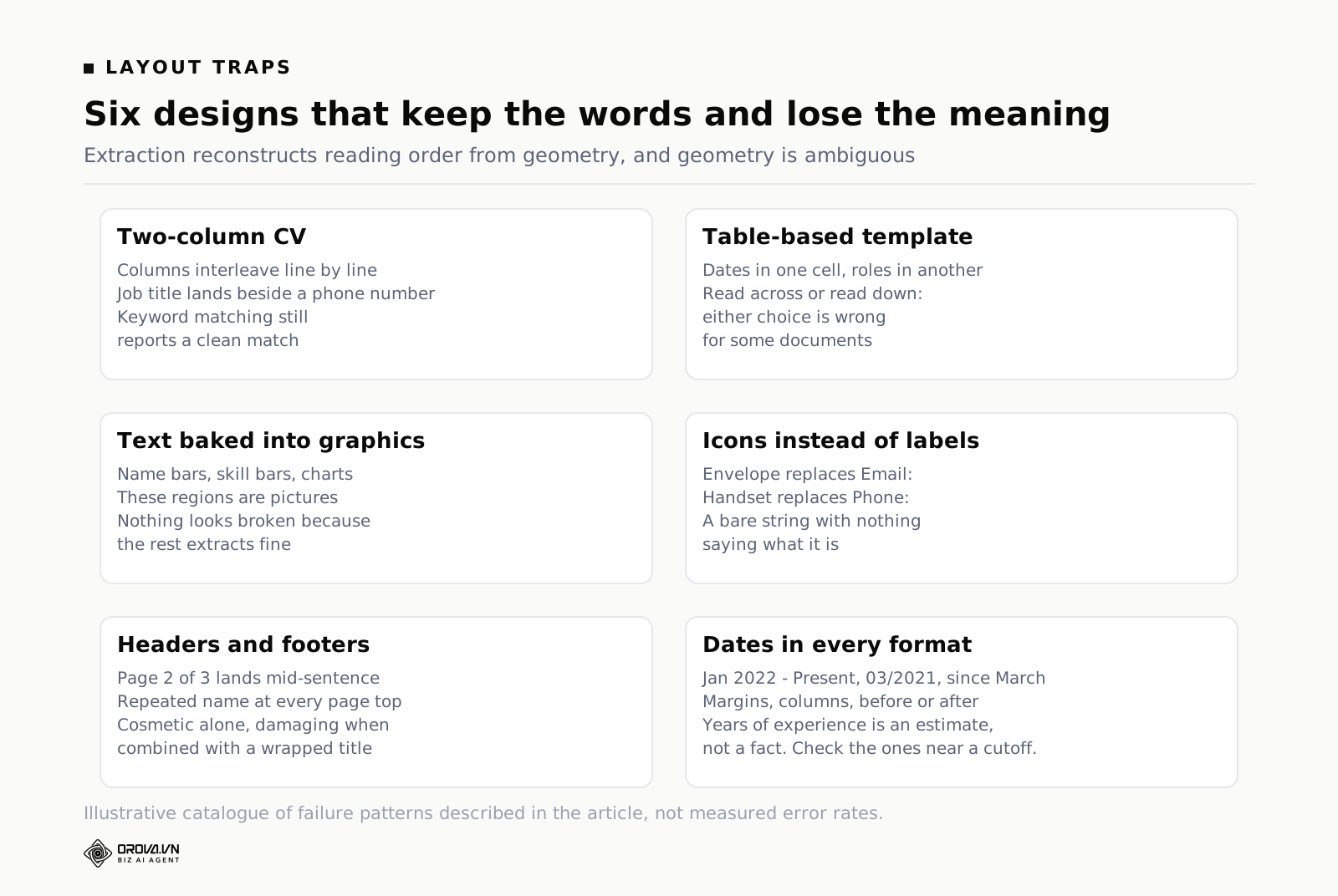
Picture a CV with a narrow left column holding contact details, a skills list and language levels, and a wide right column holding work history. The extractor pulls characters with their positions and sorts them top to bottom, left to right — which is exactly what you would do for normal text. The result interleaves the two columns line by line. You get something like: "Email: nam@example.com — Senior Marketing Executive, Acme Ltd — Phone: 09xx — Jan 2022 to present — Skills: SEO, email —" and so on, alternating.
Read that back and notice what has happened. The text is all there. Nothing was lost. But the relationships are destroyed. "Senior Marketing Executive" now sits next to a phone number instead of next to its employer. A rules-based parser looking for "job title followed by company name" finds nonsense. And a keyword matcher looking for the word "SEO" still finds it, and still reports a match, which is why keyword systems appear to survive layouts that have in fact wrecked the document.
Tables, and tables inside tables
Many CV templates lay the entire page out as an invisible table, because that is the easy way to get columns to line up. Some nest tables inside table cells. When the extraction reads a table, it has to decide whether to go across rows or down columns, and either choice is wrong for some documents.
The specific damage is to dates. Employment history laid out as a table with dates in the left cell and descriptions in the right cell can come back as a block of dates followed by a block of descriptions, with no reliable way to pair them. The candidate's three jobs and three date ranges are all present and the mapping between them is gone.
Text baked into a graphic
Design tools sometimes export a CV where blocks of text are rendered as images — a header bar with the candidate's name in a decorative font, a "skills" section drawn as a set of coloured bars with labels inside them, a chart showing self-assessed proficiency. To an extractor these regions are pictures. The name is not text. The skills are not text.
The nastiest version is the one where most of the document extracts fine and only these blocks are missing, because then nothing looks broken. You get a record with a valid work history and an empty name field, or a candidate who appears to have listed no skills at all when in fact they listed twelve of them inside a graphic.
Icons instead of labels
Modern templates replace "Email:" with a small envelope icon and "Phone:" with a handset icon. This looks clean and it removes the label a parser was relying on. The extracted text becomes a bare string — an address, then a number — with nothing saying what either one is. Good extraction recovers from this using pattern recognition, since an email address is recognisable by shape. Phone numbers are less forgiving, particularly international formats, and a date of birth or a national ID sitting nearby can be mistaken for one.
Headers, footers, watermarks and page furniture
Repeated page furniture ends up interleaved with content on multi-page CVs. "Page 2 of 3" and the candidate's name repeated at the top of each page get pulled into the text stream at the point where the page break falls, which is often mid-sentence. On its own this is cosmetic noise. Combined with a wrapped job title it can produce a garbled employer name that then gets scored.
The dates problem, generally
Dates deserve their own note because they drive one of the fields you actually care about: years of experience. CVs write dates in every conceivable way — "Jan 2022 – Present", "2022-2024", "03/2021 to 08/2023", "Summer 2020", "since March". They put them before the role, after the role, in a margin, in a separate column. Overlapping employment, freelance periods running alongside a full-time job, and gaps all have to be handled.
Any total years-of-experience number you see in a parsed record is therefore a computed estimate built on a stack of interpretations, and you should treat it as a sorting aid rather than a fact. If a threshold in your process depends on it, check the underlying dates on the candidates near the line.
The file nothing can read, and why it must be visible
Some percentage of every batch will defeat every method you throw at it. The photo is too dark. The PDF is corrupt. The document is password-protected. Someone attached the wrong file and you now have a scan of a driving licence.
What the system does with those files is, honestly, one of the most revealing things about it — and it is never in the demo, because the demo folder contains clean files.
There are three wrong behaviours and one right one.
Wrong behaviour one: score it zero. The extractor returns an empty string, the empty string goes to the scorer, the scorer correctly observes that this document contains no evidence of anything, and the candidate lands at the bottom of your list with a score of nought. Everything worked exactly as designed and a real person has just been silently rejected because of a file conversion problem. This is the failure that keeps people up at night, and rightly.
Wrong behaviour two: drop it. The file errors out, the system logs something in a place you will never look, and the candidate simply is not in the results. Your upload said 240 files. Your results table has 231 rows. Nothing anywhere tells you which nine went missing or why, and unless you count, you will not notice.
Wrong behaviour three: fail the whole batch. One bad file throws an exception, the run stops, and you lose the work already done. Less harmful to candidates, more harmful to your afternoon, and a sign that the error handling was an afterthought.
The right behaviour is that an unreadable file becomes its own visible status, sitting alongside pass, consider and fail rather than hiding inside fail. It stays in the list. It says why, in language you can act on — not "parse error 0x8004" but something closer to "no text could be extracted from this file". It does not get sent for scoring, because there is nothing to score, which also means it does not consume budget for an AI call that could only produce a meaningless answer. And there is an obvious next step: open the original file, look at it yourself, and either type in what you can read or email the candidate for a different version.
That last step takes about ninety seconds per file. For nine files in a batch of 240 it is fifteen minutes of work, once. The cost of not doing it is that you never find out you rejected someone for having an old scanner.
When you evaluate any tool in this category, this is the test to run. Put a deliberately broken file into your trial batch — a photo of a page taken in bad light, a password-protected PDF, an empty file you created by renaming something. Then look at the results screen and ask one question: can you tell, without hunting, that those files did not get read? If the answer is no, the tool is not safe to run a real role through, no matter how good the scores look on the files that worked.
Keyword matching is not resume screening
Now to the second machine — the judge — and the crude version of it that has been shipped as "screening" for twenty years.
Keyword matching works like this. You give the system a list of terms: Python, Zendesk, B2B, CFA, five years. It searches the extracted text of each CV for those terms. It counts hits, possibly weights them, and sorts. Some versions add proximity rules or require certain terms to be present. That is the whole mechanism.
It has real virtues. It is instant, it costs nothing per CV, it is perfectly consistent, and it is trivially explainable — you can point at the exact word that caused the match. For a small number of genuinely binary, genuinely non-negotiable requirements it is a reasonable first filter. Does this person hold a valid licence for the vehicle class we operate. Do they have the specific certification the regulator requires.
The trouble starts when it is used for everything else.
It cannot see a synonym
Your criterion is helpdesk experience and your keyword is "Zendesk". A candidate who spent four years running a support desk on Freshdesk does not contain the string "Zendesk" anywhere in their CV. They score zero on your most important requirement. Meanwhile someone who listed Zendesk in a skills bar after using it for six weeks on an internship scores full marks.
You can fix this instance by adding Freshdesk, Intercom, HubSpot Service Hub and six more to the list. You cannot fix the general problem, because the general problem is that you are enumerating surface forms of a concept and the supply of surface forms is unbounded. Every enumeration is missing the one the next good candidate happened to use.
It cannot tell presence from depth
The word "Python" appearing in a CV tells you the word appeared. It does not distinguish between "wrote a Python script once during a course" and "maintained a Python codebase used by the whole company for four years". Both are one hit. Both look identical in the count.
This is not a small error at the margins; it is the central thing you wanted to know, and the mechanism is structurally incapable of telling you. Everything in a CV that matters is about scope, ownership and duration, and none of those are keywords.
It rewards writing style, not work
The candidates who do best under keyword matching are the ones who know it exists. Stuffing a skills section with every tool you have ever opened is free, and there is a whole cottage industry teaching people to do exactly that. So the ranking drifts towards candidates optimised for the filter and away from candidates who wrote a short, honest CV about what they actually did.
It also drifts along other lines you did not choose. People educated in a particular system, or who came up through a particular kind of employer, use a particular vocabulary. Keywords select on vocabulary. Career changers, people returning after a break and people from a different industry doing genuinely relevant work all describe that work in the wrong words and get filtered out with no record of why.
It hides the layout damage
This is the subtle one, and it connects back to the parsing section. Remember the interleaved two-column CV, where all the words survived and all the relationships died. Keyword matching only needs words. So it happily reports strong matches on a document that has been scrambled beyond usable, and it reports them with the same confidence it would on a clean file. A system that judges by keyword count cannot detect its own extraction failures — the mechanism cannot see the difference between a good CV and a wrecked one.
Criterion scoring with evidence: what AI resume screening should look like
The alternative is to score criteria rather than count words, and to require evidence for every score.
The shape is this. You start from the job description and turn it into a list of criteria — not keywords, but statements about the person. Each criterion gets a weight reflecting how much it matters, and each is grouped by how negotiable it is. Then, for each CV, each criterion gets a score, and every score comes attached to a quote from the document that justifies it. The total is computed from the individual scores by arithmetic, not written by a model as an overall impression. Turning a JD into criteria that behave this way is a skill of its own, and we covered the writing side in job Posting Template: Write One, Get a Hiring Scorecard Too.
Take the customer support lead example. This is an invented example to show the mechanics, not data from any real hiring round.
Your keyword approach would have used: Zendesk, SLA, escalation, team lead, SaaS. Your criterion approach uses statements instead:
- Has run a helpdesk tool day to day, not just used one — weight 9, must-have
- Has managed at least two direct reports — weight 8, must-have
- Has owned a response-time or resolution-time target — weight 7, important
- Has worked with technical products where escalation to engineering was routine — weight 6, important
- Has written or rewritten support documentation — weight 4, preferred
- Comfortable in written business English with customers — weight 6, important
Now two candidates. Candidate A has a skills bar listing "Zendesk, Jira, Slack, Notion, HubSpot" and a work history of two customer service roles in retail. Candidate B has no tool names in a skills bar at all, and one line in their history that reads "ran a six-person support desk on Freshdesk for a payments product; owned the first-response target and cut it from four hours to under one over eighteen months".
Under keyword matching, A wins. A contains Zendesk; B does not. A appears in your shortlist and B does not, and nothing in the output tells you this happened.
Under criterion scoring, the first criterion asks whether the person ran a helpdesk tool day to day. B scores high and the evidence quote is that exact line from the CV. A scores low, because the only support the document offers for the claim is the tool's name in a list, and the evidence field will say so. The second criterion asks about direct reports. B's "six-person support desk" supports it. A's retail roles do not mention supervision, so the score is low and the evidence field is empty or notes the absence.
The difference is not that one system is cleverer. It is that one of them was asked a question about the person and the other was asked a question about the text.
Why evidence is the load-bearing part
Of everything in this section, the evidence requirement is the piece to insist on. A score without a quote is an assertion you cannot check. A score with a quote is a claim you can verify in four seconds by looking at the CV.
This changes what you do with the output. Instead of trusting a ranking, you audit it. Pull five results — two at the top, two at the bottom, one from the middle — and read the evidence against the file. If the quotes support the scores, your criteria are working. If a quote does not actually say what the score claims, you have found either a bad criterion or a bad reading, and both are fixable before they affect 240 people.
It also gives you something to say when a hiring manager asks why a particular candidate is not on the list, and it gives you a record if anyone asks the same question six months from now. "The system ranked them low" is not an answer. "They scored 30 on managing direct reports, and here is the only line in their CV that touches on it" is.
Why the total must be computed, not narrated
One technical point with a practical consequence. If a model produces individual criterion scores and then also produces an overall score, those two things will not always agree — the overall number is generated text, not arithmetic, and it drifts. The overall score should be computed by the system as a weighted average of the individual scores, so that it is reproducible: same scores and same weights, same total, every time, and anyone can redo the sum on paper.
The same applies to non-negotiable requirements. A must-have criterion needs to override the total rather than be averaged into it. If someone lacks the legally required certification, a strong performance on five other criteria should not float them over the line. In practice that means a rule sitting outside the average: any must-have criterion below a floor forces a fail, regardless of what the weighted total says. Where the pass threshold and the consider band should sit for your role is a separate decision, and worth making deliberately rather than accepting a default.
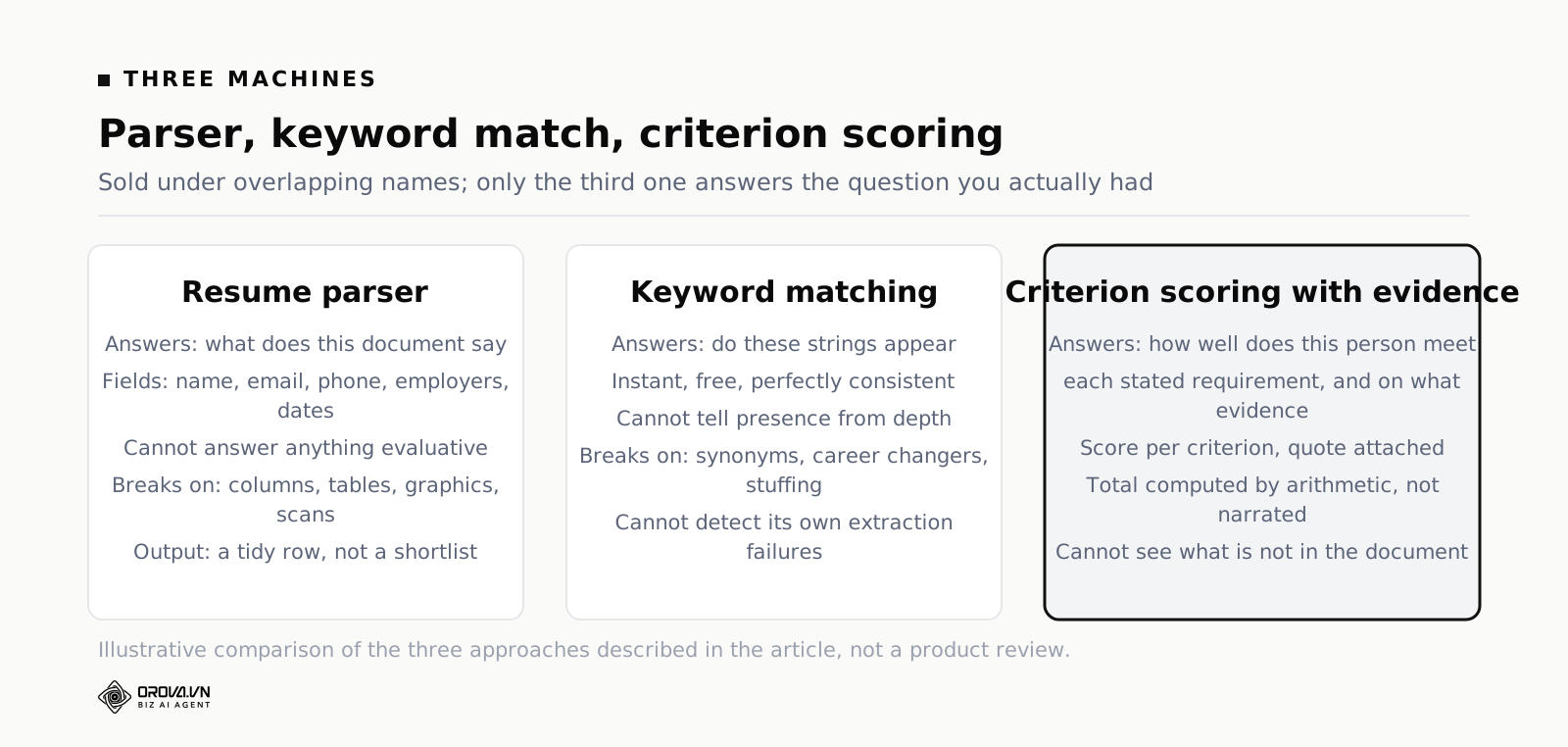
Parser, keyword match, criterion scoring: a straight comparison
Here is the comparison in one place. Use it when a vendor tells you their product "screens resumes" and you need to work out which of the three they actually mean.
| Approach | What it answers | What it cannot answer | Where it breaks |
|---|---|---|---|
| Resume parser (extraction) | What does this document say, and what are the field values — name, email, phone, employers, titles, dates, listed skills? | Anything evaluative. It has no concept of the role, so it cannot say whether the person is suitable, strong or weak. | Multi-column layouts, nested tables, text rendered as graphics, scanned pages and photos, non-standard font encodings, dates separated from their employer. |
| Keyword matching | Do these specific strings appear in the text, how often, and near what? | Depth, scope, ownership or duration. Whether "Python" means a course exercise or four years of production code. | Synonyms and equivalent tools, career changers, unusual vocabulary, deliberate keyword stuffing. It also cannot detect that extraction failed, because it only needs words, not structure. |
| Criterion scoring with evidence | How well does this person meet each stated requirement for this role, on what evidence, and what is the weighted total? | Anything not in the document: culture fit, potential, motivation, why they left. And it cannot make the hire decision for you. | Vague or unobservable criteria, weights that do not reflect what the job needs, and any input where extraction already failed — a scrambled CV produces confident scores on scrambled text unless unreadable files are caught first. |
Two things fall out of this table.
The first is that the three are layered, not alternatives. Criterion scoring needs extraction underneath it. If the extraction is weak, everything above it inherits the weakness, which is why the parsing detail earlier in this article is not a technical footnote — it is the foundation the judgement sits on.
The second is that even the best of the three has a firm boundary: it can only see what is in the document. Every question you actually care about that is not written down — will this person stay, will they get on with the team, is the two-year gap a red flag or the most interesting thing about them — is outside the machine entirely. That boundary is the useful way to think about where automation stops, which we went through in more detail in what AI in recruitment genuinely does well.
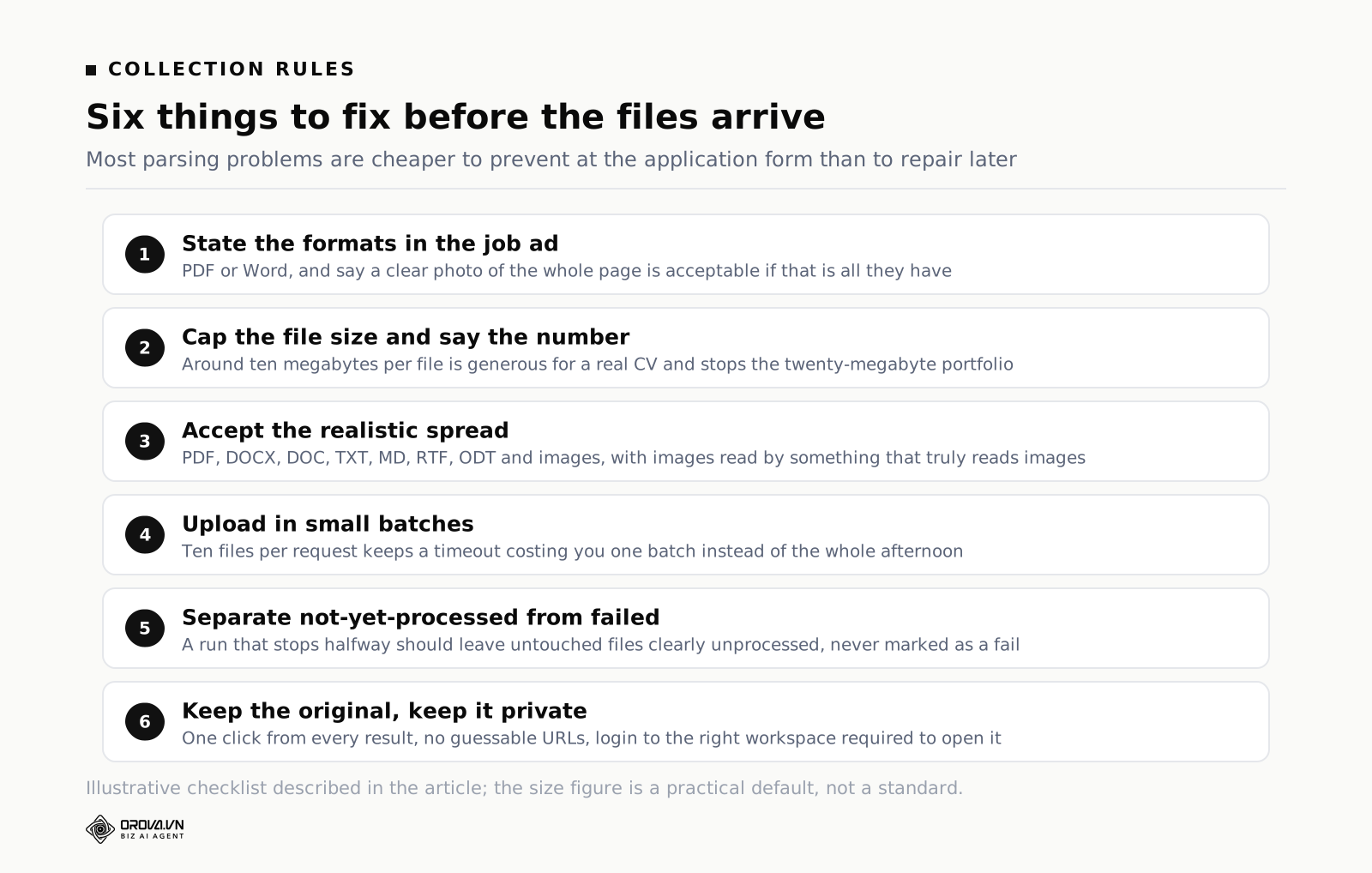
File size and format limits when you collect applications
Half of the parsing problems in this article are avoidable at the point of collection. This section is the unglamorous, high-return part.
Decide what you accept, and say so
Put a line in the job ad and in the application form. Something like: "Send your CV as a PDF or Word document. If you only have a printed copy, a clear photo of the whole page in good light is fine." Two sentences, and they change the composition of your inbox.
The second sentence matters more than it looks. If you say PDF only, the person whose only copy is on paper either sends a bad photo anyway or does not apply. Telling them a clear photo is acceptable, and telling them what makes it clear, gets you a readable image instead of a shadowed one taken at an angle.
Set a size cap and pick the number for a reason
A two-page text CV as a PDF is typically well under a megabyte. Files that arrive at fifteen or twenty megabytes are almost always one of two things: a photo taken at full camera resolution, or a design CV with large embedded images. Neither needs to be that big to be readable.
A cap in the region of ten megabytes per file is a sensible default. It is generous enough that no legitimate CV bumps into it — a full-resolution phone photo of one page usually sits comfortably under it — and low enough to stop the twenty-megabyte portfolio PDF from clogging an upload. What matters more than the exact number is that the limit is stated up front and that a rejected upload says clearly what happened, so the candidate can send a smaller file instead of assuming their application went through.
Expect to handle a spread of formats
Whatever you ask for, you will receive PDF, DOCX, the occasional old DOC, plain text pasted into an email body, and images. A tool that accepts a narrow list will send you to convert files by hand, and hand conversion is where files get quietly forgotten. Look for support across the realistic spread — PDF, DOCX, DOC, TXT, MD, RTF, ODT and common image formats — and check specifically that images are read by something that can actually read images, rather than being accepted and then silently failing.
Think about batch size and what happens mid-run
If you are uploading a folder of a few hundred files, the mechanics matter. Sending everything in one enormous request is fragile: one timeout and you do not know what landed. Splitting into small batches — ten files at a time is a reasonable size — means a failure costs you one batch, not the afternoon, and it lets the screen show real progress instead of a spinner.
The same logic applies to scoring. Processing runs should tell you which file is being worked on and how many are done out of the total, and if a run stops halfway — a network problem, an exhausted budget — the files that were not reached should sit in a clearly unprocessed state rather than being marked failed. Files you have not looked at and files that failed are different things, and a tool that conflates them will lose candidates for you.
Keep the original file, and keep it private
Whatever the extraction produced, keep the original document and make it one click away from the result. You will need it every time you check an evidence quote and every time you want to see what a candidate's CV actually looked like.
And treat that store as what it is: a pile of documents containing names, phone numbers, home addresses and employment history for hundreds of people who trusted you with them. Uploaded files should not be reachable by a guessable URL, should require being logged into the right workspace to open, and should be deletable properly rather than only hidden from a list. If you are choosing a tool, ask exactly this and expect a specific answer.
When a tool earns its place, and how far you get by hand
You do not need software to do any of this. You need software when the volume makes doing it by hand dishonest.
By hand works fine up to roughly thirty or forty applications. Write the criteria and weights in a spreadsheet, open each CV, score each criterion, paste the line from the CV that justified the score into an evidence column. It takes maybe six to eight minutes per CV once you have the rhythm, and it is genuinely good work — you will learn more about your own criteria in the first ten CVs than any tool will teach you.
Past that, the honesty problem starts. Nobody applies the same standard to CV 180 that they applied to CV 4. You skim. You start pattern-matching on employer names because it is faster. You have a whole afternoon where everyone looks the same. The screening is still happening, but it is no longer the screening you designed, and there is no record of what actually got applied. That is the point where a tool stops being a convenience and starts being the thing that makes your process real.
What you should require of that tool follows directly from everything above: extraction that handles the file types you really receive including images, an explicit and visible status for files it cannot read, criteria you write and weight yourself rather than a black-box relevance score, a score per criterion with a quote from the CV attached, a total computed by arithmetic rather than narrated by a model, and must-have requirements that override the total instead of being averaged into it.
That specification is what Orova Recruit is built to. It reads a job description — uploaded as PDF, DOCX or TXT, or simply pasted — and proposes 8 to 16 criteria across five groups: must-have, important, preferred, basic and flexible, each with a weight from 1 to 10 and a suggested pass threshold, all of which you can edit, reweight or delete. It accepts PDF, DOCX, DOC, TXT, MD, RTF, ODT and images up to 10MB per file and 500 CVs per role, uploaded singly, in bulk or as a whole folder, in batches of ten. Text-layer PDFs and Word files go through library extraction; scanned PDFs and photos go straight to a model that reads the image. Each criterion is scored 0 to 100 with evidence quoted from the CV, the server computes the weighted total rather than the model, any must-have below 50 forces a fail however high the total, and a file that cannot be read is marked unreadable — no AI call, no quota consumed, and it stays visible in the list instead of becoming a zero.
What the parsed data then feeds matters as much as the parsing. The extracted contact details populate the candidate table and the merge fields in your email templates; the per-criterion scores become the basis for the interview questions generated for that specific person; and the interview is scored on the same weights so both numbers land on one scale. Signing up is free with 1,000 quota and no card, which is enough to run a real role rather than a demo one.
Whatever you use, run the broken-file test on it before you trust it with candidates.
Parsing is step one — the question is what the parsed data feeds
Resume parsing is often sold as the destination. It is not; it is plumbing. A parser that extracts a name, an email and a work history has produced structured data, and structured data is worth exactly as much as whatever consumes it. Plenty of teams have parsing and still do everything by hand afterwards, because the parsed output goes into a table nobody uses.
Here are the four things worth feeding, roughly in order of how much time they give back.
1. The scoring pass
The obvious consumer, and the one that justifies the parser on its own. But note the dependency: scoring is only as good as the criteria, and criteria come from the job description, not from the parser. A parser paired with vague criteria produces confident nonsense faster than a human could produce it slowly.
2. The candidate table and the mail merge
Name, email, phone and current title extracted once are then reused every time you write to that person. This is unglamorous and it removes more keystrokes than anything else, because those four fields get retyped at every stage otherwise — and retyping is where the wrong-name-in-the-rejection-email incident comes from.
3. The interview questions
Less obvious and more valuable than it looks. Once the CV has been read against your criteria, the interesting output is not the score but the disagreements: which criteria the document supports strongly, which it merely asserts, and which it does not address at all. That middle category is the question list for the interview, and it is different for every candidate. Deriving it by hand costs fifteen minutes per person; deriving it from parsed and scored data costs nothing extra.
4. The scheduling and status flow
An email address that has been parsed can trigger an invitation; a status that has been recorded can trigger a reply. Neither is impressive individually, and together they remove the administrative layer that makes recruiting feel like data entry.
What parsing cannot do, and where teams get burned
Three limits worth stating plainly.
Parsers infer, and inference has an error rate. Dates in unusual formats, two-column layouts, tables inside PDFs, a career break written as a sentence rather than a gap between dates — all of these produce plausible but wrong structured output. This is why a per-criterion score should always be accompanied by the quoted text: the quote is how you catch a parsing error before it becomes a rejection.
An unreadable file is not a weak candidate. A photo taken in poor light, a corrupted export, a password-protected PDF. If these silently become zeros, you are rejecting people for the state of their file. They belong in a separate bucket that a human clears each day, and they should not consume budget or produce a score.
Structure is not meaning. Knowing that someone held a title for three years tells you nothing about what they did in it. The parser gets you to the point where a good question can be asked; it does not answer the question.
Judged by that standard, "resume parsing software" is the wrong thing to shop for. What matters is what sits downstream of the parse, and whether every conclusion it draws can be traced back to a line in the original document.
Common questions
Is a resume parser the same as an ATS?
No, though one is usually inside the other. A tracking system is the container and the workflow: it stores applications, moves candidates between stages and keeps the record. Most tracking systems include parsing so that they can populate candidate fields automatically. Neither the container nor the extraction judges fit against a role, which is why teams with a tracking system in place still end up reading every CV by hand.
Can a parser handle a scanned CV?
A text extractor cannot, because a scan contains no text — only an image of text. Getting content out of it requires either character recognition, which is fragile on photos and coloured backgrounds, or a model that reads the image directly, which is more robust and more expensive. Ask any vendor specifically what they do with scans and photos, then test it with a badly lit photo rather than a clean one.
Why does my parsed data have fields in the wrong places?
Almost always a layout problem rather than a reading problem. Two-column designs, table-based templates and sidebars cause the extracted text to interleave, so a job title ends up next to a phone number and dates lose their employer. The words are all there; the relationships were lost during extraction. If a specific candidate's record looks scrambled, open the original file and you will usually see the columns immediately.
Should I reject CVs that are not in a standard format?
No, and it is worth being deliberate about this. Format correlates with things you did not intend to select on — how recently someone job-hunted, what tools they have, whether they were coached. Rejecting on format quietly filters for that. The better move is to accept a wide range of formats, make unreadable files visible so you can deal with them individually, and spend fifteen minutes on the handful that need a human.
Does keyword matching have any legitimate use?
Yes, for genuinely binary facts where the exact term is the requirement: a named licence, a specific certification, a legal right to work in a location. Those are cases where the string really is the criterion. Use it as a hard gate on two or three items, then score everything else properly. The mistake is using it as the ranking mechanism for the whole shortlist.
How do I check that a screening tool is reading CVs correctly?
Take five files you know well and run them through. Read the evidence quote behind each score against the original document, checking whether the quote actually says what the score claims. Then add one deliberately broken file to the batch and confirm you can see, without hunting, that it was not read. Two checks, twenty minutes, and you learn more than any demo will tell you.
What about candidates who format their CV to beat the parser?
Stripping formatting to plain text and front-loading keywords beats keyword matching, which is precisely why it is being taught. It does very little against criterion scoring with evidence, because a criterion like "has managed at least two direct reports" needs a line in the document describing that work, and a skills bar cannot supply one. The more your criteria describe things a person did, the less there is to game.
What to do this week
Four things, in order, on the role you have open right now.
First, look at what is actually in your applicant folder. Count how many are PDFs, how many are Word files, and how many are images or scans. That single count tells you whether image reading is a nice-to-have or the difference between screening everyone and screening most people.
Second, open the five most visually designed CVs in the pile and check what your current tool extracted from them. If the fields are interleaved or a name is missing, you have just found out that some of your existing scores were computed on scrambled text.
Third, add a deliberately broken file to a small test batch and see whether the results screen tells you it failed. If it does not, stop using that tool for decisions until it does.
Fourth, write two sentences into your job ad about file format and photo quality, and one line into your form about the size limit. It costs nothing and it will reduce the unreadable pile in your next round.
None of that requires buying anything. It just requires separating the two questions that the word "screening" has been blurring together: can this system read the document, and can it judge the person. Get honest answers to both and the tidy spreadsheet with nine blank rows stops being a mystery and starts being a to-do list.
Let AI read and score resumes against your JD
Orova Recruit turns your job description into weighted criteria and scores every CV with evidence quoted from the file.
Try it free