
How to Choose an Online Quiz Maker for Staff Training
You have nine days until the audit, forty-one people who still need to pass a safety test, and a spreadsheet where you have been ticking off who watched which video. Judge an online quiz maker on three things and ignore the rest: whether it scores on the server instead of in the browser, whether it can run both a quiet individual exam and a live session in a room full of people, and whether the results tell you which question was badly written rather than only who failed. Themes, animations and badge art are decoration you can add in month two.
The reason those three things matter is that most quiz tools were built for a different job. They were built for lead-generation quizzes on marketing sites, or for classroom energisers, or for personality tests. Those tools score in the browser, which means the answer key is sitting in the page source. They have one mode, so you either get a game with music and a leaderboard or you get a silent form, never both. And they report a single average score, which tells you nothing about whether question seven was genuinely hard or simply written so badly that nobody could parse it.
So the audit passes, or it does not, and either way you learn nothing you can reuse next quarter. You still cannot say whether the new hires understood the lockout procedure or whether they guessed well. You cannot say which module needs rewriting. Next year you will build the same quiz again from scratch, in the same spreadsheet, under the same deadline.
This article walks through the whole decision: what the tool has to do, the two quiz formats a training team actually needs, how to choose question types, how to write questions people cannot game, the build process end to end, sharing and access control, how to read results without fooling yourself, turning a passing score into a record you can show an auditor, the mistakes that waste the most time, and a rhythm you can keep up for a year.
What should an online quiz maker do for a training team?
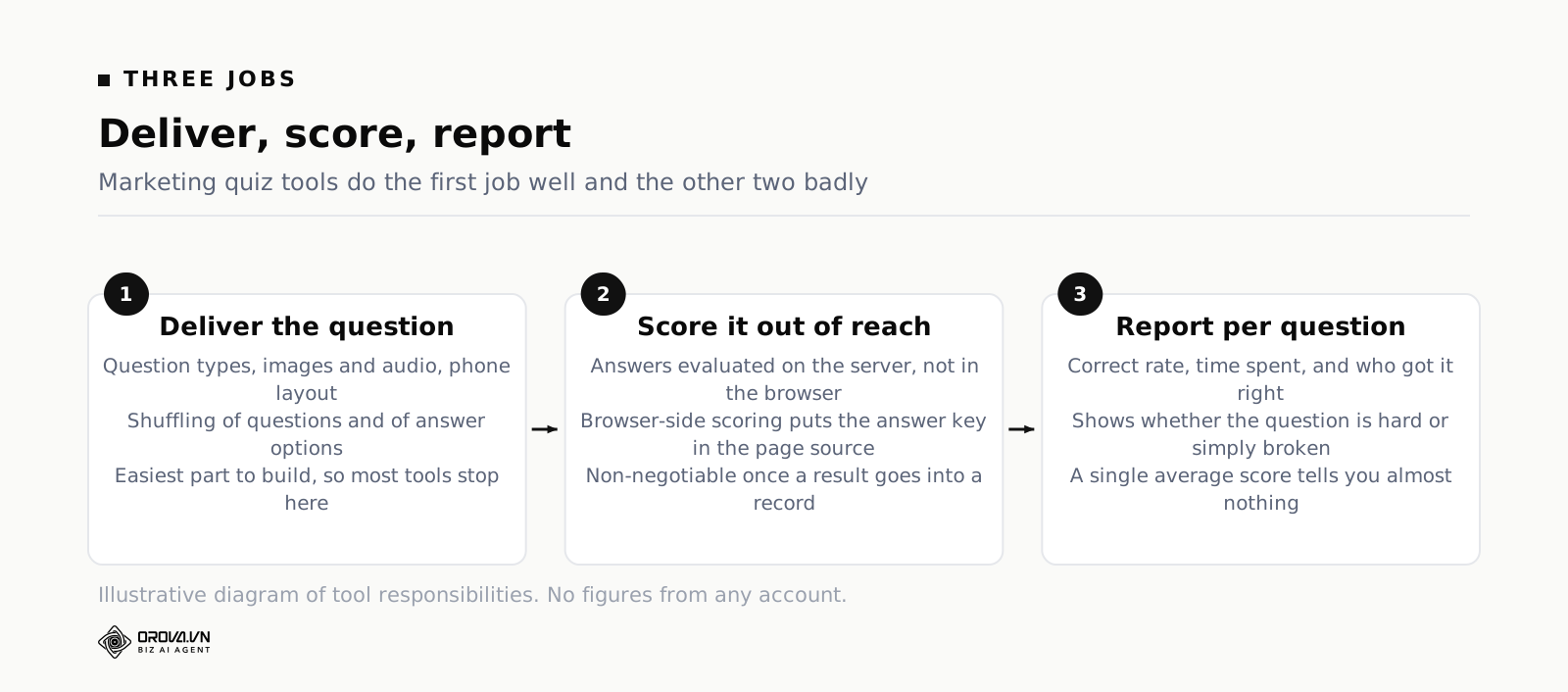
It has to do three jobs: deliver questions in a format that matches what you are testing, score them somewhere the learner cannot reach, and report results per question as well as per person. A training quiz builder also has to control who gets access, prove completion afterwards, and let you reuse the question bank next quarter.
The three jobs behind every quiz
Delivery is the part everyone looks at first, because it is the part you can see. It covers the question types available, how the quiz behaves on a phone, whether questions can be shuffled, whether images and audio can sit inside a question, and whether a learner can pause and come back. Delivery is also the easiest part to get right, which is why so many tools stop there.
Scoring is where the difference between a toy and a working tool shows up. If the correct answers are evaluated in the learner's browser, they are in the learner's browser — anyone who opens developer tools can read them, and anyone who can read them can share them in a group chat within four minutes. Server-side scoring means the learner's device sends the answers up and receives only a result back. For a fun warm-up nobody cares. For a certification test that goes into a personnel file, it is the whole ballgame.
Reporting is the part that decides whether you get better next quarter. A single average score is close to useless. What you need is a breakdown by question: how many people got it right, how long they spent on it, and — the useful one — whether the people who scored well overall also got that particular question right. If your top scorers consistently miss one question, the question is broken, not the people.
Why "quiz" means two different things
Inside a training team the word covers two activities that share almost nothing. One is assessment: an individual sits alone, answers under a rule set, and receives a score that means something administratively. The other is reinforcement: a group plays through questions together, fast, with a leaderboard on the screen, mostly to wake people up and surface confusion in the room.
They need opposite settings. Assessment wants shuffled questions, no backtracking, one attempt, no visible answers until everyone is done. Reinforcement wants speed bonuses, instant reveals, a bit of noise, and no permanent record at all. If your online quiz creator only does one of them, you will end up either running assessments that feel like games or running games that people treat as exams. Both are worse than doing nothing.
What sits outside the quiz maker
Be honest about the boundary. A quiz maker does not write your training content, does not decide what competence means in your organisation, and does not know your pass mark. It also cannot tell you whether the behaviour changed on the floor three weeks later. That last one is the only thing your operations manager actually cares about, and no quiz will ever measure it directly.
What the quiz gives you is a cheap, repeatable signal that people can retrieve the right information under mild pressure. That signal correlates with real capability well enough to be worth collecting, as long as you do not confuse the signal with the thing itself.
The two quiz formats a training team actually needs
Almost every real requirement in corporate training collapses into two formats. Get both, and you can cover onboarding, compliance, product launches, refreshers and skills checks without buying a second tool.
The individual exam, scored on the server
This is the workhorse. One person, one attempt or a defined number of attempts, questions delivered in a controlled order, scoring done away from the learner's device, and a result that persists. Use it for anything that has consequences: a compliance sign-off, an end-of-onboarding check, a certification renewal, a pre-hire screen.
The settings that matter here are unglamorous. Can you cap the number of attempts? Can you set a time limit that survives a page refresh? Can you shuffle both the question order and the answer order, so two people sitting next to each other do not see the same layout? Can you decide whether the learner sees which questions they got wrong, and when? A tool that offers a beautiful editor but no attempt cap is not an assessment tool.
The live ranked session
The second format is the one people recognise from conference rooms: a host screen, a join code or a QR code, everyone on their phones, questions revealed one at a time, points for speed as well as accuracy, and a leaderboard between rounds. It has a real training purpose beyond fun. Running a fifteen-question ranked round at the start of a refresher session tells you within eight minutes which three topics the room is weak on, and you can then spend the session on those three instead of the ones you planned.
The practical requirements are different from an exam. Joining has to be frictionless — a QR code on the projector beats typing a URL every time, and anything requiring account creation kills the energy in the room. The host needs to control pacing. And the results should be treated as diagnostic, not as a record. Nobody should be worried that their fourth-place finish in a warm-up game goes into their file.
Choosing between them by what you are measuring
The test is simple. Ask what happens if someone scores badly. If the answer involves paperwork, a retake requirement, a delayed sign-off, or a conversation with a manager, you need the individual exam with server-side scoring. If the answer is "we spend more time on that topic today", the ranked session is better, faster and more pleasant.
Many teams run both on the same content: a ranked round during the live session to find the gaps, then an individual exam a week later to confirm the gaps closed. That pairing costs almost nothing extra once the question bank exists, because both formats draw from the same questions.
Question types: matching the format to what you are testing
Most online quiz generators offer somewhere around eight question types, and most training teams use two of them. That is a waste, but the fix is not to use all eight for variety. The fix is to pick the type that matches what you are actually trying to find out.
Recall versus judgement
Recall questions ask whether someone knows a fact: the number of the form, the order of the steps, the threshold that triggers an escalation. Multiple choice, true or false, fill in the blank and matching all work well here. They are fast to write, fast to answer and fast to score, and they are the right choice for anything where getting the fact wrong is the actual risk.
Judgement questions ask whether someone can apply the fact in a situation where the right answer is not obvious. These need a scenario — a short paragraph describing a real case — followed by either a set of plausible options or an open-ended box. Judgement questions take three times as long to write and they are where the real value is. A person can memorise the escalation threshold and still escalate the wrong incident.
Where open-ended questions earn their keep
Written answers are the only way to see whether someone can explain something in their own words, which is a much stronger signal than recognising the right option from a list of four. They are also the only way to catch the person who has memorised the answer key without understanding any of it.
The cost is grading time. Twenty written answers across forty people is eight hundred pieces of text, and nobody in your team has a spare afternoon for that. This is where AI grading against a stated rubric becomes genuinely useful rather than a feature-list item — it handles the volume, and you spot-check. Two rules make it safe. First, you must be able to turn it off for high-stakes questions where a human should read every word. Second, when the AI grading is unavailable for any reason, the tool must fall back to manual grading with the submissions intact, not fail the attempt and lose the work.
A working map of question types
| What you want to find out | Question types that fit | What to avoid |
|---|---|---|
| Do they know the fact? | Multiple choice, true/false, fill in the blank | Long scenarios that hide a simple recall test |
| Do they know the sequence? | Ordering, matching | Multiple choice with the steps as options |
| Can they apply it to a messy case? | Scenario plus multiple choice, multiple select | True/false, which collapses judgement into a coin flip |
| Can they explain it? | Short written answer with a rubric | Any type where recognition replaces recall |
| Can they spot the exception? | Multiple select with partial credit | Single-answer formats that reward guessing |
One warning about multiple select — the type where more than one option is correct. Learners hate it, and they hate it for a legitimate reason: the scoring rule is usually invisible. If you use it, say in the question stem how many options are correct, or state clearly that partial credit applies. Otherwise you are testing their ability to guess your scoring policy.
If most of what you are building is drilling and repetition rather than one-off assessment, the mechanics change enough that it is worth reading separately — we cover that in the guide to building practice tests that people actually repeat.
How to write quiz questions people cannot game
Question writing is the part with no shortcut and the highest return. A well-chosen tool with badly written questions produces confident nonsense. Four habits fix most of it.
One idea per question
The most common defect is a question that tests two things at once. "Which form do you file, and within how many days?" has four possible failure modes and you cannot tell them apart from the result. Split it. Two clean questions take the same time to answer and give you twice the information.
The same applies to negatively worded stems. "Which of the following is not required?" makes people slow down and misread, and the errors it produces are reading errors, not knowledge errors. If you must use one, put the negative word in bold so it cannot be skimmed past.
Write the wrong answers first
This sounds backwards and it is the single biggest upgrade to question quality. Start from the mistakes people actually make. Think about the three things a new hire genuinely believes before training corrects them, and make those your wrong options. Now the question measures something: choosing option B tells you exactly which misconception the person still holds.
Wrong options invented to fill space do the opposite. When three of the four choices are obviously absurd, the question tests nothing, but it still shows up in your report as a question that ninety per cent of people passed, which then makes your training look effective when it is not.
Cut the giveaways
Test writers leak answers in patterns that learners pick up fast, often unconsciously. The longest option is usually correct, because the writer added qualifying detail to make it accurate. Options containing "always" or "never" are usually wrong. The correct option often repeats vocabulary from the question stem while the wrong ones do not. And correct answers cluster in position B and C because writers avoid putting them first or last.
The fix takes ten minutes. Read your finished bank looking only at option lengths and make them roughly even. Search for absolutes and rewrite them. Shuffle answer positions, or use a quiz builder that randomises them automatically at delivery time, which solves it permanently.
Set the pass mark before you write
Deciding the pass mark after seeing the scores is how a compliance quiz turns into a formality. Everyone did badly, so eighty drops to sixty, and now the test certifies nothing. Set it first, and set it from consequence rather than from feel: for content where an error causes real harm, a high mark with unlimited retakes and mandatory review beats a low mark with one attempt. For general awareness content, a moderate mark is fine and a retake requirement is overkill.
Write the reasoning down in one line next to the quiz. Six months later someone will ask why the threshold is what it is, and "it felt about right" is not an answer you want to give an auditor.
Building your first quiz, start to finish
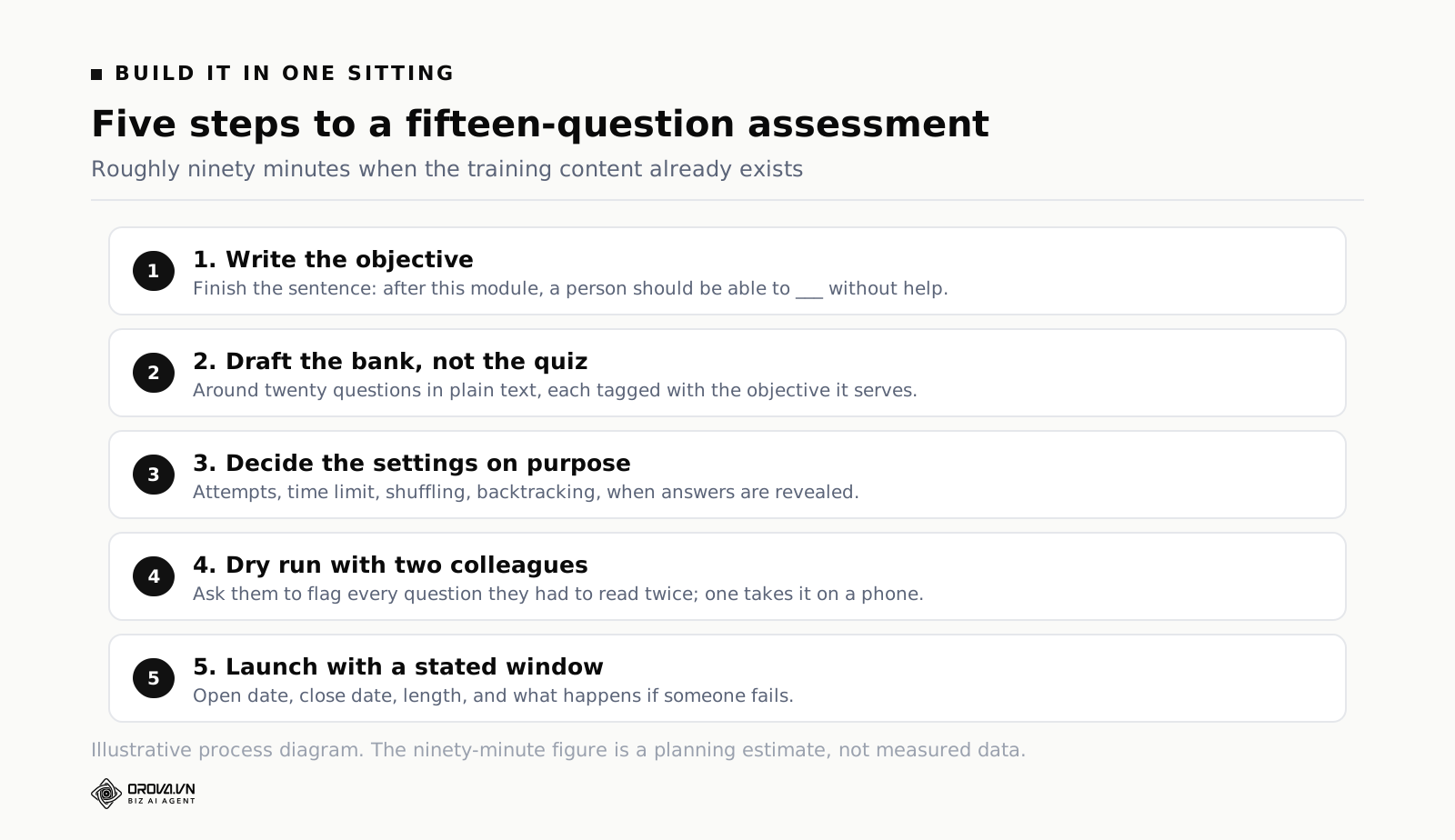
Here is the whole process in one sitting. Budget ninety minutes for a fifteen-question assessment if the content already exists. The order matters more than the speed.
Step 1: write the objective in one sentence
Before opening any tool, finish this sentence: "After this module, a person should be able to ___ without help." The blank must contain a verb someone could observe. "Understand the returns policy" fails the test. "Decide whether a specific return is inside policy and name the next step" passes it, and it tells you immediately that your questions need to be scenarios, not definitions.
If you cannot finish the sentence, the problem is upstream in the content, and no quiz will hide it.
Step 2: draft the bank, not the quiz
Write more questions than you need — around twenty for a fifteen-question quiz. The surplus gives you replacements when questions turn out to be broken, and it lets you build a second version for retakes without starting over. Draft them in plain text first. Typing directly into a quiz editor makes you fiddle with settings between questions and breaks your writing rhythm.
Tag each question with the objective it serves as you go. When you later find that everyone fails objective three, the tags let you pull exactly those questions and see what they have in common.
Step 3: settings, decided deliberately
Now open the tool and go through the settings once, on purpose, instead of leaving defaults in place. The list is short: number of attempts, time limit, question shuffling, answer shuffling, whether learners see correct answers afterwards and when, whether they can move backwards, and what happens on the last question. Every one of these is a policy decision, and every default was chosen by someone who does not know your context.
Step 4: dry run with two colleagues
Send it to two people who did not write it. Ask them to take it seriously and to note every question where they had to read twice. That flag — read twice — catches almost all wording problems. Also ask one of them to take it on a phone, because a table inside a question stem that looks fine on your monitor can be unreadable on a small screen.
The dry run typically surfaces two broken questions out of fifteen. Fixing them before launch costs twenty minutes. Fixing them after forty people have already answered costs you the whole data set.
Step 5: launch with a stated window
Tell people when it opens, when it closes, roughly how long it takes and what happens if they fail. Vagueness on the last point generates more messages to your inbox than the quiz itself takes to build. One short paragraph in the invitation removes almost all of them.
Sharing, access and keeping the answer key from leaking
The moment a quiz has consequences, someone will try to shortcut it. Not out of malice — out of time pressure. Your job is to make the shortcut harder than doing the work, not to build a fortress.
Three levels of access, and when each is right
Practically every quiz falls into one of three access levels. Public, where anyone with the link can take it, which suits customer-facing knowledge checks and open self-assessments. Login required, which restricts it to people inside your organisation and gives you a name attached to every result. And enrolled learners only, where the quiz is visible solely to the people you assigned it to.
Match the level to the consequence. Anything that produces a record used administratively needs at minimum a login, because otherwise you cannot prove who sat it. Anything used for compliance evidence should be restricted to assigned learners, so results cannot be created by someone forwarding a link.
QR codes and the room
For live sessions, a QR code on the projector is the difference between starting in thirty seconds and starting in five minutes. It matters more than it sounds: five minutes of typing a URL wrong at the start of a session drains the energy you were trying to create. Check that the code is large enough to scan from the back row, and put the plain link underneath for anyone whose camera is uncooperative.
Enforcement rules, used sparingly
Most training platforms offer a set of controls: mandatory completion before moving on, a minimum time on a page, disabling skip-ahead on video, allowing one view only, and blocking copy on the content itself. Each has a legitimate use and each has a cost in goodwill.
The one worth using almost always is minimum time on content — but only in the version that counts time while the tab is actually in focus. The naive version, which counts any tab left open, teaches people to open the module in a background tab and go to lunch, which is worse than no rule at all. Copy blocking is worth it for question banks that get reused. One-view restrictions should be reserved for genuine exam conditions, because the first person who loses their connection halfway through will need an exception anyway.
When answers leak anyway
Assume the bank will eventually circulate. Design for it instead of pretending otherwise. Build twice as many questions as any single attempt uses and draw randomly, so a leaked set covers only part of the possible quiz. Rotate a third of the bank each year. And weight your quiz toward scenario questions, which are much harder to pass on from memory than a fact-and-option pair.
Reading results without fooling yourself
Results reporting is where a training quiz either earns its place or becomes an administrative ritual. The tempting number — average score — is the least informative one available.
Look at the distribution, not the average
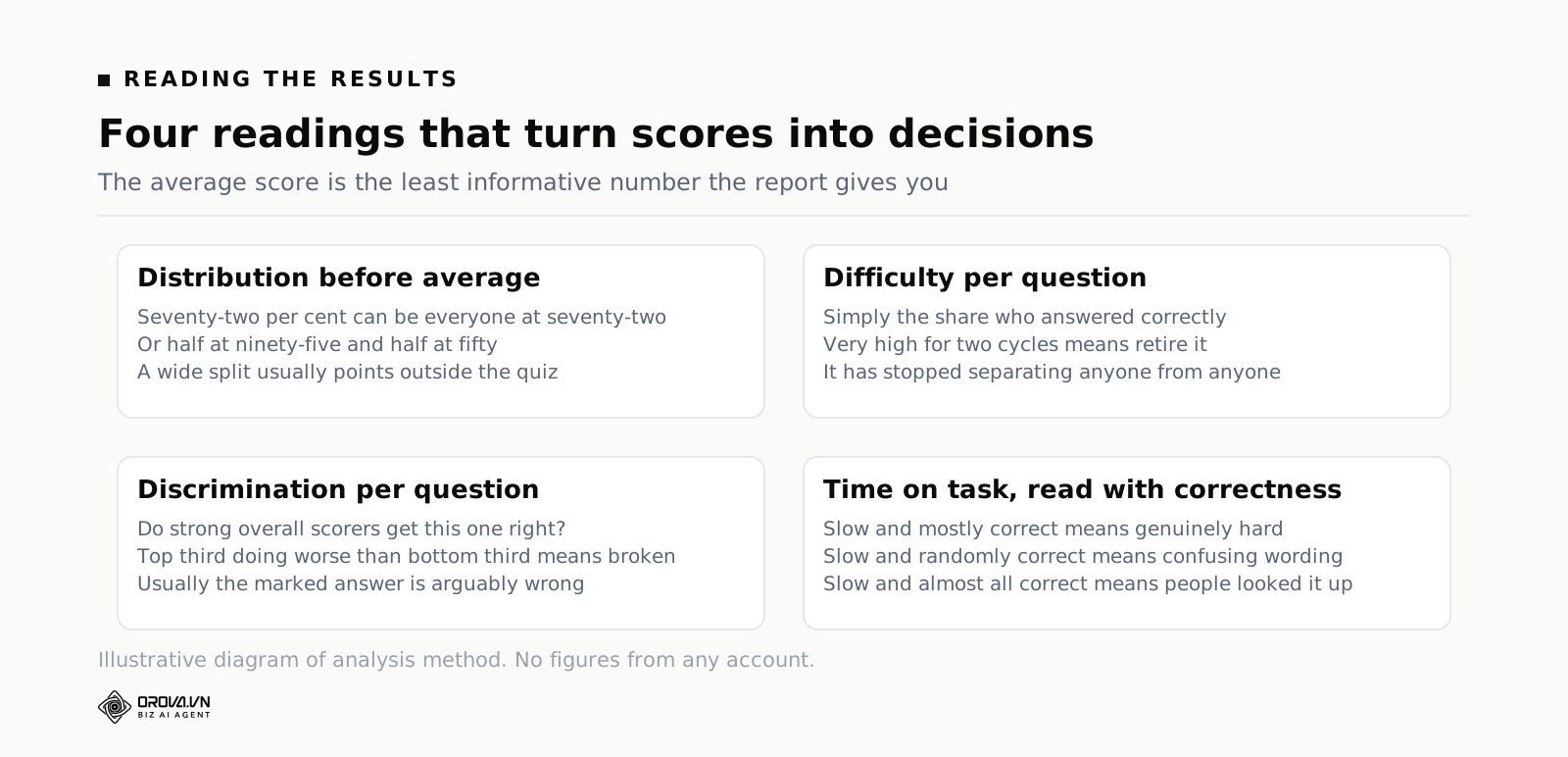
An average of seventy-two per cent can mean everyone scored around seventy-two, or it can mean half the group scored ninety-five and half scored fifty. Those are completely different situations calling for completely different responses, and the average hides which one you have. Look at the spread first, every time.
A wide split usually points at something outside the quiz: two groups received different versions of the training, or one shift never got the session at all, or the content assumed prior knowledge only half the group has. That is useful information and it never shows up in a mean.
Per-question difficulty and discrimination
Two numbers per question will tell you almost everything. Difficulty is simply the percentage who answered correctly. Discrimination is whether the people who scored well overall also got this question right. A question that strong performers get wrong at the same rate as weak performers is not hard — it is broken.
The pattern to hunt for: a question where the top third of scorers do worse than the bottom third. That almost always means the option you marked correct is arguably wrong, or the wording misleads people who know the material well enough to notice an edge case. Rewrite those first. They cost you more credibility than any other kind of defect.
Time on task, and what it does not mean
Time data is genuinely useful and routinely over-read. A question that takes far longer than its neighbours is either complex, badly worded, or being looked up. You cannot tell which from the number alone — but you can tell which by combining it with correctness. Slow and mostly correct suggests genuine difficulty. Slow and randomly correct suggests confusion. Slow and almost entirely correct suggests everyone found the answer somewhere else.
Time spent on the content before the quiz is a different measure again, and only meaningful if it counts active attention rather than an open tab. Treat any completion time that looks impossibly short as a flag to review, not as proof of cheating.
Retire questions on a schedule
Set a rule now: any question answered correctly by more than ninety-five per cent of takers for two cycles running gets retired, because it has stopped discriminating between people. Any question with negative discrimination gets rewritten immediately. Any question tied to a procedure that changed gets reviewed within a month of the change. Without a rule, banks decay quietly and nobody notices until an auditor reads a question describing a form you stopped using two years ago.
From a passing score to proof you can show someone
A score in a dashboard is not evidence. When a client, a regulator or an internal auditor asks whether your team is trained, you need something you can hand over.
Automatic issue at a threshold
The right behaviour is that a certificate is issued the moment someone crosses the pass mark, without anyone in your team clicking anything. Manual issuing sounds harmless and turns into a permanent background task — forty people finish across three weeks, and someone has to notice each one. Automatic issue also removes the awkward gap where a person has passed but has nothing to show for it.
Set the threshold with the certificate in mind, not just the score. If a certificate carries weight externally, the mark behind it should be defensible to someone who has never met you.
Verifiable codes and public lookup
A PDF with a name on it proves very little, because a PDF can be edited in a browser. What makes a certificate meaningful is a unique code printed on it and a public page where anyone can enter the code and see whether it is real, who it was issued to and when. That turns the document from decoration into evidence, and it costs nothing extra once the system supports it.
Check one detail before you commit: whether the verification page stays available to people outside your organisation without an account. A verification link that demands a login defeats the entire purpose.
Formats, and where they end up
People use certificates in three places, and each wants a different shape. A landscape format for printing and for internal records. A portrait or square format for social profiles and messaging apps, because a wide image gets cropped into illegibility on a phone. And a PDF for anything going into a file or an email attachment. If your tool only produces one shape, expect a steady trickle of requests to make another.
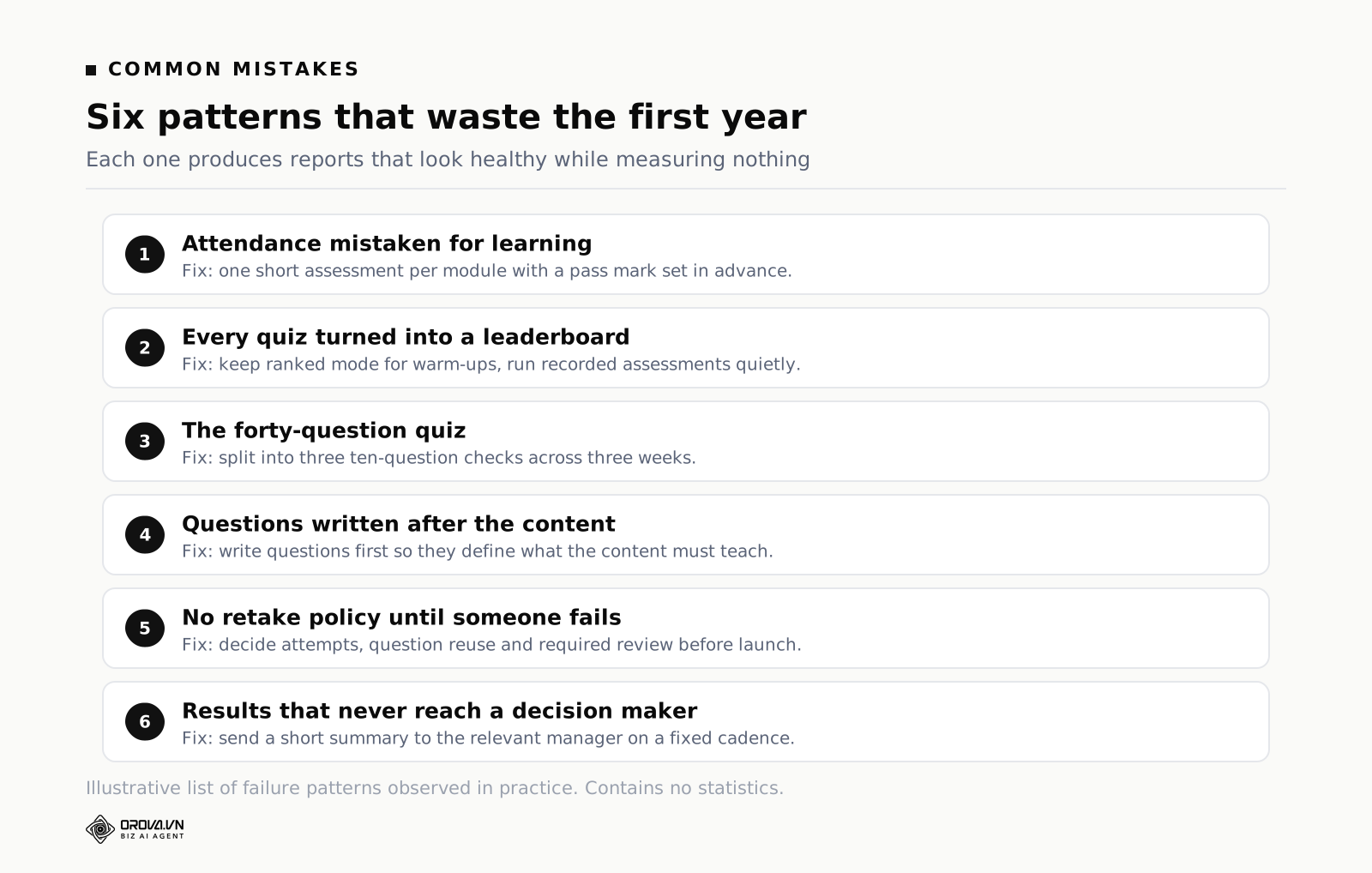
Common mistakes
Mistake 1: measuring attendance and calling it learning
Completion percentages are easy to collect and easy to report upward, which is exactly why they take over. But a hundred per cent completion with no assessment tells you people clicked through, and clicking through is not a skill. The fix is not more tracking — it is one short assessment per module with a real pass mark. Three good questions beat forty minutes of watch-time telemetry.
Mistake 2: turning every quiz into a leaderboard
Ranked mode is genuinely effective and genuinely overused. When every check is a public competition, two things happen: the people who are already confident enjoy it more and learn least, and the people who most need the training start hiding. Keep leaderboards for warm-ups and low-stakes reinforcement. For anything that gets recorded, run it individually and quietly.
Mistake 3: the forty-question quiz
Long quizzes feel thorough and behave badly. Attention drops sharply after the first fifteen or so questions, so the later answers measure stamina rather than knowledge, and completion rates fall off exactly when you need people to finish. If you genuinely need broad coverage, split it: three ten-question checks across three weeks produce better data and better retention than one thirty-question marathon.
Mistake 4: writing the questions after the content
Writing questions last is the default and it is backwards. Written first, the questions define what the content has to teach, and you almost always discover that a third of the planned material serves no assessable purpose. Written last, the questions get shaped to fit whatever the content happened to cover, including the parts that did not matter.
Mistake 5: no plan for retakes
Someone will fail. Decide in advance how many attempts they get, whether they see the same questions again, whether a review of the material is required in between, and how long they have to pass. Deciding this after the first failure means deciding it under pressure with one person watching, which produces a policy you will not want to apply to everyone else.
Mistake 6: results that never reach the person who can act
The quiz shows that the third shift consistently fails the escalation questions. That information sits in a dashboard nobody opens. Decide who receives results, in what form, and how often — a short summary to the relevant manager beats access to a reporting tool they will never log into. Assessment that changes nothing is a cost with no return.
A rhythm you can keep up for a year
The teams that get value from assessment are not the ones with the best tool. They are the ones who kept a small routine going for four quarters. Here is a schedule that survives contact with a normal workload.
| Cadence | What you do | Roughly how long |
|---|---|---|
| Weekly | Check who is overdue, send one reminder, glance at any new failures | Ten minutes |
| Monthly | Pull per-question stats for quizzes run that month; flag anything with weak discrimination | Thirty minutes |
| Quarterly | Rewrite flagged questions, retire the ones everyone passes, add replacements from the surplus bank | Half a day |
| Twice a year | Re-read every quiz against current procedures; correct anything that describes an outdated process | Half a day |
| Annually | Review pass marks against what actually went wrong operationally during the year | Two hours |
The weekly ten minutes matter most
Overdue assignments are the leak that empties the bucket. People do not refuse training; they postpone it, and then it drops off the list. One reminder a week, sent early enough that it is not nagging, closes most of the gap. This is also the task most worth automating, because it is pure repetition with no judgement in it.
Quarterly is where question quality actually improves
Rewriting questions is unglamorous work that never feels urgent, so it needs a slot in the calendar or it will not happen. Half a day per quarter, spent on the ten questions your data flagged, will do more for the credibility of your assessments than any tool change. Keep a one-line note of what you changed and why. In a year that note is the only record of how the bank evolved.
Connect the rhythm to the wider training programme
Quizzes are one instrument in a larger system that also includes content, assignment, progress tracking and reporting. If you are still deciding how those pieces fit together, the selection criteria for the platform underneath them are covered separately in our guide to choosing employee training software. The short version: judge the assessment layer and the delivery layer together, because a quiz tool that cannot see who was assigned what will always need a spreadsheet beside it.
Frequently asked questions
How long should a training quiz be?
For an assessment with consequences, ten to fifteen questions is usually the sweet spot: long enough that a lucky guesser cannot pass, short enough that people finish in one sitting. For a live ranked round, eight to twelve questions keeps the energy up. If your content genuinely needs more coverage than that, split it into several shorter checks rather than extending one.
Can you actually stop people looking up the answers?
Not completely, and chasing that goal will cost you more than it returns. What you can do is make lookup pointless. Scenario questions where the answer requires judgement rather than a fact cannot be searched. Randomised question selection from a larger bank means a shared answer key covers only part of any given attempt. Time limits reduce the room for searching. Server-side scoring stops the answers being readable in the page. Together those make cheating slower than learning, which is the realistic target.
Is there evidence that quizzing improves retention, or is it just admin?
There is a well-documented effect here. Roediger and Karpicke, publishing in Psychological Science in 2006, showed that people who were tested on material remembered more of it later than people who simply reread the same material for the same amount of time. The practical implication for training teams is that quizzes are not only measurement — the act of retrieving an answer is itself part of the learning, which is a strong argument for short, repeated checks rather than one big test at the end.
What pass mark should we set?
Set it from consequence, not convention. Where a mistake causes real harm — safety, regulated processes, anything touching money or personal data — use a high mark with unlimited retakes and a required content review between attempts. Where the goal is general awareness, a moderate mark with one retake is proportionate. Write down the reasoning in one line so it can be defended later.
Should quiz scores feed into performance reviews?
Be careful. The moment scores affect pay or promotion, behaviour changes: people optimise for the score, share answers, and stop treating low-stakes practice as safe. A reasonable line is that completion of required training is fair to track formally, while individual scores stay between the learner and the training team, used to decide who needs more support rather than who gets ranked.
How often should the question bank be rewritten?
Rotate roughly a third of the questions annually as routine maintenance, and rewrite any question immediately when the underlying procedure changes or when the data shows it is not discriminating. If your content is stable, the retirement rule alone will keep the bank healthy — retire anything nearly everyone passes twice running, because it has stopped telling you anything.
When hand-building stops scaling
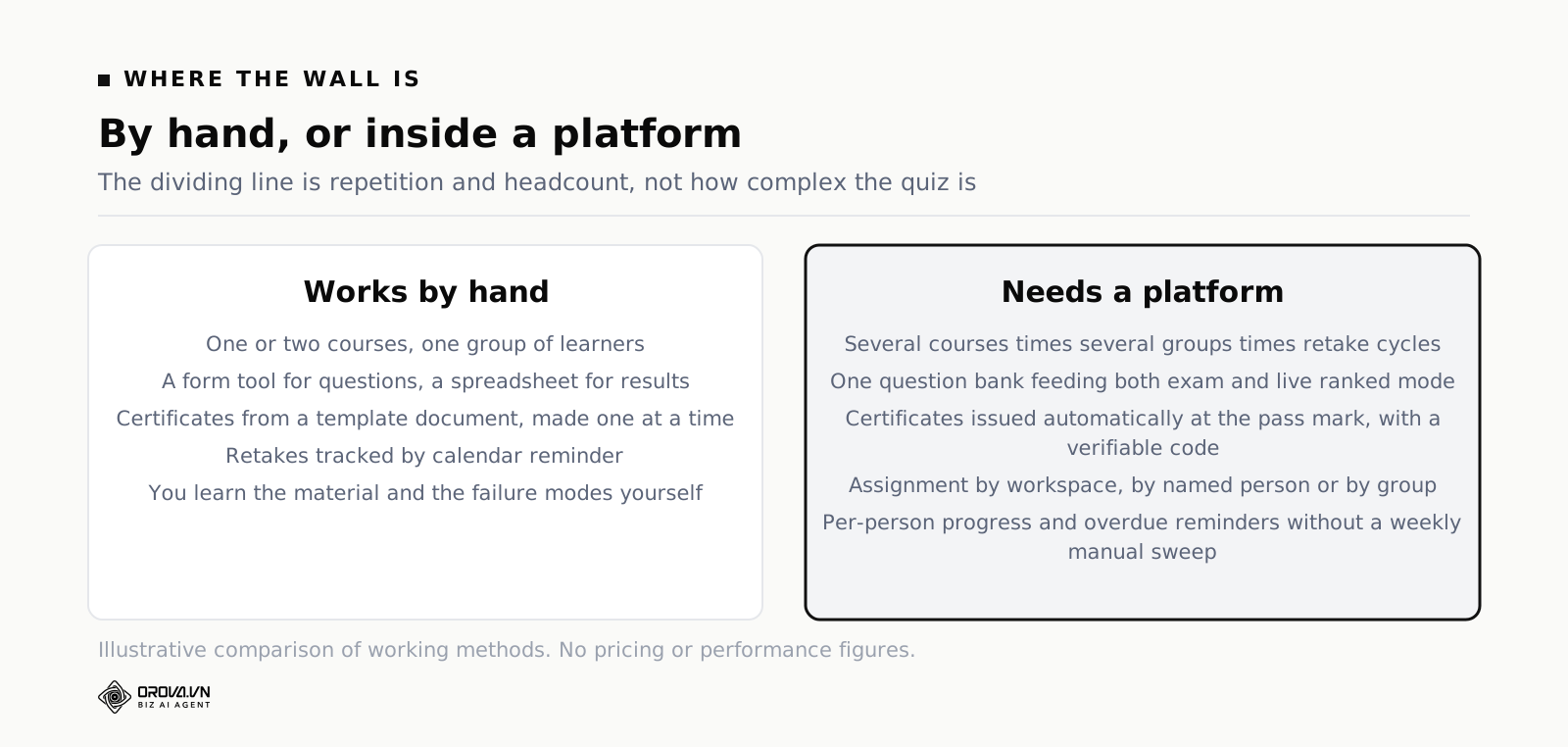
What you can genuinely run by hand
For a while, doing this by hand is the right call. A form tool for the questions, a spreadsheet for who passed, a template document for certificates, a calendar reminder for retakes — for one course and twenty people, that setup works and costs nothing. You also learn things by doing it manually that you would never notice if a system did it for you.
The symptoms that say you have hit the wall
The wall arrives predictably. It is not caused by the quizzes getting harder; it is caused by multiplication. Six courses times four groups times two retake cycles is a lot of small administrative acts, and every one of them is a chance to miss someone. The specific symptoms are recognisable: you cannot answer "who still has not completed the safety module" without opening three files, certificates go out days late because nobody noticed the pass, and the question bank exists in four versions with no way to tell which is current. At that point the spreadsheet is not saving money — it is quietly consuming a day a week.
What an online quiz maker inside a training platform changes
That is the point where an assessment tool built into a training platform pays for itself. Orova Training runs both quiz formats from one question bank — individual exams graded on the server, and a Kahoot-style ranked mode with a lobby, a QR code to join, and a live leaderboard — across eight question types, with AI grading for written answers that you can switch off per quiz and that falls back to manual marking without losing submissions if quota runs out. Passing scores can issue certificates automatically, each with a unique code and a public verification page, exportable as PDF in landscape, portrait or square. Courses, documents and quizzes are shared by link or QR in three access modes, assigned to your whole workspace, to named people or to groups, with per-person progress including real study time. The interface runs in six languages, courses export to SCORM 1.2, and new accounts get 1,000 quota to try it without a card.
What a platform will not do is fix a weak question bank. It will deliver bad questions faster, issue certificates for tests that measure nothing, and produce reports with more decimal places. The order stays the same as it was on day one: decide what competence means, write questions that discriminate, run them where the answers are not visible, and only then automate the parts that repeat.
What to do this week
Pick your most important existing quiz — the one with real consequences — and do three things with it. First, open it in a private browser window as a learner would and check where the scoring happens; if you can find the correct answers anywhere in the page, that quiz cannot be used for anything that goes into a record, and replacing it is now your top priority. Second, pull the per-question results from the last time it ran and find the questions where your best overall scorers did worse than average. There will be one or two. Rewrite them this week, because they are actively producing wrong conclusions about your people.
Third, write down the pass mark and one sentence explaining why it is that number, then put it next to the quiz where whoever inherits it will find it. If you cannot write that sentence, you have found the real problem, and it is not the tool.
If you do not have a quiz running yet, the first week is simpler. Finish the sentence "after this module, a person should be able to ___ without help", draft twenty questions in a plain text file with the wrong answers written first, and send ten of them to two colleagues for a dry run. That is roughly two hours of work, it costs nothing, and it will tell you more about the state of your training than any tool comparison.
Run exams and live quizzes from one question bank
Orova Training grades exams on the server, runs a ranked mode people join by QR code, and issues certificates automatically when someone passes.
Try it free