
Google Ads Management Tools: What They Actually Automate
Most google ads management tools are bought to solve a problem that is easy to state and hard to admit: nobody on the team has time to look at the account every day, and the days nobody looks are the days it quietly wastes money. The tools promise to watch it for you. What they actually watch, and what they are permitted to do about what they see, varies so much between products that the category name is close to useless as a description.
This is an attempt to describe the category honestly — what these tools genuinely take off your hands, where the automation stops and hands the work back, and the questions that separate a tool that manages an account from one that reports on it. Orova Ads is one of the options and appears here with its limits stated, not as a conclusion the article was built to reach.
What do google ads management tools actually do?
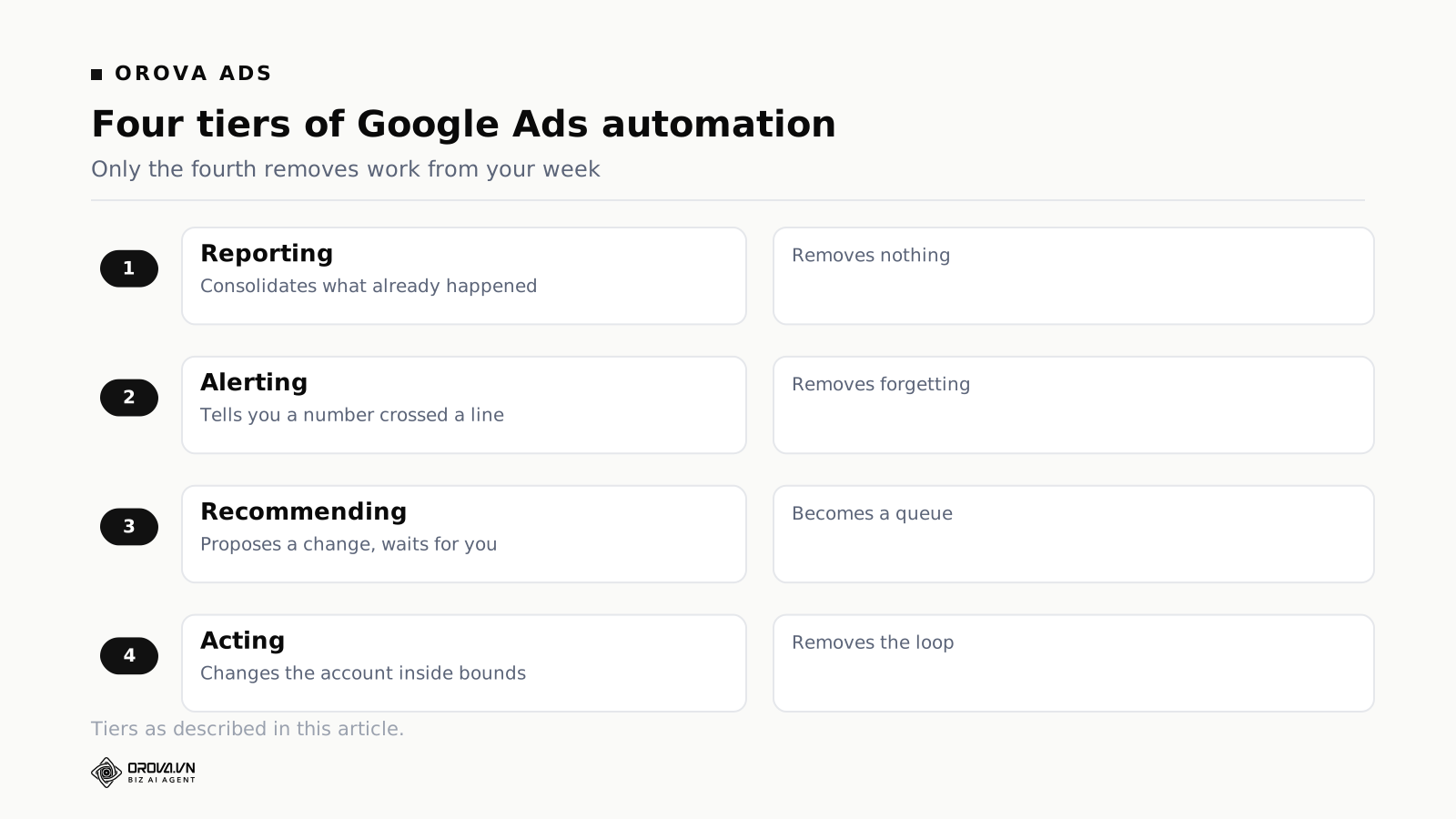
They sit between you and the account and do one of four things: report what happened, alert you when a number crosses a line, recommend a change and wait for approval, or make the change themselves within limits you set. Most do the first two well and the fourth only under conditions worth reading.
Those four tiers are the entire category, and the price difference between tier one and tier four is smaller than the difference in what they remove from your week. A dashboard that shows yesterday's cost per acquisition removes nothing; you still have to open it, interpret it, and act. A system that pauses a keyword when it has spent three times target with no conversion removes the entire loop, including the part where you forget.
Tier one: reporting
The account already reports. What a reporting layer adds is consolidation — Google alongside Meta and TikTok, in one view, with your own metric definitions rather than each platform's. That is genuinely useful and it is not management. If a product's demo spends most of its time on charts, you are looking at a reporting tool with a management-shaped name.
Tier two: alerting
Alerting is where most teams get their first real win, because the failure mode it addresses is not bad decisions but absence. Spend spikes on a Saturday. A landing page starts returning errors. A campaign that was budget-capped all month suddenly is not, because someone raised a budget elsewhere and freed up spend.
The catch is alert fatigue, and it arrives faster than anyone expects. A rule that fires on any twenty per cent movement will fire constantly on small campaigns, because small numbers move by twenty per cent for no reason at all. Within three weeks the alerts are muted, and a muted alert is worse than no alert because it created the belief that something is watching.
Good alerting has two properties: thresholds that scale with the size of the thing being measured, and a minimum volume before a rule can fire at all. A campaign with eleven clicks this week should not be able to trigger anything.
Tier three: recommendation
The tool proposes a change and you approve it. This tier sounds like a safe middle ground and often is the worst of the three, for a reason that has nothing to do with the software: a queue of pending recommendations is a queue, and queues built from other people's suggestions do not get processed. After a fortnight there are ninety recommendations, the useful ones are buried among the trivial, and reviewing them costs more attention than making the changes would have.
Recommendation works when the volume is small and each item carries its reasoning, so a decision takes fifteen seconds rather than five minutes of investigation. It fails when it becomes an inbox.
Tier four: acting on the account
Here the tool changes bids, pauses things, shifts budget, edits audiences. This is the tier that removes work, and it is the tier where the questions get serious. Not "can it act" — nearly everything claims to — but under what constraints, with what record, and how fast you can stop it.
The four questions that separate one product from another
| Question | Why it matters | A good answer |
|---|---|---|
| What is the tool allowed to change, and by how much in one step? | Unbounded automation is the only kind that produces a catastrophic day. A bid multiplier with no ceiling will eventually meet a data anomaly. | Every action carries explicit bounds, and the bounds are visible before you switch it on. |
| What did it do last Tuesday, and why? | Without a readable history you cannot debug performance changes, and you will blame the wrong thing. | A log of every action with the condition that triggered it and the values at the time. |
| How do I stop it, and how fast? | The question you will ask at 9pm on a Friday. | A single control that halts all automated action immediately, without unpicking individual rules. |
| What happens when the data is wrong? | Conversion tracking breaks more often than anyone admits. Automation acting on broken data is worse than no automation. | Minimum-volume gates, and behaviour that is defined for the case where a metric is missing rather than zero. |
That last row deserves emphasis because it is the failure that sounds theoretical and is not. A missing conversion figure and a conversion figure of zero are different facts about the world, and a system that treats them the same will pause your best-performing campaign on the morning your tracking tag breaks.
Rules or an agent: a distinction worth getting right
Two designs dominate, and they suit different accounts.
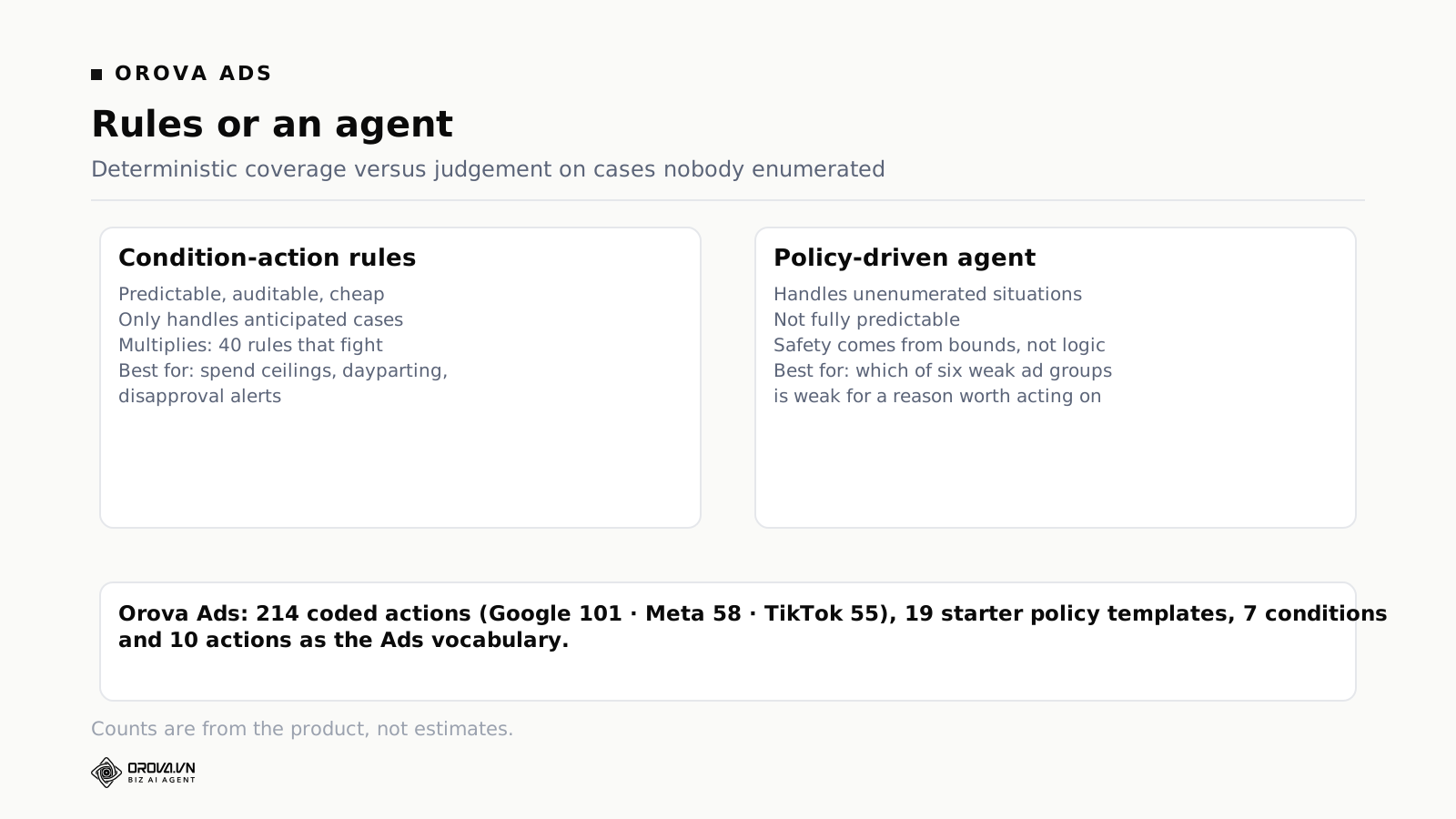
Condition-action rules are deterministic. If cost exceeds a threshold and conversions are below another, then pause. They are predictable, auditable, and cheap to run. Their weakness is that they only handle situations somebody anticipated, and they multiply — a mature rule set becomes forty rules interacting in ways nobody has modelled, where two rules fight over the same campaign nightly.
An agent reads the account state and decides what to do within a policy you write. It handles situations nobody enumerated. Its weakness is the mirror image: it is not fully predictable, so the policy and the bounds are doing the safety work that determinism does in the rule-based design.
The honest answer for most accounts is both. Rules for the things you can state exactly — daily spend ceilings, disapproval alerts, dayparting. An agent for the judgement calls that resist enumeration, such as which of six underperforming ad groups is underperforming for a reason worth acting on.
How Orova Ads is built, including what it will not do
Orova Ads connects Google Ads, Meta and TikTok in one workspace, and the automation is built around a catalogue of actions rather than free-form instructions.
There are 214 coded optimisation actions — 101 for Google, 58 for Meta, 55 for TikTok. Each one is a defined operation with bounds, not a prompt. That number is the honest reason the system can be allowed near a live budget: the set of things it can do is finite, enumerated, and each element has limits attached before anything runs.
Policies are written in plain language and turned into those actions. There are 19 starter rule templates to begin from. The Ads side exposes 7 conditions and 10 actions as the vocabulary a policy is assembled from, which is a deliberately small vocabulary — small enough that you can hold the whole thing in your head and predict what a policy will do.
Assistants are separate, named, and remember things. Rather than one global configuration, you build assistants for particular jobs — one that watches spend pacing, one that reviews search terms — each with its own memory of what it has learned about the account, its own schedule, and the ability to be shared with a colleague. There is a template library that can be rated, so an assistant that works well on one account can be reused on another rather than rebuilt.
Analysis and application are separate steps. The agent analyses and proposes; applying is a distinct action. You can run it in advisory mode indefinitely and never let it touch the account — a reasonable way to spend the first month, and the way we would suggest starting.
Conversion data is treated as part of the system, not an assumption. Server-side conversion tracking is configured inside the module for all three platforms, with a generated secret, a regeneration path, and a test endpoint. This matters more than it sounds. Automation quality is bounded by data quality, and the most common cause of an automation making a bad decision is not a bad rule but a conversion signal that stopped arriving three days ago and nobody noticed.
Each step consumes 20 quota, and every plan includes every feature — the tiers differ only in quota, not in what is unlocked. There is no version of the product where the safety features are behind a higher price.
What Orova Ads does not do
It does not write or generate your creative assets, and it does not design landing pages. It does not manage Amazon or marketplace advertising. It does not replace a media strategist deciding which markets to enter or what the offer should be — it operates within a structure you have already decided on. And it will not rescue an account whose problem is the offer rather than the execution, which is a larger share of underperforming accounts than the category likes to admit.
Where the automation stops and hands the work back
Every tool in this category has a boundary. Knowing where yours sits is the difference between a system that saves you a day a week and one that produces a false sense of coverage.
It cannot fix a measurement problem
If conversions are attributed to the wrong campaigns, every downstream decision inherits the error. Automation makes that inheritance faster and more thorough: instead of one person occasionally acting on bad numbers, a system acts on them every hour, consistently, in the same wrong direction.
Fix measurement first. That means server-side conversion tracking that actually fires, a conversion definition that matches what the business considers a sale, and a habit of checking that the numbers still arrive. This is unglamorous work with no dashboard, and it determines the ceiling on everything else.
It cannot tell you the offer is wrong
An account with a weak offer looks, in the data, like an account with an optimisation problem. Click-through rates are acceptable, cost per click is normal, and conversion rate is poor. Every automated system will respond by grinding at the levers it has — bids, audiences, placements, negative keywords — and produce small improvements that never compound into anything.
The signal to watch for is a long series of individually sensible changes that add up to nothing. When the direction of travel is flat over a quarter despite steady activity, the constraint is upstream of the ad account, and no tool in this category is going to say so.
It cannot own the relationship with the platform
Disapprovals, policy changes, account suspensions, billing failures, representatives suggesting changes that suit the platform more than you — these need a human. A tool can alert you that thirty ads were disapproved. It cannot read the policy, decide whether to appeal, or rewrite the copy in a way that both complies and still sells.
It cannot make a small account big enough to optimise
Below a certain volume, optimisation is superstition. An ad group producing four conversions a month has no statistically meaningful signal to act on, and any system that acts on it is amplifying noise. Automation is worth most in the middle: enough volume for signal, not enough headcount to watch it continuously. Very small accounts should be simplified rather than automated.
How to trial one without wasting the month
Trials in this category are usually wasted the same way: the tool is connected, admired, left in reporting mode, and cancelled at day twenty-nine on the grounds that nothing changed. Nothing changed because nothing was switched on.
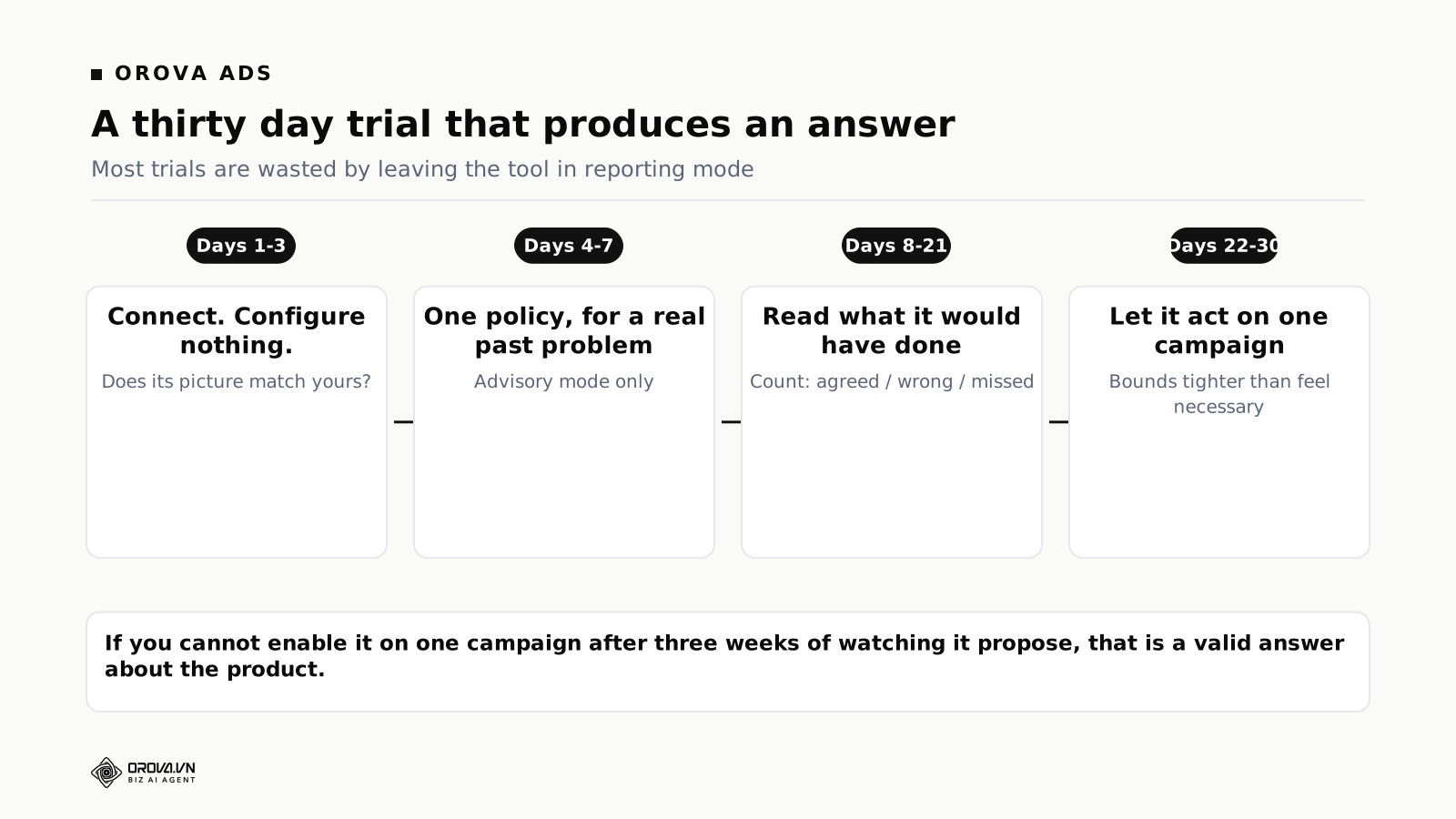
Days one to three — connect and let it observe. Do not configure anything. Let it collect and see whether its picture of the account matches yours. Where it does not, work out which of you is wrong; roughly half the time the tool has surfaced something real.
Days four to seven — write one policy for a problem you have actually had. Not a policy for a hypothetical, and not six policies. One, for the thing that most recently went wrong. Run it in advisory mode.
Days eight to twenty-one — read what it would have done. This is the whole trial. Every proposal is a test of whether the system's judgement matches yours on your account. Count how many you agree with, how many are wrong, and how many surface something you would have missed. Three numbers, one page.
Days twenty-two to thirty — let it act, on one campaign. Pick a campaign whose loss you could absorb. Set bounds deliberately tighter than feels necessary. Watch the log daily. If you cannot bring yourself to enable it on a single campaign after three weeks of watching it propose, that is your answer about the product, and it is a valid one.
Five mistakes that make these tools look worse than they are
Switching everything on in week one
Enthusiasm produces twenty rules on day two. Something goes wrong on day nine and there is no way to tell which of the twenty caused it, so all twenty get switched off and the product is judged unreliable. Add automation one policy at a time, with enough of a gap to attribute effects.
Setting bounds you have not thought about
Defaults are written to be safe for an average account, and no account is average. A ten per cent bid adjustment ceiling is conservative on a mature campaign and reckless on a new one. Spend fifteen minutes on the bounds; they are the actual safety system, more than any confirmation dialog.
Automating around a structural problem
An account with sixty near-identical ad groups competing with each other does not need automation. It needs consolidating. Automation applied to a badly structured account produces a very efficient argument with itself, and the tool takes the blame for a mess it inherited.
Forgetting that automation has a memory and you do not
Six weeks after enabling a policy, its effects are invisible — the account simply behaves the way it now behaves. This is how teams end up with rules nobody can explain, that everyone is afraid to remove. Review the policy list quarterly and delete anything you cannot justify out loud in one sentence.
Judging it on the wrong timescale
Bidding changes take days to show up because conversions lag. A week is not long enough to evaluate anything, and reacting inside a week means reacting to noise — the exact behaviour the tool was bought to replace.
What to measure to know it is working
Efficiency metrics are the obvious choice and the wrong one on their own, because they move for reasons unrelated to the tool — seasonality, competitor budgets, a change in the mix. Track three things alongside them.
Time spent in the account. Crudely, hours per week. If it has not fallen after two months, the tool has added a surface to watch rather than removed one.
Time from problem to response. How long between something going wrong and something being done. This is where automation wins most clearly, and it is invisible in efficiency metrics because the disasters that did not happen leave no trace.
Number of decisions you can explain. Pick five changes from last month and try to say why each happened. If you cannot, the system is opaque regardless of its results, and opacity is a cost that arrives later — usually on the day performance drops and nobody can reconstruct what changed.
What a week actually looks like, with and without one
Feature lists are hard to translate into a decision. A week is easier.
Without
Monday morning is reconstruction. You open the account and try to work out what happened over the weekend from aggregate numbers, which is the least informative view available. Something looks off; you spend forty minutes deciding whether it is real or a weekend pattern. Tuesday and Wednesday there is no time, so nothing happens. Thursday someone asks for numbers, so you build a report — that is ninety minutes, most of it copying. Friday you make the changes you decided on Monday, four days late, against data that has since moved.
Total: roughly four hours, most of it spent establishing what happened rather than deciding what to do, and a response time to any problem of between one and five days depending on which day it started.
With, configured badly
Monday there are sixty alerts from the weekend. You read the first eight and skim the rest. By Wednesday the alerts are filtered to a folder. Thursday's report builds itself, which is a genuine saving. Friday you make changes, still four days late, and now you also have a subscription and a nagging sense that something is watching that you have stopped watching.
Total: about three hours, one real saving in reporting, and a new failure mode where the alerts are ignored precisely because there are too many to read.
With, configured well
The weekend spend spike was handled on Saturday, within the bounds you set, and there is a one-line record of it. Monday is fifteen minutes: read the log, agree or disagree with what was done, adjust one bound. Nothing else happens until Thursday, when the report is already built and you spend twenty minutes on interpretation rather than assembly. Friday's changes are the ones the system could not make — structural things, new creative, a decision about a market.
Total: about an hour, response time to a problem measured in hours rather than days, and your attention spent on the class of decisions that cannot be delegated.
The gap between the second and third scenarios is not the product. It is roughly two hours of configuration thought, spent once, mostly on bounds and on suppressing alerts that cannot lead to an action.
Reading a log entry, and why the format matters
The single most useful artefact these tools produce is the record of what was done. Most buyers never look at the format before purchase, and the format determines whether the record is usable in the moment you need it.
A poor entry says: Bid adjusted on Campaign A. It tells you a thing happened. To do anything with it you now open the account, find the campaign, look at the history, and reconstruct the state at the time.
A useful entry contains four elements: what the state was, which condition matched, what was done, and what bound applied. Something closer to: Campaign A, search term "X", spend 3.1× target CPA over 14 days with 0 conversions and 61 clicks; matched the no-conversion rule; added as negative at ad group level; daily action limit 5, this was action 2 of 5.
Read that entry three weeks later and you can still evaluate the decision. You can also see the two guards that made it safe — the fourteen-day window and the sixty-one clicks — which is what tells you whether the rule fired on signal or on noise.
Ask for a real log during the demo. Not a screenshot in a slide: the actual log from a live account, scrolled. Products differ enormously here and it is the cheapest quality signal available.
What changes when Meta and TikTok join the account
Most teams arrive at this category through Google and add the other platforms later. The addition changes the problem in three ways that are worth anticipating.
The metrics stop meaning the same thing. A conversion in Meta's reporting and a conversion in Google's reporting are counted under different attribution assumptions and different windows. Summed into one number they produce a total that is confidently wrong and usually too high. Any consolidated view has to state which definition it is using; if the interface does not say, assume it has simply added them.
Creative fatigue becomes the dominant variable. On search, the same ad can run for months. On feed platforms, performance decays with exposure, so the highest-leverage action is refreshing creative rather than adjusting bids. Automation tuned for search behaviour will grind at bids on a Meta campaign whose real problem is that everyone in the audience has seen the asset eleven times.
The failure modes are less symmetrical than expected. A bad automated decision on search wastes budget slowly and visibly. On feed platforms, the algorithm reacts to the change, so a clumsy intervention can reset a learning phase and cost several days of performance for a change that would have been harmless on search. Bounds should be tighter on the platforms where the platform's own algorithm is doing more of the work.
This is the argument for one system across all three rather than one per platform. Not consolidated reporting, which is convenient but not decisive — the real argument is that budget decisions are cross-platform, and a tool that can only see one platform will confidently recommend moving spend into the channel it happens to be looking at.
Pricing models, and what each one hides
Published prices in this category are inconsistent enough that quoting a figure would be wrong within a quarter. The models themselves are stable, and each has a distortion worth knowing.
Percentage of ad spend. Simple, aligns badly. The tool costs more when you spend more, regardless of whether the extra spend was its idea or its achievement. On a scaling account this becomes the largest line item surprisingly quickly, and it creates an awkward incentive at exactly the moment you are asking whether to cut spend.
Per seat. Punishes teams who want more people looking at the account, which is usually the behaviour you want to encourage. It also makes the tool expensive for agencies and cheap for a one-person operation, which is roughly backwards relative to who gets value.
Per account or per connection. Predictable and easy to forecast. The distortion is that it encourages consolidating accounts that should be separate, or leaving a platform unconnected because the marginal connection is not obviously worth it — which is how you end up with automation blind to a third of your spend.
Usage or quota. You pay for work done rather than for access. This is the model Orova uses: every plan contains every feature, tiers differ only in quota, and each step of an agent run consumes 20 quota. The distortion here is that heavy analysis periods cost more, so there is a temptation to run less analysis in exactly the months when the account is most volatile. The counter-argument, and the reason for the design, is that it never puts a safety feature behind a higher price — the bounds, the logs and the stop control are in every plan.
Whichever model you face, compute the annual figure at your realistic spend rather than your current one, and ask what happens in a month where you pause everything. Some models charge for a quiet month at the rate set by a busy one.
When you should not buy one
Three situations where the honest recommendation is to keep your money.
Your monthly spend is small enough that a bad week is survivable and a good week is not transformative. Below roughly the point where a day of unnoticed waste matters, the tool is solving a problem you do not have. Simplify the account instead: fewer campaigns, tighter structure, one weekly review with a written checklist. That costs nothing and outperforms automation on a small account.
You are about to change the offer, the pricing, or the target market. Automation learns the account as it is. Changing the underlying business while a system is optimising against the old shape produces a period where every automated decision is subtly wrong, and you will not be able to separate the effect of the change from the effect of the tool. Make the business change, let it settle for a month, then automate.
Nobody will own it. These systems need about fifteen minutes a week from a named person: read the log, agree or disagree, adjust one thing. Without that owner, the automation drifts out of alignment with the business and nobody notices until a quarter has passed. Software does not remove the need for an owner, and a tool nobody owns is worse than no tool, because it creates the belief that the account is being managed.
A demo checklist you can bring to any vendor
- Show me the log from a live account, scrolled. Not a slide. Read three entries aloud and see whether they contain state, condition, action and bound.
- Show me the stop control. Time how long it takes from deciding to stop to everything being halted.
- What happens if a conversion metric is missing rather than zero? If the answer is a pause, ask to see the code path or the setting. This is the most common real-world failure and the answers vary wildly.
- Show me a bound being hit. An action that wanted to move further and was not allowed to. If they cannot demonstrate one, the bounds may be advisory.
- What is the smallest volume at which a rule can fire? There should be a number, and it should be configurable.
- Show me two rules interacting. Every mature account has rules that touch the same campaign. Ask what happens when they disagree.
- Run the whole thing in advisory mode for a month — can I? If advisory mode is not a supported way to live, the product is not designed for cautious adoption.
- What does it cost in a month when we pause all campaigns?
Eight questions, twenty minutes. A vendor comfortable with all eight has shipped a product that has met real accounts. A vendor who wants to take three of them away and come back is describing a roadmap, which may still be the right purchase — but you should know that is what you are buying.
Getting the first month right
If you take one thing from this article, make it the sequence rather than any particular product judgement.
Check that conversion data is arriving and means what you think it means. Connect the tool and let it observe without configuring anything. Write one policy addressing a problem that actually happened to you. Run it in advisory mode long enough to build an opinion about its judgement — three weeks, not three days. Enable it on one campaign with bounds tighter than feel necessary. Read the log every day for a week, then weekly. Add the second policy only once you can explain the first one's effects.
Teams who follow that sequence generally end up keeping whichever tool they trialled, because they have calibrated it against their own account and know where its judgement is good. Teams who switch everything on in week one generally cancel in month two and conclude the category does not work — a conclusion about their configuration rather than about any product.
One more thing about trust
The reason teams hesitate here is rarely technical. It is that handing budget authority to software feels like a category of decision that should stay human, and that instinct is sound. The way through it is not reassurance from a vendor; it is a bounded first step small enough that being wrong is cheap, repeated until the bounds can be widened on evidence rather than on faith.
That is also the reason to prefer a system whose actions are enumerated rather than open-ended. A finite catalogue of operations, each with limits, is a design you can reason about. An open-ended system that can do anything the underlying model decides to do may well perform better on average, and it removes your ability to say in advance what the worst case is. On a live budget, knowing the worst case is worth more than an average improvement.
The short version
Google ads management tools span four tiers: reporting, alerting, recommending, and acting. Only the fourth removes real work, and only under bounds worth reading. The questions that separate products are what it may change and by how much, what record it leaves, how fast you can stop it, and how it behaves when the data is wrong.
Fix measurement before automating anything, start with one policy for a problem you have genuinely had, and run in advisory mode long enough to learn whether the system's judgement matches yours. Rules for what you can state exactly; an agent for what resists enumeration. And keep in mind the boundary: none of these tools can tell you the offer is the problem, which is the most common thing wrong with an underperforming account.
And be sceptical of any comparison — including this one — that arrives at a single winner. The right choice depends on your spend, your structure, how many platforms you run, and how much appetite the team has for supervising something. A tool that suits an agency running forty accounts is usually wrong for one company running three campaigns, and the reverse holds just as often.
The category is also younger than it looks. Products that were reporting dashboards two years ago now describe themselves as agents, and the underlying behaviour has not always changed as much as the wording. Judge what the log shows, not what the homepage says.
Related reading: condition-to-action rules for ad ops, guard rails before AI touches a budget, and the real cost of managing ads manually. The product is at orova.vn.
Run the account inside bounds you set
Orova Ads works from 214 coded actions across Google, Meta and TikTok, each with limits attached, driven by a policy you write in plain language. Advisory mode is free to sit in for as long as you want.
See the actions