
Google Ads pricing: how to set a budget that actually pays off

Many small business owners and marketing professionals struggle significantly when they first approach the digital advertising landscape. The most common dilemma involves understanding how much money is required to generate meaningful results without depleting the entire marketing fund prematurely. Relying on generalized industry averages for Google Ads pricing often leads to disastrous outcomes; you might set a daily limit that starves your campaigns of necessary machine learning data, or worse, overspend heavily on entirely irrelevant traffic.
The short answer: Google Ads has no fixed price and no minimum spend. You set a daily budget, and an auction decides what you pay each time someone clicks your ad (some Display and video formats can also charge per impression or per view). Your real cost depends on your keywords, your competition, the quality of your ads and landing pages, and how many conversions you need each month. The rest of this guide shows how to turn those variables into a budget you can defend.
This comprehensive guide is designed to dissect the reality of advertising costs from every possible angle. Instead of vague theories, we will walk you through a practical budget calculator framework, analyze the profound cost differences between various campaign types, and expose the hidden platform traps that frequently consume funds. By thoroughly understanding how the underlying pricing mechanics operate, you will be equipped to allocate your financial resources strategically, scaling your operations with confidence rather than gambling your budget on blind assumptions.
How Much Does Google Ads Cost in 2026? The Numbers
If you want one number: at the time of writing, the average cost per click on Google Search across all industries is 5.42 dollars in 2026, according to the 2026 Search Advertising Benchmarks published by WordStream by LocaliQ (built from thousands of client campaigns on Google Ads and Microsoft Ads). The same report puts the average cost per lead at 66.69 dollars, the average click-through rate at 6.64% and the average conversion rate at 8.18%. Google itself sets no minimum spend: you choose an average daily budget, and Google's Help Center states that a campaign can spend up to twice that amount on a busy day but never more than 30.4 times the daily budget over a month.
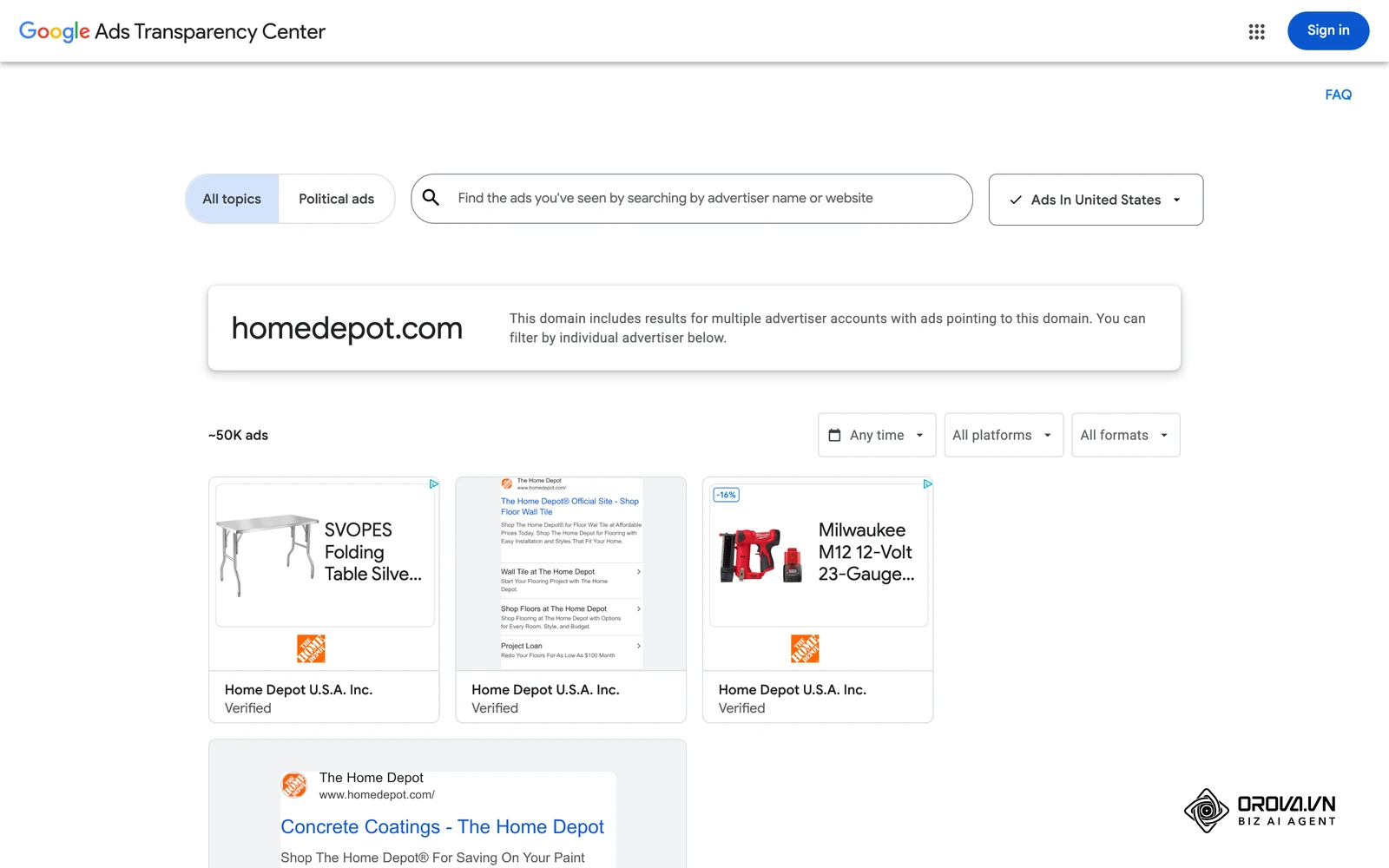
Average cost per click and cost per lead by industry (2026)
The figures below come from the WordStream by LocaliQ 2026 benchmarks. Use them as a starting point for Step 2 of the calculator later in this guide, then replace them with the forecast from your own Keyword Planner account.
| Industry | Average CPC | Average conversion rate | Average cost per lead |
|---|---|---|---|
| Arts and Entertainment | 1.63 dollars | 5.91% | 26.84 dollars |
| Restaurants and Food | 2.05 dollars | 8.05% | 30.57 dollars |
| Travel | 2.14 dollars | 5.83% | 44.70 dollars |
| Real Estate | 3.22 dollars | 3.70% | 102.51 dollars |
| Finance and Insurance | 3.39 dollars | 2.64% | 74.44 dollars |
| Education and Instruction | 4.81 dollars | 13.14% | 77.48 dollars |
| Business Services | 5.87 dollars | 4.85% | 93.69 dollars |
| Health and Fitness | 6.17 dollars | 6.94% | 67.36 dollars |
| Dentists and Dental Services | 8.00 dollars | 10.67% | 72.97 dollars |
| Home and Home Improvement | 8.33 dollars | 8.05% | 90.92 dollars |
| Attorneys and Legal Services | 9.87 dollars | 5.55% | 131.63 dollars |
| All industries | 5.42 dollars | 8.18% | 66.69 dollars |
What you actually pay for: pricing models and fees
Your total cost has two parts: the media you buy from Google and, if you hire help, a management fee. The fee ranges in the last two rows come from the 2026 pricing page WebFX publishes, as listed at the time of writing, a large US agency that lists its PPC plans openly.
| Cost item | How it is charged | Typical figure |
|---|---|---|
| Search ads | Per click (CPC) | 5.42 dollars average, 1.63 to 9.87 dollars by industry (WordStream by LocaliQ 2026) |
| Daily budget rule | Average daily budget | Up to 2 times on one day, at most 30.4 times per month (Google Ads Help) |
| Minimum spend | None | You can start with any daily budget (Google Ads Help) |
| Agency management, small accounts | Flat monthly fee | 750 dollars per month for up to 5,000 dollars of ad spend (WebFX) |
| Agency management, mid-size accounts | Flat fee or share of spend | 975 dollars or 15% of spend, whichever is higher, for 5,000 to 30,000 dollars (WebFX) |
| Agency management, large accounts | Flat fee or share of spend | 4,500 dollars or 12% of spend, whichever is higher, above 30,000 dollars (WebFX) |
Worked example: what a dental clinic would pay in a month
Take a dental clinic that wants 20 new patient enquiries a month and uses the industry averages above as a first estimate.
- Clicks needed: 20 leads ÷ 10.67% conversion rate = about 188 clicks.
- Media cost: 188 clicks × 8.00 dollars = about 1,504 dollars per month.
- Daily budget to enter in Google Ads: 1,504 ÷ 30.4 = about 49 dollars per day. On a busy day Google may spend up to 98 dollars, but the month will not exceed 30.4 × 49 = 1,490 dollars, so round the daily budget up to 50 dollars.
- Cost per lead: 1,504 ÷ 20 = about 75 dollars, close to the 72.97-dollar industry average.
- Total with an agency on a small-account plan: 1,504 + 750 = about 2,254 dollars per month, or about 113 dollars per lead.
If the clinic earns more than 113 dollars of profit from a new patient, the plan pays off even with agency help; if not, it should manage the account in-house or improve its conversion rate first.
Google Ads Pricing: Core Mechanics and Who Should Invest
Google Ads runs on an auction system. Every time a user types a query into the search engine, an instantaneous auction takes place to determine which advertisements will appear and in what specific order. Understanding this mechanism is the absolute foundation of mastering your costs.
The system does not simply award the top position to the advertiser willing to pay the most money. Instead, it uses a formula called Ad Rank. Your Ad Rank dictates your position on the page and ultimately influences your actual Cost Per Click (CPC). Ad Rank weighs your bid together with the quality of your ads and landing page, the context of the search, and the expected impact of your assets (formerly called ad extensions). Google's own Quality Score diagnostic summarizes that quality through three components: expected click-through rate, ad relevance, and landing page experience. This means that an advertiser with a highly relevant ad and a seamless website can effectively pay less per click than a competitor who bids higher but offers a poor user experience.
So, who should actually invest in this platform? You should invest if you have a product or service with a high profit margin, a clear and trackable conversion path, and a target audience that demonstrates strong, active search intent. If your business model relies on generating immediate leads—such as plumbing, legal services, or enterprise software—search advertising is incredibly effective because you are capturing users exactly when they are looking for a solution.
Conversely, you should not invest if you are selling a low-margin consumer product with no potential for repeat purchases (lifetime value). If you make a three-dollar profit on a single phone case, paying two dollars for a single click will destroy your margins before you even make a sale. Furthermore, if you have a fundamentally new invention that nobody knows exists, people will not search for it; in that scenario, visual disruption on social media is a much better use of your budget than search intent marketing.
What You Need Before Setting Your Budget
Diving into campaign creation without laying the proper groundwork is the most reliable way to waste money. Before you even think about entering a credit card into the billing section, you must prepare your tracking infrastructure and your financial baselines.
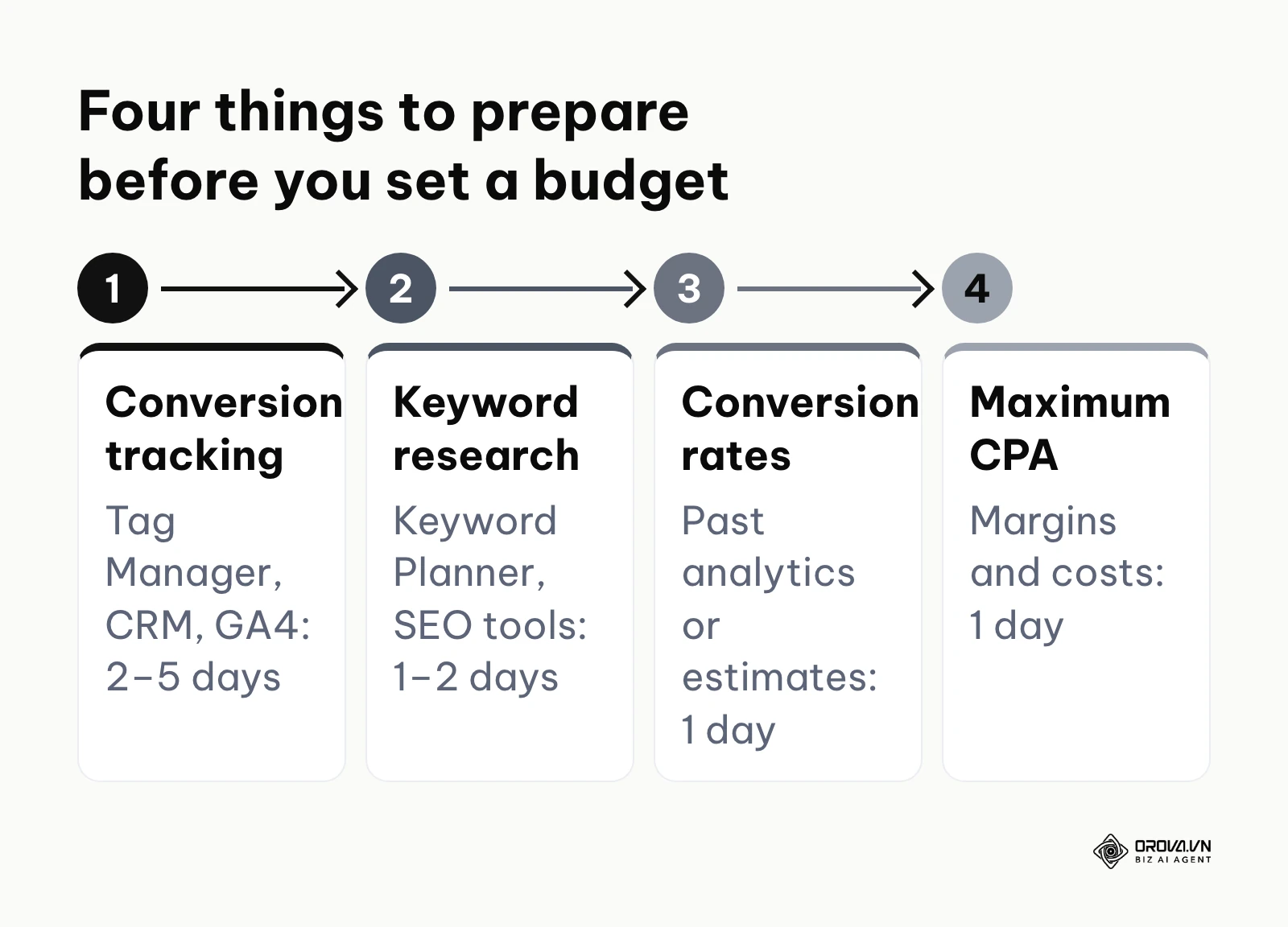
The table below outlines the essential prerequisites you must establish.
| Item Required | Where to Get It / How to Establish It | Time Needed to Prepare |
|---|---|---|
| Conversion Tracking | Google Tag Manager, CRM integrations, and Google Analytics 4. | 2–5 days depending on web development resources. |
| Keyword Research List | Google Keyword Planner, third-party SEO tools, customer interviews. | 1–2 days of deep research. |
| Historical Conversion Rates | Previous analytics data, industry benchmark reports, or conservative estimates. | 1 day of data gathering. |
| Maximum Allowable CPA | Internal financial spreadsheets detailing your profit margins and operational costs. | 1 day of financial modeling. |
Tracking conversions is non-negotiable. If you cannot definitively prove that a specific click resulted in a specific sale or lead, you are flying blind. You need to know exactly which keywords are generating revenue and which are just draining your daily limits. Furthermore, determining your maximum allowable Cost Per Acquisition (CPA) is critical. If your service nets you a 500-dollar profit, and you are willing to give up 100 dollars of that profit to acquire a new customer, your maximum CPA is 100 dollars. If your campaigns start bringing in customers at 150 dollars, you know immediately that you must pause or optimize.
Illustrative example:
- Context: A local dental clinic wanted to run search ads to attract new patients. The clinic owner, acting as the primary marketer, had a monthly budget of 1,000 dollars.
- Steps taken: Before launching, they defined their core, high-margin services (dental implants, professional whitening). They mapped out the lifetime value of a typical patient and set up Google Tag Manager to track appointment form submissions explicitly.
- Hurdles & fixes: Initially, the tracking tag was misconfigured. It double-counted conversions because it fired on both the "Submit" button click and the subsequent thank-you page load. They quickly identified this anomaly in the data, opened Google Tag Manager, and fixed the issue by isolating the firing trigger exclusively to the unique thank-you page URL.
- Result: The clinic can now accurately trace every single booked appointment back to the specific keywords the patient used, creating a solid, mathematically sound foundation for future budget allocation.
How to Build Your Budget: The 6-Step Framework
Building a budget should never be a guessing game. It requires a mathematical approach that works backward from your ultimate business goals. This 6-step framework functions as a manual budget calculator, guiding you from high-level revenue targets down to specific daily spending limits.
Step 1: Define Target Revenue and Allowable CPA
Your budget must be dictated by what you want to achieve, tempered by what you can afford to pay for a customer. Start by defining a realistic monthly revenue target specifically for this advertising channel. Then, calculate your break-even point. If a product sells for 100 dollars and costs 40 dollars to manufacture and ship, your absolute maximum allowable CPA is 60 dollars. Any acquisition cost above 60 dollars means you are losing money on every sale. Generally, you want your target CPA to be significantly lower than your break-even CPA to ensure a healthy profit margin.
Step 2: Reverse Engineer Traffic Using the Budget Calculator
Once you have your target CPA, you must calculate how many clicks you need to achieve one conversion. This requires estimating your website's conversion rate. Your own historical data is the best source; industry benchmark reports can give a rough starting point, but they vary widely by sector. If you suspect your website is poorly optimized, you might need to read up on conversion rate optimization and assume a more conservative one or two percent.
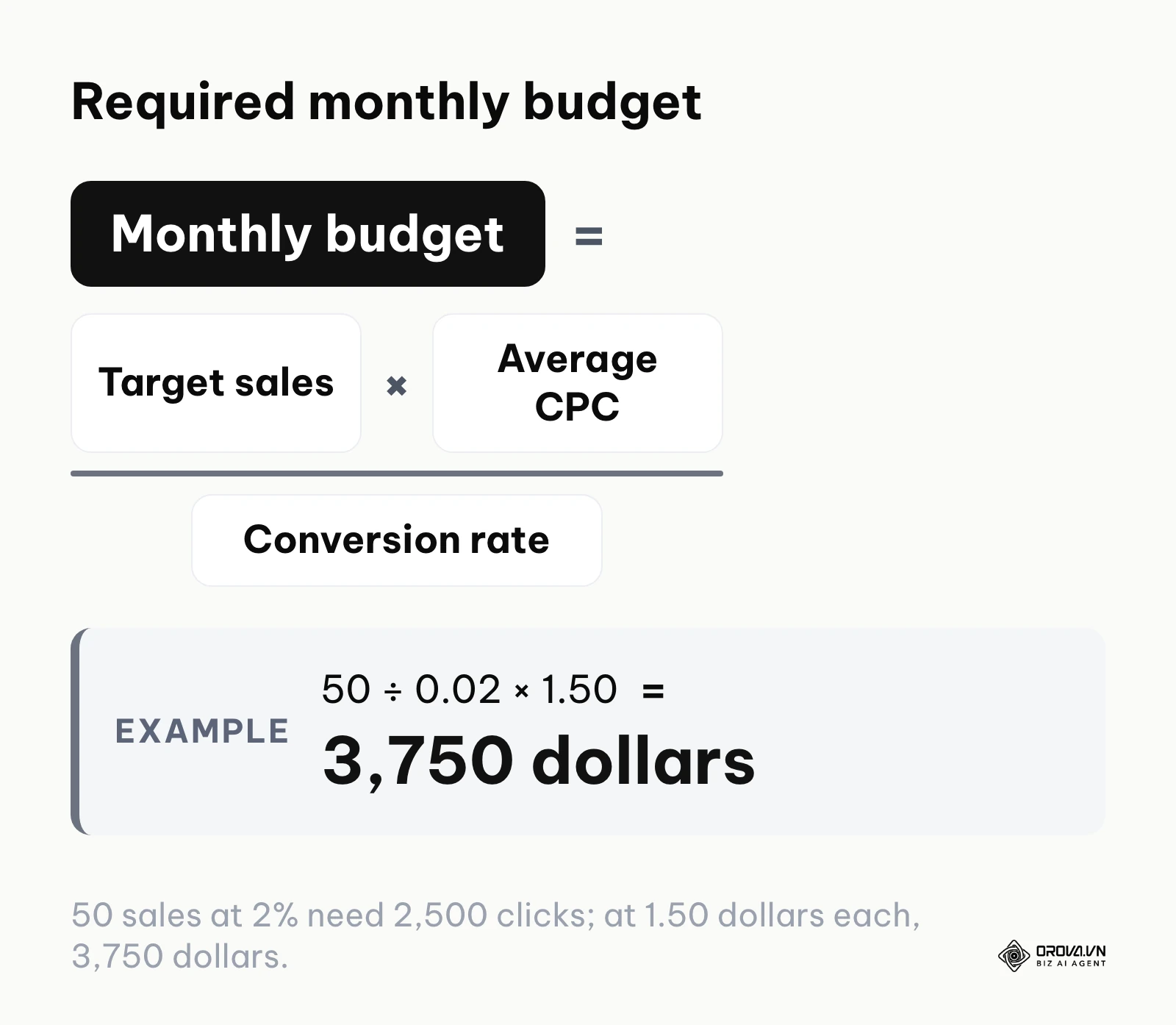
Here is the manual calculator logic you should apply:
| Metric | Calculation Method | Example Scenario |
|---|---|---|
| Target Monthly Sales | Your business goal | 50 sales |
| Estimated Conversion Rate | Historical data or benchmark | 2% (0.02) |
| Clicks Needed | Target Sales ÷ Conversion Rate | 50 ÷ 0.02 = 2,500 clicks |
| Estimated Average CPC | Keyword Planner forecast | 1.50 dollars per click |
| Required Monthly Budget | Clicks Needed × Average CPC | 2,500 × 1.50 dollars = 3,750 dollars |
| Target CPA Achieved | Monthly Budget ÷ Target Sales | 3,750 dollars ÷ 50 = 75 dollars per sale |
If the resulting Target CPA of 75 dollars is below your maximum allowable CPA, the budget is financially viable.
Step 3: Determine Your Starting Daily Budget
A common question is: how much should I spend on Google Ads to start? You take your Required Monthly Budget and divide it by 30.4 (the average number of days in a month). In our example, 3,750 dollars divided by 30.4 equals roughly 123 dollars per day.
However, what is the absolute minimum test budget? To give the algorithm enough data to learn, your daily budget should ideally be at least three to five times your target CPA, a common rule of thumb among advertisers. If your target CPA is 50 dollars, your daily budget should be at least 150 dollars to 250 dollars. If you only spend 10 dollars a day, it might take a full week just to get one conversion, meaning the algorithm will never gather enough concentrated data to optimize effectively.
Step 4: Account for the Algorithm Learning Phase
When you launch a new campaign or make a significant change to a bidding strategy, the system enters a "learning phase" that typically lasts 7 to 14 days. During this period, the algorithm actively tests different bids, placements, and audiences to see what works. Expect high volatility. Your daily spend might fluctuate wildly, and your CPA might temporarily spike well above your target. You must account for this in your budget planning. Do not panic and pause the campaign on day three just because the costs look high; doing so forces the system to restart the learning phase from scratch the next time you enable it.
Step 5: Segment by Campaign Type and Priority
Never put your entire budget into one generic campaign. Segment your funds based on intent. A standard best practice is to allocate a portion to "Branded" terms (people searching for your exact company name) because these clicks are usually very cheap and convert at a massive rate. Allocate the majority of the remaining funds to high-intent "Generic" keywords (e.g., "emergency plumber near me"). Reserve a small, tightly controlled test budget for broader discovery terms. This segmentation ensures that your most profitable avenues never run out of money because a broader keyword consumed the daily allowance.
Step 6: Set Constraints and Emergency Stop Thresholds
If you have a very small budget (under 500 dollars a month), the reality is that you must be ruthlessly precise. A 500-dollar budget leaves no room for algorithmic experimentation. In this scenario, you must utilize strict exact match keywords, severely limit your geographic targeting, and utilize manual CPC bidding so you control exactly what you pay per click. Set up automated rules within the platform to pause ad groups if they spend a certain amount without generating a conversion. Establishing these emergency stop thresholds prevents a single runaway keyword from draining your limited resources overnight.
OROVA ADS applies AI Agent to automate and optimize ad performance on Google, Meta and TikTok. Scale your budget safely, monitor 24/7 and expand your business quickly.
Experience the solution at orova.vn/ads
Search vs. Performance Max: A Deep Dive into Cost Structures
As advertising automation evolves, the distinction between different campaign types heavily impacts how your budget is utilized. The most significant shift in recent years is the heavy push toward Performance Max (PMax) campaigns, which operate very differently from traditional Search campaigns.
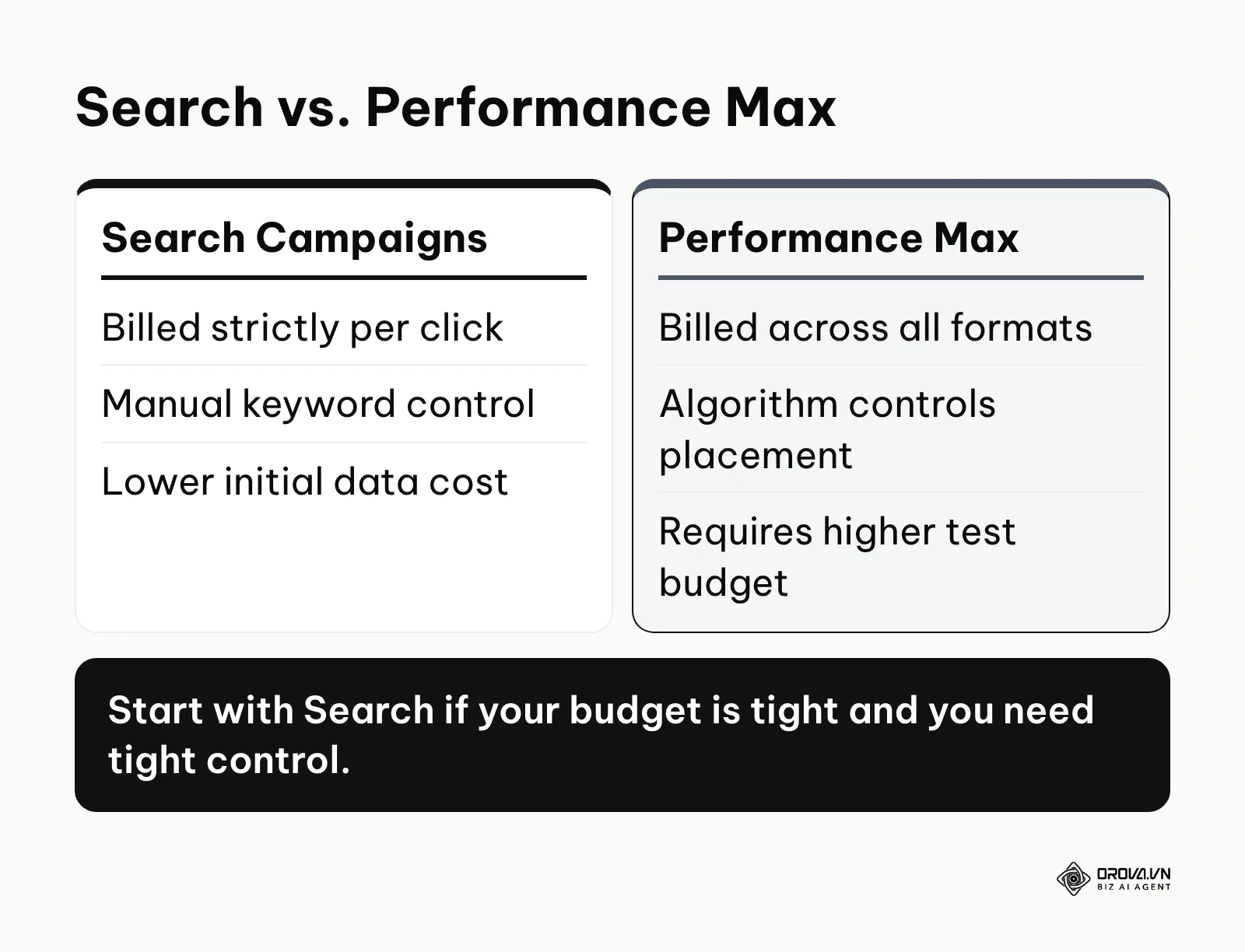
Traditional Search campaigns offer granular control. You bid on specific keywords, your ads show up purely as text on the search results page, and you are billed strictly when someone clicks. You can see exactly which keyword triggered the ad and exclude the ones that waste money. This makes Search ideal for limited budgets or highly specific B2B niches where controlling the exact search query is paramount.
Performance Max, on the other hand, is a goal-based, multi-channel behemoth. It takes your budget and automatically distributes it across Search, Display, YouTube, Gmail, Discover, and Maps. It acts as a black box; you provide the algorithm with audience signals, text assets, images, and a target CPA or Return on Ad Spend (ROAS), and it decides where to spend the money. While PMax can drive incredible volume and uncover audiences you never thought of, it requires a significantly larger initial budget to train the machine learning models. It also frequently spends money on lower-quality Display network clicks during its learning phase, which can be alarming to advertisers used to strict search intent.
| Feature | Search Campaigns | Performance Max (PMax) |
|---|---|---|
| Primary Placement | Google Search Results | Search, YouTube, Display, Gmail, Maps |
| Control Level | High (Keyword-level bidding and negative lists) | Low (Asset groups and audience signals) |
| Learning Phase Cost | Lower (You control the exact queries) | Higher (Algorithm tests broadly across formats) |
| Ideal For | Strict budgets, highly specific niche services, lead gen | E-commerce, large budgets, broad consumer appeal |
| Data Transparency | Excellent (Search term reports) | Limited (Aggregated insights) |
If you are running a comprehensive SEO strategy to capture organic search traffic, traditional Search ads allow you to perfectly complement your organic rankings by bidding on the exact terms where you lack organic presence, something PMax does not allow you to control easily.
Illustrative example: a Performance Max launch for an outdoor gear store
Illustrative example:
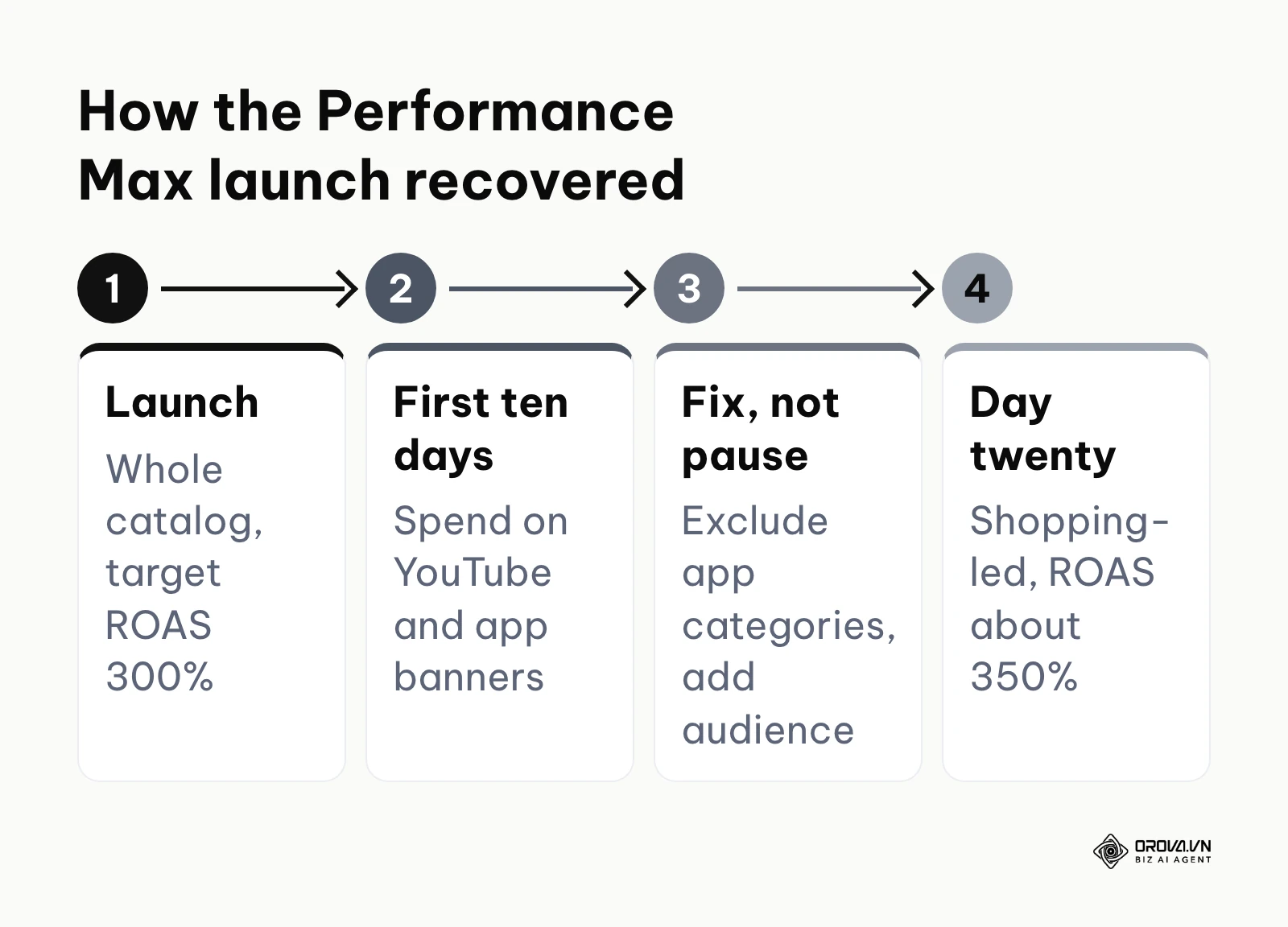
- Context: A medium-sized outdoor gear retailer with a 5,000-dollar monthly budget was looking to scale sales ahead of the winter season. The account was managed by a solo in-house marketer.
- Steps taken: They decided to launch a Performance Max campaign targeting their entire product catalog. They provided the system with five high-quality lifestyle images, various text headlines, and set a target ROAS of 300%.
- Hurdles & fixes: For the first ten days, the campaign spent aggressively on irrelevant YouTube placements and mobile app banners, driving almost zero sales and causing panic. Instead of pausing the campaign and ruining the learning phase, the marketer navigated to the settings, excluded mobile app categories at the account level, and added a custom audience of visitors who had recently browsed competitors' websites to guide the algorithm better.
- Result: By day twenty, the algorithm stabilized, shifting its spend heavily toward high-converting Google Shopping placements. The campaign eventually achieved a stable 350% return on ad spend.
Real Case Studies: Google Ads Cost Per Click by Industry in Action
To grasp budget dynamics, we must look at how Google Ads cost per click by industry plays out in real, contrasting environments. The approach for a software company is entirely different from the approach for an online retailer.
B2B SaaS Case Study: High CPC, Long Cycle
Consider a B2B Software-as-a-Service (SaaS) company selling enterprise project management tools. Their product costs 1,200 dollars per year, and the average customer stays for three years, giving them a lifetime value of 3,600 dollars. In the B2B software industry, CPCs are notoriously high. Competitors might bid anywhere from 15 dollars to 40 dollars for a single click on keywords like "enterprise project management software." If this company sets a daily budget of 50 dollars, they might only receive two clicks a day. To succeed, they need a substantial monthly budget (e.g., 10,000 dollars) simply to secure enough volume to generate statistically significant data. However, because their lifetime value is so high, they can comfortably afford a CPA of 500 dollars. Their strategy relies on extreme precision: exact match keywords, heavy negative keyword lists, and aggressive bidding on high-intent terms, accepting the high CPC as the cost of entry to a lucrative market.
B2C Ecommerce Case Study: High Volume, Lower Margins
Contrast the B2B scenario with a B2C ecommerce store selling custom phone accessories. Their average order value is 35 dollars, and the net profit margin is 40%, meaning they only make 14 dollars in profit per sale. For this business, paying a 15-dollar CPC is mathematically impossible; they would lose a dollar on every click even if every single click resulted in a sale, which never happens. Therefore, their strategy must revolve around massive volume and very low costs. They rely heavily on Google Shopping and Performance Max campaigns, where visual product feeds often yield CPCs between 0.30 dollars and 0.80 dollars. They also invest heavily in ecommerce SEO to offset paid costs. Their budget allocation prioritizes visually engaging formats and relentless retargeting of users who abandoned their shopping carts, scraping every possible efficiency to keep the CPA strictly under 10 dollars.
Measuring ROI: How to Track Your Google Ads Spend Efficiency
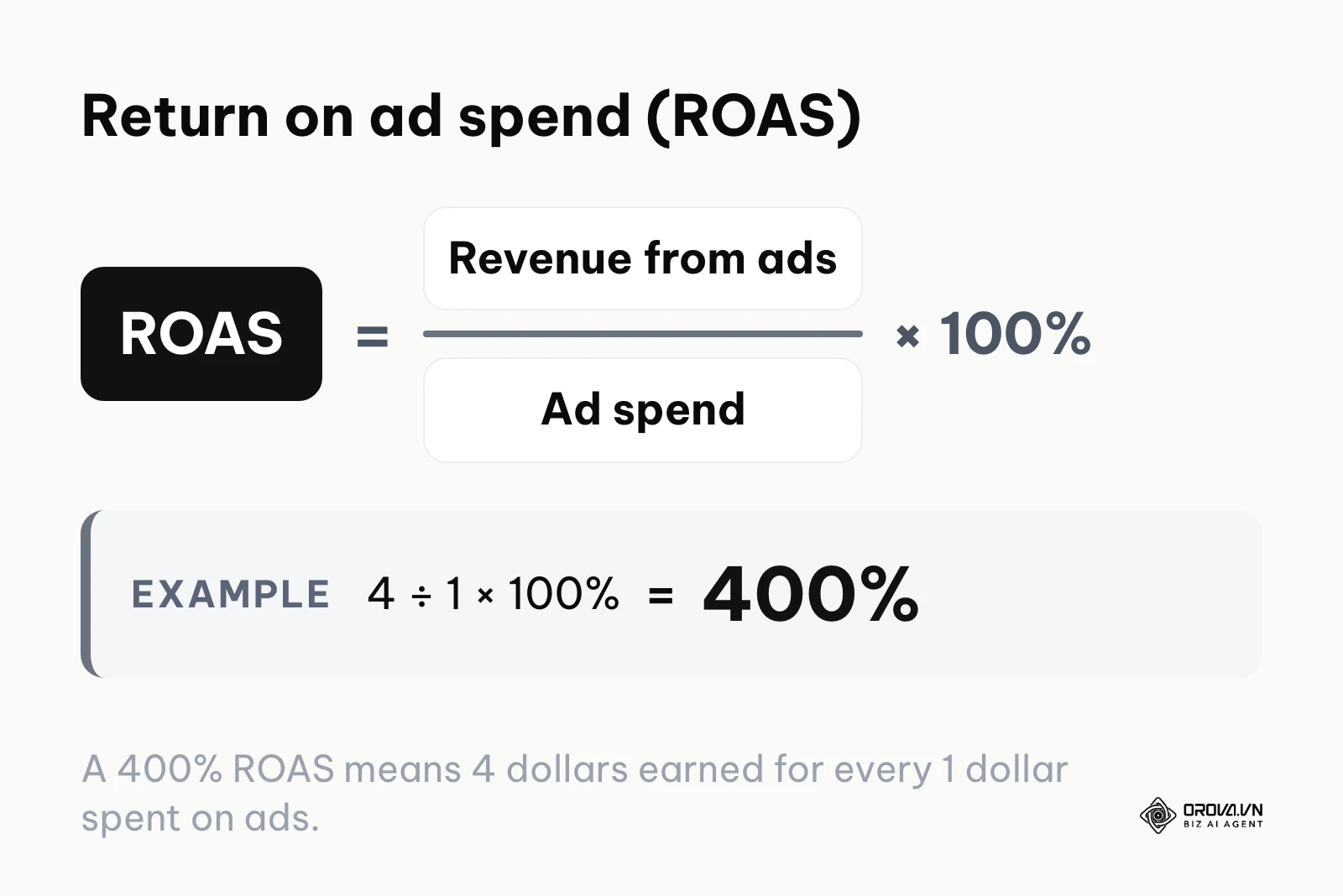
Spending money is easy; proving that the spend was worthwhile is the hard part. You must establish a rigid framework for measuring Return on Investment (ROI). Without tracking specific metrics, you cannot know if your budget is being utilized effectively or simply burned. If you need a refresher on the math behind return on ad spend, see this ROAS formula guide.
You must monitor a combination of front-end metrics (which tell you how users interact with the ad) and back-end metrics (which tell you how they interact with your business).
| Metric | What It Means in Practice | The Danger Threshold |
|---|---|---|
| Click-Through Rate (CTR) | The percentage of people who saw your ad and clicked it. Shows ad relevance. | Below 2% on Search usually indicates poor ad copy or irrelevant keyword targeting. |
| Cost Per Click (CPC) | The actual amount you pay when someone clicks. | When it consistently exceeds your historical averages without a matching rise in conversion value. |
| Cost Per Acquisition (CPA) | How much you spend in total to acquire one lead or sale. | When the CPA exceeds your maximum allowable break-even threshold calculated in Step 1. |
| Return on Ad Spend (ROAS) | Revenue generated divided by ad spend. A 400% ROAS means 4 dollars earned for 1 dollar spent. | When ROAS drops below the margin required to cover your product costs and overhead. |
| Search Impression Share | The percentage of times your ad was shown out of the total eligible times it could have shown. | Below 30% usually means your daily budget is too low or your bids are severely uncompetitive. |
A critical question arises: when is your CPA too high? Your CPA is too high the moment it eclipses the profit margin of the product or service you are selling, minus your operational overhead. If you are selling a 200-dollar physical product that costs 100 dollars to make and ship, your absolute ceiling CPA is 100 dollars. If your dashboard shows a CPA of 120 dollars, you must immediately pause the worst-performing keywords, rewrite your ad copy, or investigate your landing page experience. Never let a campaign run at a loss for months hoping the algorithm will magically fix a fundamental business math problem.
Want to scale your budget but afraid of breaking performance?
Integrate OROVA ADS now - an AI Agent that automatically monitors and optimizes Google, Meta, TikTok ads 24/7. Now, expanding and replicating your Performance Ads team is just one click away.
Try it now at: orova.vn/ads
Hidden Costs and 10 Default Settings That Burn Your Money
When discussing costs, we must address the hidden drains on your budget. The most significant hidden cost is the opportunity cost of the DIY approach. Many business owners try to save money by managing complex campaigns themselves without adequate training. They end up wasting thousands of dollars on poor targeting, which vastly exceeds the cost of hiring a professional or utilizing intelligent software.
Furthermore, Google Ads is designed by default to maximize reach, which often translates to maximizing spend if you are not careful. If you are wondering how to lower Google Ads cost quickly, you must audit your account for these 10 default settings that frequently drain budgets:
The 10 default settings to audit
- Broad Match Keywords: By default, Google pushes broad match. This allows your ad to show for very loosely related terms. Always start with Phrase or Exact match to control costs.
- Search Partners Network: This opts you into showing ads on non-Google search sites. The quality is often much lower, draining your budget with cheap but useless clicks.
- Display Network Expansion: Never leave the "Include Display Network" box checked when creating a Search campaign. It wastes your search budget on mobile app banners.
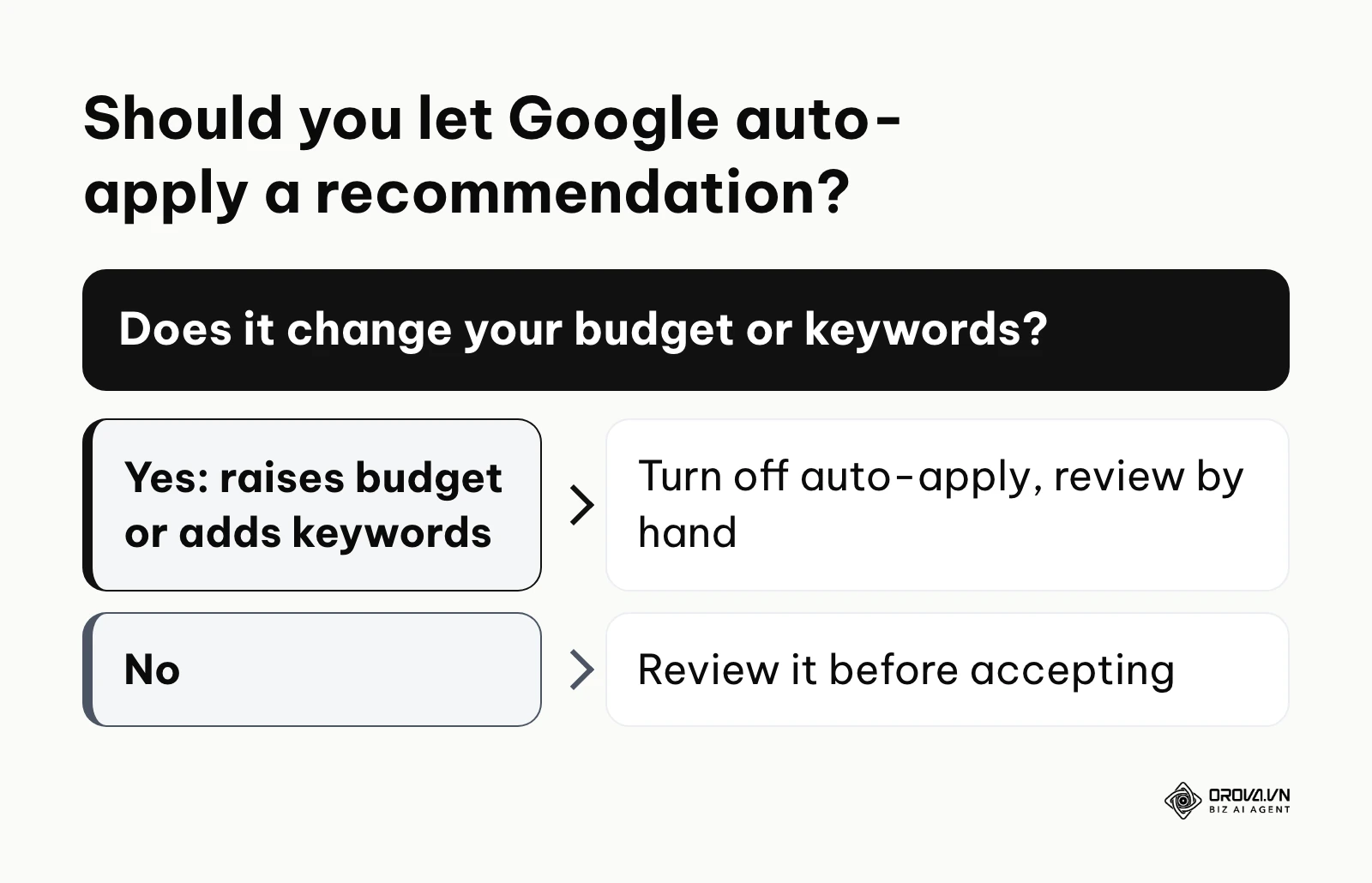
- Auto-Apply Recommendations: If auto-apply is switched on for some recommendation types, Google can apply changes such as raising budgets or adding broad keywords without a manual review. Check this setting and turn off the types that touch budgets or keywords.
- Location Targeting Options: The default is "Presence or interest in" your location. Change this to "Presence in" to avoid showing ads to people in other countries who just searched about your city.
- Mobile App Placements: In Display and PMax campaigns, mobile games generate massive amounts of accidental clicks. Exclude app categories proactively.
- Ad Schedule (Dayparting): By default, ads run 24/7. If you are a B2B company, running ads at 3:00 AM on a Sunday is likely burning money.
- Lack of Negative Keywords: Failing to add terms like "free," "cheap," or "jobs" means you pay for clicks from people who will never buy your premium service.
- Automated Bidding Without Data: Using "Maximize Conversions" when your account has zero historical conversion data forces the algorithm to guess, usually resulting in highly erratic spending.
- Ignoring Device Bid Adjustments: If your website looks terrible on mobile, but you don't decrease mobile bids, you are paying full price for traffic that cannot navigate your site.
Illustrative example: a startup's first lead generation campaign
Illustrative example:
- Context: A newly funded B2B software startup assigned a junior marketer to handle their very first lead generation campaign. The goal was to acquire enterprise leads.
- Steps taken: The marketer set up a standard search campaign quickly, added 20 broad match keywords related to their industry, and accepted Google's default recommendation to opt into the Display Network to "maximize reach."
- Hurdles & fixes: Within three days, the daily budget was completely exhausted by noon. Looking at the reports, they realized the budget was being drained by accidental clicks from mobile game banners and irrelevant searches. They immediately went into the settings, opted out of the Display Network completely, changed all keywords to phrase match, and uploaded a robust negative keyword list containing terms like "free trial" and "student."
- Result: Within 48 hours, the cost per click dropped by 40%, and the leads entering the CRM shifted from spam form submissions to genuine enterprise inquiries, drastically improving the ROI.
Where Google Ads pricing is heading in the next few years: the author's take
As we look toward the future of digital advertising, the landscape is shifting rapidly. As of 2026, the reliance on manual keyword manipulation is fading, replaced by broader algorithmic signals. Here is my perspective on where the market is heading and how you should prepare.
The Shift Toward Value-Based Bidding
I think that within the next two to three years, value-based bidding will become the default choice for most serious advertisers, with plain target CPA bidding used mainly by smaller accounts. We are already seeing the algorithm favor accounts that feed dynamic revenue data back into the system. Instead of optimizing for any lead, the system will optimize for the lead most likely to generate the highest lifetime value. You should prepare by deeply integrating your CRM with your advertising platforms so you can track the actual dollar value of every closed deal, not just the initial form submission.
AI-Driven Creative Scaling
I expect that creative assets—images, videos, and dynamic text—will become the primary differentiator in cost efficiency. Because automation manages the bidding, the main way to lower your CPC will be to have overwhelmingly superior creatives that generate higher click-through rates. The rise of AI ads means that generating hundreds of ad variations is now far easier than it used to be. The winners will be the advertisers who can systematically test and deploy these AI-generated creatives faster than their competitors. You must start building a robust asset library today to feed these data-hungry algorithms tomorrow.
Privacy Constraints Increasing First-Party Data Value
My read is that as privacy regulations tighten and third-party tracking keeps shrinking, reaching cold audiences efficiently will get harder and likely more expensive. The algorithms will have less external data to rely on. Consequently, the value of your own first-party data—your customer lists, email subscribers, and past purchasers—will keep rising. You will need to upload this data as "Audience Signals" to guide the machine learning models. You must begin aggressively capturing and structuring your customer data now, treating it as your most valuable advertising asset. Note that this assumption relies heavily on regulators continuing their current aggressive stance on tracking technologies.
Frequently Asked Questions about Google Ads Pricing
How much does Google Ads cost per month?
There is no fixed price or minimum. Search clicks cost 5.42 dollars on average in 2026 (1.63 to 9.87 dollars depending on the industry, per WordStream by LocaliQ), and the average cost per lead is 66.69 dollars. WebFX's 2026 PPC pricing page recommends 1,000 to 3,000 dollars of ad spend per month for a campaign that gathers meaningful data, and its management plans add 750 dollars per month or 12% to 15% of spend.
How much should I spend on Google Ads initially?
You should calculate your target Cost Per Acquisition (CPA) and multiply it by at least three to determine your minimum daily budget. If you cannot afford to sustain this daily budget for at least one month, you should delay your launch until you have accumulated sufficient funds to allow the algorithm to exit its learning phase properly.
How can I lower my Google Ads cost without losing traffic?
The most effective way to lower costs is to aggressively improve your Quality Score. You achieve this by ensuring your keywords, ad copy, and landing page are perfectly aligned. Additionally, relentlessly build your negative keyword lists to block irrelevant searches, and ensure you have opted out of default settings like the Search Partners network that often waste budget on low-quality clicks.
Will AI take over manual budget management completely?
AI is already handling the micro-bidding adjustments at the auction level far better than any human could. However, AI cannot define your business strategy, profit margins, or acceptable risk thresholds. Your role is shifting from manually changing bids to acting as a strategic director—setting the financial boundaries, providing high-quality creative assets, and feeding the AI accurate conversion data.
Is a 500-dollar monthly budget enough to succeed?
A 500-dollar monthly budget is extremely restrictive but not impossible if applied correctly. You should avoid broad automated strategies like Performance Max. You must rely on hyper-targeted, exact-match Search campaigns focused on a very small geographic area or a highly specific, high-intent niche. If your industry has CPCs above 5 dollars, a 500-dollar budget will likely not generate enough data, and you might be better served investing that money into organic content or local SEO efforts.
Where to Start?
Staring at a blank spreadsheet and trying to determine your budget can cause analysis paralysis. To move forward effectively, identify which of the following three situations best describes your current state, and execute the corresponding immediate step within the next few hours.
If you are a complete beginner with no historical data, your immediate step is to document your unit economics. Sit down and calculate the exact profit margin of the product or service you intend to advertise. Determine the absolute maximum amount of money you are willing to spend to acquire one customer without going negative. This number—your maximum allowable CPA—will become the anchor for all your future campaign settings.
If you have run ads before but felt you wasted money, your immediate step is to audit your account for the hidden default traps. Open your campaign settings, navigate to the network options, and ensure that the Display Network and Search Partners are completely disabled for your Search campaigns. Then, review your search terms report and add the top ten most expensive, non-converting terms to your negative keyword list.
If you are currently running successful manual campaigns and want to scale, your immediate step is to establish proper conversion value tracking. Do not just track the volume of leads; integrate your CRM so you can track the exact revenue generated by those leads. Once this data flows smoothly into the platform, you can begin transitioning from basic CPA bidding to advanced, value-based automated bidding strategies to maximize your overall return on ad spend.
About the author

Builder of Orova
Nguyễn Đỗ Trọng Ân has 8 years of experience in marketing, including 6 years managing market development across Asia. He builds Orova, a Biz AI Agent that never sleeps: it plans, runs and optimizes work for businesses.
Run your business with AI Agents
Orova is the always-on Biz AI Agent — it plans, runs, and optimizes the work for you.
Save time, unlock productivity.