
Linktree vs Beacons: Real Payout Math and Best Choice in 2026

Choosing between Linktree vs Beacons comes down to whether your social media profile acts as a simple traffic directory or an independent commerce engine. If you need a lightweight, universally recognized link list to route followers to your existing website, podcast, and YouTube channel, choose Linktree. If you want to sell digital downloads, book client appointments, generate automated media kits, and collect subscriber emails directly inside your profile without paying for external storefronts, choose Beacons.
Evaluating creator software requires objective comparison pages that look past marketing headlines to inspect real platform fees. This guide compares both tools across six critical criteria: storefront transaction fees, design flexibility, QR code print capabilities, mobile in-app browser loading speeds, tracking attribution, and long-term pricing math.
Linktree vs Beacons: Quick Comparison and Core Differences
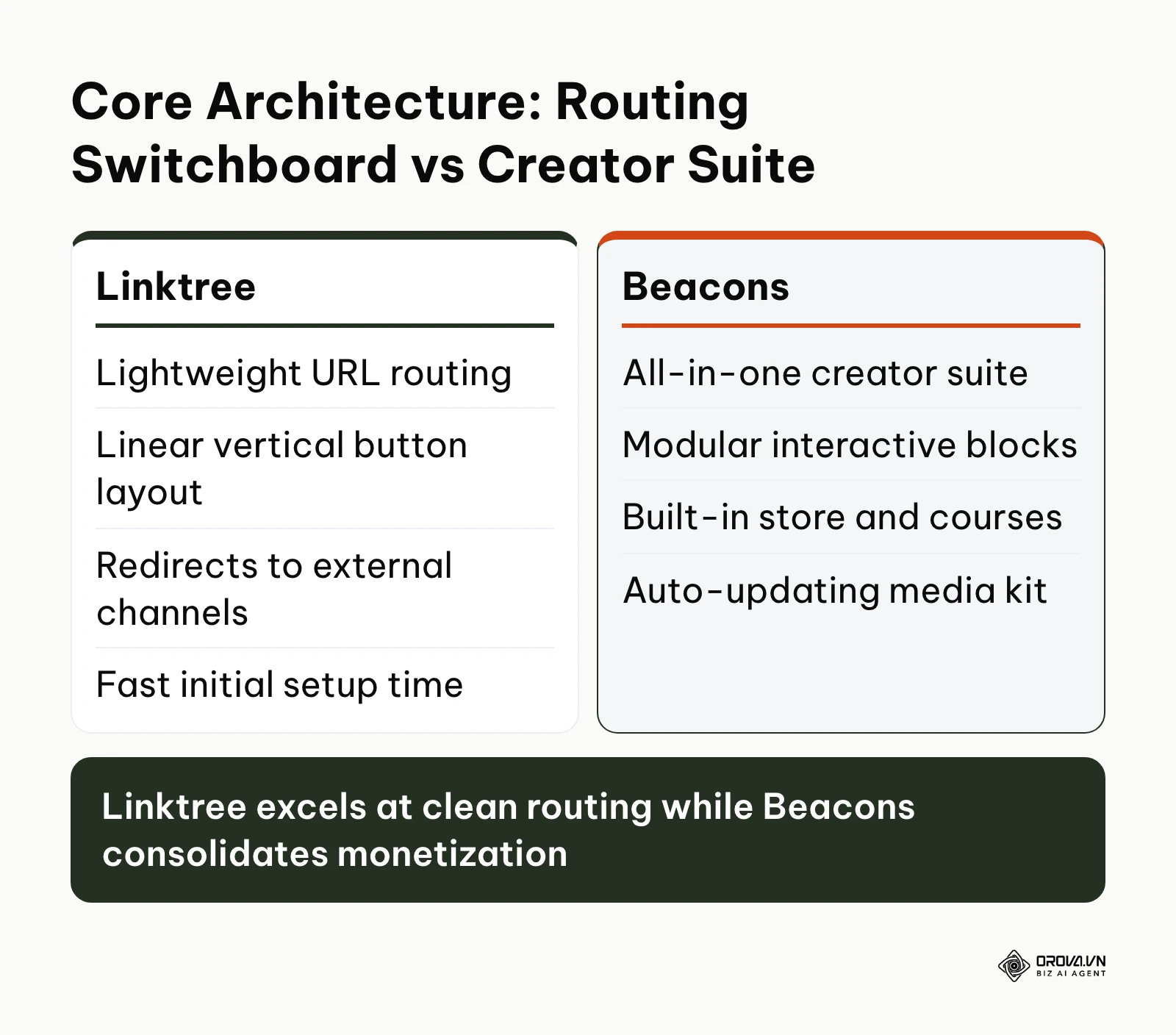
The core difference between Linktree and Beacons lies in system architecture. Linktree is a dedicated routing switchboard built to push traffic outward to external destinations, whereas Beacons is an all-in-one creator operating system designed to keep traffic inside a modular storefront.
| Evaluation Criterion | Linktree | Beacons | Clear Edge |
|---|---|---|---|
| Primary Focus | Traffic routing and link directory | Digital commerce and creator business suite | Context-dependent |
| Free Plan | Unlimited basic links, email and phone sign-ups | Customizable link in bio, store with 9% seller fees, media kit | Beacons for selling |
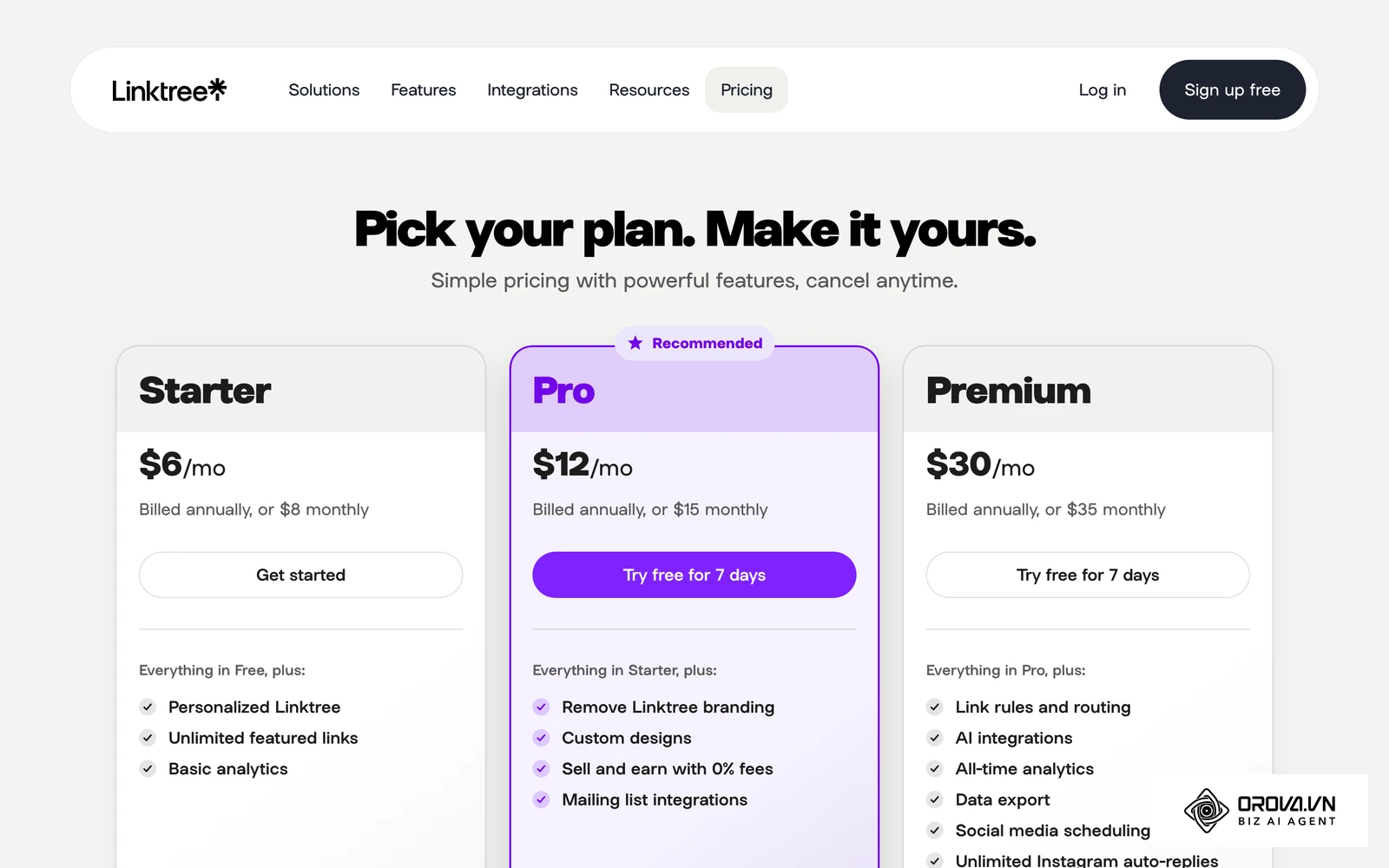
| Paid Tiers (pricing pages, October 2026) | Starter 6 dollars, Pro 12 dollars, Premium 30 dollars per month billed annually (8, 15 and 35 dollars billed monthly) | Creator Plus 30 dollars per month | Linktree for low entry cost |
| Cheapest Plan With 0% Seller Fees | Pro (12 dollars/month annually, 15 dollars monthly) | Creator Plus (30 dollars/month) | Linktree |
| Storefront Features | Sell and earn on Pro and above | Native digital products, courses, memberships | Beacons |
| Design Layouts | Linear vertical button stack | Modular blocks, tabs, carousels, and cards | Beacons |
| Media Kit Builder | Not a core feature | Auto-updating media kit on the free plan | Beacons |
| Email Marketing | Mailing list integrations on Pro | Built-in email automations (5 on Free, unlimited sends on Creator Plus) | Beacons |
| Page Weight | Lighter link list | Heavier when store, video, and forms are added | Linktree |
| Custom Domain | Not listed on the pricing page | Free custom domain on Creator Plus | Beacons |
What Are Linktree and Beacons?
Understanding the design philosophy of each tool helps prevent costly platform migrations down the road. Both platforms solve the single-link limitation enforced by social networks like Instagram and TikTok, but they approach user retention from opposite directions.
What Is Linktree?
Linktree is the original link-in-bio platform, launched in 2016 to work around Instagram's single bio link. Its primary purpose is to provide a clean, fast-loading landing page where users click through to external websites, articles, and store catalogs. If you want a step-by-step setup guide, our tutorial on how to make a Linktree walks through the initial configuration.
What Is Beacons?
Beacons is an all-in-one creator business platform. It combines a link-in-bio page, a mobile storefront for merch, digital products and courses, an auto-updating media kit, email marketing, and an AI assistant for brand deals in a single bio link. The diagram below illustrates how their core operational architectures diverge.
E-Commerce Storefront: How Linktree and Beacons Compare
Selling digital products or services directly to social followers exposes the most significant divergence between these two platforms. Monetization requires calculating payment processing overhead, customer checkout friction, and file delivery automation.
Stripe's published standard rate for online card payments in the United States is 2.9% plus 30 cents per successful charge. When evaluating bio tools, any platform seller fee stacks on top of that processing cost.
Linktree lets you sell through its storefront and payment links. According to Linktree's pricing page in October 2026, "Sell and earn with 0% fees" starts on the Pro plan, which costs 12 dollars per month billed annually or 15 dollars billed monthly. Linktree's FAQ also notes a 0.25 dollar fee per payout. The Free and Starter plans do not include the 0% fee perk, so check the seller fee shown in your dashboard before you price a product on those plans.
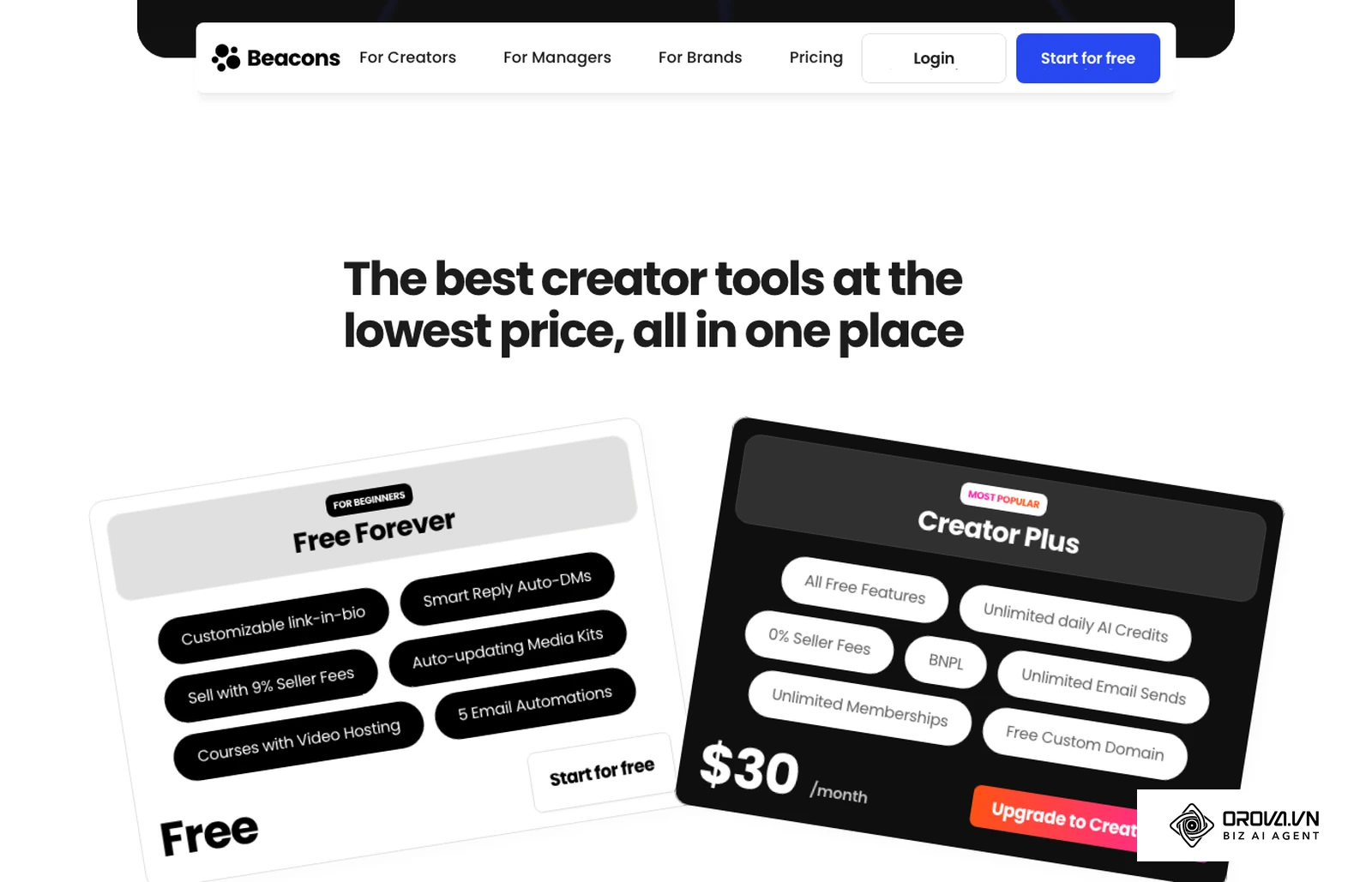
Beacons integrates digital product fulfillment natively. You can sell merch, digital downloads, and courses with video hosting, run memberships, and accept payments without leaving the bio page. According to Beacons' pricing page in October 2026, the free plan sells with 9% seller fees, and Creator Plus at 30 dollars per month drops seller fees to 0% and adds buy now, pay later (BNPL), unlimited email sends, unlimited memberships, and a free custom domain.
The following table calculates take-home numbers at three monthly revenue levels, assuming you sell a 20 dollar digital download and that standard Stripe card processing (2.9% plus 30 cents per sale) applies on every plan. Subscription costs are subtracted for the paid plans.
| Monthly Revenue | Stripe Processing | Beacons Free (9% seller fee) | Beacons Creator Plus (0% fee, minus 30 dollars) | Linktree Pro (0% fee, minus 15 dollars monthly) |
|---|---|---|---|---|
| 100 dollars (5 sales) | 4.40 dollars | 86.60 dollars | 65.60 dollars | 80.60 dollars |
| 500 dollars (25 sales) | 22.00 dollars | 433.00 dollars | 448.00 dollars | 463.00 dollars |
| 1,000 dollars (50 sales) | 44.00 dollars | 866.00 dollars | 926.00 dollars | 941.00 dollars |
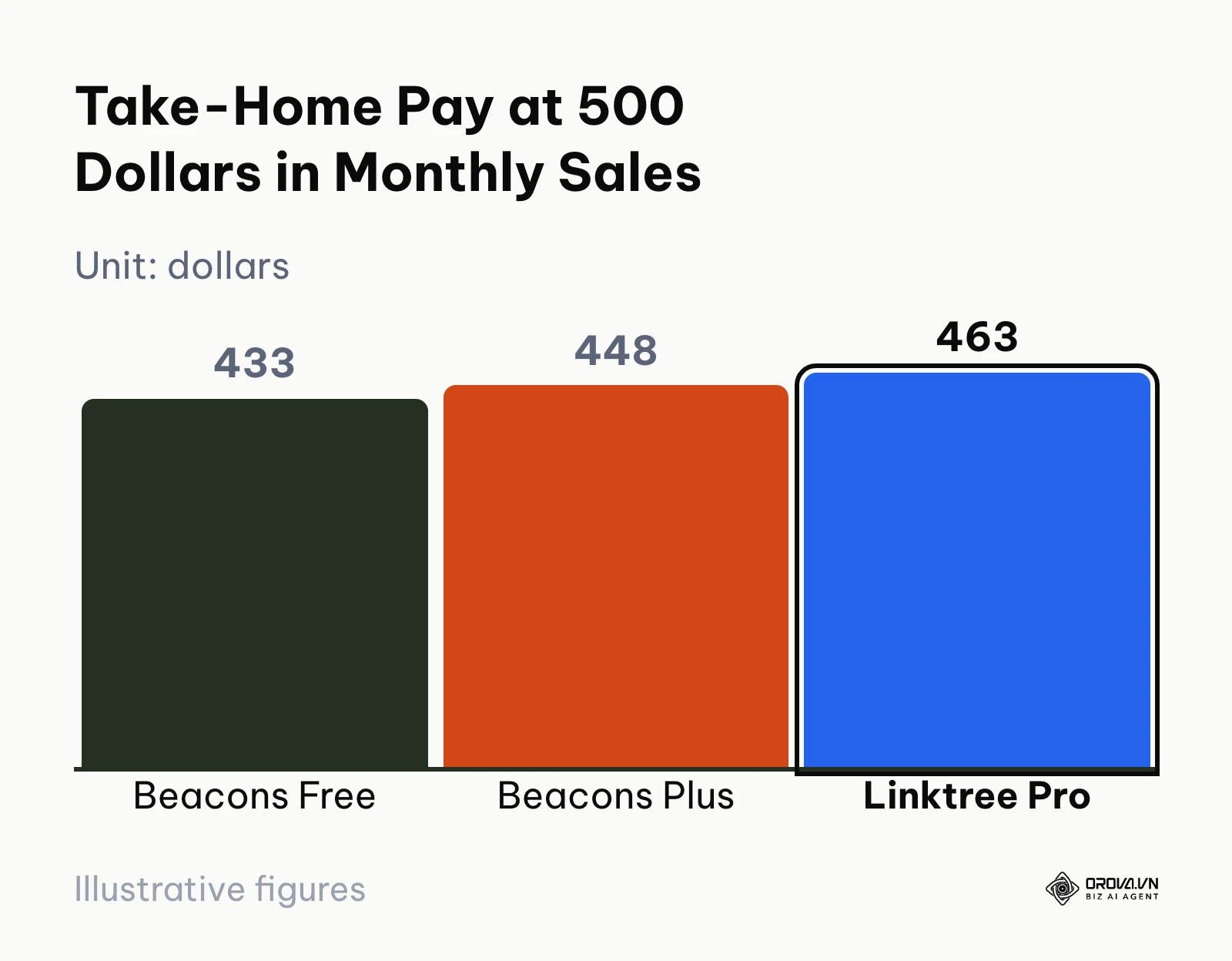
The math shows two break-even points. On Beacons, Creator Plus beats the free plan once monthly sales pass about 334 dollars, because 9% of 334 dollars is just over the 30 dollar subscription. Linktree Pro at 15 dollars per month removes seller fees at a lower monthly cost, so it beats Beacons Free from about 167 dollars in monthly sales. Beacons still bundles more selling tools (courses, memberships, BNPL, email automations) into its plans, so the cheapest fee structure is not the whole story.
Hypothetical example: A solo photography educator selling a 20 dollar Lightroom preset pack through social profiles. The creator set up the product on both platforms, uploaded a ZIP archive of presets, added product cards with mockups, and ran test purchases from a phone inside Instagram. The stumbling block was deciding which plan to pay for at roughly 300 dollars in monthly sales; running the numbers above showed Beacons Free and Linktree Pro landing close together, so the creator chose based on tools instead of fees and picked Beacons for its built-in email automations. The visible outcome was one dashboard showing orders, download delivery, and new subscribers in the same place.
Verdict: Beacons wins on selling tools (store, courses, memberships, email), while Linktree Pro is the cheaper way to reach 0% seller fees if you only need simple product sales.
Customization and Creator Tools: How Linktree and Beacons Compare
A bio page must reflect your brand identity while keeping mobile visitors engaged. Design capabilities dictate how effectively you present multiple content formats.
Linktree organizes content using a strict, linear vertical hierarchy. You can insert text links, headers, embedded video previews (YouTube, TikTok), and music players (Spotify, Apple Music). Customization on Linktree's free plan remains basic, offering pre-built color themes and simple background palettes. Linktree's pricing page lists custom designs and removing Linktree branding on the Pro plan. While clean, a Linktree page always looks recognizably like a Linktree page.
Beacons offers a modular block builder that resembles a miniature web development platform. You can arrange content into tabs (for example: "Shop", "Links", "About Me"), allowing visitors to browse different categories without endless scrolling. Beacons supports multi-column layouts, product carousels, image cards, and collapsible FAQ dropdowns. Beacons describes its free page as a customizable link in bio, so you can style blocks and layouts without upgrading.
Beyond aesthetics, Beacons provides built-in creator workflow utilities:
- Automated Media Kit: Connects directly to your TikTok, Instagram, and YouTube accounts via official APIs to display live follower counts, engagement rates, and recent brand deal case studies. When pitching sponsorship partners, you share a single live link rather than updating static PDF files.
- Native Email Capture: Collects fan email addresses directly on your bio page and sends newsletters and automated sequences (5 email automations on the free plan).
- Beam AI Assistant: Beacons presents Beam as an AI teammate for brand outreach, rate negotiation, and deal tracking; some Beam features are still in early access.
Linktree collects email and phone sign-ups on the free plan and adds mailing list integrations on Pro, but it has no built-in media kit.
| Design and Creator Tool | Linktree | Beacons |
|---|---|---|
| Page structure | One vertical list of links and embeds | Blocks, tabs, carousels, and cards |
| Remove platform branding | Pro and above | Check plan comparison |
| Custom designs | Pro and above | Customizable on the free plan |
| Media kit | Not built in | Auto-updating, on the free plan |
| Email list | Sign-ups on Free, mailing list integrations on Pro | Built-in automations, unlimited sends on Creator Plus |
Verdict: Beacons wins for customization and creator marketing tools by providing flexible modular layouts, an automated live media kit, and native audience capture.
QR Code Capabilities and Offline Traffic: How Linktree and Beacons Compare
Creators and business owners increasingly deploy QR codes on physical merchandise, business cards, event banners, and product packaging to drive real-world audiences to digital touchpoints.
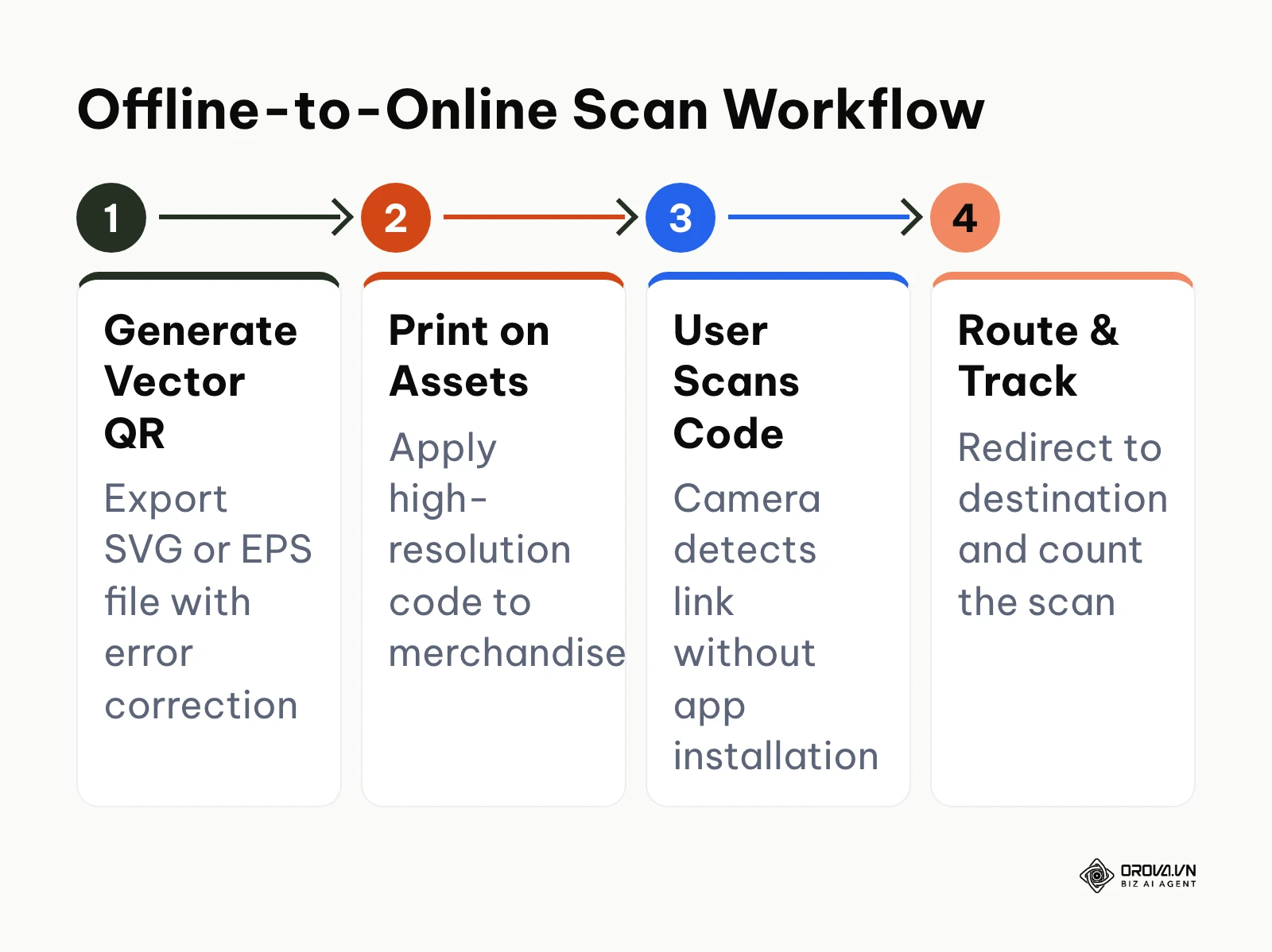
For printed physical assets, the export format decides whether a code stays sharp when a print shop scales it up. Raster files (PNG, JPEG) blur at large sizes, while vector files (SVG, EPS) scale without losing edges.
Linktree's own pricing page describes using your Linktree URL in print materials through a QR code, and both platforms can generate a QR code that points to your profile page. That QR code is tied to your main profile URL: if you change your username or leave the platform, every printed code points to the old address. Neither platform positions itself as a campaign QR tool with separate codes, print-ready vector formats, and scan reports per code, so check the export options in your own dashboard before sending artwork to a printer.
Beacons also lets you share your page through a QR code from the dashboard. Its pricing page focuses on selling, email, and media kit features rather than QR export formats, which tells you where its priorities are.
Hypothetical example: An independent coffee roaster printing promotional packaging to direct retail buyers to online wholesale subscriptions. The marketing lead generated a QR code from the bio page, prepared 2,000 retail labels, and tested camera scanning on iOS and Android phones under shop lighting. The stumbling block arose when the print shop rejected a small PNG file because the edges pixelated at label size; the lead resolved this by exporting a vector SVG with level H error correction and a logo, pointing to a dynamic short link instead of the bio URL. The visible outcome was crisp scanning on retail shelves and a destination that could be changed later without reprinting the labels.
Verdict: Tie. Both tools give you a QR code for your profile, and neither is built for campaign-level QR codes on print and packaging.
If your marketing extends from social bios to offline product packaging, event badges, and print flyers, managing static links becomes risky. Orova Link & QR lets you generate dynamic QR codes across 59 specialized formats and short links that update destinations anytime without reprinting. You can customize visual eye frames, download vector SVG or EPS files for print, and monitor scans.
In-App Browser Speed and Core Web Vitals: How Linktree and Beacons Compare
Most bio link taps from Instagram and TikTok open inside the app's own in-app browser, not in Safari or Chrome. These embedded browsers start cold more often, so page weight matters more than on a desktop.
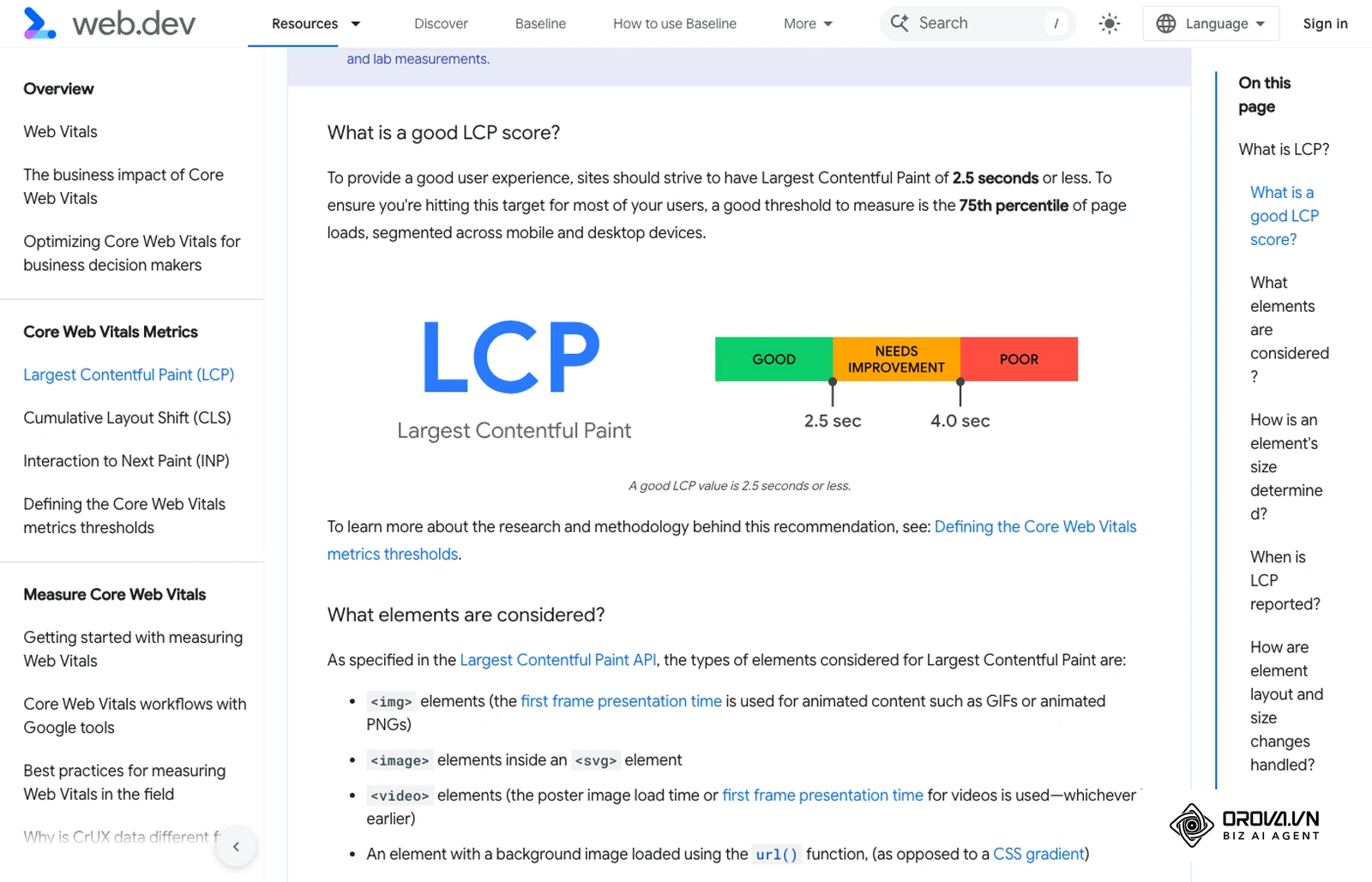
Google's Core Web Vitals guidance on web.dev treats a Largest Contentful Paint (LCP) of 2.5 seconds or less as "good". Just like standard mobile site optimization, keeping third-party scripts and heavy media to a minimum keeps in-app bounce rates under control.
Linktree pages are mostly a stack of buttons, a profile image, and a few optional embeds, so a simple Linktree loads with very little to render. The more video embeds and widgets you add, the more that advantage shrinks.
Beacons pages can carry far more: store blocks, product image carousels, course previews, email forms, and video. Each block adds images and scripts, so a full Beacons storefront is heavier than a plain link list. On a strong connection the difference is small; on a weak mobile signal inside an in-app browser, it can be noticeable.
Hypothetical example: you can measure this yourself in five minutes. Open your bio page inside Instagram on mobile data, then run the same URL through Google PageSpeed Insights on the mobile setting and read the LCP figure. If it is above 2.5 seconds, remove or move below the fold the heaviest block (usually a video embed or a large carousel) and test again.
Verdict: Linktree has the edge for raw loading speed because a plain link list has less to load; a lean Beacons page can close most of that gap.
Analytics, UTM Tracking, and Tracking Pixels: How Linktree and Beacons Compare
Driving paid traffic through TikTok Spark Ads or Meta advertising requires rigorous campaign attribution. Without tracking parameters and conversion pixels, you cannot measure customer acquisition costs.
Measuring campaign performance requires defining a standard conversion event such as a button click or checkout initiation. Both Linktree and Beacons provide built-in analytics for profile views and link clicks. Linktree's pricing page lists basic analytics from Starter and all-time analytics plus data export on Premium; Beacons promotes tracking what is working across its subscriber marketing suite.
Before you pay for a plan just for tracking, check these points in each platform's current plan comparison:
- UTM Parameters: You can always add utm_source, utm_medium, and utm_campaign to destination links by hand on any plan, and read the results in the analytics of the site you link to.
- Advertising Pixels: Connecting Meta Pixel, TikTok Pixel, or Google Analytics 4 (GA4) to the bio page itself is usually a paid feature on link-in-bio tools. Confirm the exact plan on each pricing page before you plan a retargeting campaign around it.
- Data Ownership: Linktree reserves all-time analytics and data export for Premium; Beacons keeps subscriber data inside its email suite.
A critical hurdle faced by creators using custom domains on bio tools is TikTok's automated security filter. When users click an external link inside TikTok, the platform evaluates the domain against safety reputation databases. If a custom domain is new or poorly configured, TikTok may show an "Unsafe URL: The link you are trying to visit may be dangerous" warning modal, which cuts click-through rates sharply.
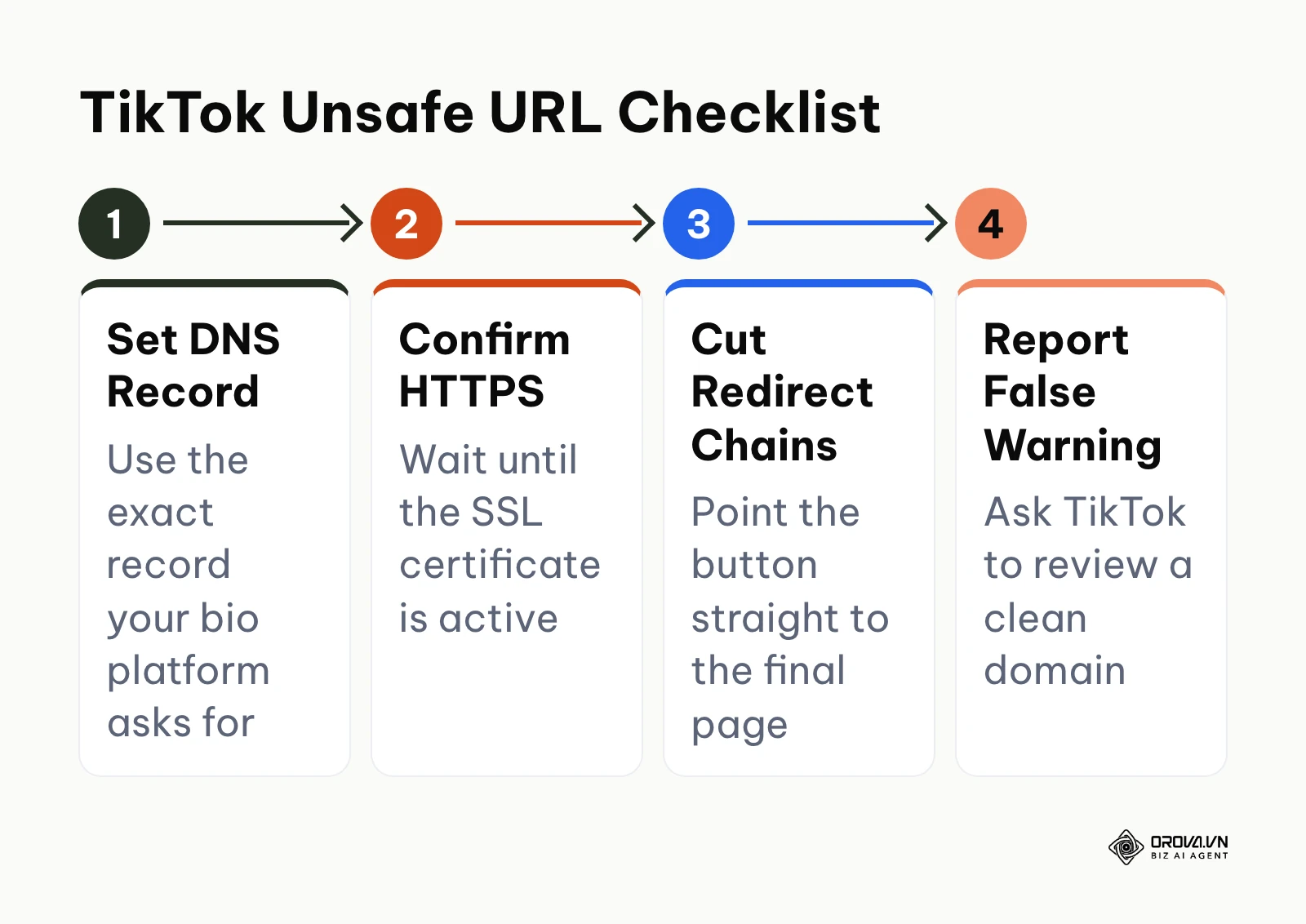
To reduce the chance of TikTok's "Unsafe URL" warning when connecting a custom domain, work through this four-step checklist:
- Configure DNS Exactly as Instructed: Add the exact record (usually a CNAME or A record) that your bio platform's custom domain guide asks for, with no leftover records pointing elsewhere.
- Verify Active HTTPS: Wait until the SSL certificate is issued and the domain loads over HTTPS without browser warnings.
- Avoid Redirect Chains: Point the bio button straight to the final page instead of chaining several short links and redirects.
- Report a False Positive: If the warning persists on a clean, HTTPS domain, use TikTok's in-app feedback or report option to request a review.
Hypothetical example: A digital marketing coordinator running paid TikTok Spark Ads to a creator profile link with a 500 dollar weekly budget. The coordinator built custom campaign URLs using Google Analytics Campaign URL Builder, pasted the tagged links into the bio button fields, set up a Meta Pixel for retargeting, and verified event firing in TikTok Events Manager. The stumbling block surfaced when TikTok's in-app browser displayed an "Unsafe URL" security warning upon clicking the custom domain bio link, causing immediate visitor bounce; the coordinator resolved this by removing an old DNS record that conflicted with the platform's CNAME, waiting for HTTPS to activate, and pointing the button straight to the final page. The visible outcome was clean UTM parameter attribution in Google Analytics 4 reports showing exact source, medium, and campaign revenue without browser security warnings.
Verdict: Tie. Both platforms cover basic click analytics; check each pricing page for pixel and export features before you commit.
Feature Matrix: Linktree vs Beacons vs Orova Link & QR
This matrix puts Linktree, Beacons, and the Orova Link & QR module side by side. Orova Link & QR is not a link-in-bio page builder; it covers the short links and QR codes that sit around your bio page, especially on print.
| Feature | Linktree | Beacons | Orova Link & QR |
|---|---|---|---|
| Architecture Type | Link directory | Modular creator storefront | Short links and QR codes |
| Link-in-Bio Page | Yes | Yes | No |
| Lowest Plan With 0% Seller Fees | Pro, 12 dollars/month annually | Creator Plus, 30 dollars/month | Not applicable (no storefront) |
| Digital Products and Courses | Sell and earn | Native store, courses with video hosting | File QR codes (upload files up to 50MB) |
| Auto-Updating Media Kit | No | Yes | No |
| Email Marketing | Sign-ups, integrations on Pro | Built-in automations | No |
| Custom Domain | Not listed on pricing page | Free on Creator Plus | No (codes run on orova.vn/l/) |
| QR Code Types | Profile QR code | Profile QR code | 59 types, including payment QR such as VietQR, PromptPay, and KHQR |
| Dynamic QR (Edit Destination After Printing) | Tied to profile URL | Tied to profile URL | Yes |
| QR Download Formats | Check your dashboard | Check your dashboard | PNG, JPEG, WEBP, TIFF, GIF, SVG, EPS, STL, OBJ, 3MF |
| UTM Tagging | Manual on any plan | Manual on any plan | 5-field UTM builder |
| Bot Filtering | Not stated | Not stated | Bot traffic filtered, 60 requests per minute anti-spam limit |
| Hourly Click Analytics | Not stated | Not stated | 24 hourly slots |
| Location Data | Not stated | Not stated | Country and province estimated from IP |
| Data Retention | All-time analytics on Premium | Not stated | About 2 years (730 days) |
| Bulk Management | Not stated | Not stated | Pause, activate, or delete several links at once |
15-Step Mobile Link-in-Bio Optimization Checklist
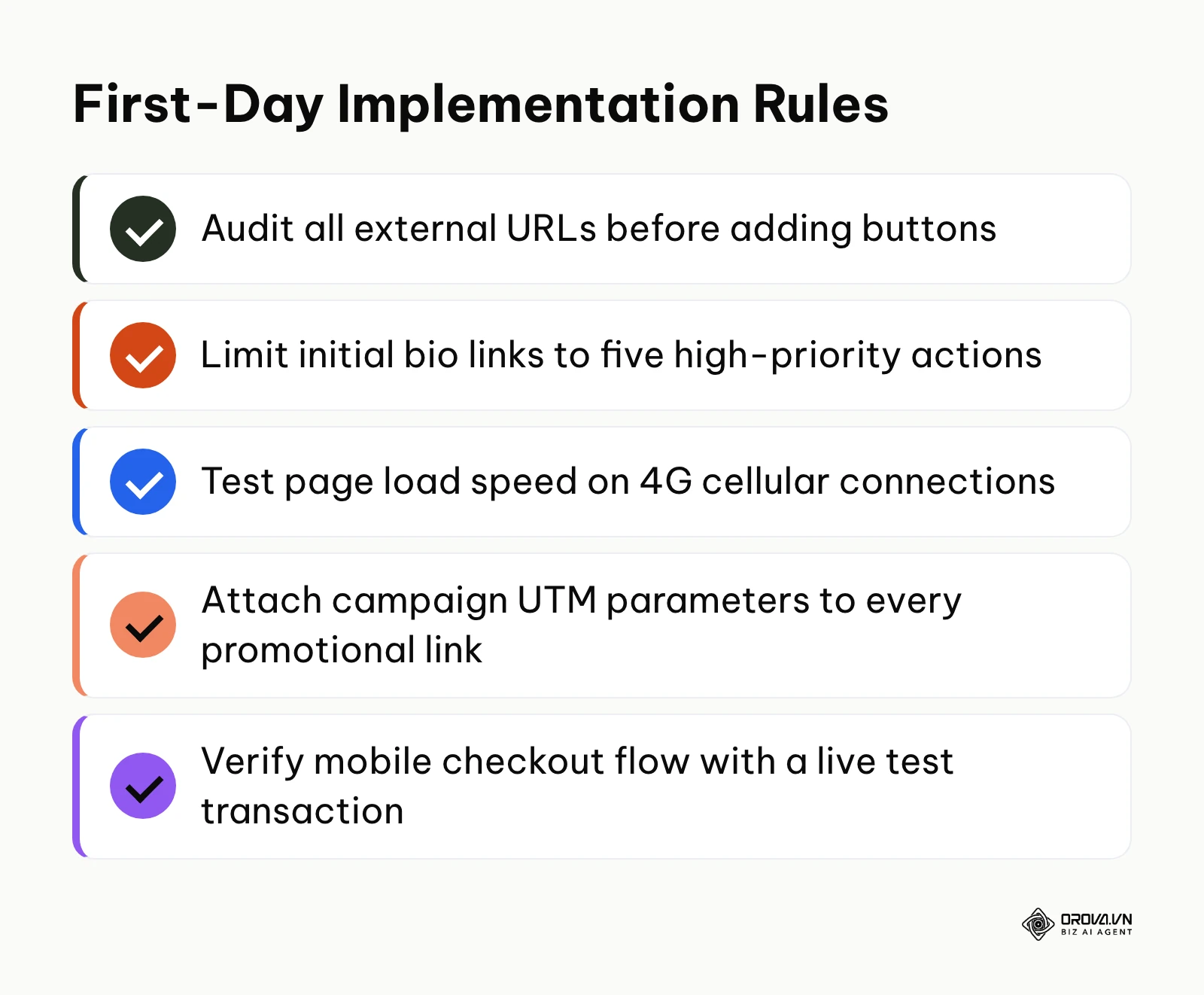
Before linking your creator profile across TikTok, Instagram, and YouTube, verify your configuration against this 15-step optimization checklist:
- Target Goal Selection: Designate one primary conversion action (e.g., newsletter signup, flagship product purchase) and place it above the fold.
- Link Quantity Limit: Restrict visible buttons to five or fewer choices to prevent choice overload and decision paralysis.
- Action-Driven Copy: Write micro-copy starting with verbs (e.g., "Download Free Guide" instead of "Free Guide").
- Thumbnail Consistency: Use uniform, high-contrast icon badges or product imagery across all link cards.
- In-App Performance Audit: Test your link inside the native Instagram and TikTok webviews on cellular data to verify sub-2.5s loading.
- Mobile Touch Target Padding: Ensure interactive buttons feature at least 48 pixels of vertical tap height to satisfy mobile accessibility standards.
- External Destination Check: Audit all outbound URLs to ensure zero broken links, 404 errors, or expired promotional campaigns.
- Standardized UTM Tags: Append utm_source, utm_medium, and utm_campaign parameters to every external marketing URL.
- Mobile Checkout Verification: Perform an end-to-end 1 dollar test purchase on mobile Safari to verify payment processing and receipt delivery.
- Email Sequence Trigger: Submit a test email address into your opt-in form and confirm instant delivery of the welcome asset.
- Clean Typography Selection: Choose high-legibility sans-serif fonts with sufficient contrast ratios against background colors.
- Contrast Ratio Compliance: Maintain a minimum 4.5:1 text-to-background contrast ratio for readability in bright sunlight.
- Social Proof Inclusion: Add concise trust badges, review star ratings, or client logo snippets above commerce modules.
- Vector QR Asset Backup: Store an SVG or EPS vector master of your QR code for immediate physical print reproduction.
- Analytics Baseline Recording: Benchmark your initial 7-day click-through rate to evaluate subsequent layout improvements.
When to Choose Linktree
Linktree remains the premier choice for organizations and established creators who treat their social media profile as a clean routing directory rather than a storefront.
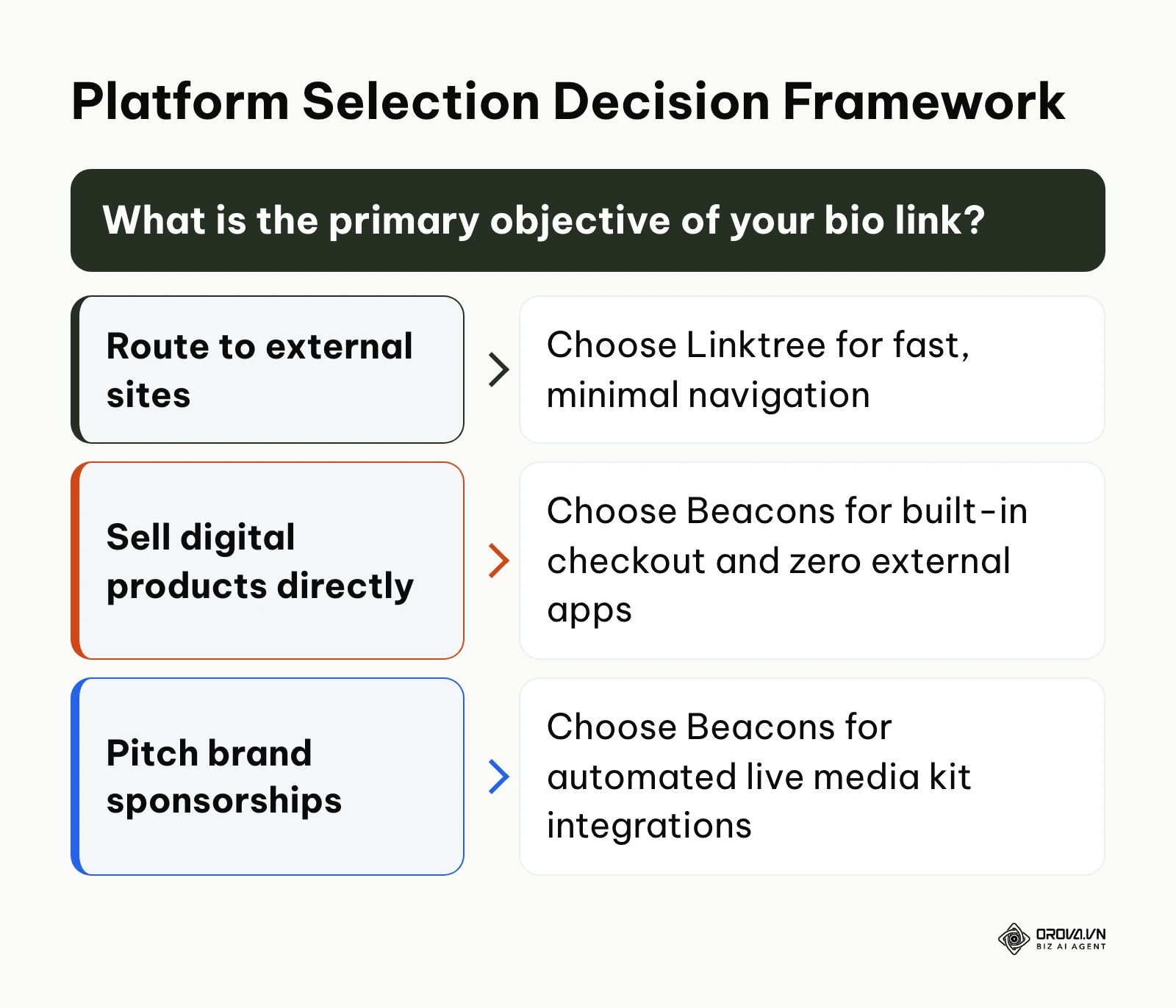
Choose Linktree if:
- You operate an established external website: If you sell products through an existing Shopify store, publish articles on a self-hosted WordPress site, or host courses on Kajabi, you do not need Beacons' duplicate storefront tools. Linktree routes traffic cleanly without cannibalizing your primary site traffic.
- You prioritize fast mobile loading: If much of your audience browses on older phones or weak mobile data, a plain Linktree list has less to load than a full storefront.
- You manage a team or agency: Linktree offers Agency and Enterprise plans with team seats and custom contracts.
- You want the cheapest route to 0% seller fees: Linktree Pro removes seller fees at 12 dollars per month billed annually, less than half the price of Beacons Creator Plus.
When to Choose Beacons
Beacons is purpose-built for independent creators, coaches, and digital entrepreneurs who want to run an entire business directly from their social profiles without juggling separate subscriptions.
Choose Beacons if:
- You monetize through digital products and booking: If you sell PDF checklists, Notion templates, audio presets, courses, or memberships, Beacons can replace a separate store tool by keeping products and checkout on your bio page.
- You actively pitch brand sponsorships: The automated media kit pulls live follower metrics and engagement data directly from social APIs, saving you hours of manual updates and presenting a polished, professional image to brand managers.
- You are building an email list from scratch: Beacons includes a built-in email collection and broadcast system, allowing you to capture leads and send newsletters without a separate email tool.
- Your digital sales exceed about 334 dollars per month: at that point Beacons Creator Plus (30 dollars per month) costs less than the 9% seller fee on the free plan, and adds unlimited email sends and memberships.
Tired of paying monthly subscription tiers just to export vector QR graphics or track campaign attribution? With Orova Link & QR, you can launch dynamic short links and custom-branded QR codes in minutes with 5 UTM tracking fields and built-in bot filtering. Start building professional routing assets today with full feature access free until July 7, 2027 without entering a credit card.
Can You Use Both Linktree and Beacons Together?
Running both Linktree and Beacons concurrently is technically possible, but it requires disciplined division of labor to avoid confusing your audience.
A common hybrid configuration involves using Linktree as your primary master routing page while embedding a Beacons store URL as a single high-priority button. This allows creators to maintain Linktree's rapid loading speed and brand familiarity while leveraging Beacons' embedded storefront for checkout processing. However, this setup introduces an extra click into the buyer journey, which invariably decreases conversion rates.
| Setup | How It Works | Best For | Trade-Off |
|---|---|---|---|
| Linktree only | All buttons point to external sites | Creators with an existing store or website | Selling needs Pro for 0% seller fees |
| Beacons only | Links, store, email, and media kit on one page | Creators selling digital products without a website | Heavier page when many blocks are added |
| Linktree plus a Beacons store button | Linktree as the main page, one button opens the Beacons store | Teams already invested in Linktree | One extra tap before checkout |
If you decide to migrate permanently from Linktree to Beacons (or vice versa), monitor these primary risks:
- Outdated Physical Print Assets: If you printed your old profile link or static QR codes on merchandise, flyers, or business cards, changing your username or platform can orphan those offline touchpoints.
- Tracking Continuity Loss: Historical click and view data does not transfer between platforms, meaning your performance baselines reset to zero.
This transition highlights where Orova Link & QR supports your marketing infrastructure. Instead of placing a direct Linktree or Beacons link on printed packaging, business cards, or offline event displays, you can route physical materials through an independent dynamic short link (orova.vn/l/...) paired with a custom dynamic QR code. Orova Link & QR allows you to modify the destination URL at any time without reprinting physical materials, while providing 59 specialized QR formats, vector SVG and EPS downloads for high-resolution print production, automated bot filtering, and detailed click analytics across 9 reporting tables.
Trends in Link-in-Bio and Creator Infrastructure Over the Coming Years: Author's Perspective
Dynamic Personalization Powered by On-Device AI
In my view, the static link list will largely disappear within the next two to three years. Today, as of 2026, we see the initial signs: platforms experiment with basic link scheduling and location-based button ordering. I believe the next iteration will utilize lightweight on-device machine learning models to dynamically reorder bio links based on individual user intent. If a follower arrives from a TikTok video discussing a specific digital guide, the bio page should elevate that exact checkout module while hiding irrelevant links. This prediction could prove incorrect if platform privacy restrictions and browser cookie deprecation prevent bio tools from reading incoming referral contexts reliably. To prepare, creators should begin organizing their content into segmented thematic categories rather than relying on endless vertical lists.
Direct Checkout Consolidation and Headless Creator Commerce
I believe the boundary between a link-in-bio tool and an enterprise e-commerce platform will continue to blur. The historical practice of routing social media visitors through three separate redirect hops (from bio link to landing page to external Shopify checkout) results in unacceptable mobile attrition. By 2028, I expect social platforms to standardize native micro-storefront protocols, allowing creators to transact directly within the webview. Beacons is currently positioned closer to this reality than Linktree. What could disrupt this trajectory is an aggressive regulatory push against walled-garden in-app browsers, forcing social networks to open all external links directly into default system browsers like Safari and Chrome. Creators should future-proof their operations by maintaining ownership of their audience contact data through direct email capture rather than relying solely on platform-dependent followers.
The Convergence of Physical-to-Digital Interactive Touchpoints
In my view, creator marketing will increasingly bridge the physical and digital divide through durable, scannable offline media. We already see creators distributing physical community cards, hosting live pop-up events, and packaging private physical merchandise. Relying on basic static QR codes for these investments creates immense operational vulnerability. I believe dynamic routing layers will become standard operating procedure for any physical creator asset. This forecast could fail if alternative near-field communication (NFC) standards fully displace visual optical scanning, though camera-based scanning remains far more universally adopted across global mobile hardware. Creators should prepare today by adopting dynamic URL routing assets that allow underlying destination destinations to be updated on the fly.
Frequently Asked Questions About Linktree vs Beacons
Can I export vector QR codes (SVG or EPS) for packaging on Linktree or Beacons?
Both platforms give you a QR code for your profile page, and the available download formats can change by plan, so check your dashboard before sending artwork to a printer. Neither positions its QR feature as a print tool with EPS or 3D files; a dedicated QR tool such as Orova Link & QR exports SVG and EPS vectors plus STL, OBJ, and 3MF for 3D printing.
How do I fix the TikTok "Unsafe URL" warning when using a custom domain?
The TikTok "Unsafe URL" warning occurs when TikTok's automated security crawler cannot verify the reputation or SSL configuration of your custom domain. To resolve this, set the DNS record exactly as your bio platform's custom domain guide specifies, wait until HTTPS is active, point the link straight to the final page without redirect chains, and report the false warning through TikTok if it persists.
Can you install Google Analytics 4 and Meta Pixel on the free tiers of Linktree and Beacons?
Pixel and GA4 connections on the bio page itself are generally paid features on link-in-bio tools, and plan details change, so confirm on each pricing page. On a free plan you can still append standard UTM parameters to your external links by hand and read the results in your own website analytics.
How is AI changing how link-in-bio tools optimize creator conversions?
Artificial intelligence is transforming link tools from passive directories into automated business assistants. Beacons, for example, presents its AI teammate Beam for brand outreach, rate negotiation, deal tracking, and link-in-bio generation, with some features still in early access. Linktree lists AI integrations on its Premium plan. Expect more of this assistance in page setup and brand deals.
Which platform offers better break-even economics for selling digital downloads?
It depends on your sales level. Beacons Free charges 9% seller fees, and Creator Plus (30 dollars per month) removes them, which pays off above about 334 dollars in monthly sales. Linktree removes seller fees from the Pro plan (12 dollars per month billed annually, 15 dollars monthly), which beats Beacons Free from about 167 dollars in monthly sales. Beacons includes more selling tools, so compare features as well as fees.
Do social media algorithms penalize link-in-bio URLs in profile bios?
Social media algorithms do not explicitly penalize accounts simply for having a verified Linktree or Beacons URL in the designated website bio field. However, platforms like Instagram and TikTok prioritize user retention and may throttle organic reach on individual posts or captions that explicitly instruct users to leave the app via external links. Using a well-optimized, fast-loading bio link ensures that the traffic that does click through converts at the highest possible rate.
Where Should You Start?
Optimizing your social media profile routing should take an afternoon, not several weeks of indecision. Evaluate your immediate operational stage and take one direct action:
If you already run an established online store or content hub on an external website: Sign up for Linktree's free plan, create five clean navigation buttons routing directly to your core external properties, verify that your profile picture matches your social branding, and place the clean link into your profile bio.
If you want to monetize your knowledge or digital assets without an external website: Create a free Beacons account, connect your Stripe account, upload your primary digital download file with a set price tag, and configure your first native checkout block to begin selling immediately.
If you distribute physical merchandise, print collateral, or event badges: Set up a dynamic short link and generate a high-resolution vector QR code that routes to your primary bio hub, ensuring that your physical assets remain permanently editable and trackable over time.
Selecting the right platform between Linktree vs Beacons ultimately comes down to whether your current business model demands clean, lightning-fast traffic routing or an all-in-one digital storefront.
About the author

Builder of Orova
Nguyễn Đỗ Trọng Ân has 8 years of experience in marketing, including 6 years managing market development across Asia. He builds Orova, a Biz AI Agent that never sleeps: it plans, runs and optimizes work for businesses.
Run your business with AI Agents
Orova is the always-on Biz AI Agent — it plans, runs, and optimizes the work for you.
Save time, unlock productivity.