
How to add link to TikTok bio in 7 steps (2026)

Knowing how to add link to TikTok bio lets creators and brands to transform viral video views into direct website traffic, email subscribers, and customer orders. By completing the setup described below, you will produce an active, clickable hyperlink prominently displayed on your public profile header. Preparing for this process requires an updated smartphone running the official TikTok mobile application, an active destination web address using secure encryption, and approximately fifteen minutes of focused configuration. Casual viewers who maintain private accounts purely for watching entertainment clips without external offerings do not need to perform this setup.
How to Add Link to TikTok Bio: Eligibility and Overview
Adding a link to your TikTok bio connects your profile visitors to an external destination through a single interactive hyperlink located below your bio text. The entire setup requires seven straightforward steps and typically takes between ten and twenty minutes.
Whether the Website field appears depends on your account type. TikTok's help pages describe a minimum of 1,000 followers before a personal account can add a website to its profile, while the rules for Business Accounts vary by region and can change: some sources report no follower minimum, others report the same 1,000-follower threshold, and some accounts must register business details (a registered business with legal information) first. The link can only be added in the TikTok mobile app, and until your account qualifies, a URL typed into the bio is plain text that nobody can tap. The reliable check is to open Edit profile in the app and see whether the Website field is shown.
Prerequisites Checklist Before Adding Your TikTok Bio Link
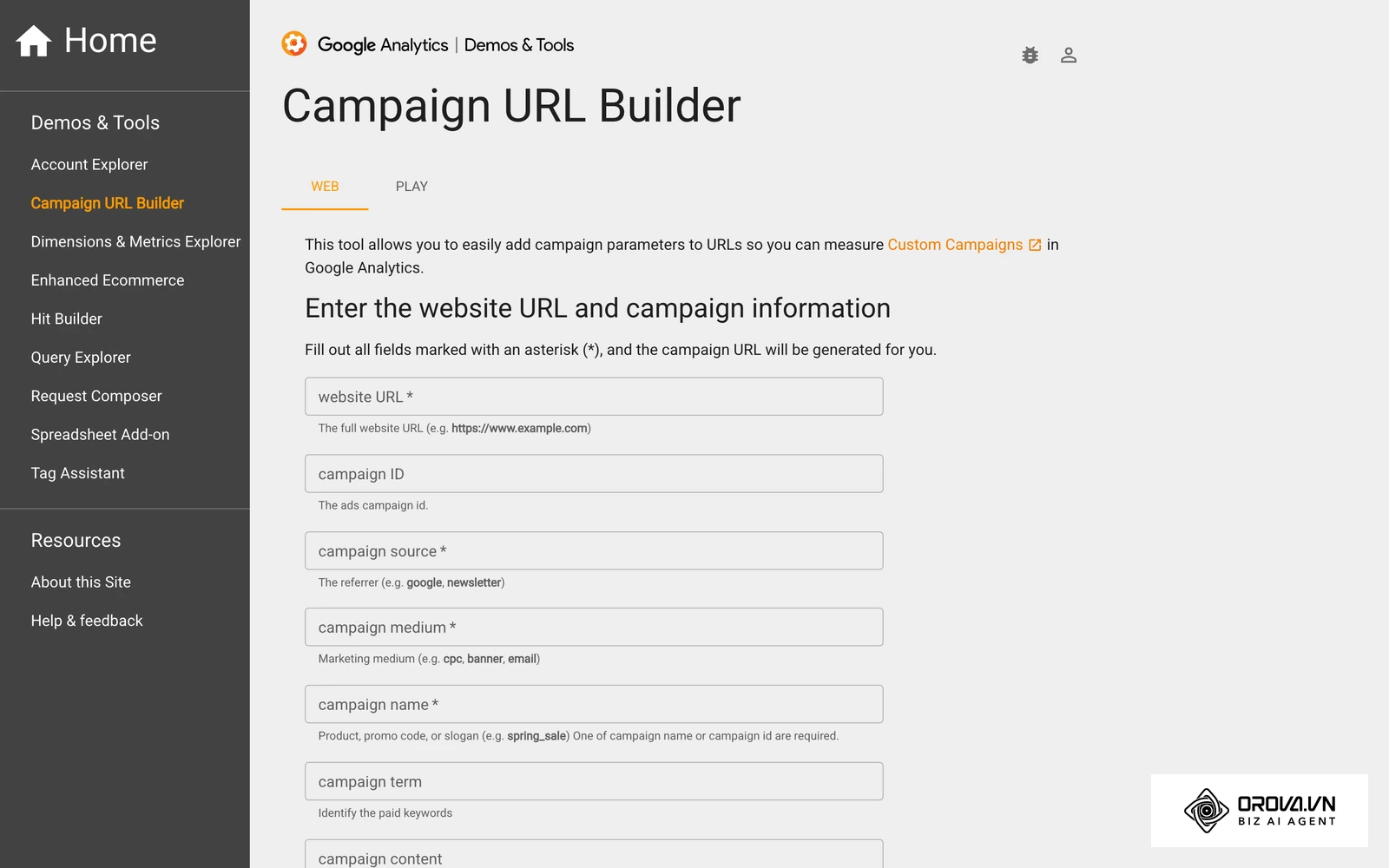
Before opening the TikTok application, assemble the necessary assets and account permissions to avoid configuration delays or broken redirects. For the tracking tags, a free option is Google's Campaign URL Builder, shown below, which assembles the UTM parameters into one finished URL.
| Component | Source | Estimated Setup Time | Impact if Missing |
|---|---|---|---|
| Destination URL | Your website, store, or landing page host | 5 minutes | Cannot complete link configuration; profile traffic cannot be routed. |
| TikTok Mobile App | Apple App Store or Google Play Store | 2 minutes | This guide follows the mobile app flow, where the Edit profile screen holds the Website field. |
| Account Authority | Primary account login credentials | 1 minute | Inability to change account types or save modified profile fields. |
| Campaign Tracking Tags | Analytics URL builder or spreadsheet | 5 minutes | In-app browser traffic registers as direct visits, obscuring campaign attribution. |
| Business Registration Details | Your official registration documents | Varies | Only needed if TikTok asks a Business Account to confirm its details in your region. |
Step 1: Audit Your Account Type and Select Your Linking Strategy
Determine whether your brand benefits more from a Business Account, whose link requirements vary by region, or from retaining trending commercial music permissions on a Personal Account.
Navigate to your TikTok profile screen, tap the hamburger menu icon located in the top-right corner, and select Settings and privacy. Examine the options nested under the Account submenu to identify whether your profile currently operates as a Personal Account or a Business Account. If your current profile has fewer than 1,000 followers and your primary objective involves selling products or generating inbound leads, a Business Account may be worth trying, but check in Edit profile afterwards whether the Website field actually appears, because Business requirements vary by region and some accounts must register business details first.
You can examine your public profile immediately after this audit; personal profiles will display creator analytics, whereas business profiles show a dedicated Business Suite panel inside the application menu.
A common pitfall during this audit is assuming that both account tiers enjoy identical media rights. Creators who convert to a Business Account without auditing their content strategy often discover that popular mainstream pop songs become unavailable for commercial licensing reasons. If your video reach relies heavily on dancing or lip-syncing to mainstream trending tracks, retain your Personal Account and build your audience to the 1,000-follower threshold before adding a link.
| Evaluation Metric | Personal Account (Creator) | Business Account (Commercial) | Recommended Strategy |
|---|---|---|---|
| Follower Requirement | At least 1,000 followers (check in app) | Varies by region; some accounts must register business details (check Edit profile) | Switch only if you need Business tools; then confirm the Website field appears. |
| Audio Library Access | Full Commercial and Trending Pop Library | Commercial Music Library only | Stay Personal if trending audio drives most of your reach. |
| Profile Link Placement | Dedicated Website field (clickable) | Dedicated Website field (clickable) | Both options render an identical interactive link button. |
| Direct Messaging Tools | Standard inbox settings | Automated welcome messages and keyword auto-replies | Choose Business if you plan to capture leads via chat. |
| Verification Demands | Standard account confirmation | Business details may be requested in some regions (check in app) | Choose Personal if you have no registered business. |
Step 2: Switch to a TikTok Business Account in App Settings
Convert your existing personal profile to a commercial tier to unlock business-specific profile options; whether this also unlocks the Website field depends on your region, so confirm it in Edit profile afterwards.
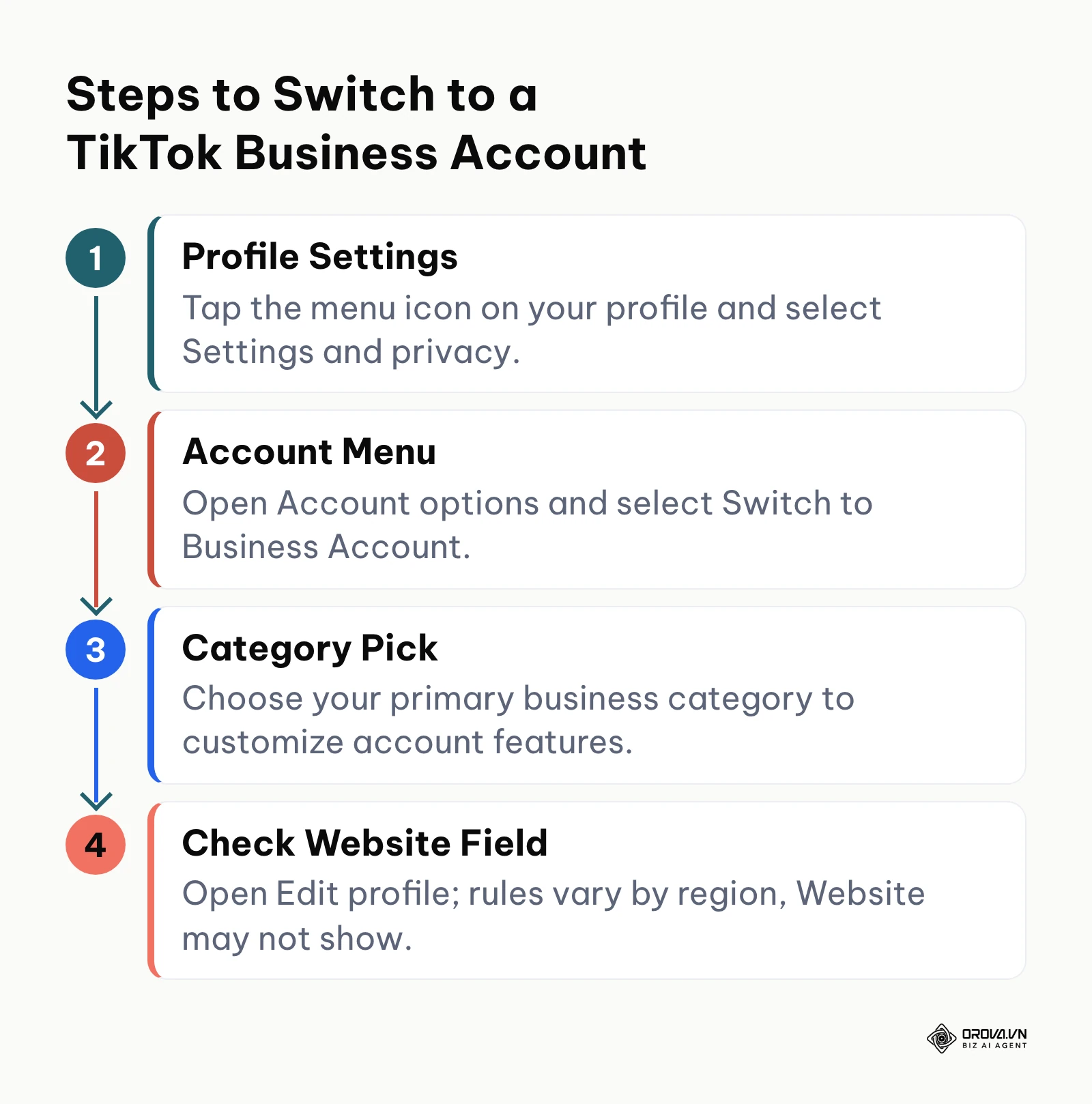
Open your TikTok profile tab, tap the three-line menu icon in the upper-right corner, and tap Settings and privacy. Next, tap Account, locate the option labeled Switch to Business Account, and tap it to initiate the onboarding flow. The application will present a series of slides summarizing commercial tools, followed by a category selection prompt. Choose the category that reflects your industry, such as E-Commerce, Education, or Professional Services, and tap Next.
Once the conversion finishes, your profile screen will display a welcome prompt directing you to the Business Suite. You will also observe new menu items inside your settings interface, such as Business Suite tools and the Commercial Music Library.
Users occasionally encounter an error where the category list fails to advance upon tapping Next. This issue typically stems from a temporary session timeout or an outdated app build. Force-close the application, confirm you are connected to stable mobile data or Wi-Fi, and repeat the sequence.
Hypothetical example: A specialized ceramic artist operating with 240 followers needed to route viewers to an upcoming pottery dropship catalog. The artist navigated to Settings and privacy, tapped Account, selected Switch to Business Account, and chose Art and Crafts as the industry category. When selecting background audio for subsequent video clips, commercial licensing filters restricted several trending pop hits. The artist resolved this limitation by filtering for tracks within TikTok's Commercial Music Library that matched the acoustic tempo of the pottery demonstration. Afterwards the artist opened Edit profile to check whether the Website field was shown, since Business requirements differ by region.
Step 3: Complete TikTok Business Registration Verification if Prompted
Handle a business-details request only if TikTok shows you one; if no request appears, move straight to Step 4.
In some regions, TikTok may ask a Business Account to confirm business information before or after a website is added. Open your profile, tap the menu icon, go to Settings and privacy, and look inside the business section (Business Suite or similar, depending on your app version). If a request is waiting, follow the prompts in the app. Menu names and required documents differ by country, so check in the app rather than relying on a checklist written for another market.
When the request is complete, or when no request appears at all, the Website row remains available in Edit profile.
The most avoidable mistake is entering a trading name that does not match your official registration documents. Use your legal business name exactly as it is registered, because a mismatch can lead TikTok to reject the submission.
| Situation in the app | What to do next |
|---|---|
| A business-details request appears | Complete it with your legal business name and registration details |
| No request, Website row visible | Go to Step 4 and prepare your tracked URL |
| No request, Website row missing | Check the follower minimum or stay Personal and grow to 1,000 followers |
Be careful with advice that presents switching to a Business Account as a permanent loophole. Requirements vary by region and change over time. If you do not run a registered business and do not want to submit business details, staying on a Personal Account and growing to 1,000 followers is the simpler path.
Step 4: Build a Standardized Tracking URL with UTM Parameters
Construct a tracked destination URL using standardized campaign parameters to ensure your analytics software correctly attributes visits originating from your profile.
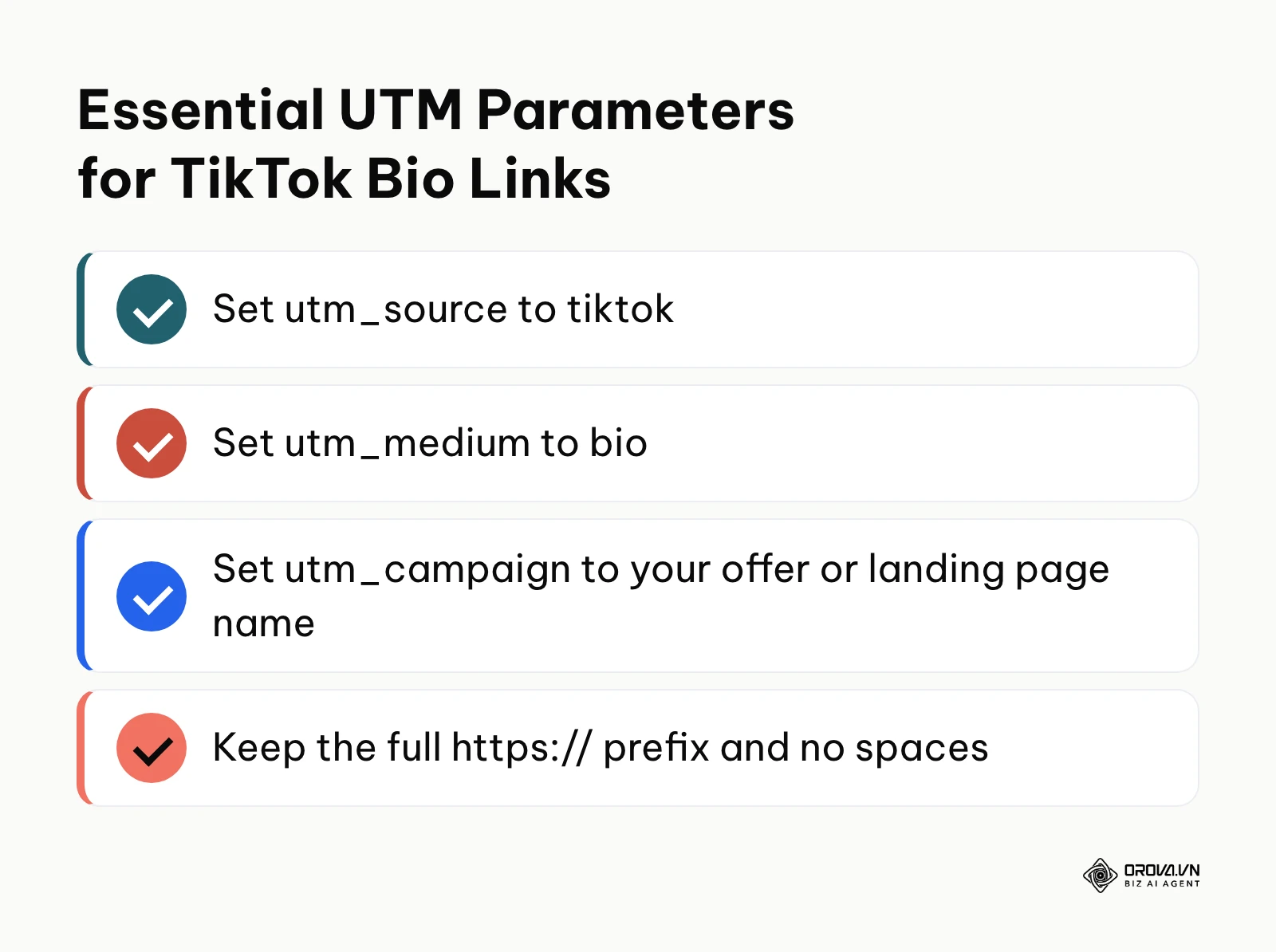
Before pasting your raw homepage address into TikTok, open your preferred tracking tool or a spreadsheet to structure your URL. When mobile users tap your bio link, TikTok loads the page inside an embedded webview browser. Without explicit parameter tags, analytics platforms frequently misclassify these visits as direct traffic rather than social referrals. Append structured Urchin Tracking Module (UTM) tags to your base URL: define your traffic source as tiktok, set your marketing medium to bio, and assign a specific campaign name representing your target landing page.
Always keep the full https:// prefix at the start of the address so apps and browsers read it as a web link rather than plain text.
After formatting your query string, paste the completed URL into a desktop browser window. Inspect the address bar to ensure the webpage resolves without redirect errors, and confirm that all attached UTM parameters remain intact after page rendering.
Creators frequently make the mistake of leaving spaces or invalid punctuation marks inside parameter values. Unencoded spaces break URL parsing, which can cut the link short or strip your campaign tags. Replace spaces with underscores or hyphens to preserve link integrity.
To explore foundational strategies for mobile landing pages, review our what is a link in bio overview for actionable layout recommendations. When structuring broader audience pathways across platforms, our guide on how to make a Linktree outlines multi-destination profile architectures.
Standard Bio Link Structure:
https://example.com/landing-page?utm_source=tiktok&utm_medium=bio&utm_campaign=profile_promo
When you route TikTok traffic to your landing pages, tracking every click becomes essential. Orova Link & QR lets you generate dynamic short links with five standardized UTM parameters and custom branded QR codes. Update your destination URLs anytime without changing your bio link or reprinting promotional materials.
Step 5: Insert Your Destination URL into the Website Field
Place your validated destination URL into the dedicated Website field within your TikTok profile editor.
Open the TikTok application and navigate directly to your profile tab. Tap the large button labeled Edit profile situated directly below your follower counters. Scroll downward past the Name, Username, and Bio sections until you locate the explicit input row labeled Website. Tap Website, paste your complete tracking URL (including the full https:// prefix) into the text box, and tap Save in the upper-right corner.
Return to your main profile tab. Your link will now appear directly beneath your profile description and above your published video grid.
The most widespread operational mistake involves pasting web addresses directly into the Bio text area rather than the dedicated Website field. When an address is saved inside the Bio field, TikTok renders it as inert plain text, rendering it completely unclickable for profile visitors. If you do not see the Website field inside the Edit profile screen, your account does not currently meet TikTok's requirements; check in the app whether the follower minimum or a business-details request applies to you.
| Where you paste the URL | What profile visitors see | Clickable? |
|---|---|---|
| Bio text box | The address as plain text inside your description | No |
| Website field in Edit profile | A link shown under your bio | Yes |
| Video caption or comments | The address as plain text | No |
Step 6: Test Clickability and In-App Browser Loading Behavior
Verify that your newly added hyperlink functions correctly across independent mobile devices and handles TikTok's in-app browser environment without technical errors.
Open the TikTok app from a separate smartphone or ask a team member using an independent account to visit your profile handle. Tap the displayed bio link directly from the public profile interface. Observe the loading sequence as TikTok initializes its internal webview browser. Verify that the destination page renders cleanly on mobile screen dimensions, assets load within three seconds, and primary call-to-action buttons remain fully functional.
When the link operates properly, the external landing page appears within the TikTok webview overlay, complete with a navigation top-bar containing a close icon and a sharing menu.
A recurring issue at this stage involves third-party cookie consent overlays freezing or breaking inside the in-app webview. Because social webviews restrict certain storage APIs, complex script popups can trap mobile visitors on a blank screen. Test your page specifically within mobile webviews and disable intrusive modal scripts on your dedicated TikTok landing page.
Hypothetical example: An independent language tutor with 1,120 followers on a Personal Account sought to distribute a free vocabulary worksheet. Upon surpassing the 1,000-follower milestone, the tutor opened Edit profile, noted the newly active Website row, and pasted a landing page link. During initial testing from a colleague's phone, tapping the link triggered a 404 error because the string began with an accidental double prefix (https://https://example.com). The tutor opened the Edit profile menu, removed the redundant characters, saved the entry, and confirmed that the URL redirected immediately to the downloadable worksheet.
Step 7: Configure Direct Message Auto-Response and Secondary Callouts
Establish alternative navigation pathways to capture audience interest from viewers who browse your videos but do not immediately inspect your profile header.
For accounts operating on a Personal tier without 1,000 followers, or Business accounts seeking to maximize audience capture, configure secondary conversion routes. If you utilize a Business Account, open Settings and privacy, tap Business Suite, select Automated messages, and enable an automated greeting message (menu names can differ slightly between app versions). Program your welcome sequence to provide your primary website address or helpful resources whenever a prospect sends an inbound direct message. Concurrently, configure your video descriptions to invite questions via direct message.
Send a test direct message from a secondary test profile to verify that your automated reply delivers the destination link cleanly to the user's inbox.
Failing to update your spoken and written calls-to-action represents a missed opportunity. Simply placing a link in your bio without guiding viewers produces minimal click volume. Conclude key promotional videos with an explicit directive telling audiences to visit your profile link for specific resources, guides, or order forms.
If your content scheduling involves high publishing volume, coordinate your social calendar using a tiktok scheduler strategy to maintain steady profile discovery. Ensuring your destination server maintains fast load speeds under sudden social traffic spikes requires proactive site optimization to prevent bounce rates from undermining campaign returns.
Comprehensive Checklist for Adding a Link to Your TikTok Bio
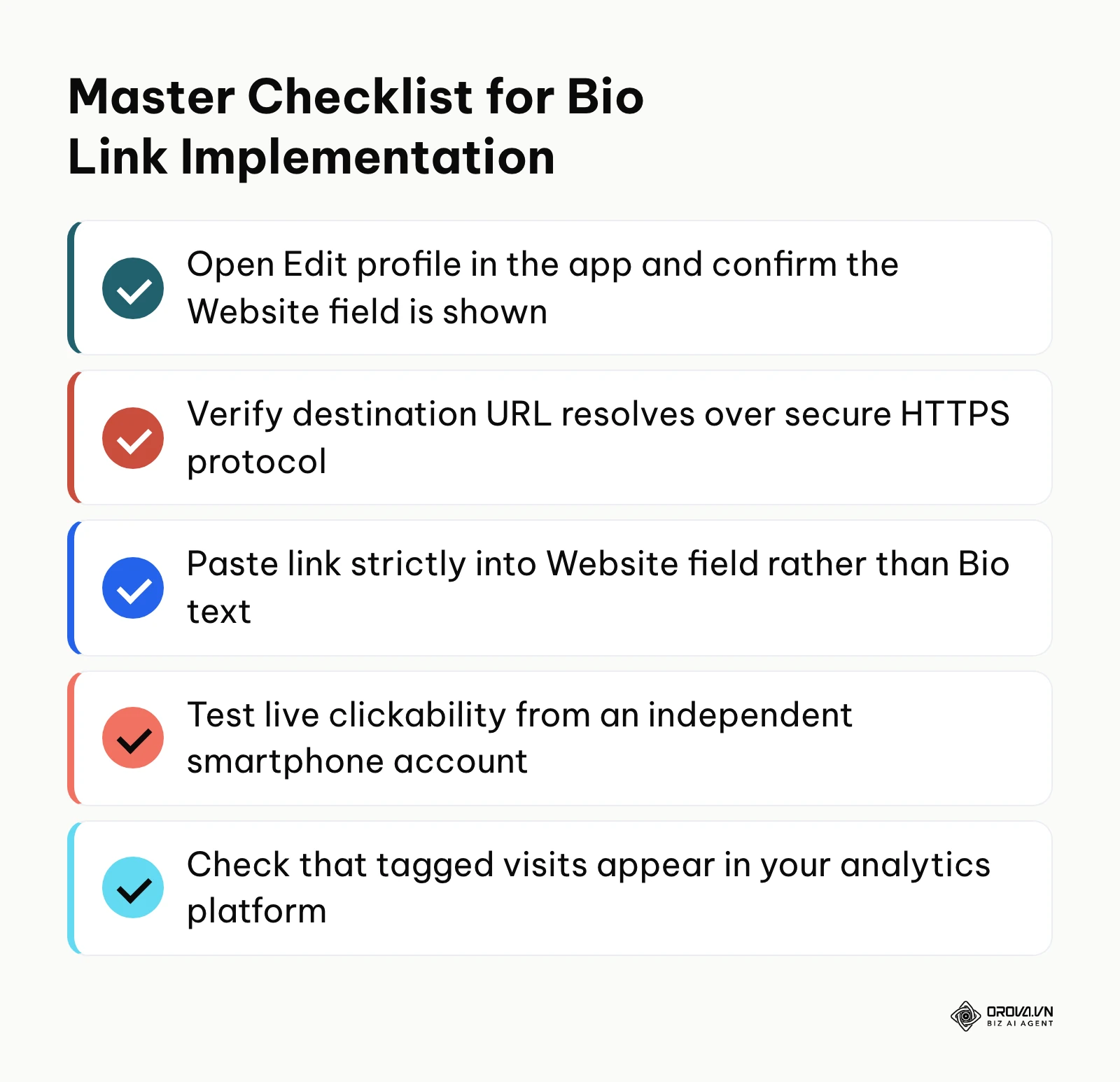
Review this summary checklist to audit your setup progress, verify completion markers, and identify any missing operational steps before scaling your video output.
| Stage | Core Action | Completion Verification Signal | Estimated Time |
|---|---|---|---|
| 1. Account Audit | Compare Personal vs Business requirements | Decision made based on sound library vs link urgency | 3 minutes |
| 2. Account Switch | Convert profile tier via Account settings | Business Suite visible inside profile menus | 2 minutes |
| 3. Business Details | Complete any business-details request if prompted | No pending request shown in the app | Varies |
| 4. URL Structuring | Attach standard UTM tags to target address | Validated URL resolves cleanly in mobile browsers | 5 minutes |
| 5. Link Placement | Paste link into dedicated Website input field | Blue clickable link visible on public profile screen | 1 minute |
| 6. Device Testing | Tap link from an external smartphone | Destination page loads within TikTok in-app webview | 2 minutes |
| 7. Fallback Routing | Enable automated DM replies and video cues | Inbound test message triggers automated resource link | 5 minutes |
Common TikTok Bio Link Errors and Practical Solutions
When attempting to configure or maintain an external link on TikTok, technical and policy hurdles can prevent your address from functioning. Work through the troubleshooting checklist below to resolve the most common profile issues.
Visual 6-Point Troubleshooting Checklist for Unclickable Bio Links
- [ ] Verify link placement: Confirm the URL resides strictly in the Website field, not inside the 80-character Bio description box.
- [ ] Check scheme format: Ensure your address begins with an explicit https:// protocol prefix; raw domain strings often fail mobile parsing.
- [ ] Inspect business status: Check in the app whether TikTok is asking your Business Account for any details.
- [ ] Purge application cache: Clear the TikTok app cache via Settings and privacy > Free up space to eliminate interface synchronization stalls.
- [ ] Test on a secondary device: Log into a different mobile phone to rule out local client caching on your primary handset.
- [ ] Allow for a short delay: If you have just crossed 1,000 followers on a Personal Account and the field is not visible yet, update the app and check again later.
| Error Symptom | Common Technical Cause | Remediation Procedure |
|---|---|---|
| Link displays as black, inert text | URL was pasted into the Bio text field instead of the Website row | Tap Edit profile, cut the URL from the Bio box, paste it into the Website row, and save. |
| Website field is completely missing | Account is Personal with under 1,000 followers, or Business verification is pending | Switch to Business Account in settings, or complete any business-details request shown in the app. |
| Tapping link triggers browser security warning | Destination server lacks an active SSL/TLS certificate or uses mixed content | Renew SSL certificates on your web host and ensure all page assets load securely over HTTPS. |
| In-app webview displays blank white screen | Intrusive third-party cookie consent scripts blocking social webview engines | Deploy a lightweight landing page specifically optimized for mobile social webview engines. |
| Website link disappears from a Business Account | A business-details request was not completed or was rejected | Check in-app notifications, confirm your legal business name, and complete the request again. |
| Google Analytics shows bio visits as Direct traffic | Destination URL lacks UTM tags; mobile webview dropped referral headers | Append utm_source=tiktok and utm_medium=bio parameters to your profile address. |
When managing external profile links and monitoring visitor interaction, Orova Link & QR provides tools to simplify your deployment. The platform enables marketers and store owners to configure dynamic short links utilizing the standardized orova.vn/l/<code_7_chars> format alongside custom branded QR codes, with 59 QR code types to choose from. Within the creation interface, you can attach comprehensive five-field UTM tracking parameters (source, medium, campaign, term, content) directly to your target destination URL. When traffic arrives from TikTok, the Statistics tab aggregates scan and click metrics into unified reporting views, allowing you to examine operating systems, mobile devices, browser types, geographic regions, and twenty-four-hour performance timelines without deploying fragmented third-party plugins. If your marketing campaign pivots to a new seasonal catalog, you can update your destination URL within the dashboard at any time without altering the live link in your TikTok bio.
How to Measure TikTok Bio Link Traffic and Conversions
Evaluating the business value of your TikTok profile link requires tracking both platform-side interactions and external website completions.
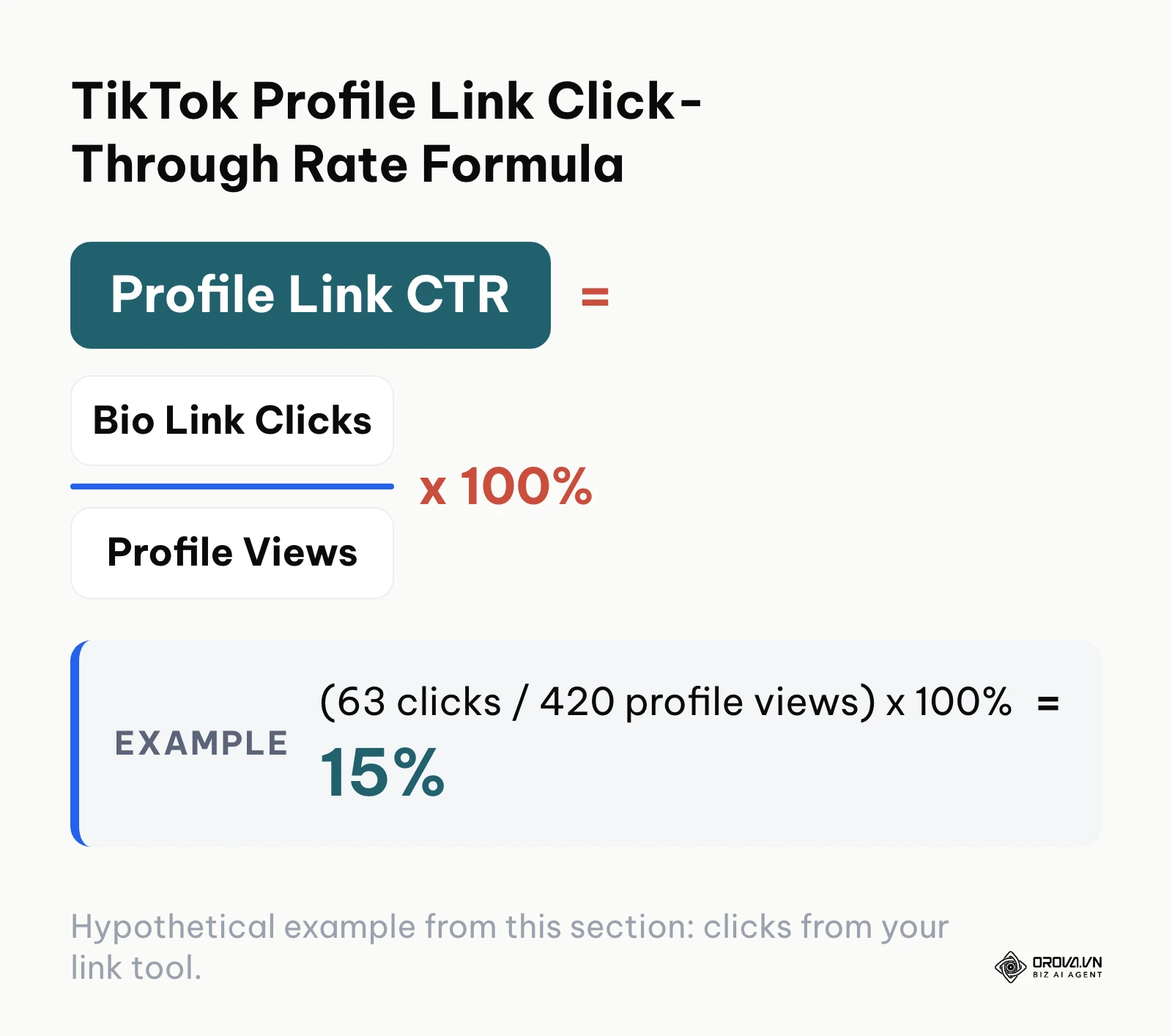
Access your TikTok native metrics by opening your profile, tapping the top-right menu, and selecting Creator tools or Business Suite, followed by Analytics. Review the Profile views metric under the Overview tab to determine how many users inspect your account header weekly. Compare this total against the outbound click counts recorded by your link management platform or external website analytics.
Because in-app browsers often do not pass a clear referrer, the UTM tags you added in Step 4 are what keep these visits attributed to your TikTok bio.
| Metric | Where to find it | What it tells you |
|---|---|---|
| Profile views | TikTok Analytics, Overview tab | How many people open your profile |
| Bio link clicks | Your link tool or short-link statistics | How many of them tap the Website link |
| Sessions with source / medium tiktok / bio | GA4 Traffic acquisition report | Visits that reached your site from the bio |
| Key events | GA4 Key events | Sign-ups or orders those visits produced |
Inside Google Analytics 4, navigate to Reports > Acquisition > Traffic acquisition. Filter your primary dimension by Session source / medium to isolate traffic marked as tiktok / bio. Evaluate session engagement duration, page depth, and key event completions. Reviewing these figures over seven-day cycles provides an accurate assessment of which video topics generate meaningful referral activity.
Hypothetical example: A boutique fitness coach launched a campaign offering a free seven-day conditioning template to generate client leads. The coach configured a tracked short link containing campaign tags specifying tiktok as the source and profile_guide as the campaign identifier. During the initial week, the coach published four workout breakdowns directing viewers to the profile link. Analytics showed 8,400 video views, 420 profile visits, and 63 bio link clicks, resulting in 18 email subscribers, which means 63 / 420 x 100% = 15% of profile visitors clicked the link. Comparing the week's videos, the coach noticed that clips about common form mistakes were followed by more profile visits than general workout montages. The coach adjusted subsequent production to focus exclusively on technical exercise tutorials.
Eliminate blind spots between your social engagement and business revenue. Orova Link & QR brings dynamic link management and comprehensive scan analytics together in one unified dashboard, free until July 7, 2027. Create your first branded short link in minutes without entering a credit card.
Trends in TikTok Bio Linking Over the Next Few Years: Author's Perspective
As of 2026, TikTok continues to balance its desire to retain audience attention inside its native ecosystem against the practical demands of commercial brands seeking external website conversion. Over the coming years, I expect the relationship between short-form video profiles and external web navigation to undergo significant structural adjustments.
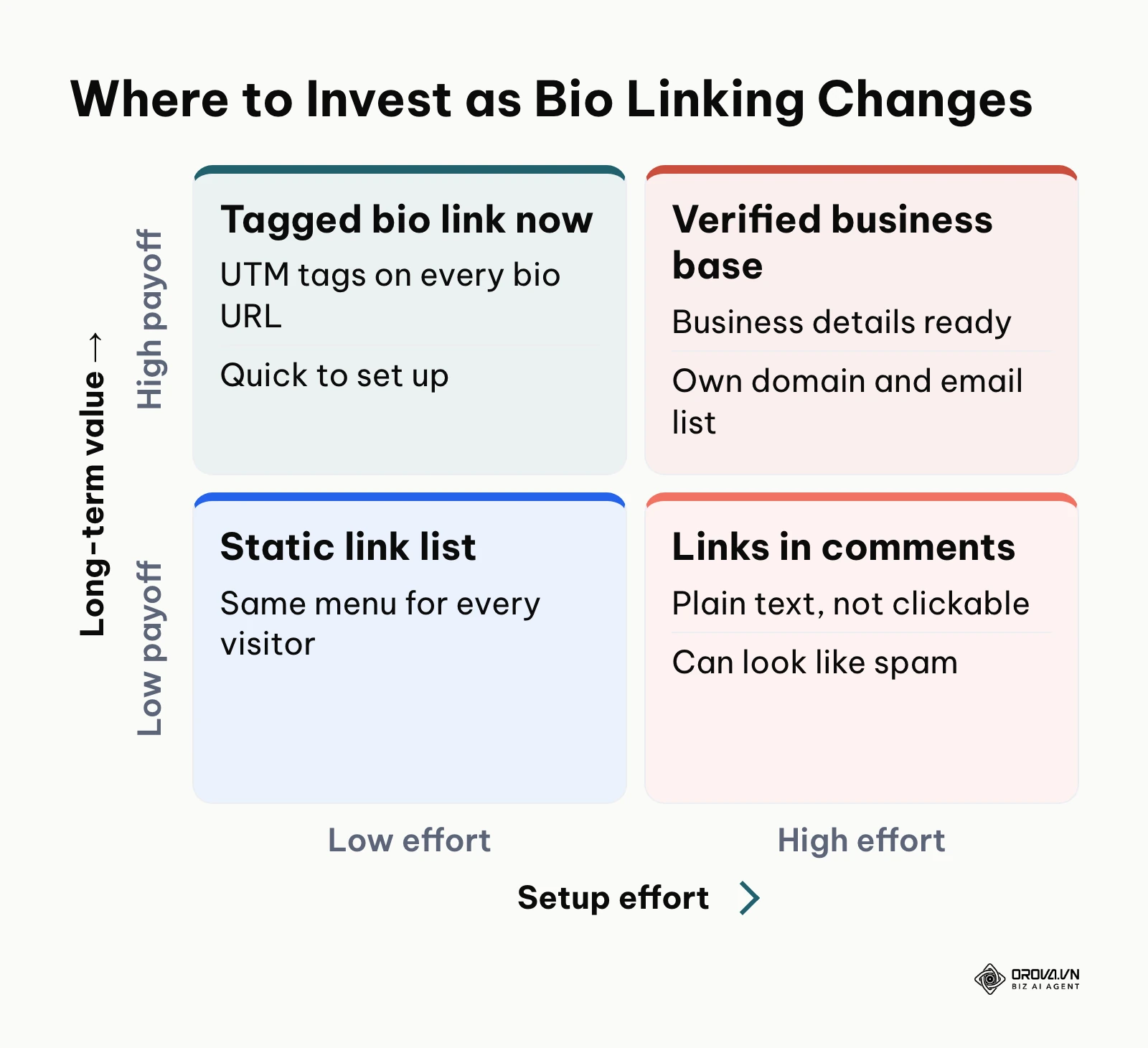
Direct external linking will face stricter platform verification barriers. Today, the friction surrounding business document verification indicates that major social platforms are actively filtering external links to curb spam and protect user safety. Over the next two to three years, I believe TikTok will move toward a closed-loop verification model, where only entities with verified corporate credentials or certified domain ownership can route traffic outside the mobile application. Creator accounts without registered business filings may find their external linking options restricted to verified platform partners or integrated social stores. Brands should prepare now by establishing formal corporate accounts, verifying domain ownership, and building direct audience relationships through email and messaging channels rather than relying entirely on unverified social bio links.
AI-driven profile landing pages will replace static destination menus. Today, mobile visitors encounter uniform, static link-in-bio menus that present identical options regardless of user context. In my view, the next generation of social linking tools will leverage lightweight predictive artificial intelligence to dynamically reorder, personalize, and translate destination offerings based on the visitor's geographic location, language preferences, and referral video topic. An individual landing on your profile from a video about beginner tutorials will automatically see beginner resources prioritized at the top of the link list. Marketers should begin structuring modular content assets today so their landing infrastructure can adapt as automated personalization engines mature.
In-app social commerce will pressure open-web referral models. The aggressive expansion of TikTok Shop demonstrates the platform's strategic objective to process transactions without sending shoppers to external websites. Over the next two to three years, I believe TikTok will progressively incentivize native in-app checkout pathways by granting algorithmic preference to videos utilizing integrated product tags over videos directing users to external bio links. This shift could theoretically be slowed if international regulatory bodies mandate open-web interoperability on major social networks; however, commercial operators should hedge this risk by mastering both native in-app storefronts and external tracking pipelines concurrently.
Frequently Asked Questions About How to Add Link to TikTok Bio
Why is my TikTok bio link not clickable after pasting?
An unclickable link almost always occurs because the web address was pasted into the Bio description box rather than the dedicated Website field. The Bio description area supports only plain text formatting up to 80 characters. To make your link interactive, open Edit profile, locate the separate Website field below your bio, paste your full URL including https://, and save your changes.
How can I add a link to my TikTok bio without 1,000 followers?
Possibly, but not guaranteed. Switching to a Business Account (Settings and privacy > Account > Switch to Business Account) unlocks the Website field for some accounts, while in other regions Business Accounts still need a follower threshold or must register business details first, and the rules can change. After switching, open Edit profile in the mobile app and check whether the Website field appears. Until it does, a URL pasted into your bio stays plain text and cannot be tapped; use direct-message auto-replies or video calls-to-action in the meantime.
Why did the Website field disappear from my Business Account?
The Website field typically disappears if TikTok introduces regional business verification mandates that your account has not yet fulfilled, or if your submitted business documentation was rejected during review. Access your Business Suite, check for any pending business-details request, and complete it to restore your website link.
Does putting an external link in your bio hurt video reach or distribution?
Adding an external link to your dedicated profile Website field does not penalize your video distribution on the For You page. TikTok's recommendation algorithm evaluates content based on watch time, completion rates, and user engagement. However, repeatedly encouraging users to leave the platform in video descriptions or posting external links across video comments can trigger automated spam filters and suppress reach.
How does AI assist with TikTok bio link routing and conversion tracking?
Artificial intelligence assists marketing workflows by analyzing traffic patterns, predicting drop-off points within mobile in-app webviews, and dynamically serving personalized landing page variations based on visitor location and engagement history. Some link tools can also flag broken destination URLs so you can fix them before visitors hit an error page.
Where Should You Start?
Your immediate implementation step depends on your current follower volume and primary content monetization goals.
If you are an independent creator with fewer than 1,000 followers whose audience growth relies on trending audio, do not rush to convert to a Business Account. Instead, audit your current content performance, identify your top three viral formats, and focus your production on crossing the 1,000-follower threshold organically so you retain complete access to popular commercial music while unlocking the native creator Website field.
If you represent an established business or e-commerce merchant seeking immediate customer acquisition, consider switching to a Business Account, keep your official registration details ready because some accounts must register business information, check in Edit profile whether the Website field appears, and verify that your destination website loads cleanly over secure HTTPS protocol on mobile devices.
If you have already surpassed 1,000 followers on a Personal Account or operate a verified commercial profile, construct a clean, mobile-optimized landing page equipped with standardized UTM parameters. Audit your profile to ensure your destination address is entered strictly into the Website field, test the live link across multiple smartphones, and begin systematically tracking how to add link to tiktok bio to convert social attention into lasting business growth.
About the author

Builder of Orova
Nguyễn Đỗ Trọng Ân has 8 years of experience in marketing, including 6 years managing market development across Asia. He builds Orova, a Biz AI Agent that never sleeps: it plans, runs and optimizes work for businesses.
Run your business with AI Agents
Orova is the always-on Biz AI Agent — it plans, runs, and optimizes the work for you.
Save time, unlock productivity.