
What is a link in bio? A practical guide to setup, layouts and tracking
A link in bio is the clickable link in your social media profile, usually pointing to a simple page that lists the few places you want followers to go next. It matters more than it looks. Picture this: you spend five hours scripting, shooting, and editing a video. The algorithm picks it up. Suddenly, a hundred thousand people are watching your content. In the video, you mention a new product launch and tell viewers to check the link in bio. Thousands of highly motivated potential customers navigate to your profile page. They look at your website field, click the single URL provided, and land on your massive corporate homepage. Faced with a complex navigation menu and no immediate sign of the product you just pitched, they get frustrated, close the app, and leave. You just lost thousands of dollars in potential revenue because of a routing failure.
This scenario happens every minute across digital platforms. Social media networks intentionally restrict outbound traffic to keep users engaged on their apps. They give you very little clickable real estate, often just the link field in your profile. If you waste it by sending users to an unoptimized destination, your marketing efforts collapse at the finish line. This is exactly the bottleneck that a dedicated bio link strategy solves.
What is a Link in Bio?
A link in bio is a single clickable URL placed in the profile section of social media platforms like Instagram or TikTok. It directs followers to a customized landing page that houses multiple important links, such as product pages, recent articles, or promotional campaigns, working around the platform's limited link slots.
The origin of this concept is simple. For years, Instagram has not made links inside regular post captions clickable. They wanted to prevent the platform from becoming a spam directory. Creators were forced to keep changing the URL in their profile settings every time they made a new post. Eventually, third-party developers created a workaround: a micro-website that holds a menu of all necessary links, requiring the profile URL to be updated only once.
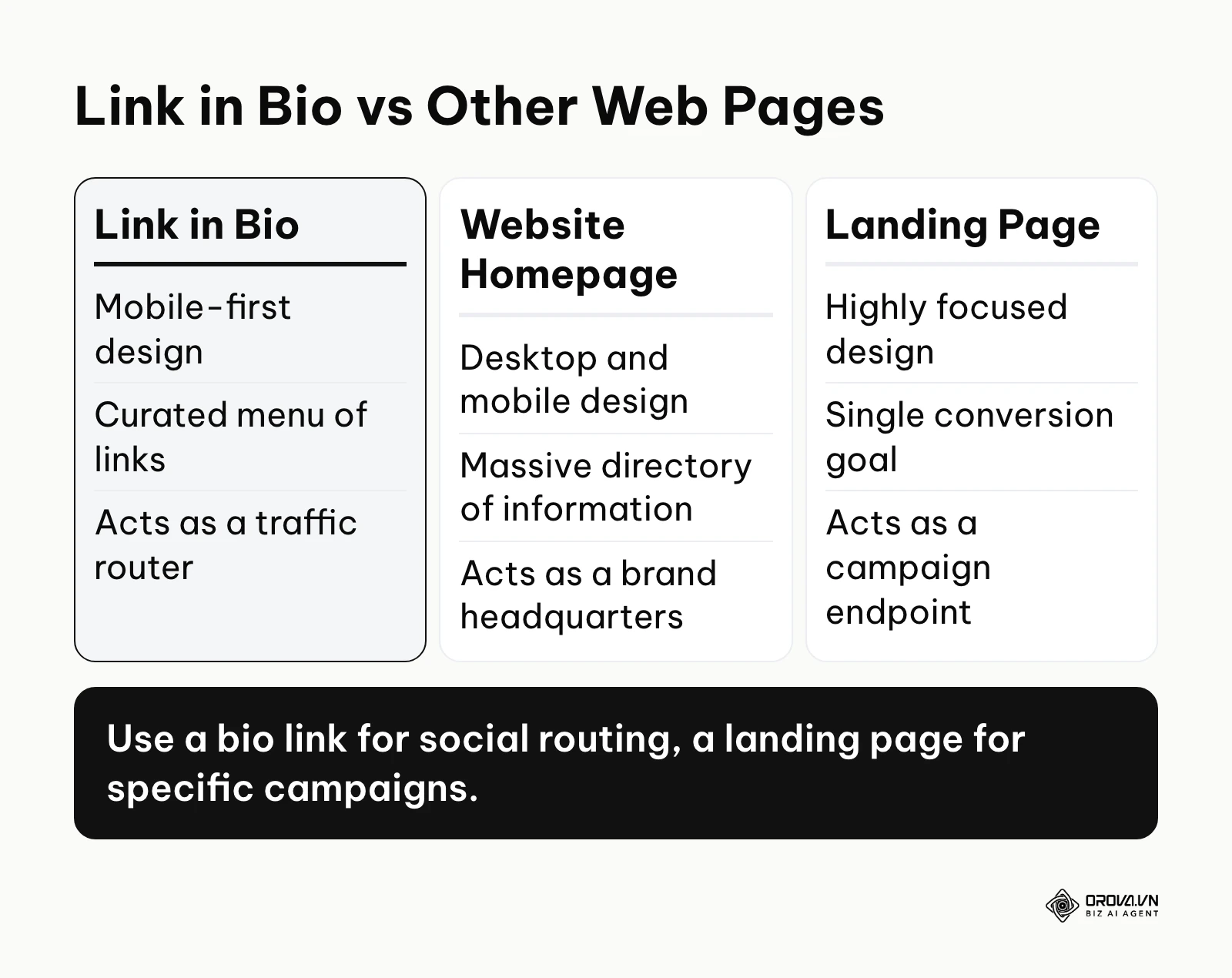
To understand this concept clearly, we must distinguish it from other common web properties.
| Concept | How it differs from a Link in Bio | Example |
|---|---|---|
| Website Homepage | A homepage is a massive directory for all company information, whereas a bio link is a stripped-down menu designed for quick mobile clicks. | Apple.com (Homepage) vs. a creator's list of 3 recommended gears. |
| Campaign Landing Page | A landing page drives a single action (like downloading an ebook), while a bio link offers a routing hub to multiple destinations. | A webinar sign-up page (Landing Page) vs. a menu offering the webinar and a store. |
| Link Shortener | A shortener merely condenses a long URL, whereas a bio link creates an entirely new visual interface housing multiple URLs. | bit.ly/xyz (Shortener) vs. a custom menu page. |
Illustrative example: Consider a local neighborhood bakery. Their Instagram profile features a bio link. When a customer clicks it, they do not go to a complex corporate site. Instead, they see a simple page with three clear buttons: "Order Cake Delivery," "View Today's Menu," and "Get Directions to Store." The customer finds what they need in seconds.
The Meaning: Why Do We Need a Link in Bio?
The primary reason this system exists is to solve the fundamental conflict between social media platforms and businesses. Platforms want retention; businesses want acquisition. Social networks intentionally create friction for users trying to leave the app. A bio link exists to remove that friction for the user while playing by the platform's rules.
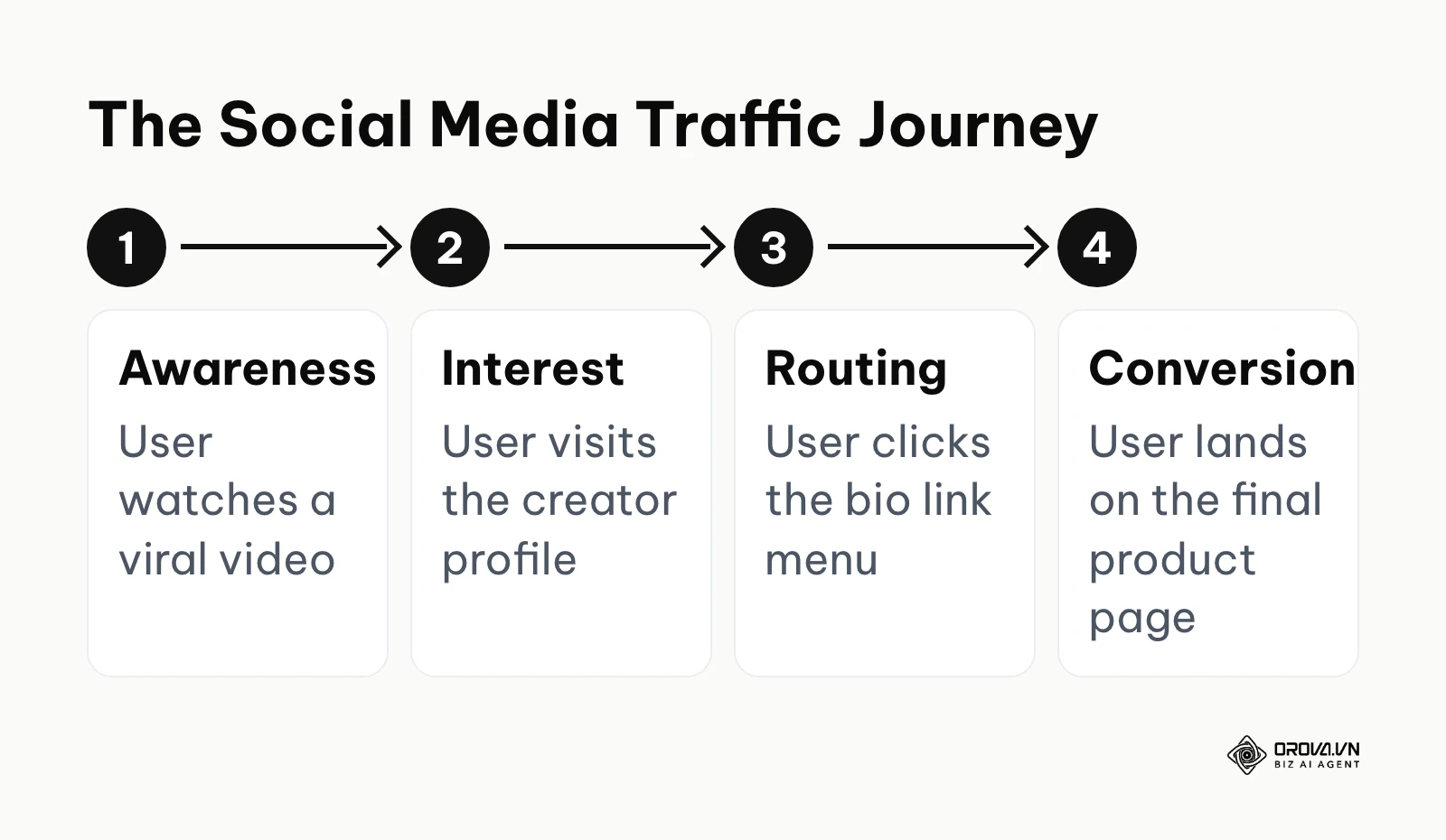
If we look at the big picture of a modern marketing funnel, the bio link sits exactly at the transition point. It bridges the gap between top-of-funnel awareness and middle-of-funnel consideration. The user journey flows from discovering a piece of content, to developing an interest in the creator, to visiting their profile, and finally clicking the routing hub to take action.
A common concern among digital marketers is how this routing affects search engine visibility. If you send thousands of users to a third-party tool instead of your domain, do you lose SEO value? In practice, major social platforms generally mark outbound profile links as "nofollow" or route them through their own redirects, so these links pass little or no traditional authority to your site either way. Therefore, using an intermediary page does not harm your core rankings. The traffic that passes through is categorized as referral traffic.
If you ignore this routing strategy, you lose control over the user experience. You force highly motivated prospects to hunt for the specific item they saw in your video. Many will give up quickly if the product is not visible right away.
When you don't need a link in bio: If your entire business model revolves around a single, high-ticket enterprise offering, or if you are running a strictly time-bound launch where any navigational distraction reduces conversions, using an intermediary link menu is a mistake. In these highly singular scenarios, routing traffic through a multi-link page introduces unnecessary friction. Instead, linking directly to the specific checkout flow or dedicated sales page is the optimal strategy to maximize immediate action.
Core Values and Benefits of an Optimized Link in Bio
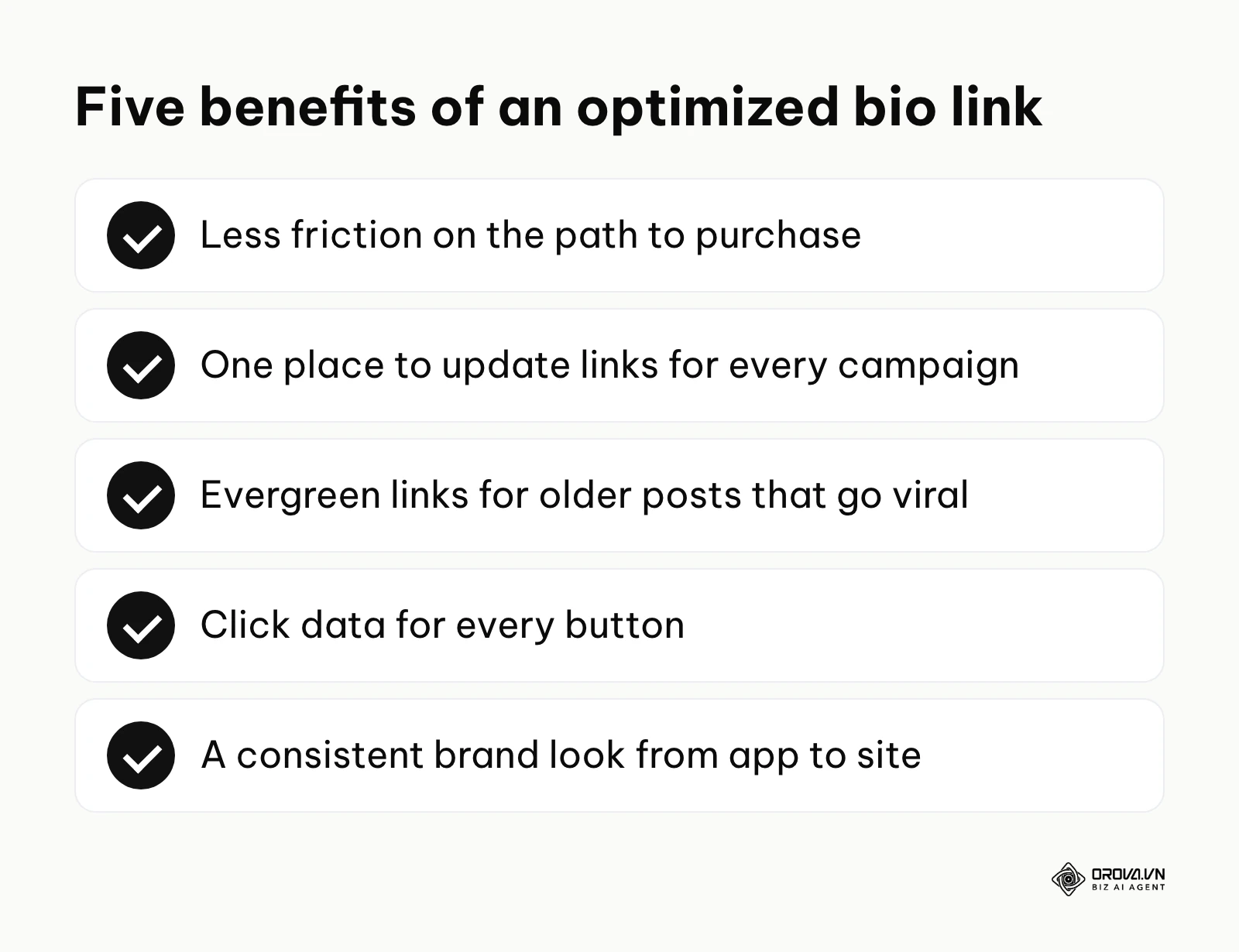
Implementing a structured routing system delivers distinct advantages categorized into broad business impact and direct operational efficiency.
Maximizing Revenue by Reducing Friction
The most critical business value is the direct impact on revenue. Every extra tap a user has to make drops your conversion rate. By presenting a curated list of destinations exactly when the user has high intent, you capture sales that would otherwise bounce off a generic homepage. Before using a bio link, traffic hits a homepage and scatters. After implementation, traffic is funneled directly to high-converting product pages.
Saving Time on Campaign Management
For the business owner, constantly updating the profile URL across five different social media apps for every new promotion is a massive waste of time. A centralized hub means you change the link in one dashboard, and the menu updates instantly across all platforms. Before, updating took thirty minutes across apps. After, it takes two minutes in one central dashboard.
Mitigating the Risk of Lost Leads
When a video goes viral unexpectedly, it might be an older piece of content promoting a past campaign. If your profile link only points to today's campaign, anyone discovering the old video hits a dead end. A structured menu mitigates this risk by keeping evergreen links accessible.
Clearer Attribution Data for Executors
For the person managing the marketing, proving the return on investment from social media is notoriously difficult. A dedicated routing tool provides built-in analytics. Before implementation, a marketer only sees generic referral data. After, they can pinpoint exactly which button on the menu drove the most clicks.
Streamlined Brand Consistency
Executors benefit from presenting a unified brand image. Instead of sending users to mismatched landing pages, the hub acts as a branded gateway. Before, the transition from social app to website felt disjointed. After, the user experiences a seamless visual transition utilizing the company's fonts and colors.
Illustrative example: Consider a mid-sized e-commerce apparel brand struggling with social conversions. The social media manager was manually changing the Instagram profile link every time a new product launched. Followers viewing older posts clicked the link in the bio, expecting a specific winter jacket, but were taken to a new summer t-shirt campaign instead. The stumbling block was a high bounce rate because the destination did not match the user's intent. By implementing a structured link hub that categorized links by "New Arrivals," "Featured in Reels," and "Shop the Feed," they eliminated the confusion. The result, in this example, was more click-throughs to product pages and fewer messages asking for product links.
| Benefit | Measured by Metric | Time to see impact |
|---|---|---|
| Revenue Maximization | Conversion Rate (CVR) | 1 to 2 weeks |
| Time Savings | Hours spent updating profiles | Immediate |
| Clearer Attribution | Goal completions in analytics | 3 to 5 days |
Want to know which bio link actually gets clicked? Orova Link & QR creates short links (orova.vn/l/...) that count every click and break results down by day, device, country and source. Add UTM tags with the built-in builder before you paste the link into your profile.
How a Link in Bio Works: The Anatomy of Conversion
Understanding the mechanics behind this strategy requires breaking down the system into its core components. It is not just about placing a URL; it is about constructing a high-performance routing environment.
The Profile Integration
The starting point is the social media platform itself. To add a link, you must navigate to the profile editing section. On Instagram, you tap "Edit profile" and look for the "Links" section. On TikTok, the clickable website field has historically been limited to certain account types and follower thresholds. These rules, and the number of links each platform allows, change from time to time, so check the platform's current help center. You paste your central hub URL into this specific field. It is crucial to ensure there are no spaces or typos, as the platform will render a broken link.
The Central Hub (Micro-Landing Page)
When a user clicks the URL in your profile, they are taken away from the social app's native interface and loaded into your central hub. This hub is essentially a very lightweight, mobile-optimized web page hosted by a third-party provider. The architecture of this page is specifically designed for speed. Heavy images and complex scripts are kept to a minimum so the page loads fast and the user does not hit the back button.
The Conversion Blocks
The interface of the hub is built using conversion blocks. These are the functional elements you place on the page. The most common block is the standard text link button. However, advanced setups utilize rich media blocks. You can embed a YouTube video directly on the page, allowing users to watch without navigating to the YouTube app. You can add email collection forms, enabling users to subscribe to a newsletter right from the menu. Crafting the text for these buttons takes care: each call-to-action should be compelling and concise.
Analytics and UTM Tracking
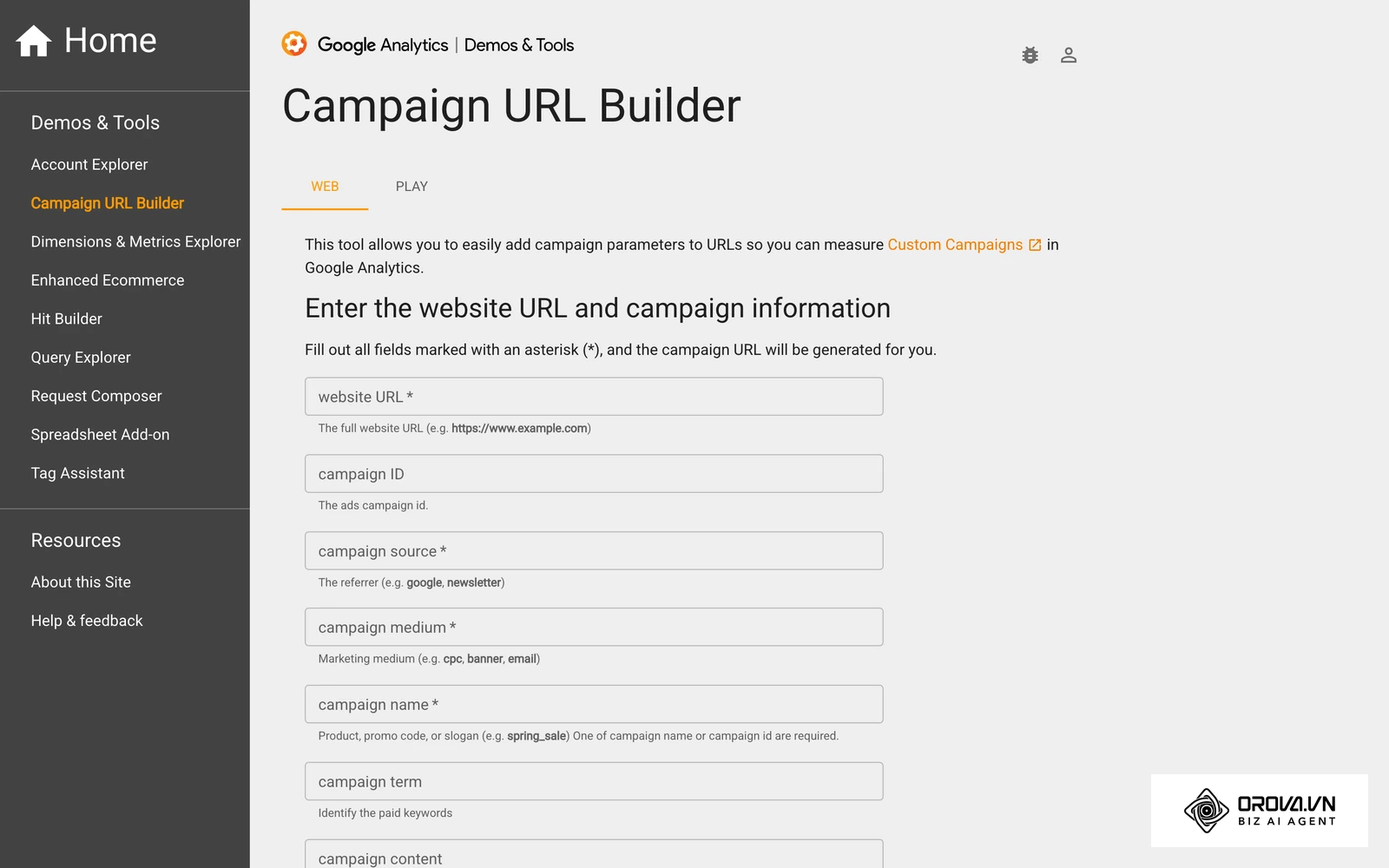
This is the component where professional setups differ from amateur ones. A raw URL simply tells your analytics software that traffic came from a specific domain. However, to understand exactly how your bio link is performing, you must configure UTM (Urchin Tracking Module) parameters. These are snippets of text added to the end of a URL. You should structure your links using specific tags: utm_source=instagram tells you the platform, utm_medium=bio_link identifies the placement, and utm_campaign=summer_sale identifies the specific promotion. By appending these tags to the destination URLs inside your hub, your analytics dashboard will show precisely which button generated a sale. When you are setting up your analytics, understanding what is conversion api becomes crucial for tracking server-side events that traditional browser pixels might miss.
Free vs. Paid Tools
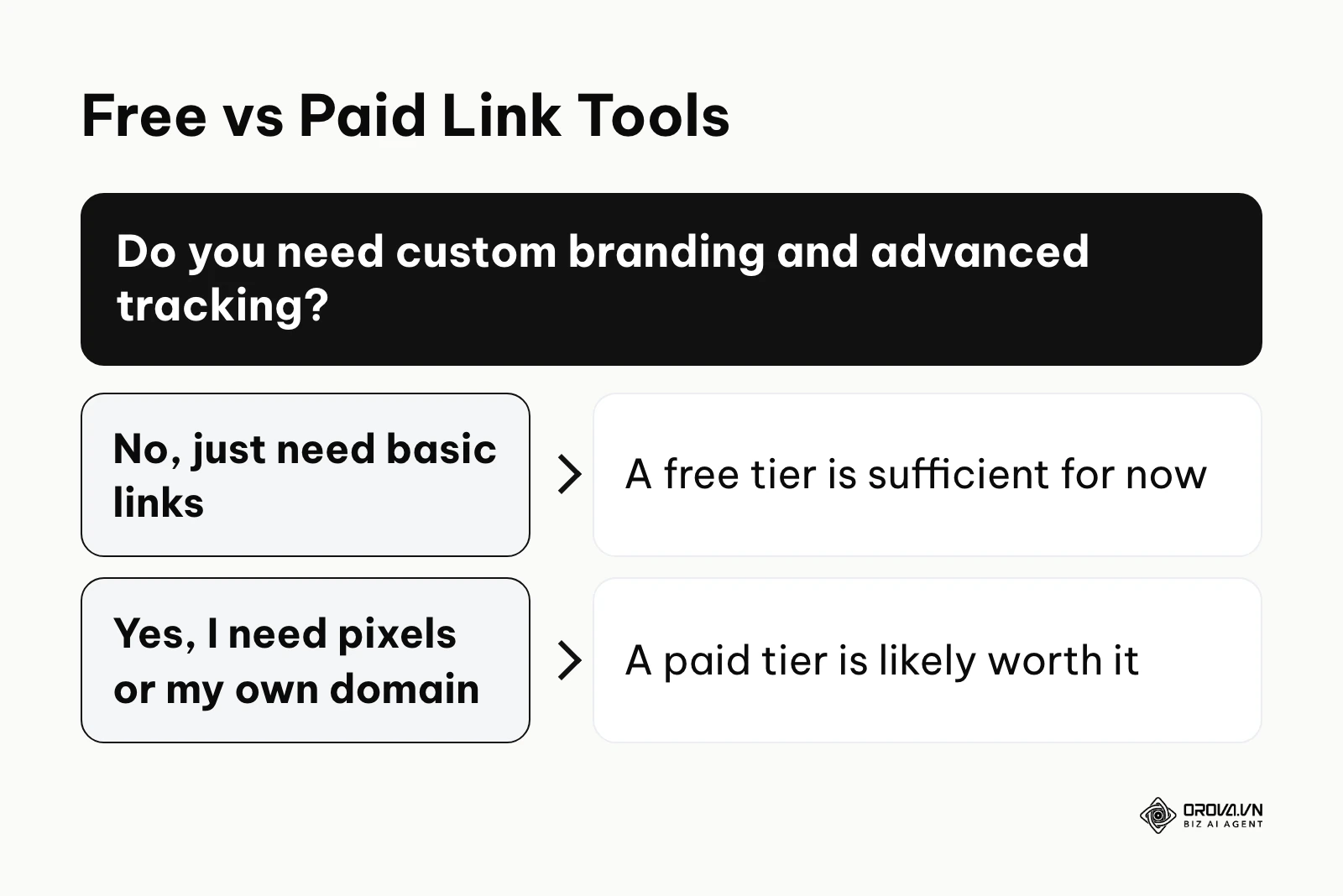
The market is saturated with software offering these services. The core feature—a list of links—is universally free. However, upgrading to a paid tier unlocks essential marketing capabilities. Paid versions typically offer custom domain mapping (removing the tool's branding from the URL), advanced analytics integrations (like adding a tracking pixel so you can retarget visitors with ads), and deeper visual customization. If your business relies on retargeting ads or requires strict brand compliance, a paid tier is necessary.
To help navigate the software ecosystem, here is a detailed breakdown of the common types of tools available.
| Type of Tool | Core Characteristic | Best Suited For |
|---|---|---|
| Basic Link Aggregators | Simple lists of buttons, fast loading, limited design. | Beginners, casual creators, small local shops. |
| Media-Rich Hubs | Allows embedding videos, podcasts, and image carousels. | YouTubers, podcasters, visual artists. |
| Commerce-Focused | Integrates payment gateways directly on the menu page. | Independent sellers, digital product creators. |
| Marketing Suites | Offers deep pixel integration, A/B testing, and CRM syncing. | Agencies, mid-market e-commerce, large brands. |
Illustrative example: A B2B software startup wanted to track exactly which TikTok videos were driving demo sign-ups. They initially used a generic short link in their bio. The stumbling block was that Google Analytics only showed "TikTok / Referral," providing zero insight into which specific video or campaign prompted the visit. To fix this, the marketing operations lead implemented dynamic UTM tracking. They created a custom link menu where the primary button's URL contained utm_campaign=q3_tiktok_push. The result was crystal-clear attribution; they could see in their CRM that videos focusing on time-saving features generated more qualified leads than videos focusing on pricing.
How to Start and Adapt: Templates and Strategies
Setting up the tool is only the mechanical part. The actual success of your bio link depends heavily on how you structure the page and persuade users to click. Different industries require entirely different approaches.
Strategy for E-commerce Owners
For an online store, the goal is immediate product discovery. Your layout must minimize the steps to purchase. First, place an urgent promotional banner at the absolute top of the page. If you have a holiday sale, this is where it goes. Second, implement a "Shop the Feed" visual block if your tool allows it. This lets users tap an image they saw on Instagram to go directly to that specific product. Third, list your top three best-selling categories. Do not list individual products unless it is a massive new launch. Finally, add an email capture form offering a small discount for first-time buyers.
Strategy for Content Creators
Creators need to monetize their audience and distribute content across platforms. Start with your most recent or most important piece of content at the top. If you just dropped a YouTube video, embed it directly so it is the first thing they see. Next, place your primary monetization link. This could be your Patreon, a digital course, or a branded merchandise store. Following that, provide links to your other social media channels to cross-pollinate your audience. Keep the design highly personalized, ensuring your face and brand colors are prominent.
Strategy for Marketing Agencies
Agencies use their profile to generate high-ticket leads and demonstrate authority. The top block should be a direct, high-value lead magnet, such as an industry report or a free audit. The second block must be a clear "Book a Consultation" button linking directly to a calendar scheduling tool. Third, link to your portfolio or three detailed case studies to build immediate trust. Agencies must ensure their bio link page uses a custom domain to maintain a highly professional appearance.
Call-to-Action Swipe File
Having a great page means nothing if you do not tell people to visit it. Here are examples of highly effective Call-to-Action (CTA) scripts to drive traffic:
- Video Spoken CTA: "I put a free checklist detailing this exact process at the link in my profile. Go grab it before I take it down."
- Caption CTA: "Want the full breakdown? Tap the link in our bio and select the first button to read the complete guide."
- Story CTA: "We just restocked the black hoodies. Tap the link on our profile page to secure yours before they sell out again."
Illustrative example: A freelance graphic designer used a free link tool to display her portfolio, newsletter signup, and consultation booking form. However, her bio page looked exactly like a generic template, diluting her brand identity. The stumbling block was that potential clients felt a disconnect between her highly aesthetic Instagram feed and the plain, unbranded link page. She upgraded her setup, applied her brand colors, used her custom typography, and added a brief welcome video at the top of the link page. The result was a more cohesive brand experience, leading to a noticeable increase in consultation bookings and newsletter subscribers who mentioned her professional presentation.
| Common Mistake | Consequence | How to Prevent It |
|---|---|---|
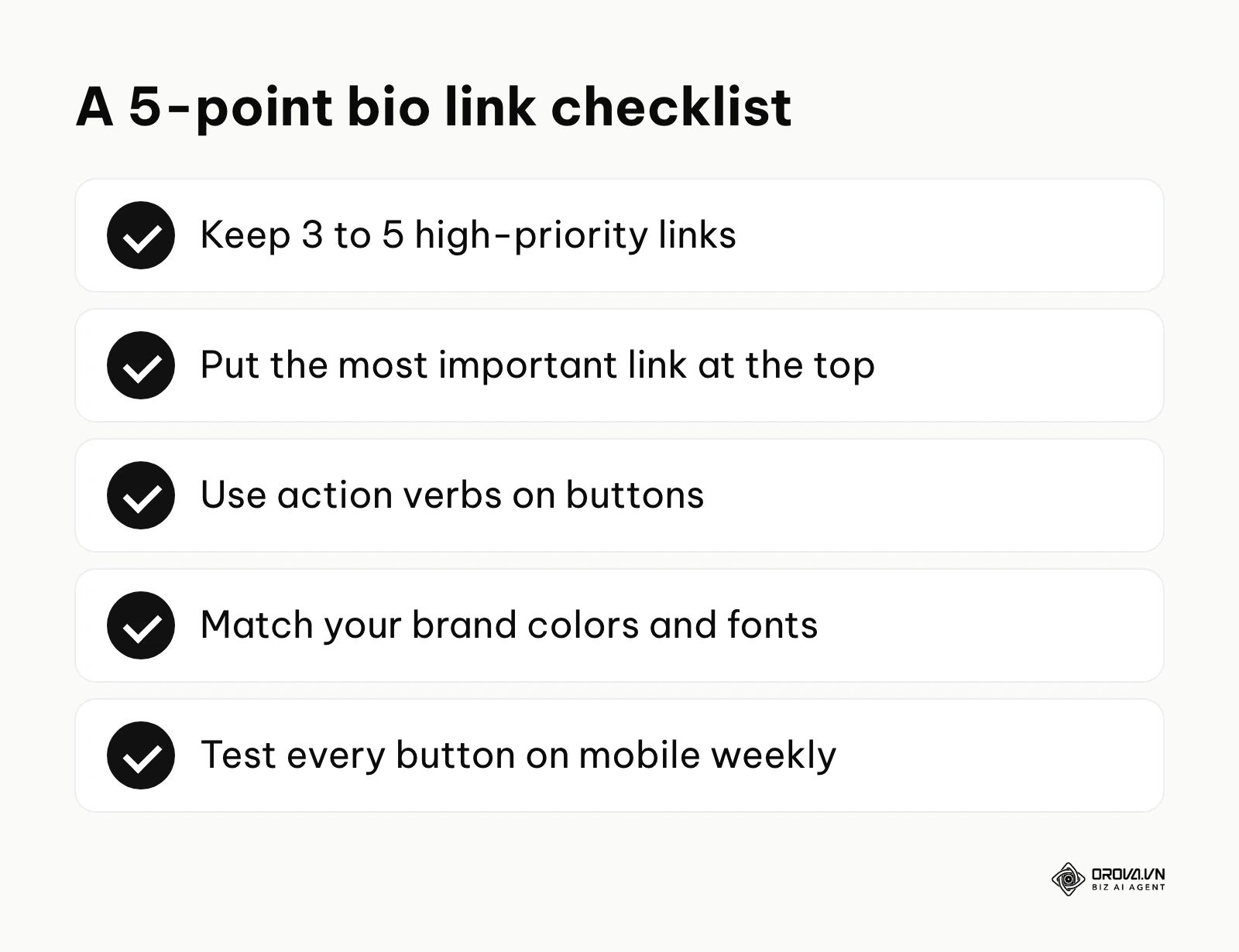
| Too many links | User experiences decision fatigue and abandons the page. | Strictly limit the page to 3-5 high-priority buttons. |
| Vague button text | Users do not know what will happen if they click. | Use strong action verbs like "Download," "Shop," or "Read." |
| Broken links | Complete loss of trust and wasted traffic. | Click every single button on your mobile device weekly to test them. |
Promoting offline too? With Orova Link & QR you can turn the same destination into a QR code, customize its colors and logo, and change where a dynamic QR points even after it is printed. Free until July 7, 2027.
Where link in bio is heading in the next few years: the author's take
Social media routing keeps changing. Here are three opinions on where these hubs are going. Treat them as views, not forecasts.
AI-Driven Dynamic Personalization
Right now, every user who clicks your profile link sees the exact same menu. I believe that in the next few years, AI will fundamentally change this static experience. If an algorithm knows a user heavily interacts with video content, the bio link will dynamically rearrange itself to place your YouTube embed at the very top. If the user frequently buys merchandise, the e-commerce links will surface first. To prepare for this, marketers should focus on categorizing their content meticulously today, so future AI tools can easily parse and serve the right links to the right users.
Deep Native Commerce Integration
We are already seeing social platforms trying to build e-commerce directly into their apps. My read is that, for product-based businesses, the plain list of links will increasingly give way to mini-storefronts. Users will be able to browse a catalog, select variants, and complete a purchase without ever leaving the bio link interface. This view could be wrong if privacy rules tighten cross-platform tracking. To prepare, keep your product catalog clean and your product URLs stable so they can plug into whatever storefront format wins.
The Shift from Link Lists to Micro-Apps
I lean towards the idea that the "link in bio" will cease to be just a list of URLs and will evolve into fully functional micro-applications. We are starting to see glimpses of this today, where users can play simple games, sign petitions, or calculate quotes directly on the menu page. The tools to build these lightweight, app-like experiences are becoming easier to use. Creators should start thinking beyond simply routing traffic and begin asking how they can provide immediate value directly on the routing page itself.
Frequently asked questions about link in bio
Is a link in bio still needed when AI search answers everything?
Yes, it is still crucial. While AI search engines are excellent at answering informational queries, social media remains a primary driver of discovery and brand affinity. People follow creators and brands on social platforms for connection and entertainment. When they want to buy a specific product showcased in a video, or join a specific community, an AI search engine cannot replace the direct routing provided by a bio link on that specific creator's profile.
Can I build my own link in bio page on my website?
Absolutely. You can create a hidden page on your own domain (e.g., yourwebsite.com/links), design it specifically for mobile screens with large buttons, and use that URL in your social profiles. The advantage is that you keep full ownership of the traffic data and control the exact branding. The downside is that you must maintain the mobile responsiveness and loading speed yourself, which requires technical effort compared to using a dedicated third-party tool.
How many links should I include in my bio?
A practical rule is to keep no more than five active links at any given time. Giving users too many options leads to analysis paralysis, causing them to click nothing at all. Focus strictly on your current quarter's business objectives. If a link does not directly drive revenue, lead generation, or significant brand awareness right now, it should be removed from the list.
Why is my link in bio not clickable on TikTok?
TikTok restricts outbound links to limit spam. Depending on your account type, follower count and region, the "Website" field may not be available or clickable yet. Many creators unlock it by switching to a business account and growing their audience, but the exact requirements change, so check TikTok's current help pages for your account.
Do link in bio tools steal my traffic?
No, reputable tools do not steal your traffic. They act as a digital switchboard, routing users to your final destinations. The traffic still ultimately lands on your website, YouTube channel, or store. However, because the user technically visits the tool's domain first, you will see the tool's name listed as the "referring source" in your analytics platform, which is why proper UTM tracking is required to maintain clear visibility.
Where to Start?
Depending on your current social media maturity, your first step will look drastically different. Identify your current situation below and take the single most important action to move forward without feeling overwhelmed by complex technical setups.
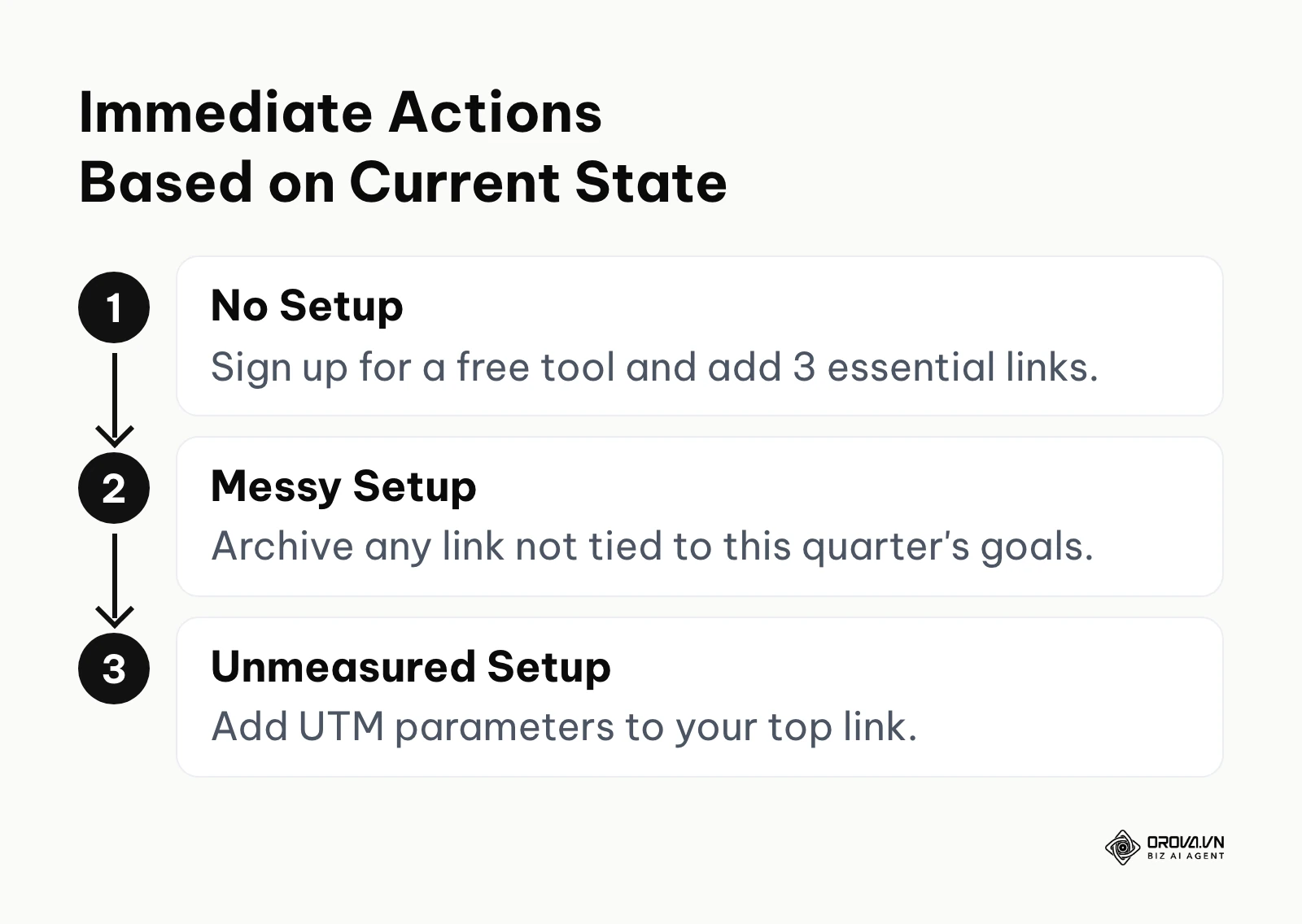
Situation 1: You have nothing set up yet. If you are currently just linking directly to your homepage or have no link at all, your immediate step is to claim your real estate. In one afternoon, register for a free account on a dedicated tool, add your logo, and insert exactly three links: your best-selling product, your newsletter sign-up, and your contact page. Update your Instagram and TikTok profiles immediately to establish a functional routing path.
Situation 2: You have a link in bio, but it is fragmented and messy. If your page has twenty links from the past two years, your first step is a ruthless audit. Spend an hour archiving any link that is not directly tied to this quarter's business goals. Limit your active list to a maximum of five high-priority destinations. This immediately eliminates decision fatigue for your visitors and forces you to focus on what actually drives results right now.
Situation 3: You have a clean setup, but you are not measuring anything. If your page looks good but you have no idea what people click, your immediate action is to implement UTM parameters. Take your top performing link, run it through a standard URL builder to append the source and medium tags, and replace the generic link on your bio page with this new tracked version. You will start capturing precise, actionable referral data within hours.
About the author

Builder of Orova
Nguyễn Đỗ Trọng Ân has 8 years of experience in marketing, including 6 years managing market development across Asia. He builds Orova, a Biz AI Agent that never sleeps: it plans, runs and optimizes work for businesses.
Run your business with AI Agents
Orova is the always-on Biz AI Agent — it plans, runs, and optimizes the work for you.
Save time, unlock productivity.