
Conversion Events: The Payload Behind Every Report
The ads platform says forty-one purchases. Your order table says thirty-three. Somebody in the meeting says the platform inflates its numbers, somebody else says the finance export must be filtered wrong, and the conversation stops being about the campaign. Nobody in the room can settle it, because the answer is not in either report. It is one layer down, in the individual conversion event that gets sent every time somebody buys something.
That layer is usually treated as plumbing — set up once by whoever built the site, then never opened again. It is also where almost every disagreement about advertising numbers actually lives. A field that is missing, a key that does not match, a timestamp that arrived too late: each of those produces a report that is wrong in a specific, findable way, and none of them produce an error message that anybody sees.
So this piece opens the payload. What is inside one event and what each field decides. Why one sale becomes two conversions across two platforms, and the exact rule that stops it. What changes when the event is sent from your server instead of the visitor's browser, including what each sender loses. How much customer data has to travel for the event to be matched to an ad click at all. And a seven-item check to run before you put the number in front of anybody. Every platform detail below is quoted from the platforms' own public documentation, read on 22 August 2026 — check the current pages before you rely on any of it, because these specifications change.
What is a conversion event, exactly?
A conversion event is a single message sent to an ad platform saying that one specific action happened. It carries the event name, the time it occurred, where it happened, identifying data about the person, an optional value, and an optional unique ID used to recognise duplicates. Every number in an ad report is a count of these messages.
The phrase "conversion tracking is set up" usually means somebody installed a tag and saw a number appear. That is a much weaker statement than it sounds. Events can arrive, be counted, and still be wrong in four different ways at once.
The five things inside one event
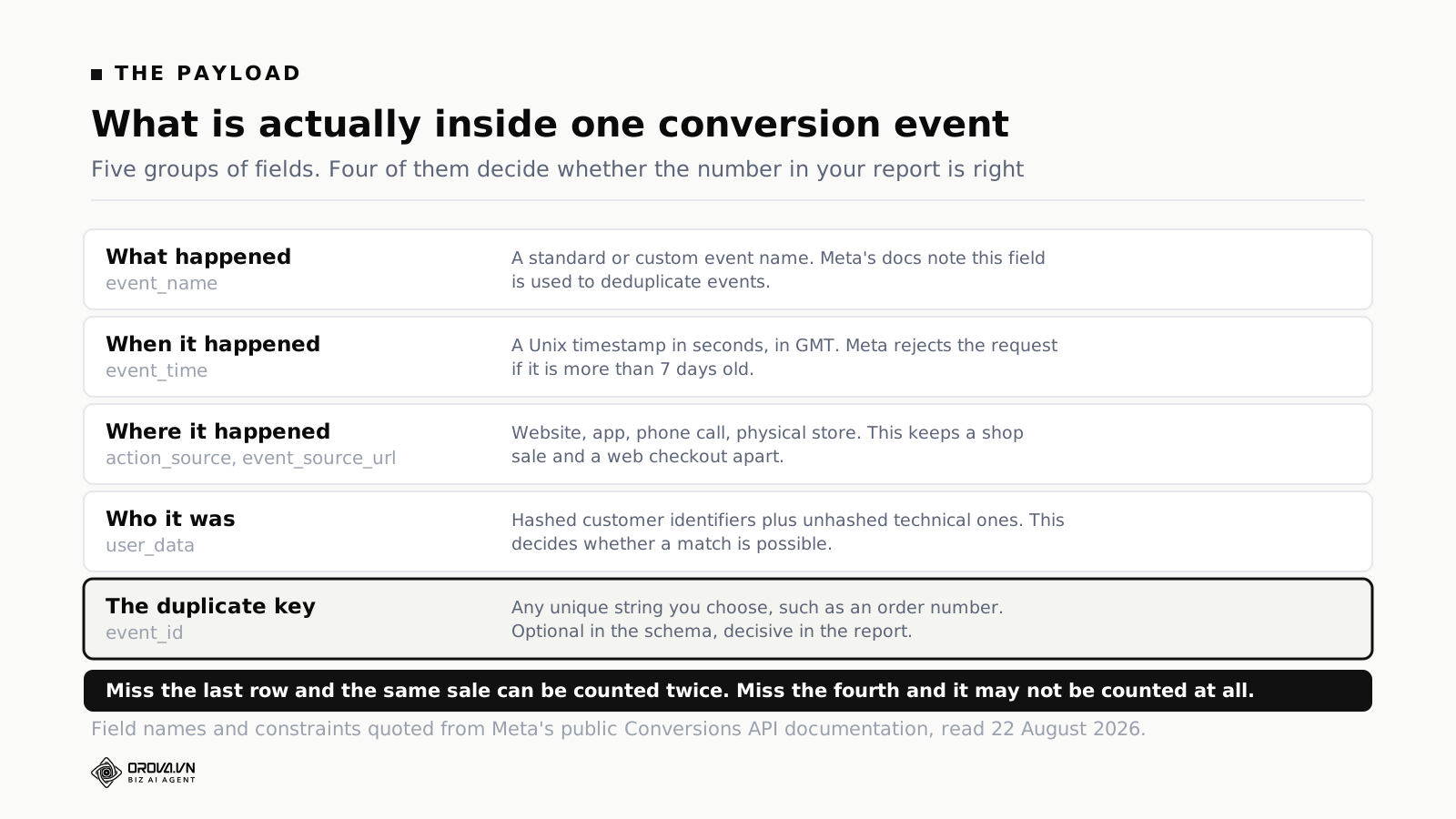
Field names differ slightly between platforms, but the groups are the same everywhere because they answer the same six questions: what happened, when, where, to whom, worth how much, and is this a duplicate.
The name
Meta's documentation describes event_name as a standard or custom event name, and adds a detail worth noticing: this field is used to deduplicate events. The name is not a label for your convenience. It is half of the matching key.
Two practical consequences. Use the standard names where a standard name exists, because the platform's optimisation models understand them. And keep names stable — renaming an event mid-quarter breaks the time series, and the break looks like a performance change rather than a data change.
The time
Meta documents event_time as a Unix timestamp in seconds, in GMT, for when the action actually occurred — and states that events older than seven days cause the entire request to fail.
That seven-day boundary matters more than it looks. Any process that batches events and retries on failure can quietly cross it. A queue that backed up over a long weekend, a nightly job that broke on the second of the month and got fixed on the eleventh: in both cases the fix works going forward and the backfill silently fails, leaving a hole in one specific window that nobody notices until somebody compares two months.
The place
action_source is a required field on Meta's server events, and the documented values cover the whole range of ways a conversion can happen: website, app, phone call, chat, physical store, email, system generated, business messaging, and other.
This is the field that keeps a shop-floor sale distinguishable from a web checkout after both have been sent to the same account. Get it wrong and every model downstream is optimising toward the wrong picture of your business.
The person
user_data is the part that decides whether the event can be joined to an ad click at all. It gets its own section below, because it is both the most consequential group of fields and the one most often filled in badly.
The duplicate key
Meta describes event_id as any unique string chosen by the advertiser — an order number or transaction ID works. It is listed as optional. It is also the single field that decides whether the same sale is counted once or twice, which makes it the most important optional field in advertising.
Why the same order gets counted twice
Here is the mechanism, and it is simpler than the argument it causes.
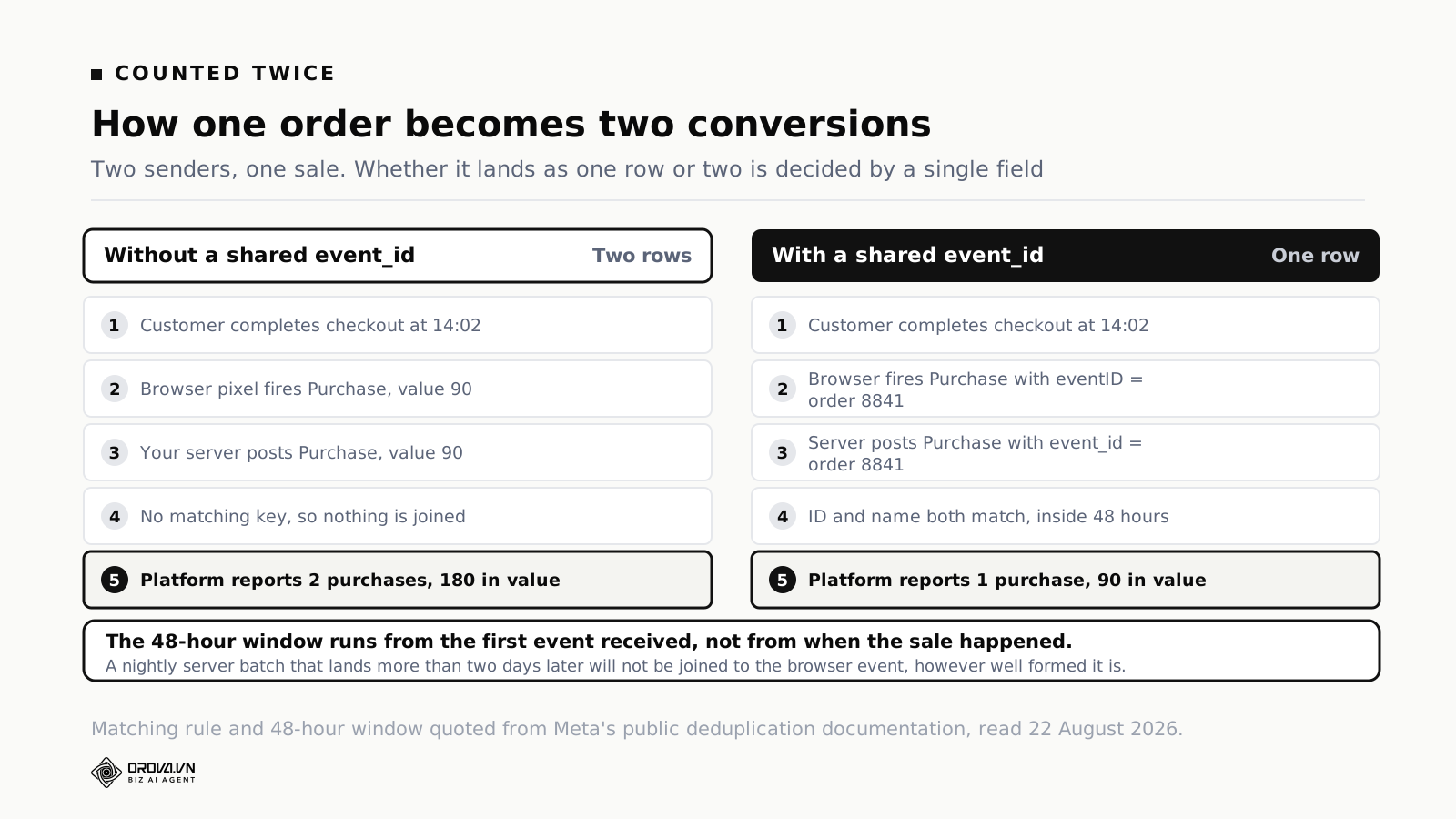
Most sites now send the same conversion twice on purpose. The browser fires it from the checkout confirmation page, and the server sends it as well after the order is committed. This is deliberate and recommended — the pair covers each other's blind spots, and Meta refers to running both as a redundant setup.
The platform then has to work out that the two messages describe one sale. If it cannot, it counts two.
The rule, as the platform states it
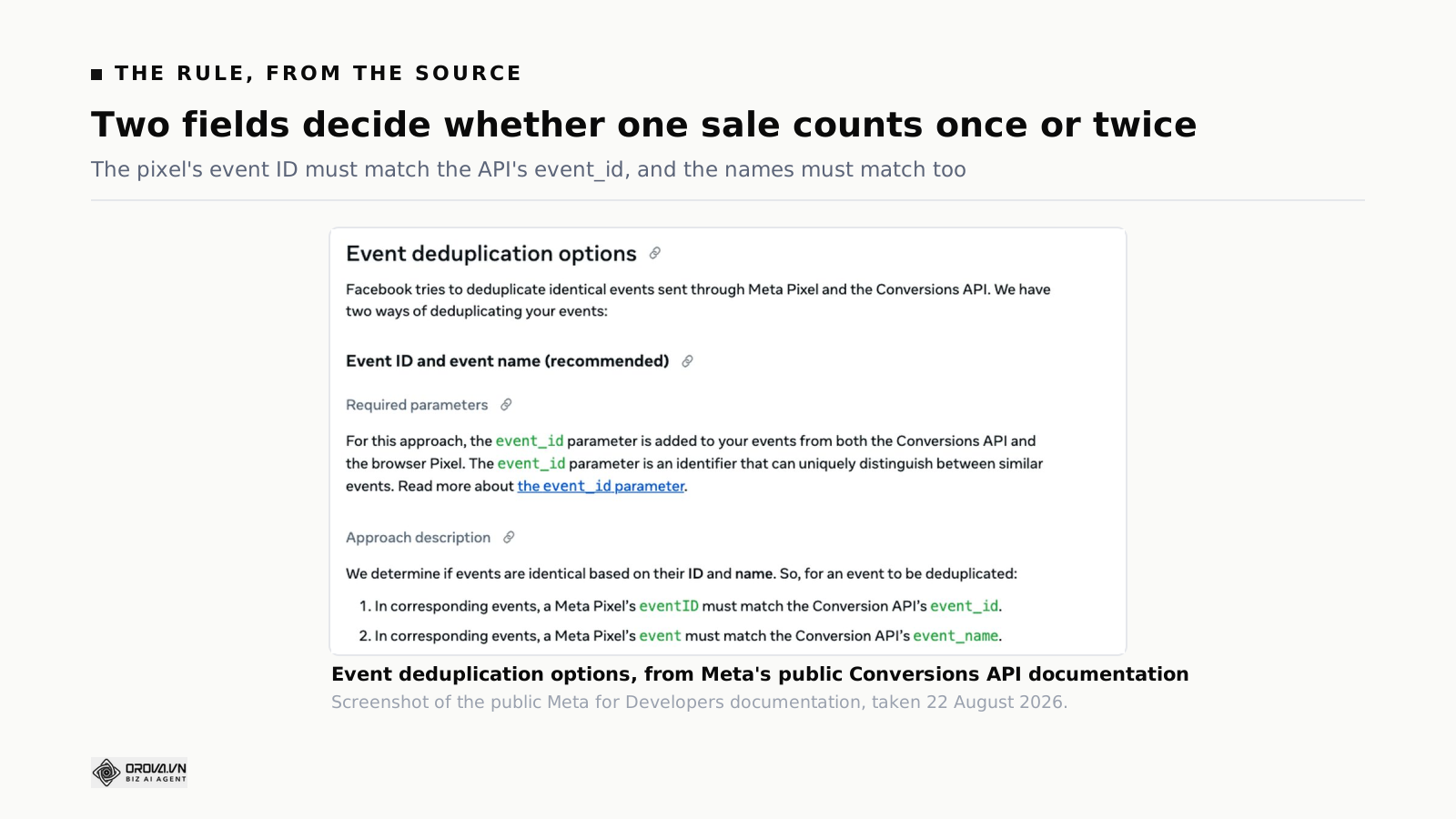
Meta's deduplication documentation is unambiguous: "We determine if events are identical based on their ID and name." For an event to be deduplicated, the Meta Pixel's eventID must match the Conversions API's event_id, and the Pixel's event must match the API's event_name.
Three details in that documentation are worth carrying with you, because each one has been the whole explanation for a wrong number.
There is a 48-hour window. Meta states that events are only deduplicated if they are received within 48 hours of the first event with a given event_id. A server batch that runs weekly cannot be joined to a browser event from Tuesday, however perfectly formed it is. If your server-side pipeline runs on a slower cadence than two days, deduplication is not going to happen, and the fix is the schedule rather than the payload.
The first event generally wins. When duplicates are found, Meta says it generally prefers the event received first. If your browser event carries less accurate values than your server event — a pre-tax total, say, or a placeholder value — that is the version likely to survive. Send the same values from both senders.
The fallback method is one-directional. The secondary approach, matching on event name plus fbp or external_id, only works for events sent first from the browser and then from the server. Meta states plainly that server events will not be discarded if no matching browser event arrived within 48 hours, even if an identical browser event turns up later. A server-first architecture cannot rely on the fallback.
Two platforms are not deduplicated against each other
Everything above is about one platform receiving the same sale twice. There is a second, larger double-count that no configuration will fix: one purchase can legitimately appear in Google's report and in Meta's report and in your analytics, because each platform is answering the question "did an ad of mine contribute to this" and more than one of them can honestly say yes.
Adding platform conversion counts together therefore produces a number that is larger than your actual sales, and always will. This is not an error to fix; it is a property of how attribution works, and we went through the trade-offs of the different models in the piece on attribution models. On a report, the practical answer is to name the source of every conversion number and never sum across platforms — the same discipline the one-page search report applies to paid and organic.
Browser-sent and server-sent: what each one sees
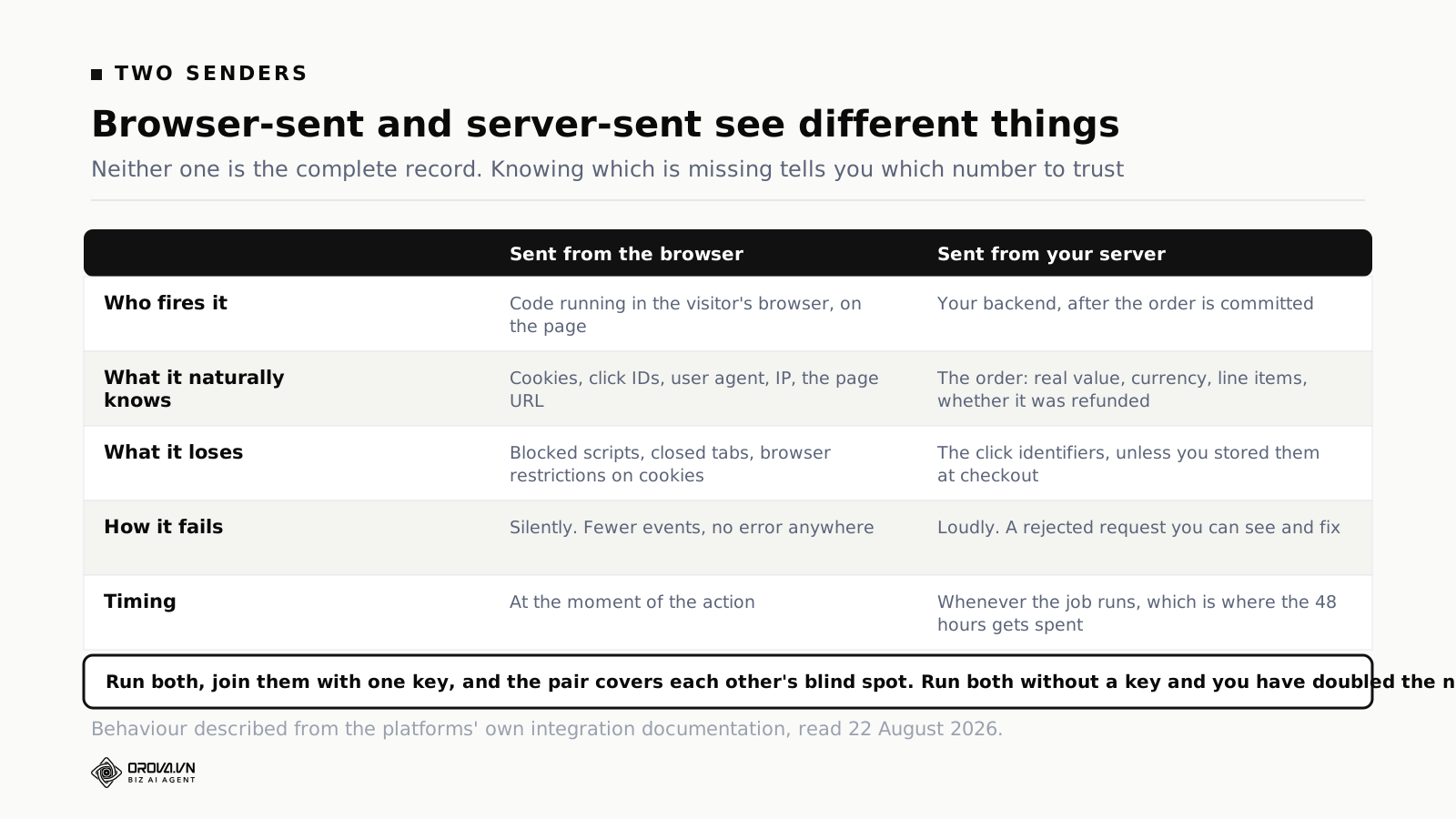
The choice between browser and server is often presented as old versus new. It is more useful to see them as two witnesses with different views, each missing something the other has.
What the browser has, and loses
The browser event has the identifiers. Click IDs land in the URL and get stored in cookies, the browser knows its own user agent and address, and the page URL is right there. That context is exactly what an ad platform needs to connect the action to an ad.
What the browser loses is anything that stops the code running: script blocking, a tab closed before the tag fires, an ad blocker, a network hiccup on a mobile connection. Browser restrictions on cookie lifetimes also mean an identifier that existed at click time may not exist at purchase time.
The critical property is that all of this fails silently. There is no error, no rejected request, no log entry. There are just fewer events than there were sales, and the gap is invisible unless you compare against your own system.
What the server has, and loses
The server event has the truth about the order: the real value after discounts, the currency, the line items, whether it was refunded an hour later. It runs after the transaction is committed, so it is not guessing.
What it loses is the identifiers, unless somebody deliberately captured them. The click ID that arrived in the landing page URL has to be stored with the session and carried through to the order record. Most conversion API implementations that under-perform fail here: the events are being sent correctly and are missing the one field that would let them be matched. Google's own offline conversion import has the same requirement for the same reason.
The compensating advantage is that the server fails loudly. A malformed request comes back rejected, with a reason, and you can see it. Given the choice between a system that is quietly wrong and one that complains, take the one that complains.
What to do about it
Run both, and join them with one key. Use your order number as event_id, put it in both senders, and send the same values from both. If you only run one, run the server side and invest the extra work in storing click identifiers at the point of arrival — the identifier capture is what makes server-side worth doing.
Where the value figure goes wrong
Count is the number everybody argues about. Value is the number that quietly decides how your budget gets spent, because it is what the bidding optimises toward — and it goes wrong in five ordinary ways, none of which announce themselves.
Tax. The browser tag reads the total displayed on the confirmation page and the server reads the net amount in the order record, or the other way round. Both are defensible; running both at once means the deduplicated event keeps whichever arrived first, and your reported revenue is systematically off by the tax rate. Pick gross or net, write it down, and make both senders agree.
Shipping. Same problem, smaller and more variable. It matters most when shipping is a large fraction of small orders, which is exactly where margins are thinnest and where the bidding decisions are most sensitive.
Discounts. A value taken from the basket before a voucher is applied inflates every promotional period. That inflation appears in the same weeks as the promotion, so it looks like the promotion worked. This one has funded a lot of unprofitable campaigns.
Currency. If you sell in more than one currency, the currency field is not optional in practice. Sending 1,200 without saying whether it is baht or dollars produces a number that is either wildly high or wildly low, and the platform has no way to know which.
Refunds and cancellations. Nothing reverses automatically. In a business where a tenth of orders come back, the platform view will overstate revenue by roughly that tenth, every month, in the same direction. Either send an adjustment or reconcile against your own system on a schedule and report the reconciled figure.
The test that catches all five: take one week, sum the value your platform reports, and compare it to the revenue your finance system recognised for the same orders. If the two differ by a consistent percentage, you have found a definition problem. If they differ by a wandering percentage, you have found a delivery problem. Those are different investigations, and knowing which one you are in saves days.
Consent, and what happens when it is refused
Every mechanism described above assumes you are allowed to send the data. Whether you are is not a question the pipeline answers for you, and an event system built without that question in it will happily send whatever it is given.
Three points that are worth being deliberate about, whatever regime you operate under.
Consent state has to reach the sender. The awkward case is server-side. A browser tag can read the consent state on the page; a backend job running hours later cannot, unless the decision was recorded with the order. If it was not recorded, the server-side pipeline is not consent-aware no matter what the front end does — which is the opposite of what most implementation diagrams imply.
Refusal is not the same as absence. An event you did not send because consent was refused is missing from the platform, and that missing volume looks exactly like broken tracking. Knowing your consent rate turns an alarming gap into an expected one, which is worth more than it sounds when somebody senior asks why conversions dropped.
Meta documents an opt-out flag. Its server event parameters include opt_out, a flag indicating the event should not be used for ads delivery optimisation, leaving it available for attribution only. That is a narrower control than consent management, but it is a real one and it is worth knowing it exists rather than discovering it later.
None of this is legal advice, and the rules differ by market. The engineering point is narrower and universal: whatever your policy is, it has to be enforced at the point the event is sent, not in a document describing the point the event is sent.
How much customer data has to travel
Matching an event to an ad click requires identifying information, and this is the part where teams either send too little and wonder why match rates are poor, or send fields carelessly and create a problem of a different kind.
The hashing rules are specific
Meta's customer information documentation requires SHA-256 hashing for the personal fields, with normalisation applied first — and the normalisation is exact. Email addresses: trim leading and trailing spaces, convert to lowercase. Phone numbers: remove symbols, letters and leading zeros, and always include the country code. Names: lowercase, no punctuation, UTF-8 for special characters. City: lowercase, no punctuation, no spaces. State: the two-character code in lowercase. Postcode: lowercase, no spaces or dashes, first five digits for the United States. Country: the lowercase two-letter ISO code.
Google's enhanced conversions for web works on the same principle. Google documents it as sending hashed first-party, user-provided data — email addresses, name, home address and phone number — hashed with SHA-256 before it leaves, used to match customers to signed-in Google accounts. Google is explicit that this supplements an existing conversion rather than replacing it.
Get normalisation wrong and nothing breaks visibly. A hash of "Jane@Example.com " with the trailing space is a perfectly valid hash of the wrong string. It will be accepted, stored, and matched to nobody. Low match rates with no errors almost always mean normalisation, not volume.
Some fields must not be hashed
This is the mirror-image mistake, and it is easy to make when a well-meaning engineer decides to hash everything for safety. Meta states that client_ip_address must never be hashed, and lists client_user_agent, fbc, fbp, subscription_id and lead_id as fields not to hash.
Hash those and the platform receives a string that cannot be interpreted. Again: no error, just worse matching.
The minimum that is worth sending
For a website purchase, the practical floor is the click identifier if you have it, the browser ID, the user agent and IP address, and a hashed email. Everything beyond that adds match quality at diminishing returns.
Two rules keep this defensible. Send only what your privacy notice and consent state covers — an event pipeline is not an exemption from the rules that govern the rest of your data handling. And send the same fields consistently, because a match rate that improves because somebody added a field looks exactly like a campaign that improved, and it is not.
If you are also uploading first-party lists for targeting, the same normalisation discipline decides your match rate there; we covered the list side in the Customer Match walkthrough.
Five mismatches you will actually meet
In the order they turn up, with the symptom that identifies each one.
The ID is on one sender only. Symptom: platform count is close to double your own, on a site that runs both senders. Somebody added the server integration and never went back to add the ID to the browser tag, or a front-end change dropped it. This is the most common single cause of an inflated number.
The event names differ. Symptom: the same doubling, but the ID is present on both. The browser sends Purchase and the server sends purchase, or one sends a custom name inherited from an older setup. Both conditions have to match, and casing counts.
The server batch is too slow. Symptom: doubling that varies by day, worse after weekends. The job runs on a cadence longer than 48 hours, so some events land inside the window and some do not. The payload is fine; the schedule is the bug.
Click identifiers were never stored. Symptom: events arrive, counts are plausible, but attributed conversions are far lower than the platform's own reporting of clicks would suggest. The events cannot be matched to ads. This is the classic under-performing server-side implementation, and it is invisible if you only look at event volume.
The conversion action was redefined. Symptom: a step change on one specific date with no corresponding change in orders. Somebody added a trigger. Check the change log before you check the code — this failure has no technical fingerprint at all, and hours get lost looking for one. It is also the reason a clicks-without-sales diagnostic should always start with the definition rather than the creative.
Test the event before you trust the number
The most common failure in this whole area is not a technical error. It is that somebody made a change, assumed it worked, and only found out six weeks later when the numbers looked strange.
The check is small. Fire a real event — a genuine test purchase or a real one on a quiet channel — and then go and look at what the platform says it received. Not what your code says it sent. What the platform confirms it has.
Four things to look at in that record.
Is the event there at all, under the name you expect, at the time you expect. A surprising proportion of investigations end at this step.
Does it carry the ID. If the event you are looking at has no event_id, deduplication is not happening, whatever the implementation document says.
Which fields arrived. Platforms typically indicate how complete the user data was. That indicator is the fastest diagnosis of a match-rate problem.
Did the twin arrive too. If you send from both browser and server, both should be visible, and the resulting count should be one rather than two.
This is the part of the workflow Orova Ads is built for. Its Conversions API covers Google, Meta and TikTok from one place: you generate the secret, send a test event, and then read the list of events the platform reports as received. The value is not that it sends events — anything can send events. It is that the received list turns a conversation about what should be happening into a look at what did happen, on all three platforms in the same place, without three separate developer consoles.
Two limits, stated plainly. Orova sends and inspects events; it does not edit the code on your site, so putting the order number into the browser tag is still a change somebody makes in your own front end. And it does not resolve the cross-platform double count described earlier, because nothing can — that is attribution, not plumbing. What it removes is the guessing about whether a payload arrived and what was in it, which in practice is most of the time lost.
Seven checks before you report the number
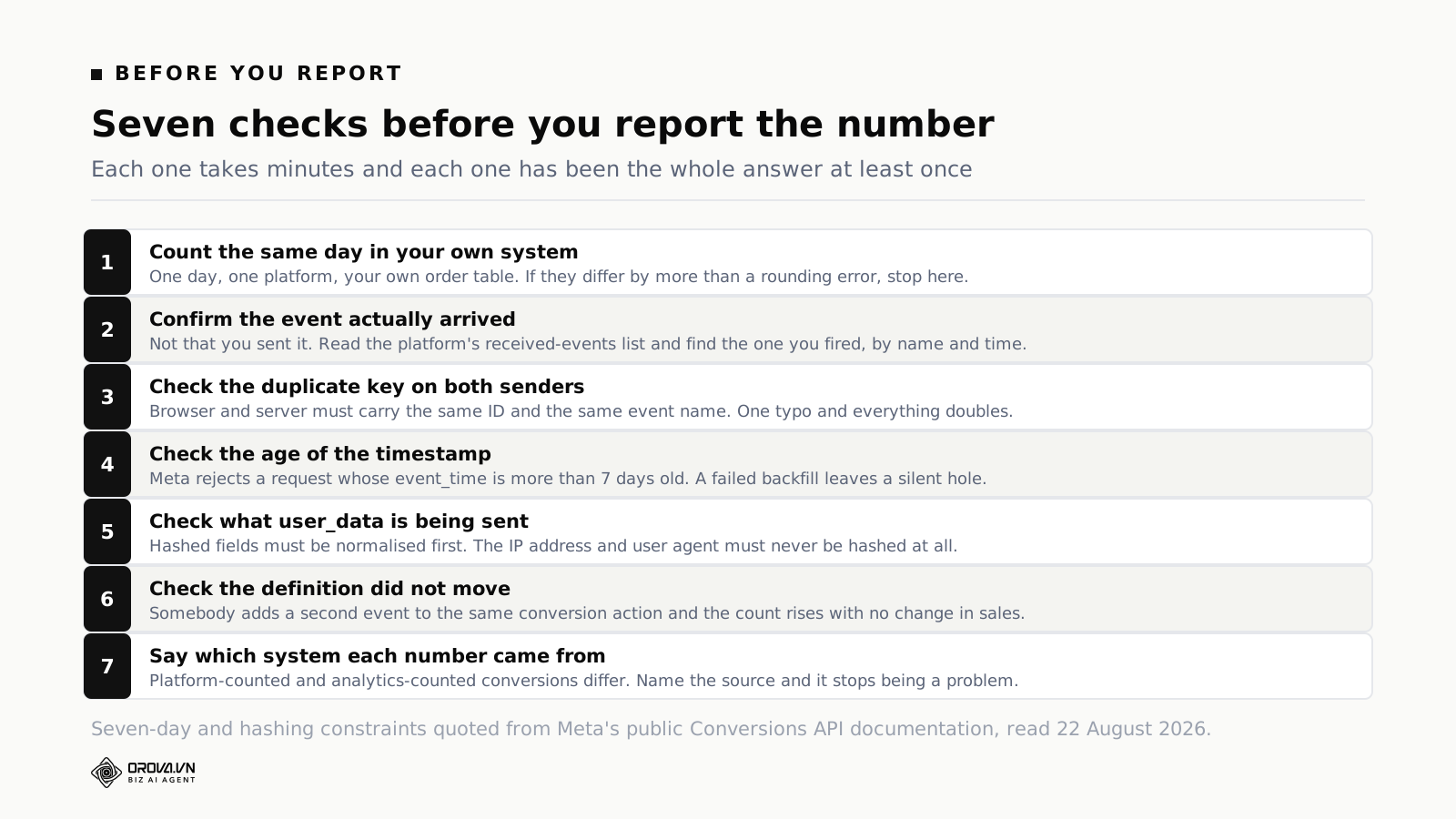
Run these in order. Each takes minutes, and each has been the entire answer to a "the numbers are wrong" escalation at least once.
1. Count one day against your own system
Pick a single day, take one platform's count, and compare it to your own order table for the same day in the same time zone. A gap of a few per cent is normal. A gap of thirty per cent is a broken pipeline and there is no point examining anything else until it is understood.
Time zone deserves a sentence of its own: platform reporting time zones are set per account and are not always what you assume. A day-boundary mismatch produces a difference that looks like data loss and is arithmetic.
2. Confirm the event arrived
Covered above. The distinction between "we send it" and "they have it" is the single most useful distinction in this work.
3. Check the key on both senders
Same ID, same event name, both sides. This is worth checking after every deployment that touches the checkout, because it is exactly the kind of thing a refactor breaks without anybody intending to.
4. Check the age of your timestamps
If any part of your pipeline batches or retries, verify that nothing is arriving near the seven-day boundary. Log rejections and alert on them — a silent backfill failure is one of the few problems here that gets worse the longer it goes unnoticed.
5. Check what user data is being sent
Normalisation before hashing, and no hashing of the fields that must stay in the clear. Verify against the platform's current documentation rather than against the implementation notes somebody wrote two years ago.
6. Check the definition did not move
This one is organisational rather than technical, and it causes more confusion than any of the others. Somebody adds a second trigger to an existing conversion action, or includes a new page in the definition of a lead, and the count rises overnight with no change in the business. Keep a dated log of every change to a conversion definition, and put the date on the report when it moves.
7. Say which system each number came from
Platform-counted and analytics-counted conversions will differ, permanently, because they count different things with different rules. State the source in a footnote. It converts a recurring credibility problem into a stated fact, and it takes one line.
If you inherited a setup you did not build
Most people reading this did not write the integration. It arrived with the site, or with an agency, or with a developer who has since left, and the documentation is a screenshot in a shared drive. Rebuilding it is rarely the right first move. Mapping it is.
Spend two hours and produce four things.
A list of every sender. Which systems send conversion events to which platforms. Include the ones you suspect are dormant — a tag manager container from a previous agency, a plugin somebody installed for a campaign in 2024. Dormant senders are not harmless; a forgotten one that still fires is a permanent double count with no obvious cause.
A list of every conversion action. In each platform, what actions exist, which are counted in the primary column, which feed bidding, and which are just watching. Accounts accumulate these. It is normal to find three actions all counting the same purchase, one of which somebody made during a test.
One reconciled day. The exercise from the checklist above, written down with the date. This is your baseline. Everything you change afterwards gets measured against it, and without it you are guessing about whether a change helped.
A change log. Start it now, even empty. Date, what changed, who changed it. The first time a number moves without explanation, this file is worth more than every dashboard you own.
Only then decide what to fix, and fix one thing at a time with a week between changes. Two simultaneous changes to a conversion pipeline produce a result you cannot attribute to either, and you will end up reverting both.
The instinct to rip it out and start clean is understandable and usually wrong. A messy setup that you understand is more valuable than a clean one you have not yet verified, because the reporting continuity survives — and continuity is the thing that lets you tell whether anything you did afterwards worked.
Common questions
Do I need server-side events if my pixel works?
"Works" usually means "reports a number", which is not the same thing. Compare a week of pixel-reported conversions to your own order table. If the pixel is materially short, server-side events recover the difference. If it is not, the case for the extra work is weaker and you can defer it.
What is the difference between an event and a conversion action?
The event is the individual message. The conversion action is the definition in the platform that decides which events get counted, how they are attributed and whether they feed bidding. One conversion action can be fed by several events, which is exactly how counts change without anybody touching the tag.
Why do Google and Meta report different numbers for the same campaign period?
Different attribution windows, different models, different definitions of a view. Both can be internally correct and mutually inconsistent. Compare each platform to itself over time, and use your own order table as the single external reference for absolute volume.
Can I use the same event_id everywhere?
Use a value that is unique per conversion — an order number is ideal — and use the same value in both senders for the same platform. Different platforms deduplicate independently, so reusing the same order number across platforms is fine and often convenient.
What happens if a customer refunds?
Nothing automatic. The original conversion stays counted unless you send a refund event or otherwise adjust. For businesses with meaningful return rates, a report built purely on platform conversions will overstate revenue, and the only fix is reconciling against your own system on a schedule.
Does more user data always improve matching?
Up to a point, and then it flattens. The click identifier is worth more than any three demographic fields. Correct normalisation is worth more than additional fields. Send what genuinely helps, under a lawful basis you can point at, and stop there.
How often should any of this be checked?
After every deployment that touches checkout or tagging, and once a month regardless. The monthly check is the one that catches slow drift — a field that stopped being populated, a job whose success rate has been falling since March. Sudden breaks get noticed because somebody complains; slow drift does not, and by the time it is visible in a chart it has already contaminated several months of comparisons. Put the monthly check in the same slot as the monthly report, so it happens before the numbers are circulated rather than after somebody queries them.
Should offline sales be sent back to the platform?
If a meaningful share of revenue closes off the website — by phone, in a shop, through a sales team — then the platform is optimising on a partial picture without them. Sending those conversions back is the same mechanism with a different source value, and it is usually the highest-value change available to a business with a long sales cycle. We went through the mechanics of that loop in the note on closing the CRM loop.
Is a value required on the event?
Not required, but without it the platform can only optimise toward count. If ten-pound orders and thousand-pound orders are both worth one conversion, the bidding will happily buy more of the cheap ones. Send value and currency wherever a real value exists.
What to do this week
Three tasks, in order, and none of them takes a day.
Reconcile one day. One platform, one day, against your own orders. Write the two numbers down. If they agree, you have a baseline you did not have before, and every future argument gets shorter. If they do not, you have found the real problem and it was not the campaign.
Look at one real event. Fire one, then go and read what the platform received. Check the name, the time, the ID and the completeness of the user data. Most teams have never done this, and most who do it find something.
Write down your definitions. One page: each conversion action, which events feed it, which system counts it, when it last changed. It takes an hour and it settles most of the disputes this article describes before they start.
None of this makes the numbers agree. Platform-counted conversions and your order table are counting different things for different purposes, and they will never be the same figure. What it does is make the difference explainable — and an explainable difference is a footnote, while an unexplained one is a meeting that keeps happening.
See what actually reached the platform
Orova Ads runs a Conversions API for Google, Meta and TikTok from one place: generate the secret, send a test event, then read the list of events the platform confirms it received. Most conversion arguments end the moment somebody can see the payload instead of describing it, and that list is the fastest route from a number you distrust to the field that broke.
See Orova Ads