
Responsive Search Ads: Assets, Pinning, Reporting
You wrote fifteen headlines for a set of responsive search ads, the account is spending, and the report will not tell you which combination is doing the work. So you go looking for advice, and most of what you find explains how to sort your assets into Best, Good and Low.
That column does not exist any more. Google deprecated the performance label in favour of full statistics for each asset, and those statistics are only available for dates from 5 June 2025 onward. The replacement is better data and a harder read, because per-asset numbers in this format deliberately do not add up, and Google says so in the documentation in a note most people scroll past.
So here is the working picture, rebuilt from the current documentation rather than from memory. What the format actually assembles, and the several places your headlines now serve that are not the headline slot. How many genuinely different headlines are worth writing. What each pinned position guarantees and what pinning costs you. What Ad Strength measures, and the sentence in Google's own help pages that says it is not part of Ad Rank or Quality Score. Then how to read the new asset numbers without fooling yourself, and a monthly rotation that survives a busy month.
What are responsive search ads actually doing?
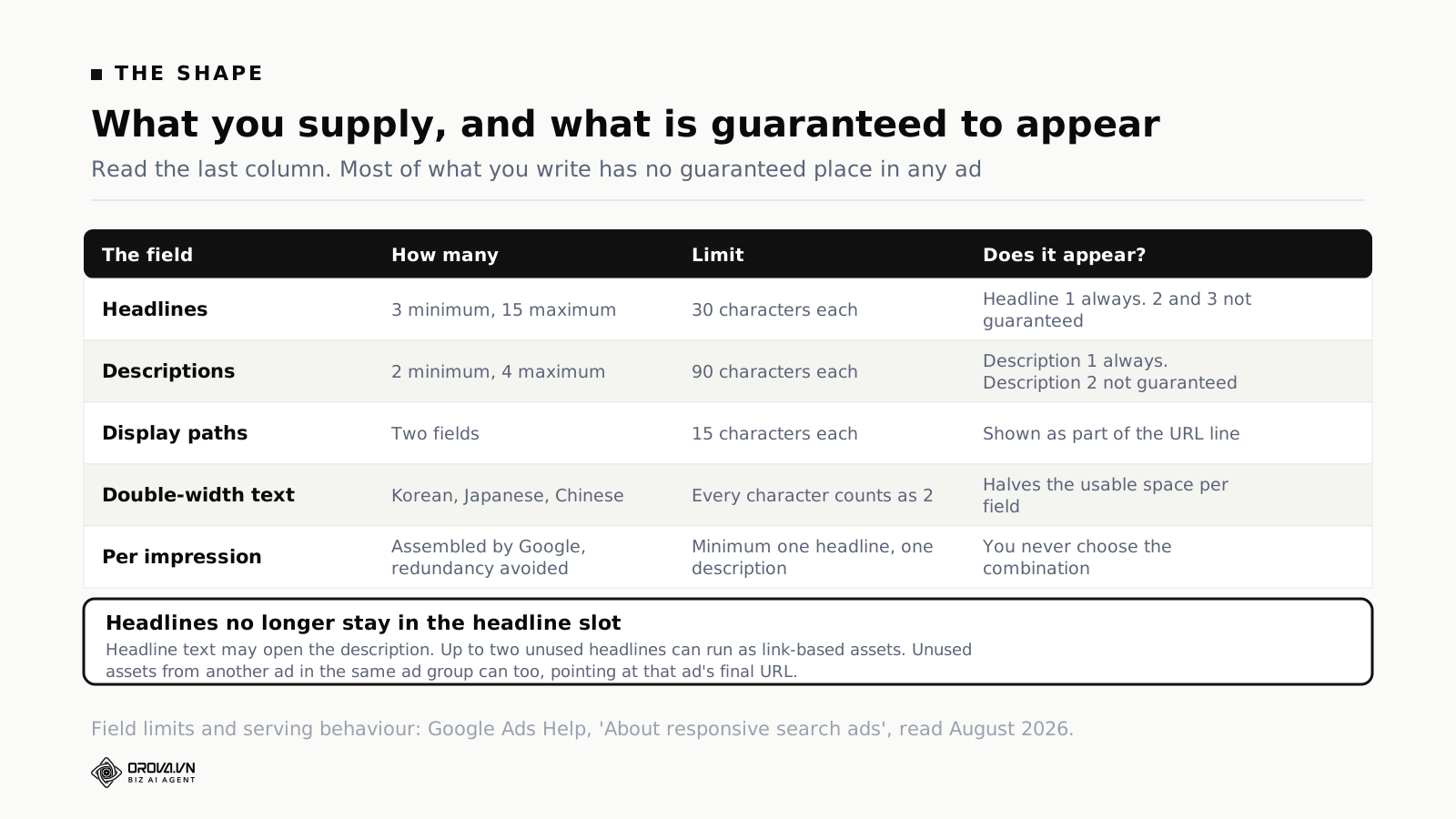
You supply up to 15 headlines and 4 descriptions. Google assembles them into combinations, avoiding redundancy, and serves a minimum of one headline and one description per impression. Over time it learns which combinations suit which queries. You control the pool and up to five pinned positions; you do not control the combination that serves.
The design intent follows from that. You are not writing an ad. You are writing a supply of interchangeable parts, and the quality of the ad depends on whether the parts genuinely differ from each other. Fifteen ways of saying "fast delivery" gives the system fifteen versions of one message. Six genuinely different angles gives it six things to test.
The character limits are worth having in front of you rather than in your head: headlines take up to 30 characters, descriptions up to 90, and display path fields 15 each. Every character in a double-width language such as Korean, Japanese or Chinese counts as two, which halves your usable space and is a common surprise for accounts running across markets. The minimums are three headlines and two descriptions; the maximums are fifteen and four.
Where your headlines now show up that is not the headline
This is the part of the current documentation that has changed the mental model most, and it has barely reached the advice circuit.
A responsive search ad can show up to three headlines in the traditional position at the top of the ad. It can also serve those assets elsewhere, based on what is predicted to perform best for a particular query. Headline text may appear at the beginning of the description. Up to two unused headlines from the same ad can serve as link-based assets — the space that used to belong only to sitelinks — pointing at the same domain as the ad's final URL. Description lines can serve in the link-based asset description space to complete that expanded format.
And then the part that catches people out: unused headline and description assets from a different ad in the same ad group can serve as link-based assets. When that happens the asset points at the final URL of the ad it was borrowed from, not the one it appeared beside.
Two practical consequences. First, a headline you wrote for one landing page can appear next to an ad pointing somewhere else in the same ad group, sending clicks to the page it came from. If your ad group contains ads for materially different offers, that is a coherence problem you should know about before it shows up in your landing page reports. Second, "unused" assets are not idle. A headline that never wins a headline slot may still be earning clicks somewhere else in the ad, which changes how you read an asset with impressions but no obvious placement.
The restrictions Google states are narrow: only active ads and assets are eligible, and sensitive verticals are not eligible for asset sharing. Anything pinned to headline position 1, headline position 2 or description position 1 continues to show in its designated position.
How many genuinely different headlines to write
The documentation's advice is to provide as many unique headlines as you can, and it is right, but "unique" is doing a lot of work in that sentence. Uniqueness of wording is not the point; uniqueness of claim is.
A practical way to build the pool. Start with six distinct angles, one headline each: what the product is, the main benefit, the objection you most often hear, the proof point, the offer or price position, and the call to action. Those six are your spine. Then write variants of the ones with room to vary — a different call to action, a shorter version, a version that leads with the number. Aim to fill the fifteen, because Google's Ad Strength recommendations explicitly ask for the maximum, and because more assets genuinely does mean more combinations to test. Just make sure the extras are variants of different angles rather than fifteen rewrites of the same one.
A discipline that helps: write the first three as though they will appear together, because sometimes they will. Then check that any pair of your headlines reads sensibly side by side, since assets can show in any order. The classic failure is two headlines that each end in a call to action, producing "Book A Demo Today | Get Started Now" — grammatically fine, and obviously assembled.
Include at least one keyword naturally in your headlines. Not in all fifteen, which reads like machine output and wastes angles. Google's Ad Strength recommendation is that keywords appear in your copy, and asset-keyword relevance is one of the components it scores.
One more constraint worth writing on a sticky note: if a keyword you need intact runs past thirty characters, it does not belong in a headline. Put it in a description, where you have ninety.
A question that comes up whenever an account has audience lists attached: should the copy change for people you already know? Not in the same ad. Search ads are matched to queries, and the pool of assets serves everyone the ad serves. If you want different copy for existing customers or for a lookalike segment, that is a different campaign or a different ad group with its own audience settings, not a headline you hope the system will aim correctly. The list-building half of that job is its own subject, and what Customer Match can and cannot do covers where those audiences come from and why match rates disappoint.
The four descriptions, which nobody spends time on
Headlines get all the attention because there are fifteen of them and they are the visible part. Descriptions get written last, in a hurry, and it shows. There are only four slots, each ninety characters, and the first one is guaranteed to appear while the second is not — which makes the arithmetic of what to put where unusually simple and unusually often got wrong.
Ninety characters is a real sentence, and this is the only place in the ad where you have room for a thought that has a subject and an object. Headlines are labels. Descriptions are where you say the thing that makes somebody click rather than scroll. Treating them as headline overflow wastes the only space in the format that can carry an argument.
Four is enough for the four jobs descriptions do well. The first should carry the core proposition in one sentence, because it is the one guaranteed to appear. The second should handle the biggest objection, since it is the most common second slot and the reader who has got that far is already weighing it up. The third is where specifics live — the number, the timescale, the guarantee, the thing that distinguishes you from the three ads above you. The fourth is where a compliance line or a qualifier goes if you need one, or a variant of the first for testing if you do not.
Two things to check every time. First, that description one reads as a complete thought without any headline in front of it, because you do not know which headline will be there. Second, that no description ends mid-clause at ninety characters — Google may shorten your text with an ellipsis when space is tight, and a sentence that was already at the limit is the one most likely to lose its ending in front of a customer.
A description that also matters more than it used to: because description lines can serve in the link-based asset description space, a description you wrote for the body of the ad may end up doing duty in an entirely different part of the layout. Another reason each one should stand alone.
Pinning: what each position guarantees, and what it costs
There are exactly five pinnable positions: headline 1, headline 2, headline 3, description 1, description 2. That is the whole of your direct control.
The guarantee is not uniform across those five, and this is the detail that matters most. Assets pinned to headline position 1, headline position 2 or description position 1 will always show. Content pinned to headline position 3 or description position 2 is not guaranteed to appear in every ad. So if you have a legal disclaimer that must appear every time, pinning it to headline 3 does not do the job. It has to go in headline 1, headline 2 or description 1.
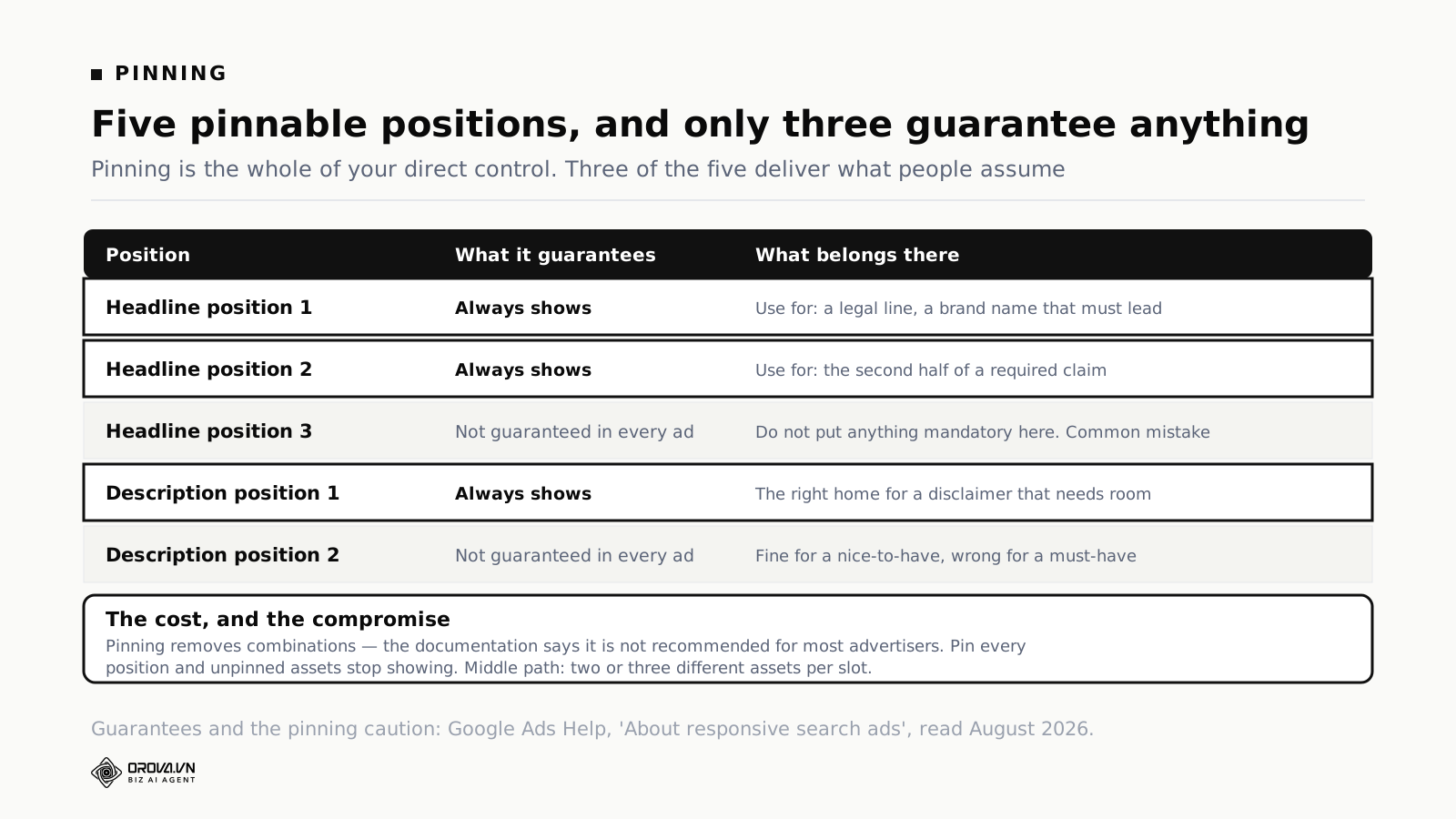
The cost is combinatorial. Pinning one headline means it shows only in that position, and nothing else can appear there. That removes options from the system, which is why the documentation says pinning is not recommended for most advertisers and can affect ad strength. If you pin assets to every available position, unpinned assets will not show at all — you have rebuilt a static ad inside a dynamic format and kept none of the benefit.
The recommended middle path, straight from the help page: pin two or three different assets to the same position rather than one. All of them are eligible for that slot, so the system can still test between them while you keep the position controlled. Avoid pinning identical or near-identical text to the same slot, which constrains the system without giving it anything to choose between.
When pinning is genuinely right: a legal disclaimer, a regulated claim, a brand name that must lead, or a price that must appear whenever a specific offer runs. When it is not: a hunch that your favourite headline is the best one. The system will find that out faster than you will, and it will do it without costing you the other fourteen.
Ad Strength is a feedback tool, not a ranking input
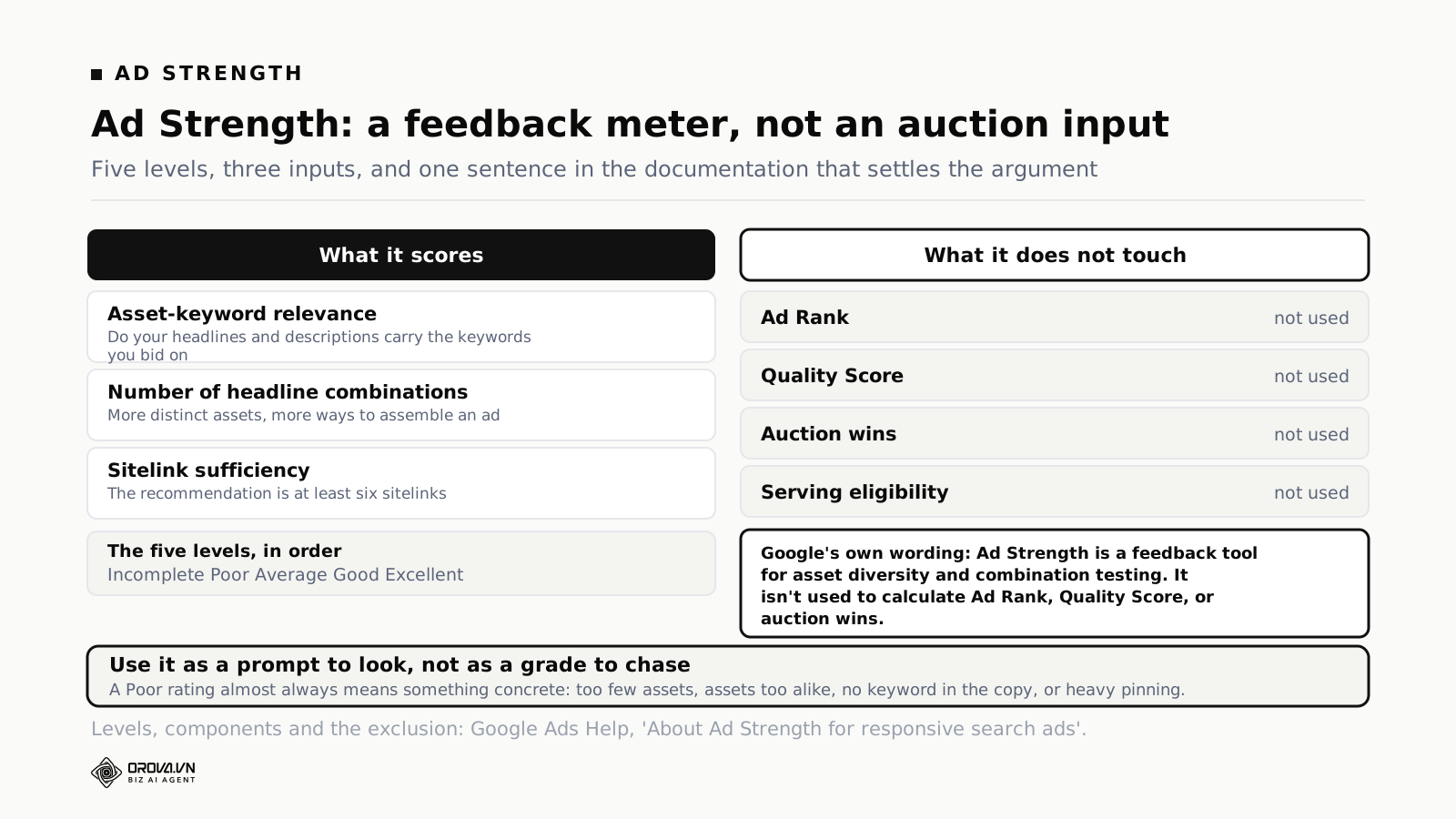
Five ratings, in order: Incomplete, Poor, Average, Good, Excellent. It scores things like asset-keyword relevance, the number of headline combinations available, and sitelink sufficiency. It is a live measure of how much variety you have given the system, which is a genuinely useful thing to know.
What it is not is a factor in the auction. Google states in the Ad Strength documentation that the rating of an ad does not directly influence its serving eligibility, and, more bluntly, that Ad Strength is a feedback tool for asset diversity and combination testing and is not used to calculate Ad Rank, Quality Score, or auction wins.
Both halves of that matter. It means chasing Excellent for its own sake is not buying you position. It also means an Average rating is not a penalty being applied to your account.
Google does publish a figure alongside its recommendations: advertisers who improve Ad Strength for their responsive search ads from Poor to Excellent find 15% more clicks and conversions on average. Worth taking seriously and worth reading carefully. It is a vendor's own aggregate, it is a correlation rather than a demonstrated cause, and the mechanism is not mysterious — accounts that go from Poor to Excellent are usually accounts where somebody sat down and wrote proper ad copy, and better copy performs better. Ad Strength is measuring the effort, not causing the result.
The useful way to use it: treat a Poor rating as a prompt to look, because it usually means something concrete is missing — too few headlines, assets too similar to each other, no keyword in the copy, or heavy pinning. Fix the concrete thing. Do not add a fourteenth variation of your best headline purely to move the meter, because the meter is not what pays.
The asset report changed, and most advice has not caught up
For years the asset report gave each asset a label: Learning, Low, Good, Best. It was easy to act on. Sort by label, delete the Lows, write replacements. Almost every guide written before mid-2025 teaches that loop.
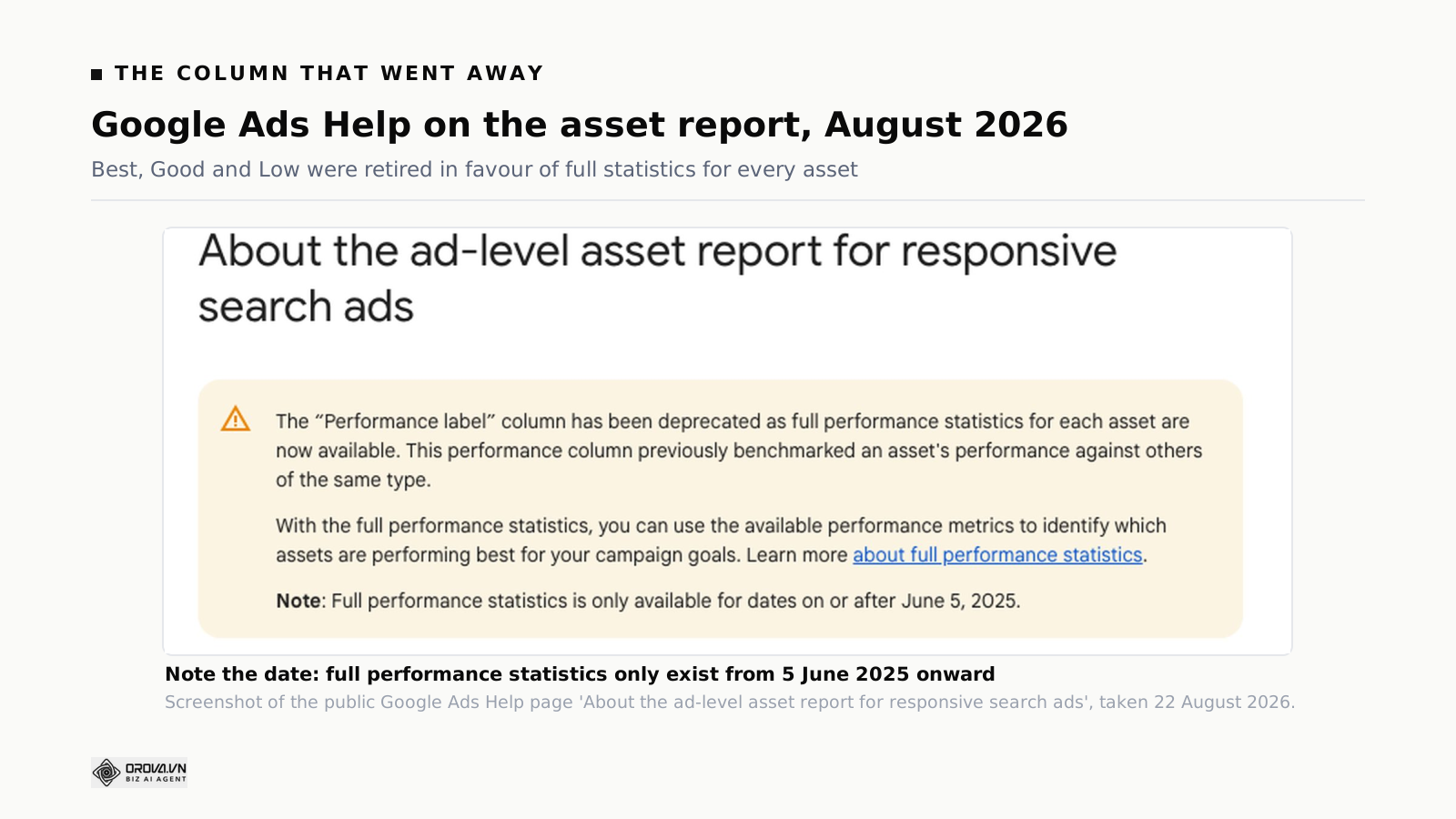
The label has been deprecated. Google's stated reason is that full performance statistics for each asset are now available, and it notes that the old column benchmarked an asset's performance against others of the same type. The new report carries impressions, clicks, conversions, conversion value and cost per asset, plus asset type, position pinning and attribute columns, with filters by enabled state, asset type and performance.
Two things follow. The first is a date problem: full performance statistics is only available for dates on or after 5 June 2025. If you pull a longer window expecting a like-for-like history, you will not get one, and any year-on-year asset comparison you attempt across that boundary is comparing two different things.
The second is a judgement problem, and it is larger. The old label was a benchmark: this asset against others of its type. The new columns are raw counts, and raw counts in a format that assembles combinations mean much less on their own than they look like they do. Which brings us to the note everybody skips.
Reading asset stats without fooling yourself
Two sentences from the documentation do most of the work here, and both are in the "important considerations" section.
The numbers do not sum. Asset-level metrics are attributed per instance of the asset served within an ad. If one ad impression includes three different assets, those three assets each register one impression. So the sum of your asset impressions will exceed your ad impressions, by design, and any attempt to reconcile the two is wasted afternoon. Every asset in a served combination gets credited with the whole event.
The ratios are directional only. Ratio metrics at asset level — CTR, CPC, CPA, ROAS — should be used as directional indicators only, because they do not reflect the performance of a single asset in isolation. They are influenced by which other assets served alongside it. A headline that happens to be paired often with your strongest description will look strong. It may be a passenger.
So what can you legitimately conclude from this report? Three things, and they are narrower than people want.
Zero impressions after several weeks means replace it. This is the one clean signal, and the documentation recommends it directly. If an asset has not served at all after a fair run, the system has decided against it every time it had the chance. That is a verdict, and it is the only verdict in the report you can read cleanly.
Large differences are worth noticing; small ones are noise. An asset with a tenth of the impressions of its peers is telling you something. A ten percent gap between two headlines is not, and acting on it will have you rewriting perfectly good copy on a monthly cycle.
Patterns across assets beat any single asset. If all four of your price-led headlines under-serve and all four of your outcome-led ones serve heavily, that is a finding about your messaging that survives the caveats. One headline doing well is not.
Google's own best practice on this page is blunt: evaluate performance at the asset group or campaign level rather than at the individual asset level. That is unsatisfying to anyone who wants a per-headline scoreboard, and it is the honest read of what the data can support. The same caution applies to every conversion number you are judging this against, which is why getting offline conversions back into the account matters more to this decision than any asset-level detail.
The combinations report, and what it is not for
The combinations report shows the ad combinations that were actually assembled and how often each appeared. It is genuinely interesting, and it is most useful for one specific check: reading your top combinations as a customer would, to catch the ones that read badly. Two calls to action stacked together, a claim beside a caveat that undercuts it, a duplicated word across two slots.
What it is not for is picking a winner and rebuilding it as a static ad. Google states this explicitly: the combinations report should not be used to create static versions of responsive search ads, because static versions are not guaranteed to perform the same. The reason is that the combination did not win on its own merit — it won for the queries it was shown to, using real-time signals, and freezing it removes exactly the mechanism that made it work.
A monthly rotation that survives a busy month
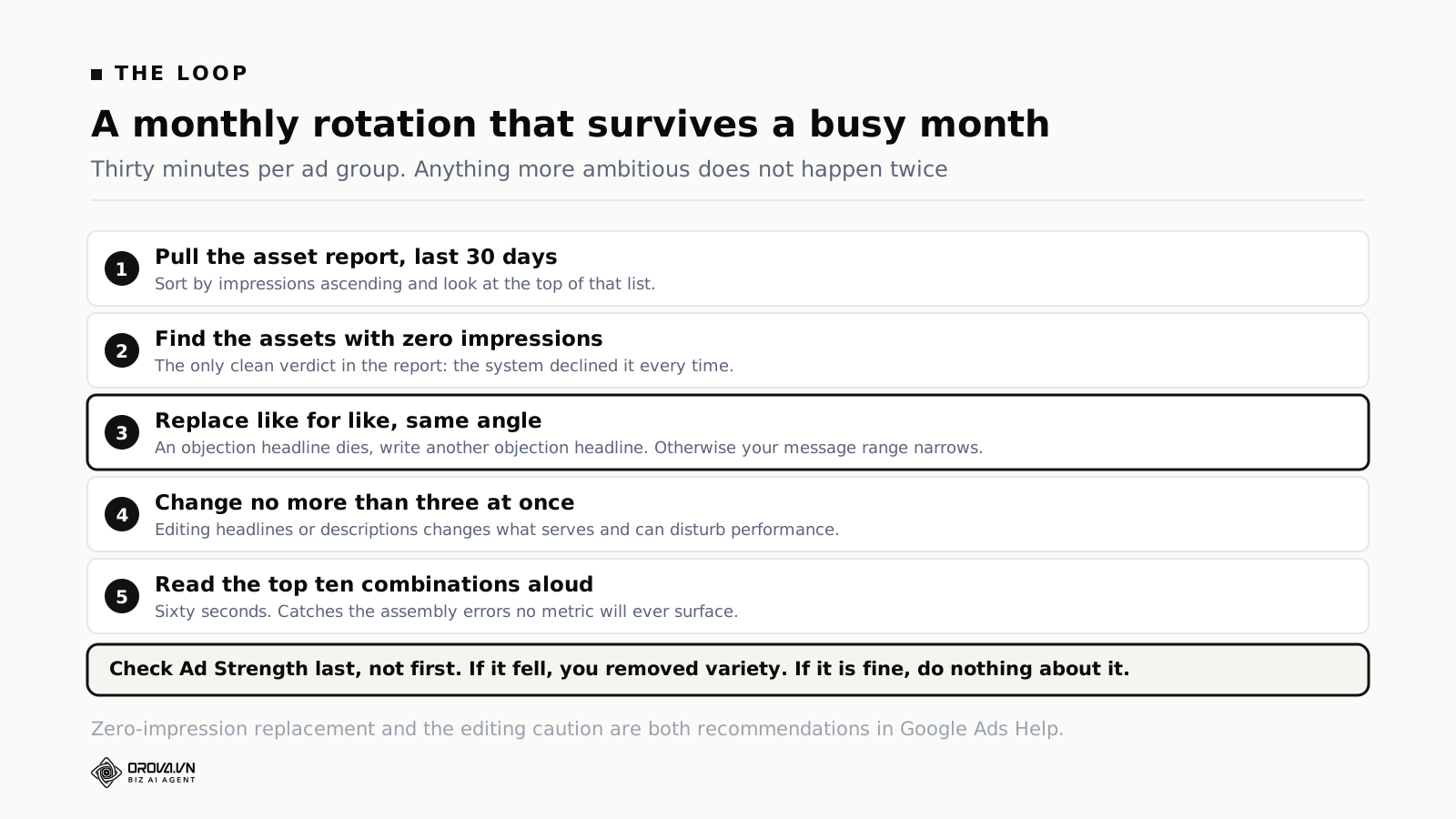
Thirty minutes a month per ad group. Anything more ambitious does not happen.
Pull the asset report for the last 30 days. Sort by impressions ascending. Look at the top of that list — the assets with zero or near-zero. That is your replacement list and it usually has one to three items on it.
Write replacements for the same angle, not a different one. If your objection-handling headline died, write another objection-handling headline. If you replace it with a fourth benefit headline, you have quietly narrowed your message range and you will not notice for months.
Change no more than three assets at once. Every edit resets what the system has learned about that ad's combinations, and the documentation warns that removing or editing headlines or descriptions can change what serves and may affect performance. Three at a time keeps the ad learning rather than restarting.
Read the top ten combinations aloud. Sixty seconds, and it catches the assembly errors that no metric surfaces.
Check Ad Strength last, not first. If it went down after your edit, look at whether you removed variety or added similarity. If it is fine, do nothing about it.
Google's own recommendation for how many ads to run alongside this: at least two responsive search ads per ad group with Good or Excellent Ad Strength, each with a unique final URL. Their published figures put the second ad at around a 6.6% conversion lift and a third at a further 3.7%, at similar cost per conversion. Same caveat as before — vendor aggregate, correlation not proof — but the direction is sensible, because two ads give the system two pools to draw from rather than one.
This routine sits inside the wider weekly account rhythm rather than replacing it. If you do not have one, the weekly optimization checklist is the frame this hangs off, and the search-terms half of that job belongs with negative keywords and match types, which is a different loop with a different cadence.
Two ads, unique URLs, and the coherence problem
Google's recommendation is at least two responsive search ads per ad group, each with a unique final URL. The first half of that is uncontroversial. The second half quietly interacts with asset sharing in a way that is worth thinking through before you follow it.
Recall that unused headline and description assets from one ad can serve as link-based assets beside another ad in the same ad group, and that when they do, they point at the final URL of the ad they came from. So the moment your two ads point at different pages, you have created a situation where a customer can click an asset written for page A while looking at an ad for page B, and land on page A. That is not a bug; it is how the expanded format is designed to work, and it is often useful — it functions like an automatic sitelink drawn from copy you already wrote.
It is useful when the two pages are close relatives: a category page and its best-selling subcategory, a service page and its pricing page. The customer sees two doors into the same house. It is a problem when the two ads in an ad group serve materially different offers, because then the borrowed asset is an invitation to somewhere the customer was not heading, and the landing page report will show traffic arriving with intent that does not match.
The practical rule that follows: keep an ad group tight enough that any asset in it could reasonably appear beside any other. That is a stricter standard than "same theme", and it is a good one for other reasons too — tight ad groups make the search terms report readable and make negative keyword work possible.
If your account has ad groups with several unrelated offers in them, this is a structural fix rather than an ads fix, and it will improve more than your asset coherence. Splitting them costs an afternoon. Leaving them costs a slow leak that shows up as a landing page conversion rate nobody can explain.
There is a second reason to run two ads that has nothing to do with performance lift: it gives you somewhere to test a genuinely different angle without disturbing the ad that is working. Change three assets in your good ad and you have disturbed its learning. Build the alternative angle as a second ad and both keep running.
Four mistakes small accounts make
Pinning everything on the first day. Usually done for control, and it converts a testing format into an expensive static ad. If you cannot bear to let go entirely, pin one thing and leave the rest free.
Fifteen headlines that are one headline. Ad Strength will flag the lack of variety, but the deeper cost is that you learn nothing. Fifteen phrasings of the same claim tell you which phrasing wins, which is the least interesting question available to you.
Deleting assets weekly. Every change disturbs the learning, and weekly churn means the ad never accumulates enough evidence for any asset to prove itself. Monthly is the floor for a small account, and quarterly is defensible if volume is genuinely low.
Judging assets on CTR. The documentation says asset-level ratios are directional only, and CTR is the ratio people reach for first. A headline that appears mostly alongside your strongest description inherits its performance. Use impressions to spot what the system rejects, and campaign-level numbers to judge whether the ad works.
A fifth, less common but more expensive: assuming that automated bidding will compensate for a weak asset pool. It will not, and the interaction runs the other way — the bidding system needs something to work with. When smart bidding works and when it does not covers that dependency properly, and the choice of target sits with target CPA against target ROAS.
Where Orova Ads fits, and where it does not
Stated plainly. Orova Ads is not a copywriting product. It does not sit inside the Google Ads editor writing your fifteen headlines for you, and this article has not been building toward that claim.
What it does is run the account layer around the ads, across Google, Meta and TikTok on one screen. Over two hundred ready-made optimization actions, so the routine work is picking the right action rather than clicking through three ad managers by hand. A custom rulebook you write for your industry and risk appetite, which the agent follows when it analyses and when it acts. Scheduled advisory: the agent looks at the accounts on your schedule and sends proposals with the data and the reasoning attached. And, by default, it only advises — the public product page puts it in one line: it never touches your money without permission. Approved proposals then execute directly on the platform rather than being redone by hand.
The part that matters most for the work in this article is the history. Every proposal, every approval decision and every executed action is logged. An asset that was swapped last quarter has a record saying who swapped it and why, which is the thing missing from almost every account that has had more than one person in it. When performance moves, you can look at what changed instead of reconstructing it from memory.
Conversions API on all three platforms is the other relevant piece, because everything above depends on the conversion numbers being real. Sending orders and leads back from your own systems is what makes the optimization worth doing at all.
What it does not do: it does not write your ads for you, it does not decide anything without your approval unless you switch that on deliberately, and it does not change what Google's format allows. Fifteen headlines is still fifteen headlines. If you are still weighing whether tooling is warranted at your spend, the survey of management tools is a better place to start than a demo.
Common questions
How many headlines should a responsive search ad have?
As many distinct ones as you genuinely have, up to the maximum of fifteen. The minimum is three. Google's Ad Strength recommendations ask for the maximum, but the value comes from range of message rather than count — six real angles beat fifteen rewrites of one.
Does pinning hurt performance?
It reduces the combinations available, and the documentation says it is not recommended for most advertisers and can affect ad strength. It is the right call when something must appear every time, such as a legal disclaimer. The compromise is to pin two or three different assets to the same position so the system can still test.
Where did the Best, Good and Low labels go?
Deprecated. Google replaced the performance label with full statistics for each asset — impressions, clicks, conversions, conversion value and cost. Those statistics are only available for dates on or after 5 June 2025, so older comparisons do not carry across.
Why do my asset impressions add up to more than my ad impressions?
Because they are meant to. Asset metrics are attributed per instance served: if one impression contained three assets, all three record an impression. This is stated in the documentation and is not an error in your account.
Does Ad Strength affect my Quality Score?
No. Google's own help page says Ad Strength is a feedback tool for asset diversity and combination testing and is not used to calculate Ad Rank, Quality Score, or auction wins, and that the rating does not directly influence serving eligibility.
Can a headline from one ad appear in a different ad?
Within the same ad group, yes. Unused headline and description assets from another ad in the group can serve as link-based assets, and in that case the asset points at the final URL of the ad it came from. Only active ads and assets are eligible, and sensitive verticals are excluded from asset sharing.
Should I rebuild my best combination as a static ad?
No. The documentation says the combinations report should not be used to create static versions, because they are not guaranteed to perform the same. The combination won for the queries it was shown to, using live signals. Freezing it removes the thing that made it work.
How often should I refresh assets?
Monthly for most accounts, changing no more than about three assets at a time. Editing headlines or descriptions can change what serves and disturb performance, so frequent churn stops the ad ever accumulating enough evidence to be worth reading.
What to do with this
Open one ad group and do three things in the next twenty minutes.
Pull the asset report for the last thirty days and find every asset with zero impressions. That list is real, it is unambiguous, and it is the only clean signal in the whole report. Write replacements for the same angles they covered.
Then look at what you have pinned. For each pin, ask whether the thing pinned must appear in every single ad. If the honest answer is no, unpin it and give the system back the combinations.
Then read your top ten combinations out loud. It takes a minute and it is the only check in this article that catches the errors a customer would see, which is a strange gap in a format that is entirely about what customers see.
Book the same twenty minutes for next month while you are there. The whole value of this routine is that it repeats: one clean signal read on a regular cadence beats a heroic audit once a year, because the only asset verdict you can trust needs several weeks of serving before it means anything. A calendar entry is the cheapest part of the entire method and the part most often left out.
Everything else in this article exists to stop you drawing conclusions the data cannot support. That is a smaller promise than "here is how to find your winning headline", and it is the true one.
Every change proposed before it is made
Orova Ads runs Google, Meta and TikTok from one screen, and by default it only advises: the agent analyses on your schedule, sends proposals with the data and the reasoning attached, and nothing touches the account until you approve. Write the rules for your industry in plain sentences and the agent works inside them. Every proposal and executed action is logged.
See Orova Ads