
A Google Ads Optimization Checklist You Can Run Every Week

It is nine on a Monday morning and the Google Ads optimization checklist you saved months ago is still sitting in a browser tab. It was long, you worked through it once on a quiet afternoon, and you have not opened it since. Since then you have been doing what everyone actually does: logging in, glancing at the spend number, deciding it looks roughly normal, and closing the tab again.
The problem is not that the checklist was wrong. It is that nobody can run sixty items every week, so the whole thing quietly turns into something you do once a year, if that, while the account runs on gut feeling in between. Worse, plenty of business owners overcorrect the other way — logging in daily, adjusting bids, pausing keywords too early, rewriting ads before there is enough data to know if the old ones were actually working. Both habits cost money, just in different directions.
This article gives you a routine you can actually keep, split by how often it needs attention: a short pass you can run every week, a longer one for once a month, and a deeper check a few times a year. You will get the exact items in each, the order to do them in, what "done" looks like, and — just as useful — a list of things you should deliberately leave alone because touching them too often is what causes the waste in the first place.
What Should a Google Ads Optimization Checklist Cover?
A working Google Ads optimization checklist covers six areas: search term quality, budget pacing, bid strategy health, creative and asset rotation, conversion tracking integrity, and account hygiene. Split them by cadence — search terms, pacing and tracking weekly; assets, structure and targets monthly; definitions, naming and cross-channel checks quarterly.
Those six areas are not arbitrary. They map onto the six ways an account decays, and each one decays at its own speed, which is exactly why a single flat list does not work.
Search terms drift fastest. Broad match and phrase match keep finding new queries every single day, and a query that appeared for the first time on Tuesday can be eating budget by Friday. This is the only item on the list where a week of inattention has a measurable cost, and it is the reason the weekly pass exists at all.
Budget pacing breaks in bursts. Nothing changes for six weeks, then a competitor exits the auction, your cost per click drops, your campaign starts hitting its daily cap by lunchtime, and you spend a month capped without noticing because the monthly total still looks about right.
Bid strategy health moves slowly and needs to be left alone to work. This is the area where the weekly instinct is most destructive. Every target change restarts calibration, so a person who "optimises" the target every Monday has an account that is permanently in a learning state and has never produced a clean read.
Creative and assets decay on a scale of weeks to months, not days. You cannot judge a headline on seven days of data in most accounts, so this belongs on the monthly pass, not the weekly one.
Conversion tracking does not decay at all — it breaks, suddenly and completely, usually because somebody changed the thank-you page or the consent banner. This is a heartbeat check, not an analysis: you are asking "did conversions arrive at all in the last seven days", and it takes about fifteen seconds.
Account hygiene — naming, geographic settings, ad schedules, orphaned campaigns, redundant negative lists, the audience segment somebody added in 2024 — decays over quarters. Checking it weekly is a waste of the one thing you have least of, which is attention.
Why Long Checklists Fail and Tiered Routines Survive
Every long checklist has the same design flaw. It treats "check for negative keywords" and "review your account structure" as equivalent line items, when one takes four minutes and the other takes four hours. Put them on the same list and the list inherits the length of its longest item. You cannot start it in a twenty-minute gap, so you never start it.
The second flaw is that long checklists reward completion rather than change. Ticking sixty boxes feels like work. But in a healthy account, fifty-five of those boxes will be ticked with no action taken, because nothing was wrong. You have spent an afternoon confirming that things are fine. The five boxes that mattered got the same four minutes of attention as the fifty-five that did not.
The third flaw is the worst one. A checklist run at the wrong frequency does not just waste time — it causes damage. Reviewing a bid target weekly is not neutral. Reviewing ad copy weekly is not neutral. Both create pressure to change something, and in Google Ads, changing something resets the clock on the data you were about to get. The checklist becomes a machine for generating interference.
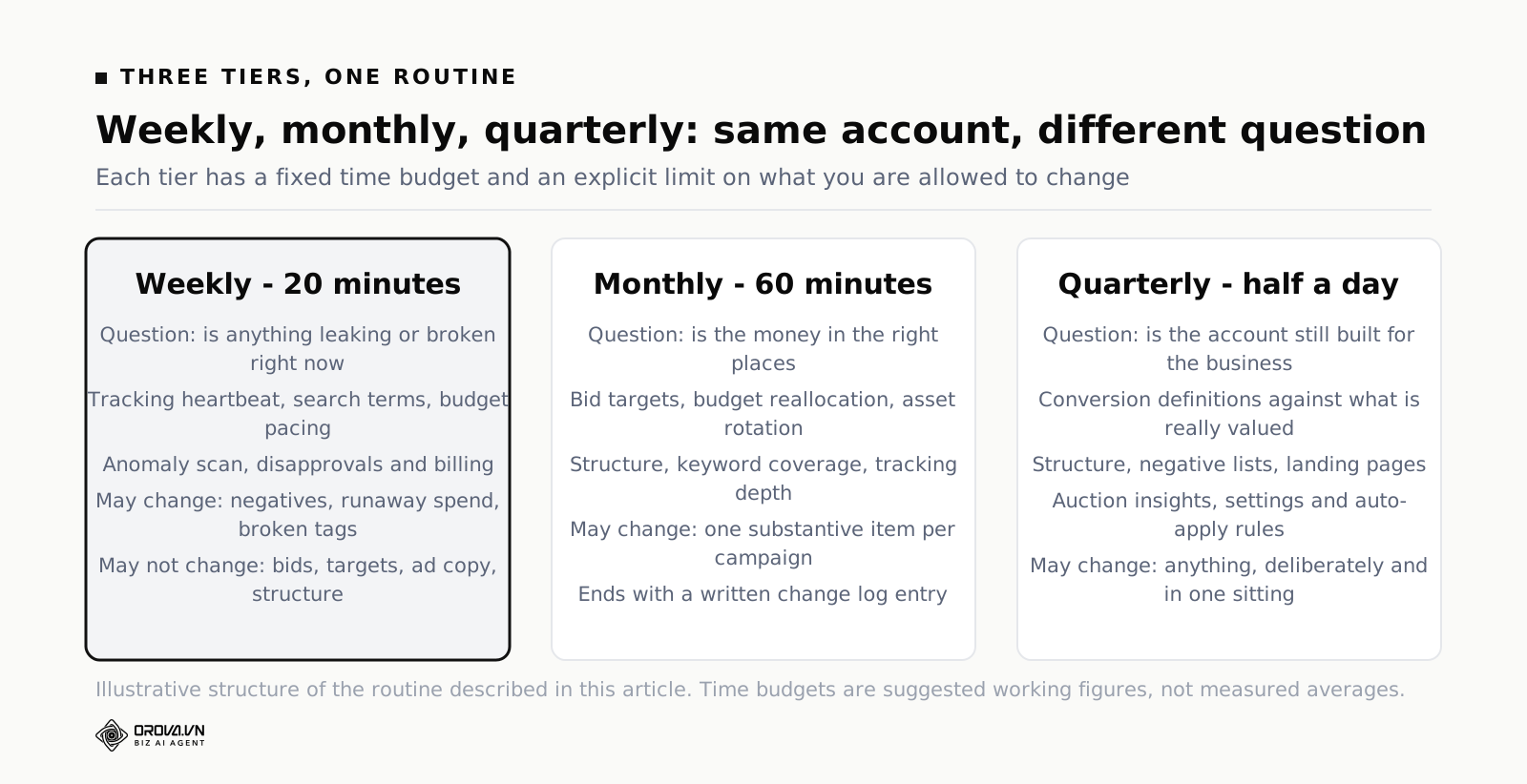
Tiering fixes all three. Each tier has a fixed time budget, a fixed question it answers, and — this is the part that makes it stick — an explicit list of things you are not allowed to touch at that tier.
| Tier | Time | Question it answers | Allowed to change |
|---|---|---|---|
| Weekly | 20 minutes | Is anything leaking or broken right now? | Negatives, paused runaway spend, broken tracking |
| Monthly | 60 minutes | Is the money in the right places? | Budgets, targets, assets, ad groups |
| Quarterly | Half a day | Is the account still built for what we sell? | Structure, conversion definitions, settings |
The last column is the discipline. If you find something on the weekly pass that belongs in the monthly column, you write it down and you leave it. Not because it does not matter, but because a twenty-minute slot cannot hold a structural decision, and a structural decision made in a hurry on a Monday morning is how accounts end up in the state they are in.
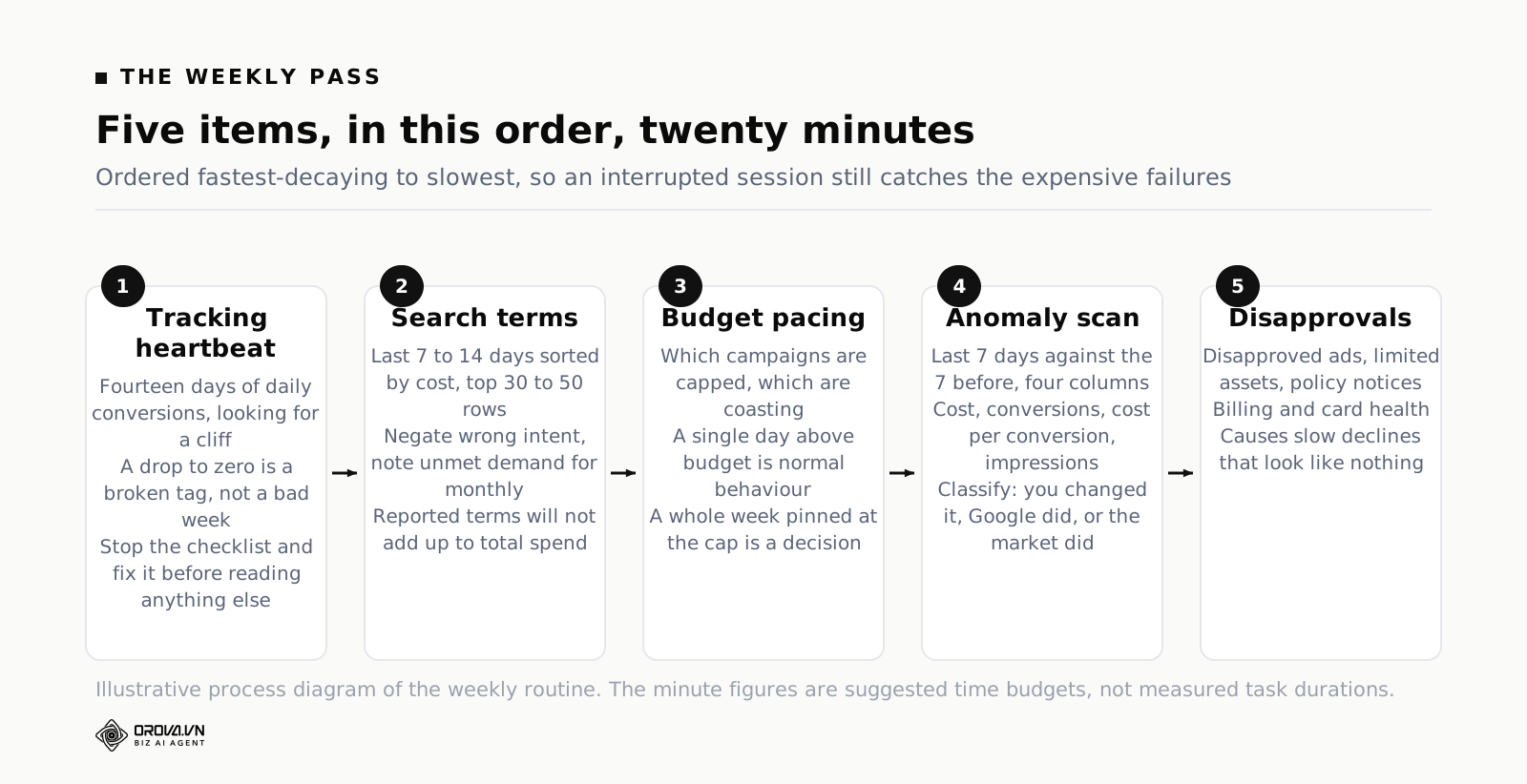
The Weekly Pass: Twenty Minutes, Five Items, In This Order
The order matters more than it looks. You go from the fastest-decaying thing to the slowest, and you front-load the two checks that catch catastrophes. If you get interrupted after eight minutes, you want to have already caught the disaster rather than being halfway through reviewing asset performance.
Set a repeating calendar block. Same day, same time, twenty minutes. Tuesday is better than Monday, because Monday's data for the previous week is complete and you are not looking at a partial weekend.
1. Did conversions arrive at all? (60 seconds)
Before anything else, look at daily conversions for the last fourteen days. You are not analysing the number. You are checking for a cliff — a day where it drops to zero and stays there. That pattern means a broken tag, not a bad week, and every other number you are about to look at is meaningless until you fix it.
Broken tracking is the single most expensive failure in the account, because a bid strategy optimising towards conversions that have stopped arriving will not sit still. It will chase, and it will chase in the wrong direction, and it will do that for as long as you let it. The check costs a minute. Do it first, every time.
Done looks like: a conversion count for yesterday and the day before that is not zero, and a fourteen-day shape with no vertical drop. If there is a drop, stop the checklist and go fix the tag.
2. Search terms: what did you pay for that you did not want? (7 minutes)
This is the item that justifies the whole routine. Open the search terms report for the last seven to fourteen days, sort by cost descending, and read the top thirty to fifty rows.
You are looking for three things. Queries with meaningful spend and zero conversions, where the intent is visibly wrong — "free", "jobs", "diy", "how to make", a competitor's brand you do not want to bid on, a product variant you do not sell. Queries that are fine but sit in the wrong ad group, matching against a keyword whose ad says something less relevant. And queries that show demand you have no keyword for at all, which is a note for the monthly pass rather than an action now.
Add negatives for the first group. Be specific about match type: a broad negative on a common word will silently block far more than you intended, and negative keywords do not behave like positive ones — a negative phrase match does not catch close variants, misspellings or plurals unless you add them. That asymmetry catches people out constantly, and it is worth understanding how negative match types actually behave before you build a large list.
One caution about the report itself. Google only shows search terms that reached a certain volume threshold, so the terms you can see will not add up to your total spend. The gap is normal. It is not a reason to distrust the exercise, but it is a reason not to claim you have "reviewed 100% of queries".
Done looks like: every row in the top thirty by cost has been read, and each one is either wanted, negated, or written on the monthly list.
3. Budget pacing: is anything capped or coasting? (4 minutes)
Two failure modes, opposite directions, both invisible in a monthly total.
A campaign that is limited by budget is turning away traffic you have already decided you want. Google's status column will tell you, but the column is generous with that label, so verify it: if daily spend is pinned at or just above the daily budget every single day, you are capped. If it wanders below, you are not.
The reverse case is a campaign spending far under its budget, which usually means the bid strategy cannot find auctions to enter — targets too tight, audience too narrow, or the keywords have low search volume. That is a diagnosis for the monthly pass, but you want to notice it weekly.
Worth knowing for the pacing arithmetic: Google Ads can spend up to twice a campaign's daily budget on any individual day, and caps you at a monthly charging limit that Google Ads Help documents as the daily budget multiplied by 30.4. So a day at 180% of budget is not an error and does not need investigating. A week at 180% is a different conversation.
Done looks like: you know which campaigns are capped, and you have either raised the budget on ones that are profitable or written them down as a monthly decision.
4. Anomaly scan: what moved more than it should have? (5 minutes)
Compare the last seven days against the seven before at campaign level, on four columns: cost, conversions, cost per conversion, and impressions. You are scanning for a move large enough that it cannot be noise.
Most weeks nothing qualifies and you move on. When something does, resist the urge to fix it in this session. Note it, and identify which of three categories it falls into: something you changed (check the change history), something Google changed (auto-applied recommendations, a bid strategy exiting learning, a new asset serving), or something the market changed (a competitor entering, seasonality, a news event). The category tells you whether it needs action at all.
Impressions are on the list because they move first. A campaign that lost 40% of its impressions this week has a problem that will show up in conversions next week, and catching it a week early is most of the value of scanning at all.
Done looks like: a short written note of anything that moved more than about a quarter, with a guess at which of the three categories it belongs to.
5. Disapprovals, policy and payment (3 minutes)
Unglamorous and occasionally the most valuable three minutes of the week. Check for disapproved ads, limited assets, policy notices on the account, and — if you are on manual payments or a card that expires — that billing is healthy.
A disapproved ad in a two-ad ad group means everything is now running on one ad. A whole ad group disapproved means a campaign is quietly serving less. Neither shows up as a dramatic number; both show up as a slow, unexplained decline that you spend three weeks investigating from the wrong end.
Done looks like: zero unreviewed disapprovals, or a note of what was appealed and when.
That is the entire weekly pass. Five items, roughly twenty minutes, and notice what is not in it: no bid changes, no ad rewrites, no pausing keywords, no restructuring. The weekly pass is a leak check, not an optimisation session. The optimising happens monthly, when you have enough data to justify it.
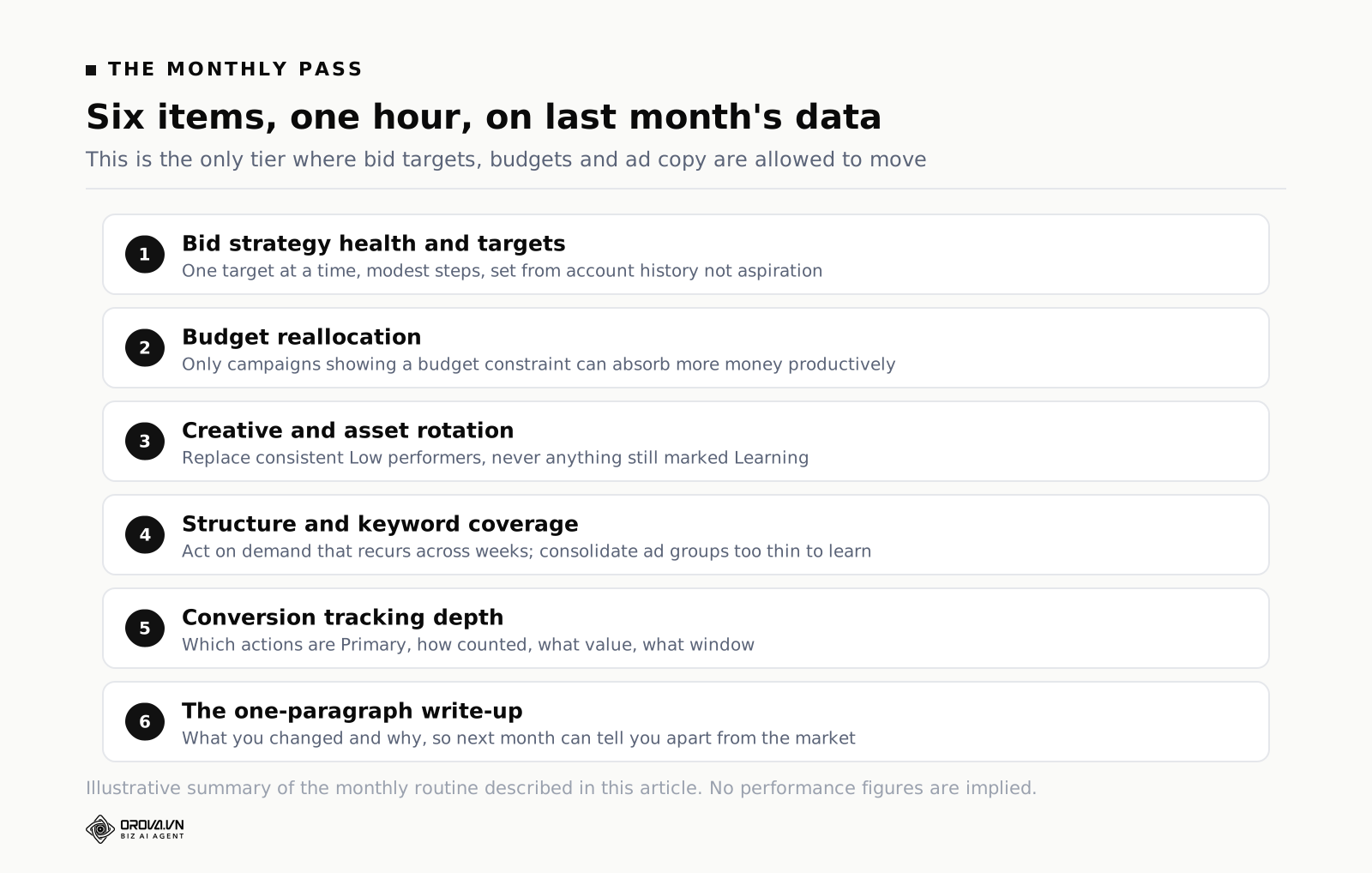
The Monthly Pass: One Hour, Six Items
Run this in the first few days of the month, on the previous calendar month's data. A full month is long enough that most of the noise has averaged out, and calendar months make the comparison easy to explain to anyone who asks.
Before you start, open the note file from the four weekly passes. Half your monthly agenda is already written.
1. Bid strategy health and targets (12 minutes)
This is where target changes are allowed, and only here. Look at each campaign's bid strategy, its status, whether it is in a learning period, and how actual cost per acquisition or return on ad spend compares to the target you set.
Three honest verdicts are possible. The strategy is hitting the target, in which case consider whether the target is ambitious enough. It is missing the target consistently by a wide margin, in which case the target was probably set from an aspiration rather than from account history. Or it does not have enough conversion volume to hold any target at all, in which case the fix is upstream — more volume, broader conversion definitions, or a simpler strategy — and not a smaller number in the target box.
Change one target at a time, and change it by a modest step rather than a dramatic one. A large target move is functionally a new strategy and starts calibration over. If you want to understand the shape of the trade-off between a target and the traffic it buys before you touch anything, the google Ads PPC: How It Works and What You Actually Pay are the least-used useful tool in the interface.
2. Budget reallocation (10 minutes)
Rank campaigns by cost per conversion or return, then ask a single question of each: if I moved money from the bottom to the top, would the top absorb it?
The second half of that question is the one people skip. A campaign with an excellent cost per acquisition that is already unconstrained will not spend more money productively — it will spend it on worse traffic, and its cost per acquisition will move towards the account average. Only campaigns showing a budget constraint are genuine candidates for more money.
Move in increments you can reverse, and change one thing per campaign per month, so that next month's read is attributable to something.
3. Creative and asset rotation (12 minutes)
Now, with a month of data, look at asset performance in your responsive search ads: which headlines and descriptions are rated Low, Good or Best, and which are marked Learning. Retire the consistent Low performers and replace them with new variants — replace rather than merely remove, so the ad keeps a full set of assets to combine.
Two rules keep this honest. Do not replace an asset that is still Learning; the rating means the system has not seen enough of it. And do not replace everything at once, because you lose the comparison. Two or three swaps per ad group per month is a pace that produces readable results.
Ad Strength is worth glancing at but not worth chasing. It is a measure of how well you have followed the format's recipe — asset count, variety, keyword inclusion — not a prediction of results. An Excellent rating on an ad nobody clicks is a well-formatted failure.
4. Structure and keyword coverage (10 minutes)
Take the queries you flagged weekly as unmet demand and decide whether any of them deserve a keyword, an ad group, or nothing. Most deserve nothing. The ones that recur across several weeks with real volume are the ones to act on.
Then look in the other direction: ad groups with almost no impressions, keywords that have not served in ninety days, campaigns running on inertia. Consolidating thin ad groups usually helps, because splitting traffic across too many containers gives every automated system a smaller sample to learn from. That trade-off between granularity and data density is the central tension in modern Google Ads account structure, and it is worth deciding deliberately rather than by accumulation.
5. Conversion tracking depth (8 minutes)
Weekly you checked that conversions arrived. Monthly you check that they mean what you think.
Open the conversion actions list and confirm: which actions are marked Primary and therefore actually steering bidding, how each is counted (every conversion versus one), what value each carries, and what conversion window each uses. Google Ads lets you set a click-through window of up to ninety days, and a long window on a short sales cycle inflates recent-period comparisons in a way that looks like improvement.
Look for the classic contamination: a newsletter signup or a page view sitting in the Primary set alongside purchases. The bid strategy will happily buy you a great many newsletter signups. It is doing exactly what you told it.
6. The one-paragraph write-up (8 minutes)
Write down what you changed, when, and what you expect to happen. Four sentences is enough. This is not reporting theatre — it is the only way next month's anomaly scan can distinguish between "the market moved" and "I moved it".
Accounts without a change log lose an enormous amount of time to re-litigating decisions nobody remembers making. The interface's change history records the mechanical fact of an edit but not the reasoning, and the reasoning is the part you will want in six weeks.
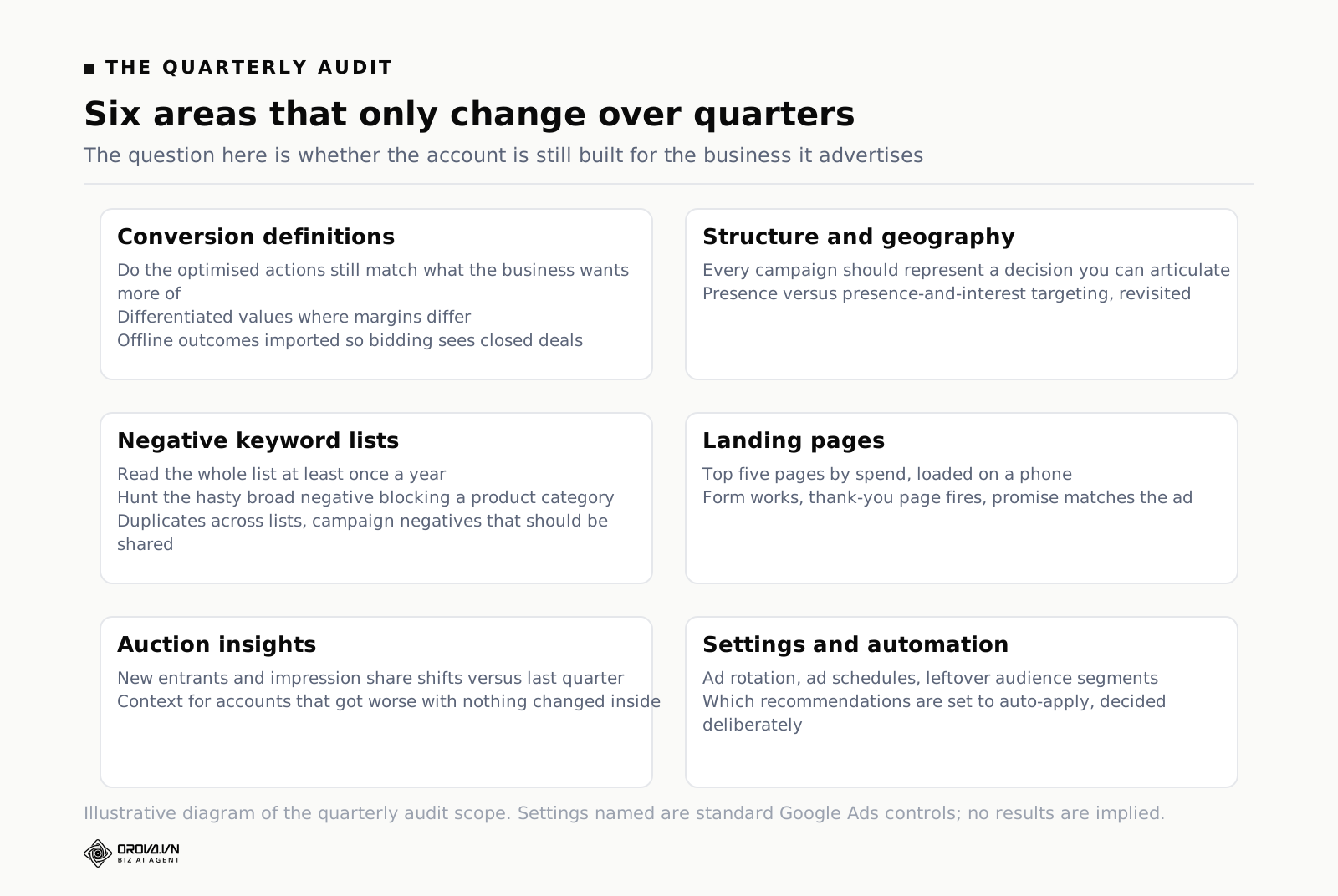
The Quarterly Audit: Half a Day, Four Times a Year
The quarterly pass asks a different question from the other two. Weekly asks whether anything is leaking. Monthly asks whether the money is in the right place. Quarterly asks whether the account is still built for the business it is advertising — and businesses change faster than accounts do.
Block half a day. Do not attempt it in fragments.
Conversion definitions versus what the business actually values
Start here, because everything downstream inherits it. Sit with whoever owns revenue and check that the conversion actions the account optimises towards still match what the business wants more of. Product lines get discontinued. Margins shift. The lead type that was gold two years ago now clogs the sales pipeline.
If you sell things with materially different margins, this is also where you decide whether to send back differentiated values instead of a flat number, and whether to import offline outcomes so that the bidding sees closed deals rather than form fills.
Structure against the current product and geography
Walk the campaign list and ask, for each one, what business decision it represents. Campaigns should be separated for reasons you can articulate: a budget that must be ring-fenced, a geography with different economics, a product line with a different target. Campaigns separated because somebody once wanted a cleaner report should be merged.
Check geographic targeting settings specifically, including whether you are targeting presence or presence-and-interest, which is a setting that quietly changes who sees your ads and which almost nobody revisits after setup.
Negative keyword lists and their side effects
Negative lists accumulate. Over two years they become archaeology. Read yours properly at least annually: look for negatives that are now blocking terms you want, duplicates across lists, and campaign-level negatives that should be shared.
The specific failure to hunt for is a broad negative added in a hurry that is now suppressing a whole product category. These do not announce themselves. You find them by reading the list, or by noticing that a keyword you expect to serve never does.
Landing pages and the post-click half
Half of what determines cost per acquisition happens after the click, and it is the half that never appears on a Google Ads checklist because it lives in a different system.
Load your top five landing pages by spend on a phone, on a normal connection. Time them. Check that the form works, that the thank-you page fires, that the phone number is tappable, and that the page says the same thing the ad promised. Quarterly is often enough for this, but skipping it entirely is how accounts spend years optimising the traffic side of a problem that lives on the page.
Auction insights and competitive drift
Pull Auction Insights for your main campaigns and compare against the previous quarter. You are looking for new entrants, someone who has dramatically increased their impression share, and changes in your own overlap rate.
This is context, not an action list. But it is the single best explanation for the account that has "got worse" without anything internal changing, and knowing the answer stops you from optimising away a problem you did not cause.
Settings, automation and account hygiene
Finally, the sweep: ad rotation settings, ad schedules that were built for an office that now works different hours, audience segments attached to campaigns for reasons nobody remembers, and — importantly — which Google recommendations are set to auto-apply.
Auto-apply is the setting most likely to change your account without your involvement. Whatever you decide about it, decide it deliberately, and write down the decision so the next quarterly audit does not have the same argument.
What to Deliberately Skip
Every checklist tells you what to do. Almost none tell you what to stop doing, which is strange, because in a mature account the second list saves more money than the first.
Changing bids or targets daily
The most common and most expensive habit. Daily bid movement on manual CPC chases noise; daily target movement on an automated strategy restarts calibration before it has finished.
The mechanism is simple enough to be depressing. You set a target. Days one to three look bad, because early learning always looks bad. You lower the target. Calibration restarts. Days one to three of the new period look bad. You lower it again. The account is now permanently in the worst three days of a learning period and you conclude that automated bidding does not work for your industry.
Skip it. Touch targets monthly at most, one at a time, in modest steps.
Pausing keywords on small samples
A keyword with twenty clicks and no conversions feels like an obvious pause. It is not obvious at all — see the arithmetic in the next section — and the pause is usually wrong.
Worse, it is asymmetric. Pausing a keyword that would have converted costs you the future volume permanently, and you never learn about it, because paused keywords generate no data to correct you with. Leaving a genuinely bad keyword running for another two weeks costs you two weeks of a small budget. The two errors are not equally priced, and the cheap one is patience.
Rewriting ads before there is data
Ad copy is the easiest thing to change, which is precisely why it gets changed for no reason. Rewriting on a hunch resets the asset ratings, throws away whatever the system had learned about which combinations work, and produces a fresh set of assets that will spend the next month in Learning.
Give ads enough impressions to earn a judgement. If you cannot state roughly how many impressions each asset has served, you do not have grounds for a rewrite.
Adding negatives from a two-day window
The search terms report from a Tuesday and a Wednesday is not a sample. A query with four clicks and no conversion is not evidence of anything, and negatives are among the hardest changes to undo, because the traffic you block never comes back to tell you it would have converted.
Negate on intent, not on performance. "Free" and "jobs" can go immediately on the first sighting, because you know the intent is wrong. A commercially sensible query with a bad two days waits.
Chasing Optimization Score
Optimization Score measures how closely your account follows Google's recommendations. It is a useful place to find ideas and a terrible place to find targets. Some recommendations are excellent, some are budget increases dressed as advice, and the score treats them identically.
Read the recommendations quarterly. Apply the ones you would have thought of yourself. Dismiss the rest, which also raises the score, which tells you something about the score.
Reacting to a single bad day
Daily cost per acquisition in a normal account swings enormously, and the smaller the account the wilder the swing. A day with three conversions instead of the usual seven is completely unremarkable. Reacting to it produces a change you will reverse on Thursday, and now you have two changes contaminating the month.
Seven-day rolling comparisons are the shortest window worth acting on, and for anything involving conversion volume, twenty-eight days is safer.
How to Tell the Difference Between Noise and a Real Problem
Most bad checklist decisions come from one mistake: treating a small sample as a verdict. There is a piece of arithmetic that fixes this, and it takes thirty seconds.
Suppose your account converts at 2% overall, and a keyword has run for a while with no conversions. How many clicks does that keyword need before "no conversions" becomes real evidence rather than bad luck? If the keyword genuinely converted at 2%, the chance of seeing zero conversions in a run of clicks falls as the run gets longer. The number of clicks at which that chance drops below one in twenty is the point where you can reasonably say the keyword is underperforming.
The arithmetic gives you this. At a 1% conversion rate you need roughly 299 clicks with nothing before the silence means anything. At 2%, roughly 149. At 3%, roughly 99. At 5%, roughly 59. At 10%, roughly 29. Read that list again, because the implication is uncomfortable. If your site converts at 2%, a keyword with 40 clicks and no conversions has told you almost nothing. Most keyword pausing happens at a fraction of these numbers.
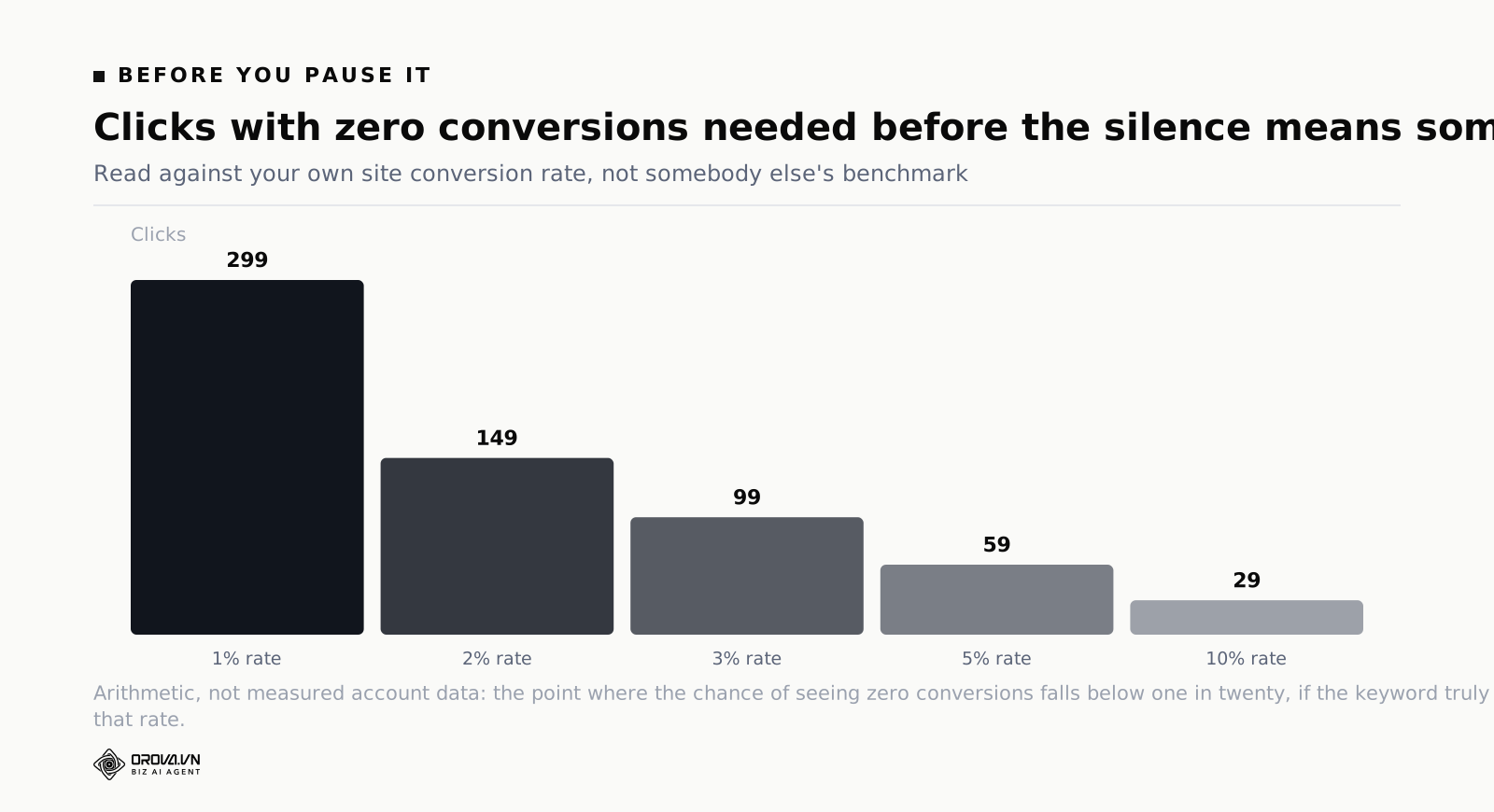
Two caveats keep this from being misused. It assumes clicks are comparable, which they are not exactly, and it only tells you that a keyword is probably below your baseline rate — not that it is worthless. A keyword at half your average conversion rate may still be profitable if its clicks are cheap.
The same logic governs everything else on the checklist. Before acting on any comparison, ask how many conversions sit underneath each side of it. Two periods with eight conversions each cannot support a conclusion about a 20% difference. This is also why the tiering works: the monthly pass has roughly four times the data of a weekly one, which is often the difference between a readable comparison and a coin flip.
One practical habit: write the threshold down before you look. Decide that you will act if cost per acquisition moves more than 25% on at least thirty conversions, then check. Deciding the threshold after seeing the number is how every number becomes significant.
Running the Routine Across More Than One Account
Everything above assumes one account and one person. The routine holds up well at that size. It starts to strain at around five accounts, and it breaks somewhere past ten, for reasons that are arithmetic rather than motivational.
Twenty minutes per account per week is fine for one account and is two full days a month across ten. The monthly pass at an hour each is another day and a half. And the strain does not fall evenly: the weekly pass is the part that must happen on schedule, and it is the part that gets dropped first, because it is the one with no deadline attached. Nobody notices a skipped weekly pass until the search terms report has three months of accumulated waste in it. That gap between the visible cost of a routine and its invisible cost when skipped is most of what people mean by PPC Ad Management: What It Involves and What It Costs.
There are three honest responses. Reduce scope, and accept that small accounts get a monthly pass only. Hire, which works and is expensive. Or automate the detection half — the part that is genuinely mechanical — and keep the judgement half for yourself.
The split is cleaner than it sounds. "Flag every search term over a spend threshold with no conversions" is a rule a machine can run every morning across every account. "Decide whether this query represents demand we should build an ad group for" is not. The same is true of pacing, disapprovals and tracking heartbeats: the checking is mechanical, the deciding is not.
This is the shape of the problem Orova Ads is built around — you write the checks as rules in plain language, set when each runs, and get proposals back with the numbers and the reason attached, with three modes covering advisory only, mixed, or letting the system act. Whether you use a tool or a spreadsheet and a calendar reminder, the principle is the same: the routine has to survive a busy week, and anything depending on you remembering will not.
Frequently Asked Questions
How often should I really check my Google Ads account?
Twenty minutes weekly, an hour monthly, half a day quarterly. Checking more often than that does not help, because the additional data is not sufficient to change any decision, and the temptation to act on it is where the damage comes from. If you want to look daily out of anxiety, look — but agree with yourself in advance that daily looking produces no changes.
What should I check first if I have inherited an account?
Conversion tracking, before anything else. Confirm that conversions fire, that the Primary set contains only things you would pay for, and that values and counting settings are sensible. Everything else in the account is being optimised towards those definitions, so auditing anything else first means auditing decisions built on a foundation you have not verified. After tracking, read ninety days of search terms, then look at structure.
Is a weekly checklist enough for a large budget account?
The cadence stays the same; the depth changes. A large account still only needs a weekly leak check, but that check covers more campaigns, so it may take an hour rather than twenty minutes, and it usually needs automated flagging to stay practical. What does not change is the rule that weekly is for detection and monthly is for decisions. Large budgets increase the cost of a hasty change, they do not justify more frequent ones.
How long should I wait after making a change before judging it?
Long enough to clear both the learning period and your conversion lag, which means you have to know your conversion lag. Compare a recent period as reported today against the same period reported two weeks later; the difference is your lag. Add that to the learning period and you have your waiting time. For most lead generation accounts this lands somewhere between two and four weeks — which is the real reason monthly is the right cadence for changes.
Should I use the recommendations tab as my checklist?
No, but read it quarterly. The recommendations tab surfaces genuinely useful things — disapproved assets, broken tracking, keywords with no ads — mixed with budget increase suggestions and match type expansions that serve Google's interests as much as yours. It is a source of candidates, not a list of tasks, and applying items to raise the score is optimising the wrong thing.
What is the minimum viable version if I only have ten minutes a week?
Two items: check that conversions are still arriving, and read the top twenty search terms by cost. That is the version that catches the catastrophic failure and the steady leak. Everything else can wait for the monthly hour. A two-item routine you actually run beats a six-item routine you skip.
What to Do This Week
Do not rebuild anything yet. Do this instead.
- Put a twenty-minute repeating block in your calendar for Tuesday morning and label it with the five weekly items in order, so you never have to remember them.
- Run the weekly pass once, properly, this week. Time yourself. If it took longer than thirty minutes, you were making monthly-tier decisions inside a weekly slot — write them down and move them.
- Open a plain text file called change log. Write today's date and one line about the state of the account. That file will be the most useful thing you own in three months.
- Book the monthly hour for the first working day of next month, and the quarterly half-day for the first week of the next quarter. Book them now, while this feels worth doing.
Then delete the sixty-one item checklist. Its content was mostly fine. Its frequency was the problem, and a routine you run fifty times a year at a fifth of the depth will find more than an audit you run once and abandon.
When You'd Rather Not Run the Checklist Yourself
Even with a clear routine, the weekly and monthly passes still take real time — checking the same reports, comparing the same numbers, deciding what counts as a real problem versus normal noise. Do that across more than one account and the time adds up fast, even when every step is written down.
Orova Ads is built to run that routine for you, checking the account on the same cadence you would, flagging what actually needs a decision, and leaving the rest alone. If keeping up with the checklist yourself feels like the part you keep putting off, it's worth taking a look.
Turn the checklist into a schedule
Orova Ads runs your rulebook on a timer and brings back proposals with the numbers behind them.
Start for free