
Google Ads Offline Conversion Tracking: Closing the CRM Loop
The Google Ads account looks healthy. Cost per lead is the lowest it has been all year, the form-fill count climbs every week, and the campaign report is a wall of green. Then the sales director sends a message that has nothing green in it: the team is spending its mornings calling people who wanted a brochure, a job, a refund, or nothing at all. That gap between what the report says and what the sales team lives through is exactly what Google Ads offline conversion tracking exists to close.
Here is the part that makes it worse than a reporting problem. Smart Bidding does not just report on the form fills you count, it actively chases more of them. Every day the account runs, the system studies which clicks produced the event you told it to value, and buys more of those same clicks. If the event you told it to value is "somebody typed an email address into a box," within a few weeks you own a machine that is very good at finding people who type email addresses into boxes, whether or not they ever intended to buy.
This article walks through what it actually takes to fix that: capturing the click when the visitor lands, storing it against the lead record, and sending the real outcome back to Google once a human decides the lead was worth something. By the end, you will know how to close that loop step by step, what breaks it, and how your bidding starts working for actual customers instead of form-fillers.
What Is Google Ads Offline Conversion Tracking?
Google Ads offline conversion tracking sends real business outcomes — a qualified lead, a signed contract, actual revenue — back to Google Ads and attaches them to the click that started them. It works by capturing a click identifier, storing it with the record in your CRM, and uploading the outcome later with a value and a timestamp.
The word "offline" is a little misleading and trips people up constantly. It does not mean the sale happened in a physical shop. It means the outcome happened somewhere your website tag cannot see it: in a phone call, in a sales rep's pipeline, in an accounting system, in a signature on a contract three weeks after the click. If the event is not a browser event on a page you control, it is offline as far as Google is concerned, even if the whole thing happened over email.
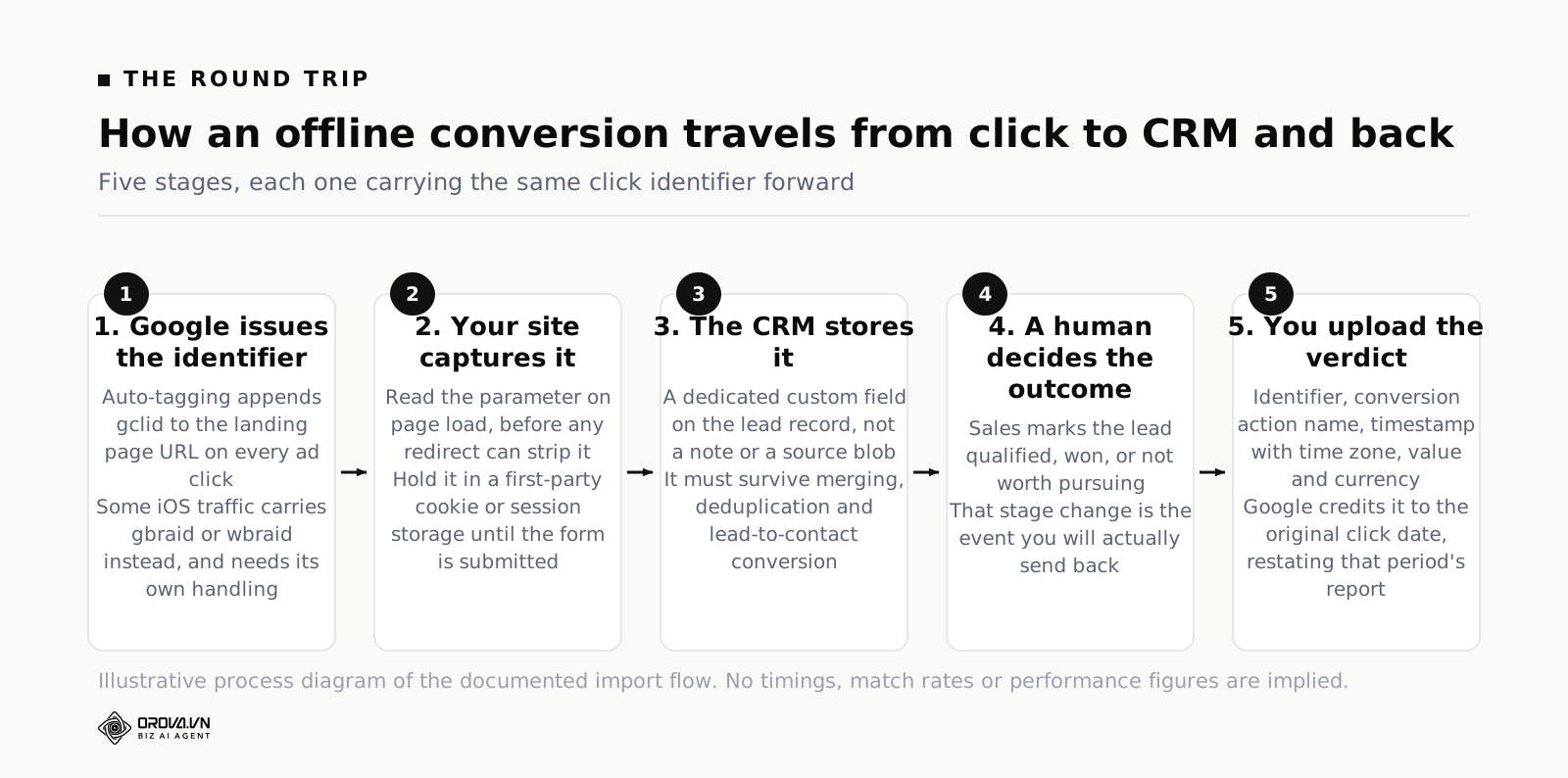
The mental model that helps is a round trip. A standard conversion is a one-way street: click arrives, visitor does something on the page, tag fires, Google records it immediately. An offline conversion is a loop with a long gap in the middle. Google hands you an identifier on the way in. You carry that identifier through your own systems for days or weeks while a human decides whether this lead is worth anything. Then you hand the identifier back with a verdict attached. Google looks up the click, matches it, and rewrites what it believed about that campaign.
That rewriting is the whole point, and it is worth pausing on because it surprises people the first time they see it. When you upload a conversion for a click that happened on 3 August, Google does not credit it to today. It credits it to 3 August. Your report for early August changes retroactively, weeks after you already looked at it, screenshotted it and put it in a deck. This is correct behaviour and it is also the reason your monthly reporting needs a stated cut-off date once offline conversions are live. More on that later, because it causes more arguments than any other part of the setup.
Why Closing The Loop Matters More Than The Report Looks
Plenty of teams set this up for reporting reasons: the marketing director wants to show revenue by campaign instead of leads by campaign. That is a fine reason and it is not the main one. The main one is that you are changing the training data of an automated bidder.
Think about what an automated bid strategy actually does. It predicts, for each auction it could enter, the probability that this particular person on this particular query at this particular moment produces the conversion you are counting. Then it bids accordingly. It is a prediction engine and its predictions are only as good as the label you give it.
Give it the label "form submitted" and it learns the shape of a form submitter. Form submitters skew towards people with time on their hands, people who are early in research, people who want the free thing, and in some verticals, people who are not customers at all — students, competitors, job seekers, and the ever-present agencies looking for someone to pitch. None of these are moral failings on the algorithm's part. It did exactly what you asked.
Give it the label "sales-qualified lead worth an expected amount of money" and the shape it learns changes. Suddenly the query "cheap [product]" looks worse than it did, the query "[product] for enterprise" looks better, and 2am mobile traffic that used to convert beautifully on forms stops earning bids. You did not write any of those rules. You just changed the definition of success and let the machine re-derive them.
This is also why offline conversion tracking pairs so closely with the question of which target you bid to. If you have never sorted out the difference between bidding to a cost per acquisition and bidding to a return on ad spend, closing the loop is the prerequisite that makes the second option possible at all — there is no revenue to target if no revenue ever gets sent back. Our walkthrough of Google Ads Smart Campaigns: How to Set One Up covers the choice itself; this article covers the pipe that has to exist first.
One more benefit, less glamorous but frequently the one that saves the most money: it tells you which campaigns are lying to you. Almost every lead-gen account has one campaign that produces cheap leads and no customers, and one campaign that produces expensive leads and most of the revenue. Without the loop, the first gets budget increases and the second gets defended in meetings by a person with a hunch. With the loop, the argument ends in about ten minutes.
The Mechanics: Capture, Store, Send Back
There are only three moving parts, and each one has a specific failure mode. Get the three right and the rest is administration.
Step one: capture the click identifier
When auto-tagging is switched on in your Google Ads account settings, Google appends a parameter called gclid to the landing page URL of every ad click. That string is the identifier for that specific click. It is not a user ID and it does not persist across sessions on its own; it is a receipt for one arrival.
You need to do two things with it. First, read it out of the URL when the page loads. Second, keep it available for however long the visitor wanders around your site before filling in a form, which usually means writing it to a first-party cookie or to session storage with a sensible lifetime. Then, when the form is submitted, copy the stored value into a hidden field that travels with the submission.
Two adjacent identifiers exist and get forgotten. gbraid and wbraid appear instead of gclid on some iOS traffic, where Apple's privacy rules prevent the usual user-level identifier from being passed. They behave similarly for upload purposes but they are different parameter names, and code that only looks for gclid silently records nothing for that portion of traffic. If your business skews towards iPhone users, "silently records nothing" can be a large fraction of your leads. Write the capture script to look for all three.
Step two: store it with the lead, in a field that survives
This is where most implementations quietly die, and it is rarely a technical problem. It is a fields-and-permissions problem.
The identifier needs a dedicated custom field on the lead or contact record in your CRM. Not a note. Not a text blob appended to the "source" field. A named field that your CRM administrator agrees exists and that nobody's automation overwrites. It must be filled at the moment the lead is created, and it must survive lead merging, lead-to-contact conversion, deduplication rules, and the sales rep who edits the record.
The classic disaster: everything works, the field fills correctly, and then a deduplication rule merges a new inbound lead into an existing contact record from last year and keeps the older record's blank identifier. Six weeks later somebody notices that only 40% of uploads are matching and nobody can explain why. Test the merge behaviour before you go live, not after.
Alongside the identifier, store two more things on the same record: the timestamp of the click or form submission, and a place to write the eventual outcome and its value. You will need all four fields in the upload file.
Step three: send the outcome back
In Google Ads you first create a conversion action with the import source — the interface walks you through choosing that the data comes from another source or a CRM, and that you are tracking conversions from clicks. Name it for the business event it represents, not for the mechanism. "Sales Qualified Lead" and "Closed Won" are good names. "CRM Import 2" is a name you will regret in a year.
Then you upload rows. The minimum a row needs is the click identifier, the conversion action name, the conversion time and, if you are sending money, the value and the currency code. Two details cause a disproportionate number of rejected uploads:
- The timestamp needs a time zone offset. Google expects a date and time with an explicit offset attached. A bare date, or a time in a zone Google has to guess, is the single most common upload error. Decide once whether you export in account time zone or in UTC with the offset written out, document it, and never let anyone change it.
- The conversion time must be after the click time. Obvious in principle, routinely violated in practice when a CRM writes the "created" date rather than the "stage changed" date, or when a batch job stamps everything with midnight.
For getting the rows into Google there is a ladder of effort. At the bottom, a person exports a CSV from the CRM and uploads it by hand each week. In the middle, a scheduled import points at a Google Sheet or a hosted file and pulls it on a recurring schedule, which removes the person but not the sheet. At the top, a direct API integration or a native CRM connector pushes conversions as the stage changes, with no file anywhere. Several major CRMs ship this connector already, and if yours does, use it rather than building the file pipeline yourself.
Start at the bottom rung anyway. A manual weekly upload for the first month is the cheapest way to find out that your identifier capture rate is 60% rather than 100%, and it is much easier to debug a spreadsheet you are looking at than a scheduled job that fails at 3am.
Enhanced Conversions For Leads: The Fallback When The Identifier Is Gone
Sometimes the identifier never makes it. The lead came in by phone. The form lives on a third-party booking system you do not control. A redirect chain stripped the parameter. The visitor came back three weeks later on a different device and converted then.
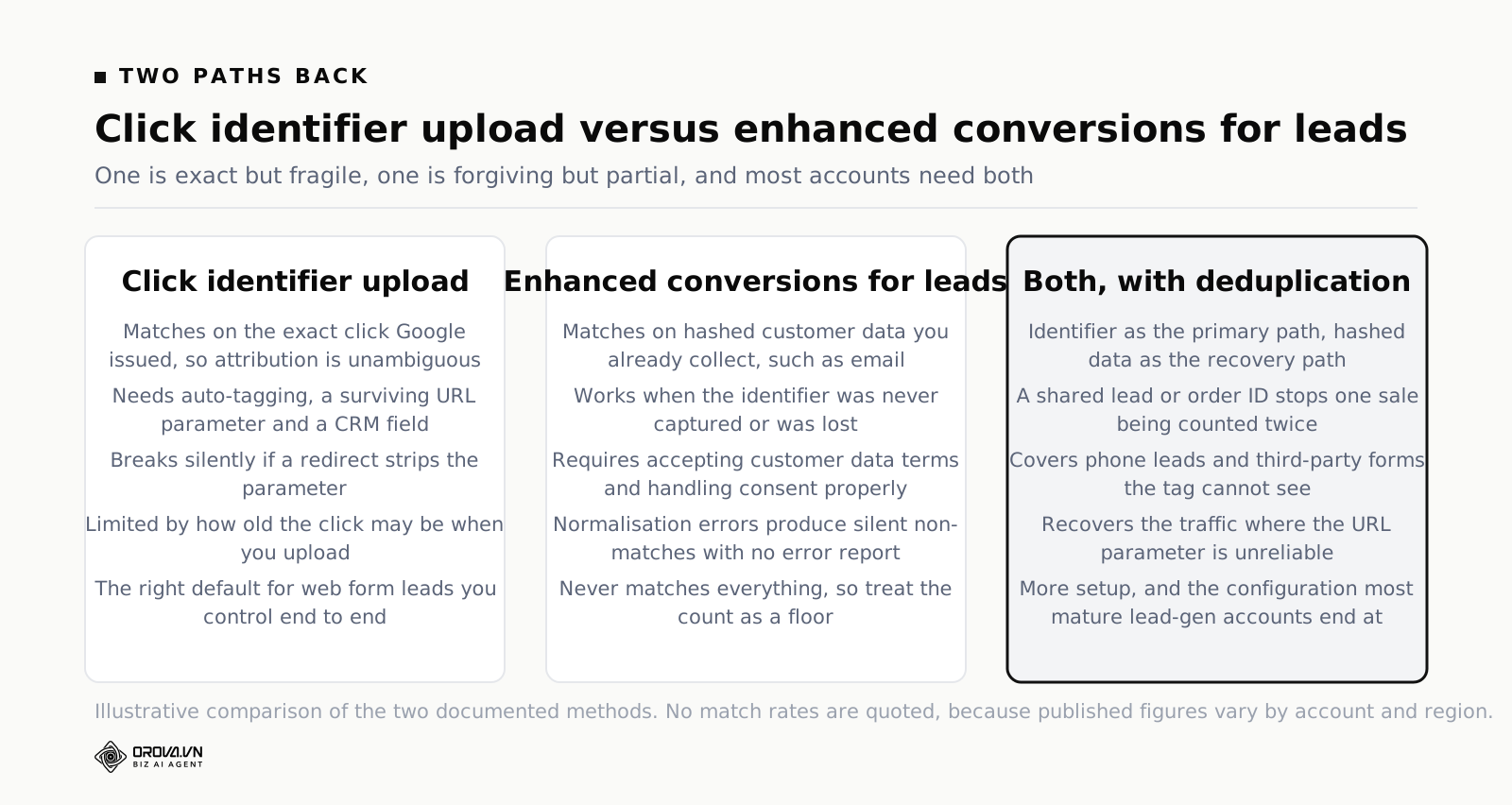
Enhanced conversions for leads solves a version of this problem with different plumbing. Instead of carrying Google's identifier, you carry the customer's own contact details — typically the email address, sometimes the phone number and name — which you already collect on the form because you need them to sell anything. When the deal closes, you send those details back, hashed, alongside the conversion. Google matches the hashed values against signed-in Google accounts and, where it finds a match, credits the click.
Three things to understand before you treat it as a drop-in replacement.
It is hashed, not plaintext. The customer data is one-way hashed with SHA-256 before it leaves your systems, and the normalisation rules matter — trimming whitespace, lowercasing, stripping the formatting from phone numbers. Hash a badly normalised email and it will simply never match anything, with no error to tell you so. If the tag or connector does the hashing for you, let it.
It requires agreeing to customer data terms. There is a policy acceptance step inside Google Ads, and there are consent obligations that vary by region — for European traffic in particular, consent signals need to be handled properly or the data should not be sent at all. This is a conversation with whoever owns privacy at your company, not a checkbox to click alone at 6pm.
Match rates are never 100%. It only works when the person's details correspond to a Google account that saw your ad. A meaningful slice of your leads will not match, and there is no report that lists which ones failed and why. Treat the output as a floor on your true conversion count, not a census.
The right posture is not choosing between the two methods. It is running the identifier as your primary path because it is exact, and enhanced conversions for leads as the recovery path for the leads the identifier missed. Just be careful not to double count: if both methods can produce a conversion for the same lead, you need a shared order or lead ID so Google can deduplicate, or you need to send each lead through exactly one path by rule.
The Timing Window, And Why It Quietly Deletes Your Best Data
Offline conversion uploads are not open-ended. Google's help documentation for importing conversions from clicks sets a maximum age for the click you are matching against — 90 days at the time of writing, and worth re-reading on the official help page before you design anything around it, because it has been revised before.
Ninety days sounds generous until you map it against a real sales cycle. Consider a business where the average deal closes in four months. Every single closed-won deal is now outside the window at the moment it becomes interesting. If your only uploaded event is "Closed Won", you will spend six months building a pipeline that reports almost nothing, and the conclusion in the room will be that offline conversion tracking does not work. It works. You aimed it at the wrong event.
This is the reasoning behind the most important design decision in the whole project: upload the earliest event that is genuinely predictive of money, not the event that is money. For a four-month sales cycle, that is usually "sales qualified" — the moment a human being who talks to customers for a living looks at the lead and says yes, this is real. That verdict often lands within days, comfortably inside the window, and it removes the overwhelming majority of the junk that was polluting your bidding.
You can still send the revenue later. Google supports adjusting a conversion after the fact — restating its value upwards or downwards when the real number arrives, or retracting it entirely if the deal collapses. Adjustments have their own separate time limit, which is not the same as the click window, so check the current figure in the help documentation and design your restatement job to run comfortably inside it.
The second timing issue is delay rather than deadline. Uploaded conversions do not appear instantly; there is processing time before the rows show up in the interface, and there is a further lag before a bid strategy has enough of the new signal to behave differently. Neither is a bug. Both mean that the day after your first upload is the worst possible moment to judge whether anything improved.
And then there is the reporting consequence mentioned earlier. Because uploads are credited back to the click date, a month's numbers keep drifting upward for weeks after the month ends. If you report on Monday for the previous week, you are reporting on data that will be materially different by Friday. The fix is not technical, it is procedural: pick a reporting lag that exceeds your typical upload delay, state it on the report itself, and never compare a fresh period against a matured one. We wrote about the arithmetic of this trap in more depth in the piece on ROAS Formula & Conversion Lag: Why Today's ROAS Is Wrong.
Building A Value Model When The Revenue Arrives Months Later
Once outcomes flow back, the next question is what number to attach to each one. Sending a conversion with no value at all is legal and it is a wasted opportunity: without a value, the bidder can count your qualified leads but cannot tell a small one from a large one, and it will happily buy fifty small ones instead of five large ones.
There are three value models in common use, and they form a ladder you climb rather than a menu you choose from.
Model one: flat value per stage
Every sales-qualified lead is worth the same number. Simple, robust, and better than nothing by a wide margin. Use it when your deal sizes are genuinely similar, or when you are in the first month and just want the pipeline proven. Its weakness is obvious: it teaches the bidder that all qualified leads are equal, which they never are.
Model two: expected value from your own funnel rates
This is where most accounts should live. You take the historical conversion rate from each stage to closed-won, multiply by your average deal size, and attach that as the value of reaching that stage. It is a forecast, not an accounting entry, and that is fine — the bidder does not need your revenue to be audited, it needs your relative valuations to be roughly honest.
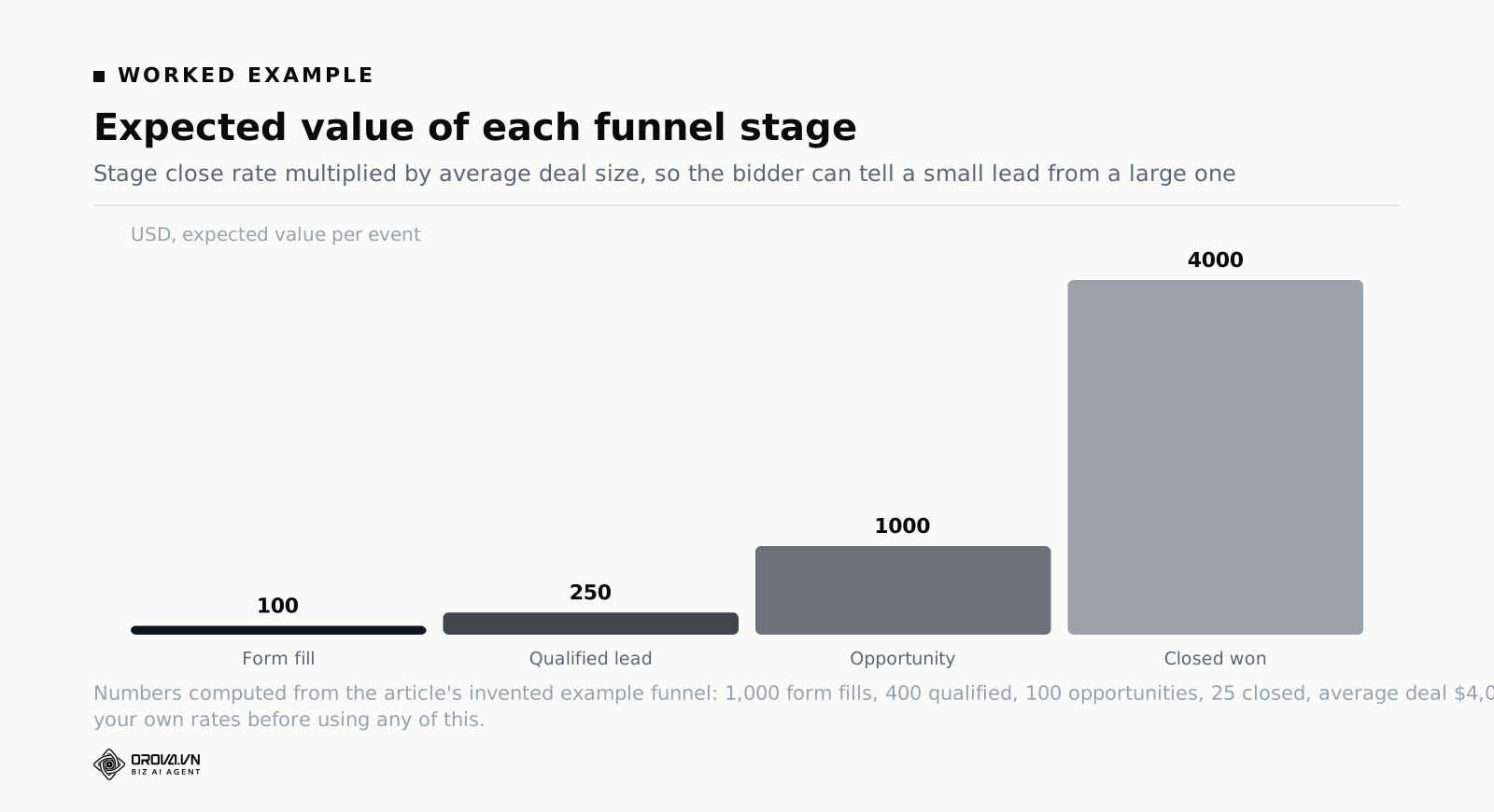
A worked example, with numbers invented purely to show the arithmetic. Suppose that in a typical month this hypothetical account produces 1,000 form fills. Sales marks 400 of them qualified. Of those, 100 become real opportunities with a proposal attached. Of those, 25 close. And the average first order is worth $4,000.
Work backwards from the close rate at each stage:
- A form fill closes 25 times out of 1,000, so its expected value is 2.5% × $4,000 = $100
- A qualified lead closes 25 times out of 400, so its expected value is 6.25% × $4,000 = $250
- An opportunity closes 25 times out of 100, so its expected value is 25% × $4,000 = $1,000
- A closed deal is worth $4,000
Notice what that spread does. It tells the bidder that reaching the qualified stage is worth two and a half times reaching the form stage, and that an opportunity is worth ten times a form fill. Those ratios are the actual instruction. The absolute figures matter less than you think, as long as they are consistent, because a return-on-ad-spend target is calibrated against whatever scale you feed it.
Model three: actual revenue with adjustments
The full version. You upload the qualified lead with an expected value inside the click window, then restate that conversion with the real contract value when it signs, and retract it if the deal dies. This is the most accurate model and the most operationally demanding, because it requires a recurring job that reconciles two systems and a clear rule about which invoiced amount counts — gross, net of discount, first order only, or including recurring revenue.
Two practical warnings. First, decide whether you are sending revenue or margin. A business with a 20% margin that bids to revenue is bidding to a number four fifths of which it never keeps, and every ROAS target it sets will be wrong in the same direction. Sending gross profit instead makes the target directly interpretable. Second, if you have long recurring contracts, do not send lifetime value. The bidder will learn to chase a number that takes three years to materialise, and you will be paying today's money against a promise. Send first-year value or first-order value and keep the lifetime number for board slides.
Choosing which single number the whole team steers by is its own decision, and it deserves more than a footnote — we made the case for picking one in ad Performance Metrics That Actually Matter.
Six Ways Offline Conversion Tracking Breaks
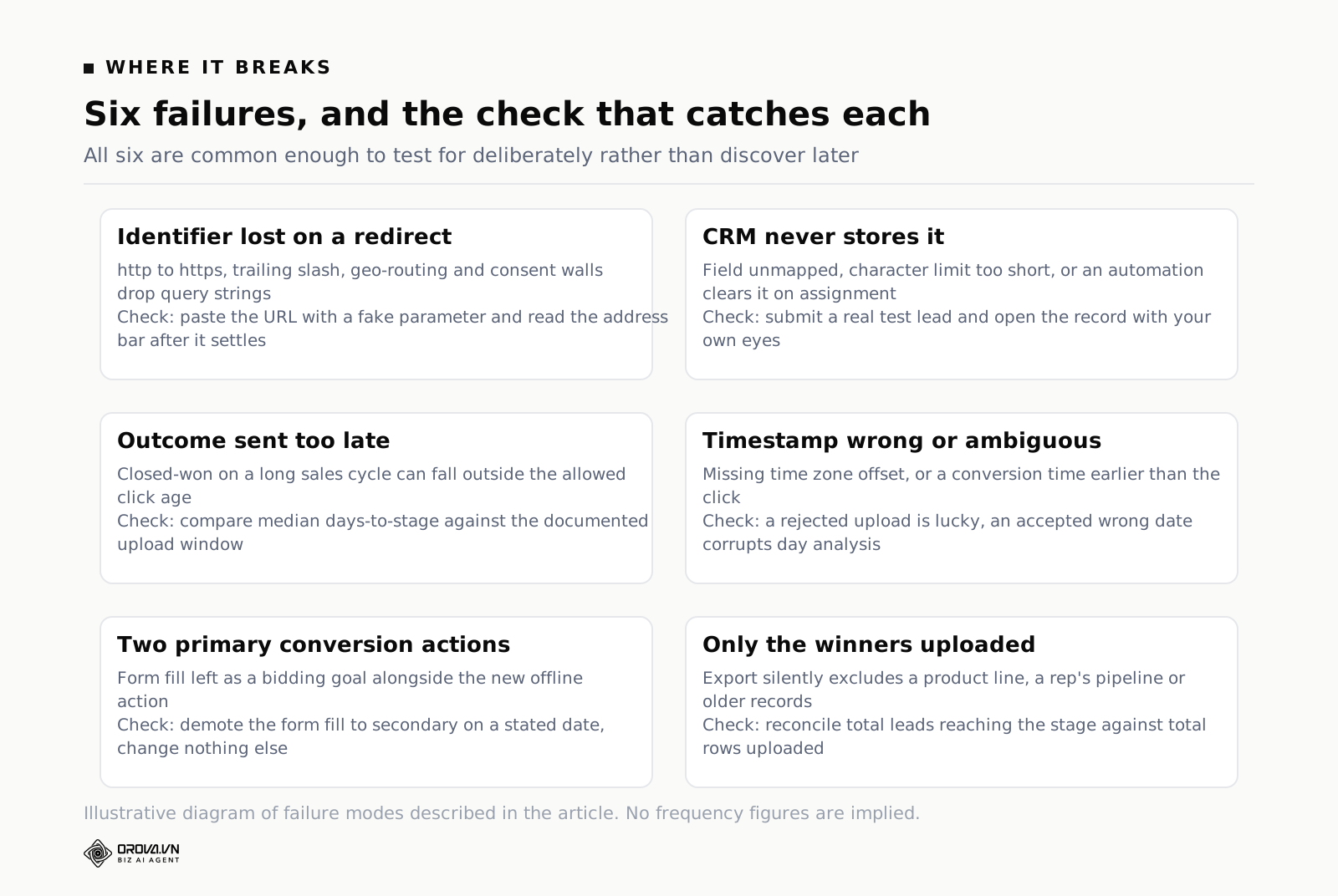
Every one of these is common enough that you should actively test for it rather than wait to discover it.
The identifier is lost on a redirect
The click lands on a URL with the parameter attached, then something redirects: an http-to-https rule, a trailing-slash rule, a geo-router sending the visitor to a country subfolder, a consent wall, a marketing tool's own tracking hop. Many redirects drop query strings by default. The visitor arrives at a perfectly nice page with no identifier in the URL and your capture script finds nothing.
Test it the crude way and it takes four minutes: paste your landing page URL into a browser with a fake identifier appended, hit enter, and look at the address bar after everything settles. If the parameter is gone, that is your entire problem and no CRM work will fix it.
The CRM does not actually store it
The hidden field exists on the form. The form posts. And the value lands nowhere, because the field was never mapped in the CRM's form integration, or it maps to a field with a character limit shorter than the identifier, or an automation clears it during lead assignment. Check by creating a real test lead through the real form and then opening the record in the CRM and looking at the field with your own eyes. Do not trust the form builder's preview.
The outcome is sent too late
Covered above, but it deserves its own line because it is the most expensive mistake here. A pipeline that only uploads closed deals in a business with a long sales cycle will report almost nothing and get switched off as a failure. Pick an earlier predictive event.
The timestamp is wrong or ambiguous
Missing time zone offsets, conversion times that precede the click, a batch export that stamps every row with the export time rather than the event time. Symptoms range from outright rejection to something worse: rows accepted but attributed to a day that has nothing to do with when anything happened, quietly corrupting your day-of-week analysis forever.
Both the form fill and the qualified lead are counted as primary
You add the new conversion action and leave the old one switched on as a bidding goal. Now the bidder is optimising towards two things at once, one of which is the junk you built this whole system to stop buying. The correct move is to demote the form fill to a secondary action — still visible in reporting, no longer part of the bid instruction — and promote the offline event.
Do it once, on a stated date, and write the date down. This is the change that shifts everything else, and if you make it in the same week as a budget change and a new campaign launch, you will never untangle which one caused what.
Only the winners get uploaded
The subtlest failure of the lot. Somebody builds the export to include only leads that reached "qualified", which is correct, but the export silently excludes whole categories of lead: those from a particular product line, those handled by a rep who uses a different pipeline, those created before the field existed. Google now sees a biased sample and optimises towards the slice of the business your export happened to cover. Reconcile total lead count against total uploaded count monthly and investigate any gap you cannot explain.
How Bidding Changes Once Real Outcomes Flow In
Prepare the people around you for this before you flip the switch, because the first month looks like a failure to anyone reading the old dashboard.
Your conversion count falls, often dramatically. That is the entire objective — you replaced a big number that included junk with a smaller number that does not — but it will still be alarming on a chart. Your cost per conversion rises for the same reason, and it is now a completely different metric wearing the old metric's clothes. A cost per qualified lead and a cost per form fill are not comparable and should never be plotted on the same axis.
Then the strategy re-learns. If you are moving an existing campaign from optimising on form fills to optimising on qualified leads, you are effectively resetting the bid strategy's model, and there is a period of instability while it rebuilds. Set the new target in the region your historical data supports rather than the region you wish for; an aggressively low target on a freshly reset strategy is how campaigns lose their volume overnight.
A few things worth doing in that first period:
- Change one thing. New conversion action, old budget, old targeting, old creative. Resist the urge to improve everything at once.
- Give it enough time that a full sales cycle's worth of outcomes has flowed back at least once. Judging in week two means judging on a period where the uploads had not caught up yet.
- Keep the old conversion action visible as a secondary metric. When someone asks whether lead volume collapsed, you want to be able to show that it did not, only the counting changed.
- Watch the search terms report specifically. This is where the shift shows up first and most legibly: queries that used to dominate spend start losing it, and the ones that replace them tell you what the algorithm learned.
- Do not restate your value model in the same month. Changing both the event and its price at once makes the result uninterpretable.
The upside, when it lands, is not subtle. Accounts that make this transition typically find that the ranking of their campaigns by value differs from the ranking by lead volume, and that the budget was allocated according to the wrong ranking. Fixing that allocation is usually worth more than any bid adjustment you have made all year.
A Rollout Plan That Does Not Break The Account
Sequence matters more than speed here. Each phase produces something you can verify before the next phase depends on it.
| Phase | What you do | Done means |
|---|---|---|
| 1. Agree the event | Sales and marketing agree which CRM stage counts, and who is responsible for setting it accurately | One named stage, one owner, written down |
| 2. Prove capture | Auto-tagging on, capture script live, redirects tested, hidden field on the form | A test lead in the CRM with a real identifier in the field |
| 3. Prove storage | Custom fields created, merge and dedupe behaviour tested, outcome and value fields added | Identifier survives a deliberate merge test |
| 4. Manual upload | Conversion action created as an import, first CSV uploaded by hand, still secondary | Rows accepted, conversions visible against the right dates |
| 5. Measure the gap | Compare leads created against leads with an identifier, find and fix the missing slice | Capture rate explained, not just measured |
| 6. Add the fallback | Enhanced conversions for leads configured for the traffic the identifier misses, with deduplication | No lead can produce two conversions |
| 7. Switch the goal | Offline action becomes primary, form fill demoted to secondary, date recorded | One change, one date, nothing else touched |
| 8. Automate and value | Scheduled or API upload replaces the manual file; expected-value model replaces flat values | A month with no human touching a spreadsheet |
Phase 5 is the one people skip and it is the one that determines whether any of this is trustworthy. If only two thirds of your leads carry an identifier, then a third of your revenue is invisible to the bidder, and it is almost certainly not a random third — it will be concentrated in whichever traffic source, device or landing page has the broken plumbing. Finding out which is worth a week on its own.
How Far Manual Work Goes, And Where A Tool Helps
Nearly all of the above is judgement work and should stay in human hands. Deciding which CRM stage represents real intent is a conversation between two departments. Deciding whether to send revenue or gross profit is a finance decision. Auditing why a third of your leads have no identifier is detective work that requires knowing your own site.
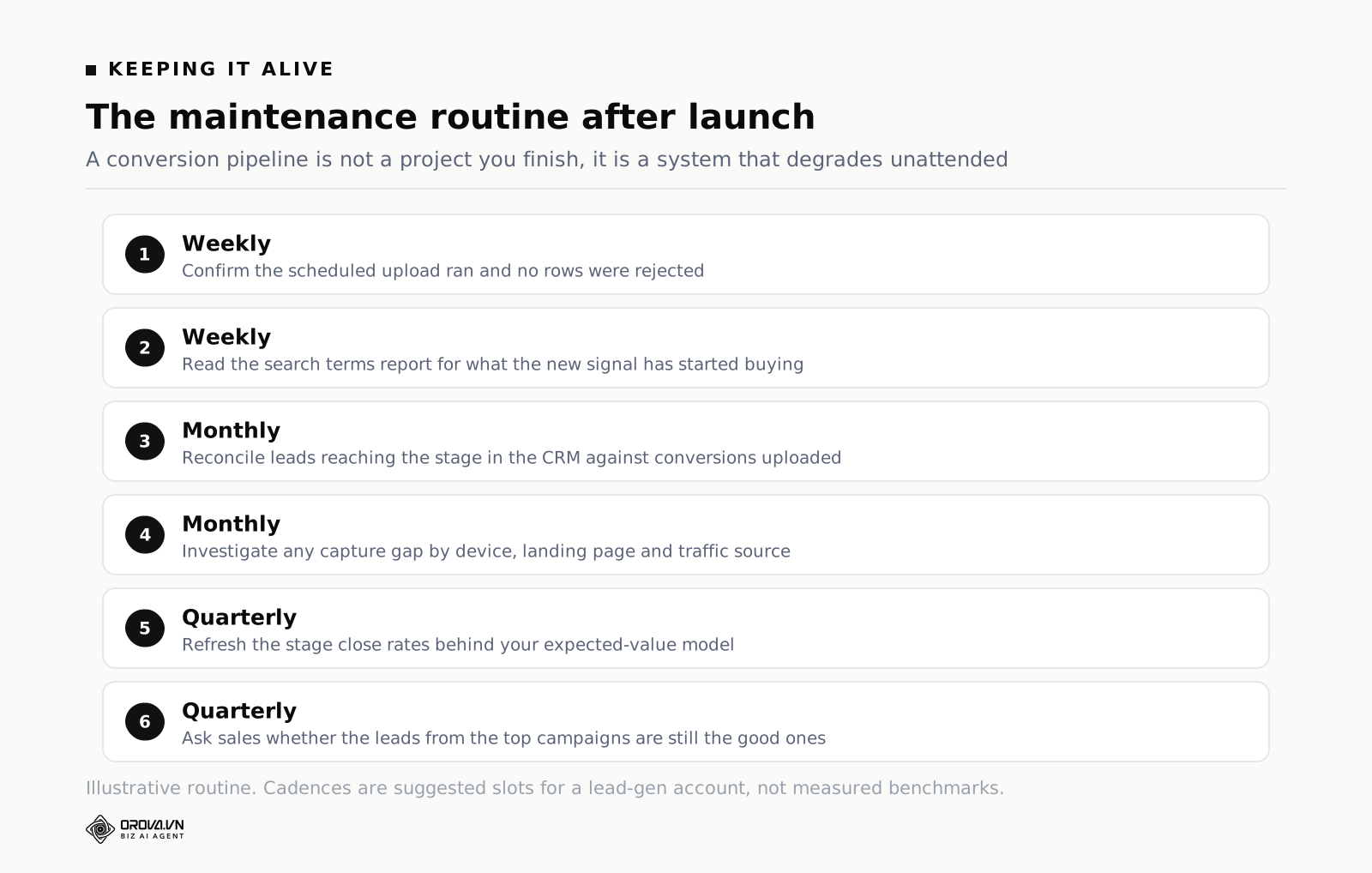
What does not need a human is the repetition. The weekly export, the reconciliation between lead count and upload count, the noticing that a campaign's cost per qualified lead has drifted for three weeks running, the checking that yesterday's scheduled upload actually ran. Those tasks are simple, they are boring, and they are exactly the ones that get skipped during a busy month — which is when a silently broken pipeline can run for six weeks before anyone spots it.
That is the gap Orova Ads is built for. It pulls campaigns, ad groups, ads and daily metrics from Google Ads, Meta and TikTok into one table, so the comparison between platforms does not require three tabs. Its rule sets are written as ordinary sentences with data placeholders, and each set runs on its own schedule, so the weekly checks happen whether or not anyone remembers. Every project also gets its own webhook address for a CRM to post real outcomes back — the Meta side of that is running in production today. By default the AI only advises: each suggestion arrives with its reasoning and the numbers behind it, logged in a history you approve or reject, and you can move to hybrid or fully automatic for individual actions once you trust them. There are 214 optimisation action codes across the three platforms, 101 of them for Google Ads. Signing up is free and includes 1,000 quota with no card required. The judgement stays yours. The not-forgetting does not have to be.
Frequently Asked Questions
Do I have to stop tracking form fills entirely?
No, and you should not. Keep the form-fill conversion action running as a secondary action. It stays in your reports, it tells you whether the top of the funnel is healthy, and it is your control group when someone claims volume collapsed. What changes is that it stops being a bidding goal. Reporting and bidding are two different jobs and only one of them needs to be exclusive.
What happens to my historical reports when I upload old conversions?
They change. Uploaded conversions are credited to the date of the original click, so a report you ran three weeks ago will show different numbers if you run it again today. This is correct and unavoidable. Manage it by defining a reporting lag longer than your typical upload delay, stating that lag on the report, and never comparing a period that has fully matured against one that has not.
Does offline conversion tracking work with Performance Max?
Yes. Performance Max optimises towards the conversion goals configured for the account or campaign, and an imported conversion action can be one of those goals like any other. In practice this is one of the highest-value places to use it, because Performance Max gives you so little visibility into where spend goes that the quality of the conversion signal is close to the only steering wheel you have.
My CRM has no field for the click identifier. Now what?
Create one — in almost every CRM this is a custom text field an administrator can add in a few minutes, and it is the right answer. If that genuinely is not possible because you are on a locked-down system somebody else owns, enhanced conversions for leads is the alternative, since it uses the email address you already store rather than a new identifier. Expect a lower match rate and treat the numbers as a floor.
Will my cost per lead go up after I switch?
The number labelled "cost per conversion" will go up, because it is now measuring a rarer and more valuable event. Your cost per form fill may also rise, because the bidder has stopped chasing the cheapest ones. Neither is a problem by itself. The question that matters is whether your cost per closed deal fell, which is a question you can finally answer once the loop exists.
What about leads that come in by phone rather than a form?
Calls have their own import path. Google supports uploading call conversions matched on the caller's number and the call start time, so a call that becomes a sale can be sent back the same way a form lead can. It requires that your call tracking records both the number and an accurate start time, and it requires the call to have come from an ad-driven number. If your business is mostly phone-led, set this up in parallel with the form path rather than after it, or you will be optimising towards the minority of your leads.
How do I know it is actually working?
Three checks, monthly. One: does the count of uploaded conversions reconcile against the count of leads that reached that stage in your CRM, with any gap explained rather than tolerated? Two: has the ranking of campaigns by value diverged from the ranking by lead volume, and did you move budget accordingly? Three: can somebody in sales look at a campaign name and agree the leads from it are the good ones? If all three are yes, the loop is closed.
What To Do This Week
Do not start by building the pipeline. Start by finding out whether you can.
Take an hour and do three things in order. Open your landing page with a fake identifier appended to the URL and watch whether it survives the redirects. Ask your CRM administrator whether a custom field can be added to the lead object and whether it survives a merge. Then ask one person in sales which stage in the pipeline is the first one they would personally bet money on, and how many days after the enquiry it usually gets set.
Those three answers determine everything else. If the parameter survives, the field can exist, and there is a predictive stage inside the click window, you have a straightforward project with a clear sequence. If any one of them fails, that failure is your entire task this month, and no amount of upload tooling will substitute for fixing it.
And if you only ever get halfway — identifier captured, qualified leads uploaded manually once a week, flat value per lead, nothing automated — you will still be ahead of most accounts in your category. The bidder does not need elegance. It needs to be told the truth about which clicks turned into money.
Getting The Loop Closed Without Living In Spreadsheets
Doing this by hand means someone has to tag every click, keep a clean match between CRM records and Google's identifiers, format the upload correctly, and repeat that process every week without missing a batch. Miss one step and the bidding system quietly drifts back to optimising for form-fills again, and nobody notices until the sales complaints start.
Orova Ads is built to handle that connection automatically, so the outcome from your CRM reaches Google Ads without someone manually stitching the two together each week. If you want to see how it fits your current setup, feel free to take a look.
One webhook per project
Orova Ads gives each project a private link so your CRM can report real conversions back to the platforms.
Start for free