
Negative Keywords in Google Ads: Match Types, Examples, Starter List
You open the search terms report for the first time in months and immediately regret it. People are typing "how to become an electrician," "electrician salary," "free electrical certificate template" — and your ads are showing up, and you are paying for the click. None of this is fraud, none of it is a glitch. Google is simply doing what you told it to do with the keywords you chose, and nobody ever told it what to avoid. That missing instruction is what negative keywords in Google Ads are supposed to fix, and if you have never touched that setting, this is likely where a big chunk of your budget has quietly gone.
The usual fix people try is glancing at the search terms report once in a while and pausing whatever looks obviously wrong. That works for a week, then new junk searches show up and nobody goes back to check. It is a manual, reactive habit — you are always cleaning up spend that already happened instead of blocking it before it happens, and a stale negative list from a year ago does almost nothing against how people search today.
This article walks you through building a real negative keyword list from scratch: how to read your own search terms report and spot the waste, the different ways negatives can block searches, where to place them so they actually apply across your account, and a starter list by business type so you are not staring at a blank page. By the end, you will know exactly which searches to cut and how to stop paying for them going forward.
What Are Negative Keywords in Google Ads?
Negative keywords are terms you tell Google Ads never to match. Add one and your ads stop showing for searches containing it. They come in three match types — broad, phrase and exact — and can be set at account, campaign or ad group level, or in shared lists applied to many campaigns at once.
The mental model that helps most: your keywords describe the shape of the demand you want, and your negatives carve out the shapes you do not. Neither one works alone. A keyword list without negatives is a fishing net with no holes — it catches everything, including the things you have to throw back after you have paid for them.
Two properties make negatives different from regular keywords, and both surprise people.
First, a negative always wins. If a search matches one of your keywords and also matches one of your negatives, the ad does not show. There is no bidding contest, no relevance tiebreak, no "but this keyword is exact match and the negative is only broad". The block is absolute. This is why a careless negative can silently switch off a profitable ad group, and why Google's own diagnostics include a "conflicting negative keywords" check.
Second, negatives are not treated like keywords in the matching engine. Google spent a decade loosening how positive keywords match — plurals, misspellings, stems, abbreviations, accents, and for phrase and broad match, whole rewrites that mean roughly the same thing. Negatives did not get that generosity. Historically, a negative keyword blocks what it literally says and nothing else. Add "electrician" as a negative and "electricians" may still get through. This behaviour has been adjusted by Google more than once, so check the current help documentation for your account rather than assuming — but build your lists on the pessimistic assumption, because the cost of an extra unnecessary negative is nothing and the cost of a missing one is money every day.
There is a third property that matters for anyone running Shopping or Performance Max: those campaign types have no positive keywords at all. You cannot tell them what to match. Negatives are the only keyword-level instruction you get, which makes them far more important there than in a Search campaign where you at least chose the starting point.
The Three Negative Keyword Match Types and Exactly What Each Blocks
The three negative keyword match types use the same brackets and quotes as positive keywords, but their behaviour is not a mirror image of the positive versions. Read this section slowly; almost every expensive negative-keyword mistake traces back to one of these three rules being misremembered.
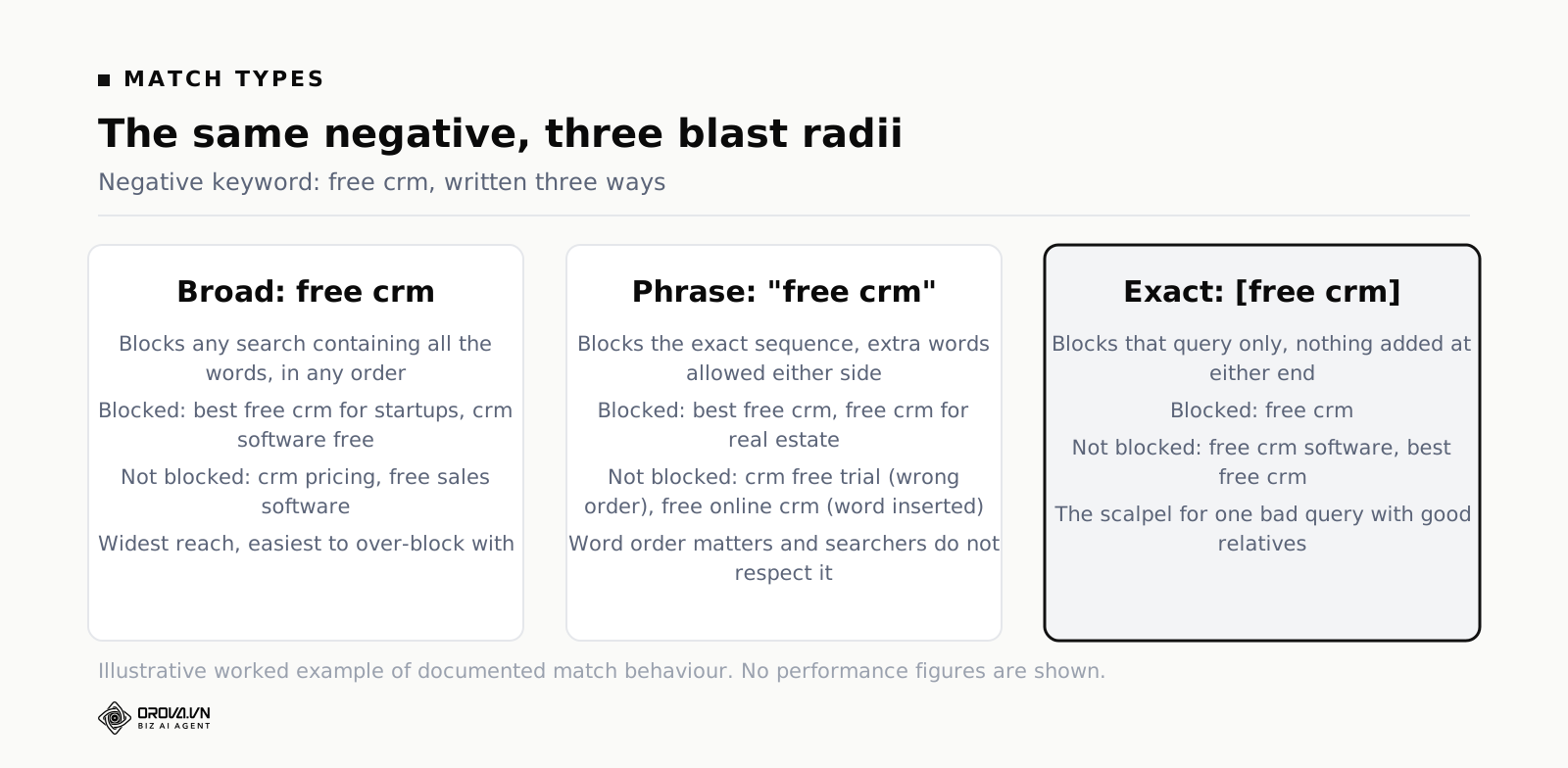
Negative broad match: all the words, any order
Written with no punctuation: free crm.
Your ad is blocked when the search contains every word in the negative, in any order, with anything else around them. It is not blocked if even one word is missing.
So free crm as a negative broad blocks "free crm", "best free crm for startups", "crm software free", and "is there a free crm". It does not block "crm pricing", because "free" is absent. It does not block "free sales software", because "crm" is absent.
The important consequence: a single-word negative broad is a blunt instrument. Adding just free blocks every search containing the word free anywhere — including "free delivery crm setup" and, if you sell anything with a trial, a good chunk of your funnel. Single-word negatives are sometimes exactly right ("jobs", "salary") and sometimes catastrophic ("review", "cheap", "used"). Multi-word negative broad is safer because it requires all the words to co-occur.
Negative phrase match: the exact string, in order, with room around it
Written in quotation marks: "free crm".
Your ad is blocked when the search contains that exact sequence of words, in that order, with nothing inserted between them. Extra words before or after are fine.
So "free crm" blocks "free crm", "best free crm", "free crm for real estate". It does not block "crm free trial" — the words are present but the order is wrong. It does not block "free online crm" — the order is right but "online" was inserted in the middle.
This is the trap that catches experienced people. Negative phrase order matters, and English search behaviour does not respect your preferred word order. Someone shopping for a bargain will type "cheap running shoes", "running shoes cheap", and "cheap shoes for running", and a single negative phrase catches only one of those. If your intent is "block anything about cheapness and running shoes together", negative broad is the correct tool. Use negative phrase when the specific sequence is what makes the search bad.
Exact match negative keywords: that search and only that search
Written in square brackets: [free crm].
Your ad is blocked only when the search is exactly those words, in that order, with nothing added at either end. [free crm] blocks "free crm" and nothing else. It does not block "free crm software", "best free crm", or "free crms".
Exact match negative keywords are a scalpel, and most accounts under-use them. They are the right choice when one specific query is a problem but its relatives are fine. A classic case: you sell project management software and "project management" as a term is your bread and butter, but the standalone search "project management" converts terribly because it is pure research intent, while "project management software for agencies" converts well. Blocking [project management] removes the research query and leaves every qualified variation untouched. Doing the same with phrase or broad would gut the account.
They are also the only safe way to handle a term that is bad on its own and good in combination. "Insurance" alone might be worthless to a niche commercial broker; "marine cargo insurance" might be their best keyword.
The close variant trap: negatives do not expand the way keywords do
This is the rule that costs the most money, so it gets its own heading.
When you add "running shoes" as a positive keyword, Google will happily match it to "running shoe", "runing shoes", "shoes for running" and a dozen other close variants. When you add "running shoes" as a negative keyword, it has traditionally blocked only what it says. The plural, the singular, the typo and the abbreviation are separate entries you have to add yourself.
Practical consequences you will meet:
- Plurals. Blocking job does not necessarily block "jobs". Blocking jobs does not necessarily block "job". Add both.
- Misspellings. "Plumber" is misspelled in search as plumer, plumbr, plumbber and pluber. Each is its own negative if you want it gone.
- Spacing. "Second hand" and "secondhand" are different strings.
- Hyphens and symbols. Google strips or ignores some punctuation in matching and rejects some characters in negative keywords outright. If a negative refuses to save, a symbol is usually why.
- Abbreviations. Blocking do it yourself does not block "diy".
None of this is hard, it is just tedious, and tedium is exactly what gets skipped. The fix is to write negatives in families rather than one at a time. When you block "salary", block "salaries", "wage", "wages", "pay scale" and "how much do" in the same sitting.
Two more mechanical notes. Negative keywords are not case sensitive, so there is no reason to add capitalised variants. And each keyword — negative included — is capped at ten words, which occasionally matters when you try to block a long, specific query and Google refuses it.
Negative Keywords Examples: A Table You Can Copy the Logic From
Abstract rules do not stick. Here are negative keywords examples laid out so you can see the three match types acting on the same term. The business in this example is a company selling accounting software to small firms.
| Negative | Match type | Blocks | Does not block |
|---|---|---|---|
| free accounting | Broad | free accounting software; accounting software free; is accounting free for startups | accounting software pricing; free invoicing tool |
| "free accounting" | Phrase | free accounting software; best free accounting app | accounting software free trial; free online accounting |
| [free accounting] | Exact | free accounting | free accounting software; free accountings |
| jobs | Broad | accounting jobs; jobs in bookkeeping; accounting software jobs | accounting job (singular) |
| "how to become" | Phrase | how to become an accountant; how to become a bookkeeper uk | how do you become an accountant |
| [accounting] | Exact | accounting | accounting software; accounting for small business |
Read the last row again. Blocking [accounting] removes the single most generic, least commercial query in the category while leaving every qualified variation alive. That one line is often worth more than fifty broad negatives, and it is invisible to anyone who has not thought about match types.
Now read the fourth row. jobs as a broad negative is safe here and it is one of the highest-value negatives in almost any account that sells to businesses. But notice it misses the singular. Two entries, not one.
Where Negatives Live: Account, Campaign, Ad Group and Shared Lists
Google gives you four places to put a negative keyword, and choosing the wrong one is how teams end up with the same negative entered fourteen times in eleven campaigns, or with a brand campaign mysteriously getting no impressions.
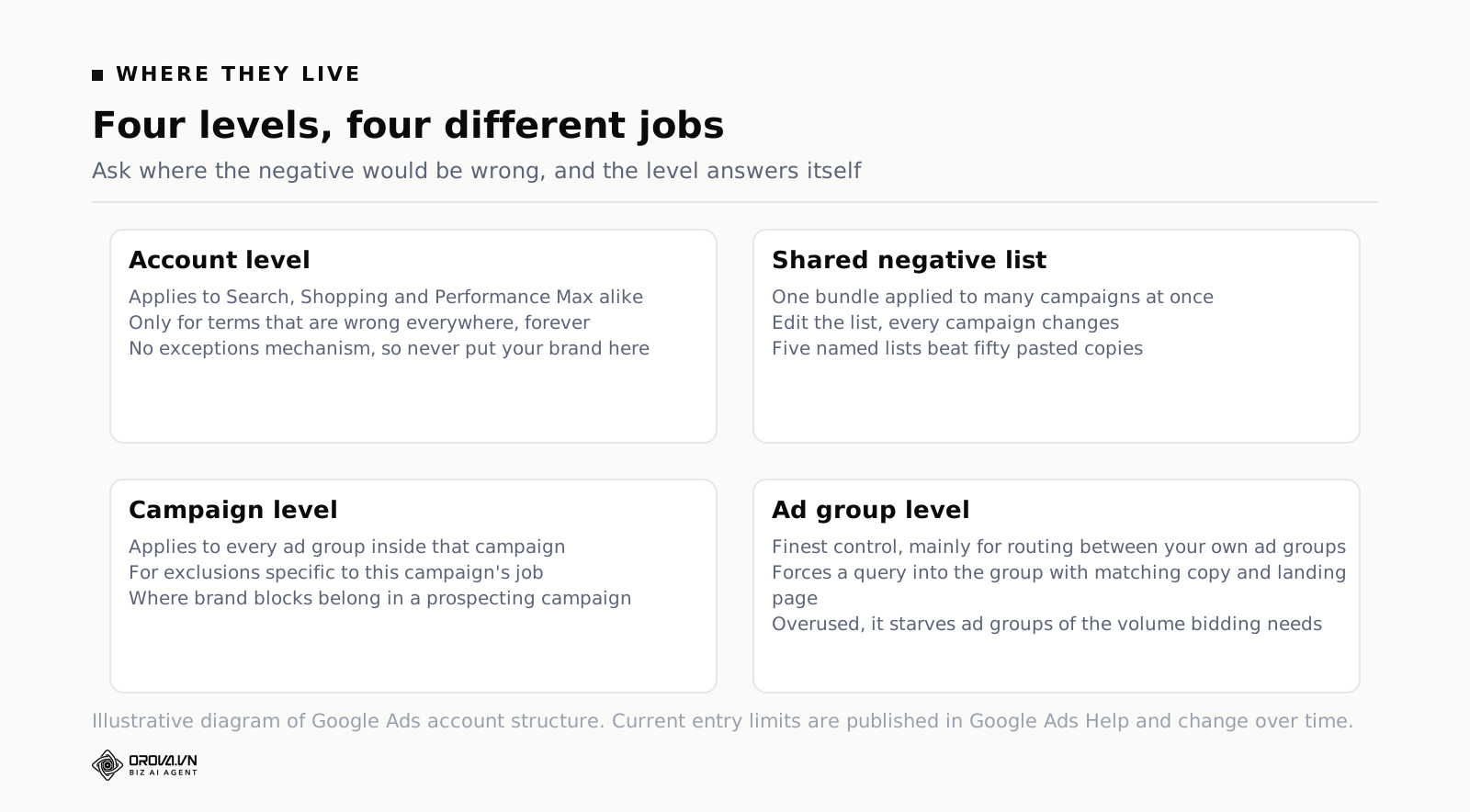
Account level
Account-level negatives apply to everything: every Search, Shopping and Performance Max campaign in the account. This is where the truly universal exclusions belong — adult terms, obviously irrelevant industries, competitor names you never want to touch, and language or region words that signal a market you do not serve. The ceiling on account-level negatives is much lower than at campaign level, which is Google's way of telling you to be selective here. Treat it as a short list of things that are wrong everywhere, forever.
The one rule: never put a term at account level that is bad in most campaigns but good in one. Account level has no exceptions mechanism. If you block your own brand name at account level to keep it out of your generic campaigns, your brand campaign dies too.
Shared negative keyword lists
A shared list is a named bundle of negatives that you build once and apply to as many campaigns as you like. Change the list, and every campaign using it changes. This is the workhorse and the thing most accounts under-use.
A structure that works in almost every account:
- Universal waste — jobs, salary, careers, hiring, internship, courses, training, "how to become", wikipedia, reddit, meaning, definition. Applied to every non-brand campaign.
- Freebie hunters — free, gratis, no cost, sample, trial (only if you have no trial), template, pdf, download, torrent, crack. Applied wherever a freebie search is worthless.
- Competitor names — one list, applied or removed as a single decision when strategy changes.
- Brand terms — your own brand and its misspellings, applied to every generic campaign so brand traffic is forced into the brand campaign where you can price it properly.
- Off-market geography — city and country names you do not serve, for the queries that name a place explicitly even when location targeting is set correctly.
Five lists, each with a clear job, is manageable forever. Twenty lists named "negatives", "negatives 2" and "new negatives Nov" is what happens when nobody decides on a structure up front. If you are rethinking how your account is organised anyway, negatives are worth designing at the same time as everything else — we cover the wider layout question in how to structure a Google Ads account.
Campaign level
Campaign negatives apply to every ad group inside that campaign. This is where campaign-specific exclusions go: terms that are fine elsewhere in the account but wrong for this campaign's job. A prospecting campaign might block your brand; a brand campaign might block generic category terms so it stays cleanly measured.
Ad group level
Ad group negatives are the finest control and the most commonly misapplied. Their real purpose is not blocking waste — it is traffic sculpting between your own ad groups. If you have one ad group for "leather sofa" and another for "leather corner sofa", the search "leather corner sofa" can match both. Adding "corner" as a negative in the plain sofa ad group forces every corner query into the ad group with the corner-specific ad copy and landing page.
This pattern is far less critical than it used to be, because close variant matching means Google will often route the query wherever it likes anyway. Do it when the two ad groups genuinely need different ads. Do not build a fifty-ad-group sculpting maze; it produces low-volume ad groups that never accumulate enough data for smart bidding to learn from.
A rule for deciding the level in three seconds
Ask one question: where would this be wrong?
- Wrong everywhere, always → account level.
- Wrong in a group of campaigns that share a purpose → shared list.
- Wrong in this campaign only → campaign level.
- Right in the campaign but belongs in a different ad group → ad group level.
If you cannot answer confidently, default to the shared list. It is the only level you can change once and have the change propagate, and it is the only level that leaves a readable record of your thinking.
How to Find Negative Keywords in the Search Terms Report
Everything above is plumbing. This is the part that actually saves money, and it is a habit rather than a project.
The search terms report shows what people typed, as opposed to the keywords report which shows what you bid on. In Google Ads it sits under the campaign's keyword section as "Search terms". It is not complete: Google withholds queries that do not meet a privacy threshold, so a portion of your spend will sit in rows labelled "other search terms" that you cannot see or block individually. That is annoying and it is not going to change. Work with what is visible, which in most accounts is more than enough to find the waste.
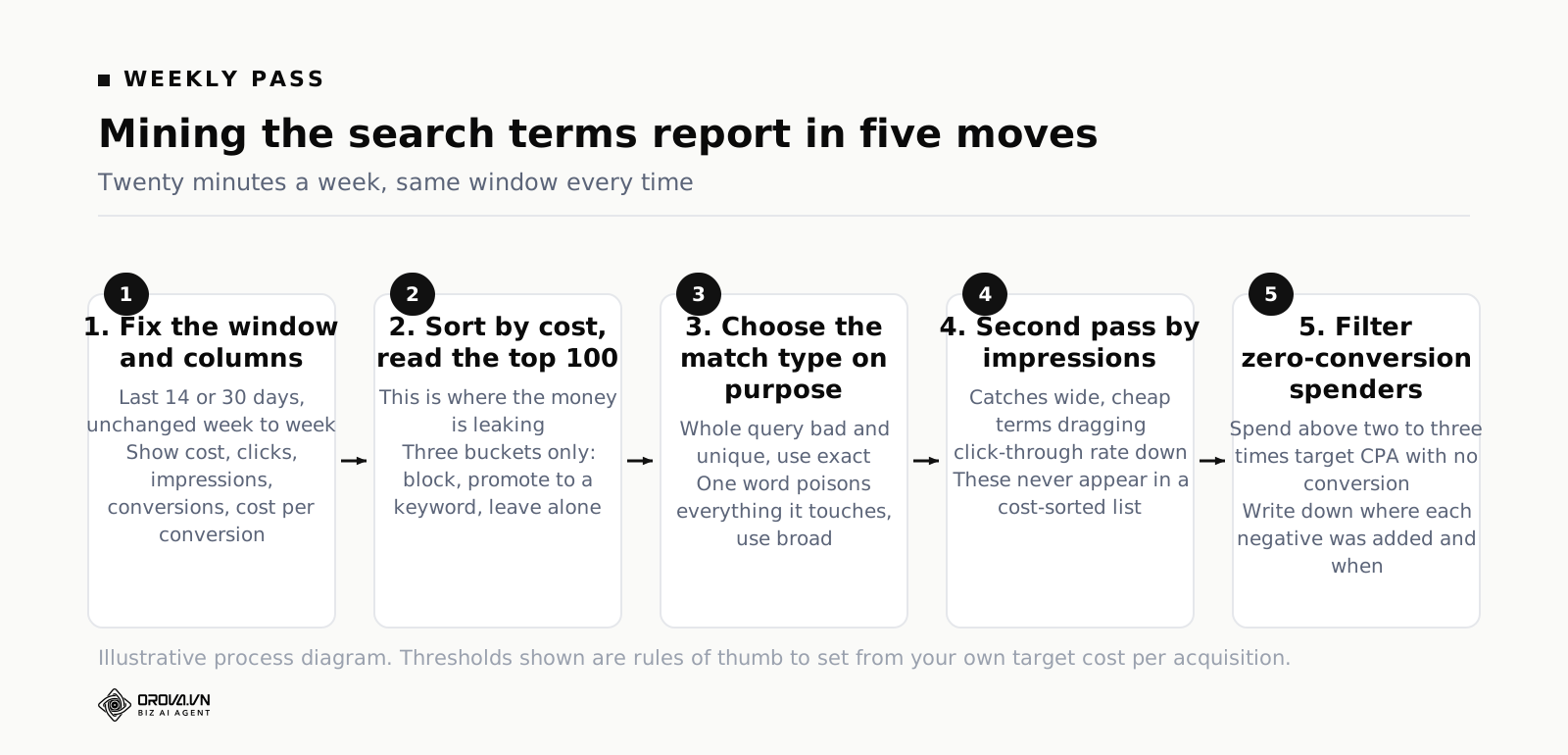
The weekly mining pass, step by step
- Set a fixed window. Last 14 days for accounts spending daily, last 30 for slower ones. Use the same window every week so you can tell whether the waste is shrinking.
- Add the columns you will actually judge on. Cost, clicks, impressions, conversions, cost per conversion. Without conversions in view you are guessing about whether a strange-looking query is bad.
- Sort by cost, descending. Read the top hundred rows. This is where the money is. Twenty minutes of reading here beats an hour anywhere else in the account.
- Sort each row into one of three buckets. Block it, promote it to a keyword of its own, or leave it alone. Most rows are "leave it alone" and that is fine — the job is to catch the outliers, not to have an opinion about everything.
- Choose a match type per block, deliberately. Is the whole query worthless, or one word in it? Whole query and it is unique → exact. One word or word pair poisons everything it touches → broad. A specific sequence is the problem → phrase.
- Second pass: sort by impressions. This surfaces terms that are wide but cheap — searches getting thousands of impressions, few clicks, and quietly dragging your click-through rate down. These rarely show up in a cost-sorted list.
- Third pass: filter for clicks above a threshold with zero conversions. Set the threshold at roughly two to three times your target cost per conversion in spend. A term that has taken three times what a customer is worth and produced nothing has told you what it is.
- Record where you put each negative. A dated note in a shared document is enough. When a campaign's volume falls off a cliff in four months, this document is how you find out why in ten minutes instead of a day.
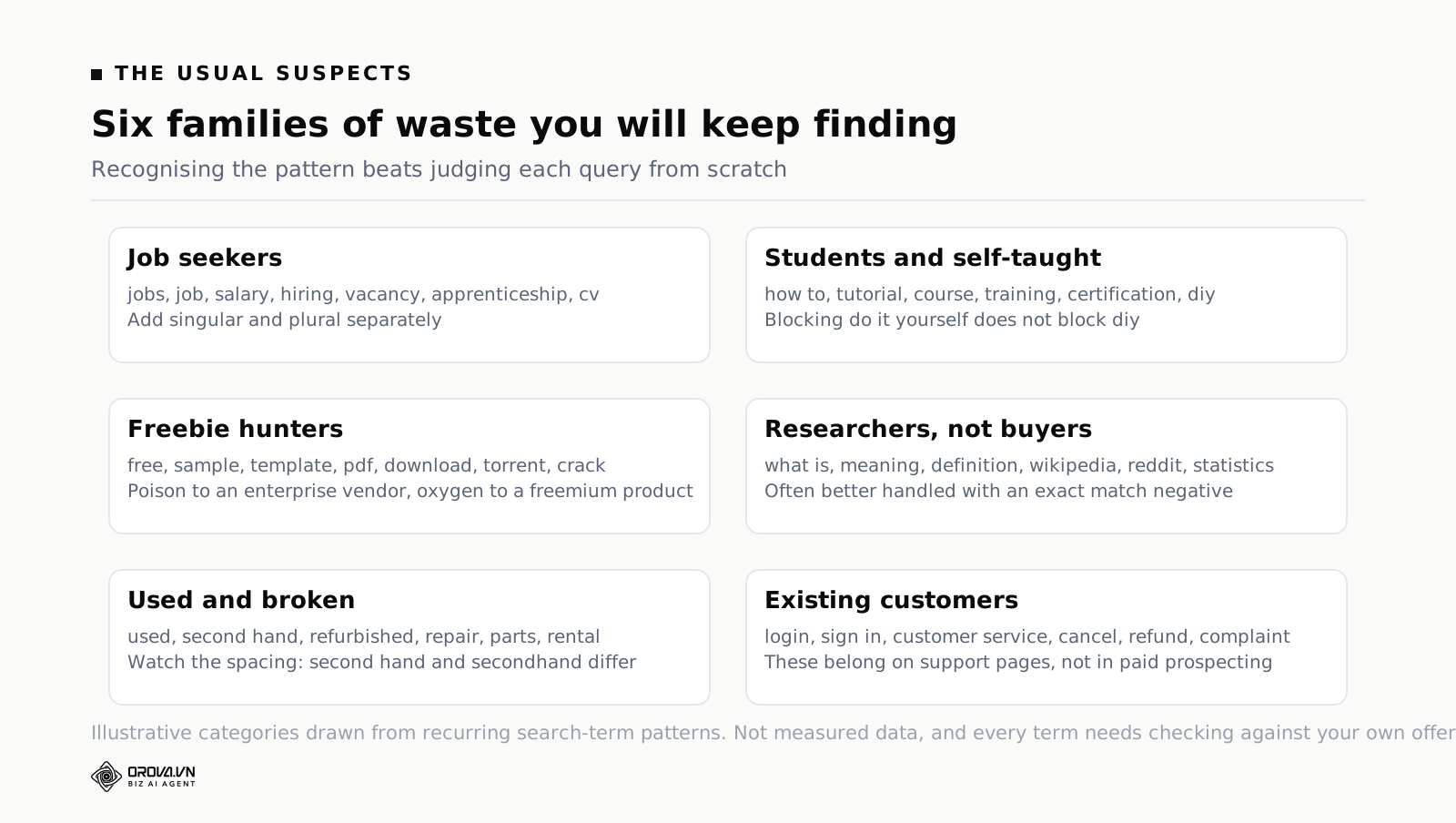
The categories of waste you will keep finding
After you have done this in a few accounts, the same families appear over and over. Knowing them in advance turns a two-hour first pass into a thirty-minute one.
- Job seekers. jobs, job, career, careers, salary, salaries, hiring, vacancy, vacancies, recruitment, apprenticeship, internship, cv, resume. Almost universally worthless unless you are recruiting.
- Students and the self-taught. how to, tutorial, course, courses, training, certification, diy, "do it yourself", guide, learn, exam, syllabus.
- Freebie hunters. free, gratis, no cost, sample, samples, template, templates, pdf, download, torrent, crack, cracked, nulled.
- Researchers, not buyers. what is, meaning, definition, wikipedia, reddit, quora, statistics, history of, examples of.
- The used and the broken. used, second hand, secondhand, refurbished, repair, fix, parts, spare, rental, hire, borrow.
- Existing customers looking for support. login, log in, sign in, customer service, contact number, cancel, refund, complaint, scam, lawsuit, "is it legit". These belong in organic support pages, not in a paid prospecting campaign.
- Wrong geography. Named cities, countries and regions you do not serve. Location targeting handles where the person is; it does not handle a person in your city searching for a supplier in another one.
- Wrong buyer. wholesale, bulk, supplier, manufacturer, distributor, franchise — if you sell retail. Or the inverse if you sell trade only.
A Starter Negative Keywords List by Business Type
A starter negative keywords list is not a substitute for reading your own data. It is a way of skipping the first month of paying to learn things everyone in your category already knows. Load these on day one, then let the search terms report tell you what is specific to you.
Every list below assumes negative broad match unless a term is marked otherwise, and every one of them needs a check against your own offer before you paste it in. If you sell templates, do not block "template".
Universal — applies to almost every advertiser
jobs, job, salary, salaries, career, careers, hiring, vacancy, recruitment, internship, apprenticeship, cv, resume, wikipedia, reddit, meaning, definition, "what is", "how to become", "is it worth it", scam, lawsuit, complaint, free porn and the rest of the adult family, and the names of any large brand in your category that you would never want to be compared against in a search ad.
Lead generation and professional services
Your waste is students, competitors' staff, and people who want to do it themselves.
- diy, "do it yourself", "how to", tutorial, guide, checklist, template, templates, sample, samples, example, examples, pdf, worksheet, spreadsheet
- course, courses, training, certification, qualification, degree, apprenticeship
- software, app, tool, platform — if you sell a done-for-you service and not a product
- jobs, salary, "hourly rate", "how much do", "average cost" — the last two are debatable and worth checking; some accounts find pricing research converts fine
- [consultant], [agency], [lawyer] and other single-word category terms as exact match negatives, leaving every qualified variation alive
Ecommerce
Your waste is bargain hunters outside your price band, people looking for spare parts, and marketplace shoppers who were never going to leave the marketplace.
- free, freebie, giveaway, "win a", competition, sweepstake
- used, "second hand", secondhand, refurbished, preloved, "pre owned", auction
- repair, fix, parts, spare, replacement, manual, instructions, "how to make", "how to build", diy
- wholesale, bulk, supplier, manufacturer, dropship, dropshipping, alibaba
- amazon, ebay, etsy, temu and other marketplaces — unless you sell there and want the visibility
- rental, hire, borrow, subscription — if you only sell outright
- "coupon code", "promo code", "discount code" — only if you never run promotions; if you do, these can be your cheapest conversions
Local service businesses
Your waste is national brands, trade suppliers, and every neighbouring town you do not drive to.
- diy, "how to", tutorial, "step by step", youtube
- jobs, salary, apprenticeship, "become a", course, training, licence, license, certification
- supplies, supplier, wholesale, "tool hire", "equipment rental", parts
- free, "free quote" only if you charge for assessments, "council", "government grant" unless you handle grant work
- every city, suburb and postcode outside your service radius, added as broad negatives — this catches the person sitting in your town searching for a tradesperson three counties away
- national competitor brand names, which soak up an enormous share of local generic searches
SaaS and software
Your waste is the free tier crowd, the pirates, and your own existing users.
- free, "free forever", "open source", opensource, github, "self hosted", "no credit card" — unless a free tier is genuinely your acquisition model, in which case invert this and bid on it
- crack, cracked, nulled, torrent, keygen, "serial key", "license key", "activation code"
- login, "log in", "sign in", password, "reset password", support, "customer service", cancel, refund, "cancel subscription"
- jobs, salary, careers, "engineer salary", glassdoor
- tutorial, documentation, docs, api, sdk, "how to use", "how to build", "build your own"
- student, academic, nonprofit, charity discount — if you do not offer those programmes
Two warnings about all four lists. First, they are starting points assembled from patterns that recur across accounts, not measured results — the only proof that a negative belongs in your account is your own search terms report. Second, some of the terms above are the most valuable words in someone else's account. "Free" is poison to an enterprise vendor and oxygen to a freemium product. Read every line before you paste.
Negatives, Broad Match and Smart Bidding
Broad match changed what negative keywords are for. In an account built on exact and phrase match, negatives were a tidying tool. In an account built on broad match plus smart bidding — which is what Google now pushes almost everyone toward — negatives are the steering wheel. They are one of the few remaining places where you tell the machine, in plain terms, where not to go.
Three things worth understanding about how they interact.
Negatives constrain the auction, not the bidding model's ambition. Smart bidding will keep trying to find conversions wherever it thinks they are. Negatives remove options from the menu; they do not change the appetite. If you block a wasteful theme, the budget does not evaporate — it goes somewhere else, which may be better or may just be differently wasteful. Blocking waste and then not watching where the money went is a half-finished job.
Over-restriction genuinely hurts broad match. A broad match campaign with two thousand negatives layered on top has been narrowed into something that is neither broad nor deliberately targeted. Smart bidding needs conversion volume to learn. If your negative list is so aggressive that ad groups drop below a handful of conversions a month, the bidding model gets worse and no amount of query purity compensates. There is a real trade-off here, and the right answer is usually fewer, better-chosen negatives rather than more.
Conflicting negatives are more common than you think. When a negative blocks one of your own active keywords, Google flags it, but the flag is easy to miss and the damage is silent — the keyword simply stops serving. Check the conflicting negative keywords report whenever a keyword's impressions fall to zero without an obvious cause. Nine times out of ten someone added a broad negative in a shared list six weeks ago.
Once you have cleaned the query stream, the natural next question is whether to spend more where things are now working. That is a bidding question rather than a keyword question, and the tool for it is the one most accounts never open — see google Ads PPC: How It Works and What You Actually Pay before you raise a target and hope.
Negative Keywords and Performance Max
Performance Max has no keywords, which means it also has no obvious place to say no. This is the single most common complaint about the campaign type and the reason a lot of advertisers describe it as a black box.
The controls that do exist, in rough order of reach:
- Account-level negative keywords. These apply to Performance Max. For a long time this was the only lever, which is why account-level negatives suddenly became important to people who had ignored them for years.
- Campaign-level negative keywords for Performance Max. Google rolled this out after long-running pressure from advertisers. Availability has arrived in stages, so open one of your Performance Max campaigns and look rather than trusting any article, including this one, about what your account can do today.
- Brand exclusions. A separate control from negative keywords, aimed at keeping Performance Max out of brand searches — your own or other companies'. If your goal is to stop Performance Max cannibalising your brand Search campaign, this is usually the correct tool rather than a negative keyword.
- Search themes. These are inputs, not filters. They tell Performance Max what to lean toward. They do not exclude anything, and adding more of them will not fix a query problem.
The reporting side is thinner too. Performance Max gives you a search terms view that is grouped into categories rather than individual queries, so the weekly mining pass described above is coarser here. Do it anyway. Category-level waste is still waste, and a category that has taken real spend with no conversions is a strong enough signal to act on.
One practical habit: if you run both Performance Max and Search in the same account, treat your account-level negative list as shared infrastructure. Anything you learn from the Search search terms report — which is far more granular — should be considered for the account list, because it is the only way that knowledge reaches your Performance Max campaigns.
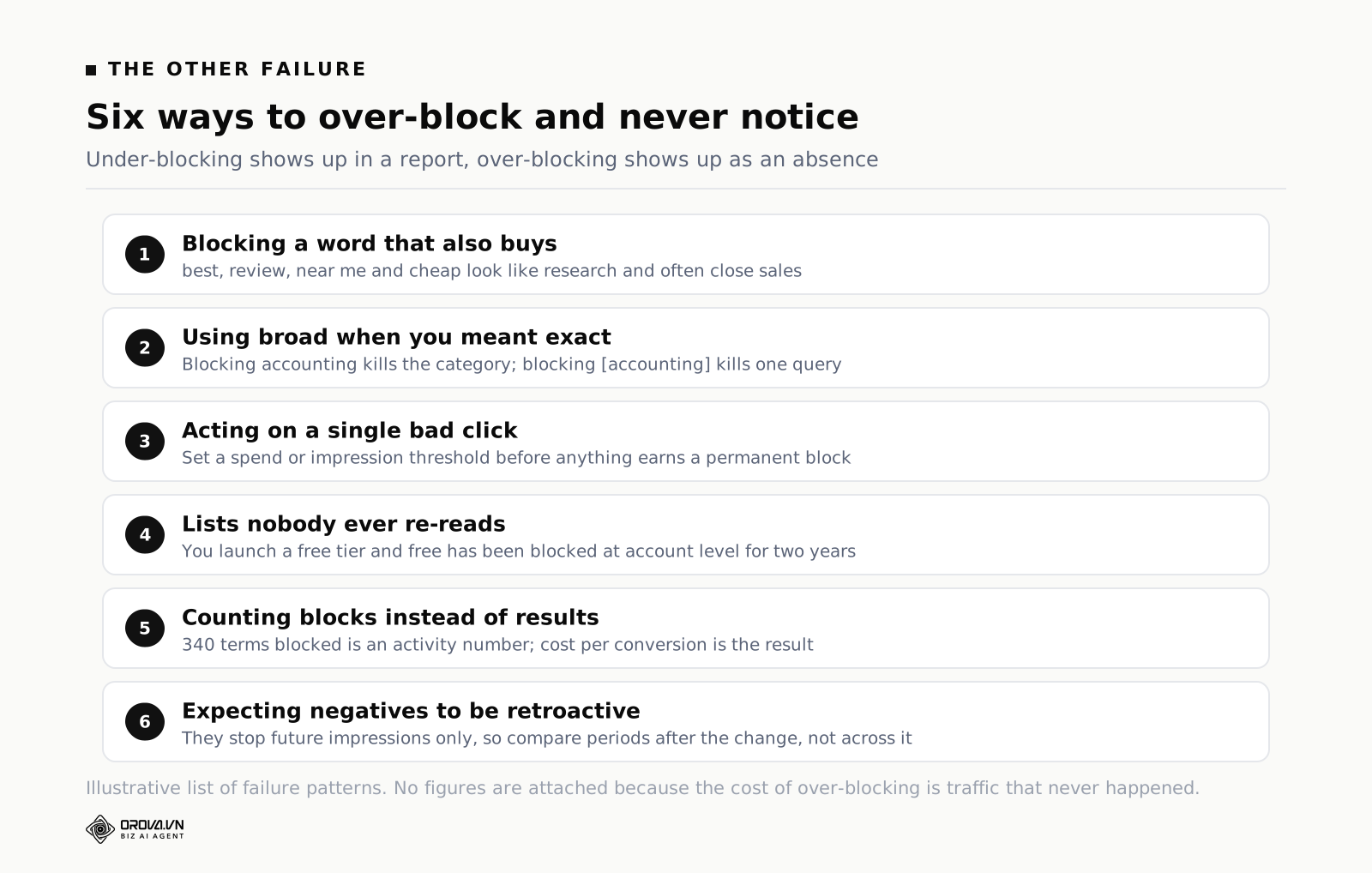
How to Avoid Over-Blocking
There is a stage in every account owner's life where negative keywords become fun. You find one, spend stops leaking, and it feels like winning. Then you find another eighty, and three months later the account is starved and nobody can explain why.
Over-blocking is harder to detect than under-blocking, because under-blocking shows up as visible waste in a report and over-blocking shows up as an absence — traffic that never happened, in a row that does not exist. Here is what causes it.
Blocking a word that also appears in buying queries
"Review" looks like research intent and is often late-stage commercial intent. "Cheap" is worthless to a premium brand and is the core of a discount retailer's business. "Near me" is a strong local buying signal that some advertisers block by reflex. "Best" is one of the most commercially valuable words in search. Before you add a single-word broad negative, run that word through the search terms report as a filter and look at what it has actually converted. Thirty seconds of checking prevents most of these.
Using broad when you meant exact
The query "accounting" is worthless. Blocking accounting as a broad negative removes every accounting search you have. Blocking [accounting] removes one query. The difference between those two lines is an entire campaign. Whenever the problem is "this specific short query has bad intent", the answer is exact match.
Acting on a single bad click
One click, no conversion, and into the negative list it goes. This is how accounts accumulate negatives that block nothing useful and occasionally block something valuable. Set a threshold before you start: a term needs to have spent something meaningful — a reasonable rule is two to three times your target cost per acquisition — or received enough impressions to be a pattern, before it earns a permanent block. Anything below that is noise.
Building lists nobody ever reviews
Businesses change. You launch a free tier and forget that "free" has been blocked at account level for two years. You start serving a new city that is sitting in your geographic negative list. You stop selling refurbished goods, or you start. Put a quarterly reminder in the calendar to read your negative lists from top to bottom. It takes twenty minutes and it is the cheapest audit in the account.
Measuring the wrong thing
"We blocked 340 wasted search terms this quarter" is a satisfying sentence and it is not a result. The result is what happened to cost per conversion and to total conversions. If blocked spend went up and conversions went down, the negatives were too aggressive, however good the cleanup felt. This is the same failure mode as every other activity metric that gets reported because it is easy to count — a pattern worth recognising generally, which we go through in best SEO Keyword Research Tools (Free and Paid Compared).
Forgetting that negatives are not retroactive
Adding a negative stops future impressions. It does not remove the historical data, and it does not refund the spend. This matters when you are judging a campaign's performance after a big negative cleanup: the trailing thirty-day numbers still contain the waste you just removed. Compare periods after the change, not across it.
A Cadence You Can Actually Keep
The reason most accounts have bad negative lists is not ignorance. It is that search term mining is boring, never urgent, and has no deadline. The fix is a schedule small enough that you do not skip it.
| When | What | Roughly how long |
|---|---|---|
| Weekly | Search terms sorted by cost, top 100 rows, last 14 days. Block, promote or leave. | 20 minutes |
| Weekly | Filter: clicks with spend above 2–3× target CPA and zero conversions. | 5 minutes |
| Monthly | Search terms sorted by impressions. Catch the wide, cheap, CTR-dragging terms. | 15 minutes |
| Monthly | Check the conflicting negative keywords report. Confirm nothing valuable is blocked. | 5 minutes |
| Monthly | Performance Max category-level search terms view. Act on categories with spend and no conversions. | 10 minutes |
| Quarterly | Read every shared list and account-level negative from top to bottom against the current offer. | 30 minutes |
| Quarterly | Compare cost per conversion and total conversions before and after the last quarter's blocks. | 15 minutes |
That is about ninety minutes a month for one account. If you run five, it is closer to a working day, and that is roughly the point at which the arithmetic changes.
When to Do This by Hand, and When a Tool Earns Its Place
For one account with a modest budget, do all of the above by hand. You will learn more about your customers in three weeks of reading search terms than from any dashboard, and the volume is small enough that a spreadsheet handles it.
The manual approach breaks at a predictable point, and it is not about budget size. It breaks when the number of judgements per week exceeds the number of careful judgements you have time to make. Three specific things get hard first. Applying a consistent threshold — "flag anything that has spent more than twice target CPA with no conversion" — across thousands of rows in several accounts every Monday. Keeping the same negative decisions synchronised across Google, Meta and TikTok when the same wasteful theme shows up on all three. And remembering, four months later, why a particular negative was added and by whom.
That last one is the argument for tooling more than any speed benefit. In Orova Ads the rules are written as ordinary sentences with data variables in braces, so "flag search terms where spend is above twice target CPA and conversions equal zero" stays legible to whoever inherits the account, and every suggestion the system produces is logged in a history tab with its reasoning and the numbers behind it, plus whether a human approved it, rejected it, or let it expire. The library behind that is 214 optimisation action codes across Google, Meta and TikTok, 101 of them on Google alone, and each one exists in two variants: an advisory code where the system recommends and you act, and an execution code where it is allowed to act for you. Three operating modes cover the middle ground — advisory, hybrid and automatic — with advisory as the default, because handing query control to any system before you trust its judgement is how people lose a quarter. There is a detail that tells you something about how these things are built: the platform refuses to combine ad accounts billed in different currencies rather than converting them quietly, since a wrong exchange rate silently corrupts every cost threshold downstream, and a blocked report is cheaper than a confidently wrong one.
Whatever you use, the order does not change. Read your own search terms first, decide your thresholds yourself, and only then automate. Automating a bad rule just produces bad decisions faster.
Frequently Asked Questions
How many negative keywords should an account have?
There is no correct number, and chasing one leads to over-blocking. A healthier measure is the share of your spend going to search terms you would not have chosen. Check it monthly. If it is falling, your negatives are doing their job regardless of whether there are eighty of them or eight hundred. A mature account that has been mined weekly for a year typically has a few hundred negatives spread across shared lists, and adds only a handful each week.
Do negative keywords lower my quality score?
Not directly. Negatives have no quality score of their own. Indirectly they usually help, because removing irrelevant impressions raises click-through rate on the keywords that remain, and expected click-through rate is a component of quality score. The effect is real but slow, and it is not a reason to add negatives on its own.
Can I use negative keywords in Shopping and Performance Max campaigns?
Yes. Shopping campaigns have no positive keywords, so negatives are the only keyword control available and are correspondingly important. Performance Max accepts account-level negatives, and campaign-level negatives have been rolled out to advertisers in stages — check inside one of your own campaigns rather than assuming. Brand exclusions are a separate control aimed specifically at brand queries.
What is the difference between a negative keyword and a negative keyword list?
A negative keyword is one term with one match type. A negative keyword list is a named bundle of them that can be applied to many campaigns at once, so editing the list changes every campaign using it. Use lists for anything you would otherwise paste into more than two campaigns.
Why is my ad still showing for a term I blocked?
Four usual causes, in order of likelihood. The match type is narrower than you thought — a negative phrase does not catch a different word order, and a negative exact catches only the identical query. The blocked term is a close variant rather than the literal string you entered, such as a plural or a misspelling. You added it at ad group level and the impressions came from a different ad group. Or you added it to a shared list that is not applied to the campaign in question. Check in that order.
Should I block competitor brand names?
It depends on whether you can beat them on the landing page. Competitor traffic is expensive, has poor quality scores and converts unevenly, but for some categories it is the only high-intent volume available. The decision belongs in one shared list so you can switch it on or off as a single choice rather than hunting through campaigns. Test it deliberately with a fixed budget and a deadline, then measure cost per conversion against the rest of the account before you decide.
Do negative keywords work across Search Partners and Display?
Negatives apply on Search Partners the same way they do on Google Search. Display and Video are different: negative keywords there work as content exclusions rather than query blocks, and the three match types do not apply in the same way. Do not assume a list built for Search behaves identically when applied to a Display campaign.
What to Do This Week
Monday. Open the search terms report for your biggest campaign, set the range to the last ninety days, sort by cost and read the top hundred rows. Do not add anything yet. Just read, and add up the cost of the rows you would never have chosen. That number is your baseline and it is the only argument you will need for spending twenty minutes a week on this forever.
Tuesday. Build two shared lists and no more. One called "universal waste" with the job, study and research terms. One called "brand" with your own name and its common misspellings, applied to every generic campaign. Two lists, applied properly, will do more than fifty negatives pasted campaign by campaign.
Wednesday. Go back to the ninety-day report and find the three most expensive individual queries with no conversions. Decide the match type for each one deliberately rather than by habit — ask whether the whole query is the problem or one word inside it — and add them at the right level.
Thursday. Open the conflicting negative keywords report. If anything valuable is blocked, you have just found money that was already yours.
Friday. Put a recurring twenty-minute slot in your calendar for the same time every week and name it "search terms". That single calendar entry is worth more than every list in this article, because the lists go stale and the habit does not.
Stop Doing This Cleanup By Hand Every Month
Building a solid negative keyword list once is doable in an afternoon. Keeping it accurate every week — reading fresh search terms, catching new junk searches, updating lists across every campaign — is the part that quietly eats your time, and it is the part most people give up on after a month or two.
Orova Ads is built to handle that ongoing part for you, scanning your search terms and applying negative keywords automatically so your account stays clean without you logging in every day. If manually checking reports isn't something you want on your weekly to-do list, it's worth taking a look at how Orova Ads handles it.
Turn your negative-keyword rules into policy
Write the rule once in plain language; Orova Ads applies it across campaigns and logs every change.
Start for free