
Google Customer Match: Setup, Limits, Match Rates
Almost everybody meets google customer match the same way. Somebody exports the customer table, saves it as a spreadsheet, uploads it, waits, and then opens the audience manager to find a number that looks nothing like the number of rows they sent. Twelve thousand customers went in. The segment says it is too small to serve. Nothing in the interface explains which half of that sentence is your fault.
The reason is that the feature has two lives. In your spreadsheet it is a list of people you know. Inside Google it is a set of hashes that either do or do not line up with signed-in accounts that are active and have not switched personalised ads off. Everything that frustrates advertisers happens in the gap between those two lives, and almost none of it is documented in the place you are standing when you hit the problem.
This is the working version. What the feature does that an ordinary remarketing tag cannot, the eligibility tiers that quietly decide whether you get real targeting or only observation, the normalisation and hashing rules field by field as Google publishes them in August 2026, the 540-day clock running under every list, why the matched population is always smaller than the file, the three jobs actually worth the effort, and a plain statement of the one thing our own product does not do here. Every technical claim below was checked against Google's own help pages, policy pages and developer documentation in August 2026, because two of them changed in ways most guides have not caught up with.
What does google customer match actually do?
Customer Match takes contact details your customers gave you, matches them against signed-in Google accounts, and turns the overlap into an audience segment you can target, observe or exclude. As of August 2026 Google's help documentation lists it as available on Search, the Shopping tab, YouTube, Gmail and Display.
The important word in that sentence is gave. A remarketing tag builds an audience out of behaviour it observed on your own property: this browser saw this page, this app opened this screen. Customer Match builds an audience out of a relationship you already have. The person does not need to have visited recently. They do not need to have visited at all in the window your tag remembers. They need to have handed you an email address or a phone number at some point, and to be signed in to a Google account under details that line up.
That difference sounds academic until you look at what each one can and cannot reach. A tag cannot reach the customer who bought over the phone, or in a shop, or through a reseller, or two years ago on a device that has since been replaced. Your customer table can. Equally, a tag knows exactly what somebody did on Tuesday and Customer Match knows nothing about behaviour at all — it knows only that this person is on a list you decided to make.
So the two are not competitors and the choice is not either-or. They answer different questions. The tag answers "who is in the middle of something with us right now". The list answers "who has ever been a customer, and what would we like to say to them that is different from what we say to strangers". If your account is currently running everything off tags, the list is the layer you are missing rather than the layer you should replace.
Can your account even use it? The eligibility gate
This is the part that catches new accounts, agency-managed accounts and anybody who has just migrated to a fresh customer ID. The feature is not simply on or off. Google's Customer Match policy, checked in August 2026, describes two doors, and which one you walk through decides what the list is allowed to do once it exists.
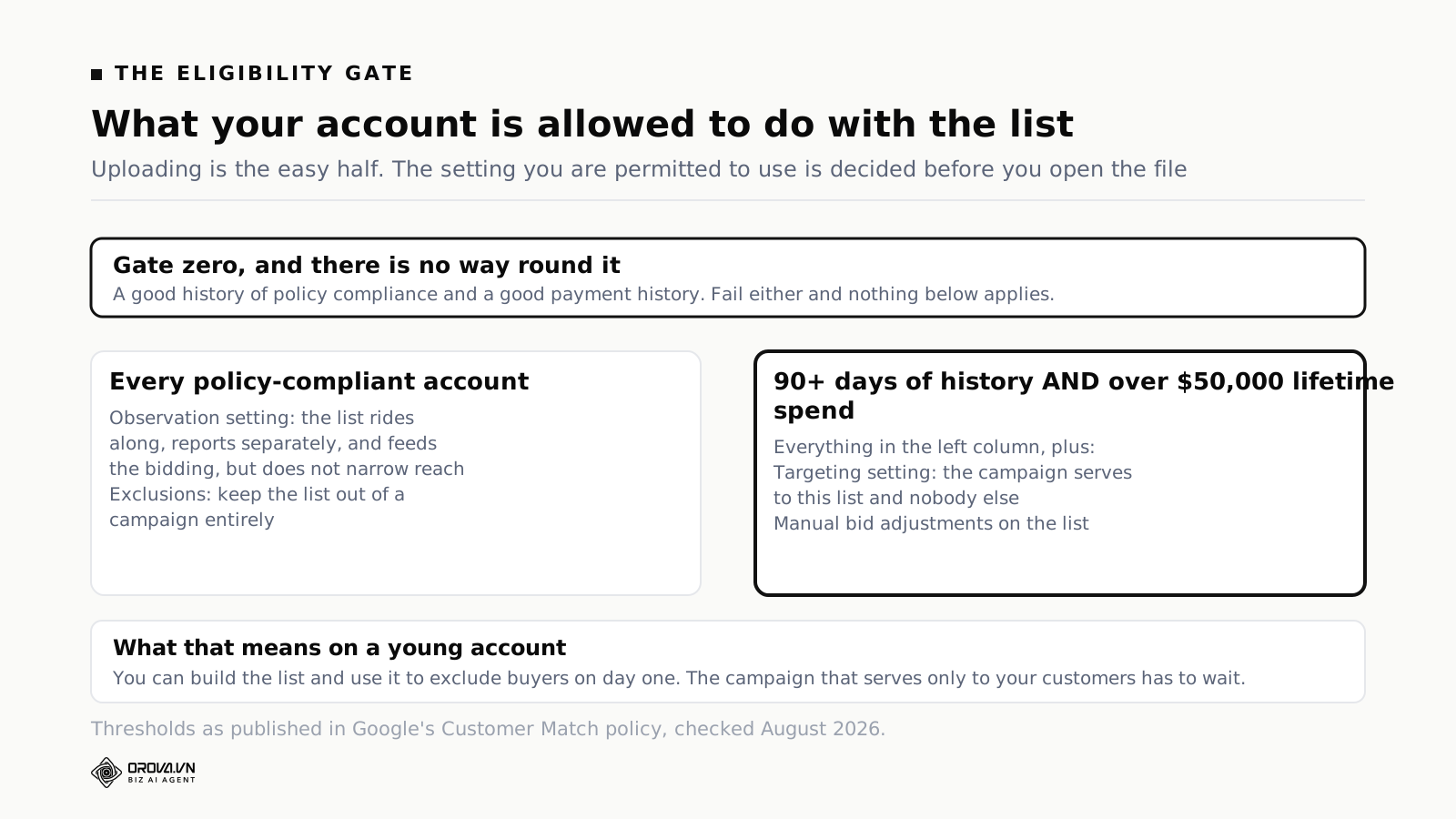
Before either door there is a condition with no threshold attached to it: the policy asks for a good history of policy compliance and a good payment history. There is no number published for either, and no dashboard that shows you where you stand. In practice it means an account with live disapprovals, a recent billing failure or a history of policy strikes is not a good candidate for a first Customer Match upload, and you should clean those up first rather than treat the upload as the fix.
Past that, every policy-compliant advertiser can use Customer Match lists in the Observation setting and for Exclusions. Accounts with more than 90 days of Google Ads history and more than fifty thousand US dollars of total lifetime spend can additionally use the Targeting setting and manual bid adjustments on the list.
What observation gets you when targeting is locked
It is easy to read that table as "we cannot use the feature yet". That is the wrong reading, and it costs young accounts the easiest win available to them.
In observation, the list rides along with whatever targeting the campaign already has. It does not narrow reach. What it does do is report separately, so you can see how people already on your books behave compared to everybody else in the same campaign, and it feeds that signal into automated bidding. On a small account that reporting split is often the first honest answer to a question the business has been arguing about for a year: how much of what we call performance is actually people who were already our customers.
Exclusions are available to everyone too, and exclusions are where the money is on day one. You do not need spend history to stop paying to reach somebody. That is the whole point of the section further down.
Which leaves manual bid adjustments — worth noting mainly because of a second rule that catches people out. Google's help page states plainly that Customer Match lists will not be used if you are running a manual bidding strategy. So the account that qualifies for manual bid adjustments on a list is by definition an account not relying on manual bidding for the automatic behaviour described in the next section but one. Read those two sentences together before you design your bidding around a list.
Where the lists run, and the two notices above the explanation
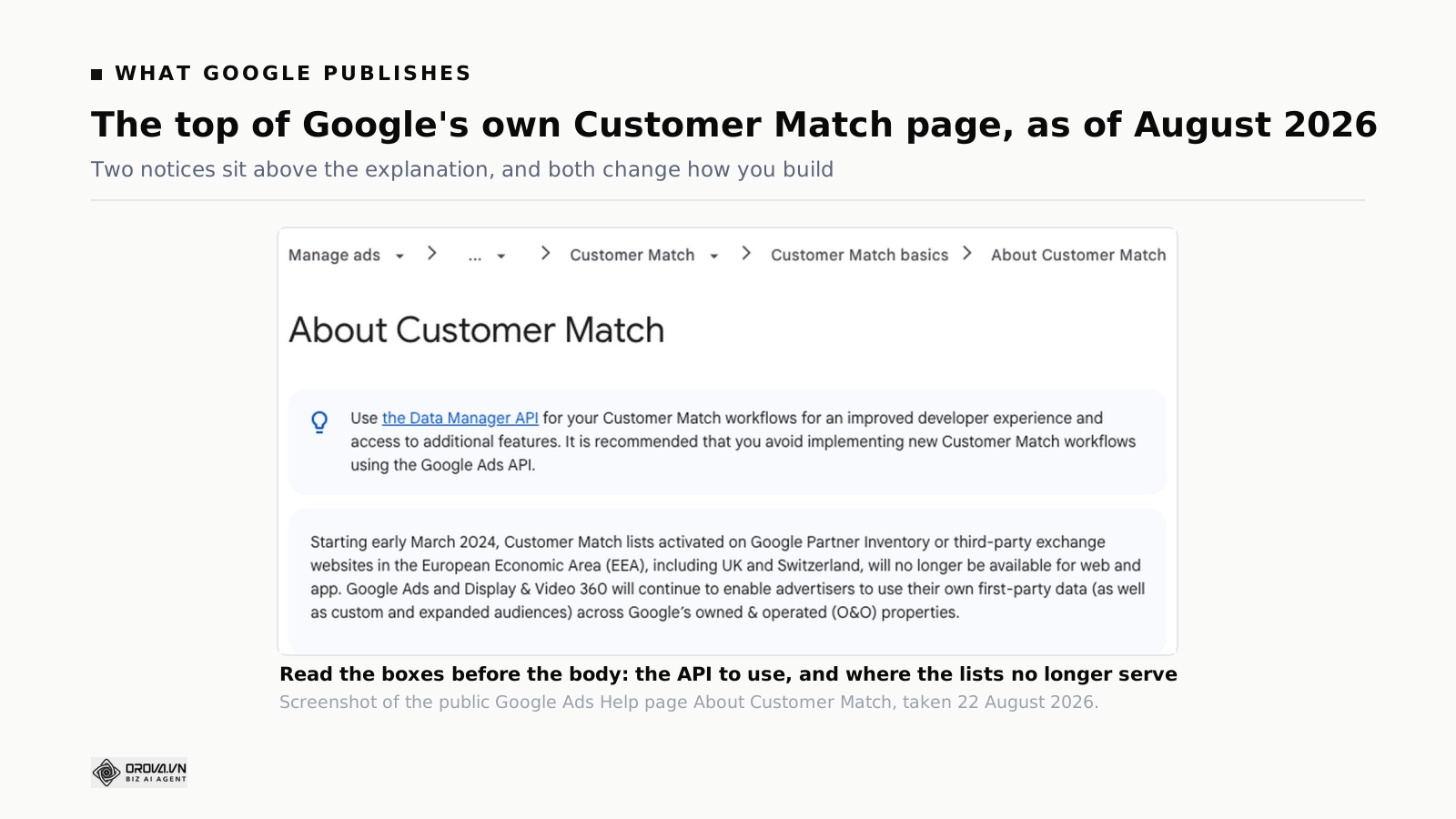
Google's own page on this feature opens with two grey boxes before it gets to a single word of explanation. Most guides skip straight past them to the fun part. Both boxes change how you should build.
The API notice
The first box recommends using the Data Manager API for Customer Match workflows, and says outright that you should avoid implementing new Customer Match workflows using the Google Ads API. That is a direct instruction to any engineer about to build an integration, and it is easy to miss because most tutorials, most Stack Overflow answers and most agency documentation still assume the Ads API path.
Google's own developer documentation describes the Data Manager API as a unified ingestion route for first-party data that can send to Google Ads, Google Analytics, Display & Video 360, Campaign Manager 360, Search Ads 360 and Google Ad Manager. Whether or not you use all of those, the practical implication is the same: if somebody on your team is about to spend a fortnight writing an uploader, they should spend the first hour reading the newer path rather than the older one.
The territory notice
The second box says that from early March 2024, Customer Match lists activated on Google Partner Inventory or third-party exchange websites in the European Economic Area, including the UK and Switzerland, are no longer available for web and app. Google Ads and Display & Video 360 continue to let advertisers use their own first-party data across Google's owned and operated properties.
In plain terms: if a slice of your audience is European and your plan depended on reaching them through the display exchange rather than through Google's own surfaces, that plan has been out of date for two years. Search, YouTube and Gmail remain owned-and-operated. The open exchange does not. Check which half of the plan you wrote before you argue with the numbers.
The thing automated bidding does with your lists whether you asked or not
Buried in the "before you begin" section of the same page is a behaviour that surprises almost everybody the first time they read it. Campaigns using Smart Bidding and optimized targeting automatically include all the Customer Match lists in your account, to improve performance towards your goal. You do not attach them. You do not opt in. They are there.
Google offers two ways out: opt out of auto-including unapplied lists that your account can access, or remove specific lists you do not want used. It also states this will not change your campaign's targeting settings, that the system learns which lists help and continuously adjusts, that the lists are not used at all under manual bidding, and that auto-inclusion currently covers YouTube and YouTube Video Action campaigns with in-feed and Search ads described as coming.
Three consequences follow, and they matter more than the feature itself.
First, a list you uploaded for one purpose can influence campaigns you never intended it to touch. If you built a "cancelled customers, do not contact" list and left it sitting in the account without applying it anywhere, it is not inert.
Second, testing gets harder. If you are trying to measure what a customer list does to performance, and the same list is silently feeding the control campaign, your test is not a test. Decide your opt-out position before you design the experiment, not after you get a confusing result.
Third, hygiene stops being optional. Every stale list in the account is a live input. That makes the naming, the ownership and the deletion of old lists a real housekeeping job rather than a tidiness preference. If you already run a weekly pass over the account, add it there; our weekly Google Ads optimisation checklist is a reasonable place to hang it.
If you want the wider context on when the automated strategies are worth handing this much control to, our piece on when Google Ads Smart Bidding works and when it does not covers the conditions under which this kind of automatic inclusion helps rather than muddies.
Building the file: which columns to send, and what to do to each one
Here is where most of the avoidable loss happens. The upload interface will accept a file that is wrong. It will process it, report a number, and never tell you that four thousand rows failed silently because somebody left the phone numbers in national format.
Google's developer documentation, checked in August 2026, describes the primary match keys as email address, mailing address and phone number, with user ID and mobile device ID also supported but described as less future-proof given their reliance on cookies and device identifiers. That framing is worth taking seriously when you decide what to invest in collecting: an email address will still be an email address in five years.
Normalising, before you hash anything
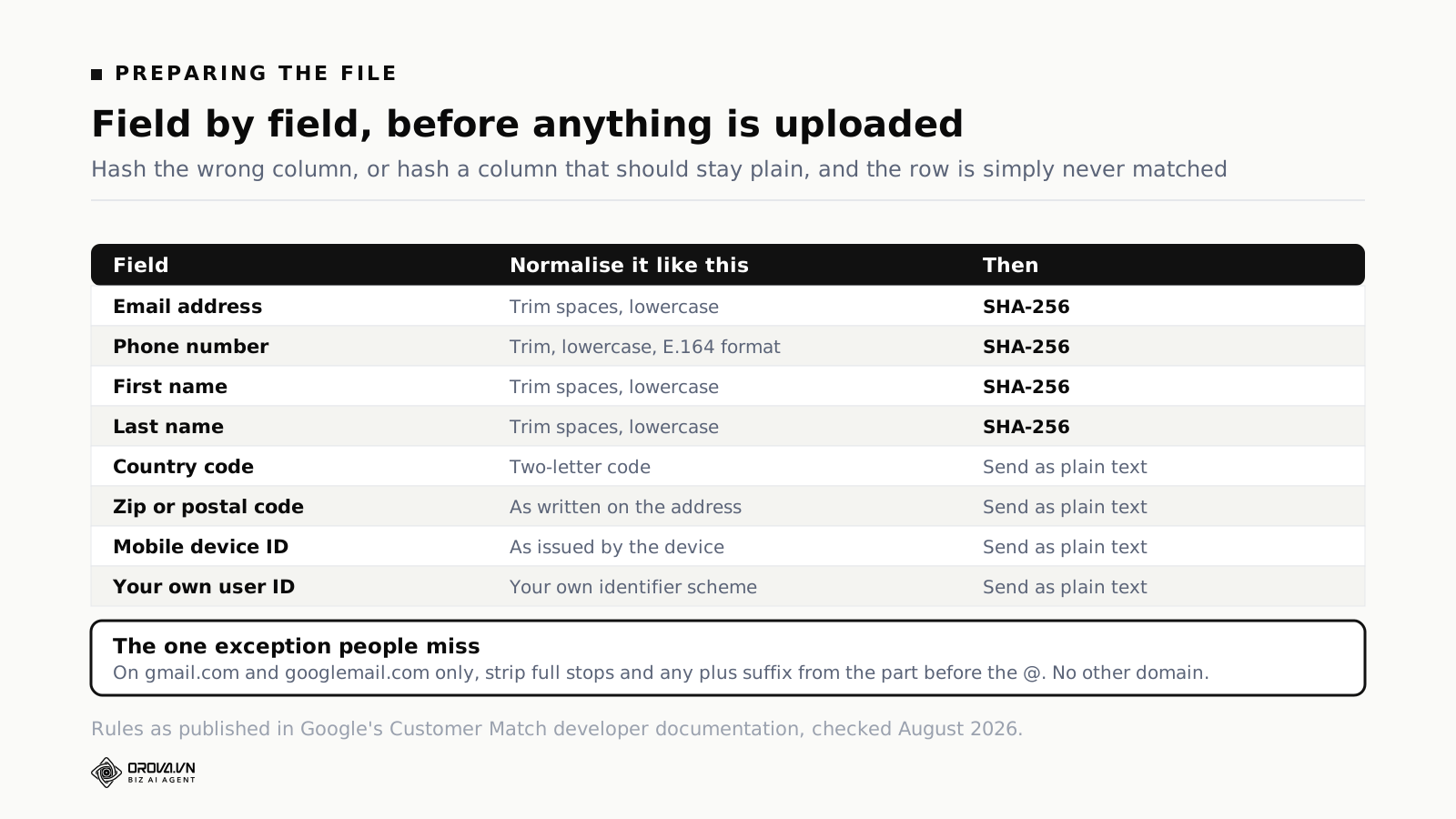
Two rules apply to everything you are going to hash. Remove leading and trailing whitespace. Convert the text to lowercase. That is it, and it is the step people skip because it feels too trivial to matter. It matters completely: hashing is exact, so Jane@Example.com and jane@example.com produce entirely different hashes and one of them will never match anybody.
Phone numbers get one extra rule: format them according to the E.164 standard, which means a plus sign, the country code, then the national number with no spaces, brackets or dashes. A UK mobile stored as 07700 900123 becomes +447700900123. A Vietnamese number stored as 0901 888 484 becomes +84901888484. This single transformation is, in our experience of looking at broken uploads, the most common reason a phone column contributes nothing at all.
Then hash. Email addresses, first names, last names and phone numbers are hashed with SHA-256 before upload. Country code and postal code are not hashed — they travel as plain text, and hashing them will break the address match rather than protect it. Mobile device IDs and your own user IDs are also sent unhashed.
The exception almost everybody misses
For addresses on gmail.com and googlemail.com only, remove all full stops from the username portion before the @, and remove the plus sign along with everything that follows it. So jane.doe+shop@gmail.com normalises to janedoe@gmail.com before hashing.
The word only is doing a lot of work. Google's documentation is explicit that addresses on any other domain should not have periods or plus suffixes removed. Strip a full stop from jane.doe@company.com and you have invented an address that belongs to nobody. Teams that write one clever normalisation function and apply it to every row are usually destroying their corporate addresses to fix their consumer ones.
One row, all the way through
Take a customer whose record in your system reads: Jane.Doe+newsletter@Gmail.com , first name Jane , last name DOE, phone (020) 7946 0958, country GB, postcode SW1A 1AA.
Trim and lowercase everything you intend to hash. The email becomes jane.doe+newsletter@gmail.com, then — because it is a Gmail address — janedoe@gmail.com. The names become jane and doe. The phone becomes +442079460958. Those four values get hashed with SHA-256 and the hexadecimal digests go in the file. The country stays GB and the postcode stays as written, both in plain text.
Do that once by hand for a single row before you write the script, and check the digest your code produces against the digest you produced manually. It takes ten minutes and it catches the class of bug that otherwise costs you a whole upload cycle plus 48 hours of waiting.
Four ways to get the list into Google
The route matters less than the file, but it changes who owns the job and how often it can realistically happen.
The interface upload. A CSV, uploaded by hand in the audience manager, using the template Google provides. The columns follow fixed headers — email, phone, first name, last name, country, zip, mobile device ID — and the file has to use the right encoding. This is the right route for a first test and the wrong route for anything you intend to do every month, because a manual step that happens every month is a manual step that will be skipped in the month everybody is busy.
The Data Manager API. The route Google now points you at for new work. This is what you build if the list needs to stay current without a person remembering.
Google Sheets. A middle path: the list lives in a sheet, the sheet is the interface, and refreshing it is somebody's ordinary spreadsheet job rather than an engineering ticket. It suits marketing teams who can maintain a sheet but cannot commission a pipeline. It also inherits every weakness of a spreadsheet, including the person who sorts one column without the others.
A CRM or partner integration. Many CRMs push audiences to Google directly, and Google's policy requires that you use its approved API or interface to upload customer data either way. If your CRM offers this, it is usually the least-effort route with the best refresh discipline, because the list is defined by a segment rule rather than by an export somebody remembered to run.
Whichever route you pick, the CRM-to-platform loop is a bigger topic than one audience list, and it is worth getting the direction of travel right. Our piece on closing the CRM loop into ad platforms covers what should flow which way and why the return path matters more than the outbound one.
What happens in the 48 hours after you press upload
Google's troubleshooting documentation states that Customer Match uploads can take up to 48 hours to process. That single fact resolves a large share of the panic that follows a first upload.
It also creates a trap. If your refresh runs more often than the processing completes, the list can appear stuck in an "in progress" state indefinitely, because a new job starts before the previous one finished. Daily refreshes on a large list are a common way to produce a segment that never quite settles. Unless something in your business genuinely changes daily, a weekly cadence is calmer and loses you almost nothing.
During those two days, resist the urge to fix things. The number you see mid-processing is not the number you will end up with, and the most common self-inflicted wound at this stage is a second upload of a differently-broken file on top of the first one, which makes the eventual diagnosis considerably harder.
Why the list you get back is smaller than the list you sent
This is the question that brings most people to this topic in the first place, and it deserves an honest answer rather than a reassuring one.
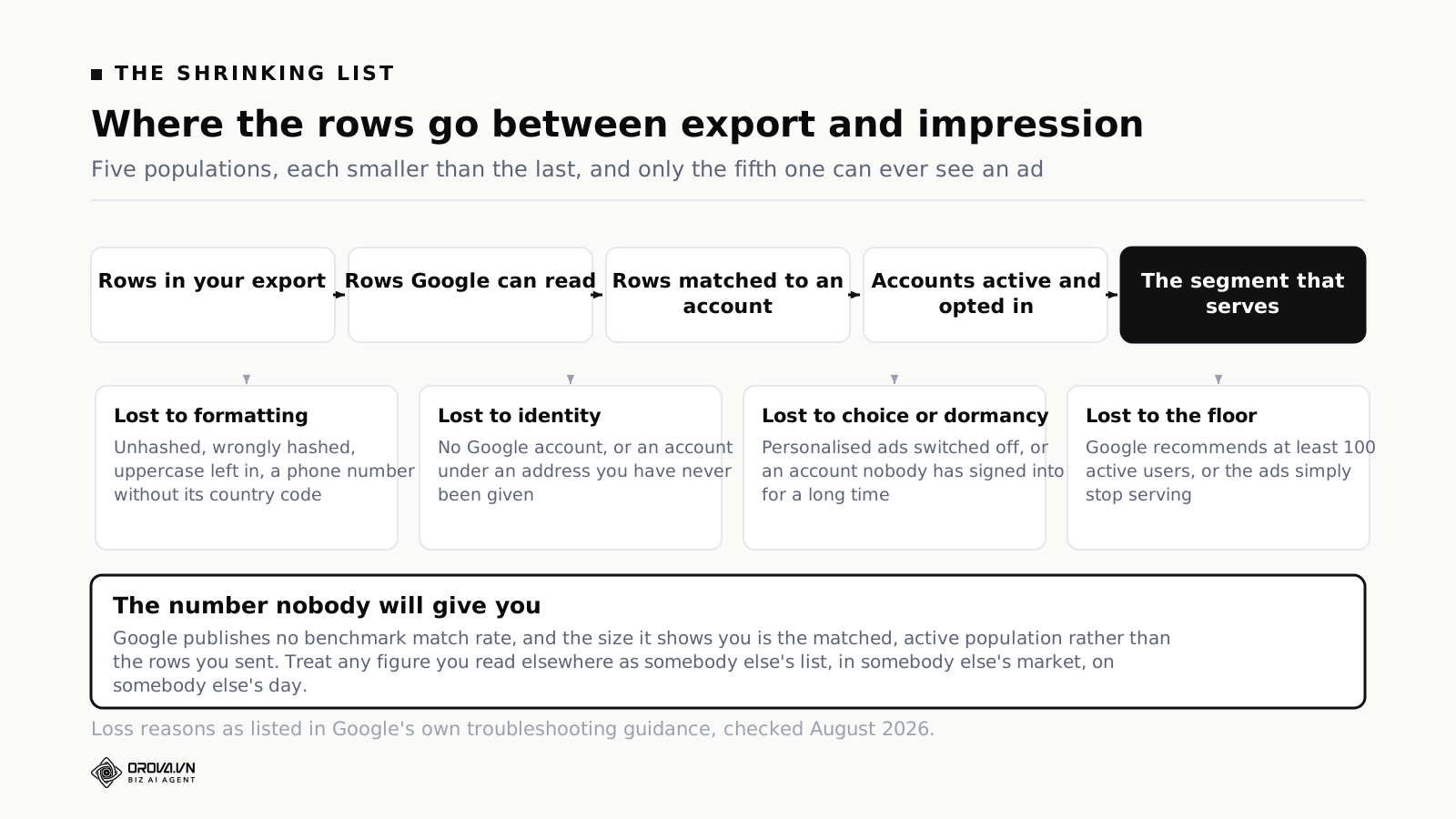
Start with what the reported size actually is. It is not the count of rows Google accepted. It is the matched, active population — the people who both line up with a Google account and are in a state where they could be shown an ad. Comparing it against your row count is comparing two different things, which is why the drop looks so brutal.
The losses you caused
Formatting and hashing errors are yours. Uppercase left in. Whitespace left in. Phone numbers without a country code. A hash algorithm that is not SHA-256. Hashed country codes. Stripped full stops on non-Gmail domains. Each of these silently zeroes out a row, and none of them raises an error you will see.
Data quality is also yours, and it is a longer game. Typos captured at the point of sale, addresses entered by staff on behalf of customers, single shared addresses for a whole household, role addresses like info@ that belong to an organisation rather than a person. None of those will ever match a signed-in individual, no matter how correctly you hash them.
The losses you did not cause
Some people simply do not have a Google account under the address you hold. Some have one under a different address entirely. Some have switched off personalised ads, which is their right and is not a bug. Some accounts are dormant. And if you leaned on mobile device identifiers, Google's documentation notes that only users active on Google networks within the past 30 days are counted at all.
There is no benchmark to compare yourself against, because Google does not publish one. Any specific percentage you read in a blog post is somebody else's list, in somebody else's market, in somebody else's year. The only comparison that means anything is your own list against itself over time — same segment definition, same normalisation, measured monthly.
Raising the matched share, in order of return
Work down this list rather than across it. The first three are free and usually recover more than the rest combined.
Fix normalisation first. Re-run one known row by hand as described above. If your script and your hand disagree, stop everything else.
Send more than one identifier per person. Google's guidance is explicit that using multiple types of identifier improves matching. An email and a phone number gives two chances to match one person. Adding name and address gives a third route. Sending only whichever column your CRM exports most cleanly is leaving the other doors shut.
Send more people. The developer documentation suggests uploading at least 5,000 members to increase the chance of having enough matched, active users for targeting. That is not a rule and there is no rejection at 4,999 — it is a statement about arithmetic. A small list run through a lossy process leaves you below the serving floor.
Prefer the address they gave you, not the one you inferred. Addresses collected at signup, at checkout or at account creation match better than addresses appended by a data vendor or reconstructed from a first-initial-plus-surname convention.
Refresh regularly rather than heroically. A list rebuilt every week from a live segment stays close to reality. A list uploaded once in March and revisited in December has spent nine months decaying.
Split the list before you blame it. Upload your last-12-months buyers separately from your 2019 cohort. If the recent list matches well and the old one does not, you have learned something about your data rather than about Google. If both are equally poor, the problem is in your pipeline.
Stop counting rows. Track the matched, active number month over month. That is the only figure that responds to anything you do.
Job one: stop paying to reach people who already bought
If you do only one thing with this feature, do this one. It works on any policy-compliant account with no spend history required, it takes an afternoon, and it produces a saving you can see in the same week.
The case is easiest to make in display and video, where the waste is largest and least visible. The ANA's programmatic transparency study found that roughly a quarter of programmatic ad spend is wasted on inefficient buying and invalid impressions. An exclusion list does not touch most of that. What it does remove is the one slice of waste you can actually identify by name: the customers whose money you already have, being shown an acquisition ad, at a price set by an auction you are effectively bidding against yourself in.
The candidates for exclusion are more varied than people expect:
- Recent buyers of the exact thing you are advertising. The clearest case. Somebody who bought the mattress on Tuesday should not spend a fortnight being shown the mattress.
- Active subscribers being served the free-trial ad, which is both wasted money and a small insult.
- People who complained, refunded or cancelled — reacquisition spend aimed at somebody who left unhappy is spend aimed at a second complaint.
- Customers on a contract who cannot buy again for eleven months. Excluding them now and rotating them back in at month ten is a calendar job, not a targeting job.
- Anybody your sales team is already talking to, if the ad's job is to start a conversation that has already started.
The self-competition angle is the one that gets ignored, and it is not unique to Google. The same mechanism operates anywhere you buy attention in an auction, which we covered from the other platform's side in what audience overlap does to your own bids. Excluding a group is one of the very few optimisations that cannot make performance worse, provided you excluded the right group.
It also pairs naturally with the exclusion work you should already be doing on the query side. Removing the wrong people and removing the wrong searches solve the same problem from two directions; our guide to negative keywords and match types covers the other half.
Job two: say something different to people who already know you
The second job is the one that needs the targeting tier, and it is worth waiting for.
Consider the same search query typed by two people. One has never heard of you. The other has been a customer for three years. Serving both of them "the leading platform for X, book a demo" is a decision, even when it is made by accident. To the stranger it is an introduction. To the customer it is proof that nobody at your company is paying attention.
What changes when you can separate them is not the bid. It is the copy and the destination. The customer gets an ad that assumes the relationship: the upgrade, the second product, the thing they have not switched on yet, the renewal. The landing page skips the explanation of what you do. The offer is different because the ask is different — you are not asking them to trust you, you are asking them to do one more thing.
Three patterns are worth building around:
Cross-sell against category demand. Somebody who bought your accounting product and is now searching for payroll software is a warm audience with a live intent. That combination — your list plus their query — is the most valuable state in the entire account, and it exists for a matter of days.
Reactivation with a reason. A lapsed customer needs a reason to come back that is not "we exist". A new feature, a price change, a category they never tried. The list gets you the audience; the reason is your job and no amount of targeting substitutes for it.
Renewal defence. When a contract comes up and a competitor is bidding on your brand, the customer list is how you make sure your own message reaches the person deciding.
Measure this differently from acquisition, too. Revenue from existing customers carries a different cost of sale, so a blended return figure will flatter or damn it wrongly; our explainer on calculating ROAS and what counts as good covers why the segment you measure has to match the segment you targeted.
Job three: seed a lookalike, and what changed in 2026
The third job is the one that has moved the most, and it is the one where old articles will actively mislead you.
The history matters here. Google stopped generating similar audiences — the old "similar segments" — from May 2023, pointing advertisers at optimized targeting and at Lookalike segments instead. Lookalike segments take a seed list built from your first-party data, a Customer Match list among them, and find accounts sharing characteristics with it. They were offered at three reach levels described as narrow, balanced and broad, corresponding to roughly 2.5%, 5% and 10% of the addressable population.
Through 2026, Google has been moving Lookalike segments in Demand Gen campaigns to a suggestion mode in a phased rollout, with the reach slider no longer acting as a targeting constraint, and the previous minimum seed size of 100 users no longer applying. The direction is consistent with everything else the platform has done in the last three years: your data becomes an input to the system's decision rather than a fence around it.
What that means practically:
- Seed quality is now the whole lever. If you cannot tighten the fence, the only control left is what goes into the seed. A seed of "everybody who ever bought" produces a lookalike of everybody. A seed of "customers in the top revenue decile who renewed at least once" produces something worth having.
- Small, sharp seeds beat large, vague ones. This runs against the instinct to send everything, and against the arithmetic in the matching section, so it is a genuine trade-off rather than a rule. Sharp enough to be meaningful, large enough to survive the matching losses.
- Refresh the seed, not just the list. A seed defined in January describes a customer base that no longer exists in September.
- Do not plan a 2026 campaign from a 2022 article. If a guide talks confidently about the reach slider as a targeting control, it predates the change.
The 540-day clock, and what to put in the calendar
Every Customer Match list has a timer running under it, and it is the single most common cause of a segment that worked last year and does not work now.
Google's published rules, as of August 2026: Customer Match lists have a maximum membership duration of 540 days. Any list membership added or refreshed more than 540 days ago is no longer eligible. To stay eligible, a list must have at least 100 members added or updated within the last 540 days.
Five hundred and forty days is about seventeen and a half months. That is longer than most people's planning horizon and shorter than most people's memory of having set something up, which is precisely why it bites. The list does not announce its own expiry. It quietly stops being able to reach the people who have aged out.
A workable cadence looks like this:
- Weekly: the automated refresh runs, whether from the API, the CRM integration or the sheet. Nothing to do unless it fails.
- Monthly: somebody looks at the matched, active size of each live list and writes it down. Three numbers in a row that only go down is a signal, and it is invisible if nobody records them.
- Quarterly: review the segment definitions themselves. Does "recent buyer" still mean 90 days? Does the exclusion list still describe the right people?
- Annually: delete what nobody uses. Remember that unapplied lists are still an input to automated bidding, so an unused list is not a harmless one.
Put the monthly number somewhere a human will see it. A figure that lives only in the audience manager is a figure nobody checks, which is how a list gets to month sixteen unnoticed.
The policy fine print, in one place
Read this section before your first upload rather than after your first warning email. Google's Customer Match policy, checked August 2026, sets out the following.
First-party context only. You may only upload customer information you collected in a first-party context — from your own websites, apps, physical stores, or other situations where customers shared their information directly with you. Purchased lists, scraped addresses and data acquired from a broker are not eligible, regardless of how legitimate the vendor sounds.
Disclose and obtain consent. Your privacy policy must disclose that you share data with third parties for these purposes, and you must obtain consent where required by law or by Google policy. In the EEA and the UK this is not a formality.
Use an approved route. Uploads must go through Google's approved API or interface. Anything that automates the browser to fake a manual upload is a policy problem waiting to happen.
Age restrictions. You may not upload information about customers under 13, or data collected from child-directed sites and apps.
No sensitive categories. You may not use sensitive interest categories to target ads, and you may not derive such categories from Customer Match data. A list whose very definition reveals something sensitive about the people on it — a health condition, a financial hardship, a belief — is a problem even if every individual field is innocuous.
No implied knowledge. Ad copy may not imply knowledge of personally identifiable or sensitive information about the person seeing it. "Still thinking about that thing you looked at on Tuesday, Jane?" is the wrong instinct. It is also, separately, terrible advertising.
No over-narrowing. Combining lists with tight geographic restrictions to reach a very small group is prohibited. The rule exists to prevent the identification of individuals through targeting, and it catches well-meaning account managers building hyper-local segments.
When Customer Match is the wrong tool
A guide that only lists reasons to use something is a brochure. Four situations where the honest answer is no.
Your customer table is small and mostly business addresses. A B2B list of 400 corporate addresses will match poorly and land under the serving floor. Your effort is better spent elsewhere.
You collected the data somewhere else. If the addresses came from an event partner, a purchased list or a scrape, the policy answer is no, and the answer does not change because the campaign would have worked.
You want to know what individuals did. This is an audience tool, not an analytics tool. It will not tell you that a named person saw an ad, and any plan that depends on that is aiming at the wrong feature — and, if you were hoping to attribute at that level, at the wrong discipline entirely. Our overview of the trade-offs between attribution models covers what is and is not knowable.
Your conversion data is broken. If the platform does not reliably know who converted, every list you build from that data inherits the error. Fix the measurement first. Our guide to offline conversion tracking in Google Ads covers the case where the sale happens away from the website, which is exactly the case where customer lists are most tempting and most likely to be built on sand.
Troubleshooting, symptom by symptom
| What you see | Most likely cause | What to do |
|---|---|---|
| Upload stuck "in progress" for days | A new refresh starting before the last one finished, or a very large file | Stop the refresh schedule, wait a full 48 hours, then check once |
| Matched size far below row count | Normalisation or hashing errors, or a single identifier column | Hand-check one row end to end; add a second identifier type |
| Segment reports "too small to serve" | Matched active users below the serving floor | Broaden the segment definition or merge related lists; Google recommends at least 100 active users |
| Phone column contributes nothing | National format instead of E.164 | Reformat with a plus sign and country code, then re-hash and re-upload |
| Corporate addresses match far worse than consumer ones | Gmail normalisation applied to every domain | Apply the full-stop and plus-suffix stripping to Gmail and Googlemail only |
| List worked last year, reaches nobody now | Memberships past the 540-day limit | Refresh from the live source; check at least 100 members were added or updated inside the window |
| Targeting setting unavailable | Account below 90 days of history or the lifetime spend threshold | Use observation and exclusions now; revisit when the account qualifies |
| List seems to affect campaigns you never applied it to | Automatic inclusion in Smart Bidding and optimized targeting | Opt out of auto-inclusion, or remove the specific list from the account |
| European reach dropped and never recovered | The March 2024 change to Partner Inventory and exchange sites in the EEA | Plan European reach around Google's owned and operated surfaces |
What Orova does here, and what it does not
Plainly, so nobody has to work it out from a marketing page.
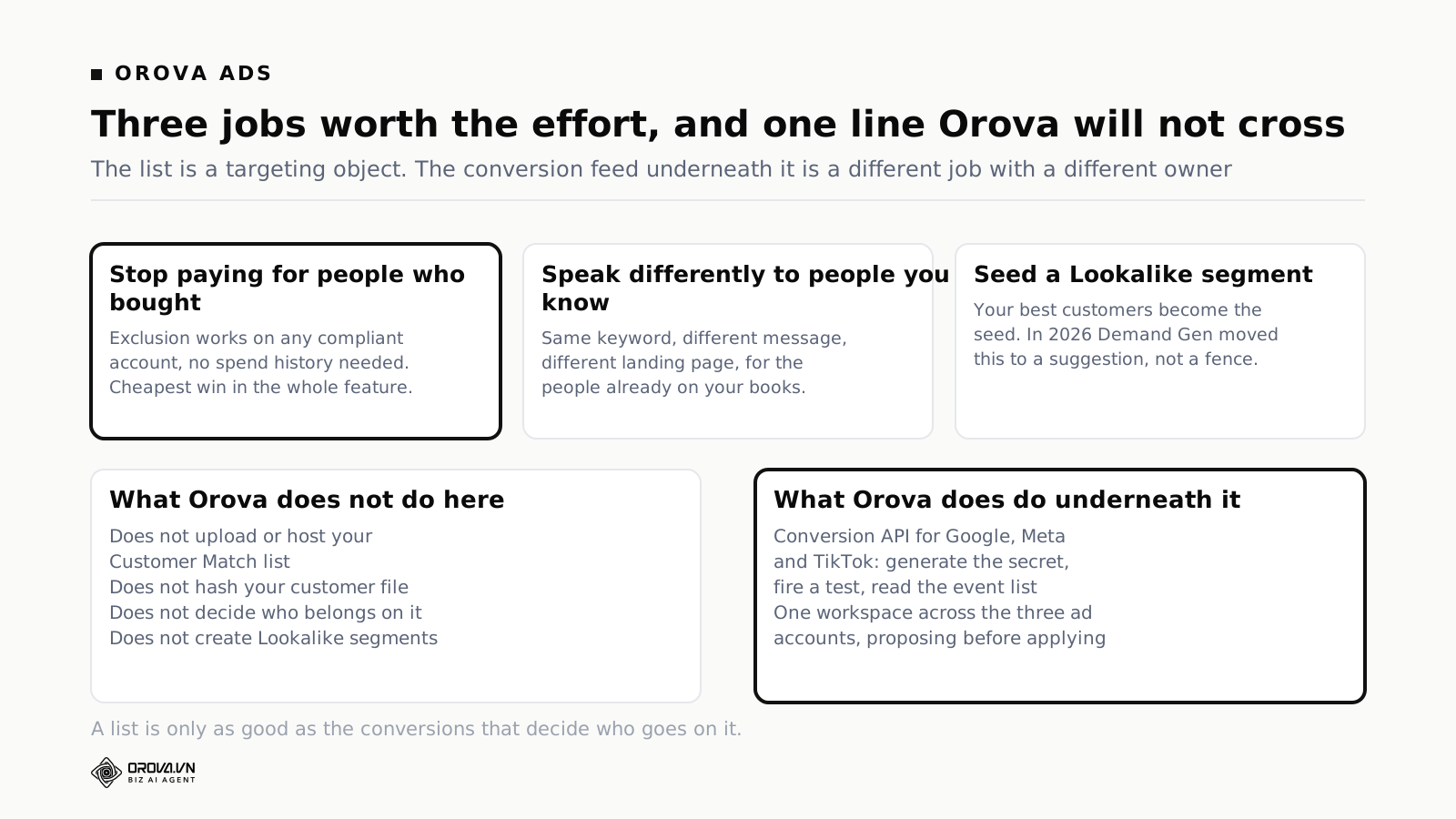
Orova does not upload your Customer Match list. It does not host your customer file, it does not hash it, it does not decide who belongs on which segment, and it does not build Lookalike segments for you. Everything in the preparation sections above is work you do in your own systems and push through Google's own routes.
What Orova Ads does is the layer underneath. It runs a Conversion API for Google, Meta and TikTok from one place: generate the secret, fire a test event, and read the list of events that actually arrived. That last part is the one that changes arguments, because "we set it up" and "events are arriving" are different claims and only one of them is checkable.
The connection to this article is direct. Every list in this guide is defined by something you believe about a person — they bought, they lapsed, they are worth copying. Those beliefs come out of your conversion data. When the conversion feed is missing offline sales, or double-counting, or dropping events on a platform nobody checks, the lists you build from it are confidently wrong in ways no amount of correct hashing will fix.
Beyond the conversion feed, the same workspace connects the three ad accounts in one table, runs an agent on a schedule that proposes changes before it applies them, and keeps every action inside limits you write as ordinary sentences rather than as code. It is the operations layer around the account, not a replacement for the audience tools inside it.
A checklist before your first upload
- Account has clean policy and billing history; disapprovals resolved.
- You know which tier you are in, and therefore whether you are building for targeting or for observation and exclusion.
- The data was collected in a first-party context, and you can say where.
- Privacy policy discloses third-party sharing; consent obtained where required.
- Segment definition written down in one sentence a colleague would agree with.
- At least two identifier types per person where you have them.
- Trim and lowercase applied to everything you will hash.
- Phone numbers in E.164 with a country code.
- Gmail and Googlemail full-stop and plus-suffix rules applied to those two domains only.
- SHA-256 on email, phone, first name, last name; country and postcode left as plain text.
- One row hand-verified against your script's output.
- Refresh route decided, with an owner's name against it.
- A calendar entry to record the matched, active size in one month.
- A position taken on automatic inclusion in Smart Bidding, before you start measuring anything.
Questions people ask
How long does a Customer Match upload take to appear?
Google's documentation says uploads can take up to 48 hours to process. If it is still processing after that and your refresh schedule is running frequently, the schedule is likely the cause rather than the file.
What is a good match rate?
There is no published benchmark, and any number quoted as universal is somebody else's account. Compare your own list against itself over time using the same segment definition and the same normalisation. That trend is real; the benchmark is not.
Do I need to hash the data myself?
If you are uploading through the API you provide SHA-256 hashes yourself. If you are uploading a file through the interface, the tooling can handle hashing for you, but the normalisation still has to be right first — trimming, lowercasing and E.164 formatting are your responsibility either way, and they are where the losses come from.
Can I use Customer Match to exclude people if my account is brand new?
Yes. Exclusions and the observation setting are available to every policy-compliant advertiser. Only the targeting setting and manual bid adjustments require more than 90 days of history and more than fifty thousand dollars of lifetime spend.
How many people do I need on a list?
Google recommends list sizes of at least 100 active users to keep ads serving, and its developer documentation suggests uploading at least 5,000 members to improve the odds of ending up with enough matched, active users for targeting. The gap between those two numbers is the matching loss described above.
Will my lists still work in Europe?
On Google's owned and operated surfaces, yes. Since early March 2024, lists activated on Google Partner Inventory or third-party exchange websites in the EEA, including the UK and Switzerland, are no longer available for web and app.
Does uploading a list mean Google can see my customer data?
You upload hashes, not addresses, for the fields that require hashing. That is a meaningful protection and it is not a magic one — a hash of an email address is still a stable identifier for that address. Treat the upload as data sharing governed by your privacy policy and your consent position, because that is exactly what Google's own policy requires you to treat it as.
The short version
Customer Match rewards the boring half of the work. The interesting decisions — who to exclude, what to say differently, which customers are worth copying — are worth very little if the file arrives with uppercase left in and the phone numbers in national format. Get the normalisation right, send more than one identifier, refresh on a schedule somebody owns, watch the matched active number instead of the row count, and take a deliberate position on automatic inclusion before you try to measure anything.
And start with exclusions. They are available on day one, on any compliant account, they cannot make performance worse if you excluded the right people, and they will tell you something uncomfortable and useful about how much of your acquisition budget has been going to people you already had.
Clean lists start with clean conversions
Orova Ads runs a Conversion API for Google, Meta and TikTok from one place: generate the secret, fire a test event, and see the list of events that actually arrived. The same workspace connects the three ad accounts and runs an agent on a schedule that proposes before it applies. It does not upload your Customer Match list for you.
See Orova Ads