
Lever Applicant Tracking System: An Honest Look
Every shortlist of hiring software eventually narrows to two or three names, and the lever applicant tracking system is almost always one of them. It arrives on the list with a specific reputation: the one that is also a candidate CRM, the one that is supposed to be pleasant to use, the one recruiters say they miss after they leave. What almost never arrives with it is a clear answer to the only question that matters on a demo call, which is what your week looks like differently on the Monday after you switch.
The reason is that the buying conversation happens in the wrong currency. Vendors talk in features, buyers listen for reassurance, and the actual difference between two mid-market platforms is usually four or five small behaviours repeated a hundred times a month. A scheduling flow that takes two clicks instead of an email thread. A candidate profile that already knows this person applied eighteen months ago. A report that a hiring manager can open without asking you to export anything. Those are not exciting, and they are the whole product.
This is an honest look at Lever: what its central design choice actually buys you, when the CRM half earns its licence and when you are paying to ignore it, the two places small teams reliably get stuck, what your data looks like on the way out, and how it lines up against Greenhouse and Workable on the criteria that decide the purchase. Its packaging, add-ons and public pricing behaviour were checked against Lever's own pages in August 2026, because they changed and most comparison articles have not noticed. There is also a section near the end saying plainly what Orova does not do here, because a comparison that only flatters the author is not worth reading.
What does the lever applicant tracking system actually do differently?
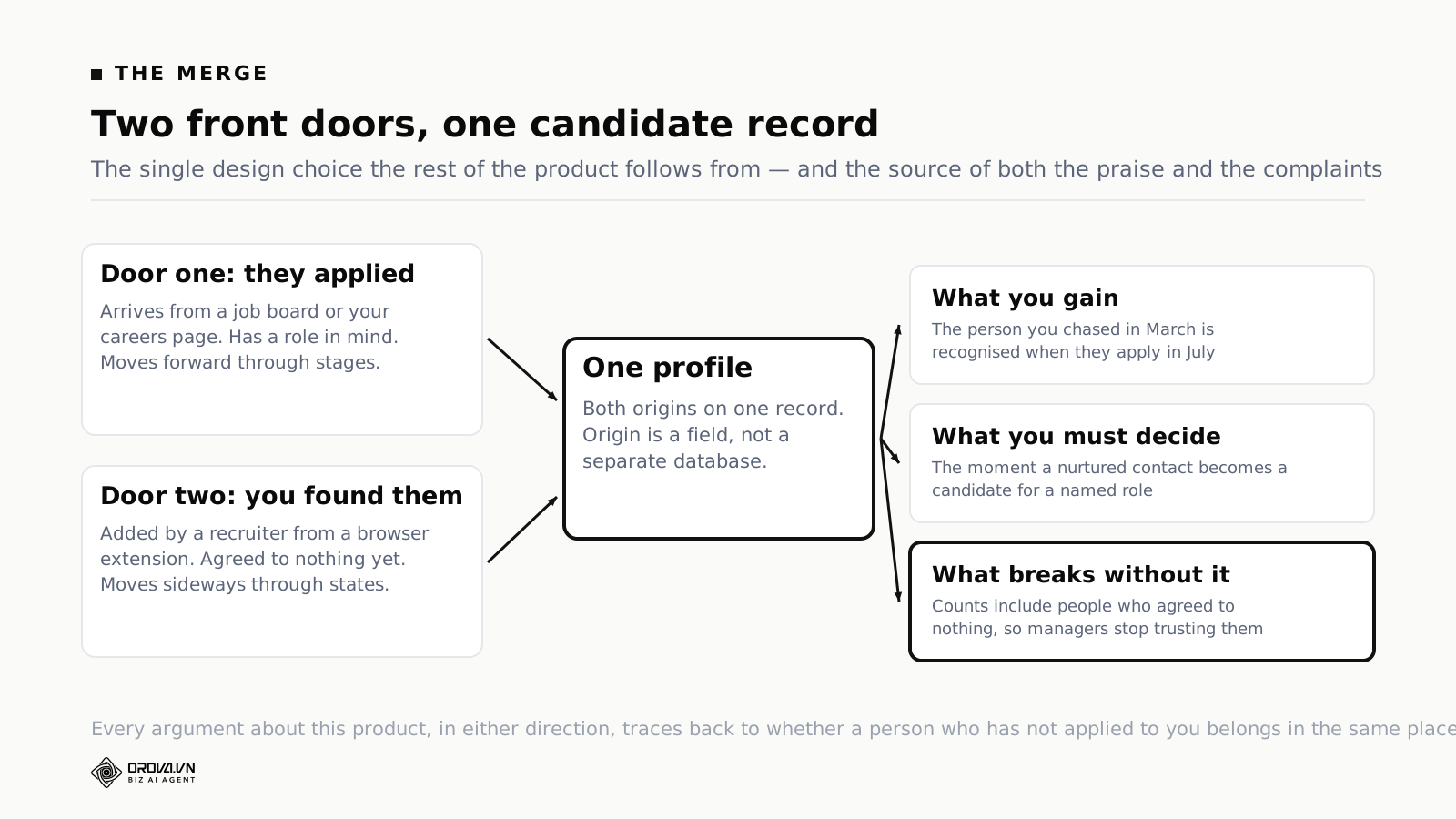
Lever keeps inbound applicants and outbound sourced contacts in one record and one pipeline, rather than in an ATS bolted to a separate sourcing tool. As of August 2026 its own pricing page describes the product as "ATS & CRM in one" with AI screening, unlimited AI interview transcripts and summaries, and fraud prevention signals.
That sounds like packaging. It is not. Almost every mid-market platform can store a candidate, move them through stages and collect feedback. The design question underneath is whether a person who has never applied to you belongs in the same system as a person who has. Most applicant tracking systems answer no, and treat sourcing as a separate module, a separate database, or a partner integration. Lever answers yes, and builds the whole interface around it.
Everything downstream inherits that answer. Your pipeline reports include people who never filled in a form. Your duplicate detection has to work across a much messier set of records. Your recruiters have one place to look rather than two, which is the good half. And your hiring managers see a pipeline number that includes people who have not agreed to anything yet, which is the half that causes arguments in Monday meetings if nobody explains the model.
If you have never run a formal system, start with the mechanics rather than the brands. Our explainer on what an applicant tracking system does covers the stage model, the parsing, and the reporting that every vendor on your list shares, which makes the differences easier to see.
What "ATS and CRM in one" merges, in practice
Three things get merged, and they are worth separating before you decide whether the merge helps you.
One profile, two front doors
A person can enter your system by applying, or by being added by a recruiter from a browser extension while reading their profile somewhere else. In a split stack those are two records in two tools, and the reconciliation happens in somebody's head or not at all. In Lever they are one record with two possible origins, and the origin is a field rather than a database boundary.
The everyday value of this shows up in a moment that happens more often than teams expect: you source someone, they do not respond, and four months later they apply on their own. In a split stack that is a fresh applicant with no history, and the recruiter who worked them has probably left or forgotten. In a merged model the earlier attempt is on the profile, including what you said and when they went quiet. That context is worth real money at the top of a hard search, and it is invisible in every feature comparison table ever printed.
One pipeline, two kinds of motion
Applicants move forward through stages. Sourced contacts move sideways through relationship states — contacted, replied, interested, not now. Merging them means one board has to express both, which Lever does by keeping nurture activity attached to the profile while the stage still governs the hiring process.
This is the part that takes a week to get used to and then feels obvious. It is also the part that breaks if you do not decide, as a team, when a nurtured contact officially becomes a candidate for a specific role. Teams that skip that decision end up with pipeline numbers nobody trusts, which is a process failure the software gets blamed for.
One report, two populations
Because both populations live in one place, reporting can answer questions a split stack cannot: how many of this quarter's hires started as outbound, how long sourced candidates take compared with inbound, which channels produce people who actually pass the phone screen. As of August 2026 Lever lists reporting as a headline capability of the core platform rather than an upsell, with a Candidate Insights module offered separately.
The catch is the same as with every analytics promise in hiring software. The reports are only as good as the discipline behind stage moves and archive reasons. If your recruiters bulk-reject with the default reason at the end of the month, every funnel chart you produce is a picture of that habit rather than of your hiring.
Nurture: when it earns its keep, when you pay to ignore it
Nurture is the feature that Lever's positioning rests on, and it is the feature most likely to go unused. Lever's own product documentation describes it as automated email campaigns aimed at individual candidates, with recruiter templates, tracking, and a rediscovery engine that resurfaces past applicants worth contacting again.
Structurally this is content marketing pointed at candidates instead of buyers, and it fails for the same reasons — sending on a schedule nobody can hold, writing sequences that are about you rather than about the reader, and measuring opens instead of replies. The discipline that makes it work is the same discipline described in our piece on content that produces conversations rather than traffic, transposed to a different audience.
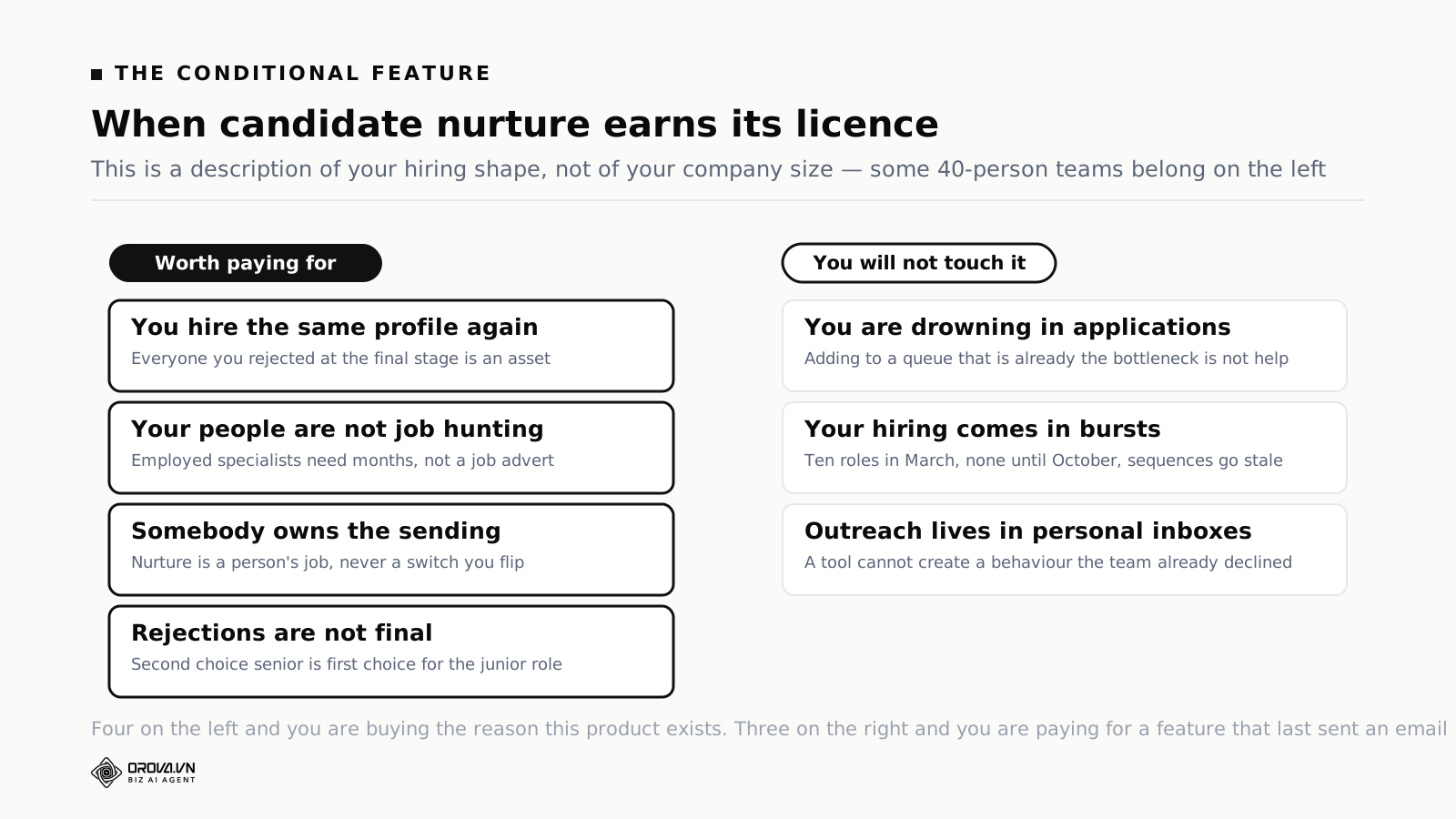
Four conditions that make nurture worth the licence
You hire the same profile repeatedly. If you will need three more of this exact role within a year, everyone you rejected at the final stage is an asset, and a rediscovery pass costs a fraction of a fresh search. If every role is a one-off, the pool never repeats and nurture has nothing to work on.
Your candidates are not actively looking. Senior engineers, specialist clinicians and experienced finance staff are usually employed and unbothered. Reaching them is a months-long relationship, not a job advert, and a system that remembers the relationship is doing real work.
Somebody owns the sending. Nurture is a job, not a setting. If no named person is responsible for writing sequences and reading replies, the campaigns will run for six weeks and then quietly stop, and you will be paying for a feature that last sent an email in March.
Your rejections are not final. A candidate who was second choice for a mid-level role is a strong first choice for a junior one, and a merged system makes that lookup a search rather than an archaeology project.
Three signs you will never touch it
You are drowning in applications, not short of them. If every posting produces four hundred CVs, your problem is on the reading side. Nurture adds more people to a queue that is already the bottleneck, which is the opposite of help.
Your hiring is bursty. Ten roles in March and nothing until October means no continuous relationship to maintain, and the sequences you wrote in spring are stale by autumn.
Your recruiters live in their inbox. If outreach currently happens from personal email and nobody wants that to change, the campaigns will not get used no matter what you buy. Tooling does not create a behaviour that the team has already declined once.
None of this makes nurture a bad feature. It makes it a conditional one, and the condition is about your hiring shape rather than your budget. If you are working out which parts of hiring to automate first, our guide to where recruitment automation actually pays off puts nurture in order against the other candidates.
Three things Lever does faster, day to day
These are the repeated small motions that make recruiters attached to a platform. They are also the ones that never survive a feature comparison, because every vendor has a row for them.
Scheduling a panel without the email thread
Coordinating four interviewers and a candidate across two time zones is the single most expensive administrative task in hiring, and it recurs for every serious candidate. Lever's scheduling flow reads interviewer calendars, proposes slots that work for the whole panel, and lets the candidate pick. The saving is not the minutes; it is the elimination of a thread that would otherwise take two days of elapsed time while a competing offer moves.
That elapsed time is the thing to keep your eye on. According to SHRM, average time to fill in the United States has reached 44 days, up about a third from 2021. Very little of that increase is interviewing. Most of it is waiting — for a slot, for feedback, for an approval — which is why scheduling automation is worth more than its feature-list position suggests.
Adding a passive candidate without leaving the page
A browser extension that captures a profile into the system in one action sounds trivial until you count how often a recruiter does it. At twenty a day, the difference between one action and a copy-paste ritual is an hour, every day, of a person you are paying to talk to humans.
Getting a number without exporting anything
The reporting layer being in the core product rather than an add-on changes who can answer questions. When a hiring manager can open a pipeline view themselves, the recruiter stops being a report-generation service. When they cannot, every question routes through one person and arrives as a spreadsheet that is out of date by the time it is read.
Note the shape of all three. None is a capability the competition lacks. Each is a difference in how many actions and how many people a routine task requires, which is exactly what you should be testing on a demo with your own roles rather than reading about.
What Lever costs, as of August 2026
Lever does not publish prices. Its pricing page, checked in August 2026, is a headline, a promise that you pay for what you need rather than complexity you will not use, and a form that produces a customised quote. There are no tiers listed with figures next to them, no per-seat rate, and no self-service checkout. Every number you find elsewhere is a third-party estimate or a report from another buyer, and treating those as your price is how negotiations go badly.
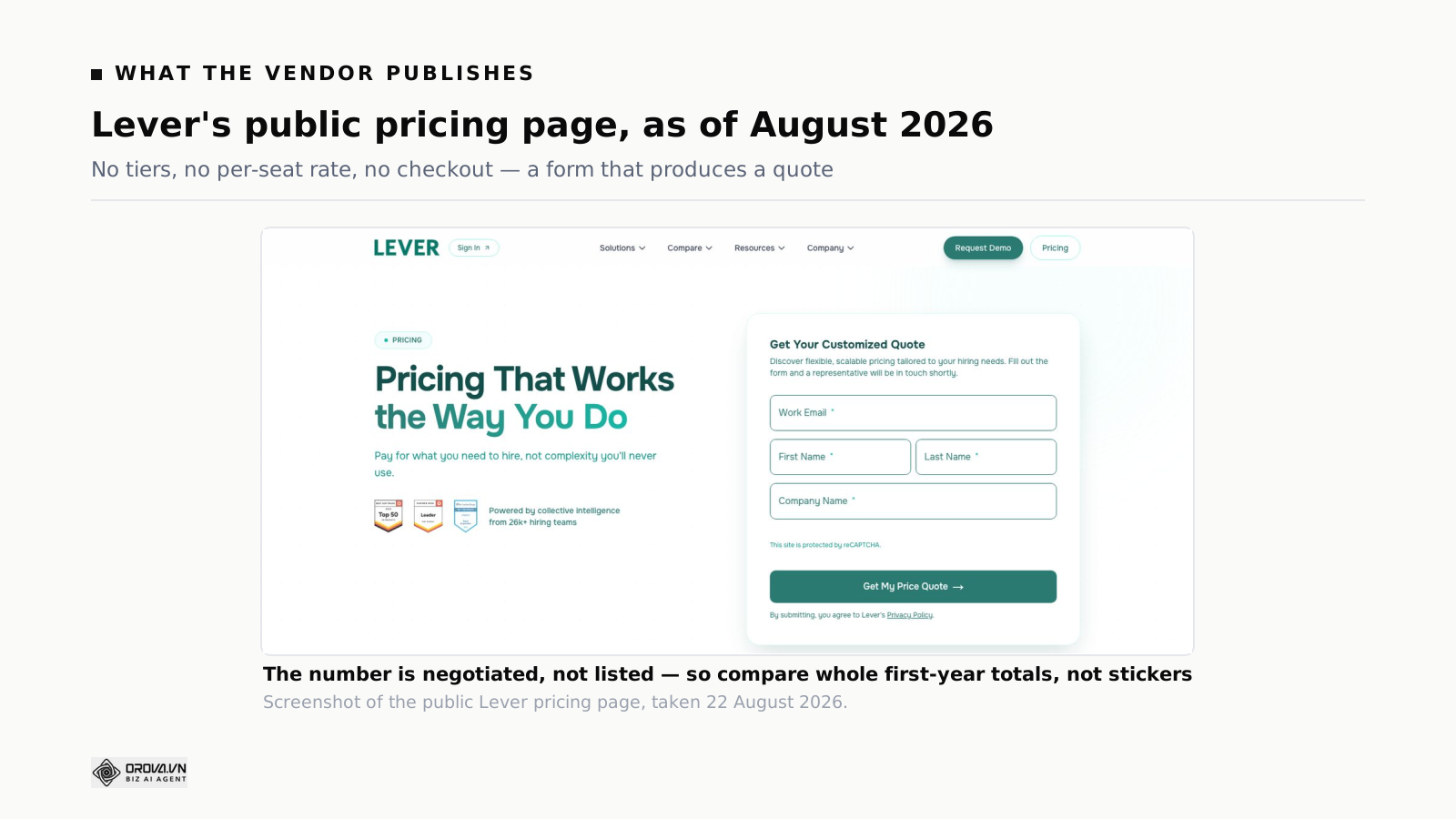
This is normal for the segment and it is not evidence of anything sinister. It does mean the sticker is only one line in a first-year total, so ask about the rest explicitly rather than discovering them in month two.
The lines to get in writing
- The licence itself, and precisely what drives it. Employee count, recruiter seats, open requisitions and hires per year are all used by different vendors, and they behave very differently as you grow. Ask which one, then model it against your headcount plan for three years rather than one.
- Implementation. Configuration, pipeline design and training are usually a one-off fee, sometimes waived under pressure at quarter end, and never zero in effort even when it is zero in cash.
- Data migration. Moving candidates, notes and attachments from whatever you are on now. Ask what actually migrates, at what fidelity, and what silently does not.
- Add-on modules. As of August 2026 Lever lists Candidate Insights, AI Screening by VONQ, and Onboarding as separate items rather than parts of the core. If your evaluation is being sold on one of those, it belongs in the price you compare.
- Integrations. Your HRIS, background check provider and assessment vendor may each charge on their side, and API access is sometimes gated. Confirm both directions.
- Renewal. Ask for the uplift cap in writing before signing. Year two is where mid-market contracts do their real damage, and the moment of maximum leverage is now, not then.
One more line that never appears on a quote: the hours your own team spends. An implementation that needs a recruiting coordinator for two days a week for six weeks has a cost, and it is usually larger than the migration fee you argued about.
Two places small teams get stuck
Lever is a mid-market product with a mid-market set of assumptions. Two of those assumptions are where smaller teams run aground, and both are visible before you buy if you know to look.
It assumes somebody owns the pipeline
The merged model works because a person maintains it — dedupes records, moves nurtured contacts into roles, keeps archive reasons honest, decides when a relationship becomes a candidacy. In a team with two full-time recruiters that person exists. In a company where hiring is 30% of an operations manager's week, it does not, and the model degrades into a shared inbox with better fonts.
The symptom is specific and easy to check three months in: how many contacts are sitting in a nurture state that nobody has touched in ninety days? If that number grows faster than your hires, the merge is producing clutter instead of context. Teams in this position often do better with something simpler; our comparison of applicant tracking for small businesses covers what to expect at that end of the market.
Volume screening is still reading
AI screening now appears on Lever's core platform description, alongside fraud prevention signals and interview transcripts. That is genuinely useful and it is not the same job as evaluating four hundred CVs against a role's real criteria. Ranking and prioritising a pipeline tells you where to start; it does not produce a defensible record of why candidate 214 was rejected and candidate 87 was advanced.
The distinction matters more than vendors admit, because the two jobs fail differently. A ranking that is slightly wrong costs you order. An unexplained rejection costs you a conversation with a hiring manager, or in some markets a conversation with a lawyer. If you want the boundary drawn properly, our piece on what AI in recruitment actually gets right separates the tasks that genuinely automate from the ones that only look automatable.
Data in and out: what leaves with you
Nobody evaluates an exit during a purchase, which is precisely why exits are painful. Ask these questions while you still have leverage.
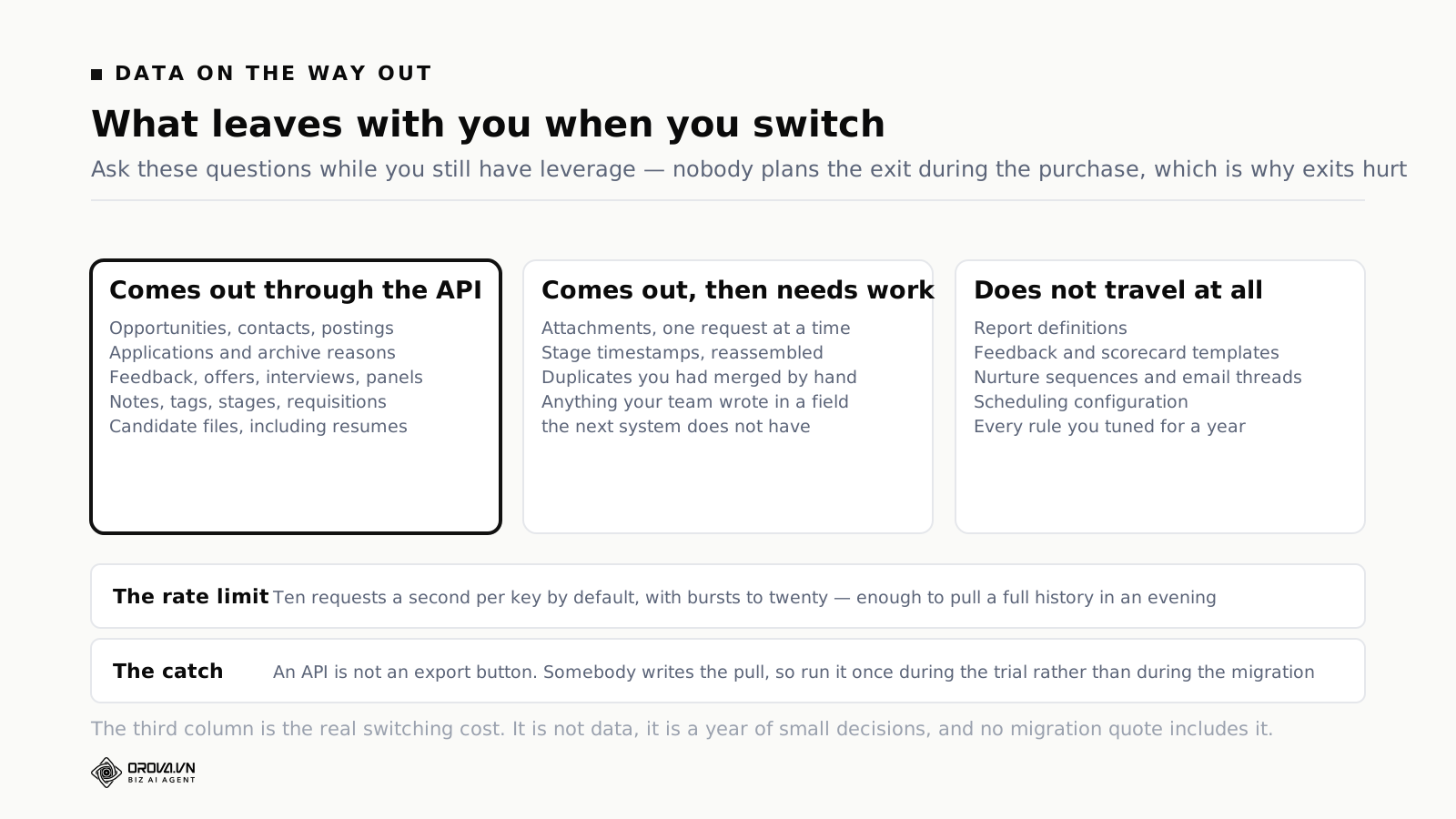
Lever publishes a developer-facing Data API, and its documentation is public. As of August 2026 it exposes the objects you would expect a migration to need — opportunities, contacts, postings, applications, feedback, offers, interviews, panels, notes, tags, stages, archive reasons, requisitions, users, and candidate files including resumes. The default rate limit documented is ten requests per second per API key, with bursts allowed up to twenty. That is enough to pull a full history in an evening for most companies, and it is a materially better position than platforms that offer a support ticket and a CSV.
Three practical notes on that, all of which apply to any vendor rather than Lever specifically:
- An API is not an export button. There is no documented single bulk-dump endpoint, so somebody has to write and run the pull. Budget a developer day, and run it once during the trial rather than discovering the shape of the data during a migration.
- Attachments are the slow part. Resumes and offer documents come out as files, one request at a time. At ten requests a second and a few thousand candidates, that is fine. At sixty thousand it is an afternoon of careful retry logic.
- Some things do not export in any useful form. Report definitions, scorecard templates, nurture sequences, email threads and interview scheduling configuration are configuration rather than data. You will rebuild them wherever you land next, and that rebuild is the real switching cost.
Do the same audit on the way in. If you are migrating from a spreadsheet or a shared inbox, the honest answer is that most of the history does not survive the move, and pretending otherwise is how implementations slip by a month.
Lever, Greenhouse and Workable on six criteria
These three land on the same shortlist constantly, and they are genuinely different products aimed at different problems. The table below is written to be argued with in a room, not to declare a winner.
| Criterion | Lever | Greenhouse | Workable |
|---|---|---|---|
| Central design idea | ATS and candidate CRM in one record | Structured hiring made comparable across managers | Get roles posted and applicants moving quickly |
| Best fit | Teams doing real outbound sourcing alongside inbound | Teams with many hiring managers who need consistency | Teams that need speed and breadth of job distribution |
| Sourcing and relationships | Core to the product | Present, with automation on higher tiers | Present, lighter in emphasis |
| Interview structure | Feedback forms and panels, good but not the centre | The strongest of the three, and the reason people buy it | Adequate for most non-regulated hiring |
| Published pricing | None, quote only, as of August 2026 | None, quote only | Historically the most transparent of the three |
| Where it hurts | Needs an owner for the pipeline to stay clean | Process weight the team must actually carry | Depth for complex, multi-stage hiring |
Read the rows as a mirror. The right answer is a description of your bottleneck, not a score. If your problem is that four hiring managers each interview differently and you cannot compare their feedback, the structure argument wins and our closer look at what Greenhouse does well is the more useful read. If your problem is that nobody good ever applies and you have to go and find them, the merged CRM argument wins. If your problem is that roles take a week to post and applications arrive in three inboxes, neither argument matters yet.
The question that actually decides it
Ask each of your recruiters and two hiring managers to describe the last hire that went badly, in order, in five sentences. Do not ask what software they want. The failure will be in one of five places — not enough candidates, wrong candidates, too slow to screen, too slow to schedule, or a decision nobody could explain afterwards. Those five map cleanly onto very different purchases, and the mapping is more reliable than any demo.
Where Lever sits in the Employ family now
This part gets left out of most reviews and it changes how the sales conversation runs. Lever is not an independent company. Employ Inc. announced its acquisition of Lever in August 2022, adding it to a portfolio that already included JazzHR, Jobvite and NXTThing RPO. As of August 2026, Lever's own site presents all three products together, positioned by sophistication: JazzHR for foundational hiring, Lever for scalable hiring, Jobvite for the most complex.
Two practical consequences follow.
Your rep may be selling three products. If your requirements sit near a boundary, expect to be moved across it. That is not a trick; the segments are real. But it does mean "which product" is part of your negotiation rather than a given, and asking directly why they placed you in this one is a fair and revealing question.
AI features arrive by acquisition as well as by roadmap. Employ acquired Pillar, an interview intelligence platform, in an announcement dated 5 March 2025. Unlimited AI interview transcripts and summaries now sit in the platform description, which is a fast way to ship a capability and also a reason to ask how deeply it is integrated rather than adjacent. During the trial, run one real interview through it and read the summary next to your own notes.
None of this is a reason to avoid Lever. Ownership consolidation is the default state of this market, and the alternatives on your list are mostly private-equity backed too. It is a reason to ask about roadmap commitments in writing rather than in a slide.
Where Orova is not a candidate CRM
Orova Recruit is a screening layer. It is not an applicant tracking system, and it is emphatically not what Lever is. Since this article has spent several thousand words asking you to be precise about what you are buying, here is the same precision applied to us.
Orova Recruit has no candidate CRM. No nurture campaigns, no sequences, no rediscovery engine, no outbound tracking, no browser extension for capturing profiles, no record of people who have not applied to you. The single idea Lever is built around is the one Orova does not implement at all.
Orova Recruit does not post jobs. No careers page, no syndication to job boards, no hosted application form. Candidates do not arrive through Orova; you bring the applications you already have.
Orova Recruit does not manage offers or onboarding. No approval chains, no offer letters, no e-signature, no HRIS handoff, no first-day workflows. Once a decision is made and exported, the paperwork happens elsewhere.
Orova Recruit is not company-wide hiring analytics. Results are per position. There is no cross-company funnel dashboard, no source-of-hire attribution across channels, and no audit log built for a regulator.
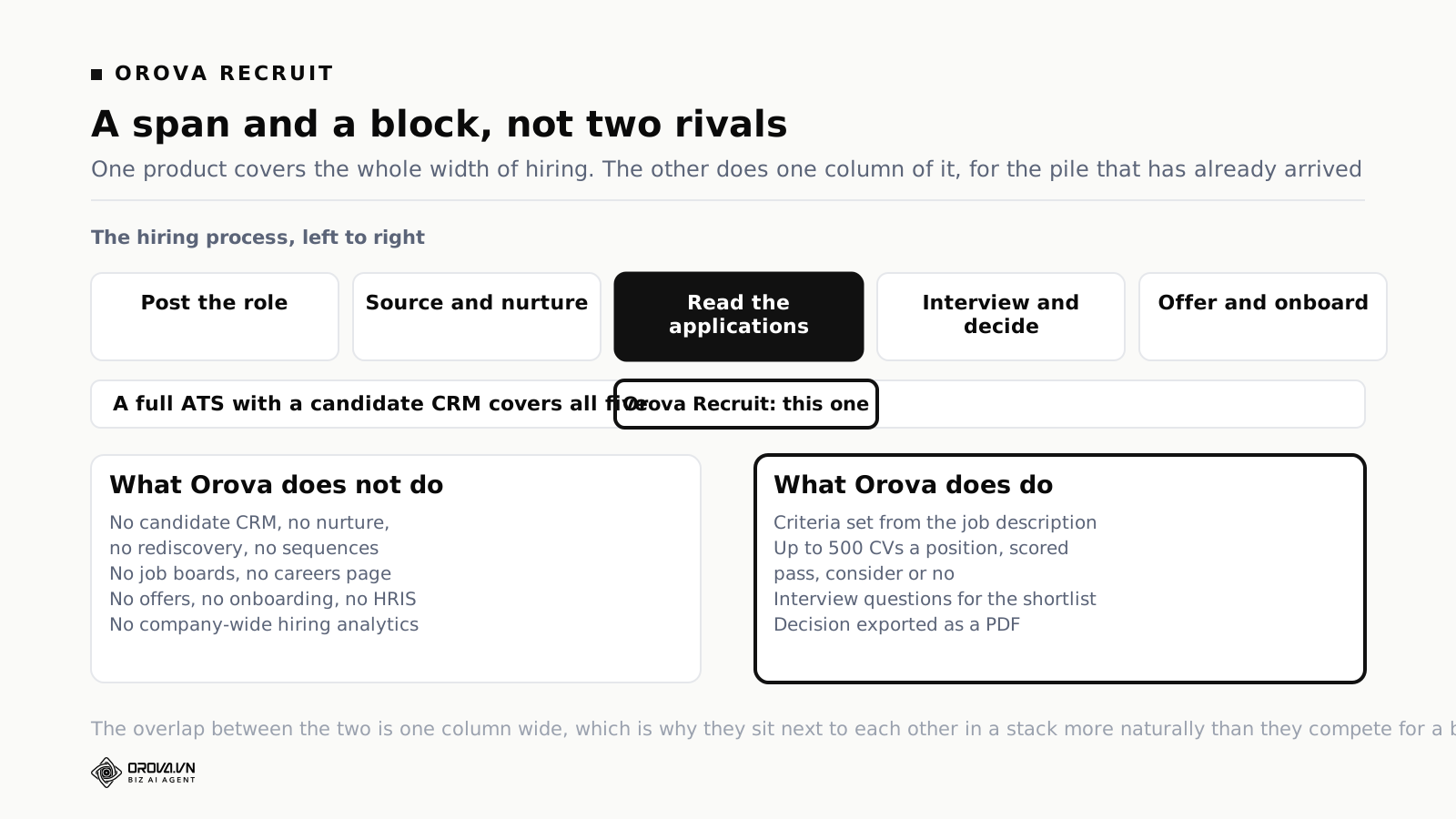
What Recruit does cover is one block: turning a role plus a pile of applications into a shortlist you can defend. You write or analyse the job description and set the criteria for that role. You load up to 500 CVs per position and each is scored into pass, consider or no, with a fourth state for files the system could not read. It generates and refines interview questions for the people who made the shortlist. It records or transcribes the interview from a file. Scoring becomes a recommendation, the recommendation becomes a decision made individually or in bulk, and the decision exports as a PDF. There is room and slot scheduling, and templated invitation emails with rules for sending them.
The reason to say all of this plainly is that it makes the choice easy rather than harder. If your bottleneck is that nobody good applies, buy the CRM. If your bottleneck is that four hundred people applied and two of them are right, Orova Recruit is aimed at exactly that, and it does not require you to leave whatever ATS you already have.
Lever and Orova Recruit, step by step
Bring this table to an internal discussion and mark the rows that currently cost you time before deciding anything.
| Step in hiring | Lever | Orova Recruit |
|---|---|---|
| Write and analyse the job description | Templates and requisitions | Writes and analyses it, then turns it into scored criteria |
| Publish to job boards and careers page | Yes | No |
| Source passive candidates | Yes, the core of the product | No |
| Nurture campaigns and rediscovery | Yes | No |
| Read and score a large batch of CVs | AI screening prioritises the pipeline | Up to 500 per position, scored pass / consider / no |
| Generate interview questions for a shortlist | Feedback forms you design | Generated per candidate, then refined |
| Structured feedback from several interviewers | Yes, across panels | Interview notes and evaluation, single-team scale |
| Schedule interviews | Yes, with panel and candidate self-booking | Room and slot scheduling |
| Record and transcribe the interview | AI transcripts and summaries in the platform | Recording plus transcription from a file |
| Record the decision and its reasoning | Feedback and stage history | Decision made single or in bulk, exported as PDF |
| Offers and onboarding | Yes, with an onboarding add-on | No |
| Company-wide hiring analytics | Yes, with Candidate Insights available separately | Per-position results only |
Two conclusions usually fall out of an honest reading. Most teams have three or four painful rows rather than twelve. And the painful rows are rarely the ones that get demoed, because demos are built around what looks impressive rather than what is tedious.
How to evaluate Lever in two weeks
An ATS evaluation expands to fill the time available, mostly because everybody has an opinion and nobody has data. Two weeks is enough if you fix the order.
Days one and two: write down what is broken
Get the last five hires on paper with dates for each stage. Where did the days go? Which stage lost candidates you wanted? Which decision could nobody explain a week later? This is your requirement document, and it will contradict at least one thing your team has been saying for a year.
Days three and four: size the two worst problems
Attach a number to the top two. Days lost to scheduling. Candidates who went cold while waiting. CVs read per role and by whom. If a problem cannot be sized, it is a feeling, and feelings do not survive a renewal conversation with finance.
Days five to eight: demos, with your own material
Insist on running your own role and your own CV pile in the trial. A scripted demo shows you the happy path on clean data. Ask to see a messy duplicate, a candidate who applied twice for different roles, and a rejection with a reason attached. Ask them to schedule a four-person panel live, on screen, without cutting to a pre-recorded clip.
Days nine and ten: price the whole first year
Licence, implementation, migration, add-ons, integrations, internal hours. Then ask for the year-two uplift in writing. Compare totals, not stickers, and compare them against the cost of the problem you sized on day four.
Days eleven to fourteen: test the boring path
Run one real role end to end in the trial. Not a demo role. Watch where your own team hesitates, because hesitation on day ten becomes abandonment on day ninety. Then pull your data out through the API before you sign, so you know the exit works while you still have a choice.
Questions worth asking on the call
- What drives the price, and what happens to it if our headcount grows 40% next year?
- Which product in your family did you place us in, and what put us there rather than the tier above or below?
- What is the year-two renewal uplift, and will you cap it in the contract?
- Which of the things you have shown me are add-ons rather than core?
- Can I pull my full candidate history through the API during the trial?
- What migrates from our current system at full fidelity, and what does not?
- How many of your customers our size are using nurture weekly, and can I speak to one?
- What happens to a candidate record when someone applies twice for different roles eighteen months apart?
The last one is the tell. It is a small, specific, unglamorous question, and the quality of the answer tells you whether you are talking to somebody who knows the product or somebody who knows the deck.
Common mistakes with a Lever rollout
Buying the CRM and never staffing it. The most common outcome by a distance. The merged model is the reason to choose this product, and it needs an owner. Without one you have bought a good ATS at a price set by a feature you do not use.
Migrating everything. Twelve years of dead candidate records will make your new system feel exactly like your old one. Bring the last two years and the people you actually want to contact again. Archive the rest somewhere cheap.
Recreating your old stages. The temptation is to model the pipeline you have. The opportunity is to model the one you want. Do this in week one; changing stages later means historical reports stop comparing.
Letting archive reasons go generic. Every report you will ever want depends on rejection reasons being honest. Agree on a short list, make it mandatory, and audit it after a month. A system with one reason called "other" at 60% is a system with no reporting.
Skipping the hiring manager training. They are the ones who will not log in. Whatever you buy, the fifteen minutes they get is what determines whether feedback arrives on time. Our template for a job description that turns into scoring criteria is a useful thing to put in front of them in that session, because it makes the standard concrete rather than abstract.
Treating onboarding as a later problem. Whether you buy the add-on or not, the first week of a new hire is where your offer acceptance either gets validated or regretted. If you are building internal training material for that week, our guide to choosing an authoring tool tier covers the same buy-versus-build question in a different aisle.
Frequently asked questions
Does Lever publish its pricing?
No. As of August 2026 the public pricing page offers a customised quote through a form rather than published tiers or per-seat rates. Any specific figure you find elsewhere is a third-party estimate or another buyer's negotiated deal, which may be a useful benchmark but is not a price list.
Who owns Lever now?
Employ Inc., which announced the acquisition in August 2022 and also owns JazzHR, Jobvite and NXTThing RPO. As of August 2026 the three products are presented together on Lever's own site as a range from foundational to sophisticated hiring.
Is Lever better than Greenhouse?
They optimise for different failures. Lever is stronger if a meaningful share of your hires come from outbound sourcing and relationships you maintain over months. Greenhouse is stronger if your problem is inconsistent interviewing across many hiring managers. Pick the one whose central idea matches your bottleneck.
Can Lever screen CVs automatically?
Its platform description as of August 2026 includes AI-powered screening, fraud prevention signals, and unlimited AI interview transcripts and summaries, with AI Screening by VONQ listed as an add-on. Prioritising a pipeline is a different job from producing an evidence-backed pass or reject decision on every application, so test it against a role you know well before assuming which one you are getting.
Is Lever suitable for a 30-person company?
It will work, and you will probably be paying for the half of the product you do not staff. Below roughly fifteen hires a year, and with no dedicated recruiter, lighter tools cover the same ground. The exception is a small company hiring senior specialists entirely through outbound, where the CRM half is the whole job.
How long does implementation take?
Plan for four to eight weeks of elapsed time for a mid-market rollout with migration, and expect the constraint to be your own team's availability rather than the vendor's. Ask for a named implementation contact and a written plan with dates before you sign.
What happens to our data if we leave?
Lever documents a Data API covering opportunities, contacts, postings, applications, feedback, offers, interviews, notes, stages, requisitions and candidate files, with a documented default of ten requests per second per key. That is a good position. What does not come out cleanly is configuration — report definitions, feedback templates, nurture sequences and scheduling setup — which you will rebuild wherever you go next.
Do we still need a screening tool if we have Lever?
Only if reading is your bottleneck. If roles produce dozens of applications, the ATS handles it. If they produce hundreds and a human is skimming them at eleven at night, a screening layer is solving a different problem from the one your ATS was bought for, and the two are not substitutes.
Does Lever handle interview questions and scoring?
It provides feedback forms and panels that you design. The questions themselves are yours to write. If that is the part your team struggles with, our list of interview questions that separate candidates is a better starting point than a blank template.
The short version
Lever's central bet is that inbound applicants and outbound relationships belong in one record. If that bet matches how you hire, it is a strong product and the CRM half is not a bonus feature but the reason to buy. If it does not, you will pay for a capability that sits idle while you use the ATS underneath it, which is a perfectly good ATS but not a differentiated one at that price.
So: size your bottleneck before you shortlist. Get the whole first-year total in writing, including the add-ons that were demoed as if they were core. Pull your data through the API during the trial rather than during the divorce. Ask the small, specific questions, because the answers to those are what tell you whether the person on the call has ever run a hire.
And be honest about which half of hiring is actually hurting. Finding people and reading people are different problems with different tools, and buying the wrong one is how teams end up two years in, paying mid-market prices, with the same pile of unread applications they had before.
When the bottleneck is reading, not sourcing
Orova Recruit scores up to 500 CVs per position against criteria you set for that role, sorting them into pass, consider and no, with the evidence quoted from the CV behind every point. It generates the interview questions for the shortlist and exports the decision as a PDF you can defend. It is not a candidate CRM and it does not post jobs.
See Orova Recruit