
Discovered currently not indexed: causes and fix order
Discovered — currently not indexed means Google knows your URL exists and has not fetched it. The page has not been read, so nothing on it has been judged. The report is telling you about a queue, not about your writing.
That distinction decides what you should do next. Editing a page in this state changes nothing, because Google will not see the edit until it decides the page is worth a visit. What moves it is links, crawl capacity and server speed. This article covers the five causes, the order to fix them, how to tell which one you have, and a four-week plan with a real case attached.
If your label reads "Crawled — currently not indexed" instead, Google did read the page and turned it down. That is a content problem with a completely different set of fixes, and it is covered in a separate article built around a real diagnosis.
The four states, and which one you are in
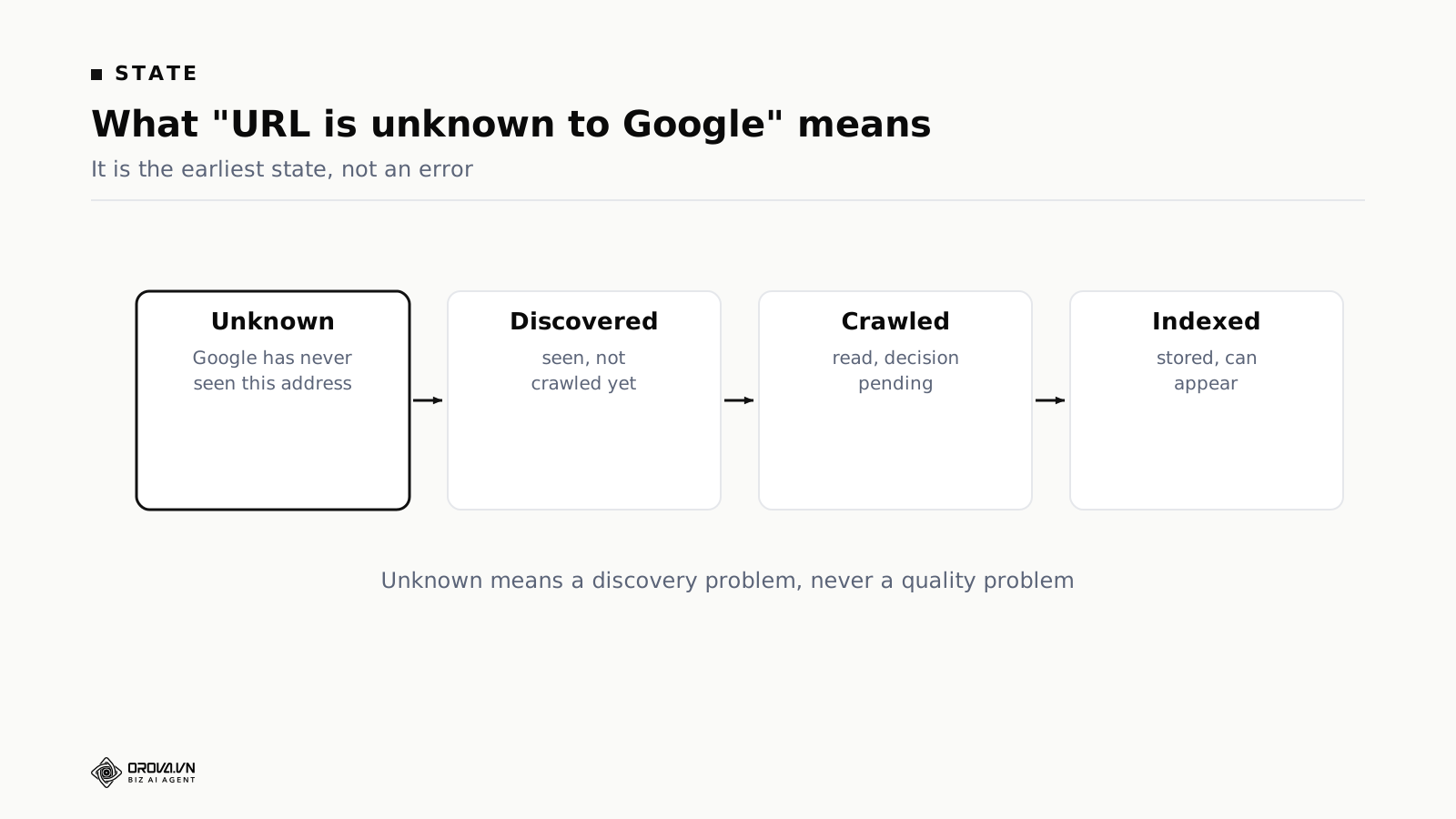
Search Console describes every URL it knows about using one of a small set of labels. Four of them describe the path from publication to a page that can appear in results.
URL is unknown to Google. No record of the address at all. Nothing links to it that Google follows, and it is not arriving through a sitemap that Google is reading.
Discovered — currently not indexed. Google has the address, usually from a sitemap or a link, and has not spent a fetch on it. In URL Inspection the last crawl date is empty, which is the clean confirmation that nothing was read.
Crawled — currently not indexed. Fetched, read, and not stored. This is the only label of the four that carries a judgement about the page.
Submitted and indexed. Stored, and able to appear in results. Able to appear is not the same as ranking for anything.
The first two labels share a cause family and share a fix family. Everything below applies to both, so if some of your pages read "unknown" and others read "discovered", you can work on them together. The gap between the second and third labels is where people waste months, because both contain the phrase "currently not indexed" and they point in opposite directions.
People also read this label as a verdict, as though Google looked at the site and decided not to bother. Nothing has been decided. Deciding requires reading, and reading has not happened.
Five reasons a URL is discovered but never crawled
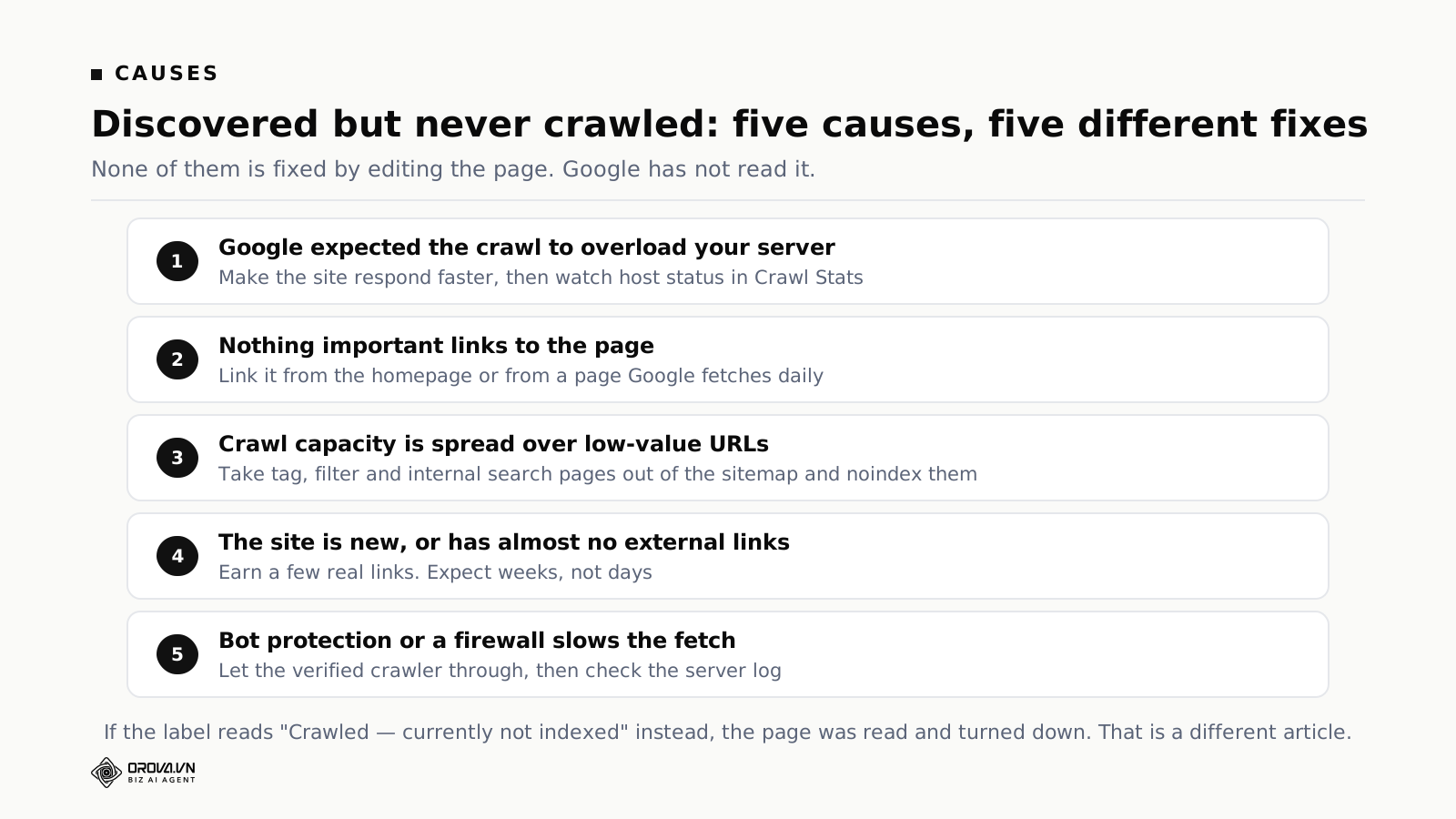
One: Google expected the crawl to overload your server
This is Google's own stated reason for the label. When it judges that fetching a URL would put too much load on the site, it reschedules the crawl. That is why the last crawl date comes back empty rather than showing a failed attempt.
The signal it uses is how your server has responded to previous requests. Slow responses, timeouts and intermittent errors all push it to back off. A site that answers in two seconds gets fetched far less often than one that answers in two hundred milliseconds, and none of that shows up as an error you would notice.
This cause is easy to confirm and it sits at the top of the list for that reason. The Crawl Stats report gives you the answer in about a minute.
Two: nothing important links to the page
The most common cause on a content site.
Google finds pages by following links, and it uses those links to guess at how much a page matters. A URL that arrives only through a sitemap has told Google it exists and nothing else. A URL linked from the homepage has told Google it exists and that the site treats it as important.
On blogs this happens through ordinary drift. An article publishes, appears on the listing page for a week, then scrolls off as newer ones arrive. Six months later it is linked from page twelve of an archive, or from nothing at all. The page did not get worse. Its route got longer.
Three: crawl capacity is spread over low-value URLs
Google fetches a finite amount from any given site. Tag pages holding one article each, filtered listing views, internal search result pages, and pagination running to page thirty all consume that allowance and return nothing.
The dividing line for whether this is your problem is roughly whether you could list your own pages. A site with a few hundred real pages and a clean sitemap is not hitting a ceiling. A site where filters and parameters have multiplied a few hundred pages into tens of thousands of URLs is hitting it constantly, and adding links will not help until the surface shrinks.
Four: the site is new, or has almost no external links
A domain registered weeks ago with nothing pointing at it gets very little crawl allocation. Pages sit in the queue, and there is no fault to find.
This is the one case where waiting is the correct action, and it is also where people do the most unnecessary work, because the symptom looks exactly like the other four. A handful of genuine links from established sites changes both the allocation and the speed, and it is the slowest of all the fixes here.
Five: something between Google and your server slows the fetch
Bot protection services, firewall rules, rate limiting, and geographic restrictions. Robots.txt is the one everybody checks. These are the ones that catch people, because they live in a control panel rather than in a file on the site, and bot protection in particular is often on by default and blocks anything that looks automated, which every crawler does.
A robots.txt that permits everything means nothing if a rule further out is refusing the request before it reaches your site. The confirmation lives in your server log: search for crawler requests over the past month and see whether any arrived.
How to tell which of the five applies to you
The five look identical from the outside. This sequence separates them, cheapest check first.
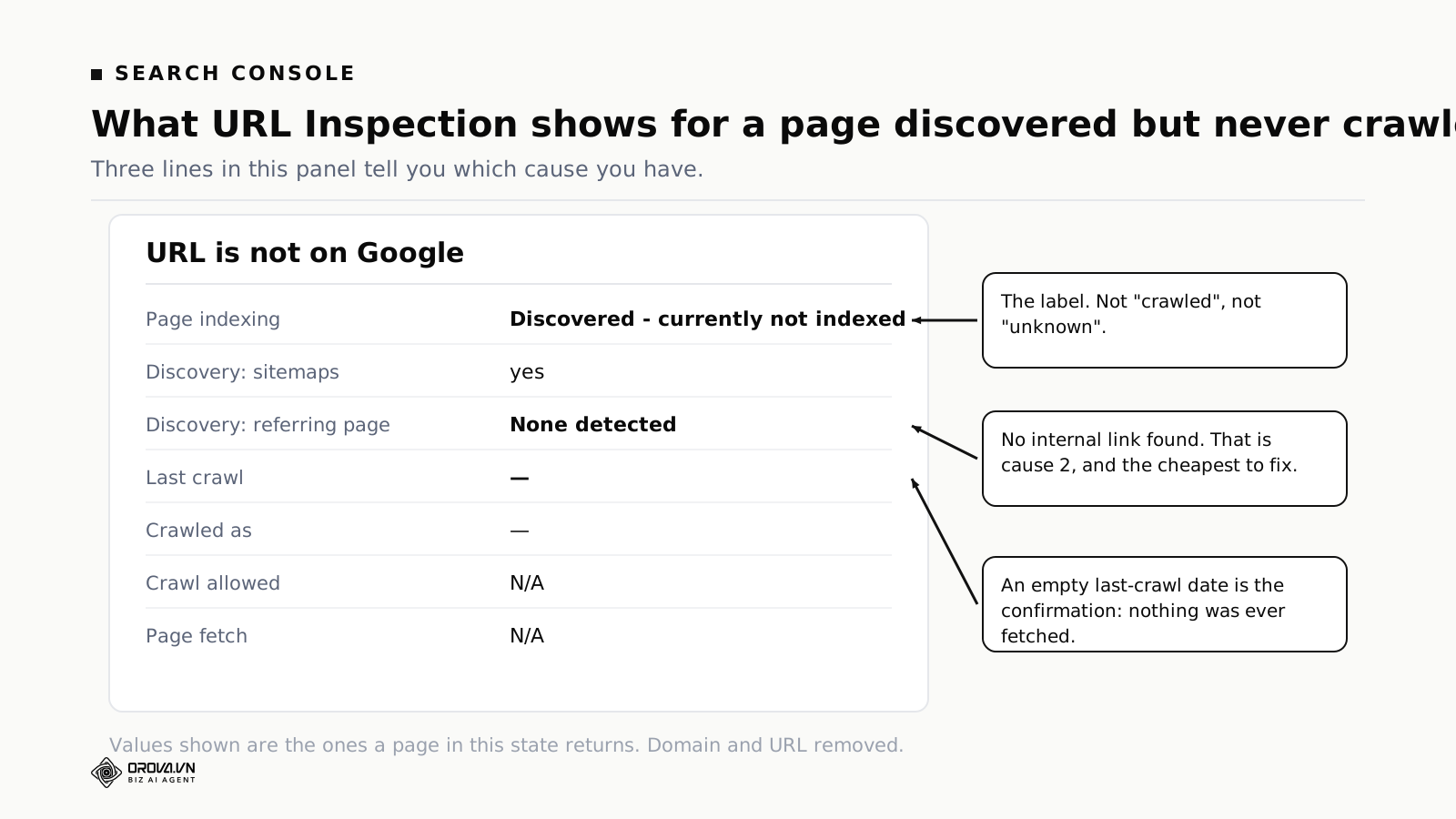
Check one: read the URL Inspection panel properly
Paste the URL, then read three specific lines rather than the headline.
Page indexing gives you the label. Confirm it says "Discovered - currently not indexed" and not one of the neighbours.
Referring page under discovery. If it says none detected, Google found the URL through your sitemap and has not seen a link to it from anywhere. That is cause two, and it is the cheapest of the five to fix.
Last crawl. Empty confirms nothing was fetched. If there is a date there, you are not in this state at all and the rest of this article is the wrong one.
Check two: open Crawl Stats
It sits under Settings rather than on the main menu, which is why almost nobody reads it. Three numbers matter.
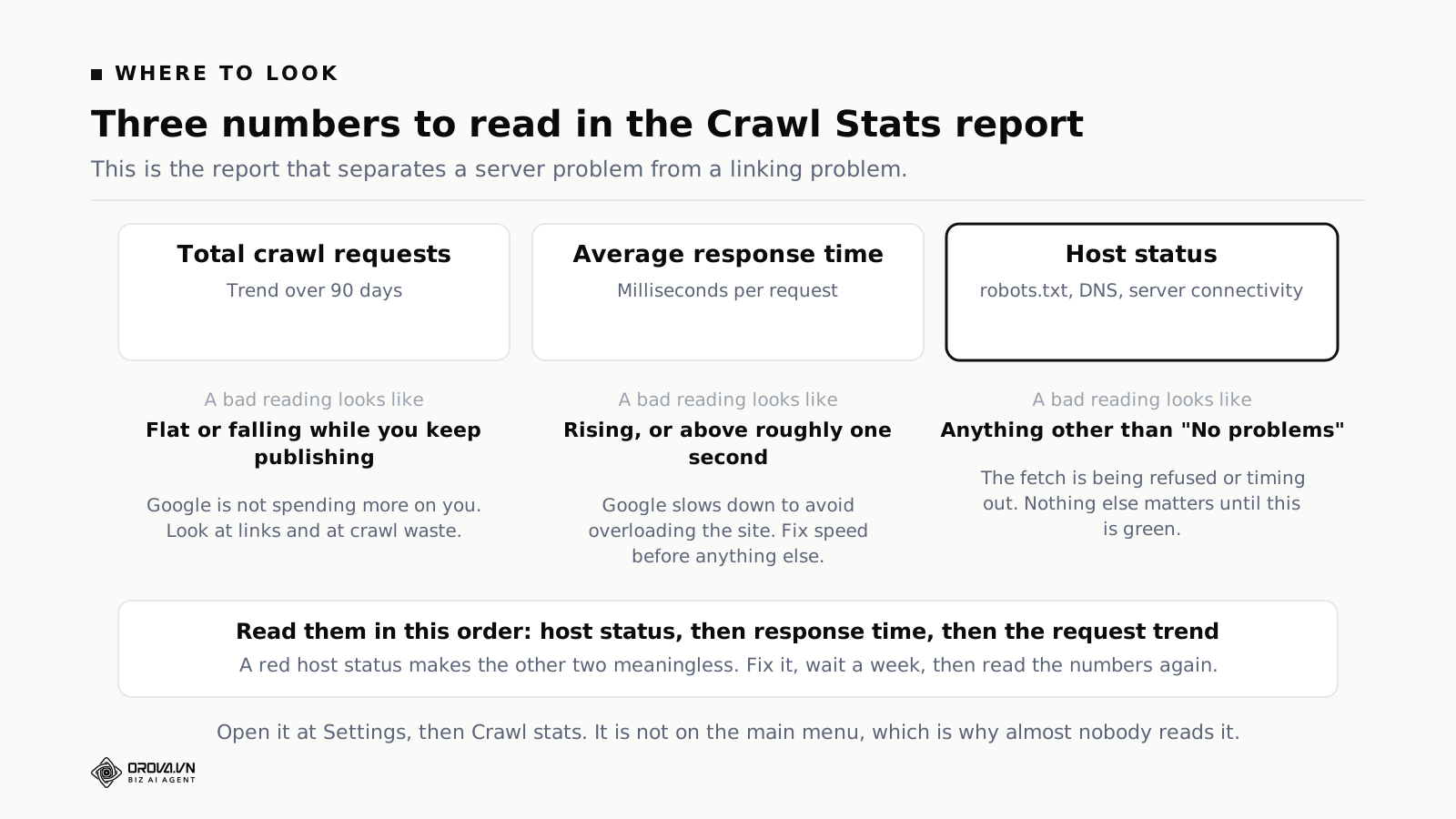
Host status. Anything other than a clean status means fetches are being refused or timing out. Fix that before touching anything else, because every other measurement on the site is distorted while it is red.
Average response time. Rising over the ninety-day window, or sitting above roughly a second, is cause one. This is a development task rather than an SEO task, and it is usually the highest-value technical work available on a slow site.
Total crawl requests. Flat or falling while you keep publishing means Google is not choosing to spend more on you. That points at causes two, three and four rather than at your server.
Check three: count the internal links to the page
Search your own site for the page's slug and count what comes back. Zero, or one result that turns out to be an archive listing, is cause two confirmed.
Do this for five or six of your unindexed pages rather than one. If the pattern holds across all of them, the problem is your link structure rather than those specific pages.
Check four: look for what is competing
Open your sitemap and count how many of the URLs in it are pages you would actually want someone to land on. If tag pages, filtered views and paginated archives outnumber your articles, that is cause three, and it explains why real pages are queued behind things nobody wants.
Check five: check the age and the link profile
If checks one to four come back clean and the domain is a few weeks old with nothing pointing at it, you have cause four. Add the links you can, then leave it alone and measure monthly.
The fix, in order, with what each step costs
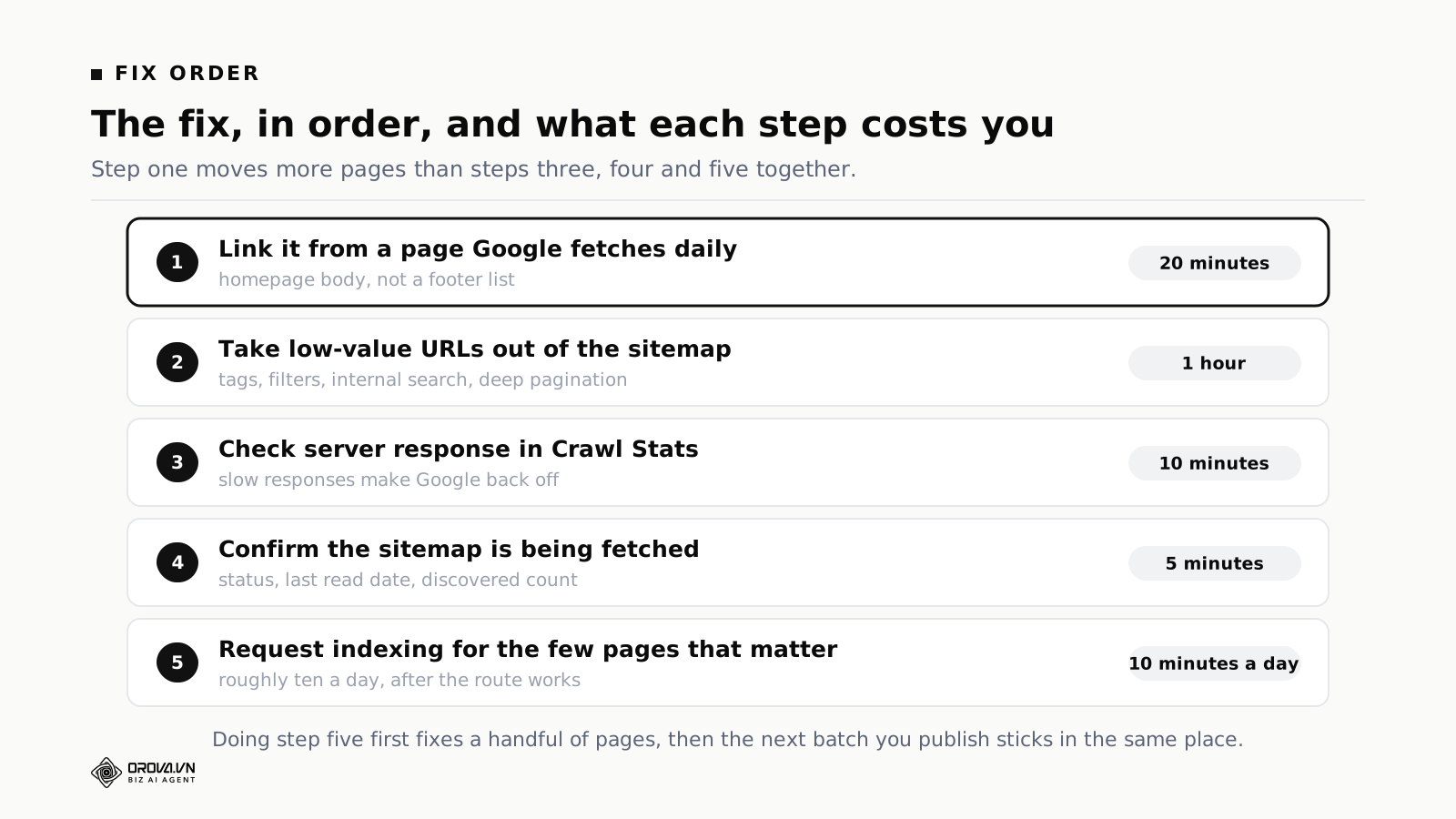
Step one: link to it from a page Google fetches daily
Twenty minutes, and it is the highest-value action available.
Find a page you know is indexed and fetched regularly, usually the homepage or a well-established article, and add a real contextual link to the page you want crawled. In the body text, where it makes sense to a reader, not in a footer list of fifty items.
A sitemap entry says the page exists. A link from a page fetched daily says the page is worth reaching. Only the second one changes the queue position.
Step two: take the low-value URLs out of the sitemap
About an hour on most sites, and it is the step people skip because it produces no visible improvement on the day.
Remove tag pages holding one or two items, filtered listing views, internal search results and deep pagination from the sitemap, then mark them not to be indexed. You are not deleting anything, and readers who use those pages keep using them. You are telling Google where not to spend.
Step three: check how fast the server responds
Ten minutes to read, longer to fix if it is bad. Crawl Stats gives you the average response time and the host status. If the response time is climbing, that is the thing holding your crawl rate down, and no amount of internal linking will get past it.
Step four: confirm the sitemap is being fetched
Five minutes. Open the Sitemaps report and read three things: the status, the date of the last read, and the number of URLs discovered.
A failure status means delete the file from the report and submit it again. A discovered count of zero on a file containing hundreds of entries means the file is being read and not parsed, which is a formatting problem. A last read date months old on a site publishing weekly is your answer on its own.
Step five: request indexing for the few pages that matter
Ten minutes a day, and it goes last on purpose.
URL Inspection has a request button with a daily allowance in the low tens. Use it on your most important pages after steps one to four, not before. Requesting a page whose route is still broken fixes that one page and leaves the next batch you publish in exactly the same position.
Repeating the request on the same page does not help. The allowance is small, and a second request on a page already queued is one you could have spent elsewhere.
A real case: 103 of 185 articles sat in this state
A site published two articles a day for four months, then someone opened Search Console and found three clicks in twenty-eight days.
The first cause was technical. A hosting incident lasting a few hours meant the sitemap could not be fetched. Google recorded the failure and did not retry. The site was back to normal the same day and nothing in analytics or uptime monitoring showed a residual problem. Resubmitting the sitemap fixed discovery and the index rate rose to 45%, which looked conclusive.
Thirteen days later the rate had fallen to 35%, and eleven of twenty sampled articles had settled at "Discovered — currently not indexed". Google now knew about every article and was choosing not to fetch them.
The reason was cause two, in its most extreme form. The homepage carried eighteen links and not one of them pointed to an article. All eighteen went to functional pages. To reach an article, Google had to load the homepage, follow the link to the news index, then work through roughly eighteen pages of pagination. Depth of more than ten clicks, with nothing important pointing at any of it.
The structural fix took an afternoon: thirty article links added to the homepage, a library page holding 163 links with no pagination, footer links to both from every page, and 110 near-empty tag pages pulled out of the sitemap so that file went from 110 URLs to 3.
A full audit of all 185 articles taken shortly after that fix: 50 indexed, 103 at "Discovered — currently not indexed", 19 at "URL is unknown to Google", and 13 at "Crawled — currently not indexed". Fifty-six percent of the site was sitting in the state this article is about, and none of it was a writing problem.
The reason the numbers had not moved yet was time. The homepage's most recent crawl was recorded three weeks before the fix, so Google had not been back to see the thirty new links. The full diagnosis of that site, including the sitemap failure and what happened next, is written up in the companion article.
Two things from that case are worth taking whether or not your situation matches. A technical incident with a same-day fix produced two months of invisible damage, because the damage lived in a report nobody opens. And a single good reading proves nothing: the rate went up, then down, and only the full audit gave a picture worth acting on.
The internal link priority order
Given limited effort, add links in this order.
From the homepage. The most-fetched page on almost every site and the one at depth zero. Three to five article links in the body of the homepage do more for discovery than any number of sitemap resubmissions.
From your most-linked article. Whichever page has the most inbound links from elsewhere is your second-strongest entry point. A contextual link from it carries real weight.
From topically related pages. An article that already discusses the same subject is a natural place for the link, and the relevance pays off after indexing as well as before.
From a library or index page. Useful as a catch-all, weaker per link, because a page of a hundred and sixty links spreads attention thinly. Build it anyway. It puts everything within two clicks, which is the point.
What works badly: footer link lists, sidebar widgets showing recent posts, and paginated archives past page two. All of them technically link, and all of them sit in the part of the page that carries the least weight.
What a healthy internal link structure looks like
Since links are the actual fix, it is worth being concrete about what you are building toward.
Every page reachable in three clicks
From the homepage, any article should be reachable in three clicks or fewer. Past that depth, crawl attention drops off sharply. Paginated archives are the usual offender: page twelve of a blog archive is nominally reachable and practically invisible.
Between five and fifteen contextual links per article
Links inside the body text, pointing at related articles, placed where a reader would want them. Below five and pages become isolated. Above fifteen or so and each link carries less, and the text starts reading like a directory.
A real hub page per topic
One page per subject area that links to everything on that subject with a sentence about each. Not a tag archive listing titles. A page someone would read. Hub pages solve the depth problem and the importance problem at the same time, and they tend to attract external links on their own.
Links pointing in both directions
New articles should link to older ones, and older articles should be edited to link to newer ones where it fits. The second half is the part nobody does, and it is what keeps older pages being fetched.
Three inbound links on the day an article publishes
From the homepage, from the topic hub, and from one related older article. Adding those at publication costs a few minutes. Adding them six months later requires remembering the article exists, which is why it does not happen.
Why sitemaps are weaker than people assume
A lot of the confusion around this state comes from over-trusting the sitemap. Three things are worth knowing.
A sitemap is a suggestion
Submitting a URL does not oblige anything to fetch it. The sitemap tells a crawler what exists. It does not tell it what deserves attention, and that judgement comes from links.
This is why a site can have a perfectly valid sitemap listing six hundred URLs and an index rate under a third. Nothing is broken. The pages are known and not prioritised, which is precisely what "Discovered — currently not indexed" is reporting.
A failed fetch is sticky
If the file was unreachable when a crawler tried, the failure is recorded. There is no guaranteed retry schedule, and on a site with little authority the next attempt can be a long way off. The failure takes seconds to happen and can take months to correct itself. Manual resubmission is what breaks that, and manual resubmission requires somebody to look.
A sitemap cannot compensate for structure
The case above is the demonstration. Resubmission restored discovery and the rate improved, then fell back, because the structure gave those pages no importance signal at all.
A useful way to hold it: the sitemap answers "does this exist", links answer "does this matter". Only the second question changes crawl priority.
The Search Console labels, translated
The report uses phrases that sound similar and mean very different things. Reading the right label first saves the most time of anything in this article.
URL is unknown to Google. Never seen. A discovery problem. Fix the route.
Discovered — currently not indexed. Known, not fetched. Crawl priority or server capacity. Everything in this article applies.
Crawled — currently not indexed. Read and passed over. The only label reflecting a judgement about content, and the one place where rewriting is the right response.
Duplicate without user-selected canonical. Google found near-identical pages and picked one itself. Usually parameter URLs or tag archives rather than a content problem.
Alternate page with proper canonical tag. Working as intended, unless it appears on your main article URLs, in which case something is misconfigured and you are telling Google those articles are not the original version.
Excluded by noindex tag. You told it not to index. Check whether you meant to, especially after a migration from a staging environment.
Blocked by robots.txt. Crawling was refused. Different from noindex, and the two get confused constantly. A blocked page can still appear in results without a description. A noindexed page cannot appear at all.
What to do while you wait
The interval between fixing a route and seeing a state change is uncomfortable, because nothing you do makes it shorter. Four things are worth doing in that window.
Record a baseline. Write down today's numbers: total pages, indexed pages, index rate, and the date. Without it, the improvement three weeks from now is invisible and you will not know whether the fix worked. This is what separates people who can say what changed from people who have a feeling that things are better.
Stop publishing for a couple of weeks. New articles compete for the same crawl allocation as the backlog. Adding to a queue that is not being processed helps nobody, and it makes the index rate look worse because the denominator grows. Start again when crawl activity picks up in the Crawl Stats report.
Do the linking work properly rather than minimally. Go through your best pages and add genuine contextual links to related articles. Not a bulk operation. A real edit a reader would find useful. This is the work that keeps paying after the immediate problem is solved.
Look at what did get indexed. Ask why those pages and not the others. The pattern is usually informative. If the indexed set is mostly recent posts, the archive structure is the problem. If it is mostly pages linked from the homepage, that confirms where the crawl attention goes.
A four-week plan
Week one: diagnose and fix the route
Run the five checks. Record the baseline. Fix whatever the checks found, most likely a linking gap, a slow server, or a sitemap full of tag pages.
Add contextual links from the homepage and your two strongest articles to the pages that matter. Request indexing for up to ten of them. Do not publish anything new this week.
Week two: structure
Build or fix one hub page for your main topic. Go through your ten best-performing pages and add real contextual links to related articles from each. Open the Sitemaps report again, because a failure status can recur.
Week three: measure
Re-record the numbers and compare against the baseline. On a site with any crawl activity at all, some movement should be visible by now. None at all points back at cause five, an access block, or at cause one, a server that is too slow to fetch from.
Resume publishing if crawl activity has picked up.
Week four: re-measure and decide
This is the reading that matters, because it is far enough out to be a trend rather than a reaction.
Climbing means the fix worked and the remaining work is ongoing internal linking. Flat means something in the route is still blocked, and it is nearly always cause two or cause five. Improved then fallen back is the structural pattern from the case above: the technical fix worked and the structure did not support it.
A weekly check that takes two minutes
Rather than finding an indexing problem two months late, read four numbers once a week.
Sitemap status and last read date. Any failure or a stale date is the highest-priority finding available.
Total indexed pages. A drop is worth investigating immediately. A plateau while you keep publishing is worth investigating within the week.
Index rate. Indexed divided by total, on the same list each time. The direction matters more than the value.
Any new label appearing. A label that was not there last week means something changed, and finding out what while it is one week old is far cheaper than finding out at two months.
The reason this check almost never happens is worth naming, because the pattern repeats across teams. It produces no alert: uptime monitoring stays green, analytics keeps showing traffic from pages already indexed, and ads keep delivering. It lives in a screen nobody opens, since people go to Search Console for queries and clicks, which are elsewhere. The symptom is a flattening rather than a drop, which is much harder to notice and easy to blame on competition. And the people who cause it are not the people who feel it, because an infrastructure incident is closed by whoever handles infrastructure weeks before the search consequence lands on whoever handles content.
One line on the incident checklist closes most of that gap: after any hosting, DNS or migration incident, open the sitemap report.
Where this sits in the rest of your SEO work
Indexing is the gate everything else sits behind, and the order is worth being blunt about.
Keyword research on an unindexed page is wasted. Content optimisation on an unindexed page is wasted. Structuring paragraphs so an AI summary can quote them is wasted, because summaries draw from pages already in the index.
None of that work is wrong. It is second in line. Doing it first is the most common misallocation of effort in the discipline, partly because indexing feels like a technical concern belonging to somebody else, and partly because Search Console reports it quietly.
The order that works: confirm the page is indexed, confirm it is getting impressions for something, then improve what it says and how it is structured. Each step is only worth doing once the previous one is true.
If you manage several sites
The same problem at a different scale, with a different failure mode. On one site, the risk is that nobody looks. Across ten sites, the risk is that looking becomes a job nobody has time for, and the site that breaks is whichever one is opened least.
Two practices help. Check the sitemap report for every property on the same day each week, as one batch rather than ten separate tasks. It takes about fifteen minutes for ten sites and it catches the one that failed. Then keep the four weekly numbers for every site in one sheet, one row per site per week. A site whose index rate has been sliding for a month stands out immediately in a table and never does inside its own account.
Neither practice needs a tool. Both need somebody to own the fifteen minutes.
Frequently asked questions
How long should a page stay at "discovered — currently not indexed"?
Days on an established site with good internal linking, weeks on a young one. Past a month with no change, treat it as a signal rather than as a reason for more patience, and go back to the five checks.
Should I rewrite a page in this state?
No. Google has not read it, so nothing about the writing has been assessed. Rewriting is the fix for "Crawled — currently not indexed", which is a different label.
Does requesting indexing repeatedly help?
No. It does not appear to cause harm either, but the daily allowance is small and a second request on a page already queued is one you could have spent on a page that is not.
Should I delete pages that stay in this state?
Not for that reason alone. Discovered means unread, not judged, and deleting removes the possibility of discovery entirely. Pages sitting at "Crawled — currently not indexed" for a long time are a different conversation.
Do social shares help a page get crawled?
Indirectly at best. Most social links carry attributes that discourage crawling, so the share itself does little. What helps is someone seeing the post and linking to it from their own site, which is a different mechanism with a much longer lead time.
Does paid traffic help indexing?
No. Paid delivery and organic discovery are separate systems. Running ads to a page does not cause it to be fetched.
Will fixing this recover the traffic I should have had?
Partly. Pages crawled late start from zero and need time to accumulate impressions, so the missing months do not come back. What you recover is the future, which is worth starting today rather than in another two months.
Does a healthy index rate have a number?
Not a universal one. What matters is the direction and whether your important pages are in the indexed group. A site at 60% where every commercial page is indexed is healthier than one at 90% where the indexed pages are all tag archives.
Can a page go from indexed back to this state?
Not usually back to discovered, but it can be dropped from the index and return to "Crawled — currently not indexed". That is a different problem with different causes.
My site is large and established. Does this still apply?
The five causes are the same, but the weighting changes. On a large site, cause three dominates: parameter combinations, filtered views and session identifiers consume the allowance, and the fix is reducing how many URLs exist rather than adding more links. Also check for pages orphaned by a migration, where the URL pattern changed and nothing on the current site references the old address any more.
Where to start today
Open URL Inspection on one page you care about and read three lines: the label, the referring page, and the last crawl date. That takes a minute and it narrows five causes down to one or two.
Then add one real link to that page from your homepage. Discovery problems are the cheapest class of SEO problem there is. They need a link and a server that answers quickly, not a rewrite.
Further reading: crawled but not indexed, diagnosed on a real site, internal links done right, when crawl budget actually matters, and optimising old posts instead of writing new ones.
If you would rather have index health checked every week than discovered two months late, Orova runs that check for you.
Let Orova SEO handle the repetitive part
Keyword research, drafting, refreshing old posts and rank tracking — running automatically on your own site.
Explore Orova SEO