
Crawled currently not indexed: a real case, diagnosed
"Crawled — currently not indexed" means Google fetched your page, read it, and decided not to keep it. The page is not blocked. It is not missing. Google saw it and passed.
That label is the most misread line in Search Console. Most people who find crawled currently not indexed on a handful of URLs conclude their writing is at fault and start rewriting. On the site described below, all 185 articles were checked one at a time, and only 13 were in that state. Another 122 unindexed articles sat in states where Google had never read a word of them. Rewriting those would have changed nothing at all.
This article gives you two things. First, a way to confirm which state you are actually in, taken from a real case that ran four months before anyone noticed and needed two separate rounds of fixes. Second, what to do about pages that genuinely were read and rejected. If your report says "Discovered — currently not indexed" instead, that is a different problem with different fixes, and it has its own article here.
What the label means, and how it differs from the other three
Indexing is Google storing a copy of your page in its database. Publishing is only the first step. Google still has to discover the page exists, decide to spend a fetch on it, and decide the result is worth storing. Fail any of those and the page never shows up in search results, no matter how visible it is on your own site.
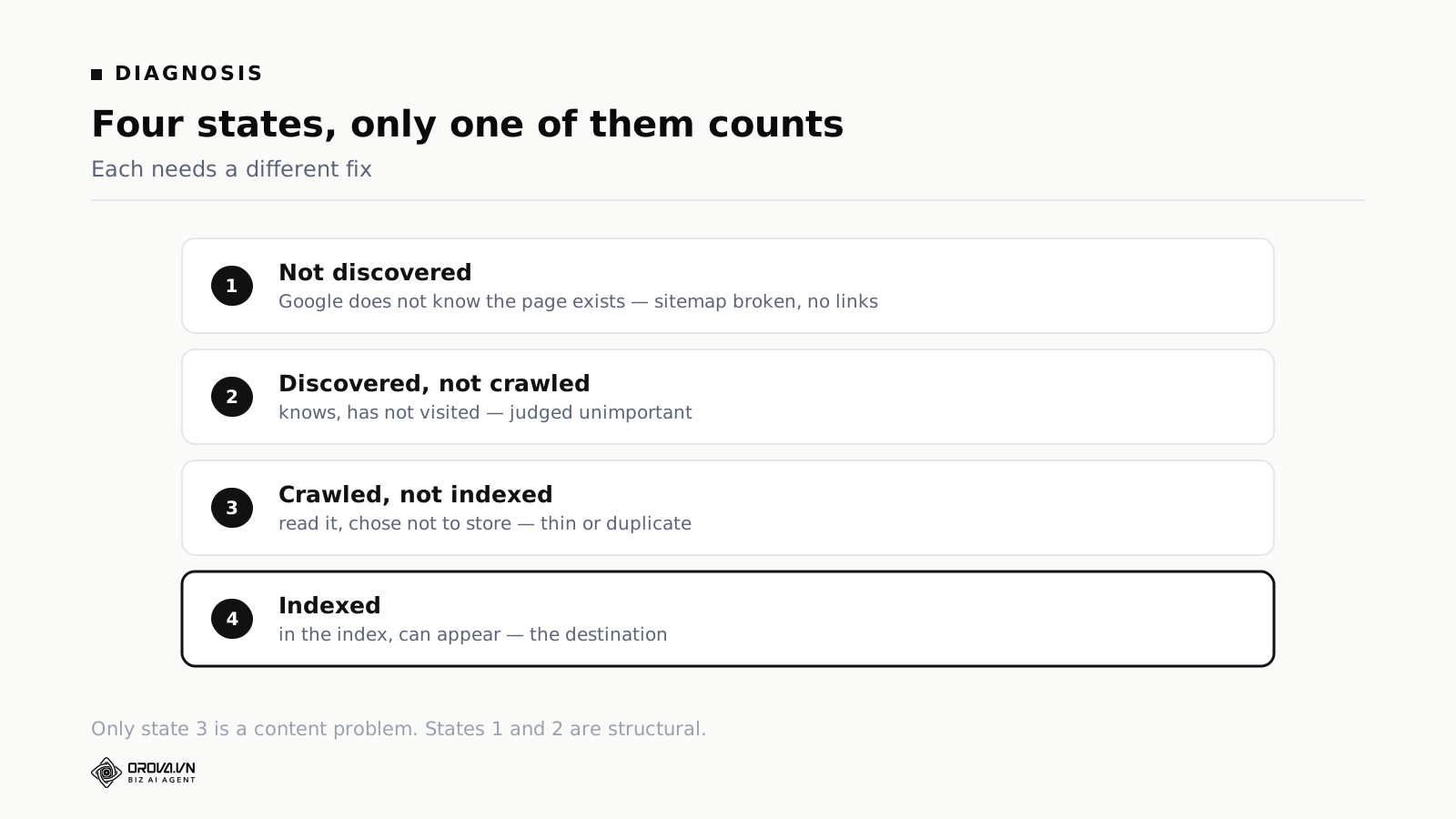
"URL is unknown to Google." No record of the page at all. Not queued, not skipped, absent. The cause is always discovery: no working sitemap entry and no internal link pointing at it. Nothing about the page is being judged, because nothing has been read.
"Discovered — currently not indexed." Google knows the URL exists and has it queued. It has not spent a fetch on it yet. This is a priority decision, not a quality one. The levers are importance signals: how many pages link to it, how deep it sits, how often the section it lives in gets updated.
"Crawled — currently not indexed." Read and rejected. This is the only one of the four that is a judgement about what is on the page. Typical causes are thinness, near-duplication of another page, or a page whose purpose is unclear.
"Submitted and indexed." The page is stored and can appear in results. Whether it ranks is a separate question with a separate answer.
The distinction that costs people the most time is between the second and third. Both descriptions contain the words "currently not indexed", they sit next to each other in the same report, and they call for opposite work. One asks you to change your link structure. The other asks you to change the page. Do the wrong one and you spend a month producing no movement.
Confirm the state before you touch the content
Three checks, in this order. The whole sequence takes about twenty minutes.
The site: operator. Type site:yourdomain.com into Google. The result count is rough, but it tells you the scale of the problem. If you have published two hundred articles and the count comes back in single figures, you know within ten seconds that this is not an editing problem.
On the case site, this returned the homepage and a few odd pages. Two hundred articles were absent.
URL Inspection in Search Console. Paste one specific article URL. Google returns its exact state in the vocabulary above. This is the step that replaces opinion with a fact.
Do it on more than one URL. A single inspection tells you about a single page, and pages on the same site are often in different states for different reasons. Ten to twenty URLs, picked across old and new content, gives you a shape.
The Pages report and the Sitemaps report. The Pages report groups every known URL by state and lets you export the full list. The Sitemaps report shows each submitted file, its fetch status, and how many URLs Google took from it.
Export the Pages report rather than eyeballing it. You want the counts per state, not an impression. If "Crawled — currently not indexed" is a small slice and "Discovered" is a large one, your work is structural and content edits are wasted effort. If "Crawled" dominates, the work is editorial and you can stop reading about internal links.
One warning about samples. Twenty URLs is enough to tell you roughly where you stand. It is not enough to tell you whether a fix worked, because the sample changes and the noise between two readings can be larger than the effect you are looking for. To judge an intervention, check every URL, or check the same fixed list each time.
The case: four months, twice a day, three clicks in twenty-eight days
A site published two articles a day for four months. When someone finally opened Search Console, the number was three clicks in twenty-eight days. Not three hundred. Three.
The owner assumed the writing was at fault. It was not. The articles were long, illustrated, and clearly distinct from one another. Almost none of them were in Google's index at all. For two months, nearly everything published had been invisible.
Running the three checks above produced an answer quickly. The site: operator showed a handful of pages. URL Inspection on sixteen sampled articles returned "URL is unknown to Google" on eight of them. Google had never heard of half the sample.
The Sitemaps report showed where that came from. All six sub-sitemaps read "Couldn't fetch" with 0 discovered URLs.
The cause was not on the website, and the fix took five minutes
Checked by hand, the sitemap was healthy. It opened in a browser and returned status 200 with valid XML and every article listed. Requesting it with a Googlebot user agent worked. Requesting it from a server in another country worked. Twenty requests in a row, all fine.
The failure was in the past, not the present. Roughly two months earlier the hosting had gone down for a few hours. Google happened to fetch the sitemap inside that window, hit an error, and recorded the failure.
Then it did not try again.
For an established site with a long history, Google retries within days. For a young site it deprioritises the retry, and that can run for months. Every article published in the meantime falls into a gap.
What makes this failure mode dangerous is that nothing warns you. The site runs normally. Publishing works. No error appears anywhere in your own tooling. There are simply no visitors, and a young site has few visitors anyway, so having fewer sets off no alarm.
The fix was to delete the sitemap from Search Console and submit it again. No file changes, no server changes, nothing touched on the site. It only told Google to forget its cached failure and read the file fresh.
Google re-read it the same day and went from 0 discovered URLs to 144. Thirty minutes after that, the sampled articles had moved: "URL is unknown to Google" fell from eight of sixteen to one of twenty, and nine URLs had shifted to "discovered, awaiting indexing". Index rate at that point was 45%.
Why that fix was not enough: articles sat ten clicks deep
Thirteen days later the measurement was repeated. The sitemaps were entirely healthy by then, all six files, no errors, Google re-reading them on its own schedule, all 183 articles received.
The index rate had fallen to 35%. Lower than it was immediately after the fix.
Eleven of twenty sampled articles now sat at "Discovered — currently not indexed". Google knew they existed, had taken them from the sitemap, and was choosing not to visit. Search data for the previous seven days: one click and 322 impressions, of which the homepage accounted for 314. Every article on the site combined contributed eight impressions.
Checking the link structure explained it. The homepage carried 18 links and not one of them pointed to an article. All eighteen went to functional pages: the news index, the reports section, registration, terms.
To reach an article, Google had to load the homepage, follow the link to the news index, then work through roughly eighteen pages of pagination to find anything older than the last few days. Depth of more than ten clicks.
Depth and inbound link count are how Google guesses at importance. A page ten clicks down with nothing pointing at it looks like a minor page. Google records that it exists and files it at the back of the queue, which is exactly the state the report was showing.
A sitemap answers the question "does this page exist". It does not answer "is this page worth reading". The second question is answered by link structure, and no amount of sitemap work touches it.
Fix two: flatten the structure
Four changes, done in one afternoon.
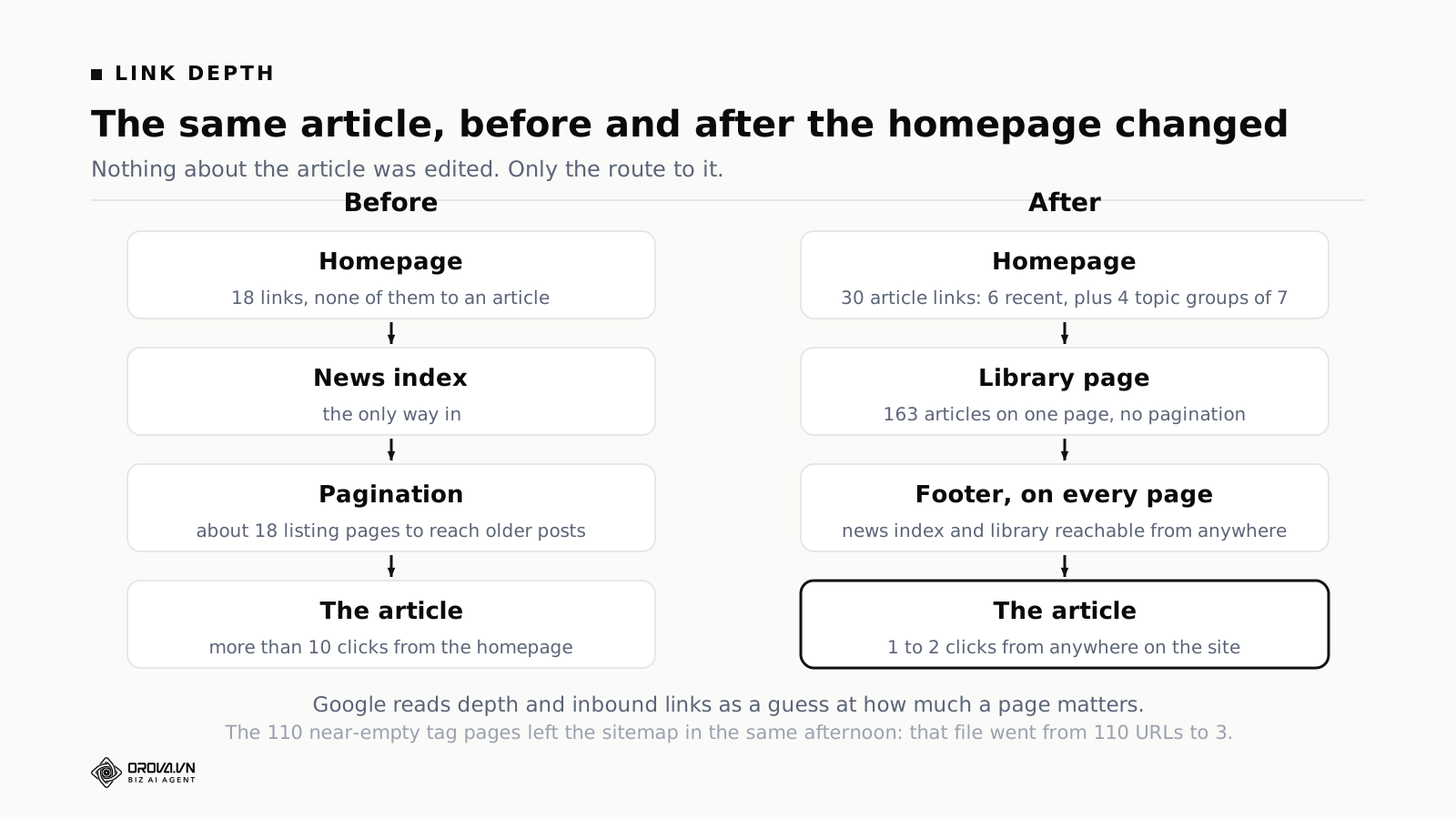
Put articles on the homepage. A block at the foot of the homepage: the six most recent articles, plus four topic groups of seven links each. The homepage went from zero article links to thirty.
One detail from that build is worth copying. The block uses text cards rather than image cards, because the site's cover images are text on a dark background and become unreadable at card size. A twenty-word excerpt replaced the image, so the cards still read as cards rather than as a bare list of links.
Build a library page. One page listing every article by category, no pagination, with jump links per section. It holds 163 links on a single page. Readers rarely use a page like this. Crawlers find it extremely convenient, because one fetch reveals every URL along with a clear structural relationship between them.
Add footer links. Links to the news index and the library in the footer of every page. From anywhere on the site, every article is now within two clicks, including from other articles.
Take the junk out of the sitemap. The site had 110 tag pages in its sitemap, most containing one or two articles. They consume crawl capacity and return nothing. They came out of the sitemap and were marked not to be indexed. The tag sitemap went from 110 URLs to 3.
That fourth change is the one people skip, and it is the cheapest of the four. Google allocates a finite amount of fetching per site. Spending it on 110 near-empty tag pages leaves less for 183 real articles. The same logic applies to deep pagination and to auto-generated filter combinations, which on larger sites can outnumber real pages by an order of magnitude.
Where it stands, honestly
This case does not have a tidy ending, and saying so is more useful than implying otherwise.
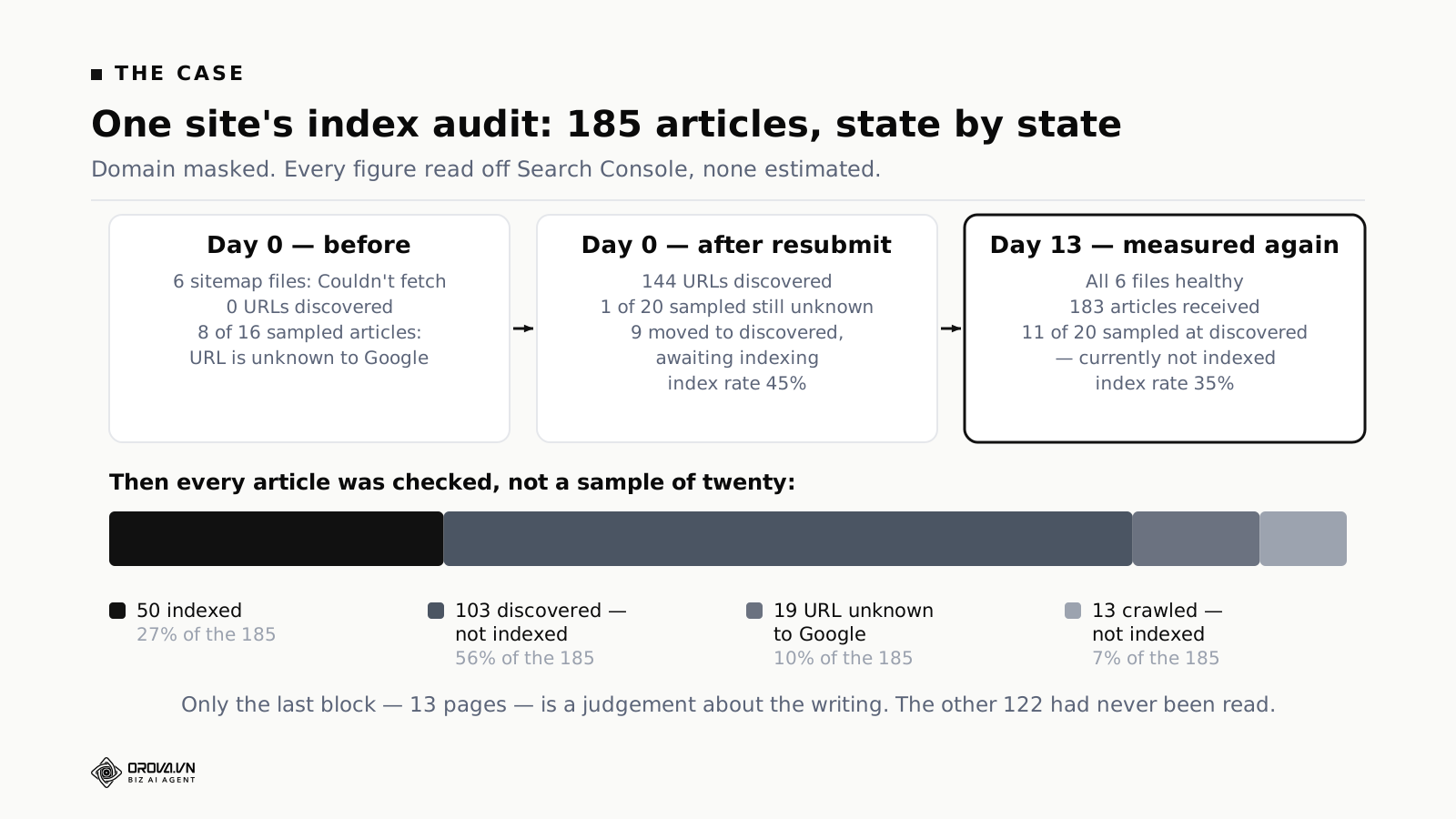
All 185 articles were measured after the second fix. 50 were indexed, or 27%. Of the rest, 103 sat at "Discovered — currently not indexed", 19 at "URL is unknown to Google", and 13 at "Crawled — currently not indexed".
The figure that stings most: zero of the 42 in-depth analysis articles were indexed. Those are the longest and most heavily worked pieces on the site. None of them were in Google's index.
The main reason is time. The second fix was days old, and the homepage's most recent crawl was recorded three weeks before that. Google had not yet come back to see the thirty new links, so none of the structural work had reached it.
What was left was waiting, plus one manual task: using Request Indexing in Search Console on the fifteen strongest articles. Google allows roughly ten to twelve requests per day, so that ran over several days.
Only 13 of 185 pages were a content problem
Read that breakdown again with the keyword in mind. On a site where the owner's first instinct was to rewrite everything, seven percent of the articles had actually been read and rejected. Fifty-six percent were queued and never fetched. Ten percent were unknown.
This ratio is not universal, but the shape of it is common on young sites, and it explains why so much indexing advice misses. Advice about thin content, search intent and originality is aimed at the seven percent. It does nothing for the sixty-six percent that Google has not read.
There is a fast way to check where you sit. Open the Pages report, look at the two counts, and compare them.
- "Discovered" much larger than "Crawled". You have a structural problem. Fix links and crawl waste first. Editing pages now is wasted work, because the edits will not be seen.
- "Crawled" much larger than "Discovered". Google is reaching your pages and turning them down. The rest of this article is for you.
- Both large. Fix the structure first anyway. It is faster, and it changes the denominator for everything else.
One more caveat before you act on those counts. Both buckets include URLs you never wanted indexed in the first place: tag pages, filtered listings, paginated archives, internal search results. Filter those out before you compare, or you will diagnose a content problem that is really a housekeeping problem.
Five reasons Google reads a page and does not store it
These are the causes worth checking when the state genuinely reads "Crawled — currently not indexed" and the URL is a page you want indexed.
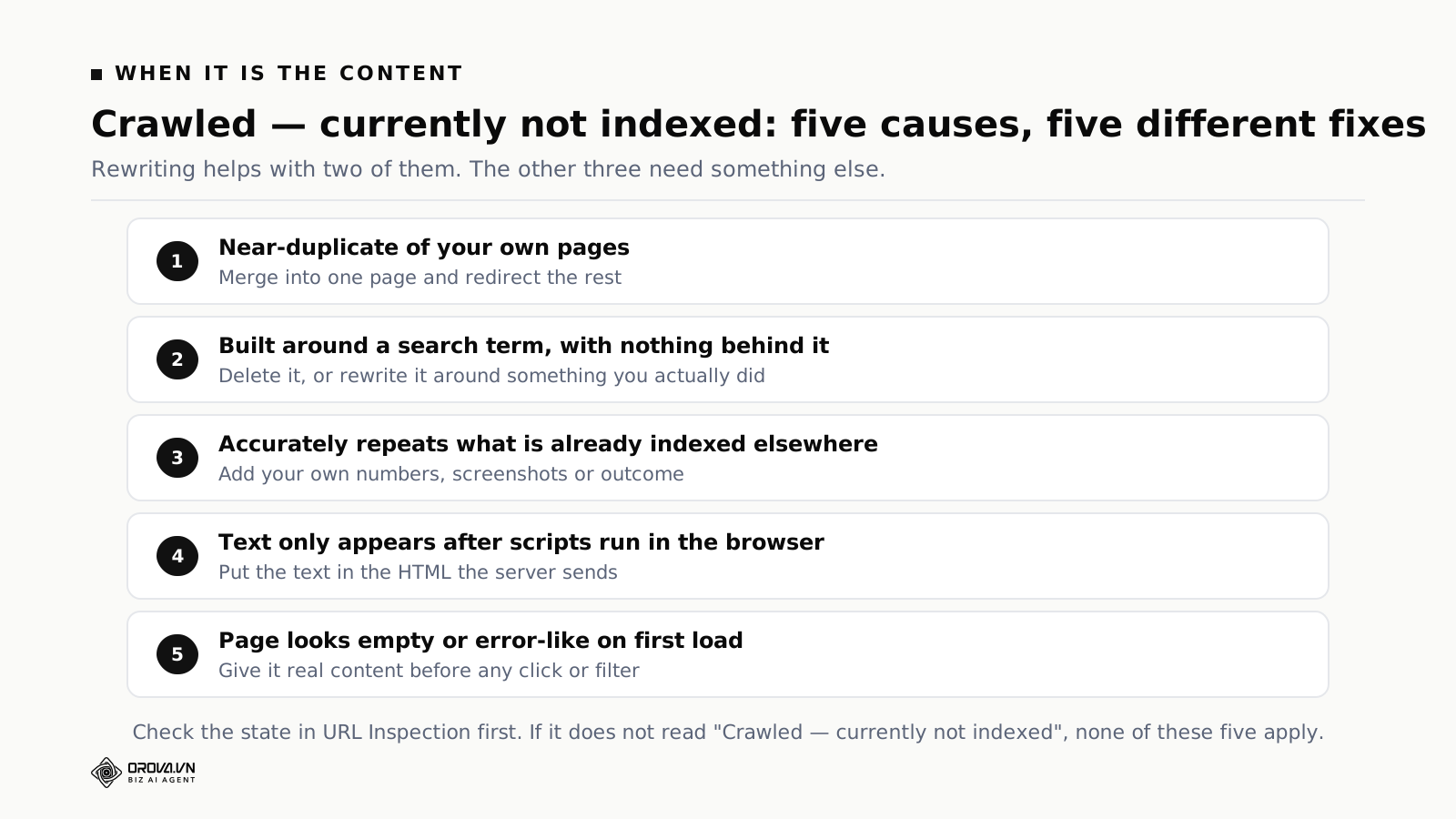
Near-duplication across your own pages. Twenty articles on closely related subtopics, each covering much of the same ground. Google stores a few and treats the rest as redundant. This is the most common cause on sites that publish to a schedule, because a schedule pushes you into splitting one topic into several thin pieces to fill the calendar.
The tell is easy to check. Take two of your unindexed pages, put their H2 lists side by side, and see how many headings say the same thing. If a reader who finished one would learn nothing new from the other, Google reached the same conclusion.
Pages built around a search term with nothing behind them. Thin location pages, thin product variant pages, articles assembled from a keyword and nothing else. These are increasingly not indexed at all, and the trend has been one way for several years.
Content that accurately repeats what is already indexed. A page that correctly restates what twenty other sites already say has nothing to add to an index that already holds those twenty. This one is the hardest to accept about your own work, because the page is not wrong and is not thin. It is just redundant, and redundancy is a perfectly good reason to decline storage.
Text that only exists after scripts run. If the content is not in the HTML your server sends, Google has to render the page before it can judge it. It can do that, more slowly and at greater cost, and for a young site with little crawl capacity to spare, that cost is a real penalty. Check with the rendered HTML view in URL Inspection, which shows you what Google actually got rather than what your browser shows you.
Pages that look empty on first load. Category pages with no items, listings that only populate after a filter is chosen, pages whose main content sits behind a click. Google reads what is there on arrival. If that is a shell, the page gets treated as a shell, and it sometimes lands in the Soft 404 bucket instead.
Three checks cover all five in about fifteen minutes: view the rendered HTML in URL Inspection, put your unindexed titles in a list and look for near-twins, and open three unindexed pages as a stranger would to see whether anything on them could only have come from you.
Fixing a page that was read and rejected
Each of the five causes has a different repair, and picking the wrong one is how pages sit in this state for a year.
Consolidate near-duplicates rather than improving them separately. Pick the strongest of the group, move the genuinely distinct material from the others into it, then redirect the others to it permanently. Four thin pages that each half-answer a question do worse than one page that answers it. Deleting without redirecting loses whatever links those URLs had, so redirect.
Do this in small batches. Consolidating forty pages in a week produces a large set of redirects and a period where Google is working out which URL is authoritative, and it becomes hard to tell what caused what.
Add something only you could have written. A number from your own account, a screenshot of your own report, an outcome you measured, a mistake you made and what it cost. The useful test is whether the page contains a sentence that could only have been written by someone who did the work. If not, the page is a summary of other people's pages, and index space for summaries is scarce.
This is what makes the case in this article worth publishing at all. Any site can explain what "Crawled — currently not indexed" means. The counts of 50, 103, 19 and 13 came from someone opening a report on a specific afternoon.
Delete what should not exist. Some pages were made to fill a template and have no reader. Removing them is not a loss. It also returns crawl capacity to pages you care about, which is the second-order benefit people forget.
Move rendered content into the server response. This one is a development change rather than an editing change, and it is usually the single highest-value technical fix on a site that has it. Confirm first with the rendered HTML view, because it is often assumed and rarely checked.
Mark deliberately what you do not want indexed. If a page exists for navigation or for logged-in users, tell Google not to index it. That is not a defeat. It cleans the report, so the numbers you look at next month describe pages you actually care about.
After any of these, re-request indexing for that URL and note the date. Expect days on an established site and weeks on a young one. If the page is still in the same state four weeks later, the change you made was not the thing Google objected to, and it is time to try a different one of the five rather than to make the same edit again.
One trap when re-requesting: do not resubmit the same page repeatedly. The daily allowance is small and every extra request on a page that is already queued is one you could have spent on a page that is not.
Two ways this diagnosis goes wrong
Both of these cost real time on the case above, and both are easy to repeat.
Testing the sitemap by hand and concluding it is fine. It was fine. The file was healthy in every test that could be run against it. The mistake was inferring from that that the sitemap was not the problem. The file being healthy and Google's record of the file being healthy are two different facts, and only the second one has any effect. A week went into that inference.
The general form is worth remembering: when a platform reports a problem you cannot reproduce, the platform's memory of the problem is itself the problem. Do not spend long trying to reproduce it. Look for a way to reset the record.
Drawing a trend from two samples. The first measurement gave 45%, the second 35%, and the immediate reading was that things had got worse. The samples were not identical, and part of that gap was sampling noise sitting on top of a real problem.
Measuring all 185 URLs gave a clearer picture and a slightly worse one than either sample suggested. Sampling is fine for a quick signal. It is not adequate for judging whether an intervention worked. For that, measure everything, or measure the same fixed list each time.
Priority order when you only have an afternoon
Work down this list and stop when the time runs out.
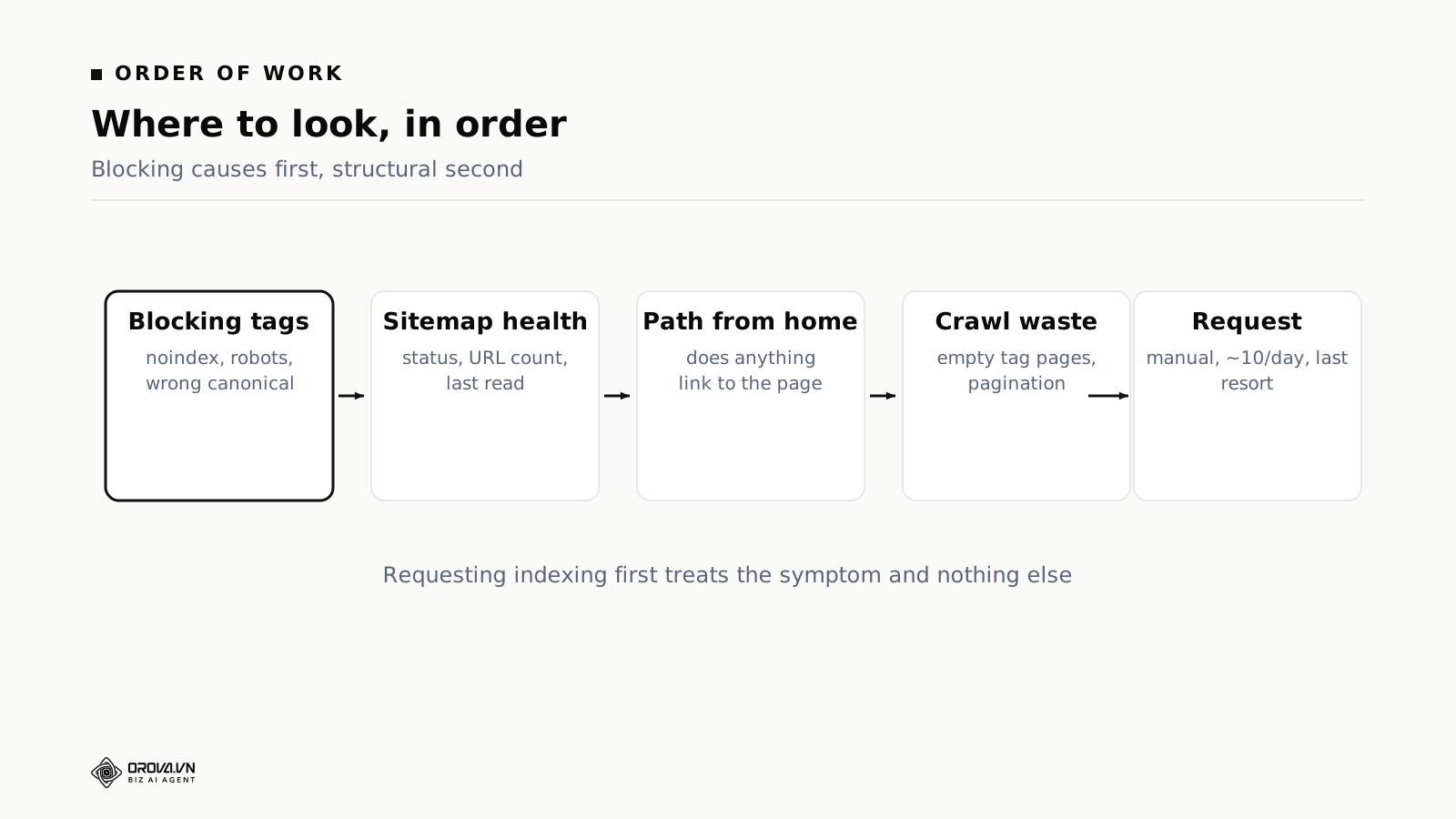
First, total blockers. A stray noindex tag, a robots.txt rule covering the wrong directory, canonical tags pointing somewhere else. Each one makes every other effort meaningless, and each takes minutes to fix once found.
The noindex case is usually a leftover from a staging environment. The dangerous variant is a site-wide setting that every new page inherits while the homepage stays indexed from before, which produces a site that looks half-working.
The canonical case is worth a second look because the label is opaque. A status of "Alternate page with proper canonical tag" on your main article URLs means you are telling Google those articles are not the original version. Sometimes that is correct for a parameterised duplicate. On an article URL it is a misconfiguration.
Second, the sitemap. File status, discovered URL count, last read date. Any file showing an error gets deleted and submitted again. Five minutes, and on the case above it was the whole first half of the story.
Third, the path from the homepage. If the homepage links to no articles, add a block. This is the most laborious item on the list and the one that changes the trajectory most.
Fourth, crawl waste. Empty tag pages, deep pagination, filter combinations, internal search result pages. Worth doing, not urgent, and easy to hand to someone else.
Fifth, manual index requests for your strongest pages. Last, because if the four above are unresolved, requesting indexing fixes a handful of pages and then the same problem returns with the next batch you publish.
Plenty of people start at item five, because it feels like action. A month later their newer articles are stuck in the same place.
Building internal links that actually help
"Add internal links" is standard advice and usually too vague to act on. Here is the specific version, in the order that worked on the case.
Links from the homepage carry the most weight. Not because of a special rule, but because the homepage is fetched most often and sits at depth zero. A link there takes an article from ten clicks away to one.
The practical form is a block of recent articles plus a few topic groups. Six recent plus four groups of seven covers thirty articles, which on a site of two hundred is a meaningful share of the ones that matter.
A complete index page is worth building. One page listing everything, no pagination, organised by category. The temptation is to paginate it for tidiness. Do not. Pagination puts back exactly the depth you are trying to remove.
Footer links reach every page at once. Two links in a global footer put the news index and the library within reach from anywhere, including from articles. That turns every article into a stepping stone toward every other article.
Contextual links inside articles matter, but differently. A link buried in paragraph fourteen of a page that is rarely fetched is not a fast route to anything. Those links are for signalling how your topics relate, which pays off after the pages are indexed. They are not the tool for an indexing emergency.
The priority order when pages are not being indexed is homepage block, then index page, then footer, then contextual links. That is the reverse of how most people approach internal linking, because contextual links are the ones most written about.
What a healthy index rate looks like, and how to track it
There is no universal number, because it depends entirely on what your site publishes.
If every URL on your site is a real article, expect most of them indexed, well above eighty percent once the site is established. Sitting far below that with no junk pages in the count points to a real problem.
If your site has tag pages, pagination, filters and archives, the raw rate will legitimately be much lower, because many of those URLs should not be indexed. The raw number is meaningless here. What matters is the rate among the pages you want indexed.
So before measuring anything, split your URLs into "should be indexed" and "should not", and measure only the first group. A rate of 30% across everything might be 90% across what matters, or it might be 30% there too, and those are completely different situations.
On the case above, the measurement covered articles only and deliberately excluded tag and archive pages. That is why 27% was genuinely alarming rather than an artefact of counting the wrong things.
Three habits keep this from creeping back.
Measure the index rate monthly, on the same list. One number tracked over months shows a trend, and the trend is what you act on rather than any single reading.
Check the sitemap report after any infrastructure change. New host, new domain, platform migration, or a few hours of downtime. Every one of those is a moment to open Search Console. The most expensive lesson in this whole case sits exactly here: an incident that lasted a few hours cost two months of invisibility, and nothing in anyone's monitoring connected the two.
That gap is worth closing deliberately. Infrastructure incidents get logged, discussed and closed by whoever handles infrastructure. The search consequences land weeks later on whoever handles content, who never heard about the incident. One line added to the incident checklist, check the sitemap report afterwards, closes it for free.
Watch impressions, not only clicks. Zero clicks has many possible causes. Zero impressions has one: Google is not putting your pages in front of anyone. It is both an earlier and a cleaner signal. On the case above the evidence had been sitting in the report for two months. The homepage accounted for 314 of 322 impressions, and every article combined was shown eight times. That number said everything. It needed someone to open the screen.
Frequently asked questions
Is "crawled — currently not indexed" always a content problem?
Not always, but it is the only one of the four states where content is a plausible cause, because it is the only one where Google has read the page. The exceptions are technical: content that only appears after scripts run, and pages that look empty on arrival. Check the rendered HTML before you conclude the writing is at fault.
How is it different from "discovered — currently not indexed"?
"Discovered" means Google has the URL queued and has not fetched it. Nothing on the page has been assessed, so editing it changes nothing. "Crawled" means Google fetched it and declined to store it. The first is fixed with links and crawl capacity, the second with the page itself.
How long after publishing should a page be indexed?
Hours to days on an established site, weeks on a new one. Still unindexed after a month is a signal rather than a reason for more patience.
Does Request Indexing work?
Yes, within a daily allowance of roughly ten to twelve, so save it for your most important pages. It treats the symptom. If the link structure is still poor, the next batch of articles will stick in the same way.
Should I stop publishing while I fix indexing?
Pausing for a couple of weeks is usually right on a site with a real indexing problem. New articles compete for the same limited crawl capacity as the unindexed backlog, and adding to a queue that is not being processed helps nobody. Start again once crawl activity picks up in the Crawl Stats report.
Should I delete old unindexed pages?
If they are thin and duplicate a stronger article, merge them into it and redirect. If they are good and simply unindexed, do not delete them. Link to them from stronger pages instead.
Do paid ads help pages get indexed?
No. Paid traffic and organic indexing are separate systems, and running ads to a page does not cause it to be crawled or stored.
Does resubmitting the sitemap work for everyone?
It works when Google holds a cached failure for a file that is currently healthy, which is a specific situation rather than a general remedy. If your sitemap report shows success and a correct URL count, resubmitting achieves nothing and the problem is elsewhere. Read the report before reaching for this.
Is a sitemap mandatory?
No, but it is strongly advisable for a site with many articles, since it is the fastest channel for telling Google that new content exists. The case above shows what happens when that channel breaks quietly.
My site is not new. Does any of this apply?
The diagnostic order is the same, but the usual causes differ. On an established site the sitemap is rarely the culprit. Look instead at a migration that changed URLs, where temporary redirects prolong the confusion indefinitely; at a sudden jump in URL count from faceted navigation or a programmatic section; at slower server responses, which quietly reduce how much gets fetched; and at a large volume of thinner pages added recently, which can pull indexing rates down across pages that were previously fine.
Where this leaves you
Three clicks in twenty-eight days after four months of steady publishing sounds like a story about weak writing. It was a story about one red status line in a report nobody had opened, plus a homepage that linked to nothing worth reading.
Before you conclude that your writing is not good enough, confirm that Google has ever read it. Those two questions sound similar and lead to completely different work. One means rewriting hundreds of articles. The other means clicking a few buttons in a console.
If you do one thing today, open Search Console, go to the Pages report, and compare the count next to "Crawled — currently not indexed" with the count next to "Discovered — currently not indexed". That comparison tells you which half of this article you needed.
Related reading: discovered but never crawled: five causes and the order to fix them, when crawl budget actually matters, site architecture and URL structure, and five Search Console reports worth reading.
If you would rather have index health checked every week than discovered two months late, Orova runs that check for you.
Let Orova SEO handle the repetitive part
Keyword research, drafting, refreshing old posts and rank tracking — running automatically on your own site.
Explore Orova SEO