
What running an AI ads manager actually costs you
An AI ads manager watches your ad accounts, works out what should change, and either tells you or does it. What almost nobody explains before you sign is where the bill comes from. Every time the software reasons about your account it sends your data to a language model, and that call is billed by the volume of text it processes. Your invoice is a resale of those calls with a margin on top.
That one fact decides more about the product than anything on the comparison page. It decides whether the tool looks at your account once a day or once an hour, whether it reads every campaign or only the ones a cheap arithmetic check flagged first, and whether the vendor gains by making the analysis better or by making it shorter.
This article shows you what an AI ads manager costs to run, what drives the number up, how to read your own consumption before you hit a wall, and which questions separate a vendor who has thought about this from one who has not. Where usage-based pricing is worse for you than a flat fee, that is in here too.
What you are actually paying for
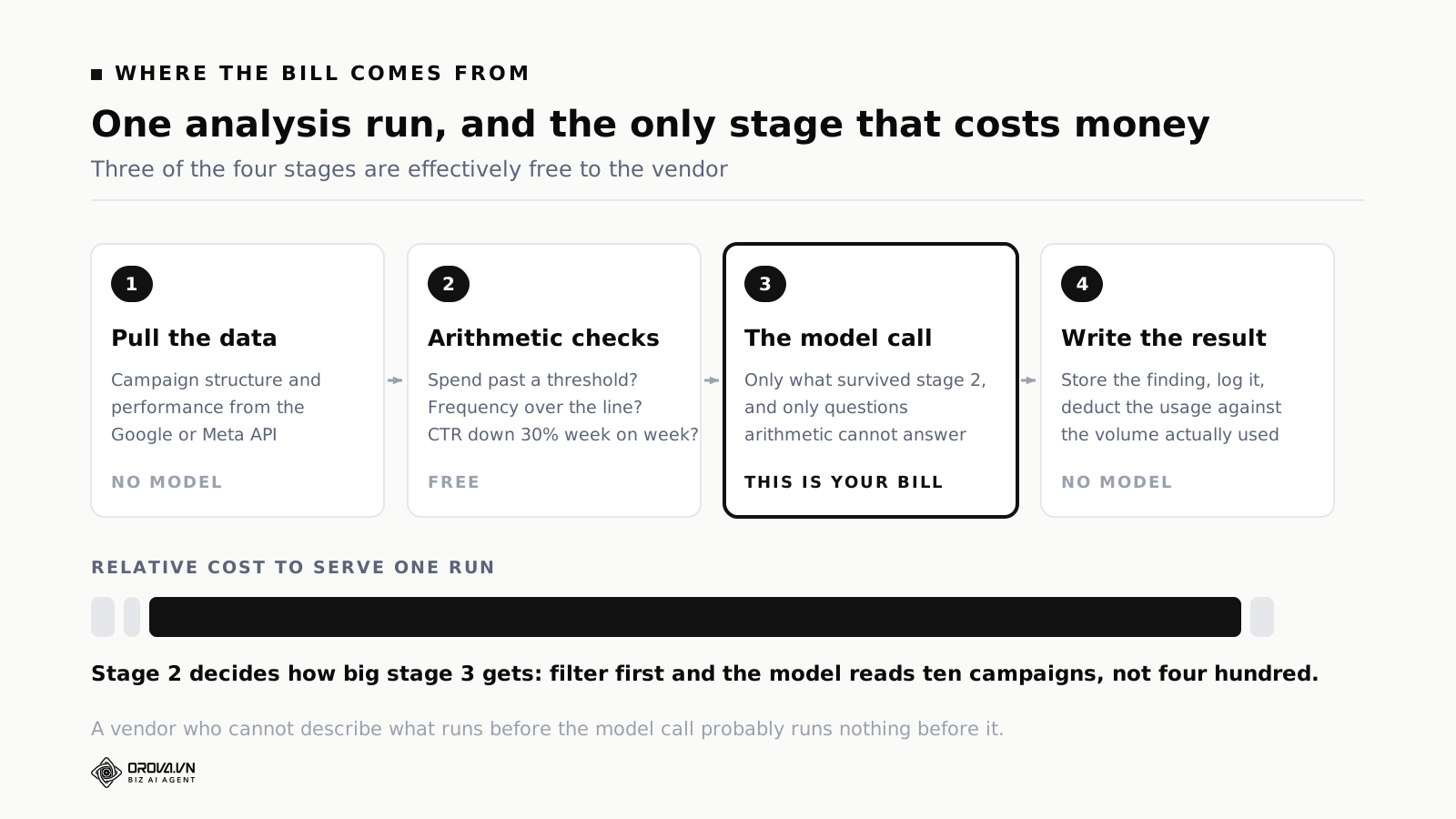
One analysis run has four stages. Only one of them is expensive, and knowing which one tells you where your money goes.
Pulling the data. The tool fetches campaign structure and performance from the Google Ads or Meta API. No model is involved. This costs the vendor almost nothing and is limited by the platform's own request limits, not by your plan.
Arithmetic checks. Everything answerable with a number gets answered here. Has this campaign spent past a threshold? Has frequency crossed a line? Is click-through rate down more than thirty percent week on week? These are free, and they settle a large share of the questions on their own.
The model call. Only what survived the arithmetic goes here, and only for questions arithmetic cannot answer: whether a pattern looks like creative fatigue or a competitor moving, whether this week's recommendation contradicts last week's, what the most likely explanation is given the account's history. This is the line item on your bill.
Writing the result. Store the finding, log it, deduct the usage. Deduction happens after the work against the actual volume, not as a flat charge for having pressed the button.
The second stage is the one that decides your cost. Without it, an account with four hundred campaigns sends four hundred campaigns to the model and pays for the model to conclude that three hundred and ninety of them are fine. With it, the model sees the ten that look unusual, and your cost tracks the number of problems rather than the size of your account.
When you evaluate a tool, this is the thing to ask about first. If the vendor cannot describe what runs before the model call, there probably is nothing, and you will find out through the invoice.
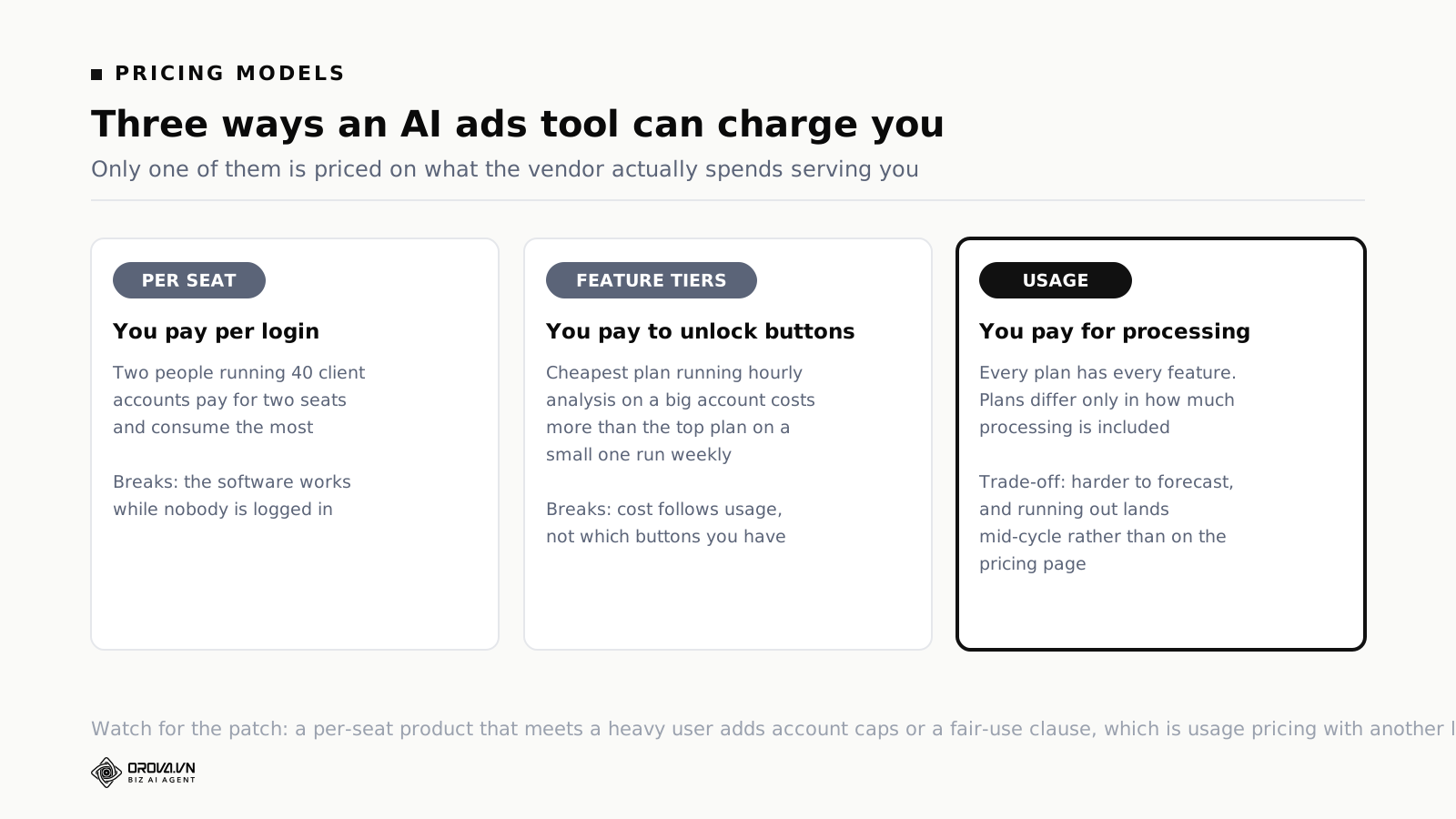
Three ways to price this, and why two of them break
Per seat
The standard SaaS model, and the one that fits automation worst. You pay per person with a login. The whole point of an AI ads manager is that it works while nobody is logged in, so the number of seats has almost no relationship to how much work the software does.
The mismatch runs both ways. A two-person agency running forty client accounts pays for two seats and consumes an enormous amount of processing. A twenty-person marketing team running one account pays for twenty seats and barely uses it. Per-seat pricing charges the first one least and the second one most, which is exactly backwards.
Watch for the patch, because there always is one. A per-seat product that meets a heavy user adds an account limit, a campaign limit, or a fair-use clause. At that point you are on usage-based pricing anyway, with a less honest label on it.
Feature tiers
Cheap plan gets basic features, mid plan unlocks more, top plan unlocks everything. Software has been sold this way for twenty years and buyers know how to read it.
It breaks here for a specific reason: the vendor's cost of serving you no longer depends on which buttons you can press. It depends on how often you press the ones you have. A customer on the cheapest plan running a large account with hourly analysis generates more cost than a customer on the top plan running a small account weekly. Feature tiers price the first as small and the second as large.
The patches make it worse rather than better. Rate limits on the cheap plan mean the feature exists but does not work. Fair-use clauses mean the limit is undefined until you cross it and somebody emails you. Both produce the same outcome for you: you cannot predict what you are allowed to do.
Usage
Every plan has every feature. What differs is how much processing you get in a cycle. When the allowance runs out you top up or wait for the next cycle.
What this gets right for you is that cost tracks what you actually consume, at any account size, without a negotiation. A small customer can use the deepest analysis in the product. They just run it less often, which is a much better deal than being locked out of it entirely.
It also points the vendor's incentive in a useful direction. Under feature tiers, the way to make more money is to move desirable things up a tier. Under usage pricing, the way to make more money is to make each unit of processing produce something you act on, because a customer who gets nothing from their allowance does not renew.
What consumes your allowance, heaviest first
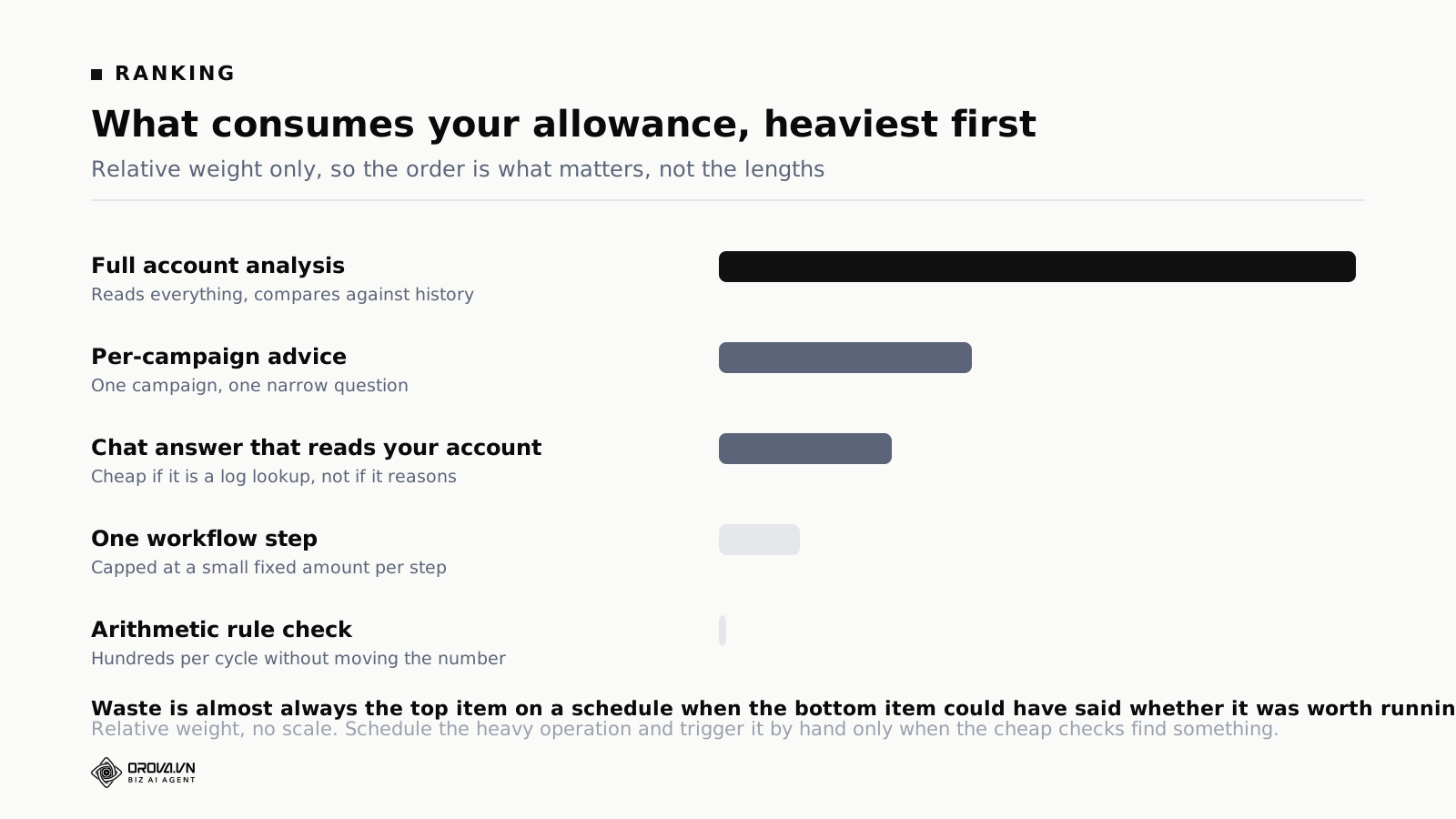
The order matters more than the exact figures, because it tells you where to be careful with your settings.
Full account analysis is the heaviest single operation you can trigger. It reads everything, compares against history and produces a structured assessment. Schedule it. Do not sit there pressing it.
Per-campaign advice costs a fraction of a full run, because the input is one campaign and the question is narrow.
A chat answer that reads your account sits in the middle. Asking what frequency means is close to free. Asking why your frequency spiked last week means reading the data and reasoning about it, and that costs.
A workflow step is capped at a small fixed amount, so a five-step workflow has a ceiling you can work out before you run it. The trap is frequency rather than size, and it is covered further down.
An arithmetic rule check is close to free. Hundreds of them run in an evaluation cycle without moving the number.
Read that list once and most consumption questions answer themselves. Almost all waste comes from running the top item on a schedule when the bottom item would have told you whether it was worth running at all.
What to expect at 10, 50 and 200 campaigns
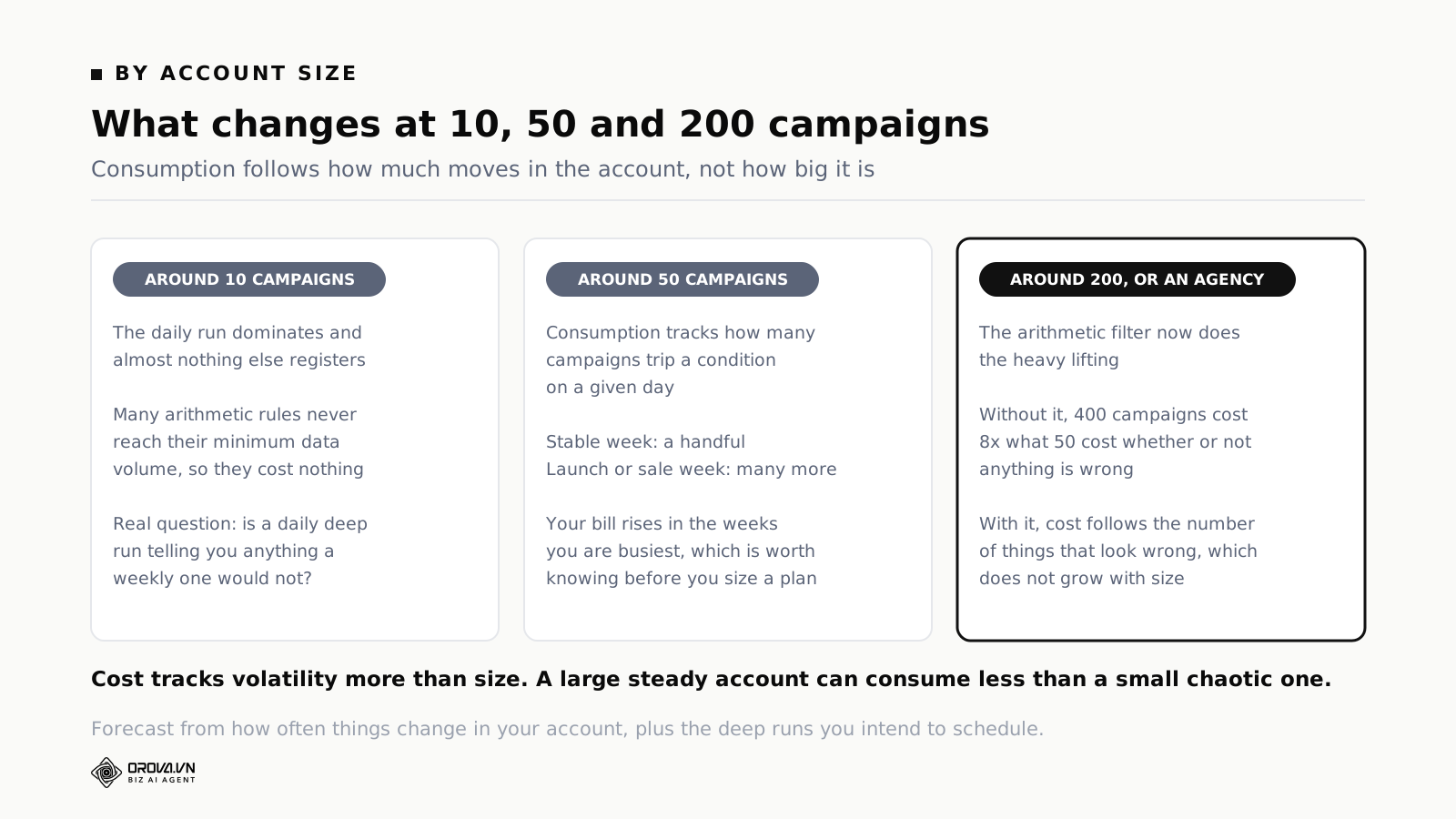
Rather than quote figures that depend on your structure, here is the shape at three sizes and what changes between them.
Around ten campaigns, daily analysis. The daily run dominates and almost nothing else registers. Many arithmetic rules never reach their minimum data volume, so they cost nothing at all. At this size the practical question is not how much you consume but whether a daily deep run is telling you anything a weekly one would not.
Around fifty campaigns, daily analysis with active rules. Consumption starts tracking how many campaigns trip an arithmetic condition on a given day. On a stable account that is a handful. During a launch or a sale period it is many more, and your consumption rises in the weeks you are busiest, which is worth knowing before you size a plan.
Around two hundred campaigns, or an agency across clients. The arithmetic filter is now doing the heavy lifting. Without it, cost would scale with total campaigns: four hundred campaigns would cost eight times what fifty cost, whether or not anything was wrong with any of them. With it, cost scales with how many things look wrong, and that does not grow in step with account size.
The practical conclusion is one most buyers get wrong. Cost tracks volatility more than size. A large, stable, well-structured account can consume less than a small chaotic one where somebody restructures the campaigns every week.
So when you forecast, do not start from campaign count. Start from how often things change in your account, and add the deep runs you intend to schedule.
Why every feature gate was removed, and what it means for you
In July 2026 every feature limit came out of the product. Plans differ only in how much processing they include. It is worth knowing why, because the reasoning tells you what to look for elsewhere.
The problem showed up in support conversations. A customer would describe a problem, the right answer was a feature sitting on a higher plan, and a help conversation turned into a sales conversation. That is a bad position for the person asking, who is being upsold at the moment they need help, and for the person answering, who is trying to solve a problem with one hand tied.
Going through the list gate by gate, the question was: if this came out, what breaks? For nearly every one the answer was nothing, except the price ladder.
Two restrictions stayed, and neither is about price. Anything that touches billing needs the account owner rather than any workspace member. Unattended execution on a live ad account needs explicit written permission. Both apply on every plan, because they are permission rules rather than plan features.
What this means for you as a buyer is a question you can put to anyone: ask why each restricted feature is restricted. There are defensible answers. Actions with legal or compliance implications should be gated. Higher-risk automation should require a deliberate opt-in. "It is a premium feature" is not one of them, and a vendor who gives you that answer is telling you the gate exists to move you up a plan.
Where usage-based pricing is genuinely worse for you
Two situations where this model is a poor fit, stated plainly, because both are real and neither has a clean answer.
When you need a fixed annual number
Procurement in a larger organisation usually needs a figure that will not move. Usage pricing turns that figure into a forecast, and a forecast is harder to get approved than a fixed line item. The person signing has to defend a range rather than a number.
The workaround is buying a large block of capacity up front. It works, and it removes some of the honesty of the model, because capacity you bought and did not use is money spent on nothing. If you go this route, negotiate what happens to the unused portion before you sign rather than after.
When your usage is extremely spiky
A business with a two-week peak and ten quiet months has a hard time sizing a monthly allowance. Buy for the peak and you waste it for ten months. Buy for normal and you hit the wall in the fortnight that matters most.
Top-ups solve this mechanically. They do not solve the discomfort of not knowing in advance, and they do not help if your peak happens on a weekend when nobody with a company card is answering. Before a known peak, top up in advance rather than planning to react.
There is a third situation people expect to be a problem and it usually is not: a large but steady account. Steady consumption is easy to forecast after one full cycle, and usage pricing on a predictable account behaves almost exactly like a flat fee.
Three ways teams waste their allowance
These three cover most of the consumption that produces nothing.
Running deep analysis on a schedule
The most common one by a distance. A full account analysis every morning sounds thorough. On an account that changes slowly it produces near-identical output five days a week, and you pay full price for each copy.
What works instead: arithmetic checks daily, deep analysis weekly, plus a deep run triggered when the arithmetic checks find something unusual. You get the same coverage and you pay for the deep run on the days it has something to say.
Using chat as a report
Three people asking the assistant the same question about the same account in the same week costs three times what one scheduled report costs, and produces three answers that differ slightly in emphasis, which then produces a fourth conversation about which one is right.
What works instead: if a question gets asked more than twice, it belongs in a scheduled report. A report is read by everybody and costs once.
Workflows with an expensive first step
A workflow whose first step is an interpretive model call, followed by arithmetic filters, has the order inverted. The expensive step runs on everything and the cheap steps run on the survivors, which is the opposite of what you want.
What works instead: arithmetic filters first, always. Then check the frequency. A small per-step cost is nothing on its own. The same cost across eight steps, every hour, is a different bill entirely, and it is the version of this mistake that hurts.
How to read your own consumption report
Most accounts never open this until they run out. Ten minutes at the start of a cycle saves the emergency at the end of it.
Look at the distribution, not the total
The useful question is not how much you used. It is what used it. A cycle where most of the consumption went to scheduled analysis is healthy. A cycle where most of it went to chat questions means somebody is using conversation to do a report's job.
Find the runs that produced nothing
An analysis that ran and found no issues still cost you. If that is happening daily on a stable account, your schedule is more frequent than your account changes. This is the single most common source of waste and it is fixed by changing one setting.
Check for the same question asked repeatedly
Several people asking the same account question in a week is a signal that the answer belongs in a scheduled report. It is also a signal that your team does not know where to find the answer, which is worth fixing for reasons beyond the bill.
Compare consumption against actions taken
This is the number that actually matters. Count the findings you acted on this cycle. If you consumed a full allowance and acted on two things, the problem is not the size of your plan. If you consumed it and acted on findings every week, you genuinely need more capacity and buying it is the correct decision.
A worked day, itemised
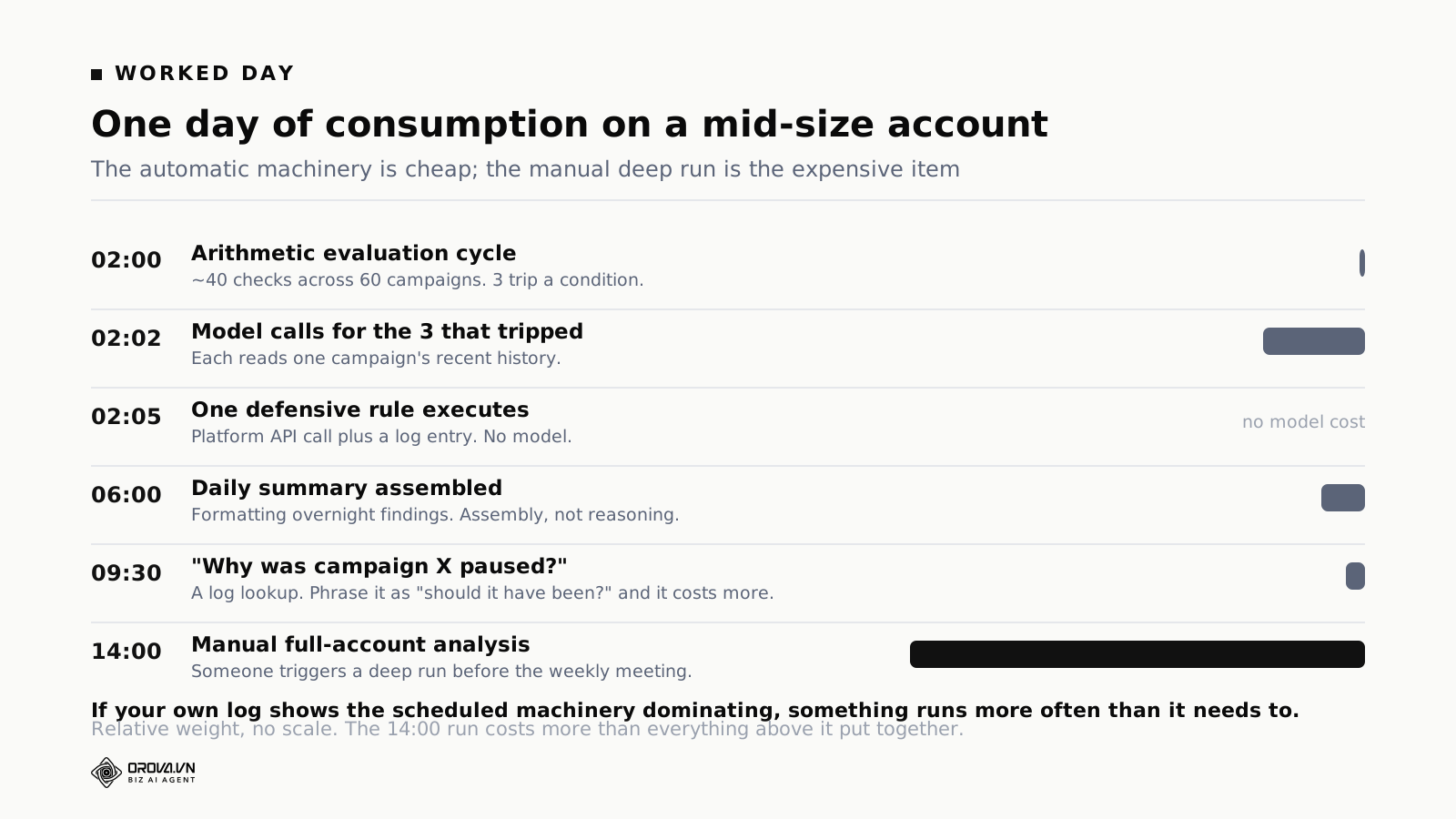
Here is a single day on a mid-size account with an ordinary configuration, in order.
02:00, the arithmetic evaluation cycle. Every active rule with a numeric condition runs against yesterday's data. On this account that is around forty checks across sixty campaigns. Cost is negligible. Three campaigns trip a condition.
02:02, model calls for the three that tripped. Each one needs interpretation: is this a real problem, or an artefact of a low-volume day? Three small calls, each reading one campaign's recent history. This is the first meaningful consumption of the day.
02:05, one defensive rule executes. One of the three met the pause criteria and had execute rights. The action itself costs nothing in model terms. It is an API call to the platform plus a log entry.
06:00, the daily summary is assembled. Overnight findings are formatted into the morning report. Mostly assembly rather than reasoning, so consumption is modest.
09:30, somebody asks the assistant a question. "Why was campaign X paused?" is a log lookup, so it is cheap. The same question phrased as "should campaign X have been paused?" needs the data read and reasoned about, and costs more. Phrasing changes the bill, which is not obvious until you see it in a log.
14:00, a manual full-account analysis. Somebody triggers a deep run before the weekly meeting. This single operation costs more than everything else in the day put together.
The shape is the point. The automatic machinery is cheap and the expensive thing is the deep analysis a human asked for. That is the right distribution. If your own log shows the scheduled machinery dominating, something is running more often than it needs to.
What to do when you run out mid-cycle
It happens, and buying more should not be the first move.
First, work out what consumed it. In most cases the answer is one of the three patterns above, and the fix is a configuration change rather than a bigger plan. A daily deep run dropped to weekly frees more capacity than most top-ups.
Second, work out whether the consumption produced anything. If most of a cycle went to scheduled deep analysis and you acted on two findings, the schedule is wrong. If it went to analysis you acted on repeatedly, you need more capacity and it is worth paying for.
Only then does a top-up make sense. If a vendor sells you capacity to paper over a configuration problem, you will run out again next month and you will be right to blame the product.
One thing to check in the contract before you need it: whether a top-up expires at the end of the cycle. Capacity you bought separately should not vanish with the monthly allocation, and the consumption log should draw from the expiring pool first so you are not losing the pool you paid extra for.
How pricing meets the permission model
Pricing and permissions are separate systems that meet in one place. A rule with execute rights runs without anybody asking for it, which means it consumes your allowance without anybody asking for it.
For arithmetic rules this does not matter, because they are close to free. It matters for anything that involves a model call on a schedule, and it matters most for anything that runs unattended overnight.
The protection is the same limit that protects you operationally: a cap on how many campaigns or ad sets a single run may touch. A rule limited to two entities per run has a bounded cost as well as a bounded blast radius. Those two limits turn out to be the same limit, which is convenient.
The case that needs its own attention is a multi-step workflow on a frequent schedule. A small cost per step is nothing. That same cost times eight steps, every hour, is a real number. Before you save a schedule, look for a projection of consumption for the schedule rather than for one run. If the tool only shows you the cost of a single run, do the multiplication yourself.
There is a related question worth putting to your team rather than to the vendor: who is allowed to press the expensive button? Deep analysis is the heaviest operation in the product and in most tools anybody with access can run it as often as they like. Deciding that deep runs are scheduled rather than ad hoc, with exceptions by request, costs nothing and removes the most common surprise on the invoice.
What the ad platforms charge for the same job
Google, Meta and TikTok all give you automated rules at no extra charge, which raises a fair question: why pay anybody for processing at all?
For a large class of work, you should not. A simple threshold condition inside one platform, acting on that platform's own campaigns, is well served by the native tooling. It is free, it runs natively, and putting a paid layer on top of it buys you nothing.
Three things the native rules do not do, and each one is a reason the paid version costs something.
Conditions that span platforms
A combined spend ceiling across Google and Meta cannot be written inside either one, because neither platform knows what the other spent. Enforcing it needs a system that reads both, which means data movement and storage that somebody pays for.
Thresholds derived from your own history
Native rules take fixed numbers. "Pause when cost per acquisition exceeds 200,000 VND" is expressible. "Pause when cost per acquisition exceeds three times this account's own trailing ninety-day median" is not. The second is the more useful rule, and it requires computing that median, storing it and updating it.
Interpretation
Native rules act on conditions. They do not tell you that the frequency rise, the click-through decline and the cost increase are probably one phenomenon rather than three separate ones.
That synthesis is what the model call buys. Whether it is worth paying for depends on how many accounts you run and how much of your week currently goes into producing the same synthesis by hand. If you manage one account and enjoy the analysis, the honest answer may be that the native rules are enough.
Questions to ask any vendor about pricing
Seven questions. The answers tell you more about the product than any feature list.
What exactly counts against the limit? You want a per-operation breakdown. If the answer is vague, the limit will be enforced in ways you cannot predict.
Can I see what an operation costs before I run it? If the tool cannot tell you before you press the button, you cannot plan, and you will hit the wall by surprise.
What happens when I run out? Does it stop, queue, degrade, or silently reduce quality? The last one is the worst answer in the category, because you cannot tell it happened. Ask it directly and listen for hesitation.
Does the tool switch to a cheaper model when I am running low? Same reasoning. A tool that quietly gives you worse answers to protect its margin is worse than one that stops.
Are any features restricted by plan, and why each one? Compliance and risk are defensible. Tier differentiation is not.
Does unused capacity roll over, and does a paid top-up expire? These are two different questions and vendors often answer only the first.
Do failed operations count? A call that reached the model and then failed downstream has already cost the vendor money, so expect it to be charged. A call that never reached the model should not be. What matters is that both appear in your log rather than one being quietly hidden.
Ask these before the trial, not after. During a trial you are looking at output quality, and pricing questions get postponed until the moment they are hardest to negotiate.
Frequently asked questions
Does a bigger account always cost more to run?
No, it costs more roughly in proportion to how many campaigns pass the arithmetic filters. An account with four hundred campaigns where thirty look unusual costs about the same as an account with fifty campaigns where thirty look unusual.
Does unused allowance expire at the end of the cycle?
The cycle allocation does. A purchased top-up should not, because you bought it separately. Check that the consumption log shows which pool each deduction came from and that it draws from the expiring pool first.
What is the biggest lever I control?
The frequency of full account analysis, by a wide margin. Daily is right for most accounts, weekly is right for stable ones, and hourly is almost never worth it because ad performance does not change meaningfully in an hour.
Can I cap spending so it never exceeds a number?
With a cycle allocation, the allocation is the cap. Nothing draws past it without an explicit top-up, so your worst case for the cycle is known before it starts. Be careful with any tool that bills purely on consumption with no ceiling, because a misconfiguration then becomes an invoice.
Is the allowance shared across everything the tool does?
One pool across ads, content and analysis is the better arrangement, because splitting it forces you to predict your own usage mix in advance and nobody does that accurately.
Why not charge per outcome instead?
Because outcomes cannot be attributed cleanly. If a campaign improves after a recommendation, separating that recommendation's effect from seasonality, competition and everything else you did that week is not honestly possible. Processing is at least measurable.
How do I forecast the first month?
Run one cycle on your normal schedule and read the consumption log at the end of it. One real cycle beats any estimate, which is also the best possible use of a trial period. Note which week was your busiest, because that is the week that will decide your plan size.
Should I compare this cost against my ad spend?
It is a reasonable sanity check, and do the arithmetic with your own figures rather than accepting a vendor's benchmark. Take the annual cost of the tool, divide by the ad spend it manages, and decide whether that percentage is worth the hours it gives you back. The answer is very different for someone spending a little and someone spending a lot.
Does the way I phrase a question change what it costs?
Yes. A question answered from a log is cheap. A question that requires reading account data and reasoning about it is not. "What did the rule do?" and "was the rule right?" look similar and cost differently.
Further reading: how an in-product AI assistant is built to stay cheap to run, 19 starter rules and what each is for, and advisory versus execute permissions.
To see consumption itemised for your own account, start at orova.vn.
Let Orova SEO handle the repetitive part
Keyword research, drafting, refreshing old posts and rank tracking — running automatically on your own site.
Explore Orova SEO